Where to buy
Check the latest price, availability and delivery on Amazon. Orders are placed on Amazon. We may earn a commission from qualifying purchases.
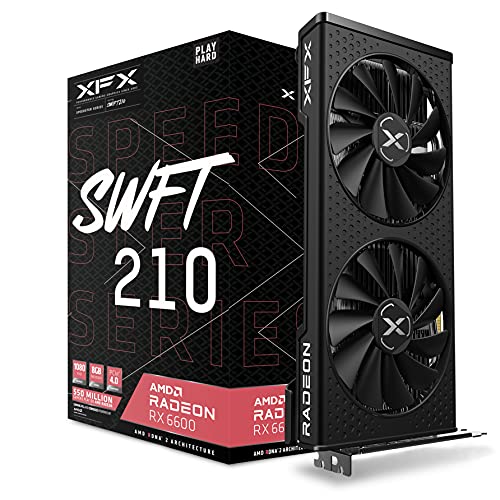
- Best build if you insist on new parts: XFX Speedster SWFT 210 Radeon RX 6600 8GB — the anchor card of the all-new DIY build below — Check on Amazon
- AMD Ryzen 5 5600G — the anchor of the APU build, graphics today and a card slot waiting for tomorrow — Check on Amazon
- MINISFORUM UM870 Slim Barebone — the barebone completion path, priced honestly with its RAM, SSD and OS added — Check on Amazon
- abytespark Gaming PC, GTX 1660 Super — the complete tower that undercuts every DIY route in this guide — Check on Amazon
See 2 more Amazon options
- Beelink SER5 MAX Mini PC, Ryzen 7 7735HS — the skip-the-build pick, complete at the budget line — Check on Amazon
- STGAubron Gaming PC, Ryzen 5 5500 and RX 580 — the used-GPU-class build someone else assembled, a buy only on a price dip — Check on Amazon
Read the full guide ↓
Disclosure: As an Amazon Associate, reviewstook.com earns from qualifying purchases. Links to Amazon on this page are affiliate links; they cost you nothing extra. Listing details such as price and availability change often, so check the current Amazon listing before you buy.
Every “best gaming PC build under $500” guide on the internet was written for a market that no longer exists, so this one starts with the admission nobody wants to print. In November 2026, the classic all-new build — a Ryzen 5 5500, a B550 motherboard, 16GB of DDR4, a 500GB NVMe drive and a Radeon RX 6600, in a case with a power supply — adds up to well over the $500 line at current Amazon prices, before a Windows licence. Not at the budget. The parts did not get better; two of them got dramatically more expensive. Memory and flash storage have spent 2025 and 2026 in a shortage that roughly doubled consumer SSD prices and turned a basic 16GB DDR4 kit from a budget afterthought into one of the most painful lines in the basket. A build that genuinely fit this budget in 2024 costs far more today with the same silicon in it, and any guide that shows you a $500 parts list right now is quoting prices from memory — sometimes literally last year’s. Check the live price on Amazon for every part before you believe any total, including ours: this guide deliberately prints no totals, because in this market a printed total is out of date before the page finishes loading.
That does not make the search pointless. It makes it a different search. Five hundred dollars still buys a real gaming PC in November 2026; it just buys it by a different route than a shopping cart full of new components. This guide walks six complete paths honestly, each accounted for down to the last part — RAM, storage and operating system included, because a build quote that leaves out the OS is a lie by omission. Two paths are genuine do-it-yourself builds, assessed at what they actually cost today so you can see the gap with your own eyes. One is the barebone route, where the headline price is a trap we dismantle line by line. And three are complete, purchasable systems that beat building at this budget right now — including a GTX 1660 Super tower that no honest parts list can match this year. If you came here determined to build, the APU path and the reuse maths further down are written for you. If you came here for a gaming PC and the building was only the expected means, the complete systems will save you real money.
In this guide
Quick Picks
Short on time, or comparing several options at once? Each row below names a builder type and the path that suits it, with a link to the listing. Prices in this market move weekly, so check the live price on Amazon before you commit to any path.
| Buyer type | Pick | Why it stands out | Link |
|---|---|---|---|
| Best all-new DIY build | Ryzen 5 5500 + RX 6600 parts build (XFX SWFT 210) | The real $500 build of 2024 — honestly over the line today; check price on Amazon | Check on Amazon |
| Best build now, GPU later | Ryzen 5 5600G APU build | Plays today on integrated graphics; the empty PCIe slot is the upgrade plan | Check on Amazon |
| Best barebone path | MINISFORUM UM870 Slim completion | A mid-range barebone that honestly totals well past the budget — read the maths before buying | Check on Amazon |
| Best complete tower | abytespark Gaming PC, GTX 1660 Super | A complete tower with Windows that undercuts every DIY route; check price on Amazon | Check on Amazon |
| Best zero-effort PC | Beelink SER5 MAX Mini PC | A complete mini PC at the budget line; the strongest integrated graphics in this guide | Check on Amazon |
| Best price-dip buy | STGAubron Gaming PC, RX 580 | A buy when it dips to the budget line or under, a skip above it | Check on Amazon |
How These Picks Were Chosen
The budget was applied to the whole machine, not to the loudest component. Every path below is accounted for as a complete machine: a CPU, motherboard where applicable, 16GB of RAM, at least 500GB of SSD storage, a case and power supply where applicable, and an explicit statement of what the operating system costs — including when the honest answer is “nothing, because it is included” or “nothing yet, because the build runs Windows unactivated.” Any product whose headline price excluded parts a PC cannot run without was either completed with real, currently listed parts or excluded. That rule is what kills most barebone listings as “$500 builds”: a barebone box with no RAM, no SSD and no OS is not a complete computer at its headline price, and this guide never presents one as such.
We did not build these machines ourselves. We read the maker listings and specification pages, and checked every component against current Amazon listings and price records from November 2026 wherever the market allowed. Because prices in this category change constantly, the reviews describe each part’s price position — budget tier, mid-range, premium for its class — rather than printing a hard number you should hold us to; always check the live price on Amazon before ordering. Two market facts shaped the whole guide and are worth stating before the reviews. First, memory: a 16GB DDR4 desktop kit that was a budget-tier purchase two years ago now sits in a far more expensive tier on Amazon, and a single 16GB DDR5 laptop-style stick for mini PCs was recorded at premium-tier retail in a November 2026 pull of in-stock Amazon US mini PC listings. Second, storage: trackers following the 2025–2026 NAND shortage record consumer SSD prices roughly doubling, with a basic 500GB NVMe drive moving from the budget class into the mid-range. Those two lines, RAM and SSD, add a substantial surcharge to every build in this guide compared with two years ago — before the graphics card is even discussed.
Performance claims are kept to what the hardware class supports. The discrete builds and towers here are 1080p machines: esports titles at high frame rates, older AAA games around 60 frames per second at medium-to-high settings, the newest AAA releases at low-to-medium settings, leaning on upscaling. The integrated-graphics paths are a class below that and are described as such. Nothing in this guide is presented as a 1440p machine, because at $500 in November 2026 there is no honest way to build or buy one — that search has its own guide, linked at the end of this one.
The 6 Best Gaming PC Builds Under $500
1. The All-New DIY Build — Ryzen 5 5500 and Radeon RX 6600 (XFX Speedster SWFT 210)
Who it suits: Builders who want every part new, warrantied and chosen by them — and who would rather see this build’s real position against the November 2026 budget in print than be flattered by a $500 headline the parts cannot honor.
This is the build every forum thread recommends, so it goes first and it gets assessed first, line by line, at current Amazon prices — check price on Amazon for each part, because the numbers move weekly. The processor is the AMD Ryzen 5 5500, six Zen 3 cores with a bundled Wraith Stealth cooler, a budget-tier CPU. The motherboard is the ASRock B550M-HDV, the stripped-down entry B550 board, firmly budget tier. Memory is a 16GB (2×8GB) DDR4-3200 kit of the Silicon Power class — currently the single most shocking line in the basket, for a part that sat in the budget tier two years ago and has climbed far out of it. Storage is a Kingston NV3 500GB NVMe drive, likewise far pricier than its class used to be. The graphics card anchoring this build is the XFX Speedster SWFT 210 version of the Radeon RX 6600, 8GB of GDDR6, a mid-range card whose new price has stayed stubbornly high in recent months, with some marketplace listings far above the card’s usual tier. The case is a Montech XR-class mid-tower, a budget-tier case, and the power supply is the Thermaltake Smart 500W, a budget-tier unit. Add the basket up at live prices and it lands well over this guide’s budget — and Windows is still not in the basket: a licence adds more, while running Windows unactivated, as many budget builders do, adds nothing.
None of that makes it a bad build. Component for component it is the best machine in this guide: the RX 6600 is a genuine 1080p card with modern driver support, the 5500 is a real six-core gaming CPU, the B550 board leaves the door open to a Ryzen 7 5700X3D-class upgrade, and every part carries its own warranty. It is simply not a $500 build in November 2026, and the honest service this review can do is show exactly where the money went: a large share of the overrun is RAM and SSD inflation alone, and most of the rest is a graphics card that was a budget-tier buy in its cheapest era and has not lived at that tier since. If your budget is truly $500, the paths below are your guide. If your budget can stretch, this is the build to stretch to — it is the only route here whose every component is current, new and individually replaceable.
- Every part new with its own warranty — the only fully DIY route to a modern discrete GPU in this guide.
- The basket, line by line: a budget Ryzen 5 5500 CPU, an entry B550 board, a 16GB DDR4 kit, a 500GB NVMe drive, the RX 6600, a mid-tower case and a 500W PSU — check price on Amazon for each.
- B550 platform keeps a real CPU upgrade path alive for later.
Honest limitation: At current prices this build misses the keyword’s budget by a wide margin, before an operating system — in the current memory and NAND market, no all-new discrete-GPU parts list we could verify comes in under $500.
Choose it if you can stretch the budget and want the best, most upgradeable machine here. Skip it if $500 is a hard ceiling — the complete systems below deliver a working gaming PC today for less.
2. The APU Build — Ryzen 5 5600G Now, Graphics Card Later
Who it suits: Patient builders playing esports and older games today, who want a real tower with an empty graphics slot and a dated plan to fill it when card prices or their budget recover.
The APU strategy is the oldest trick in budget building: buy a processor with competent integrated graphics, play on it now, and let a discrete card arrive later as a second purchase rather than a compromise today. The anchor is the AMD Ryzen 5 5600G — six Zen 3 cores with Radeon Vega 7 integrated graphics and a bundled cooler — a mid-range APU whose price has swung noticeably across 2026, which is why this build’s position against the budget is best judged at the live listing: check price on Amazon. Around it, the basket repeats the shared lines from the first build: the entry-level ASRock B550M-HDV board, a 16GB DDR4-3200 kit — dual-channel memory matters twice as much here, because the integrated graphics borrow system RAM and bandwidth — a Kingston NV3 500GB drive, a Montech XR-class case and the Thermaltake Smart 500W. The honest verdict is that the total still lands over $500 at current prices, and this review will not pretend otherwise — but it is the closest a tower of entirely new parts comes, and it comes with the slot, the power supply headroom and the platform to become the first build later.
What the Vega 7 graphics actually deliver needs the same honesty. This is integrated graphics from 2021: esports titles at 1080p low-to-medium settings are its home, older AAA games run at reduced settings, and the newest releases are a struggle it sometimes loses. Two technical notes belong in any 5600G build plan. The chip’s graphics share memory with the system, so the 16GB kit is partly a graphics purchase — another reason the current RAM price hurts this build more than most. And the 5600G connects its graphics slot at PCIe 3.0 speed, which costs little with today’s mid-range cards but should be known before the future upgrade is bought. Judged as a finished $500 gaming PC, this build is a promise rather than a product. Judged as the first stage of a two-stage purchase — the only staged purchase in this guide where stage two is a single part dropped into a waiting slot — it is the smartest way to start building in a bad market.
- A complete, working tower of new parts with the strongest upgrade story in this guide: one card completes it.
- The basket: the 5600G APU, an entry B550 board, a 16GB DDR4 kit, a 500GB NVMe drive, a mid-tower case and a 500W PSU — check price on Amazon for each line.
- Vega 7 graphics cover esports and older games at 1080p reduced settings from day one.
Honest limitation: The all-in total is still over budget at current prices, and until the graphics card arrives this is the weakest gaming performer among the tower paths — integrated graphics are a bridge, not a destination.
Choose it if you enjoy building and can fund a graphics card within the year. Skip it if you want the strongest gaming performance per dollar today — that is the complete tower two picks down.
3. The Barebone Completion — MINISFORUM UM870 Slim, Priced With Everything It Still Needs
Who it suits: Builders who already own DDR5 laptop memory and an NVMe drive from a dead laptop or an earlier project — the only buyers for whom this path’s arithmetic can work.
Barebone mini PCs are where “$500 build” guides go to mislead, so this pick exists to be priced in the open. The MINISFORUM UM870 Slim barebone is a genuinely appealing box: a Ryzen 7 8745H with Radeon 780M graphics — the strongest integrated graphics AMD sells in this class — two DDR5 SO-DIMM slots, two M.2 NVMe slots, USB4 and 2.5GbE networking, sold as a mid-range barebone — check price on Amazon. The listing itself states what the headline does not: this item is the barebone version, without RAM, SSD or OS, and the buyer must install all three. So let us install them, at current prices. A single 16GB DDR5 SO-DIMM was recorded at premium-tier retail in a November 2026 survey of Amazon US mini PC listings — laptop memory has been hit even harder than desktop memory. A 500GB NVMe drive adds another mid-range line, in the same class as the Kingston NV3. The completed total lands well past this guide’s budget, with no operating system yet bought, for a machine whose graphics are integrated. The pattern is not unique to this model: the same November survey documented a sibling barebone whose completion — the box plus a 32GB kit and a 1TB drive — cost more in total than the same machine bought complete.
The conclusion writes itself, and this guide will not soften it: in the November 2026 memory market, completing a barebone is the most expensive way to acquire a mini PC, and at a $500 budget it is not a close call. The path keeps exactly one honest use case, and it is a real one. If a dead laptop or a shelved project has already given you a DDR5 SO-DIMM kit and an M.2 drive, the completion cost collapses to the barebone box alone, the 780M graphics are legitimately the best integrated performance in this guide, and the result is a compact, quiet, genuinely capable 1080p esports machine for less than any other path here. That is a salvage build, and salvage builds are honorable. What is not honorable is presenting the barebone’s headline price as the price of a computer to a buyer who owns no parts — which is why this pick is in the guide as a warning with a link, rather than as a recommendation with one.
- Radeon 780M graphics — the strongest integrated GPU in this guide — in a dual-slot, dual-drive, USB4 box.
- The honest completion maths: the barebone plus a 16GB DDR5 SO-DIMM at premium-tier retail plus a 500GB NVMe lands well over budget, OS still excluded.
- For owners of salvaged DDR5 memory and an SSD, the same box completes at the cost of the box alone — the cheapest strong path in the guide.
Honest limitation: Bought from zero, this is the worst-value path in the guide: a completed total well over budget, before an operating system, for integrated graphics that complete mini PCs below deliver, finished and warranted, at the budget line.
Choose it if the RAM and SSD are already in a drawer at home. Skip it if you would be buying the memory new — in this market, that single stick is a premium-tier purchase all on its own.

4. The Complete Tower That Beats Building — abytespark Gaming PC, GTX 1660 Super
Who it suits: Buyers whose real goal is a gaming PC under $500 — and who are happy to let the market’s weirdness work for them instead of against them.
Here is the arithmetic that decides this guide. The all-new build above lands well over the budget at current prices and still needs an operating system. This tower — a complete, assembled, Windows-licensed machine with a discrete GTX 1660 Super 6GB, 16GB of RAM and a 1TB NVMe SSD — sits in the budget tier as a complete system: check price on Amazon. It is not a barebone, not a parts basket, not a promise: it is the whole computer, cheaper than the parts to build its equivalent, in a market where the RAM and SSD inside it carry a substantial retail cost on their own. The GTX 1660 Super is a 2019 card, and this guide prices it as one — but it remains a real discrete GPU with 6GB of GDDR6, fully capable of the 1080p brief this whole category shares: esports at high frame rates, older AAA around 60 frames per second at medium-to-high, newer titles at reduced settings. Against the RX 6600 build it gives up a performance step and several years of driver future. Against every other sub-$500 path it is the strongest complete gaming machine money buys today.
The compromises are real and belong in print. The processor behind the listing’s “Core i7” headline is documented in the listing’s own fields as an i7-7700 — a capable quad-core from 2017, but a dead-end platform with no upgrade path, paired with DDR4 in a case whose power supply wattage the listing does not publish. The brand is a small one, so support is the seller and Amazon rather than a global maker. And the configuration under this listing family has drifted before, so the exact CPU, storage and live price must be confirmed on the listing before ordering. None of that changes the verdict for a buyer with $500 and a wish to play games this month: the prebuilt market’s leftovers are currently priced below the sum of their parts, and this tower is the clearest example in the guide. Building is a hobby with real rewards. It is not, in November 2026, a way to save money at this budget.
- Complete and licensed: GTX 1660 Super, 16GB RAM, 1TB NVMe and Windows included in one budget-tier package — less than the DIY basket’s parts; check price on Amazon.
- The strongest discrete-GPU gaming performance actually available under $500 today.
- Arrives assembled and tested; the build time is zero and the warranty is one throat to choke.
Honest limitation: The i7-7700 platform is a dead end — no CPU upgrade path — the PSU wattage is unpublished, and the small-brand listing’s exact configuration must be verified live before buying.
Choose it if you want the most gaming performance under $500, full stop. Skip it if upgradeability matters more than today’s frame rates — that is the APU build above, at a higher total.
5. The Skip-the-Build Pick — Beelink SER5 MAX Mini PC
Who it suits: Buyers who want a finished, warranted gaming-capable PC at exactly the budget line, in a box that fits behind a monitor — and who accept integrated graphics as the price of zero assembly.
If the barebone pick showed how badly the mini-PC maths can go, this pick shows the same category done right. The Beelink SER5 MAX is a complete mini PC built around the Ryzen 7 7735HS and its Radeon 680M integrated graphics, with 24GB of LPDDR5 memory and a 500GB PCIe 4.0 NVMe drive, sold with Windows installed — positioned right at this guide’s budget line; check price on Amazon. Set that against the barebone route: a stronger-or-equal finished machine, with more RAM than the completion build we priced, a warranty on the whole unit, and a power cable as the only assembly step, for noticeably less in total than completing the UM870 Slim from zero. The 680M is the second-strongest integrated graphics in this guide — a genuine 1080p esports performer at reduced settings, roughly in the class of an older entry-level discrete card, and entirely capable of the older-AAA catalogue at medium settings. For a desk, a dorm or a living-room TV, it is a complete answer to the search at the $500 line.
The limitations are structural and permanent, and this guide states them the same way every time this class of machine appears. The 24GB of memory is soldered: it will never be 32GB. There is no graphics slot and never will be; the 680M is the fastest this machine will ever render. Storage can grow — there is a second drive path in the spec — but the performance ceiling is fixed at purchase, which makes this an appliance bought for what it is, not a platform bought for what it could become. Buyers who feel the itch to tinker should read that sentence twice. Buyers who want to play games tonight, on a silent box the size of a paperback, with the whole budget spent and not a dollar of it on parts still in the post, have found their pick.
- Complete at the line: positioned at the budget with Windows, 24GB RAM and 500GB NVMe — no parts basket, no completion trap; check price on Amazon.
- Radeon 680M graphics handle 1080p esports and older AAA at reduced-to-medium settings.
- Smaller, quieter and lower-power than every tower path in this guide.
Honest limitation: Soldered RAM and no expansion slot mean the performance you buy is the performance you keep — there is no upgrade chapter to this machine’s story.
Choose it if you want a finished PC at exactly $500 with zero building. Skip it if you plan to grow into a discrete GPU later — that future belongs to the tower builds.

6. The Price-Dip Build, Pre-Assembled — STGAubron Gaming PC, Ryzen 5 5500 and RX 580
Who it suits: Hunters willing to watch a price for a few weeks — buyers who want the used-GPU build’s value without a used market’s risks, from a listing that dips under the line on a documented pattern.
The classic $500 build of the forum era pairs a modern budget CPU with a cheap, older graphics card — and this tower is that exact formula, assembled by someone else. Inside is a Ryzen 5 5500 on the AM4 platform, a Radeon RX 580 8GB, 16GB of DDR4 and a 512GB SSD, with Windows installed and a keyboard and mouse in the box. Its price behaviour is the whole story: this listing’s price swings widely, spending much of its time in the mid-range above this guide’s budget and dipping to the budget line on a documented pattern — check price on Amazon, and check it more than once. So this pick carries the hardest rule in the guide, and it is not negotiable: at $500 or below, on one of its dips, this is a strong buy — a modern CPU platform with a real upgrade path, wearing an older card that can be replaced when the GPU market calms. Above $500 it is a skip, because the abytespark tower above it is better at its own price. Set a price alert, wait for the dip, and treat patience as a component in the build.
Two honest warnings travel with the RX 580 wherever it appears. The card is a 2017 design, and AMD has moved the RX 500 series to a legacy driver cadence — security and stability updates rather than day-one game optimizations — so its 1080p competence is a slowly depreciating asset. And this seller’s listings, like the tower in pick four, leave some fields unpublished: the power supply wattage is not stated, which matters the day a hungrier card replaces the 580. What the machine gets right is the foundation: unlike the i7-7700 tower, the 5500’s AM4 socket accepts years of faster CPUs, the DDR4 and SSD are standard parts, and the whole formula — modern platform, yesterday’s GPU, tomorrow’s upgrade — is exactly what a smart $500 builder would assemble by hand, at a dip price below the current cost of assembling it.
- The forum-formula build, pre-assembled: live AM4 platform plus an 8GB card, with Windows and peripherals included.
- Documented price behaviour — long stretches above the budget against regular dips to the line — makes the dip a strategy, not a hope.
- The only sub-$500 complete tower here whose CPU can be upgraded later.
Honest limitation: At its everyday mid-range price it fails this guide’s budget outright, and the RX 580’s legacy driver status means its best gaming days are behind it.
Choose it if you can wait for the dip and value the upgradeable platform. Skip it if you are buying this week at whatever price is showing — the abytespark tower is the better immediate buy.

Comparison Table
| Path | Price position | Graphics | OS included | Link |
|---|---|---|---|---|
| All-new DIY build (Ryzen 5 5500 + RX 6600) | Well over budget — check price on Amazon | Radeon RX 6600 8GB, discrete | No | Check on Amazon |
| APU build (Ryzen 5 5600G) | Over budget, closest of the all-new towers — check price on Amazon | Radeon Vega 7, integrated | No | Check on Amazon |
| Barebone completion (UM870 Slim) | Well over budget from zero; box-only cost with salvaged RAM/SSD | Radeon 780M, integrated | No | Check on Amazon |
| abytespark tower (GTX 1660 Super) | Budget tier, complete — check price on Amazon | GTX 1660 Super 6GB, discrete | Yes | Check on Amazon |
| Beelink SER5 MAX mini PC | At the budget line — check price on Amazon | Radeon 680M, integrated | Yes | Check on Amazon |
| STGAubron tower (RX 580) | Mid-range at its everyday price; a buy only on a dip to the budget line | Radeon RX 580 8GB, discrete | Yes | Check on Amazon |
Why the $500 Build Broke: The 2026 Memory and NAND Spike
It is worth one section to explain why a guide like this reads so differently from its 2024 ancestors, because the explanation decides what you should do. The $500 build did not die of graphics-card greed — the RX 6600 anchoring the first build here was a budget-tier card in its cheapest era and still trades in the mid-range new. It died of memory and storage. Demand from AI datacenters pulled the world’s DRAM and NAND production toward server contracts through 2025 and 2026, and consumer parts absorbed the shock: trackers record consumer SSD prices roughly doubling, a 500GB NVMe drive moving from the budget class into the mid-range, a 16GB DDR4 desktop kit climbing from budget tier to a genuinely painful purchase, and a single 16GB DDR5 stick for mini PCs recorded at premium-tier retail. RAM and SSD together added a substantial surcharge to every parts list in this guide. No cleverness in part selection removes that tax; it is levied on every route that involves buying memory and flash at retail — which is precisely why the paths that avoid buying them at retail, the complete systems priced from older inventory, win this year’s comparison.
The practical conclusions follow from the cause. First, parts you already own have never been worth more: a case, a power supply, an SSD or a DDR4 kit carried over from a retired machine is worth its 2026 replacement cost, not its 2021 purchase price, and the reuse section below turns that into build plans. Second, complete systems assembled from pre-spike inventory are temporarily underpriced relative to their contents — the abytespark tower’s RAM and SSD alone would cost a substantial sum to buy new today — and that arbitrage closes as old stock sells through. Third, if your build can wait, memory markets are cyclical in a way graphics markets are not; the builders who assembled the first build in this guide in 2024 were not smarter, they were earlier. A guide’s job is to describe the market that exists. In the market that exists, $500 buys a complete system or a staged build — and this guide has assessed both honestly rather than pretend the old list still adds up.
If You Already Own Parts: The Reuse Maths
There is one more route to a genuine sub-$500 build, and it is the route most real builders actually take: the new machine inherits parts from the old one. A retired office PC or a previous build commonly donates a case, a power supply of known history, an SSD and — most valuable of all in 2026 — a DDR4 memory kit. Price the APU build again with those donations: the Ryzen 5 5600G and the B550M-HDV are the only mandatory purchases if case, PSU, SSD and RAM carry over, a total far under the budget, leaving room in the budget for the graphics card this build was always waiting for. The same donations applied to the discrete build strip the case, PSU, SSD and RAM lines out of its basket — a large share of its total — landing it near the budget with the RX 6600 included. And the barebone pick becomes the best value in the guide the moment its missing parts come from a drawer instead of a checkout.
Reuse has rules, and they are the difference between a salvage build and a false economy. A power supply older than its warranty, or of unknown history, is the one part never worth inheriting into a machine with a discrete GPU — a new 500W unit sits in the budget tier, which is cheap insurance for every other part in the box. Memory must match the platform: DDR4 kits fit the AM4 builds here and nothing else in this guide, and DDR5 laptop sticks fit the barebone and nothing else. An inherited SSD should be checked for health before it becomes the only copy of anything. Within those rules, reuse is not a compromise — in a shortage market it is the single most powerful budgeting tool a builder has, and the only one that restores the $500 build to honesty.
How to Choose Your $500 Path
- Decide what the $500 must include before pricing anything. A total that excludes the operating system, or assumes parts you do not own, is not a total. Every path in this guide states its OS position in print; hold any other guide — or seller — to the same standard.
- If the budget is hard and the need is now, buy complete. In the current market the finished systems in this guide deliver more gaming performance per dollar than any basket of new parts, because their contents were priced before the memory spike. The abytespark tower for performance, the Beelink for zero effort, the STGAubron on a dip for upgradeability.
- If building is the hobby, build the APU path. The 5600G tower is the only staged route whose second stage is a single part in a waiting slot. Accept that its honest total sits over the budget at current prices, or close the gap with reused parts, and let the graphics card arrive when prices or payday allow.
- Treat barebone prices as down payments, never as totals. Before any barebone purchase, price the exact RAM and SSD it needs at today’s listings and add them. In November 2026 that exercise adds a very substantial sum to a mini PC barebone — the difference between this guide’s warning and most guides’ silence.
- Count your drawers before your cart. A case, PSU, SSD or DDR4 kit already owned is worth its 2026 replacement cost. Reuse is the single most powerful lever a DIY builder has this year.
- Never inherit an old power supply into a discrete-GPU build. It is the cheapest part to buy new and the most expensive part to have fail. Budget for a new budget-tier unit and reuse something else instead.
- Use price alerts as a build component. Two paths in this guide — the STGAubron tower and the 5600G itself — have documented histories of dipping far below their usual tiers. At this budget, timing is not a nicety; it is worth real money.
- Match the path to your upgrade honesty. If you will never open the case again, the sealed mini PC’s fixed ceiling costs you nothing. If you tinker yearly, pay for the platform — AM4 towers here accept faster CPUs and any future card — and accept less performance today.
Common Buying Mistakes
- Following a $500 parts list from 2024 — or from a video made then — and discovering at checkout that the RAM and SSD lines have quietly ballooned.
- Counting a barebone’s headline price as the price of a computer. No RAM, no SSD and no OS is not a PC; it is the first instalment of one.
- Quoting a build total without the operating system, then paying for Windows on top of a budget that was already spent.
- Buying a single 8GB memory stick to save money in an APU build — integrated graphics live on memory bandwidth, and single-channel RAM taxes the exact performance the build exists to deliver.
- Reusing an ancient, unknown-history power supply under a new graphics card to save the cost of a budget-tier part, and risking every other part in the machine.
- Paying the STGAubron tower’s everyday price. Its value exists only at its documented dips; at its usual tier it is beaten by other picks in this guide.
- Assuming a mini PC can be upgraded later like a tower. Soldered memory and absent slots are forever; buy integrated graphics only if its ceiling is a ceiling you can live under.
- Chasing a 1440p build at this budget. Nothing honest at $500 in November 2026 renders 1440p natively — see Best Gaming PC Build For 1440p Gaming Under $500 for what that search actually returns, and Best Gaming PC Build Under $700 for the budget where the all-new build becomes real again.
Final Recommendation
- Most buyers with a hard $500: abytespark Gaming PC with GTX 1660 Super — the strongest complete gaming machine under the line.
- Committed builders: the Ryzen 5 5600G APU build — over budget from all-new parts, under budget with reused parts, and one card away from greatness.
- Zero-effort buyers: Beelink SER5 MAX — finished, warranted and positioned exactly at the budget line.
- Patient hunters: the STGAubron RX 580 tower, bought only at $500 or under on a dip.
- Salvage builders with DDR5 in a drawer: the MINISFORUM UM870 Slim completion, at the cost of the box alone.
- Stretched budgets: the all-new RX 6600 build — the best machine here, at a real total well over the budget line.
Our top two at this budget are the abytespark tower, because no honest parts list in November 2026 assembles its equal within the budget, and the 5600G APU build, because it is the one route that keeps the builder’s promise — a real tower, honestly priced, waiting on a single graphics card to become the machine the first build describes. Between them they cover the two honest shapes this search takes in a shortage market: buy the finished machine the market has mispriced in your favor, or build the platform and let time fix the graphics. Readers working to a tighter line should see Best Gaming PC Build Under $400, beginners will find the staged approach expanded in Best Gaming PC Build For Beginners Under $500, and anyone whose parts drawer is empty but whose desk is small should weigh Best Gaming PC Build For Small Spaces Under $500. Price every line before you order, count the operating system, and check the live listings — at $500 in 2026, the homework is the build.
Frequently Asked Questions
Can you really build a gaming PC for under $500 in 2026?
From entirely new parts, honestly, no — the standard build’s basket lands well over the budget before an operating system, because RAM and SSD prices have roughly doubled in the 2025–2026 shortage. Under $500 is achievable three honest ways: buy a complete system priced from older inventory, build an APU machine in stages, or reuse parts you already own. Anyone showing you an all-new $500 parts list is quoting old prices.
Why did RAM and SSD prices change the answer so much?
Because they are the two lines every build must buy. A 16GB DDR4 kit and a 500GB NVMe drive now cost far more than the same lines cost in 2024 — enough, by themselves, to break a $500 budget before the graphics card is chosen. Complete systems built from pre-spike stock dodge that tax, which is why they win this year’s comparison.
Is a barebone mini PC a cheaper way to build?
Not when the memory comes from a checkout. The barebone in this guide completes well over budget from zero — more than a finished mini PC with stronger specifications — because a single 16GB DDR5 stick now sits at premium-tier retail. Barebones only win when the RAM and SSD are salvaged from parts you already own.
Should I build the APU machine or buy the complete tower?
Buy the tower if you want performance now: the GTX 1660 Super machine is stronger today and cheaper in total. Build the APU machine if you value the process and the future — its graphics are weaker today, but a single card dropped into its waiting slot overtakes the tower later, on a platform that also accepts faster CPUs. It is a choice between a finished product and a funded project; both are respectable, and this guide has priced each.
What about Windows — is it included in each path’s price?
Deliberately, and stated per pick. The three complete systems include Windows in their price. The DIY and barebone paths do not: they run Windows unactivated at no cost — fully usable, with personalization limits — or take a free Linux installation, or add a licence on top of the build’s cost. A build quote that hides this is understating itself by the price of a licence.
Can any of these PCs game at 1440p?
No, and any guide claiming otherwise at this budget should be read with suspicion. Every path here is a 1080p machine; the discrete paths hold that resolution credibly, the integrated paths at reduced settings. Native 1440p begins several price tiers up — the honest map of that search is in Best Gaming PC Build For 1440p Gaming Under $500 and the wider Best Gaming PC Under $500 guide covers the complete-system side of this same budget.
- Best Gaming PC Build Under $400
- Best Gaming PC Build Under $700
- Best Gaming PC Build Under $1200
- Best Gaming PC Build For Beginners Under $500
- Best Gaming PC Build For Streaming Under $500
- Best Budget Gaming PC Under $500
- Best Barebones Mini PC Under $500
- Best Mini Gaming PC Under $500
- Best 1080p Gaming PC Under $500


