Where to buy
Check the latest price, availability and delivery on Amazon. Orders are placed on Amazon. We may earn a commission from qualifying purchases.
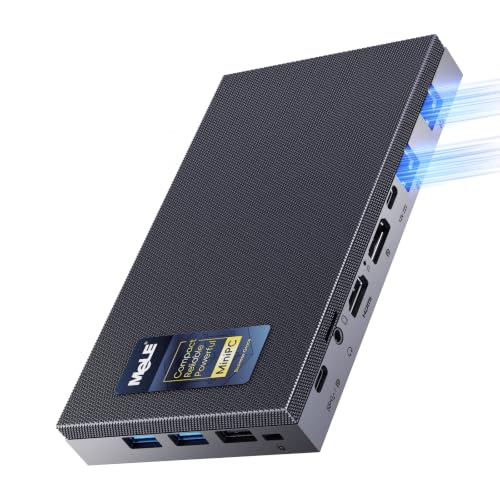
- Best fanless mini PC for a small space under $700: MeLE Quieter DL Business-Grade, N150, 16GB RAM, 512GB SSD, Dual 2.5GbE — Check on Amazon
- MeLE Quieter4C N150, 16GB RAM, 512GB SSD, Triple 4K Display, VESA Mount — Check on Amazon
- Protectli Vault Pro VP2430, N150, 4x 2.5GbE, Barebone — Check on Amazon
- Kinupute Fanless Industrial Mini PC, Core i7-1165G7, 8GB RAM, 256GB SSD — Check on Amazon
- UDPTCP Fanless Core Ultra 7 155H Mini PC, 6x 2.5GbE (Barebone) — Check on Amazon
See 1 more Amazon option
- Protectli Vault Pro VP2440, N150, 2x 10G SFP+, 16GB RAM, 250GB SSD — Check on Amazon
Read the full guide ↓
Disclosure: As an Amazon Associate, reviewstook.com earns from qualifying purchases. Links to Amazon on this page are affiliate links; they cost you nothing extra. Listing details such as price and availability change often, so check the current Amazon listing before you buy.
A fanless mini PC looks like the easiest small-space purchase in computing: no tower, no fan, a metal slab you can hold in one hand. Then it arrives, and the small-space questions start. Where does the power brick live? How far does the Ethernet cable bend behind it before it hits the wall? Can it sit inside the TV unit, on top of the router, under a stack of books? For a fanless machine those are not tidiness questions — they are survival questions. A fanned PC carries its cooling inside itself and merely prefers fresh air. A fanless PC is its cooling: the finned case is the heatsink, and every surface of that case needs room air around it to do its one job. Shrink the space carelessly and you have not saved room, you have built an oven with a computer in it. This guide therefore grades the installation rather than the spec sheet. The processors and ports are the same verified facts as in our main fanless guide; what changes here is the order of importance — footprint first, then the brick, then the cables, then the heat — because in a small room those are the things that decide whether the machine still works in August.
The honesty rules are the same as everywhere in this series. Every machine below was verified as genuinely passively cooled from the manufacturer’s own material or hands-on coverage, never from a “silent” listing headline. Prices are not printed in this guide — check the current price on Amazon for each pick — and two picks are barebones whose extra parts are noted openly. One pick carries an explicit buy-only rule tied to this guide’s budget instead of a printed figure. And the gaming honesty stays: these are silent, low-power machines with integrated graphics, good for retro titles, emulation, light esports and streamed play. They are not small gaming towers, and no amount of clever shelving changes that. What they are is the one class of PC that can disappear into a room — behind a monitor, on a bookshelf, beside a router — and run for years without being heard. Below: the quick picks, installation-first reviews of all six, a comparison table, the five measurements to take before you order anything, the placement mistakes that cook fanless PCs, and the questions small-space buyers actually ask.
In this guide
Quick Picks
Short on time, or comparing several options at once? Each row below names a buyer type and the product that suits it, with a link to the listing.
| Buyer type | Pick | Why it stands out in a small space | Link |
|---|---|---|---|
| Best overall for a small space | MeLE Quieter DL Business-Grade, 16GB/512GB | The only pick with documented dimensions — a sub-inch slab under a pound, VESA mount in the box | Check on Amazon |
| Best behind a monitor | MeLE Quieter4C N150, 16GB/512GB | VESA mount included and USB-C power input, so the desk keeps one cable class | Check on Amazon |
| Best beside the router | Protectli Vault Pro VP2430 (Barebone) | Four 2.5GbE ports in an appliance case built to sit in a network corner for years | Check on Amazon |
| Best sealed metal desktop | Kinupute Fanless Mini PC, Core i7-1165G7 | A real desktop CPU in a finned industrial case — no fan to clog in a dusty corner | Check on Amazon |
| Most capability per shelf | UDPTCP Fanless Core Ultra 7 155H (Barebone) | The strongest silent silicon and six LAN ports — the largest case here, and it earns the room | Check on Amazon |
| Best for a 10-gigabit corner | Protectli Vault Pro VP2440, 16GB/250GB | Two 10G SFP+ cages in a fanless appliance — check price on Amazon and buy only if it fits the under-$700 budget | Check on Amazon |
How These Picks Were Chosen
The first filter never changes in this series: fanless, proven. A machine had to be documented as passively cooled in the maker’s own datasheets, specification pages or listing material, or in a hands-on review that opened it. Words like “quiet” and “silent mode” were not accepted, because in this market they routinely describe a small fan turning slowly. Models whose fanless status could not be verified were excluded, however famous, and they are named in the research notes published with this guide.
The second filter is this variant’s own: installability. Each pick was graded as a physical object in a real room. Where the maker’s documentation states dimensions, a weight or a mounting option, we use those figures and say where they came from. Where it does not, we claim nothing — the pick is graded by its form-factor class instead, and the review tells you to take the exact measurements from the live listing before ordering. That discipline matters more here than in any other guide in the batch: only one of these six machines has verified dimensions in the underlying research, so a guide that printed six neat sets of measurements would be inventing five of them. The brick counts as part of the footprint throughout, because every fanless mini PC here runs from an external power adapter, and an adapter with nowhere to sit is desk clutter you bought on purpose. Cable drop counts too: a four-port firewall in a corner is not one box, it is one box plus four Ethernet cables bending behind it.
The budget was applied as a ceiling on the machine as sold. Two picks are barebones that need memory and storage before they compute anything; their reviews note the extra parts openly rather than letting a barebone format do quiet dishonesty. One pick, the VP2440, is included for a port layout nothing else here matches, with a rule — check the current price on Amazon and buy only if it fits the under-$700 budget of this guide. We did not use these products ourselves; the facts come from maker listings, datasheets and independent coverage gathered for the base guide, and where a maker’s own test figures are quoted they are labelled maker-published.
The Space You Cannot See on the Spec Sheet
Three invisible volumes decide every fanless installation, and none of them appears in a listing title. The first is the air jacket. A fanless case sheds heat by radiating and gently convecting from its fins into the room, and it can only shed what the surrounding air will carry away. Crowd the fins — push the box against a wall, stack it on a warm router, slide it into a media cabinet — and the jacket collapses. The machine does not break dramatically; it throttles, quietly, forever, and in a sealed cabinet it also cooks its own storage and shortens its life. The rule in this guide is absolute and stricter than for any fanned machine: open air on the finned surfaces, clearance on every side, fins upright where the design allows, and no sealed cabinets, drawers or cupboards for any of the six picks. If your only available space is enclosed, the honest purchase is a fanned mini PC with its vents planned — or a different room layout — not a fanless box placed on hope.
The second invisible volume is the brick. Every machine here is powered by an external adapter, and that adapter is a second object with its own footprint, its own warmth and its own cable. In a small space it needs an address before the machine arrives: a ventilated spot on the floor or the back of the desk, never buried in the same sealed nook you were refused for the PC itself, and never dangling by its cable behind a shelf. One pick, the Quieter4C, can take power over USB-C PD, which lets a small desk run a single cable class and keeps the brick situation simpler; the rest use conventional adapters whose size the listings do not document — so plan a palm-sized allocation and check the live listing photographs rather than trusting any figure a roundup invents.
The third is the cable drop. Measure the installed depth, not the case depth: chassis, plus the bend radius of the power cable, plus HDMI or DisplayPort, plus however many Ethernet leads your use actually plugs in. A desktop pick with one network cable and a wireless keyboard lives shallow. The six-port UDPTCP, fully cabled, is a small hedgehog of Cat6 that needs real depth behind it and a corner where the bundle can fall vertically instead of being folded flat against a wall. None of this is a reason to avoid the network machines — it is a reason their natural home is the network corner, where the cables were going anyway, rather than the middle of a minimal desk.
The 6 Best Fanless Mini PCs for Small Spaces Under $700
MeLE Quieter DL Business-Grade, Intel N150, 16GB RAM, 512GB SSD
Who it suits: Anyone whose small space needs a silent box that can be measured, mounted and forgotten — a firewall, home server or Home Assistant host that works the day it arrives.
This is the only machine in the guide whose size is a documented fact rather than a class estimate, and that fact is remarkable: about 6.6 by 3.7 by 0.84 inches and under a pound — thinner than a paperback novel, lighter than the monitor arm it can hide behind. MeLE includes a VESA mount in the box, so the best small-space installation in this guide is the zero-footprint one: the slab bolted to the back of a display, its whole metal top — which is the heatsink — facing open room air, the desk surface left entirely empty. Run on a shelf instead and the same thinness works horizontally, provided the top surface stays uncovered; the one forbidden move is sliding it into a stack, because the surface doing the cooling is the surface you would be burying. Two Intel I226-V 2.5-gigabit ports make it a genuine firewall or router box as well as a desk machine, and the Business-Grade build is the specific one to buy: it is the version with the Intel network controllers that pfSense and OPNsense handle cleanly, memory in a real DDR4 slot you can later raise to 32GB, and a 512GB NVMe SSD already fitted. MeLE rates it around 6 watts at idle, which is the running cost of a machine that never sleeps. Check the current price on Amazon for this 16GB/512GB Business-Grade build.
The caveats are about stock and ceiling. Stock of this exact build runs thin — availability has been intermittent — so treat it as a listing to catch and check price on Amazon when it appears. If it is out of stock, the Business-Grade 8GB/256GB build of the same machine, positioned lower in this budget tier, is the sensible fallback; what you should not do is drift to MeLE’s cheaper soldered-memory builds of the same model name, which substitute Realtek network controllers that owners report firewall systems failing to recognise. The performance ceiling is the N150 itself — four small cores for network services, office work, 4K playback and the light end of gaming: retro, emulation, streamed play. In a small space that ceiling is usually the right size of machine; just buy it as the silent infrastructure box it is.
- Documented size: about 6.6 × 3.7 × 0.84 in and 0.95 lb — the smallest verified footprint in this guide.
- VESA mount in the box, so it can occupy no desk surface at all.
- Two Intel I226-V 2.5GbE ports, slotted RAM to 32GB and a fitted 512GB NVMe SSD.
Honest limitation: Stock of the 16GB Business-Grade build is intermittent, and the cooling top surface must stay uncovered — it cannot be stacked, shelved under other kit or enclosed.
Choose it if your space is measured in inches and you want the installation to be provable before you order. Skip it if you need more than two network ports, or the only home you can offer it is inside a cabinet.

MeLE Quieter4C, Intel N150, 16GB RAM, 512GB SSD
Who it suits: The classic small-desk or living-room buyer: a silent PC for office work, browsing, media and streaming that mounts behind the screen and is never thought about again.
The Quieter4C is the category’s best-known design, and for small spaces its party trick is power. Alongside two HDMI 2.0 ports, its full-function USB-C port carries a third 4K display and accepts USB-C PD power input, so a tidy desk can run the machine, the monitor and the dock over one cable class instead of a brick, a barrel lead and a separate display cable all fighting for the same six inches. A VESA mount is included, and behind a monitor is where this machine belongs: the case is the heatsink, the back of a display is open air, and the whole computer occupies volume that was previously just the gap between screen and wall. Auto power-on, Wake-on-LAN and PXE boot complete the disappear-and-forget brief — after a power cut the machine returns to duty unattended, which is why the design is a signage and kiosk favourite. In this configuration you get 16GB of memory, a 512GB SSD and Windows 11 Pro — check price on Amazon.
Two trade-offs define it against its sibling above. Networking is desktop-grade rather than firewall-grade: a single gigabit Ethernet port and Wi-Fi 5, perfectly adequate at a desk and the weaker choice if the box is ever asked to route a house. And the memory on this N150 configuration is fixed — soldered, in effect permanent — so the 16GB you buy is the 16GB the machine retires with; buy the size you mean to keep. The gaming story is the N150 story everywhere in this guide: retro and emulation happily, light esports with modest expectations, modern titles streamed from a bigger machine or the cloud rather than rendered locally. As a small-space purchase the Quieter4C’s argument is not power per inch — it is that the inches it uses were waste space to begin with.
- VESA mount included — the behind-the-monitor installation is the intended one.
- USB-C PD power input plus triple 4K output keeps a small desk to one cable class.
- 16GB RAM and 512GB SSD fitted; auto power-on for unattended 24/7 roles.
Honest limitation: Memory is fixed on this configuration with no later upgrade, and networking is a single gigabit port with Wi-Fi 5 — a desk PC, not a firewall.
Choose it if the PC’s job is to vanish behind a screen in a room that stays quiet. Skip it if you need dual LAN, upgradeable memory, or any real local gaming power.

Protectli Vault Pro VP2430, Intel N150, 4x 2.5GbE (Barebone)
Who it suits: Firewall and homelab builders whose small space is a network corner — and who want documentation, firmware choice and a support desk behind the box that guards the house.
Small-space grading changes what “best” means for the VP2430. It is an appliance-class finned case — the underlying research documents no dimensions for it, so take the exact figures from the live listing before ordering — and its natural habitat is not the desk but the shelf, ledge or ventilated nook where the router already lives. That placement is a feature: four Intel I226-V 2.5-gigabit ports mean four Ethernet cables, and a network corner is the one place in a small home where a bundle of Cat6 falling vertically is normal rather than a defeat. Protectli’s datasheet describes the model in its first line as a fanless appliance; inside are the N150, a DDR5 SO-DIMM slot Protectli has qualified with modules up to 64GB (Intel’s own sheet for the chip says 16GB; Protectli publishes its tested list), 32GB of onboard eMMC and an M.2 slot for real storage. Coreboot firmware is available as an alternative to the standard AMI BIOS, and Protectli publishes its own VPN test results — its WireGuard figure for this box, around 2.25 Gbps in the maker’s own OPNsense test, is a maker number, labelled as such. Check the current price on Amazon for this barebone listing, and note the barebone VP2430e — the same machine without the eMMC, which has replaced it in Protectli’s line — as the related barebone variant to compare on the listing.
Be clear about what the listing buys: a shell with a pedigree. This listing is a barebone — DDR5 memory and an M.2 drive are yours to fit, and no operating system is included. In a small space that has one practical consequence beyond the homework: do the fitting at a table, not in the nook, and order the parts with the machine so the installation happens once. The heat rule applies with full force — the finned case needs open air on its surfaces, so a ventilated shelf yes, a sealed comms cupboard no, however tempting the tidiness. Configured, the four video outputs (HDMI, DisplayPort and two USB-C with DisplayPort) make it a workable light desktop, and its gaming ceiling is the N150 ceiling: retro, emulation, streaming, light esports. Buy the Protectli premium when the machine is your network’s front door and you want a manual and a datasheet behind it; the MeLE boxes serve a hobby corner for less.
- Four Intel I226-V 2.5GbE ports, each on its own lane — built for the network corner it will live in.
- Coreboot option, published datasheets and US-based support — appliance paperwork, not gadget paperwork.
- A DDR5 slot Protectli has tested with modules up to 64GB, plus onboard eMMC to boot a featherweight OS from.
Honest limitation: Barebone and OS-free — memory, storage and installation are on you — and its exact dimensions are not in the verified research, so measure from the live listing.
Choose it if this is your firewall and its home is a ventilated shelf by the router. Skip it if you want a finished PC, or its only available space is enclosed.

Kinupute Fanless Industrial Mini PC, Core i7-1165G7, 8GB RAM, 256GB SSD
Who it suits: Buyers whose small space is also a working space — a desk corner, counter, kiosk or workshop bench — who need a silent machine that is a real desktop first and an appliance second.
Most fanless mini PCs pair their sealed cases with entry-level chips. The industrial makers ignored that assumption, and this Kinupute puts an Intel Core i7-1165G7 — four cores, eight threads, up to 4.7GHz, with Iris Xe graphics — inside a finned, ruggedised metal enclosure with no fan at all. For a small space the industrial build is the point: there is no fan to clog with the dust that small, lived-in rooms generate, no intake to keep clear of the wall, and the maker’s design intent is continuous duty in places a consumer box would not be trusted. Check price on Amazon for the configuration with 8GB of DDR4 memory, a 256GB SSD and Windows 11 Pro installed — a complete, ready-to-run desktop, with no barebone parts to add. Two 2.5-gigabit LAN ports give it a second career as a network appliance, dual displays run over HDMI and VGA, and Wi-Fi 6 is built in. The research documents no dimensions for this listing, so grade it as a finned industrial desktop-class box and take exact measurements from the live listing before you commit a shelf to it.
The trade-offs are the industrial ones. Eight gigabytes of memory is the seen configuration’s weak point — adequate for office suites, browsers and appliance work, tight under heavy multitasking — and the 256GB drive fills quickly once a media library arrives; in a small space, note that both fixes live inside the case, so this is the rare pick whose storage can grow without growing its footprint, if you confirm the upgrade path on the live listing before buying. The processor is a 2020-era design, and in a passive case it settles well below its boost headline under long loads — the sustained-load tax every sealed box pays. Placement discipline is the same as for every pick here, with one addition: a finned industrial case sheds heat from its fins, so give it clearance on the finned sides and top, and do not let the smallness of the room talk you into the space above a radiator or inside a sunlit window alcove. Its Iris Xe graphics are the second-strongest in this guide — light esports and older games, flawless 4K desktop and video. Kinupute also sells a sibling industrial listing with six serial COM ports for factory and legacy-equipment work; it exists in the same family, and this review’s links stay on the desktop configuration.
- An i7-1165G7 with Iris Xe graphics — proper desktop silicon sealed into a fanless enclosure.
- Nothing to assemble: Windows 11 Pro is installed, Wi-Fi 6 is built in and both LAN ports are 2.5-gigabit.
- Rugged metal industrial build intended for continuous 24/7 operation in real rooms.
Honest limitation: Only 8GB of RAM and 256GB of storage in the seen configuration, on a 2020-era platform — and no documented dimensions, so verify the fit from the live listing.
Choose it if you want a silent everyday desktop that tolerates a dusty, busy corner. Skip it if you need 16GB of memory on day one or the newest platform.

UDPTCP Fanless Core Ultra 7 155H Mini PC, 6x 2.5GbE (Barebone)
Who it suits: Homelab builders and virtualisation hosts who want the most processor silence can buy — and whose small space can offer one honest shelf corner rather than a hideaway.
Grade this one by class, because the research documents no dimensions for it: Notebookcheck’s report on the machine describes a slightly larger chassis than the mini-PC norm, built around a sizable passive heatsink — which is exactly the trade a small-space buyer should expect. This is the biggest object in the guide, and it is big because it is doing the most: a 16-core Core Ultra 7 155H with the strongest integrated graphics here (an Arc iGPU of 8 Xe cores), six Intel I226-V 2.5-gigabit ports plus a console port, Thunderbolt 4, DisplayPort and HDMI outputs, a PCIe 4.0 x8 expansion slot and SIM slots for modem cards. The supporting ratings are industrial — the maker rates the system for ambient temperatures from 0 to 60°C and up to 95% humidity. In a small home its home is the network corner or a dedicated shelf with open air on the finned surfaces and depth behind it for the cable bundle: six Ethernet leads, power, display and USB is a hedgehog, and hedgehogs do not fold flat. Check the current price on Amazon for the barebone kit.
The barebone format needs to be understood clearly, as in the base guide. The barebone version is a motherboard, case and processor that still need DDR5 SO-DIMMs and an M.2 SSD; allow for a meaningful extra outlay for 16–32GB of memory and a 512GB–1TB drive, which puts a finished machine near or a little past this guide’s ceiling. The fully configured 32GB/1TB build sits above this guide’s budget tier, so treat it as a step-up option rather than an in-budget pick — check the current price on Amazon for either version. Two specification notes belong in the open: the board supports DDR5-5600 but configured builds ship with DDR5-4800, and no Wi-Fi card is included by default in any Amazon configuration — wireless is an M.2 card you add. For games, the Arc iGPU is the only one here that deserves the word “capable”: esports and older titles at 1080p low-to-medium settings, plus full-quality streaming to several rooms — still integrated graphics in a sealed box that will not hold boost clocks through a long session. Buy it as the silent server that anchors a small home’s corner, not as a games machine that happens to be quiet.
- A 16-core Core Ultra 7 155H with Arc graphics — the most powerful silicon here, cooled without a fan.
- Six Intel I226-V 2.5GbE ports, Thunderbolt 4 and a PCIe 4.0 x8 slot for a growing homelab.
- Maker-rated for ambient temperatures from 0 to 60°C and humidity up to 95%.
Honest limitation: The largest case here by class, and a barebone — memory, storage and OS can carry the finished cost past this guide’s budget; no Wi-Fi card included.
Choose it if one corner of your small space is allowed to be a real server shelf. Skip it if your space budget is a monitor’s shadow, or your $700 is a hard all-in ceiling.

Protectli Vault Pro VP2440, Intel N150, 2x 10G SFP+, 16GB RAM, 250GB SSD
Who it suits: Network builders whose internet or core switch already runs at 10 gigabits — the one job in this guide where the ports, not the processor, are the performance.
Every 2.5GbE fanless box stops at two and a half gigabits, however good its processor. The VP2440 keeps Protectli’s fanless Vault Pro formula and the same Intel N150, then adds two Intel X710 10-gigabit SFP+ ports alongside two I226-V 2.5GbE ports — and in a small space, that matters in a specific way: the SFP+ cages take slim DAC or fibre leads instead of fat copper bundles, so the fastest network corner in this guide can also be one of the shallowest, provided the switch it feeds sits within a short cable run. Protectli’s own published tests — maker figures, and labelled that way wherever this guide uses them — put the VP2440’s WireGuard throughput over the SFP+ ports at close to double the VP2430’s, for the simple reason that the ports were the limit all along. The Amazon configuration covered here ships with 16GB of DDR5 memory and a 250GB SSD plus the 32GB onboard eMMC, memory ceiling 64GB, no operating system included. The research documents no dimensions for it; it is an appliance-class case like its sibling, and exact measurements belong to the live listing. Its installation home is the VP2430’s home — a ventilated shelf in the network corner, fins in open air, never a sealed comms cupboard.
This pick carries the guide’s most explicit price warning, stated here rather than in small print: check the current price on Amazon before you consider it, and do not assume it fits this guide. The rule is simple: this pick belongs in this guide only if the price you see on Amazon fits the under-$700 budget of this guide when you check it. A second, unusually well-documented caveat: Protectli’s technical service bulletin TSB-2025-001 reports that VP2440 units running coreboot firmware v0.9.0 can see intermittent slowdowns on the 2.5GbE ports due to an ASPM issue, with a software workaround published and a permanent fix in development; the default AMI BIOS is unaffected. That a maker publishes such a bulletin at all is the strongest argument for buying Protectli — and it is here so you can plan around it, firmware choice first. For gaming, nothing changes: it is an N150. Buy it for the SFP+ cages, or do not buy it.
- Two Intel X710 10G SFP+ ports — the only 10-gigabit fanless option in this guide, on slim cabling.
- Arrives fitted with 16GB of DDR5 and a 250GB SSD, and the memory ceiling is 64GB.
- Datasheets, a hardware knowledge base and firmware bulletins published by the maker itself.
Honest limitation: No printed price here — check price on Amazon and buy only if it fits the under-$700 budget — and coreboot v0.9.0 carries a documented 2.5GbE slowdown issue with a workaround; the stock AMI BIOS is unaffected.
Choose it if your internet feed or core switch already runs at 10 gigabits and a fan in the rack is a hard no. Skip it if nothing on your network passes 2.5 gigabits — the VP2430 covers that ground for less.
Comparison Table
| Product | Processor | Installation profile | Link |
|---|---|---|---|
| MeLE Quieter DL Business-Grade, 16GB/512GB | Intel N150 | Documented 6.6 × 3.7 × 0.84 in, 0.95 lb; VESA mount in the box | Check on Amazon |
| MeLE Quieter4C N150, 16GB/512GB | Intel N150 | VESA mount included; USB-C PD power for a one-cable-class desk | Check on Amazon |
| Protectli Vault Pro VP2430 (Barebone) | Intel N150 | Appliance-class case for a ventilated network-corner shelf; measure from the listing | Check on Amazon |
| Kinupute Fanless Mini PC, i7-1165G7 | Core i7-1165G7, Iris Xe | Finned industrial desktop class; no fan to clog in a dusty corner | Check on Amazon |
| UDPTCP Fanless Core Ultra 7 155H (Barebone) | Core Ultra 7 155H, Arc iGPU | Largest case here by class; needs a real shelf and cable depth | Check on Amazon |
| Protectli Vault Pro VP2440, 16GB/250GB | Intel N150 | Appliance-class case; slim SFP+ cabling for a shallow 10G corner | Check on Amazon |
How to Choose: Measure Before You Buy
Small-space buying is a measuring exercise that happens before the order, not an apology that happens after it. Work through these five steps in order; each one is cheap, and together they prevent every placement failure this guide warns about.
- Measure the spot. Tape-measure the exact shelf, ledge or desk area — width, depth and height — and write the numbers down. Then compare them against the maker’s documented dimensions where they exist (the Quieter DL’s are in its review above) or against the live listing’s specification table where they do not. If a pick’s size cannot be verified before ordering, treat that as a reason to choose a pick whose size can, or to order only with a returns window you are willing to use.
- Reserve ventilation clearance. Now shrink your measured spot in your head: a fanless case needs open air around its finned surfaces on every side, because those surfaces are the cooling system. If what remains after clearance no longer fits the machine, the spot is wrong — not the machine. Sealed cabinets, drawers, closed TV units and under-stair cupboards fail this step for all six picks, with no exceptions for the low-power ones; a 6-watt box in a sealed box still cooks, just slowly.
- Give the power supply an address. Every pick here runs from an external brick. Decide where it sits — a ventilated floor spot behind the desk, the back of the shelf, a cable tray — and confirm the lead reaches the machine without tension and without the brick dangling by its cord. The Quieter4C’s USB-C PD input can simplify this step on a desk that already runs USB-C power; the rest need a palm-sized allocation you plan rather than discover.
- Walk the cable drop. Count what will actually be plugged in and trace each cable’s path from port to destination: display, power, and one Ethernet lead per port you will genuinely use. Add the bend behind the machine to the case depth and re-check step one’s numbers — that sum is the installed depth, and it is the one that has to fit. Network picks belong where cables already gather; a six-port box mid-desk fails this step aesthetically even when it passes it physically.
- Then order — and verify on arrival. When the machine lands, check the delivered configuration against the model number and the listing before it goes into its home: the Quieter DL must be the Business-Grade Intel-NIC build, not a soldered Realtek namesake; barebones should be completed at a table before installation; the VP2440’s price on Amazon must have fitted the under-$700 budget. Run it in the open for a day, confirm it holds its pace under your real load, and only then mount it, shelf it and dress the cables.
Common Buying Mistakes
- Sealing the fanless PC inside a cabinet, drawer or media unit. The single worst small-space move. A passive case shut in a closed box cooks in its own heat; throttling arrives first and a shorter life follows. This refusal is stricter than for fanned machines because the case is the cooler.
- Stacking it. Books on top, another warm box underneath, the router as a coaster — anything that blankets the finned surfaces removes the cooling you paid for. The Quieter DL’s entire top is its heatsink; burying it is burying the product.
- Measuring the case and forgetting the installation. Brick, cable bend and clearance are part of the footprint. A machine that fits the shelf bare and fits nothing once cabled does not fit the shelf.
- Trusting dimensions from a roundup instead of the listing. Only one pick in this guide has verified dimensions in the research. For the rest, the live listing’s specification table is the only honest source — check it before ordering, not after delivery.
- Believing a “quiet” or “silent” headline. If the maker’s own material does not say fanless, assume there is a fan. This guide excluded several famous models on exactly that evidence gap — in a bedroom at 2 a.m., the difference is the whole purchase.
- Buying a barebone and forgetting the parts. Memory, an SSD and possibly an OS licence belong in the budget — and in the parts order — from the start, not in a second delivery while the shell sits in its corner.
- Choosing a firewall build by port count alone. The chip behind the port matters: Intel I226-V controllers are the safe choice for pfSense and OPNsense, and some builds of popular models substitute Realtek controllers those systems may not recognise.
- Putting the fastest box in the worst air. The Core Ultra and i7 picks settle to what their fins can shed; in a warm, crowded nook they surrender their advantage fastest. Match the ambitious machine to the honest shelf, or buy the N150 that was designed for the heat it will actually meet.
Final Recommendation
- Most small spaces, measured and mounted: MeLE Quieter DL Business-Grade, 16GB/512GB.
- Behind the monitor, one cable class: MeLE Quieter4C N150, 16GB/512GB.
- Network corner with documentation: Protectli Vault Pro VP2430 (Barebone).
- Dusty working corner, real desktop: Kinupute Fanless Mini PC, Core i7-1165G7.
- One honest server shelf: UDPTCP Fanless Core Ultra 7 155H (Barebone).
- 10-gigabit networks: Protectli Vault Pro VP2440 — check price on Amazon; buy only within the under-$700 budget.
Our top two for a small space are the MeLE pair, for opposite reasons that meet in the middle. The Quieter DL is the only pick whose installation can be fully planned from documented figures — a sub-inch, sub-pound slab with a mount in the box — and it arrives complete with the right network chips. The Quieter4C is the better pure desk machine, trading the second LAN port for USB-C power and the category’s most proven disappearing act behind a monitor. The Protectli pair belong in the network corner and are bought for firmware, datasheets and support; the Kinupute is the working corner’s desktop; and the UDPTCP is the one pick that asks for real room and repays it with real capability. Smaller rooms with smaller jobs lose little by stepping down — Best Fanless Mini PC For Small Spaces Under $500 and Best Fanless Mini PC For Small Spaces Under $400 apply the same installation grading at lower budgets — and first-time buyers should read Best Fanless Mini PC For Beginners Under $700 before choosing between a barebone and a finished box. Measure the spot, reserve the air, address the brick, walk the cables — then order, and let the quietest computer you own also be the easiest one to place.
Frequently Asked Questions
Can I put a fanless mini PC inside a TV cabinet or media unit?
No — not a sealed one, and this guide refuses that placement for all six picks. A fanless case cools by radiating from its fins into room air; close the door and the air inside becomes the limit, the machine throttles, and heat soaks its own storage. An open-backed, generously ventilated shelf is a different matter: if air can enter low and leave high without obstruction, treat it as open air and verify with a day of real load before you commit. When in doubt, mount the machine behind the display instead — the VESA picks exist for exactly this problem.
How much clearance does a fanless mini PC actually need?
Enough that every finned surface faces moving room air rather than a wall, a book or another warm device — think a clear hand’s breadth of open air around the case as a working rule, more above it, since heat rises. The exact figure that matters is behavioural, not geometric: placed correctly, the machine holds its pace through your longest real workload; placed badly, it slows down and stays slow. Run the day-one test in the checklist before you dress the cables.
Where should the power brick go?
Somewhere with its own air and no tension on its cables: the floor behind the desk, the back of the shelf, a ventilated cable tray. Not inside the same sealed nook you were refused for the PC, not buried under soft furnishings, and not hanging by its lead. The brick is part of the installed footprint — give it an address in step three of the checklist rather than improvising one on delivery day.
Can a fanless mini PC play games in a small setup?
The right games, yes. Retro titles and emulation, indie games and esports at low settings run across this list; the Core Ultra 7 155H and i7-1165G7 picks stretch to older AAA games at 1080p low-to-medium settings. Modern AAA gaming at native settings is beyond all of them, because passive cooling caps the graphics power a sealed box can sustain — if that is the real job, Best Mini Gaming PC Under $700 is the same budget with a fan and several times the graphics performance. The natural small-space pattern is streaming: a bigger machine elsewhere renders, and the silent box puts it on your screen, which is the subject of Best Fanless Mini PC For Streaming Under $700.
Which of these is genuinely the smallest?
The Quieter DL is the smallest verified footprint here — about 6.6 by 3.7 by 0.84 inches and under a pound, documented in the maker’s material. The other picks’ dimensions are not in the verified research, and this guide will not rank what it cannot source: check the live listings’ specification tables for the Protectlis, the Kinupute and the UDPTCP, and be suspicious of any roundup that prints six tidy measurement sets for this category. For the broader shape of the range, Best Fanless Mini PC Under $700 covers the same six machines graded on capability rather than placement.
Barebone or ready-to-run in a tight space?
Ready-to-run if the spot is awkward: the MeLE boxes and the Kinupute install once and are done. Barebone if you enjoy the build or already own DDR5 and an NVMe drive — but do the assembly at a table, complete the machine, test it in the open, and only then put it in its corner. A barebone installed first and completed later means doing fiddly work in the least accessible place in the room, twice.
What if my space is bigger than I thought — or my budget smaller?
Both are good news in this category. Fanless performance barely scales with price, so Best Fanless Mini PC Under $500 and Best Fanless Mini PC Under $400 keep the same chips in simpler builds, and a roomier desk opens the door to the fanned small-format machines in Best Small Form Factor Gaming PC Under $700. Spend what you save on the mount, the monitor arm and the cables — the parts of a small setup you actually look at.


