Where to buy
Check the latest price, availability and delivery on Amazon. Orders are placed on Amazon. We may earn a commission from qualifying purchases.
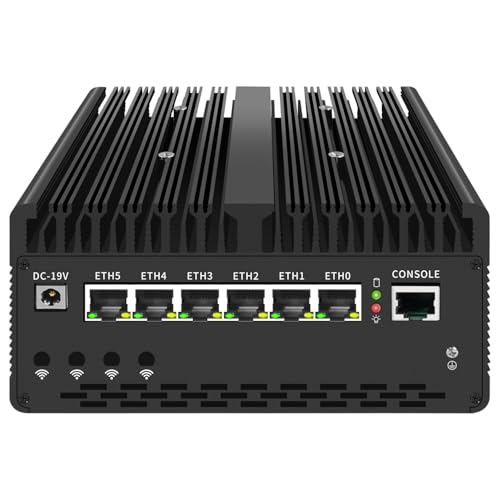
- Best overall fanless mini PC for beginners under $700: UDPTCP Fanless Core Ultra 7 155H Mini PC, 6x 2.5GbE (Barebone) — Check on Amazon
- MeLE Quieter DL Business-Grade, N150, 16GB RAM, 512GB SSD, Dual 2.5GbE — Check on Amazon
- Protectli Vault Pro VP2430, N150, 4x 2.5GbE, Barebone — Check on Amazon
- Kinupute Fanless Industrial Mini PC, Core i7-1165G7, 8GB RAM, 256GB SSD — Check on Amazon
- MeLE Quieter4C N150, 16GB RAM, 512GB SSD, Triple 4K Display — Check on Amazon
See 1 more Amazon option
- Protectli Vault Pro VP2440, N150, 2x 10G SFP+, 16GB RAM, 250GB SSD — Check on Amazon
Read the full guide ↓
Disclosure: As an Amazon Associate, reviewstook.com earns from qualifying purchases. Links to Amazon on this page are affiliate links; they cost you nothing extra. Listing details such as price and availability change often, so check the current Amazon listing before you buy.
If this is your first mini PC, start with the one fact that explains everything else in this guide: a fanless computer has no fan at all. Not a quiet fan, not a slow fan — none. The metal case is the cooling system, soaking up the processor’s heat and radiating it into the room through its fins, the way a radiator heats a house. That single design choice is why these machines are completely silent, sip power and last for years with nothing to wear out — and why they are not, and cannot be, gaming towers. Every machine below runs on integrated graphics, the modest graphics built into the processor itself, because a separate graphics card makes far more heat than a sealed metal box can shed. So be honest about the job before you spend anything. If your games are retro classics, indie titles, light esports at modest settings, or big games streamed from another machine or the cloud, a fanless mini PC is a genuinely lovely thing to own: silent, tiny and always on. If you want modern games played natively, no fanless box at any price will do it — better said on page one than after you have paid.
It also helps to know where $700 sits in this market. Fanless computers top out far lower than gaming PCs do — the limit is physics, not money, because a finned box can only radiate so much heat — so $700 buys everything except raw speed: extra network ports, factory-fitted memory and storage, rugged cases, proper documentation and support. The six picks below were each verified as truly fanless from the maker’s own specifications or hands-on coverage — several famous models were left out because their “silent” claims could not be verified — and they range from two build-it-yourself barebones to three machines that work the evening they arrive. New to the vocabulary? A plain-English glossary after the quick picks translates every term on the box, and the same six machines are graded without the beginner framing in Best Fanless Mini PC Under $700.
In this guide
Quick Picks
Short on time, or comparing several options at once? Each row below names a buyer type and the product that suits it, with a link to the listing.
| Buyer type | Pick | Why it stands out | Link |
|---|---|---|---|
| Best overall | UDPTCP Fanless Core Ultra 7 155H (Barebone) | The strongest processor and graphics that passive cooling can buy, with six fast network ports | Check on Amazon |
| Best ready-to-run dual-LAN box | MeLE Quieter DL Business-Grade, 16GB/512GB | Two Intel network ports, memory and storage already fitted, thinner than a paperback | Check on Amazon |
| Best firewall pedigree | Protectli Vault Pro VP2430 (Barebone) | Four network ports, a firmware choice, published manuals and US support | Check on Amazon |
| Best industrial desktop | Kinupute Fanless Mini PC, Core i7-1165G7 | A real desktop-class processor in a sealed metal case built for 24/7 duty | Check on Amazon |
| Best silent desktop and streamer | MeLE Quieter4C N150, 16GB/512GB | Three 4K displays, USB-C power, a wall mount, zero moving parts | Check on Amazon |
| Best for 10-gigabit networking | Protectli Vault Pro VP2440, 16GB/250GB | The only fanless box here with two 10-gigabit ports | Check on Amazon |
How These Picks Were Chosen
The first test was the word in the keyword: fanless, proven. A machine only qualified if the maker’s own datasheet or product material described passive cooling, or a hands-on review that opened the unit confirmed no fan inside. Words like “quiet,” “silent mode” and “low noise” were treated as advertising, not evidence, because they routinely describe a small fan spinning slowly — one you would hear across a quiet bedroom at night. Anything we could not verify was excluded, including some well-known names; the near-misses are listed in the notes alongside this article.
The budget was applied to the machine as actually sold, and we point you to the live listing for pricing — check the price on Amazon before you buy — because prices on niche listings like these move around. Two picks are barebones, meaning the sticker buys a case, board and processor with the memory and storage still to buy; their reviews show that extra cost openly instead of burying it. One pick had no verified US Amazon price at research time at all; rather than invent a figure, its review gives you a rule — buy it only if the live price is at or under $700 when you look. Where a maker’s own test numbers appear, such as Protectli’s published VPN results for its Vaults, the review says they are the maker’s numbers. We did not use these products ourselves; we compared maker listings, datasheets and independent reviews, and weighed processors, ports, memory, storage and support. Finally, each pick was graded on what a first-time buyer experiences: the setup between the box arriving and the machine working, whether the configuration can grow or is fixed forever, and how clearly the maker documents it. That beginner lens is what separates this guide from its sibling.
The Words on the Box, in Plain English
Mini PC listings are written in shorthand. Here is every term used in this guide, translated, with the honest version of what it means for the six machines below.
- Fanless / passive cooling. The computer has no fan. The processor’s heat travels into the metal case, and the case’s fins radiate it into the room. Two consequences matter: the silence is total, because there is nothing inside that can make noise; and the case must breathe, so the placement rules (open air, fins uncovered) are real instructions, not fussiness. A warm case is a working case.
- CPU (the processor). The chip that does the thinking. More cores generally means more jobs at once. Listings advertise a “boost” speed the chip can touch briefly; in a fanless case it settles lower during long, heavy work, because the fins set the pace — normal behaviour, not a fault.
- Integrated graphics, and shared memory. None of these machines has a separate graphics card. The graphics live inside the processor and borrow part of the ordinary memory (RAM) to work in — that borrowing is “shared memory.” Plenty for desktops, video, retro games and light titles — and the hard ceiling on gaming here, because there is no card to upgrade later on any pick.
- RAM (memory), soldered vs socketed. RAM is the machine’s short-term workspace; 16GB is the comfortable amount for a modern desktop. “Socketed” memory sits in a slot and can be swapped or increased later; “soldered” memory is fixed at the factory forever. Per pick: the UDPTCP, Quieter DL and VP2430 take socketed memory; the VP2440 arrives with 16GB fitted and a documented 64GB ceiling; the Quieter4C’s is soldered; the Kinupute’s documentation advertises no slot, so plan on its 8GB being final.
- SSD (storage). Where your files and games live, on fast chips rather than a spinning disk. An NVMe SSD sits in an M.2 slot inside the machine. Two Protectli picks also carry a little built-in eMMC storage — slow and tiny, meant for a lightweight system like firewall software, not your game library.
- Barebones vs ready-to-run — and the operating system. A barebones machine is a kit: case, board and processor, with memory, storage and an operating system still to buy and fit; a ready-to-run machine works out of the box. The operating system is the software it runs — Windows, or free alternatives such as Linux and the firewall systems OPNsense and pfSense. Here, the UDPTCP and VP2430 are barebones with no system included; the VP2440 arrives fitted but with no system installed; the two MeLE boxes and the Kinupute include Windows 11 Pro and are ready to run.
- Resolution and refresh rate. Resolution is how many pixels the picture has: 1080p is the standard sharp picture; 4K has four times the pixels. Refresh rate (Hz) is how many times per second the picture redraws — a 144Hz monitor can show smoother motion than a 60Hz one, but only if you set that rate in Windows, since monitors often start at 60Hz. Note the trap: a fanless box can display a crisp 4K desktop while still only rendering games at 1080p or below — displaying 4K and gaming at 4K are different jobs.
- Upscaling. A trick where a game renders at a lower resolution and software rebuilds the picture to fill the screen, trading a little sharpness for a lot of smoothness. The version that matters here is AMD’s FSR — software rather than brand-locked hardware, so games that offer it can use it on any of these chips. There is no DLSS here: that is NVIDIA’s system, and none of these machines has an NVIDIA card. Upscaling helps light games; it does not turn integrated graphics into a gaming card. What 1440p honestly means for machines like these is covered in Best Fanless Mini PC For 1440p Gaming Under $700.
- Power brick. Mini PCs have no internal power supply; they run from a small external adapter — a laptop-style brick on a cable — one more reason they stay silent. The brick makes a little heat of its own, so give it air rather than burying it in a cable box. One pick, the Quieter4C, can also be powered through its USB-C port.
- Ethernet ports, and the chip behind them. Ethernet is the wired network socket — faster and steadier than Wi-Fi, and the reason these machines exist: a firewall needs at least two sockets, one facing the internet, one facing your home. 2.5GbE means a socket two and a half times faster than the standard gigabit one. The controller chip behind the socket matters just as much: Intel’s I226-V is the one firewall software recognises without drama, while some cheaper builds substitute Realtek controllers that owners report firewall systems failing to see.
- Platform. The generation of technology a machine belongs to — which processor family, and which memory type (DDR4 or the newer DDR5). Platform decides what upgrades are even possible: a DDR4 machine can never take DDR5 memory, and an older platform’s processors stop being sold.
- New vs renewed. “Renewed” means a used machine checked and resold — legitimate, but a different purchase from new. Stated plainly: none of the six picks here is a renewed or refurbished listing; all six are sold new. What varies here is not condition but completeness, as the reviews spell out.
The 6 Best Fanless Mini PCs Under $700 for Beginners
UDPTCP Fanless Core Ultra 7 155H Mini PC, 6x 2.5GbE (Barebone)
Who it suits: The beginner happy to fit two parts and install an operating system in exchange for the most capable silent machine this budget can buy — a home server, router and light games machine in one box.
Begin with what makes it unusual: most fanless PCs pair their sealed cases with small, efficient processors, because that is all a passive case was long assumed to cool. This one seals Intel’s Core Ultra 7 155H — a 16-core laptop processor with Arc integrated graphics, the strongest graphics in this guide by a wide margin — inside a slightly larger finned case the maker rates for rooms from 0 to 60°C and up to 95% humidity. Around it sits the richest set of connections here: six Intel I226-V 2.5-gigabit Ethernet ports plus a console port, Thunderbolt 4, DisplayPort and HDMI outputs, an expansion slot, and SIM slots for mobile-data cards. Nothing else verified at this budget pairs this processor class with this many fast ports.
Now the part the headline leaves out, priced honestly. Check the price on Amazon — and note what that price buys: the barebone kit of case, board and processor, with no memory, no storage and no operating system. Finishing it means DDR5 memory and an M.2 SSD of your own — a meaningful extra spend for 16–32GB and a 512GB–1TB drive, landing the finished machine near, or a little past, this guide’s ceiling. The maker’s own fully configured version underlines the point — the 32GB and 1TB build is a premium-tier configuration that sits over this guide’s budget. Two small-print items belong in the open: the board supports faster DDR5-5600 memory but configured builds ship DDR5-4800, and no Wi-Fi card is included in any configuration seen on Amazon — wireless is a card you add or a cable you run.
For games, this is the one pick whose integrated graphics earn the word “capable”: esports titles and older games at 1080p on low-to-medium settings, retro and indie games without strain, and streamed play at full quality. In a long session the processor settles to the pace its fins can sustain, where a fanned machine would hold its boost. Buy it as a silent server and desktop that can also play, and it will delight you; buy it as a games machine that happens to be silent, and the physics will eventually introduce itself.
- Core Ultra 7 155H with Arc graphics — the strongest processor and graphics in this guide, passively cooled.
- Six Intel I226-V 2.5GbE ports plus a console port, Thunderbolt 4 and an expansion slot.
- Maker-rated for rooms from 0–60°C and humidity up to 95% — industrial conditions, not office assumptions.
Honest limitation: It is a barebone — memory, storage and an operating system are extra purchases and extra work, which can carry the true cost past $700 — and no Wi-Fi card is included.
Choose it if you want the one fanless box that does not feel like a compromise and you are comfortable completing it. Skip it if you want a computer that works the evening it arrives, or your $700 must cover absolutely everything.

MeLE Quieter DL Business-Grade, Intel N150, 16GB RAM, 512GB SSD
Who it suits: The beginner who wants the silent machine to simply work — memory and storage fitted, Windows installed, two proper network ports — with no assembly and no parts list.
The Quieter DL is a metal slab less than an inch thick — about 6.6 by 3.7 by 0.84 inches and under a pound — whose entire top surface is the heatsink. It arrives complete: 16GB of memory in a real slot you can later raise to 32GB, a 512GB SSD, Windows 11 Pro, and a mount for hiding it behind a monitor. MeLE rates it at about 6 watts when idle — the figure that matters for a machine that never sleeps — so as a home server, smart-home hub or quiet firewall it costs almost nothing to run and makes no sound doing it. Check the price on Amazon for this 16GB/512GB Business-Grade build before you order.
One warning matters more than everything else in this review, because MeLE sells several versions of this model under similar names. The Business-Grade build — the one this review covers — carries two Intel I226-V network controllers, the chips firewall software like pfSense and OPNsense recognises without fuss. The cheaper versions of the same model pair soldered memory with Realtek network controllers that owners report those same firewall systems failing to recognise at all. Same model name, different machine. Check the listing title for “Business-Grade” before you order, and check the controllers in Device Manager when it arrives (the walkthrough below shows how). Stock of this exact build has also been thin — one tracker recorded it unavailable in mid-November 2026 — so treat it as a listing to catch. If it is out of stock, the Business-Grade 8GB/256GB build of the same machine — a lower, budget-tier configuration — is the sensible fallback; the soldered versions are not.
Performance expectations, set honestly: the N150 is a small, efficient quad-core that handles network services, office work, browsing and 4K video comfortably, and nothing beyond that comfortably. A reviewer who tested the N100 version of this same box found Rocket League barely playable at its default settings and Fortnite choppy even at the lowest; the N150 is a small step up, not a different class. Think of it as an emulation, retro and streaming endpoint that also runs a home’s quiet infrastructure.
- Two 2.5GbE ports on Intel I226-V controllers — the firewall-friendly chips, fitted to the Business-Grade build.
- Memory in a real slot (up to 32GB) and a 512GB SSD fitted; Windows installed; nothing to assemble.
- About 6W at idle by MeLE’s rating, in a sub-inch fanless slab with a mount in the box.
Honest limitation: The N150 is an entry-level chip — services and media, not muscle — stock of the 16GB build has been intermittent, and you must make sure you are buying the Intel-controller Business-Grade version, not a soldered Realtek build wearing the same model name.
Choose it if you want a silent dual-network box that works out of the box. Skip it if two network ports are not enough, or gaming performance matters to you at all.

Protectli Vault Pro VP2430, Intel N150, 4x 2.5GbE (Barebone)
Who it suits: The beginner whose silent machine has a serious job — guarding the home network — and who would rather have a manual, a datasheet and a support desk than the longest spec sheet.
Protectli is the name-brand end of the fanless appliance world, and the VP2430 is its current four-port design. Inside are an Intel N150, four Intel I226-V 2.5-gigabit ports (each on its own internal lane, as a routing box should be built), a memory slot Protectli has tested with sticks up to 64GB (its published list goes beyond Intel’s own sheet for the chip), a little built-in eMMC storage, and an M.2 slot for a real drive. The extras never appear in a headline: a coreboot firmware option instead of the standard BIOS, a knowledge base with a full datasheet and hardware overview, and Protectli’s own published VPN test results — its WireGuard figure for this box, around 2.25 Gbps in the maker’s own OPNsense test, is a maker number, labelled as one, but most rivals publish nothing at all. Check the price on Amazon for the VP2430 barebone before you order; its close successor, the VP2430e barebone, sits in the same mid-range tier.
Be clear about what arrives, though: a shell with a pedigree. This listing is a barebone — you fit memory and drive, and no operating system is included at any price, so your first evening includes installing OPNsense, pfSense, Proxmox, Linux or Windows yourself. For a confident beginner that is an afternoon’s project with excellent documentation; for anyone else it is the barrier that should send them to the ready-to-run MeLE above. Once configured, its four video outputs (HDMI, DisplayPort and two USB-C with DisplayPort) make it a workable light desktop, with the N150 gaming story everywhere in this guide: retro, emulation, streaming, light esports at low settings. Pay the Protectli premium when the machine is your network’s front door; save the money if it is a hobby box.
- Four Intel I226-V 2.5GbE ports on separate internal lanes — a layout designed for routing from the start.
- Coreboot firmware option, published datasheets and hardware guides, US-based support.
- Memory slot qualified by Protectli to 64GB, with built-in eMMC for a lightweight boot system.
Honest limitation: Barebone and operating-system-free — memory, storage and installation are your homework — and the N150’s ceiling is the same entry-level ceiling as every N150 box here.
Choose it if the machine will guard your network and you want the fanless platform with the deepest documentation and support under $700. Skip it if you want a finished PC, or installing an operating system sounds like a chore rather than a project.

Kinupute Fanless Industrial Mini PC, Core i7-1165G7, 8GB RAM, 256GB SSD
Who it suits: The beginner who wants a silent machine that is an ordinary desktop first — office work, browsing, point-of-sale, a kiosk — in a sealed metal case with no fan to clog, fail or be heard.
The industrial-PC makers never accepted the assumption that a sealed case needs a small processor. This Kinupute puts an Intel Core i7-1165G7 — four cores, eight threads, boosting to 4.7GHz, with Iris Xe integrated graphics — inside a finned, rugged metal enclosure with no fan, built for continuous duty. Check the price on Amazon — and note that, crucially, the price is for a complete machine: 8GB of DDR4 memory, a 256GB SSD and Windows 11 Pro already installed. That makes it the strongest ready-to-run desktop in this guide — no barebone arithmetic, no operating system to source. Two 2.5-gigabit network ports give it a second career as a router or network appliance, displays run over HDMI and VGA, and Wi-Fi 6 is built in — the wireless the UDPTCP makes you add yourself.
The trade-offs are honest and visible. Eight gigabytes is the configuration’s weak point in 2026 — fine for office suites, browsers and appliance work, tight for heavy multitasking — and with no memory slot advertised in the maker’s documentation, treat that 8GB as final rather than a starting point. The 256GB drive fills quickly once a media library moves in. The processor itself is a 2020-era design, a generation or more behind the Core Ultra at the top of this guide, and inside a passive case it settles well below its 4.7GHz headline during long loads — the sealed-box rule again. Its Iris Xe graphics are the second-strongest here — the same light-esports and older-games territory as the UDPTCP at somewhat lower settings, and flawless for 4K desktop and video. A sibling industrial listing with six serial ports exists in the same family, for factory and legacy-equipment work. For a quiet room, this is the pick that behaves most like a normal PC — because it is one, minus the fan.
- A Core i7-1165G7 with Iris Xe graphics — genuine desktop silicon inside a sealed, fanless shell.
- Ready on day one: Windows 11 Pro installed, Wi-Fi 6 built in, two 2.5GbE ports.
- A rugged metal industrial enclosure meant to run around the clock.
Honest limitation: Only 8GB of memory and 256GB of storage in the seen configuration — with no documented way to grow the memory — on a 2020-era platform whose boost speeds a passive case cannot sustain.
Choose it if your silent desktop also has to survive like an appliance. Skip it if you need 16GB of memory on day one — the UDPTCP barebone, once completed, is the stronger machine.

MeLE Quieter4C, Intel N150, 16GB RAM, 512GB SSD
Who it suits: The classic fanless buyer, and the easiest recommendation in this guide for a beginner: a silent desk or living-room PC for office work, browsing, media and streaming, mounted behind a monitor and forgotten.
The Quieter4C defined this category for most buyers, and the current N150 version keeps the formula: the whole case is the heatsink, and inside are an Intel N150 quad-core, 16GB of memory and a 512GB SSD, with Windows 11 Pro installed. Check the price on Amazon before you order. The connections are desktop-shaped rather than firewall-shaped: two HDMI ports plus a full-function USB-C give up to three 4K displays, that USB-C port can also power the machine, and the box includes a VESA mount, plus auto power-on, Wake-on-LAN and network boot — the resume-after-a-power-cut behaviour signage and kiosk buyers love. For streaming it is close to ideal: the N150’s built-in video hardware handles 4K playback and media-server transcoding without a sound, which is precisely the workload Best Fanless Mini PC For Streaming Under $700 is about.
Against its sibling above, the trade is ports for polish. The Quieter4C has a single standard gigabit network port where the Quieter DL has two fast Intel ones, so it is the weaker firewall and the stronger desk PC. Its memory is soldered — fixed at the factory, so the 16GB you buy is the 16GB you keep — and its Wi-Fi is the older Wi-Fi 5, a detail that matters only if your desk has no cable. The gaming verdict is the N150 verdict everywhere here: retro and emulation happily, esports at low settings, modern games via streaming rather than local rendering. What you get for the money is the configuration itself — enough memory and storage to never feel entry-level — in the category’s most proven fanless design. If the Quieter DL is the network person’s MeLE, this is everyone else’s.
- Triple 4K displays over dual HDMI and USB-C, in a proven fanless design.
- 16GB of memory and a 512GB SSD fitted — a configuration with no entry-level compromises.
- Auto power-on, Wake-on-LAN and network boot for unattended 24/7 roles; mount included.
Honest limitation: A single gigabit network port and Wi-Fi 5 date the networking, and the memory is soldered — no later upgrade, ever.
Choose it if the entire point is a desk or living room that stays silent. Skip it if you need two network ports for firewall duty — that is the Quieter DL — or memory you can upgrade later.

Protectli Vault Pro VP2440, Intel N150, 2x 10G SFP+, 16GB RAM, 250GB SSD
Who it suits: The beginner with one specific, advanced need: a home network that runs at 10 gigabits — fibre internet faster than 2.5GbE, or a 10-gigabit core switch — and the patience to install their own operating system.
Every other machine here stops at two and a half gigabits per port, because its ports are the limit; the VP2440 exists for homes where that is not fast enough. It keeps Protectli’s fanless Vault Pro formula and the same Intel N150, then adds two Intel X710 10-gigabit SFP+ ports alongside two I226-V 2.5GbE ports. In Protectli’s own published testing — maker figures, labelled as such — its WireGuard result over those fast ports runs close to twice the VP2430’s, because the ports were the bottleneck all along. The Amazon configuration covered here arrives with 16GB of DDR5 memory and a 250GB SSD fitted, plus the small built-in eMMC storage, with the memory ceiling at 64GB for later. Everything said about the VP2430’s platform applies: published datasheets, a hardware knowledge base, coreboot firmware available, and no operating system included.
This pick carries the guide’s bluntest price warning, stated here rather than in small print: we could not verify a US Amazon price for this listing at research time, and we will not invent one. European pricing for an 8GB build sits at a premium tier, which suggests the shape of the pricing — but the rule is simple: it belongs in a $700 guide only if the live Amazon price is at or under $700 when you check it. A second, unusually well-documented caveat: Protectli’s own technical bulletin TSB-2025-001 reports that VP2440 units running the coreboot firmware version v0.9.0 can see intermittent slowdowns on their 2.5GbE ports, with a published software workaround and a permanent fix in development; the standard BIOS is not affected. That the maker publishes such a bulletin at all is the strongest argument for buying Protectli. For gaming, nothing changes: it is an N150. Buy this for its fast ports, or not at all.
- A pair of Intel X710 10G SFP+ ports — no other fanless box in this guide goes past 2.5 gigabits.
- Arrives fitted with 16GB of DDR5 and a 250GB SSD, with headroom to grow to 64GB of memory.
- Protectli’s datasheets and support operation — right down to published bulletins about its own firmware.
Honest limitation: No verified US price at research time — buy only at a live price of $700 or less — no operating system is installed, and the coreboot firmware version noted above carries a documented 2.5GbE slowdown issue with a workaround; the standard BIOS is unaffected.
Choose it if your internet or core switch runs at 10 gigabits and a fan in the rack is a non-starter. Skip it if nothing on your network exceeds 2.5GbE — the VP2430 covers that ground for less money.
Comparison Table
| Product | Processor | Best use | Link |
|---|---|---|---|
| UDPTCP Fanless Core Ultra 7 155H (Barebone) | Core Ultra 7 155H, Arc graphics | Silent virtualisation host and router with real headroom | Check on Amazon |
| MeLE Quieter DL Business-Grade, 16GB/512GB | Intel N150 | Ready-to-run silent firewall and home server | Check on Amazon |
| Protectli Vault Pro VP2430 (Barebone) | Intel N150 | Best-documented four-port firewall platform | Check on Amazon |
| Kinupute Fanless Mini PC, i7-1165G7 | Core i7-1165G7, Iris Xe graphics | Silent everyday desktop with industrial build | Check on Amazon |
| MeLE Quieter4C N150, 16GB/512GB | Intel N150 | Silent desktop, media PC and streaming endpoint | Check on Amazon |
| Protectli Vault Pro VP2440, 16GB/250GB | Intel N150 | Fanless routing for 10-gigabit networks | Check on Amazon |
How to Choose a Fanless Mini PC Under $700
- Start with the job, not the processor. At this budget, fanless money buys ports, fitted parts, build quality, documentation and support — not speed. If your honest want is “faster games,” a fanned PC is the right purchase; if it is “silent, always on, connected to everything,” you are in the right guide.
- Count network ports first; they can never be added later. One port (Quieter4C) suits a desktop. Two fast ports (Quieter DL, Kinupute) suit a home firewall. Four (VP2430) suit a network you want to divide into segments. Six plus expansion (UDPTCP) suits a virtualisation host, and the VP2440’s special ports are the only route past 2.5 gigabits.
- Check the chip behind the ports, not just the count. Intel I226-V controllers are the safe choice for firewall software. Some builds of popular models quietly substitute Realtek controllers that firewall systems may not recognise — the Quieter DL’s Business-Grade builds exist precisely to avoid this — so read the exact listing, not just the model name.
- Give the case air — and plan the spot before it arrives. A fanless PC cools by radiating from its fins into the room, so it needs open air on those surfaces and must never live in a sealed cabinet or drawer. Compact setups are this category’s home turf; Best Fanless Mini PC For Small Spaces Under $700 grades the same idea purely on placement.
- Be honest about games, one last time. If gaming is the primary job, stop here: Best Mini Gaming PC Under $700 is the same budget with fans and several times the graphics performance, and Best Home Office PC Under $700 covers the quiet-but-fanned middle ground. Keep a fanless box for the games it is genuinely good at — retro, emulation, light esports and streamed play.
Your First Evening: Setting Up a Fanless Mini PC
The routine below assumes a ready-to-run machine. Barebone buyers (UDPTCP, VP2430) start one step earlier: fit the memory stick and SSD — a small screwdriver job, well documented by both makers — and have an operating-system installer ready on a USB stick (the VP2440 needs one installed too). Then, in order:
- Place it like a radiator, because it is one. A fanless case is its own heatsink, so set the machine where open air can move around its finned surfaces — desk, open shelf, or mounted behind a monitor. Never bury it in a drawer, a sealed media cabinet or a pile of other warm equipment. Expect the case to feel warm in use; warm is the cooling working.
- Give the power brick an address. Plug the adapter in where it gets a little air — not coiled inside a sealed cable box — then connect it to the machine. Do not switch on yet.
- Connect the monitor to the mini PC’s own display sockets. There is no separate graphics card to find — the box’s HDMI and DisplayPort sockets are the graphics output. Use the outputs your pick documents — dual HDMI plus USB-C on the Quieter4C, HDMI and DisplayPort on the Quieter DL and UDPTCP, HDMI and VGA on the Kinupute, and four outputs (HDMI, DisplayPort, two USB-C) on the VP2430.
- Add keyboard, mouse and a network cable. Plug in your peripherals, and run an Ethernet cable from your router for setup even if the machine will live on Wi-Fi later — updates download faster and nothing can drop mid-install. For the UDPTCP, which includes no Wi-Fi card at all, the cable is not a preference — it is the connection.
- Switch on and let Windows Update finish — really finish. On a ready-to-run machine, run Windows Update repeatedly until it reports nothing left, and let it pull the drivers with it. This can take a while on a first evening, but a half-updated machine stays busy in the background for days — the true origin of most “my new PC is slow” stories. On a no-operating-system pick, this step is your own installation first, updates second.
- Set the monitor’s real refresh rate. Windows usually starts a high-refresh monitor at 60Hz and leaves it there. Go to Settings, Display, Advanced display, and choose the highest refresh rate your monitor offers. You paid for those extra Hz; this thirty-second step is what actually delivers them.
- Verify you received the machine you ordered. Open Settings, System, About (or Task Manager’s Performance tab) and compare with the listing: processor name, memory size, storage size. This matters most for the Quieter DL: in Device Manager, confirm the network adapters are Intel I226-V controllers — that is how you know you received the Business-Grade build, not a soldered Realtek sibling in the same model name. If anything differs, you are still inside the return window — exactly why this check belongs on evening one.
- Install a game store, and set your library expectations. Install Steam (and any other store you use), sign in, and start with the games these machines genuinely enjoy: retro and indie titles, light esports at modest settings, and — for everything heavier — a streaming app that lets a bigger machine or the cloud do the rendering while your silent box runs the screen. Your fanless PC is now set up, and it will not make a sound about it.
What Else You Will Spend
No pick includes a monitor, keyboard or mouse, and those top the extra-spend list — the monitor first, because it is the one upgrade every pick here can actually show you. We quote no peripheral prices — the research verified machines, not accessories — so treat any bundle arithmetic that folds a screen into a pick’s price with suspicion.
The rest of the extra spend is the “catches,” and the honest way to hold them is as machine-plus-fix totals. The UDPTCP barebone becomes a finished computer only after memory and storage of your own, plus an operating system if you do not use a free one — budget for the completion parts from the start. The VP2430 carries the same structure: a DDR5 stick and an M.2 drive are a second purchase before it runs anything, and the operating system is your own installation. The VP2440’s catch is smaller but real — the hardware arrives fitted, the operating system does not. The Kinupute’s catch is not a purchase at all: its 8GB of memory and 256GB drive are the configuration you live with, so judge it as the whole machine, limitations included. Add a spare Ethernet cable for setup if you do not own one, and measure the shelf spot before the box arrives. Beginners budgeting a first setup from zero may also want Best Mini PC For Beginners Under $700, which grades the fanned alternatives on the same first-evening logic.
Upgrades, in Plain Terms
Here is the whole upgrade story for fanless mini PCs, without the sales gloss. Memory and storage are the only upgrades that exist, and only on the machines built for them. The Quieter DL’s memory sits in a slot and can grow from 16GB to 32GB; the VP2430’s slot is qualified by Protectli up to 64GB; the VP2440 ships with 16GB and a documented ceiling of 64GB; the UDPTCP takes whatever DDR5 you fit at completion time. Storage follows the same pattern, though the Quieter DL’s single slot means a bigger drive replaces the fitted one rather than joining it. On the other side: the Quieter4C’s memory is soldered and will be 16GB forever, and the Kinupute’s documentation promises no memory upgrade — buy both as finished configurations.
And the graphics card upgrade — the one gaming readers always ask about — does not exist: no slot arrangement, power supply or passive case can support one, and the UDPTCP’s expansion slot is for network and storage cards, not a route to a gaming GPU. The processors themselves are fixed to their boards throughout this category. So the honest path, if you outgrow the graphics, is a second machine for games, with the silent box retiring to the server and streaming duties it was always best at — the deal you make when you choose silence, better made with open eyes.
Common Buying Mistakes
- Trusting a “quiet” or “silent” headline. Unless the maker’s own material says the machine is fanless, work on the basis that a fan is inside; several famous models were excluded from this guide for failing exactly that test.
- Expecting a fanless PC at this budget to beat a cheaper fanned one. It will not: the extra money buys silence, ports and a duty rating, while a fanned mini PC for noticeably less money remains the faster computer.
- Buying the wrong MeLE Quieter DL. The model name covers soldered-memory builds with Realtek network controllers as well as the Business-Grade Intel build; firewall software may not even see the Realtek ports. Check the build name before ordering and the controllers in Device Manager when it arrives.
- Buying a barebone and forgetting the parts. Memory, an SSD and possibly an operating system belong in the budget from the start, not in a second order placed while a shell sits on your desk.
- Shutting the fanless PC inside a cabinet, drawer or media unit. A passive case in a closed box becomes an oven with a computer in it — throttling first, a shortened life after. The fins need the room’s air.
- Paying over the odds for the VP2440 without checking. It had no verified US price when this guide was researched; it belongs here only at a live price of $700 or less.
- Assuming Wi-Fi is included. The UDPTCP ships with no Wi-Fi card in any configuration seen; with no cable run at your desk, that is a card to buy or a different pick.
- Judging by the boost clock. In a sealed case the sustained speed is the real speed, set by the fins and the room.
- Reading a gaming-list appearance as a gaming promise. A fanless box plays retro, emulated, light-esports and streamed games; plan your library around that, or buy the fanned machine instead.
Final Recommendation
- Most beginners who want maximum silent capability: UDPTCP Fanless Core Ultra 7 155H (Barebone).
- Silent firewall or home server, ready to run: MeLE Quieter DL Business-Grade, 16GB/512GB.
- Firewall as infrastructure, with documentation: Protectli Vault Pro VP2430 (Barebone).
- Silent everyday desktop: Kinupute Fanless Mini PC, Core i7-1165G7.
- Silent streaming and desk PC: MeLE Quieter4C N150, 16GB/512GB.
- 10-gigabit networks: Protectli Vault Pro VP2440 — and only while its live price stays at $700 or below.
For most first-time buyers the shortlist is two machines. The UDPTCP is for readers who want the one fanless box that does not feel like a compromise — 16-core processor, the strongest integrated graphics in the category, six fast ports — and who accept the barebone homework as the price of admission. The second is the MeLE Quieter DL Business-Grade, for the larger group who want silence as a finished product: fitted memory and storage, the right network chips, Windows installed, and a machine that disappears behind a monitor for years. The Protectli pair are the specialist’s choice, bought for firmware, documentation and support; the Kinupute and Quieter4C cover the desktop and streaming ends. Readers on a lower budget lose less than usual stepping down here — Best Fanless Mini PC Under $500 keeps the same chips in simpler builds — and anyone whose priority changed from silence to speed while reading should cross to Best Compact Gaming PC Under $700 with our blessing. Before you order, check the live price and the exact build name one last time; when the box arrives, give its fins room to breathe. Do those two things and a fanless PC repays you exactly as promised — by never being heard from again.
Frequently Asked Questions
I am a complete beginner. Should I avoid the barebones?
Not necessarily — but go in with open eyes. Fitting a memory stick and an SSD is a few screws and ten minutes, and both barebone makers here document their hardware well. The bigger step is the operating system: the UDPTCP and VP2430 ship with none, so your first evening includes installing one from a USB stick. If that sounds enjoyable, the UDPTCP rewards you with the strongest machine in the guide; if it sounds like a chore, the Quieter DL and Quieter4C exist precisely for you.
Can a fanless mini PC play games at all?
Yes — the right games. Retro titles and emulation, indie games, and esports at low settings run on every machine here; the Core Ultra 7 155H and i7-1165G7 picks stretch that to older big-budget games at 1080p on low-to-medium settings. Modern releases at native settings are beyond all of them, because passive cooling caps the graphics power any sealed box can sustain. For everything heavier, stream it: let a bigger machine or a cloud service render while the silent box runs the screen — see Best Fanless Mini PC For Streaming Under $700.
Why is the case warm, and will it overheat?
Warm is the design working: with no fan, the case itself carries the heat away. The machine will slow itself down by design under very long, heavy loads rather than overheat — throttling is the safety mechanism, not a defect. What it cannot survive is being sealed away: keep the finned surfaces in open air, out of closed cabinets and direct sun, and it will run at its sustainable pace indefinitely. The industrial models here are rated for room temperatures and round-the-clock duty no ordinary fanned desktop would claim.
Which pick should I buy if I just want it to work tonight?
The MeLE Quieter4C for a desk or living-room PC — Windows installed, generous memory and storage, a mount in the box, and nothing to configure beyond the walkthrough above. Choose the Quieter DL instead if the machine’s job involves your network, because its two Intel network ports are the right hardware for that work. Either way you are choosing between two ready-to-run machines; the barebones and the 10-gigabit Protectli are second machines for most beginners.
What if I get into gaming properly later?
Then your fanless box becomes the quiet infrastructure it was always best at: home server, media box, streaming endpoint, firewall. The gaming upgrade is a separate fanned machine bought when you know what you play — readers at that point may want Best Entry Level Gaming PC For Beginners Under $700. You cannot upgrade your way there inside the fanless case: there is no graphics-card path, on any pick, at any price.


