Where to buy
Check the latest price, availability and delivery on Amazon. Orders are placed on Amazon. We may earn a commission from qualifying purchases.
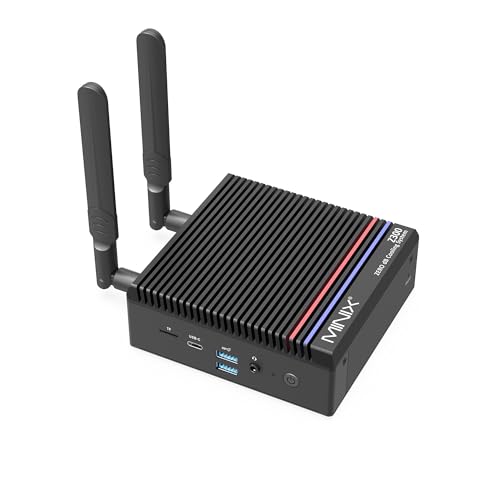
- Best fanless streaming station under $500: MINIX NEO Z300-0dB, Intel Core i3-N300, 16GB RAM, 512GB SSD — Check on Amazon
- MeLE Quieter 4C (Intel N150, Business Grade), 8GB RAM, 256GB Storage — Check on Amazon
- CWWK N100 Fanless Firewall Mini PC, 4 x 2.5GbE LAN, 8GB DDR5, 128GB NVMe — Check on Amazon
- Protectli Vault FW4C, 4 Port 2.5GbE Firewall Appliance, 4GB RAM, 32GB Storage — Check on Amazon
- MeLE Quieter 4C (Intel N100, Business Grade), 8GB RAM, 128GB Storage — Check on Amazon
- ZOTAC ZBOX CI337 Nano Fanless Mini PC, Intel N100, Barebone (No RAM / SSD / OS) — Check on Amazon
Read the full guide ↓
Disclosure: As an Amazon Associate, reviewstook.com earns from qualifying purchases. Links to Amazon on this page are affiliate links; they cost you nothing extra. Listing details such as price and availability change often, so check the current Amazon listing before you buy.
Start with the sentence every other guide in this category buries: a fanless mini PC is not a game-streaming PC in the usual sense, and nothing under $500 changes that. The machines below carry Intel N-series processors with integrated graphics. They can render light games themselves, but ask one to render a demanding game and encode the broadcast at the same time and it runs out of both graphics power and cooling — these boxes have no fan, and their cases can only shed so much heat. If your plan is a one-machine setup that plays modern titles while it streams them, spend the budget on a cooled machine from our Best Streaming PC Under $500 guide instead. This guide exists for the three jobs a silent box genuinely does well.
Job one: the talk and desktop station. Just-chatting streams, podcast-style broadcasts, coding and desktop walkthroughs, tabletop and card-game cameras, screen-share teaching — anything where the picture is you, your desk and your screen rather than a game the PC is rendering. For that work the encoder matters and the graphics card does not, and every pick here encodes in hardware. Job two: the console capture station. A PlayStation, Xbox or Switch renders its own games; the PC only has to receive the capture card’s feed, composite it with your camera and alerts, and encode it — a light, steady load these chips handle comfortably, in total silence, in the same room as your microphone. Job three: the quiet media and transcode box beside the stream — the always-on machine that serves clips, runs the bot, hosts the VOD archive or transcodes recordings overnight without a fan spinning up in your bedroom.
There is one more honest item on the list, and it is the reason this category exists for streamers at all: silence is an audio feature. A microphone does not care how fast your PC is; it cares how loud the room is. A fanless PC contributes nothing to your noise floor — no fan curve ramping up mid-sentence, no whine for noise suppression to chew on. Streamers spend real money on acoustic treatment to get what these boxes give away free. What they ask in return is that you respect their limits: the workflow above, an encoder setting chosen correctly (there is a full section on that below), a wired network connection, and recording storage planned rather than assumed. Get those four things right and a silent box is a genuinely good streaming station. Get them wrong and no configuration in this guide will save the broadcast.
In this guide
Quick Picks
Short on time, or comparing several options at once? Each row below names the streaming job and the machine that suits it, with a link to the listing. Check price on Amazon for the current listing, because mini PC prices move constantly.
| Streaming job | Pick | Why it stands out | Link |
|---|---|---|---|
| Best all-round silent stream station | MINIX NEO Z300-0dB, Core i3-N300, 16GB / 512GB | Eight cores, 16GB of memory and real recording room — the only pick with headroom in every direction — check price on Amazon | Check on Amazon |
| Best silent talk / capture desk | MeLE Quieter 4C, Intel N150, 8GB / 256GB | VESA-mounts behind the monitor and vanishes from the desk entirely — check price on Amazon | Check on Amazon |
| Best stream-plus-network box | CWWK N100, 4 x 2.5GbE, 8GB DDR5 / 128GB | Four Intel 2.5GbE ports: the station and the home network in one silent box — check price on Amazon | Check on Amazon |
| Best supported silent appliance | Protectli Vault FW4C, 4GB / 32GB | coreboot option, US support and a two-year warranty — bought for the network, not the desk — check price on Amazon | Check on Amazon |
| Best value configuration | MeLE Quieter 4C, Intel N100, 8GB / 128GB | The same silent station in a budget-tier configuration — check price on Amazon | Check on Amazon |
| Best build-your-own station | ZOTAC ZBOX CI337 Nano, Intel N100 | A fanless kit you complete with 16GB and a real SSD of your choosing — check price on Amazon | Check on Amazon |
How These Picks Were Chosen
The first filter was the same one our base Best Fanless Mini PC Under $500 guide applied: the word “fanless” had to be verified, from the manufacturer’s own specifications or an independent review that confirmed there is no fan inside. Machines that market themselves as “silent” while hiding a small fan were excluded, and so was any box whose passive status could not be confirmed either way. Silence is the product; the standard of proof is the product.
The second filter was the encoder, because for this guide the encoder is the streaming specification. Every pick is an Intel integrated-graphics machine, which means the streaming encoder is Intel Quick Sync — a fixed-function block on the chip that turns video into a broadcast stream without asking the processor cores or the graphics render units to do it. That is precisely why these weak-render machines can stream at all: the game (or the capture card, or the desktop) and the encode are different hardware doing different jobs. The grading in this guide therefore starts from which Quick Sync generation each chip carries, how much memory the whole simultaneous workload has to share, and how much storage the recordings get — the three things that actually decide whether a stream from one of these boxes holds together.
Two honesty rules follow from that. First, no pick in this guide can encode AV1. The Quick Sync generations in the N100, N150, i3-N300 and Celeron J3710 predate AV1 encoding entirely; if you see a listing or a forum post crediting one of these chips with an AV1 stream, it is confusing AV1 playback with AV1 encoding. Your broadcast from any machine below is H.264 — which happens to be exactly what Twitch asks for anyway. Second, no pick has a discrete encoder of any kind — no NVENC, no second encoding block, nothing held in reserve. There is one encoder per machine, and the OBS section below is written around using it once, correctly.
The third filter was the simultaneous load, because streaming is never one job. A live broadcast is four jobs at once: something renders the picture, the encoder compresses it, a browser and chat client sit open beside it, and — if you record — a drive absorbs the file. On these machines all four jobs share one small memory pool and one small drive, so this guide grades memory and storage as streaming specifications, not afterthoughts. 16GB is comfortable. 8GB works with discipline. 4GB is below the floor, and the one pick that ships with 4GB is graded that way in its review. A stream recorded at Twitch bitrate occupies roughly 2.7GB per hour, and a higher-quality local recording several times that — a 128GB drive is a plan, not a capacity.
Finally, prices change often, so check price on Amazon for the live listing before you buy. Where a machine is sold in several configurations, we linked one specific ASIN and graded exactly that configuration. We did not use these machines ourselves; the grading rests on the specifications, listing data and independent measurements documented in the base guide’s research, applied to the streaming workload.
The Encoder Is the Streaming Spec
One short section of groundwork, because everything else in this guide hangs on it. When OBS sends your stream to Twitch, it does not send raw video — it sends a compressed stream, produced continuously, in real time, for hours. The component that produces it is the encoder. On a gaming PC that is usually a block on the graphics card. On every machine in this guide it is Intel Quick Sync, and the differences between the picks are differences between Quick Sync generations and the resources around them.
The newest Quick Sync blocks here — in the N150, the i3-N300 and the N100 — encode H.264 cleanly at streaming bitrates and handle the 6,000 kbps constant-bitrate stream Twitch recommends without troubling the processor cores. That is the whole trick of this category: the encode is nearly free, so a chip that could never play a modern game while streaming it can still broadcast a console feed, a desktop or a conversation at a full 1080p60. The Protectli’s Celeron J3710 carries the oldest Quick Sync generation in the guide — a decade-old design whose H.264 encoding works but with the least headroom of the six, one more reason that pick is graded as a network appliance first.
What Quick Sync cannot do here is just as important. It cannot encode AV1 on any of these chips — see the rule above. It cannot encode a second, independent high-quality stream while it encodes the first; streamers who record a clean local copy at high bitrate while broadcasting are asking one block to do two jobs, and the honest answer is to record at the stream’s own settings or not record locally at all. And it cannot help the render side: if the picture being encoded is a game the same chip is struggling to draw, a good encoder faithfully broadcasts the struggle. That is why the workflow at the top of this guide is drawn the way it is — capture and conversation put the load on the encoder, which is strong; self-rendered games put it on the graphics, which are not.
The last piece of the encoder story is heat, because these are fanless boxes and streaming is a sustained load. A two-hour broadcast is not bursty desktop work; the encoder, the network and the compositor run continuously. Independent testing of the fastest pick here measured its processor at 98°C under sustained load — within specification, but proof that the case reaches its thermal ceiling and the chip trims its clocks to match. Talk and capture loads are gentler than a synthetic all-core benchmark, and in open air these machines hold their streaming pace; seal one inside a TV cabinet, though, and you have built it an oven. Placement is part of the streaming setup, and the mistakes section returns to it.
Detailed Reviews
1. MINIX NEO Z300-0dB — the silent station with headroom in every direction
Who it suits: streamers who want one fanless box to be the whole station — console capture or talk formats at 1080p60, a browser and chat running alongside, local recordings kept on the machine — and who would rather buy the headroom once than manage around its absence every broadcast.
The MINIX NEO Z300-0dB is built around the Intel Core i3-N300, the eight-core flagship of the Alder Lake-N family, and for streaming the core count is the story. Encoding is handled by the chip’s Quick Sync block, which leaves the eight cores to do everything else a broadcast involves: compositing scenes, running the browser, holding chat and alerts, feeding the capture preview. Around that sit the two specifications no other complete pick here matches together — 16GB of memory, in a slot and upgradeable to 32GB, and a 512GB PCIe SSD in an M.2 slot that accepts drives up to 4TB. Sixteen gigabytes is the difference between a stream desk you think about and one you do not: OBS, a browser with chat and dashboards, Discord and a capture preview coexist without the machine swapping, and the 512GB drive is the only fitted storage here that treats local recording as a normal activity rather than a rationing exercise. Connectivity completes the picture: dual HDMI at 4K for a main screen and a chat monitor, a 2.5-gigabit Ethernet port for the wired connection this guide insists on, Wi-Fi 6 for everything except the stream itself, and USB-C with display output. The all-metal chassis — roughly 135 x 122 x 45mm — is the heatsink; the design is verified fanless from the maker’s specifications and independent coverage. Check price on Amazon for the current listing.
- The strongest simultaneous load here: eight cores and 16GB of memory carry render-light streaming, browser, chat and recording together
- Real recording room: 512GB fitted, with an M.2 slot that grows to 4TB as your archive does
- A two-screen desk without adapters: dual 4K HDMI plus USB-C display output
- Upgradeable memory: a real SO-DIMM slot, 16GB fitted and 32GB supported — almost unheard of in this category
Honest limitation: the render ceiling is the category’s ceiling. The integrated graphics draw light games and nothing more, so self-rendered game streams stay at 720p with modest titles, and no encoder changes that. Sustained loads also meet the thermal wall independent testing documented — 98°C on the processor under continuous load — so a long, heavy broadcast in a warm room will see clocks trimmed. And it sits at the premium end of this guide’s budget range, so check price on Amazon to confirm it still fits under $500 before you buy.
Choose this if you want the one fanless station that needs the fewest compromises managed. Skip it if your format is talk-only and your recordings live elsewhere — the MeLE picks below do that job in a lower price tier. Check on Amazon
2. MeLE Quieter 4C (N150, 8GB / 256GB) — the station that disappears behind the monitor
Who it suits: talk-format, podcast and console-capture streamers working in a bedroom, living room or shared space — anyone whose microphone shares air with the PC and whose desk cannot spare the room a tower would take.
The MeLE Quieter 4C in this configuration pairs Intel’s N150 — the Twin Lake refresh of the N100, quad-core with slightly higher clocks — with 8GB of LPDDR5 memory and 256GB of storage, Windows 11 Pro preinstalled. Its Quick Sync block is the newest generation in this guide alongside the N100’s, and for the two jobs this machine is for — conversation and capture — it encodes a 1080p60 H.264 stream at Twitch’s 6,000 kbps without drama. The installation is the pick’s signature: the low-profile fanless chassis VESA-mounts behind a monitor, so the entire station is a screen, a microphone and a camera, with the computer invisible and its (nonexistent) fan noise a non-issue for the recording. Dual HDMI outputs drive two 4K displays, USB-C power delivery can run it from a suitable monitor, and Wi-Fi 6, Bluetooth 5.2 and gigabit Ethernet cover connectivity — the Ethernet port being the one the stream itself should use. Check price on Amazon for this business-grade configuration.
- Verified fanless: the Quieter series is a passively cooled design, confirmed by the maker and by years of independent reviews
- Desk-invisible: VESA-mounts behind the monitor and can be powered over USB-C — the cleanest stream desk in this guide
- Current-generation encoder: the N150’s Quick Sync handles the talk and capture workflow at full 1080p60
- Business-grade build: MeLE’s 24/7-oriented configuration line, from the brand that specialises in fanless PCs
Honest limitation: the memory is soldered LPDDR5 — 8GB is what you get forever — and for streaming that number is graded harder than it would be on a quiet desktop. OBS, a browser carrying chat and dashboards, and a capture preview all draw from the same 8GB the operating system does; the talk and capture workflow fits, but it fits with discipline — spare browser tabs closed, nothing heavy rendering behind the broadcast. The 256GB of storage likewise asks for a recording habit: archive or offload VODs rather than letting them accumulate. Check price on Amazon before you buy, as pricing for this configuration moves often.
Choose this if silence and disappearance are the brief and your format is talk or console capture. Skip it if you want memory headroom for a busier desk — that is the MINIX above — or if you want a lower-tier configuration, in which case the model below is the same box in a more budget-focused build. Check on Amazon
3. CWWK N100 Firewall Mini PC (4 x 2.5GbE, 8GB / 128GB) — the station that is also the network
Who it suits: home-lab streamers and technical broadcasters who like their infrastructure consolidated — one silent box that runs the stream station and the home network’s services, from a maker the firewall community knows well.
The CWWK N100 four-port is a finned, verified-fanless aluminium appliance built around the quad-core N100, fitted here with 8GB of DDR5 memory and a 128GB NVMe SSD. Graded as a streamer, its Quick Sync block is the same generation as the MeLE N100’s — entirely adequate for the talk and capture workflow at 1080p60 — and its DDR5 sits in a SO-DIMM slot rather than being soldered, which makes this the one mid-priced pick whose memory can grow if the simultaneous load starts to pinch. What no other pick offers is the back panel: four Intel i226-V 2.5-gigabit Ethernet ports. Let the grading be precise about what they do for a broadcast. A stream needs exactly one wired connection, and any pick in this guide has one; the extra ports do not make your upload faster. What they make possible is consolidation — this box can route the house, segment the stream gear onto its own network, and host services in Proxmox or Docker while it encodes, all in silence, all in one finned case. Two HDMI outputs, USB 3.0 and 2.0 and a USB-C port round it out. Check price on Amazon for this configuration, and confirm the exact variant in the live listing, as this listing family spans several configurations.
- Four Intel 2.5GbE ports: the station, the router and the segmented stream network in one silent box
- Socketed DDR5 memory: the mid-priced pick whose 8GB is a starting point, not a life sentence
- Verified fanless: a finned aluminium case with no fan, designed for 24/7 duty
- Doubles as a server: Proxmox, Home Assistant and Docker hosts run alongside or instead of streaming duty
Honest limitation: storage is the tightest SSD budget in this guide. 128GB holds Windows, OBS and your scene assets comfortably and your recordings barely — plan to record to network storage or an external drive from day one. There is also an Amazon premium over the maker’s direct channel, support is a marketplace seller rather than a US desk, and this listing family spans several memory and storage variants — check the live listing’s configuration carefully before ordering, and treat variant differences cautiously for the same reason. Buyers planning heavy intrusion-prevention on the same box should also note the base research’s warning: Suricata or Zenarmor at full gigabit taxes an N100.
Choose this if consolidating the stream station and the network into one silent appliance is the project. Skip it if you want documentation, firmware options and a support desk — that is the next pick’s entire reason to exist. Check on Amazon
4. Protectli Vault FW4C (4GB / 32GB) — the supported appliance, graded honestly as a streamer
Who it suits: buyers whose silent-PC purchase is really about the network — a documented, warrantied firewall with open-firmware options — and who may ask it to run a modest talk stream or stream-adjacent duty as a secondary job.
The Protectli Vault FW4C puts four Intel i226-V 2.5-gigabit Ethernet ports in a finned, fanless enclosure, and sells them through a US company that publishes proper documentation, maintains a knowledge base, answers support tickets and backs the box with a two-year warranty. Its signature feature is firmware choice: a coreboot option, the open-source firmware security-conscious buyers seek out, alongside the standard AMI BIOS. Check price on Amazon for the FW4C. One configuration warning from the base research must be carried at full size: a reviewer described the Amazon unit as “barebone” while the listing title includes 4GB of memory and 32GB of storage, and Protectli sells this model in several combinations and channels — check the live listing’s exact configuration before ordering, because on Amazon the configuration is the product.
- coreboot available: open firmware no other pick here offers, for the network the stream depends on
- Real support: US-based company, published documentation and a two-year warranty
- Four 2.5GbE Intel ports: the same i226-V controllers as the CWWK, in a fully supported package
- Verified fanless: a finned metal case built for silent 24/7 service
Honest limitation: graded as a streaming station, this is the weakest machine in the guide, and the review will not pretend otherwise. Its Celeron J3710 platform is a generation older than the N100 boxes, carrying the oldest Quick Sync generation here; 4GB of DDR3 memory is below the comfortable floor for OBS plus a browser and chat — the simultaneous load this guide grades by — and 32GB of mSATA storage cannot hold local recordings in any meaningful quantity. A low-key talk stream is within it; a stream desk is not what it is for. You are paying for support, firmware and trust, and those are worth paying for — in front of the stream, not behind the microphone.
Choose this if the silent box you actually need is the supported firewall your stream runs behind. Skip it if the box itself must carry the broadcast — every other pick here is a stronger station, and the CWWK above routes and serves better in a similar tier. Check on Amazon
5. MeLE Quieter 4C (N100, 8GB / 128GB) — the same silent station in a budget configuration
Who it suits: budget-focused streamers who want the Quieter 4C talk-and-capture station in a more affordable tier — and who understand exactly which configuration they are looking at, because this guide lists the same chassis twice on purpose.
What you are looking at in this Quieter 4C configuration is pick two’s chassis one chip generation earlier: a quad-core N100 in place of the N150, the same soldered 8GB of LPDDR5, and 128GB of storage where the newer build carries 256GB — same fanless, VESA-mountable case, same dual 4K HDMI outputs, same USB-C power delivery, same Windows 11 Pro. For streaming the two configurations are closer than their tiers suggest. The N100’s Quick Sync is the same generation as the N150’s and encodes the talk and capture workflow identically; the encoder does not care which badge the chip wears. What differs is everything around it — most importantly the storage, which at 128GB is the hardest recording constraint among the complete desktops in this guide. Check price on Amazon for the current listing.
- The same encoder, the same chassis: identical fanless case, mounting, ports and Quick Sync generation to the N150 configuration
- Budget-tier positioning: a more affordable configuration of the same silent station
- Desk-invisible: VESA-mounts behind a monitor, powered over USB-C, silent in the room with the microphone
- Business-grade build: the same 24/7-oriented configuration line as pick two
Honest limitation: two of them, and both matter more to a streamer than to a desktop user. The 128GB of storage is a ration, not a capacity: Windows and OBS take their share, and local recordings at anything above stream bitrate will fill the rest within a handful of long sessions — an offload habit or external drive is part of the purchase. And the 8GB of memory is soldered, with the same discipline requirements as pick two and no upgrade path ever. Finally, compare it carefully with the better N150 model above: if the two configurations are close when you shop, the N150 build’s extra storage makes it the smarter buy.
Choose this if you want the budget configuration and your recordings live on external or network storage. Skip it if you need more storage headroom — the N150 configuration above is simply the smarter buy for that. Check on Amazon
6. ZOTAC ZBOX CI337 Nano — the fanless station you spec yourself
Who it suits: tinkerers who want to decide the two specifications streaming cares about — memory and storage — for themselves, and buyers with a spare SO-DIMM and SSD on the shelf who want a budget-tier route into a verified-fanless station from an established brand.
Zotac sells the ZBOX CI337 Nano as a kit — an Intel N100 in the company’s long-running fanless CI-series chassis, its listing headlined “Fanless Silent” and the line’s passive design well documented — with empty slots waiting for the memory, storage and operating system you supply. There is no RAM, no SSD and no OS in the box, and the costing must be stated as plainly in a streaming guide as anywhere: check price on Amazon for the kit, and budget separately for completing it with a 16GB memory stick and a 512GB SSD, with a free Linux install or an OS you already own. Stated that way, the kit is the most interesting streaming proposition in this guide: it is the only route besides the MINIX to a fanless station with 16GB of memory and half a terabyte of recording room, because you choose the parts the streaming workload actually grades. The finished machine is a silent N100 desktop with the same Quick Sync generation as the MeLE picks, HDMI and DisplayPort outputs, a card reader and VESA mounting. Confirm the exact memory type and slot specification on Zotac’s product page before ordering parts.
- You set the streaming specs: fit 16GB and a real SSD and the simultaneous-load and recording problems shrink together
- Budget-tier way in: a verified-fanless kit from an established brand — check price on Amazon
- A documented design: Zotac’s CI series has been the mainstream fanless mini PC line for years
- Linux-friendly: the natural home for a free OS, which keeps the completion cost down
Honest limitation: the sticker price is not a computer — it is most of a computer — and there is no Windows licence in the arithmetic unless you add one. A completion built entirely from new retail parts adds assembly and an OS install on top of the kit, so weigh that effort against a complete Quieter 4C above. The encoder, once built, is the same N100 Quick Sync as the cheaper complete picks: the kit buys memory and storage, not a better broadcast.
Choose this if you have compatible parts waiting, or you want the 16GB-and-big-SSD specification without the MINIX’s premium tier. Skip it if you want a station that works ten minutes after the box opens — every other pick here is complete. If the kit route appeals more broadly, our Best Barebones Mini PC Under $500 guide covers the wider barebones market in the same price band. Check on Amazon
Comparison Table
Every machine in this guide side by side, graded on the specifications a broadcast actually uses. Check price on Amazon for each machine before you buy, because listings change often.
| Machine | Encoder | Memory | Storage | Price | Best streaming job |
|---|---|---|---|---|---|
| MINIX NEO Z300-0dB | Quick Sync (i3-N300) | 16GB DDR4, upgradeable to 32GB | 512GB PCIe SSD | Check price on Amazon | The whole station, with headroom |
| MeLE Quieter 4C (N150) | Quick Sync (N150) | 8GB LPDDR5, soldered | 256GB | Check price on Amazon | Talk / capture desk that disappears |
| CWWK N100 4-Port | Quick Sync (N100) | 8GB DDR5, socketed | 128GB NVMe | Check price on Amazon | Station plus home network |
| Protectli Vault FW4C | Quick Sync (J3710, oldest here) | 4GB DDR3L | 32GB mSATA | Check price on Amazon | Supported firewall in front of the stream |
| MeLE Quieter 4C (N100) | Quick Sync (N100) | 8GB LPDDR5, soldered | 128GB | Check price on Amazon | Value station in a budget tier |
| ZOTAC ZBOX CI337 Nano | Quick Sync (N100) | None fitted — add your own | None fitted — add your own | Check price on Amazon (kit) | Build the station to your spec |
Set Up OBS Once, Correctly
Every pick in this guide is set up the same way, because every pick encodes the same way. Work through this section once and the broadcast side of a fanless station is finished.
Pick the hardware encoder. In OBS, set the stream encoder to Quick Sync H.264 (it appears as QSV or QuickSync H.264 depending on version). This is the single most important setting in the guide: it puts the encode on the fixed-function block designed for it. The alternative you must not choose is x264, the software encoder, which hands the job to processor cores these machines do not have spare — on a four-core N100 it will consume the machine; on the FW4C’s J3710 it is not a realistic option at all. The MINIX’s eight cores could carry a light x264 talk scene in an emergency, but Quick Sync is still the right answer there; treat x264 as a diagnostic, never the plan.
Set the rate control for the platform. For Twitch, use constant bitrate (CBR) at 6,000 kbps with a keyframe interval of 2 seconds — the combination the platform is built around. YouTube accepts higher bitrates and is more forgiving of variation, but CBR with 2-second keyframes is a sound default there too. Keep the encoder preset on its quality-balanced middle setting; the fastest presets waste the quality margin these encoders have, and the slowest buy nothing a viewer can see at 6,000 kbps.
Match the output to the job, not the ambition. For talk and console-capture formats, a 1080p canvas with a 1080p output at 60 frames per second is the honest setting — the encoder carries it and the picture is your camera and your screen, not a render the chip is struggling with. For a self-rendered game stream, drop the output to 720p60 and the game’s settings with it; that is the ceiling of what these graphics draw and encode simultaneously, and a clean 720p broadcast looks better than a 1080p one full of artefacts. On the FW4C, start at 720p30 and treat anything above it as a bonus.
Learn the three counters before you need them. OBS’s Stats window separates stream problems into three numbers, each with a different fix. Dropped frames are a network problem — the connection could not carry the bitrate — and no encoder setting fixes them; check the wired connection, then lower the bitrate. Skipped frames due to encoding lag mean the encoder fell behind; lower the output resolution or the preset cost. Frames missed due to rendering lag mean the graphics side could not compose the scene in time; cap the game’s frame rate, simplify browser sources, or step the output down. Misreading these counters is how streamers spend a weekend fixing the wrong thing.
Wire the connection. Plug the station into Ethernet. Every pick here has a wired port — the CWWK and Protectli have four — and a 6,000 kbps stream deserves a cable, not a radio shared with every device in the house. The Wi-Fi 6 in the MeLE and MINIX picks is genuinely good and genuinely irrelevant to this rule: use it for everything except the broadcast itself. Finally, record honestly: on the 128GB and 32GB picks, record to an external or network drive or do not record locally; on the MINIX and a completed ZOTAC, a local recording at the stream’s own settings is reasonable — a separate high-bitrate recording pass is a second job for a single encoder.
What $500 Does Not Include: The Rest of the Stream Kit
The PC is the silent part of the station. It is not the whole station, and none of the kit below is inside any pick’s price — budget for it separately, in this order, because this is the order audiences perceive it.
A microphone, first. Viewers forgive a soft picture for hours and a bad microphone for about a minute. This is also where the fanless purchase quietly pays you back: with no fan in the room’s noise floor, a modest microphone can sit closer, run at lower gain and sound better than a costlier one fighting a gaming rig’s fans. Whatever microphone budget you have, it outranks everything else in this section.
Lighting, second. A camera is a light-measuring device, and a lit face at 720p reads as higher quality than a dim one at 1080p. One decent light aimed at you does more for a talk stream’s perceived production value than any setting in the previous section.
A webcam, third. Only after the microphone and the light. The picks here drive cameras over USB without issue; spend after audio and light, not before.
A capture card, only for console. If your format is talk, desktop or PC-native, a capture card does nothing for you — OBS captures the screen directly. The card exists for exactly one job: bringing a console’s HDMI output into the station. If you stream from a PlayStation, Xbox or Switch, it is essential and it is a separate purchase; if you do not, it is a paperweight. Readers speccing a machine around capture-first formats may also want our Best Mini PC For Streaming Under $500 guide, which grades small PCs on streaming duty without the fanless constraint.
How to Choose Your Silent Streaming Station
Name the format before the machine. Talk and desktop formats put the load on the encoder and the memory; console capture adds a card and keeps the same profile; self-rendered games put the load on graphics these chips do not have. The first two formats are this guide. The third is a different guide — the Best Mini Gaming PC Under $500 coverage exists for buyers who need the PC itself to play the game, and it trades silence for exactly that.
Grade memory as a streaming spec. The broadcast is never the only thing running. Sixteen gigabytes — the MINIX, or a ZOTAC you complete that way — is the comfortable station. Eight gigabytes runs the talk and capture workflow with tab discipline. Four gigabytes, in the Protectli, is a firewall’s allowance, and its review grades it that way. Soldered memory makes the decision permanent, which is why this guide states plainly which picks can never grow.
Plan recording storage like a budget, because it is one. At Twitch bitrate a recording grows by roughly 2.7GB an hour; a higher-quality local master grows several times faster. The MINIX’s 512GB absorbs a season of broadcasts. The 256GB MeLE asks for a monthly offload habit. The 128GB picks and the FW4C’s 32GB ask for an external or network destination from the first session. None of this is a defect — it is arithmetic, and it is cheaper done before the drive fills mid-stream.
Keep the station in open air. A fanless case is a heatsink with a computer attached, and a sustained two-hour encode is exactly the load that warms it. Open shelf, fins unobstructed, out of the sealed TV cabinet. Buyers whose only spot is enclosed should read the Best Fanless Mini PC For Small Spaces Under $500 guide’s installation grading — and take its cabinet warnings as applying double to a machine that encodes for hours.
Match the support to the job’s stakes. A stream station that misbehaves costs you a broadcast; a firewall that misbehaves costs you the network. That asymmetry is why the Protectli earns its premium in front of the stream while the marketplace CWWK wins on hardware value — and why first-time silent-PC buyers may prefer the framing in our Best Fanless Mini PC For Beginners Under $500 guide before choosing between them.
Common Mistakes
- Buying a fanless PC to stream games it renders itself. The category’s one dishonest purchase. These chips broadcast other pictures beautifully — a console’s, a camera’s, a desktop’s — and their own modern gaming barely at all. Match the machine to the workflow at the top of this guide.
- Leaving OBS on the x264 encoder. The software encoder hands the broadcast to processor cores that are the scarcest resource in the box. Quick Sync exists on every pick here precisely so the cores do not have to encode; use it.
- Chasing AV1 on hardware that cannot encode it. No chip in this guide encodes AV1, whatever a listing implies. Your broadcast is H.264 — which is what Twitch is built for — and any upgrade path that starts from an AV1 claim starts from an error.
- Streaming over Wi-Fi because the port is across the room. Dropped frames are a network counter with a network fix. Run the cable, or move the station; the picks with four Ethernet ports are not short of somewhere to plug it in.
- Assuming the drive will cope. A 128GB station that records locally at high quality is a station that fills its drive during a long session — and a full system drive mid-broadcast is a failure you scheduled yourself. Plan the recording destination first.
- Sealing the box in furniture. A fanless PC in a closed cabinet is a PC in an oven, and a two-hour encode is a long bake. Placement is cooling; treat it that way, especially on streaming duty.
Final Recommendation
For most streamers, the MINIX NEO Z300-0dB is the fanless streaming station to buy under $500: the only eight-core chip in the class, 16GB of upgradeable memory, recording room that does not need rationing and a 2.5-gigabit wired connection, in a verified fanless case — check price on Amazon to confirm it still fits the under $500 budget. Talk and capture streamers who want the station to vanish should take the MeLE Quieter 4C; those in a lower tier can choose the N100 configuration of the same box instead. Network-minded builders split by temperament — the CWWK consolidates, the Protectli supports — and the ZOTAC kit rewards anyone who would rather choose the memory and storage themselves. Choose whichever you pick for the workflow it can actually carry: a silent station for conversation, capture and media is a genuinely good tool, and it will never once be heard on your own broadcast.
FAQ
Can a fanless mini PC really stream to Twitch? Yes — in the workflows this guide is built around. Talk, desktop and console-capture streams encode in Quick Sync hardware at Twitch’s 6,000 kbps without troubling the processor, and the silence improves your audio for free. What it cannot do is render a demanding game and stream it from the same chip; that job needs a cooled machine with a graphics card.
Which encoder should I use in OBS on these machines? Quick Sync H.264, on every pick. It is the hardware block these chips carry for exactly this job. Avoid the x264 software encoder — it spends the processor cores the rest of the broadcast needs — and do not look for an AV1 option: none of these chip generations can encode AV1.
Is 8GB of memory enough for streaming? For the talk and capture workflow, yes, with discipline: OBS, one browser carrying chat, and little else. It is a shared pool — the browser, the chat and the broadcast itself all draw from it — so close what the stream is not using. Sixteen gigabytes removes the discipline requirement, which is why the MINIX tops this guide and why the ZOTAC kit’s ability to be built with 16GB matters.
Why does my stream drop frames on a fast internet connection? Read the OBS Stats counters before changing anything. Dropped frames are the network — usually Wi-Fi, however fast the headline speed; wire the station in. Skipped frames are the encoder falling behind; missed frames are the graphics side failing to compose. Each counter has its own fix, and the setup section above maps them.
Can I record high-quality VODs while I stream? Carefully. There is one encoder per machine, and a separate high-bitrate recording is a second job for it. On the MINIX or a well-completed ZOTAC, recording locally at the stream’s own settings is reasonable. On the 128GB picks, record to external or network storage; on the FW4C’s 32GB, do not record locally at all.
Fanless under $500, or a fanned mini PC? Decide by format. If the PC must render the games, buy the fan and the graphics — our Best Fanless Mini PC Under $500 base guide and the wider Best Mini PC Under $500 coverage mark the boundary from both sides. If the format is conversation, capture or media and the microphone shares the room, silence is a production feature no fan curve can match — and the cheaper Best Fanless Mini PC Under $400 tier covers the same workflow where the budget is tighter.


