Where to buy
Check the latest price, availability and delivery on Amazon. Orders are placed on Amazon. We may earn a commission from qualifying purchases.
- Best overall compact for a first PC: ASUS ROG NUC (2025), Core Ultra 9 275HX, RTX 5070 Laptop GPU, 32GB RAM, 1TB SSD — Check on Amazon
- Cooler Master NR2 Pro Mini ITX, Ryzen 7 9800X3D, RTX 5070 Ti 16GB, 32GB DDR5, 2TB SSD — Check on Amazon
- Alienware Aurora ACT1250, Core Ultra 9 285, RTX 5080, 32GB RAM, 1TB SSD — Check on Amazon
- MINISFORUM AtomMan G7 Pro, Core i9-14900HX, RTX 5070 Laptop GPU — Check on Amazon
- MINISFORUM AtomMan G7 Ti, Core i9-14900HX, RTX 4070 Laptop GPU, 32GB RAM, 1TB SSD — Check on Amazon
See 1 more Amazon option
- HP OMEN 16L TG03, Core i7-14700F, RTX 5060 Ti 16GB, 32GB RAM, 2TB SSD — Check on Amazon
Read the full guide ↓
Disclosure: As an Amazon Associate, reviewstook.com earns from qualifying purchases. Links to Amazon on this page are affiliate links; they cost you nothing extra. Listing details such as price and availability change often, so check the current Amazon listing before you buy.
If this is your first gaming PC, welcome — and let us start with the honest part, because $3,000 is an unusual place for a beginner to begin. Three thousand dollars is flagship money, not a starter budget. A genuinely good first gaming PC costs considerably less than this ceiling, and several machines in this guide sit well below the top of the budget, which is not a coincidence. So this guide is for a particular kind of beginner: someone whose budget really does stretch to $3,000, who wants a small machine that arrives ready to play rather than a box of parts, and who wants every claim on the box explained in plain English before any money moves. If a cheaper machine fits your life better, this guide will say so and point you at it.
Here is what the money honestly buys in a small box, and what it does not. It does not buy the fastest graphics card in the world: there is no RTX 5090 system anywhere near $3,000 — complete 5090 computers sit in a much higher price tier altogether — so if any listing hints at a 5090 at this money, it is describing something else, and a beginner should walk away from it. What $3,000 does buy is a ladder of sensible compromises. At one end are mini PCs about the size of a hardback book, roughly three liters in volume, which save desk space by using laptop graphics chips that can never be replaced. In the middle sits one genuine small-form-factor build with a full desktop graphics card and a real upgrade path. At the other end is a roughly 38-liter tower — the big end of “compact,” and we will call it that — the only verified way to get the strongest card in this guide under the budget, and only when it is on sale. Every review below states each machine’s size in liters, so “compact” never does any smuggling.
One more habit to learn before the picks, because it can save you a lot of money at this level: prices here move constantly, so always check the current price on Amazon before you buy. Some of these machines are only worth buying when they are on sale, and each review flags where that matters. Checking the live listing — its current price, its seller and its exact configuration — is the single most useful skill a new buyer can pick up.
The Words on the Box, in Plain English
Gaming PC listings are written in shorthand that assumes you already know it. You do not need to. Here are the terms used in this guide, translated.
- GPU (graphics card): The part that draws the game on your screen. It matters more for games than any other component, and it is usually the most expensive part in the box.
- Laptop GPU vs desktop GPU: Some small PCs use the graphics chips made for gaming laptops. They share names with desktop cards — an “RTX 5070 Laptop GPU” and a desktop “RTX 5070” sound identical — but they are different parts, built to use less power, and the laptop version is slower. Every review below states plainly which kind you are getting.
- VRAM (graphics memory): Memory that lives on the graphics card and holds the game’s images. More VRAM lets games use sharper detail and higher resolutions, and it is what older cards run out of first. The cards here carry 8GB or 16GB; 16GB is the comfortable, longer-lasting amount.
- CPU (processor): The computer’s general brain. It runs Windows, your browser, voice chat and the parts of a game the graphics card does not handle. More cores help with streaming and work software; some chips, like the Ryzen 7 9800X3D below, are famous specifically for gaming.
- RAM (memory): The computer’s short-term workspace, separate from the graphics card’s VRAM. Every machine here has 32GB, which is plenty for gaming today. In the minis it comes on small laptop-style sticks called SO-DIMMs.
- SSD: Where your games and files live. An SSD is fast storage: games load quickly and Windows feels snappy. 1TB holds a modest game library; 2TB holds a large one.
- Resolution: How many pixels make up the picture. 1080p is the standard; 1440p is sharper and is the sweet spot for the machines here; 4K is sharpest and hardest for a graphics card to draw.
- Refresh rate: How many times per second your monitor redraws the picture, measured in Hz. A basic screen is 60Hz; gaming monitors run 144Hz and higher, which makes motion look much smoother — but only if the graphics card can keep up. The PC and the monitor are a pair.
- Upscaling and frame generation (DLSS): Tricks that let a graphics card draw a game at a lower resolution, then stretch it to fill your screen, so games run more smoothly. NVIDIA’s version is called DLSS. In Quality mode, a 1440p picture is actually drawn at about 1707×960 inside the card and upscaled; at 4K output, Quality draws about 2560×1440 and the faster Performance mode about 1920×1080. It looks close to the real thing and is how small PCs punch above their size — but it is not the same as drawing every pixel.
- PSU (power supply): The part that feeds electricity to everything else. In the towers here it is a box inside the case, described in watts — the Cooler Master below has a proper named 850W unit. In the minis it is an external brick, like a big laptop charger, that also needs a home on or under your desk.
- Prebuilt: A complete computer, assembled and tested by the maker, with Windows installed. Everything in this guide is a prebuilt: you unbox it, plug it in, sign in and play.
- Barebone: The opposite of ready. A barebone machine is an empty shell sold without memory, storage or Windows — it cannot even switch on until you buy and fit those parts yourself. Two listings below mix barebone and complete versions on the same page, and their reviews show you how to tell them apart before you pay.
- Renewed / refurbished: A used machine that has been checked, cleaned and resold, usually with a shorter warranty. None of the six machines in this guide is renewed — all are sold new — and at $3,000 there is no reason to accept a used one.
- Sale price vs list price: The list price is the full price a maker prints. Sale prices come and go, and the live price is the only one that counts, so check the current price on Amazon before you buy. Some PCs are good value at list; others only make sense when they are on sale.
In this guide
Quick Picks
Short on time, or comparing several options at once? Each row below names a buyer type and the machine that suits it, with a link to the listing.
| Buyer type | Pick | Why it stands out | Link |
|---|---|---|---|
| Best overall compact for a first PC | ASUS ROG NUC (2025), RTX 5070 Laptop GPU | A book-sized box, a three-year warranty, and nothing to figure out | Check on Amazon |
| Best if you may upgrade later | Cooler Master NR2 Pro, 9800X3D / RTX 5070 Ti | Real desktop parts in 18.25 liters — the only pick whose graphics card can be swapped | Check on Amazon |
| Best graphics, if your desk allows it | Alienware Aurora ACT1250, RTX 5080 | The strongest card in this guide, in a ~38-liter tower, at its deal price only | Check on Amazon |
| Best mini value, with homework | MINISFORUM AtomMan G7 Pro, RTX 5070 Laptop GPU | Current-generation mini at about half the budget — if you pick the right version on the page | Check on Amazon |
| Best mini under $1,500 | MINISFORUM AtomMan G7 Ti, RTX 4070 Laptop GPU | Last generation’s top laptop chip, run at full power, in about 2.55 liters | Check on Amazon |
| Best big-brand compact | HP OMEN 16L TG03, RTX 5060 Ti 16GB | A 16-liter tower from a household name, with a proper support network | Check on Amazon |
How These Picks Were Chosen
We did not use these machines ourselves. We read the makers’ listings and specification pages, independent reviews and price trackers, and compared what decides whether a small gaming PC is a joy or a regret: the box’s real size, the graphics card’s class, memory, cooling, and what it actually sells for. Three beginner-specific rules shaped the list.
First, the budget was applied to the complete, usable machine. Every pick is a real Amazon listing that sits within the $3,000 budget — check the current price on Amazon, because listings move — and where a machine is only in budget when it is on sale, the review says so plainly. Anything that only fits as an empty barebone shell was either left out or has its true finished cost explained in the open — the mini-PC market loves quoting the empty-box price, and a first-time buyer is exactly who that trick catches.
Second, size is stated in liters wherever the maker publishes it, and “compact” was never taken on trust from a product photo. The machines below run from about two and a half liters to about thirty-eight. The big one is included openly, labeled a compact tower rather than a small-form-factor PC, because it is the only verified route to its graphics card under this budget; if your desk cannot take it, the other five are a third of its size or less.
Third, graphics honesty. Laptop and desktop chips with the same name are different parts, so each review names the class and what it means for the resolutions a beginner actually plays at — 1080p and 1440p for most people, 4K for the one tower built for it. Cooling was scored as a first-class concern too: where independent coverage reported noise, heat or reliability patterns for a specific model, the review carries that.
The 6 Best Compact Gaming PCs Under $3,000 for Beginners
ASUS ROG NUC (2025) — Core Ultra 9 275HX, RTX 5070 Laptop GPU, 32GB RAM, 1TB SSD
Who it suits: The beginner who wants the smallest serious gaming PC a big brand sells, and is happy to trade future upgrades for a box with nothing to figure out.
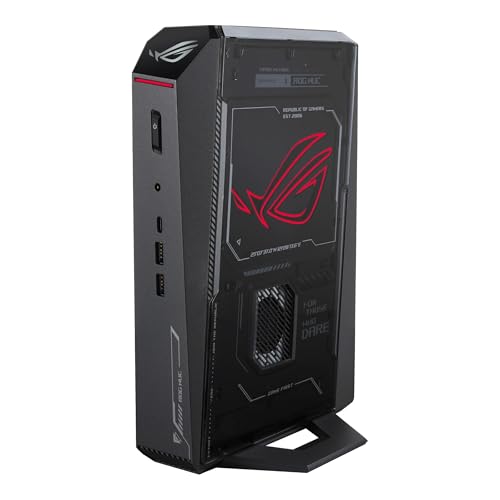
Start with the physical object, because it is the point: the ROG NUC is a slim upright box of roughly three liters — picture a hardback novel standing on a shelf — holding a Core Ultra 9 275HX processor with 24 cores alongside an RTX 5070 Laptop GPU, 32GB of fast DDR5-6400 memory and a 1TB SSD. It connects to everything a beginner could plug in: two Thunderbolt 4 ports, six USB ports, two HDMI outputs and a DisplayPort, plus wired Ethernet. Three internal fans cool it, a separate 330W adapter brick powers it (the brick needs a spot of its own — see the setup section), and it comes with a three-year warranty from ASUS, sold through ASUS’s own storefront on Amazon — check the current price on Amazon. For 1440p gaming with DLSS helping, this is the complete, calm, warrantied answer.
The honesty paragraph matters as much as the spec list. That graphics chip is the laptop version: 8GB of graphics memory and a smaller power budget than the desktop card with the same name, and it is soldered to the board — the graphics this box has on the day it arrives are the graphics it retires with. A stronger version of this same box with the RTX 5080 Laptop GPU exists, but it sits well above this guide’s budget, which is why the 5070 version is the one here. Independent roundups of owner experience are genuinely split: plenty of happy owners, and a real minority of reports of units that arrived dead or failed early. The beginner’s defense costs nothing — buy it from ASUS’s own storefront, register the warranty, and run the machine hard during your first days, while returning it is still painless. And check who is selling: third-party offers for this model can carry heavy markups over ASUS’s own storefront price. Bought from ASUS’s own storefront, this is the best compact gaming PC in this guide for a first-timer; bought at a marked-up third-party price, it is a lesson in reading the seller line.
- Roughly three liters with a 24-core processor — the smallest complete package here, by far.
- The best port selection in the guide, including dual Thunderbolt 4 and five ways to connect displays.
- Three-year warranty from a major brand, sold by ASUS’s own Amazon storefront.
Honest limitation: The graphics chip is a soldered laptop part with 8GB of VRAM — a clear step below a desktop RTX 5070 — and owner reports for this line are divided, so test your unit thoroughly inside the return window.
Choose it if the smallest footprint with a real warranty is your priority. Skip it if you want desktop-class graphics or any way to upgrade the graphics later — that is the Cooler Master below.

Cooler Master NR2 Pro — Ryzen 7 9800X3D, RTX 5070 Ti 16GB, 32GB DDR5, 2TB SSD
Who it suits: The beginner who suspects they will catch the upgrading bug — or who simply refuses the laptop-graphics compromise — and wants a genuinely small PC built from real, replaceable desktop parts.
Everything the minis give up, this machine keeps. It is built inside Cooler Master’s NR200P Max case, an 18.25-liter box about the size of a large shoebox, and inside are the standard parts a normal desktop uses: an AMD Ryzen 7 9800X3D processor (the most sought-after gaming CPU in this guide), a desktop Gigabyte RTX 5070 Ti graphics card with a full 16GB of graphics memory, 32GB of DDR5-6000 memory, a 2TB SSD, a proper 850W Gold power supply, and a large 280mm liquid cooler for the processor. It is sold and shipped by Amazon.com. The consequence a beginner should understand: because every part is standard, every part can be replaced. When a future graphics card tempts you in three years, this is the only machine in the guide that can actually accept it, space permitting. On price, learn its rhythm before you buy: its price swings widely between sale periods and full list, so check the current price on Amazon and be patient. The pattern is the advice — buy it when it is on sale, never at its peak.
The small print is the usual price of dense engineering. Packing a big liquid radiator and a full-power desktop card into 18 liters makes fan noise reviewers describe as reasonable rather than silent — you will hear it during long sessions. The graphics card connects through a riser cable, a ribbon that lets it sit sideways in the small case, and independent coverage of this exact system recorded one unit whose front USB-C port was dead on arrival and another whose riser connection needed reseating after shipping. Both are why the setup section tells you to check every port in your first week, while returns are free. The 16GB card and the upgrade path make this the longevity pick: at 1440p it is the machine here most likely to still feel strong in four years — and if it ever stops feeling strong, you can change the part responsible instead of the whole computer.
- A desktop RTX 5070 Ti with 16GB of VRAM and the best gaming CPU in the guide, in 18.25 liters.
- Standard parts throughout, including a named 850W Gold power supply — the only true graphics upgrade path here.
- A 2TB SSD and 280mm liquid cooling, sold and shipped by Amazon.com.
Honest limitation: It is six times the ROG NUC’s volume, audible under load, and its price swings widely between its best and worst days.
Choose it if you want desktop performance and the option to upgrade the graphics card one day. Skip it if the listing is sitting near its peak price, or you need a machine that disappears behind a monitor.
Alienware Aurora ACT1250 — Core Ultra 9 285, RTX 5080, 32GB RAM, 1TB SSD
Who it suits: The beginner whose real priority is the strongest graphics in this guide — smooth 4K gaming — and whose desk can take a tower that is compact for its class but not, honestly, small.
Let us measure it before praising it, because beginners deserve the number, not the adjective. The Aurora’s outside dimensions are listed at 18.05 × 7.76 × 16.46 inches, which works out to roughly 38 liters of volume. That is about 40% smaller than the previous Aurora design, but more than twelve times the ROG NUC’s footprint — nobody should buy it expecting a mini. What the volume buys is the thing nothing smaller on Amazon offers at this budget: a full desktop RTX 5080 graphics card with 16GB of memory, an Intel Core Ultra 9 285 processor, 32GB of RAM, a 1TB SSD, liquid cooling and a 1000W Platinum power supply, all from Dell, with Dell’s warranty and support network behind it. This exact configuration — model number DACT1250-9575BLK-PUS, and the model number is how you make sure you are looking at the right one — is only in budget when it is on sale, so check the current price on Amazon before you commit. That writes the buying rule: in budget at the deal price, over budget at the regular price.
Two warnings from our own checking of this listing, both easy for a beginner to handle. First, the listing contradicts itself: one part describes the processor as 20-core while Intel’s own specification for the Ultra 9 285 is 24 cores, and the liquid cooling is described as both fitted and optional in different sections. The fix is to trust the chipmaker’s specification over the listing text and confirm the exact configuration with the seller before you order. Second, to settle the question every beginner asks at this price: the RTX 5090 was never offered in this case at any price, so no version of this machine is a secret back door to one. If you need genuinely small, take the Cooler Master or the ROG NUC instead. If the deal price is live and the desk can take it, this is the strongest gaming machine in the guide — its big case is exactly why its graphics card can run at full speed for hours without slowing down to cool off.
- A desktop RTX 5080 with 16GB of VRAM — the fastest graphics in this guide; buy it at its deal price only.
- A 1000W Platinum power supply and liquid cooling: headroom the small boxes cannot offer.
- Dell’s warranty, support and retail presence behind a flagship machine.
Honest limitation: At roughly 38 liters it is a compact tower, not a small-form-factor PC, and at its regular price it is over this guide’s budget — it only belongs here on sale.
Choose it if top-end graphics matter more than footprint and the deal price is showing. Skip it if you actually need small — the other five machines are a third of its size or less.

MINISFORUM AtomMan G7 Pro — Core i9-14900HX, RTX 5070 Laptop GPU
Who it suits: The beginner who wants the newest mini hardware at about half the budget and will spend five careful minutes reading the product page — this listing rewards care and punishes haste.
The machine itself is easy to like. It pairs an Intel Core i9-14900HX processor — 24 cores, the same flagship class as the ROG NUC’s chip — with an RTX 5070 Laptop GPU, inside a slim upright mini from Minisforum, the specialist brand that updates its mini PCs fastest. Unlike most minis, it leaves real room to grow where growth is possible: two memory slots accepting up to 96GB and two SSD slots, though the graphics chip, as always in a mini, is fixed forever. Connectivity is modern — HDMI 2.1, USB4, WiFi 7 — and cooling is serious for the size, with six heat pipes and two fans. At Minisforum’s own store, the complete version with 32GB of memory and a 1TB SSD sits well below the top of this budget. For 1440p gaming with DLSS, that is the ROG NUC’s essential offer for considerably less money.
Now the part that decides whether this is a bargain or a trap, stated exactly as our checking found it: the Amazon page for this listing is titled as the barebone version — the empty shell, without memory, storage or Windows — while some other sellers’ descriptions of the same listing describe a complete unit. Minisforum sells both through one shared page, separated by a style selector near the price. So before ordering, slow down and confirm the style you have selected is the complete one, with RAM, SSD and Windows named in it. If only the barebone is available, do the completion math honestly: the barebone sits in a lower tier, but once you add memory — laptop DDR5 kits are a significant extra cost — plus an SSD and a Windows license, a shell you finish yourself can cost more than a complete machine. Bought complete, this is the value pick of the guide. Bought carelessly, it is a very fast box that cannot switch on.
- A current-generation laptop GPU and a 24-core flagship processor, with the complete version in the lower half of this budget.
- Two memory slots and two SSD slots — the most growing room of any mini here.
- Six heat pipes and dual fans, HDMI 2.1, USB4 and WiFi 7.
Honest limitation: The Amazon listing is titled as the barebone version and mixes complete and empty versions on one page — you must confirm the complete style, with memory, storage and Windows, before you order.
Choose it if you will verify the style selector carefully and want current-generation mini performance at half the budget. Skip it if you want one unambiguous listing and a big-brand warranty — that is the ROG NUC.

MINISFORUM AtomMan G7 Ti — Core i9-14900HX, RTX 4070 Laptop GPU, 32GB RAM, 1TB SSD
Who it suits: The beginner who wants the proven version of the mini formula — last generation’s best laptop graphics at full power, in the smallest box in this guide — and would rather spend the savings on a good monitor.
One number explains this machine, and it is a number most mini makers hide: graphics chips come in power levels, and the same chip runs fast or slow depending on how many watts the maker feeds it. The G7 Ti’s RTX 4070 Laptop GPU runs at the full 140 watts — the highest setting NVIDIA allows for that chip — which closes much of the gap that detuned versions of the same card leave open. Around it sit the same 24-core Core i9-14900HX processor as the G7 Pro, 32GB of memory on two replaceable laptop-style sticks, two SSD slots and WiFi 7, in an upright chassis of roughly 2.55 liters — the smallest in this guide. The complete 32GB/1TB version sits at the lower end of this guide’s price range — check the current price on Amazon. On value it undercuts every other graphics-equipped mini here while giving up surprisingly little at 1440p with DLSS.
The care this listing needs is the family habit: barebone and complete versions share one listing family — the barebone versions sit in a lower tier — so select the complete style (the one named for 32GB and 1TB) and confirm it before checkout, because a barebone plus today’s memory prices is a worse deal than the complete box. The second honesty note is about age: the graphics chip is a generation old, fixed in place, with 8GB of graphics memory that will feel its age sooner than the 16GB cards higher in this guide. Buy it for what it does today, at a price that admits it — on those terms it is the easiest recommendation in the guide to defend.
- The RTX 4070 Laptop GPU at its full 140W — the honest, full-power version of the chip.
- The complete 32GB/1TB version, at the lower end of this guide’s range, in about 2.55 liters.
- Replaceable memory sticks and two SSD slots soften the fixed-graphics compromise.
Honest limitation: A previous-generation, soldered graphics chip with 8GB of VRAM, sold on a shared listing where the empty and complete versions must be told apart.
Choose it if you want the most mini performance per dollar today. Skip it if 16GB of graphics memory or the newest generation matters more than the savings.

HP OMEN 16L TG03 — Core i7-14700F, RTX 5060 Ti 16GB, 32GB RAM, 2TB SSD
Who it suits: The beginner who wants compact from a household-name brand with a service network behind it, and is content with very good 1440p gaming rather than the fastest graphics in the guide.
The OMEN 16L is a 16-liter tower: small enough for a dorm desk or a TV-unit shelf, and built the traditional way, with desktop parts inside — including a normal replaceable desktop graphics card, which separates it from every soldered mini in this guide. This listing pairs an Intel Core i7-14700F processor with an RTX 5060 Ti carrying the full 16GB of graphics memory — buy that version; an 8GB variant of the same card exists, and it is the trap configuration — alongside 32GB of RAM and a generous 2TB SSD. On price, check the current price on Amazon: this configuration sits in the lower half of this guide’s range, well below the $3,000 ceiling, and the honest frame for this machine is that it leaves about half the budget unspent.
That framing is also its limitation, stated plainly: at 1440p the 5060 Ti is a good card, but with $3,000 in hand, choosing this machine means paying for brand, support and a quiet, retail-friendly design rather than speed — the Cooler Master above is dramatically faster, in a higher tier of this budget. The second warning concerns Amazon’s stock of this model generally: many listings are bundles a reseller has opened and upgraded, where the added memory and storage carry the seller’s one-year warranty while HP’s covers only the original parts. Check who is selling this listing and which warranty covers which parts before you buy — a factory-sealed HP and a reseller-upgraded one are different purchases wearing the same name.
- 16 liters with a replaceable desktop graphics card — the big-brand compact done properly.
- The 16GB version of the RTX 5060 Ti, with 32GB of RAM and 2TB of storage.
- HP’s service network and shop-shelf presence, at roughly half the guide’s budget.
Honest limitation: The graphics ceiling is the honest cost — a 5060 Ti in a $3,000 guide is a brand-and-support purchase — and Amazon’s stock of this model includes reseller-upgraded bundles with split warranties.
Choose it if brand support matters and your gaming is at 1080p or 1440p. Skip it if performance per dollar is your measure — the Cooler Master and both minis all outrun it.

Comparison Table
| Product | Size | GPU class | Best use | Link |
|---|---|---|---|---|
| ASUS ROG NUC (2025) | ~3 liters | RTX 5070 Laptop, 8GB | Smallest warrantied gaming PC | Check on Amazon |
| Cooler Master NR2 Pro | 18.25 liters | Desktop RTX 5070 Ti, 16GB | True SFF with an upgrade path | Check on Amazon |
| Alienware Aurora ACT1250 | ~38 liters | Desktop RTX 5080, 16GB | Desktop-5080 performance on deal | Check on Amazon |
| MINISFORUM AtomMan G7 Pro | Mini PC, vertical slab | RTX 5070 Laptop | Current-gen mini value | Check on Amazon |
| MINISFORUM AtomMan G7 Ti | ~2.55 liters | RTX 4070 Laptop, 140W | Most mini performance per dollar | Check on Amazon |
| HP OMEN 16L TG03 | 16 liters | Desktop RTX 5060 Ti, 16GB | Big-brand compact with support | Check on Amazon |
Your First Evening: Setting Up, Step by Step
Every machine in this guide arrives ready to run, and setup is the same evening’s work for all of them. Here is the order that avoids the classic beginner mistakes.
- Step 1 — Unbox and check the contents. Keep the box and packaging until the return window closes. Check the PC, its power cable or adapter brick, and any extras against the listing’s contents line. On the two Minisforum picks, stop here and re-read the box: if it says barebone and you ordered the complete version, do not start — contact the seller first.
- Step 2 — Place it, then power it. Stand the machine where air can reach its vents — never inside a closed cabinet — and give the slim minis clearance above and behind, where their heat escapes. The minis use an external power brick (the ROG NUC’s is a 330W unit); give it a home where it can vent, not buried behind cushions. Plug the PC into a surge protector, not straight into the wall.
- Step 3 — Connect the monitor to the graphics card, not the motherboard. This is the most common first-PC mistake in existence. On the tower machines (Cooler Master, Alienware, HP), the back panel has two clusters of display sockets: one on the motherboard, one on the graphics card lower down. Plug your monitor into the graphics card’s sockets. Use the motherboard’s and the PC will run on weak built-in graphics while your expensive card sits idle — mysteriously slow, with nothing looking broken. On the minis, simply use the HDMI or DisplayPort sockets on the box.
- Step 4 — First switch-on and Windows setup. Connect a keyboard and mouse, press power, and follow Windows’ setup screens: language, Wi-Fi or Ethernet, and an account as you prefer. Then let Windows Update run — all of it, including the restarts — before installing anything else. It can take a while; skipping it causes stranger problems than it saves.
- Step 5 — Update the graphics driver. Install NVIDIA’s app (from NVIDIA’s website) and let it fetch the current driver for your card. The driver is the software that lets games talk to the graphics card, and the one in the box is rarely the newest. This step fixes more “my new PC feels off” reports than any other.
- Step 6 — Set your monitor’s real refresh rate. Gaming monitors ship talking to Windows at 60Hz even when they can do 144Hz or more. In Windows Settings, go to System, Display, Advanced display, and choose the highest refresh rate your monitor offers. Skip this and you will never see the smoothness you paid for.
- Step 7 — Verify what actually arrived. Before the return window closes, confirm the delivered machine matches your order. In Windows Settings under System, then About, check the processor name and installed RAM; in the NVIDIA app, check the graphics card’s name. Compare all three against the model number and configuration on your order — DACT1250-9575BLK-PUS on the Alienware, the style name on the Minisforum pages, the 16GB card on the HP. Sellers mix up styles on shared listings; a mismatch caught in week one is a free return, and in month two it is an argument.
- Step 8 — Install a game store and one game. Steam, the Xbox app and the Epic Games Store are the standard storefronts; install one, download a game you know well, and play it for an hour. Listen to the fans and check every USB port with something simple while you play. An hour of real use in the first days is the cheapest insurance a beginner can buy — it is how dead-on-arrival and loose-cable stories get caught while returns are still free.
What Else You Will Spend
A PC’s price is the price of the box, and only the box. None of the six prices in this guide includes the rest of a working setup — name these in your budget before ordering, not after.
- A monitor — budget for this first. It is the one essential none of these machines includes, and it decides how good everything looks. Match it to the machine: the minis and the HP are 1440p machines, so a 1440p monitor with a high refresh rate serves them best; the Alienware can feed a 4K screen. A mismatched pair — flagship PC on an old office monitor, 4K 240Hz screen on a three-liter mini — wastes both halves.
- Keyboard and mouse. Some listings bundle basic ones and some do not; check the contents line of the exact listing before assuming.
- Sound. A headset or speakers; monitors with built-in speakers exist but sound thin. Voice chat needs a microphone, which most gaming headsets include.
- A surge protector and a home for the power brick. Cheap insurance for an expensive box, and — for the minis — a spot where the adapter can sit in open air.
Upgrades, in Plain Terms
Sooner or later every beginner asks what can be improved later instead of replaced. The honest answer depends entirely on which shape you bought. Here it is per pick — with graphics promises made only where a named power supply in the maker’s own documentation supports them.
- ASUS ROG NUC: Memory and storage are the whole story — processor and graphics chip are soldered in place, permanently. Buy it for what it is on day one.
- Cooler Master NR2 Pro: This is the upgradeable one. It is built from standard desktop parts and its power supply is a named, documented unit — Cooler Master’s V850 SFX Gold, 850 watts — so a future graphics-card swap is a real plan here, provided the new card fits the case and its power needs are confirmed against that 850W supply before buying. Memory and storage swap the standard way, too.
- Alienware Aurora ACT1250: Its power supply is also named and generous — 1000W Platinum — which is electrical headroom, but Dell’s case and board are its own design, so treat any future graphics swap as “ask Dell first,” not a promise. Storage is the straightforward addition.
- MINISFORUM G7 Pro and G7 Ti: Memory (up to 96GB across two laptop-style sticks) and SSDs are genuinely upgradeable on both — unusually generous for minis. The graphics chip is soldered on both and never changes.
- HP OMEN 16L TG03: The graphics card is a standard replaceable desktop part, so a swap is possible within the case’s space and the fitted power supply’s limits — confirm both against the unit you receive before planning one.
The pattern worth remembering: in a mini you buy a finished appliance; in a standard-parts tower, a starting point. Part of the price difference between the ROG NUC and the NR2 Pro is exactly that difference.
How to Choose a Compact Gaming PC Under $3,000
- Decide your liter budget before your dollar budget. Under five liters means laptop graphics, soldered and final — the two Minisforum minis and the ROG NUC live here. Around 16 to 20 liters is where replaceable desktop cards begin (HP at 16, Cooler Master at 18.25). At roughly 38 liters you are buying a compact tower — a fine thing to buy, as long as you call it that.
- Say the graphics class out loud. Before ordering, say whether your card is the laptop or the desktop version. If the listing will not tell you plainly, that silence is the answer.
- Match the machine to the screen you own or will buy. The minis and the HP are 1440p machines with DLSS doing part of the work; native 4K at high settings is the Alienware’s job.
- Price the whole machine, never the shell. If a price beats this guide by a suspicious margin, you are probably looking at a barebone — and at recent memory prices, an empty box can finish above the complete version of itself once the parts are added.
- Buy the deal cycle, not the day. Prices here swing widely between sales: the Cooler Master’s price moves a lot between its sale and peak periods, and the Alienware is only in budget on sale. Check the current price on Amazon for each model, and wait for a sale rather than paying peak pricing.
- Verify the seller and the style. Brand-name minis attract marketplace markups — the ROG NUC attracts heavy third-party markups over its own list price — and shared listings mix empty and complete versions. The cheapest step in this purchase is reading the listing you are actually buying.
- Let the budget save itself. If you cannot name what the top of the budget buys you — the desktop card and upgrade path in the Cooler Master, the desktop 5080 in the Alienware — then the G7 Ti or the HP, both in the lower half of the budget, is probably your machine, and the difference belongs in the monitor.
Common Buying Mistakes
- Believing a compact RTX 5090 exists at this budget. It does not — complete 5090 systems sit in a much higher price tier. A listing that implies otherwise is selling a laptop chip, an empty shell, or a mistake.
- Comparing a laptop graphics chip to a desktop card by name. The ROG NUC’s RTX 5070 Laptop and the Cooler Master’s desktop RTX 5070 Ti are different classes of part, priced accordingly.
- Ordering the barebone version by accident on a shared listing, and unboxing a machine with no memory, no storage and no Windows.
- Paying a third-party markup on a brand-name mini. Check the seller line; ASUS sells the ROG NUC itself, at list.
- Plugging the monitor into the motherboard instead of the graphics card, then concluding the new PC is slow — the most common first-evening error there is.
- Forgetting the power brick. A 330W external adapter needs a home with airflow too; a mini that “disappears” behind a monitor still has a brick that does not.
- Assuming small means quiet. Dense cases run small fans fast, and the quietest machine in this guide is the largest one.
- Judging “compact” by a photograph. Demand the liters — a tower photographed alone can be 38 liters wearing a tidy design.
Final Recommendation
- Most beginners who want small: ASUS ROG NUC (2025) — from ASUS’s own storefront; check price on Amazon.
- Beginners who may upgrade one day: Cooler Master NR2 Pro — when it is on sale; check the current price on Amazon.
- Strongest graphics, desk permitting: Alienware Aurora ACT1250 — only at its deal price, when it is on sale.
- Value in a mini: MINISFORUM AtomMan G7 Pro in its complete version, or the G7 Ti in the lower half of the budget.
- Brand and support first: HP OMEN 16L TG03 with the 16GB RTX 5060 Ti.
Our top two for a first compact PC at this budget are the ASUS ROG NUC, for the complete book-sized package with a three-year warranty — bought from ASUS’s storefront at list, never at a marketplace markup — and the Cooler Master NR2 Pro, for everyone who hears “laptop graphics” as a dealbreaker and wants desktop parts, a 16GB card and a real upgrade path in 18.25 liters. Between them they cover the two honest shapes of this search: smallest possible, and smallest without compromise. If neither fits — because only the strongest graphics will do — the Alienware is the answer at its deal price, its 38 liters understood before it arrives. Beginners who suspect they are overspending should also see Best Compact Gaming PC For Beginners Under $1500 and Best Compact Gaming PC For Beginners Under $2500; those whose real problem is the room should start with Best Compact Gaming PC For Small Spaces Under $3000. Measure your space in liters, name your graphics class out loud, confirm the style and seller, and check the current price on Amazon before you order.
Frequently Asked Questions
Is $3,000 too much for a first gaming PC?
For most beginners, yes — and this guide is built to hand you the change. A genuinely good first gaming PC costs considerably less than this ceiling — the G7 Ti and the HP both sit in the lower half of this budget. The top of this budget buys specific things: a desktop graphics card and an upgrade path in the Cooler Master, or Dell’s desktop RTX 5080 in the Alienware. If you cannot name which of those you need, spend less and put the difference into the monitor.
Can I get an RTX 5090 in a compact PC under $3,000?
No. Complete RTX 5090 systems sit in a much higher price tier, and a true small-form-factor 5090 effectively does not exist at retail — its cooling does not fit a small case. Any listing suggesting a 5090 at this money is describing a laptop chip, a barebone kit, or an error.
Is a laptop graphics chip in a mini PC a bad deal?
Not inherently — it is a trade to make knowingly. You give up raw speed, graphics memory and any upgrade path; you get a three-liter box that fits anywhere. At 1440p with DLSS helping, the ROG NUC and G7 Pro are genuinely capable. The mistake is paying desktop-card money for one, which is why this guide judges each mini against its own class.
What is a barebone, and how do I avoid buying one by accident?
A barebone is an empty shell: no memory, no storage, no Windows, unable to switch on until you buy and fit those parts yourself. Makers sell barebone and complete versions through the same listing, separated by a style selector near the price. Before checkout, read the selected style’s name and the specification box and confirm RAM, storage and an operating system are named in it. If they are not, you are looking at the shell.
I plugged everything in and my games run terribly. What did I do wrong?
Most likely the monitor cable. On a tower PC, plug the display cable into the graphics card’s sockets — the row lower on the back panel — not the motherboard’s sockets higher up, which run on weak built-in graphics and leave your card idle. After that, check the current NVIDIA driver is installed and your monitor’s refresh rate is set to its real value in Windows’ display settings.
Can I upgrade one of these machines later?
It depends on the shape. In the minis, graphics and processor are soldered forever; memory and storage are upgradeable, and on the two Minisforum machines unusually generous. The HP takes a replacement desktop card within its space and power limits. The Cooler Master is built from standard parts with a named 850W Gold power supply and is the only machine here with a true graphics upgrade path. Buy the soldered machines for what they are today.
Will a small gaming PC be loud or slow itself down when it gets hot?
Both effects are managed rather than eliminated at this size. Minis move power-supply heat outside the box in the adapter brick and use dense multi-fan or heat-pipe coolers; they are audible under long loads. The Cooler Master’s 280mm liquid radiator sustains desktop speeds at moderate noise; the big Alienware barely works up a sweat. Whatever you buy: never seal a small PC in an unventilated cabinet, and give upright minis clearance on every vented face.
- Best Compact Gaming PC Under $3000
- Best Compact Gaming PC Under $2500
- Best Compact Gaming PC Under $1500
- Best Compact Gaming PC For Beginners Under $2500
- Best Compact Gaming PC For Beginners Under $1500
- Best Compact Gaming PC For 1440p Gaming Under $3000
- Best Compact Gaming PC For Streaming Under $3000
- Best Small Form Factor Gaming PC Under $3000
- Best Mini Gaming PC Under $3000
- Best Gaming PC Under $3000


