Where to buy
Check the latest price, availability and delivery on Amazon. Orders are placed on Amazon. We may earn a commission from qualifying purchases.
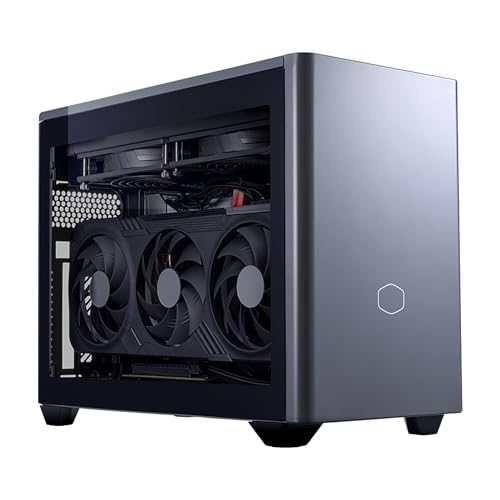
- Best overall for 1440p: Cooler Master NR2 Pro Mini ITX, Ryzen 7 9800X3D, desktop RTX 5070 Ti 16GB, 32GB DDR5, 2TB SSD — Check on Amazon
- ASUS ROG NUC (2025), Core Ultra 9 275HX, RTX 5070 Laptop GPU, 32GB RAM, 1TB SSD — Check on Amazon
- Alienware Aurora ACT1250, Core Ultra 9 285, desktop RTX 5080, 32GB RAM, 1TB SSD — Check on Amazon
- MINISFORUM AtomMan G7 Pro, Core i9-14900HX, RTX 5070 Laptop GPU — Check on Amazon
- MINISFORUM AtomMan G7 Ti, Core i9-14900HX, RTX 4070 Laptop GPU, 32GB RAM, 1TB SSD — Check on Amazon
See 1 more Amazon option
- HP OMEN 16L TG03, Core i7-14700F, RTX 5060 Ti 16GB, 32GB RAM, 2TB SSD — Check on Amazon
Read the full guide ↓
Disclosure: As an Amazon Associate, reviewstook.com earns from qualifying purchases. Links to Amazon on this page are affiliate links; they cost you nothing extra. Listing details such as price and availability change often, so check the current Amazon listing before you buy.
1440p is where gaming PCs stop compromising, and it is also where compact gaming PCs start lying — usually not in the specification table, but in the gap between a GPU’s name and the GPU itself. A shopper with $3,000 and a small desk will find machines in this guide whose graphics chips share a model name yet belong to different classes entirely: the desktop RTX 5070 Ti in the Cooler Master is a full-power card with 16GB of memory, while the RTX 5070 Laptop GPU in the three-liter minis is a soldered mobile part with 8GB, built to a fraction of the power budget. Both can drive a 1440p monitor. They do it in different ways, with different amounts of help from upscaling, and this guide grades each machine on which kind of 1440p it actually delivers: rendering every pixel natively at 2560×1440, reconstructing the image from a lower internal resolution with DLSS, or leaning on frame generation to reach high-refresh numbers. Those are three different promises, and at this budget you deserve to know which one you are paying for.
The good news first: unlike the budget tiers, where “1440p” on a compact box is mostly a euphemism for upscaled 1080p, every machine here has a genuine discrete GPU, and native 1440p rendering is honestly on the table — at full settings on the two desktop-card builds, and across the majority of current games on the laptop-GPU minis with DLSS Quality sharing the load. The ceiling is equally clear, and we state it before the picks: there is no RTX 5090 anywhere near $3,000 — complete 5090 systems sit well above this budget — the one true small-form-factor desktop RTX 5080 we found, Zotac’s 11.46-liter Magnus One Ultra, also sits well above this budget, and even ASUS’s RTX 5080 Laptop version of its three-liter NUC sits above this guide’s ceiling. So the strongest graphics in a genuinely small box at this cap is a desktop 5070 Ti; the desktop 5080 appears only inside a roughly 38-liter compact tower, when its current price sits within budget, and it is labeled as exactly that. Check the current price on Amazon for each pick before you buy, because two picks only make sense when their current listing sits within this budget.
In this guide
Quick Picks
Short on time, or comparing several options at once? Each row below names a buyer type and the machine that suits it, with a link to the listing.
| Buyer type | Pick | Why it stands out | Link |
|---|---|---|---|
| Best overall for 1440p | Cooler Master NR2 Pro, 9800X3D / desktop RTX 5070 Ti | Native 1440p at high settings from a real desktop card, in 18.25 liters | Check on Amazon |
| Smallest true 1440p machine | ASUS ROG NUC (2025), RTX 5070 Laptop GPU | Three liters, a 24-core HX processor and a three-year warranty | Check on Amazon |
| Most 1440p headroom | Alienware Aurora ACT1250, desktop RTX 5080 | The only desktop 5080 under $3,000 — headroom for high-refresh 1440p and DLSS-upscaled 4K — check price on Amazon | Check on Amazon |
| Best value 1440p mini | MINISFORUM AtomMan G7 Pro, RTX 5070 Laptop GPU | Current-generation laptop GPU in a slim vertical mini, well under budget | Check on Amazon |
| Best 1440p mini under $1,500 | MINISFORUM AtomMan G7 Ti, RTX 4070 Laptop GPU | The 4070 Laptop chip at its full 140W, in about 2.55 liters | Check on Amazon |
| Best big-brand 1440p | HP OMEN 16L TG03, RTX 5060 Ti 16GB | A 16-liter tower from a major brand with a replaceable desktop card and 16GB of VRAM | Check on Amazon |
How These Picks Were Chosen
The first filter was the render target itself. A pick had to offer a credible route to a good 1440p experience — native rendering at sensible settings, or DLSS upscaling from a strong internal resolution — from a real Amazon listing at or under the $3,000 budget. Machines whose 1440p story depends entirely on aggressive upscaling from 1080p or below were graded as what they are, and anything that only fits the budget as an empty barebones shell either carries its completion cost in the open or was left out. Where a pick is price-dependent, the review says so, and you should check the current price on Amazon before ordering.
The second filter was naming honesty. Laptop and desktop GPUs that share a name are different silicon at different wattages, and the difference decides how a 1440p image gets made: a desktop card renders more of it natively, while a mobile part leans harder on DLSS. Each review names the class of its GPU explicitly, states its VRAM, and describes the 1440p mode that class honestly supports. The third filter was VRAM, because 1440p is where memory stops being a footnote: texture pools and ray-tracing workloads at 2560×1440 punish 8GB cards in a way 1080p never did, so the guide distinguishes the 16GB picks — the longevity choices — from the 8GB picks, which earn their places on price and size rather than future-proofing.
We did not use these machines ourselves. We worked from maker listings, specification pages and independent coverage, comparing GPU class and power limit, CPU, memory, storage, case volume and cooling design. Cooling earned its own pass because sustained clocks, not boost clocks, are what a long 1440p session actually runs at: a three-liter mini, an 18-liter ITX case with a 280mm radiator and a 38-liter tower hold their performance in completely different ways, and where independent coverage reported noise, throttling or reliability patterns for a specific model, the review carries it. Finally, upscaling support was taken only from the documented hardware: every pick is an NVIDIA RTX part, so DLSS is available across the guide, but the generation matters — the RTX 50-series picks support DLSS 4 with multi frame generation, the RTX 40-series pick supports DLSS 3 frame generation — and no pick was credited with anything its chip does not do.
Native, Upscaled, Generated: Three Different Promises
Before the reviews, it is worth pinning down the vocabulary, because the whole guide turns on it. Native 1440p means the GPU renders all 3.69 million pixels of every frame at 2560×1440. It is the sharpest, most artifact-free way to fill a 1440p panel, and the most expensive in GPU terms. Upscaled 1440p means the GPU renders fewer pixels and an algorithm — here, NVIDIA’s DLSS — reconstructs the 1440p output. The internal resolutions are published scaling factors, not marketing: DLSS Quality mode renders at 0.67× per axis, so a 1440p output with DLSS Quality is built from an internal render of roughly 1707×960; DLSS Performance renders at 0.50× per axis, roughly 1280×720 internally. Quality mode is visually close to native in most games and is the setting this guide treats as honest 1440p; Performance mode is a fallback for the heaviest titles, and the reviews say so where it matters. The same factors explain the 4K story for readers eyeing a bigger panel: DLSS Quality at a 4K output renders about 2560×1440 internally, and DLSS Performance about 1920×1080 — which is why the desktop-card picks below can credibly drive a 4K monitor with DLSS while the laptop-GPU minis are better matched to 1440p.
Frame generation is the third promise, and the one most often confused with rendering. DLSS frame generation inserts AI-created frames between rendered ones, raising the displayed frame rate without the GPU rendering those extra frames. It makes motion smoother on a high-refresh monitor, and the RTX 50-series picks here go further with DLSS 4’s multi frame generation, which can insert more than one generated frame. But generated frames do not reduce input latency the way rendered frames do, they need a healthy base frame rate to look and feel right, and they do nothing for a GPU that cannot reach a playable native or Quality-upscaled baseline in the first place. This guide therefore grades every pick first on its rendered performance — native or DLSS Quality — and treats frame generation as headroom on top, never as a substitute. When a review says a machine is a strong high-refresh 1440p pick, it means the rendered baseline is strong enough for generation to be worth switching on.
The 6 Best Compact Gaming PCs for 1440p Gaming Under $3,000
Cooler Master NR2 Pro — Ryzen 7 9800X3D, Desktop RTX 5070 Ti 16GB, 32GB DDR5, 2TB SSD
Who it suits: The 1440p buyer who refuses the laptop-GPU compromise — someone who wants a genuine desktop graphics card and the strongest gaming CPU in the guide, and accepts 18.25 liters as the price of both.
If this guide has a reference machine for 1440p, it is this one. Inside Cooler Master’s NR200P Max chassis sits an AMD Ryzen 7 9800X3D — the fastest gaming processor in this guide — alongside a desktop Gigabyte GeForce RTX 5070 Ti with 16GB of GDDR7, 32GB of DDR5-6000 memory, a 2TB Gen4 SSD, a Gigabyte B850I AORUS PRO Mini-ITX motherboard, an 850W SFX Gold power supply and a custom 280mm liquid radiator cooling the CPU. For 1440p that specification translates directly: the 5070 Ti is a native-1440p card first, able to render demanding games at 2560×1440 without asking DLSS for help, and DLSS Quality then becomes headroom for high-refresh play rather than a necessity, with DLSS 4 multi frame generation available on top for the highest-refresh panels. The 16GB of VRAM is the other half of the story — it is the memory capacity that lets texture settings and ray tracing stay turned up at this resolution without the stutter that memory-starved cards develop. It is also the only machine here built entirely from standard, replaceable parts, sold and shipped by Amazon.com, so the card can be swapped when a future generation tempts you. Pricing demands patience rather than faith: check the current price on Amazon before you buy, and only buy when the listing sits comfortably within the $3,000 budget.
The compromises are the honest ITX ones. Eighteen liters is six times the volume of the minis below, and a full-power desktop card behind a 280mm radiator makes fan noise that independent coverage describes as reasonable rather than silent. The GPU also arrives on a riser cable, and the ownership quirks reported for this exact system include a front USB-C port dead on one unit and a riser connection that needed reseating after shipping on another — check both in your first week, while a return is still painless. Neither issue changes what the machine is: the strongest rendered-1440p performance in this guide, in the smallest case that can honestly hold desktop parts.
- Desktop RTX 5070 Ti 16GB and a 9800X3D — the strongest native-1440p pairing here.
- 16GB of VRAM keeps textures and ray tracing turned up at 2560×1440.
- Standard ITX parts throughout: the only genuine GPU upgrade path in the guide.
Honest limitation: At 18.25 liters it is a small desktop, not a mini; it is audible under load, and its price can swing widely — check the current price on Amazon and buy when it sits within budget, not on impulse.
Choose it if native 1440p with headroom is the priority and you can wait until the current price on Amazon sits within budget. Skip it if you need a machine that disappears behind a monitor — that is the ROG NUC below.
ASUS ROG NUC (2025) — Core Ultra 9 275HX, RTX 5070 Laptop GPU, 32GB RAM, 1TB SSD
Who it suits: Buyers who want the smallest serious 1440p PC a major brand sells — a three-liter box that stands behind a monitor — and who understand that a laptop GPU is how that size is bought.
Grade this machine by its class and it is remarkable. The chassis is roughly three liters (about 11.1 × 7.4 × 2.2 inches), yet inside are Intel’s Core Ultra 9 275HX, a 24-core Arrow Lake-HX processor, an NVIDIA GeForce RTX 5070 Laptop GPU, 32GB of DDR5-6400 and a 1TB NVMe SSD, with the best connectivity in the guide: dual Thunderbolt 4, six USB-A ports, dual HDMI and DisplayPort outputs and Ethernet. For 1440p, the honest description is this: the 5070 Laptop GPU renders natively at 1440p in a wide range of current games at sensible settings, and DLSS Quality — an internal render of roughly 1707×960, visually close to native — extends that to heavier titles, with DLSS 4 multi frame generation available for high-refresh panels once the rendered baseline is healthy. This configuration (model RNUC15JNK9X489AU) is sold through ASUS’s own Amazon storefront — check the current price on Amazon before you buy. A three-year warranty from a major brand stands behind it, which no other mini in this guide matches.
What it is not is a desktop 5070. The laptop GPU carries 8GB of GDDR7 on a mobile power budget, a clear class below the desktop card in the NR2 Pro, and it is soldered: the graphics fitted on day one are the graphics the machine retires with, and 8GB of VRAM is the constraint that will age first at 1440p as texture demands climb. ASUS sells an RTX 5080 Laptop configuration of this same chassis, but that configuration sits well above this guide’s ceiling, which is why the 5070 configuration is the pick. Two buying disciplines apply. Owner sentiment in independent roundups is genuinely divided, with praise for performance-per-liter alongside reports of dead-on-arrival and failing units, so stress-test hard inside the return window. And buy it from ASUS’s storefront: check price on Amazon there first, because third-party offers on this model can carry heavy markups, which is markup, not value. Bought from ASUS’s storefront within budget, it is the smallest complete 1440p package under $3,000; bought at a marked-up third-party price, it is a cautionary tale.
- About three liters with a 24-core HX processor — the smallest complete 1440p package here.
- DLSS 4 with multi frame generation on a current-generation RTX 50-series laptop GPU.
- Three-year warranty and the best port selection in the guide.
Honest limitation: The RTX 5070 Laptop GPU is a mobile part with 8GB of VRAM, soldered in place; owner reports for the line are divided, so test your unit thoroughly in the return window.
Choose it if the smallest footprint with a proper warranty tops your list. Skip it if you want desktop-class rendered performance or any graphics upgrade path — that is the NR2 Pro above.

Alienware Aurora ACT1250 — Core Ultra 9 285, Desktop RTX 5080, 32GB RAM, 1TB SSD
Who it suits: Buyers whose real target is maximum 1440p headroom — high-refresh native rendering today, DLSS-upscaled 4K as a bonus — and who will trade genuine smallness to get a desktop RTX 5080 under the cap.
Start with the size, stated rather than hidden: the Aurora ACT1250 measures 18.05 × 7.76 × 16.46 inches, roughly 38 liters by outside dimensions. Dell markets the design as about 40% smaller by volume than the previous Aurora, and it is far smaller than the mid-towers filling general $3,000 guides — but by this guide’s standard it is a compact tower, not small-form-factor, and it is included for one reason: it is the only verified route to a desktop RTX 5080 under $3,000. What that buys at 1440p is the deepest headroom here. A desktop RTX 5080 with 16GB of GDDR7 renders 1440p natively with settings and refresh rate to spare, holds its clocks through long sessions thanks to liquid cooling and a 1000W Platinum power supply in a case with real airflow, and — via DLSS Quality’s internal render of about 2560×1440 — drives a 4K panel credibly as well, with DLSS 4 multi frame generation on top. The supporting cast is flagship-grade: an Intel Core Ultra 9 285, 32GB of DDR5 and a 1TB SSD, behind Dell’s warranty and support. The price rule is absolute: check the current price on Amazon for this configuration (model DACT1250-9575BLK-PUS) before you buy. It is a pick only when the current listing sits within the $3,000 budget; above that budget, it is out of scope for this guide.
Two warnings from our own verification of this listing. Amazon’s product information contradicts itself — describing the Ultra 9 285 as 20-core in one section where Intel specifies 24 cores, and describing the liquid cooling as both fitted and optional in different sections — so confirm the exact configuration with the seller before ordering and trust the chipmaker’s specification over listing copy. And one boundary worth drawing before you shop configurations of it: Dell never sold this chassis with an RTX 5090 at any price, so no version of it is a quiet route to one. If your constraint is genuinely the desk rather than the frame rate, treat this review as the price of desktop-5080 performance measured in liters, and take the NR2 Pro or the ROG NUC instead.
- Desktop RTX 5080 16GB — the most 1440p headroom in the guide — check price on Amazon.
- The only pick that also drives a 4K panel credibly, via DLSS Quality upscaling.
- 1000W Platinum PSU and liquid cooling: sustained clocks small boxes cannot match.
Honest limitation: Call it what it is — a compact tower of roughly 38 liters rather than SFF — and note that it only belongs in this guide when its current price on Amazon sits within the $3,000 budget.
Choose it if maximum headroom matters more than footprint and the current price on Amazon sits within budget. Skip it if you actually need small — every other machine in this guide is a fraction of its size.

MINISFORUM AtomMan G7 Pro — Core i9-14900HX, RTX 5070 Laptop GPU
Who it suits: Value hunters who want the current-generation laptop GPU and a flagship HX processor in a slim vertical mini for roughly half the budget — and who will read a listing carefully, because this one demands it.
The proposition mirrors the ROG NUC’s at a far smaller bill. Intel’s Core i9-14900HX — 24 cores, boosting to 5.8GHz — pairs with an NVIDIA GeForce RTX 5070 Laptop GPU in Minisforum’s slim vertical AtomMan chassis, and unlike the NUC, memory and storage stay genuinely upgradeable: two DDR5 SO-DIMM slots up to 96GB and two M.2 slots. The 1440p grading is the same class as the NUC’s and should be read the same way: native 1440p rendering across a wide range of current games at sensible settings, DLSS Quality carrying heavier titles, DLSS 4 multi frame generation available for high-refresh panels, and 8GB of VRAM as the constraint that will age first. The configured 32GB/1TB version sits in the lower half of this guide’s budget range — check the current price on Amazon — which leaves room in the budget for the 1440p high-refresh monitor this class of machine deserves.
The caveat is the listing itself, stated the way our verification found it: the Amazon page for this ASIN is titled as the barebone version — without storage or operating system — while some marketplace mirrors of the same ASIN describe a configured 32GB/1TB unit. Minisforum routes both versions through one listing with a style selector, so before ordering, check on the live page that the style in your cart is the configured one — memory, storage and Windows all present. If only the barebone style is live, price the completion honestly before assuming a bargain: a barebone still needs memory, storage and an operating system, and at current memory prices a from-scratch completion can close much of the gap to the configured ROG NUC. Bought configured — check price on Amazon — it is the value pick of this guide; bought carelessly, it is a very fast box that cannot boot.
- Current-generation RTX 5070 Laptop graphics beside a 24-core i9-14900HX — check price on Amazon for the configured style.
- Memory and storage stay upgradeable: two SO-DIMM slots to 96GB and two M.2 slots.
- Slim vertical case cooled by six heat pipes and twin fans around the HX processor.
Honest limitation: The listing’s own title describes the barebone version and the styles are mixed on one page — confirming you are buying the configured machine, RAM, SSD and OS included, is on you.
Choose it if you will verify the style selector and want current-generation mini performance at half the budget. Skip it if one clear listing and a household-name warranty matter more — the ROG NUC is that purchase.

MINISFORUM AtomMan G7 Ti — Core i9-14900HX, RTX 4070 Laptop GPU, 32GB RAM, 1TB SSD
Who it suits: Buyers who want the proven version of the mini formula: last generation’s flagship laptop GPU run at its full power limit, in about 2.55 liters, for roughly half the budget.
The number most mini makers hide is the one this machine leads with: its GeForce RTX 4070 Laptop GPU runs at the full 140W TGP, the highest power configuration NVIDIA allows for that chip. That matters directly at 1440p, because detuned versions of the same chip leave performance on the table that this one keeps — independent coverage of this model places its gaming performance around desktop RTX 4060 Ti territory, which translates to native 1440p in many current games and DLSS Quality — roughly 1707×960 rendered internally — for the heaviest, with DLSS 3 frame generation available on top. Around the GPU: the same 24-core Core i9-14900HX as the G7 Pro, 32GB of memory across two DDR5-5600 SO-DIMM slots (up to 96GB), two PCIe 4.0 M.2 slots and WiFi 7, in a chassis of roughly 2.55 liters. Check the current price on Amazon for the configured 32GB/1TB version. It sits in the lower tier of this guide’s budget, among the most affordable discrete-GPU minis here, and the budget left over can go toward the monitor.
The discipline this listing requires matches its sibling’s: barebone and configured styles share one listing family, and this ASIN belongs to that family — select the configured 32GB/1TB style and confirm it on the page before checkout, because a barebone plus today’s memory and storage costs can be worse value than the configured box. The GPU is a generation old and soldered, with 8GB of GDDR6 that will age faster than the 16GB cards above it, and its DLSS support stops at frame generation rather than the 50-series’ multi frame generation. This is a machine bought for the 1440p it delivers now, at a price that acknowledges all of that. Judged on those terms, few picks in the guide are easier to stand behind.
- RTX 4070 Laptop GPU at the full 140W — the undetuned version of the chip.
- The configured 32GB/1TB style — check price on Amazon — in a case of roughly 2.55 liters.
- Memory sits in sockets rather than solder, and a second M.2 slot waits — partial answers to the soldered GPU.
Honest limitation: Last generation’s chip, soldered down, with 8GB of GDDR6 — and a listing family where telling the configured style from the barebone one is the buyer’s job.
Choose it if performance per dollar in a mini is the whole argument. Skip it if 16GB of VRAM or a current-generation GPU matters more than the saving over the higher-tier picks.

HP OMEN 16L TG03 — Core i7-14700F, Desktop RTX 5060 Ti 16GB, 32GB RAM, 2TB SSD
Who it suits: Buyers who want their 1440p machine from a household-name brand with a real service network — and who accept that HP’s 16-liter chassis tops out at an RTX 5060 Ti, two GPU tiers below this guide’s ceiling.
The OMEN 16L is the only machine here you could plausibly find on a retail shelf: a 16-liter tower, small enough for a dorm desk or a media console, holding desktop parts — including a replaceable desktop graphics card, which already separates it from every soldered mini in this guide. This listing pairs an Intel Core i7-14700F with a GeForce RTX 5060 Ti carrying the full 16GB of GDDR7, 32GB of DDR5 and a 2TB SSD. For 1440p, grade it as the mainstream native machine: the 5060 Ti renders 1440p natively across the broad mainstream of current games, DLSS Quality and DLSS 4 multi frame generation supply headroom for high-refresh panels and heavier settings, and the 16GB of VRAM — the same capacity as the flagship picks above — means texture settings are not the compromise they are on the 8GB minis. Be careful to buy this version of the card: an 8GB variant of the 5060 Ti exists in this chassis and is the trap configuration. On price, check the current price on Amazon for this 32GB/2TB listing, and judge it as a mid-tier option within this guide’s $3,000 budget — the honest frame is that it leaves a substantial part of the budget unspent.
That framing is also the limitation, stated plainly: a buyer with $3,000 who chooses this machine is paying for brand, warranty logistics and a quiet retail-grade acoustic profile, not for rendered performance — the NR2 Pro is dramatically faster at a higher tier of this budget. The second warning concerns Amazon’s OMEN 16L stock generally: many listings for this chassis are reseller bundles that have been opened and upgraded, where the upgraded RAM and SSD carry the seller’s warranty rather than HP’s. Before buying, establish who is actually selling this listing and which warranty — HP’s or the seller’s — covers which components, because a factory-sealed configuration and a reseller-upgraded bundle are two different purchases sharing one product name.
- A desktop card you can replace later, in a 16-liter case — the big-brand formula without the solder.
- This configuration pairs the 16GB RTX 5060 Ti with 32GB of RAM and a 2TB drive.
- HP’s support network behind it, in the mid tier of this guide’s budget.
Honest limitation: You are buying a brand, a warranty and a service network more than graphics: the 5060 Ti is two tiers below this guide’s ceiling, and Amazon’s stock of this chassis includes reseller-upgraded bundles whose parts carry split warranties.
Choose it if brand support matters and your 1440p library is mainstream. Skip it if performance per dollar is the metric — the NR2 Pro and the minis both outrun it on their own terms.

Comparison Table
| Product | Size | GPU class | 1440p verdict | Link |
|---|---|---|---|---|
| Cooler Master NR2 Pro | 18.25 liters | Desktop RTX 5070 Ti, 16GB | Native 1440p at high settings; DLSS as headroom | Check on Amazon |
| ASUS ROG NUC (2025) | ~3 liters | RTX 5070 Laptop, 8GB | Native in many games; DLSS Quality for the heaviest | Check on Amazon |
| Alienware Aurora ACT1250 | ~38 liters | Desktop RTX 5080, 16GB | Native 1440p with the most headroom; upscaled 4K viable | Check on Amazon |
| MINISFORUM AtomMan G7 Pro | Mini PC, vertical slab | RTX 5070 Laptop | Native in many games; DLSS Quality for the heaviest | Check on Amazon |
| MINISFORUM AtomMan G7 Ti | ~2.55 liters | RTX 4070 Laptop, 140W | Native in many games; DLSS Quality for the heaviest | Check on Amazon |
| HP OMEN 16L TG03 | 16 liters | Desktop RTX 5060 Ti, 16GB | Native 1440p for the mainstream library | Check on Amazon |
How to Choose a Compact Gaming PC for 1440p Gaming Under $3,000
- Decide how your 1440p gets made. Native rendering, DLSS Quality upscaling and frame generation are three different promises, in descending order of honesty required. Every pick here clears the native-or-Quality bar; if a listing outside this guide cannot tell you which mode its “1440p ready” claim rests on, assume the weakest one.
- Read the GPU’s class, not its name. Different silicon at different wattages hides behind the shared name of an RTX 5070 Laptop GPU and a desktop RTX 5070. At 1440p the gap shows up as how much of the image is rendered versus reconstructed — the reviews above name the class for each pick, and you should demand the same of any listing you consider.
- Count VRAM for the resolution you play. At 1440p, 16GB is the comfortable capacity for textures and ray tracing over a machine’s life; 8GB works today with settings discipline and ages faster. The 8GB picks here earn their places on size and price — buy them knowingly.
- Ask what the wattage is. Makers ship the identical laptop GPU at full power or turned down, and the difference is rendered frames. The G7 Ti’s verified 140W is the reason it outruns its generation’s reputation; treat a listing that hides its GPU power limit as an answer in itself.
- Pair the monitor to the rendered baseline, not the marketing. A 1440p high-refresh panel is the natural match for every machine in this guide — it is the resolution they render, and high refresh is there for the picks with headroom and frame generation to use. A 4K panel is a reasonable buy only with the desktop-card picks, where DLSS Quality renders about 2560×1440 internally and reconstructs convincingly; pairing 4K with a laptop-GPU mini means living in Performance mode, rendering near 1080p, and that trade should be made deliberately.
- Treat frame generation as a bonus, never the baseline. Generated frames smooth motion on high-refresh panels but do not cut input latency, and they need a healthy rendered frame rate underneath. Grade any machine — in this guide or out of it — on its rendered performance first.
- Price the whole machine, never the shell. Barebone prices exclude RAM, SSD and Windows. At current memory prices, a “cheap” barebone can finish near the configured price of the same box after you add memory, storage and Windows — check price on Amazon for the configured style before assuming the barebone saves money.
- Buy the deal cycle, not the day. This category’s prices can swing widely between events — the NR2 Pro’s price varies a lot, and the Aurora is only in budget when its current listing sits within the $3,000 cap. Set your ceiling per model within this budget, check the current price on Amazon, and wait until it fits.
- Verify the seller and the style. Shared listings mix barebone and configured styles; reseller bundles split warranties between maker and seller; third-party offers on brand-name minis have carried heavy markups over the brand’s own storefront price. Reading the exact listing in front of you costs nothing and prevents most of this category’s regrets.
- Score the upgrade path you will actually use. In the minis the GPU never changes; in the OMEN the card can be replaced within its limits; the NR2 Pro is standard parts throughout. If you keep PCs for five-plus years, that difference is worth real money. If you swap whole machines every few years, the soldered compromise mostly evaporates.
Common Buying Mistakes
- Assuming a compact RTX 5090 exists somewhere at this budget. It does not — not near $3,000, and not in true small-form-factor at retail at all. A listing that hints otherwise is built on a laptop GPU, an empty shell, or an outright error.
- Judging a laptop GPU against a desktop GPU because the names match. The ROG NUC’s RTX 5070 Laptop and the NR2 Pro’s desktop RTX 5070 Ti are different classes of part, and they produce a 1440p image in different proportions of rendering and reconstruction.
- Counting frame generation as rendered performance. Generated frames raise the displayed rate; they do not lower latency, and they cannot rescue a GPU whose rendered baseline is already struggling.
- Living in DLSS Performance mode by accident. Performance renders near 1280×720 internally at a 1440p output. It is a fallback for the heaviest scenes, not the mode a $3,000 purchase should be planned around — if a machine needs it everywhere, its honest resolution is lower.
- Clicking the wrong style on a shared listing and taking delivery of a barebone — a fast, expensive box with no memory, no storage and no Windows inside.
- Paying a marketplace markup on a brand-name mini. Marketplace sellers have listed the ROG NUC well above ASUS’s own storefront price, on the same platform — check price on Amazon from ASUS’s storefront first.
- Buying 8GB of VRAM without a plan. At 1440p it is the first specification that will force settings down as games grow; the 16GB picks exist precisely for buyers who keep machines longest.
- Pairing a 4K high-refresh monitor with a laptop-GPU mini. The panel will spend its life upscaling from near-1080p internal renders; a good 1440p panel is the better buy for that class of machine.
- Skipping the stress test. Dead-on-arrival units show up in owner reports across this category’s brands. Push the machine hard during its first week, while returning it is still free.
Final Recommendation
- Most 1440p buyers: Cooler Master NR2 Pro — when its current price on Amazon sits within the $3,000 budget.
- Smallest true 1440p machine: ASUS ROG NUC (2025) — from ASUS’s storefront; check the current price on Amazon and avoid third-party markups.
- Maximum headroom, size negotiable: Alienware Aurora ACT1250 — only when its current price on Amazon sits within the $3,000 budget.
- The mini value play: MINISFORUM AtomMan G7 Pro in its configured style, or the G7 Ti in the lower tier of the budget.
- Support and service first: HP OMEN 16L TG03, in the 16GB 5060 Ti configuration.
Our top two for 1440p buyers at this budget split along the guide’s central line. The NR2 Pro is the rendered-performance answer: a desktop 5070 Ti with 16GB of VRAM, the best gaming CPU in the guide, standard parts and an upgrade path, in 18.25 liters — bought when its current price on Amazon sits within budget, it is the machine most likely to still feel right at 1440p in four years. The ROG NUC is the footprint answer: three liters, a current-generation laptop GPU that renders natively in many games and reconstructs convincingly in the rest, and a three-year warranty — bought from ASUS’s storefront — check price on Amazon — never at a marketplace markup. If neither fits because you want headroom beyond both, the Aurora delivers it when its current price sits within budget, with its size understood, and the G7 Ti delivers most of the mini experience at a lower tier of the budget. Shoppers whose desk matters more than their frame rate should also see Best Compact Gaming PC For Small Spaces Under $3000, first-time buyers should start with Best Compact Gaming PC For Beginners Under $3000, and those who can spend less for the same desk footprint should see Best Compact Gaming PC Under $2500. Name your GPU class out loud, decide whether your 1440p is rendered or reconstructed, confirm the style and the seller on the listing, and check the current price on Amazon before you order.
Frequently Asked Questions
Can these compact PCs really run games natively at 1440p?
Yes — that is what separates this tier from the budget guides. The desktop-card picks (the NR2 Pro’s RTX 5070 Ti, the Aurora’s RTX 5080, the OMEN’s RTX 5060 Ti) render 2560×1440 natively as their default mode, and the laptop-GPU minis render natively across a wide range of current games at sensible settings, using DLSS Quality for the heaviest titles. What none of them does is make a laptop GPU into a desktop one: the class of the chip decides how much of the image is rendered and how much is reconstructed, and each review says which.
Is a laptop RTX 5070 enough for 1440p gaming?
For most players, yes — with the terms understood. It renders natively at 1440p in many current games, DLSS Quality (an internal render of roughly 1707×960) carries the demanding ones with image quality close to native, and DLSS 4 multi frame generation serves high-refresh panels once the rendered baseline is healthy. Its real limits are the mobile power budget and 8GB of VRAM, which will force settings discipline sooner than the 16GB desktop cards as games grow. Buy it for three liters and current performance, not as a five-year flagship.
Should I buy a 1440p or a 4K monitor for one of these machines?
A 1440p high-refresh monitor is the natural match for all six — it is the resolution they are built to render, and the refresh headroom is real on the desktop-card picks. A 4K panel makes sense with the NR2 Pro or the Aurora, where DLSS Quality renders about 2560×1440 internally and reconstructs a convincing 4K image. With a laptop-GPU mini, a 4K panel means routine Performance-mode upscaling from near 1080p, which wastes both purchases; spend the difference on a better 1440p panel instead.
Does DLSS frame generation count as real performance?
It counts as real smoothness, not real rendering. Generated frames are inserted between rendered ones, so the displayed rate rises while input latency stays tied to the rendered rate underneath. On a strong baseline — native 1440p or DLSS Quality — it is a genuine benefit on high-refresh monitors, and the RTX 50-series picks here can generate more than one frame per rendered frame. On a weak baseline it papers over the problem. That is why this guide grades rendered performance first and treats generation as headroom.
Is 8GB of VRAM a problem at 1440p?
It is a managed constraint today and the first aging point tomorrow. At 2560×1440, texture pools and ray tracing consume memory that 1080p never asked for; 8GB cards handle current games with sensible texture settings, but the margin is thinner every year. The 16GB picks in this guide — the NR2 Pro, the Aurora and the OMEN — are the longevity choices. The 8GB minis earn their places on size and price, and their reviews state that trade openly.
Can I get an RTX 5090 in a compact gaming PC under $3,000?
No. Complete 5090 systems on Amazon sit well above this guide’s $3,000 budget, and a genuine small-form-factor 5090 effectively does not exist at retail — a 575W desktop card and its cooling do not fit a small case. Treat any listing that suggests otherwise as a laptop GPU, a barebone kit, or a mistake.
Why does the word “barebone” on a listing matter so much?
Because it changes what you are buying: a barebone unit arrives with no memory, no storage drive and no operating system fitted. Minisforum and others sell barebone and configured versions through the same listing with a style selector, and at current memory prices, completing a barebone can cost more than the configured version of the same machine. Confirm the style name on the listing before checkout; the G7 Pro’s Amazon title literally describes the barebone version.
Can I upgrade a compact gaming PC later?
That depends on the shape you buy. The minis keep their soldered GPU and CPU for life; memory and storage are the usual upgrade allowance, and nothing more. The OMEN 16L accepts a different desktop card as long as it fits the case and the power budget. Only the NR2 Pro — assembled from standard ITX components — offers a true graphics upgrade path. Buy the soldered machines for the 1440p they deliver today.
- Best Compact Gaming PC Under $3000
- Best Compact Gaming PC Under $2500
- Best Compact Gaming PC Under $1500
- Best Compact Gaming PC For Beginners Under $3000
- Best Compact Gaming PC For Streaming Under $3000
- Best Small Form Factor Gaming PC Under $3000
- Best Mini Gaming PC Under $3000
- Best Gaming PC Under $3000


