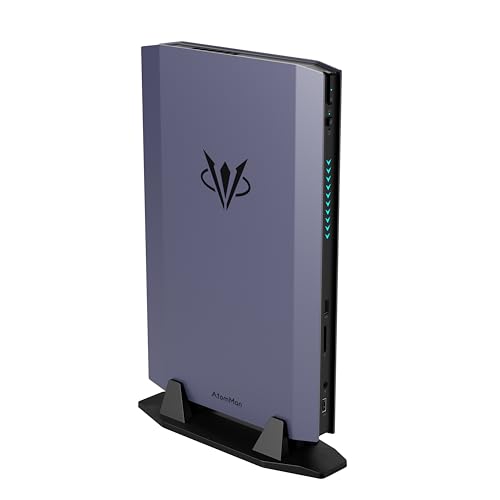
Where to buy
Check the latest price, availability and delivery on Amazon. Orders are placed on Amazon. We may earn a commission from qualifying purchases.
- Best overall compact streaming PC: AtomMan G7 Ti Mini PC, Core i9-14900HX, RTX 4070 Laptop, 32GB DDR5, 1TB SSD — Check on Amazon
- AtomMan G7 Pt Mini PC, Ryzen 9 7945HX, RX 7600M XT, 32GB DDR5, 1TB SSD — Check on Amazon
- MINISFORUM AtomMan G1 Pro, Ryzen 9 8945HX, Desktop RTX 5060, 32GB DDR5, 1TB SSD — Check on Amazon
- ASUS NUC 14 Performance Barebone (ROG NUC), Core Ultra 7 155H, RTX 4060 Laptop, Kit — Check on Amazon
See 2 more Amazon options
- Skytech Blaze4 Mini Gaming PC, Ryzen 7 5700, RTX 4060 Ti, 16GB DDR4, 1TB SSD — Check on Amazon
- HP OMEN 16L Gaming Desktop, Ryzen 7 8700F, RTX 5060, 1TB SSD (seller-upgraded listing) — Check on Amazon
Read the full guide ↓
Disclosure: As an Amazon Associate, reviewstook.com earns from qualifying purchases. Links to Amazon on this page are affiliate links; they cost you nothing extra. Listing details such as price and availability change often, so check the current Amazon listing before you buy.
A streaming PC has two jobs that fight each other: render the game, and encode the broadcast. In a full tower you can brute-force that fight with space and power. In a compact PC — a two-and-a-half-liter mini on a shelf, a small tower under a desk — the fight is won or lost on one component most gaming guides treat as a footnote: the hardware encoder. That is the grading standard for this guide. Every pick below was judged first on the encoder its documented silicon actually carries, then on whether the CPU, memory and storage around it can hold a game, OBS and a browser open at the same time without the stream becoming the thing that stutters.
Two honesty points before the picks, because this category blurs both. The first is the naming one this batch never drops: an RTX 4070 Laptop GPU is not a desktop RTX 4070. The laptop chip has 4,608 cores and 8GB of memory against the desktop card’s 5,888 cores and 12GB, and in the top pick below it runs at its full 140W, which places it around desktop RTX 4060 Ti class. The second is the encoder one, and it cuts the other way — it is good news stated precisely. Every machine in this guide carries a current-generation hardware encoder with AV1 encode: the NVIDIA picks encode through a single NVENC block of the Ada or Blackwell generation, and the one AMD pick uses an RDNA3 encoder that also handles AV1. What none of them has is a second NVENC block. The dual-encoder configuration belongs to desktop RTX 4070-class cards and above, which live in towers at this money — so on every pick here, one encoder block shares the live stream and any local recording, and the OBS section below shows how to set that up so it never becomes a problem.
The realistic workflow, defined up front: one machine playing and streaming at 1080p60 is honest on all six picks — that is what their encoders are for. Streaming at 1440p60 is a YouTube story, not a Twitch one: Twitch’s standard ceiling of roughly 6,000 kbps CBR starves a 1440p picture no matter what hardware feeds it, while YouTube accepts higher bitrates, 1440p uploads and AV1 live streams, which is where these encoders earn their keep. Local recordings in AV1 look better per gigabyte than H.264 on every pick. What this tier does not change: a compact case is still a thermal compromise, a mini PC’s GPU is still soldered for life, and the microphone you sound good on is still not in any of these boxes. The picks, their encoders, and exactly those limits follow.
In this guide
Quick Picks
Short on time, or comparing several options at once? Each row below names a streamer type and the product that suits it, with a link to the listing.
| Streamer type | Pick | Why it stands out | Link |
|---|---|---|---|
| Best overall for streaming | AtomMan G7 Ti Mini PC (RTX 4070 Laptop) | 24 cores and 32GB behind a full-power Ada NVENC encoder — the strongest one-box broadcast stack in a mini | Check on Amazon |
| Best value streamer | AtomMan G7 Pt Mini PC (RX 7600M XT) | RDNA3 encoder with AV1 for YouTube and 16 Zen 4 cores — check price on Amazon | Check on Amazon |
| Best desktop encoder in a mini | MINISFORUM AtomMan G1 Pro (Desktop RTX 5060) | A real desktop card’s newest-generation NVENC and 5GbE wired networking in 3.8 liters — only when it falls within this guide’s budget | Check on Amazon |
| Best kit for parts owners | ASUS NUC 14 Performance Barebone (ROG NUC) | A full-power mobile RTX 4060’s NVENC in an ASUS kit — once you finish building it | Check on Amazon |
| Quietest room for a microphone | Skytech Blaze4 Mini (RTX 4060 Ti) | A desktop 4060 Ti’s NVENC in a mini tower whose fans stay out of your recording | Check on Amazon |
| Most simultaneous-load headroom | HP OMEN 16L (RTX 5060) | 64GB of memory fitted — game, OBS, browser and recordings without closing anything | Check on Amazon |
How These Picks Were Chosen
The method differs from a gaming guide in one deliberate way: the encoder was graded before the frame rates. For each pick we established, from the documented GPU silicon alone, which hardware encoder the machine carries and what it can encode — no encoder was assumed from a product name, and none was upgraded in the telling. The NVIDIA laptop and desktop cards here (RTX 4070 Laptop, RTX 4060 Laptop, RTX 4060 Ti, and the two desktop RTX 5060s) each carry a single NVENC block of their generation with AV1 encode; the AMD pick’s RX 7600M XT is RDNA3 silicon, whose encoder also handles AV1. Around that fact, each machine was graded on the simultaneous load a real broadcast applies — the game rendering, OBS compositing and encoding, a browser with chat and dashboards, and local recording writing to disk — using the documented CPU core counts, fitted memory and storage. A machine that games beautifully and streams badly was graded as a bad streaming PC.
The budget was applied to the complete, working machine, exactly as in the gaming guide this one re-angles. Check the current price on Amazon for every pick, as listing prices change often. Two picks carry conditions that their reviews state rather than hide: the G1 Pro spends most of its life above this budget and qualifies only when a promotion brings it within this budget, and the ASUS NUC is a barebone kit whose listing excludes the memory, storage and operating system it needs before it can stream anything at all — its review explains that completion step. The OMEN 16L’s qualifying listing is a seller-upgraded configuration, and its review carries the marketplace warnings that fact deserves.
Two machines were left out on the same evidence as in the base guide. Minisforum’s AtomMan G7 Pro, with an RTX 5070 Laptop GPU, is the class flagship, but its configured pricing sits above the whole budget; it is the ceiling, not a pick. AMD’s Ryzen AI Max+ 395 mini PCs, whose integrated graphics led their class at launch, have been repriced by the current memory shortage to well above this budget — outside this guide entirely. What remains is six machines that can genuinely broadcast from a small case at or under $1,500, graded on the hardware that decides whether the broadcast holds.
The Encoder Is the Streaming Spec
Everything a streaming PC does differently from a gaming PC happens in one small block of the GPU. The game renders on the main silicon; the broadcast is compressed by a dedicated encoder that works independently, which is why a modest GPU with a modern encoder out-streams a powerful GPU with an old one. Three encoder families appear in this guide, and the differences between them are the ranking in miniature. The Ada-generation NVENC in the G7 Ti, the ASUS NUC and the Blaze4 Mini is the proven broadcast block: crisp H.264 at Twitch bitrates, plus AV1 encode for YouTube live and local recordings. The Blackwell-generation NVENC in the G1 Pro and the OMEN 16L is the newest version of the same idea — again a single block on these cards, again with AV1. And the RDNA3 encoder in the G7 Pt’s RX 7600M XT is the credible third option: it encodes AV1, which makes it a genuinely good YouTube and recording machine, while its H.264 output at Twitch’s roughly 6,000 kbps is visibly softer than NVENC’s at the same bitrate — a difference your viewers see in fast motion, and the reason the AMD pick is graded as the YouTube-leaning value choice rather than the Twitch-first one.
The single-block fact deserves its own paragraph because marketing blurs it. Higher desktop cards — the RTX 4070 class and above — carry two NVENC blocks, letting one encode the stream while the other records locally without either noticing. No pick in this guide has that configuration, and any listing implying a laptop 4070 or a desktop 5060 does is wrong. In practice the limit is gentle: a single modern block encodes a 1080p60 stream and a local recording at the same time without distress, provided the game is not simultaneously saturating the GPU itself — which is a rendering problem, handled by the frame-rate cap in the OBS section, not an encoder problem. Buy any pick here knowing it has one excellent encoder, set OBS up the way the section below describes, and the encoder will not be the reason a stream fails.
The 6 Best Compact Gaming PCs for Streaming Under $1,500
AtomMan G7 Ti Mini PC — Core i9-14900HX, RTX 4070 Laptop, 32GB DDR5, 1TB SSD
Who it suits: Streamers who want one small box to do everything — play at 1440p, encode the broadcast, run the whole streaming stack — and who stream to Twitch and YouTube alike.
The G7 Ti earns the top spot here for the same silicon that topped the gaming guide, read through a broadcaster’s eyes. Its RTX 4070 Laptop GPU runs at the full 140W NVIDIA allows, which places its gaming performance around desktop RTX 4060 Ti class — and its encoder is that chip’s Ada-generation NVENC block, a single encoder with AV1, which is exactly the block a one-machine broadcast wants: the game renders on the main silicon while NVENC compresses the stream without touching the frame rate. Behind it sits the strongest simultaneous-load hardware in this guide: a 24-core Core i9-14900HX to absorb OBS compositing, browser dashboards, chat bots and Discord without competing with the game, and 32GB of DDR5 so none of those programs has to close when the game gets heavy. For the configured 32GB/1TB version, check the current price on Amazon, and note that a second free M.2 slot means recordings can live on their own drive — a small thing that matters in month six of a channel, when a 1TB system drive full of VODs starts deleting games.
The streaming-specific costs are the mini-PC costs wearing headphones. The CPU and GPU are soldered, so the encoder and graphics this machine has on delivery day are the ones it retires with — there is no future card swap when a new encoder generation tempts you. And 140W of GPU plus a 24-core processor in roughly two and a half liters means fans that are audible under sustained load in performance mode, sitting — in most mini-PC setups — on the same desk as the microphone. Placement is the fix: the box is small enough to live behind a monitor or on a shelf across the desk, and at that distance its noise leaves the recording. Silent mode exists, but it buys quiet with game performance, and a stream notices both halves of that trade. Judged as a complete broadcast appliance that takes no desk space, this is the strongest verified compact streaming PC under $1,500.
- Ada-generation NVENC with AV1 at the GPU’s full 140W — Twitch H.264 and YouTube AV1 from one block.
- 24-core i9-14900HX and 32GB of DDR5: the most simultaneous-load headroom of any mini here.
- A second M.2 slot for a dedicated recording drive, in a roughly 2.5-liter chassis.
Honest limitation: The GPU and its encoder are soldered for life, and the fans are audible under load — plan its placement around your microphone, not just your monitor.
Choose it if you want the most capable one-box stream in the smallest case. Skip it if your desk layout forces the PC to sit beside your mic at full load, or you plan to upgrade graphics in two years — that buyer needs the Blaze4 Mini or OMEN below.

AtomMan G7 Pt Mini PC — Ryzen 9 7945HX, RX 7600M XT, 32GB DDR5, 1TB SSD
Who it suits: YouTube-first streamers and recording-heavy creators on a budget — anyone whose audience watches at higher bitrates, where this pick’s encoder is at its best.
The G7 Pt is the value pick of the gaming guide and keeps the title here, with one platform-shaped condition. Its graphics are a Radeon RX 7600M XT — a laptop GPU, named as such — running at a healthy 120W, and its encoder is AMD’s RDNA3-generation block, which matters for two reasons. It encodes AV1, so YouTube live streams and local recordings get the modern codec and its quality-per-gigabyte advantage. And its H.264 at Twitch’s roughly 6,000 kbps ceiling is visibly softer than NVENC’s in fast motion — not broken, not unwatchable, but the known AMD trade, and the reason this machine is graded YouTube-first. The CPU around it is arguably the best mixed-work chip here: a Ryzen 9 7945HX with 16 full desktop-class Zen 4 cores, which eats the game-plus-OBS-plus-browser load and leaves genuine x264 software encoding on the table as a fallback for talk and desktop content. For the configured 32GB/1TB version, check the current price on Amazon; in this guide’s line-up it is positioned in a lower tier than the G7 Ti.
The rest of the ownership picture mirrors its sibling. The GPU is soldered; memory and storage are the only upgrades, with SO-DIMM slots to 96GB and PCIe 5.0 NVMe support. The 300W external power brick is the largest in this guide — a desk-planning detail for a machine bought to be unobtrusive, and one more cable run to think about in a streaming corner full of them. The 65W and 85W CPU power modes are genuinely useful here: dropping to the quieter mode for talk streams, where the encoder load is light and the microphone is close, then opening it up for game nights. For a creator whose home platform is YouTube, or who records more than they broadcast, this is the strongest value streaming pick in the guide.
- RDNA3 encoder with AV1 encode — the right silicon for YouTube live and high-quality local recordings.
- 16 full Zen 4 cores and 32GB of memory: simultaneous load is never this machine’s problem.
- Positioned in the lower part of this budget tier — a value route to a discrete-GPU streaming mini; check price on Amazon.
Honest limitation: Its H.264 is visibly softer than NVENC at Twitch bitrates, and the 300W brick is the bulkiest here — Twitch-first streamers should weigh the first, small desks the second.
Choose it if YouTube is your platform, or recordings matter as much as live. Skip it if Twitch at 6,000 kbps is your whole channel and picture softness in motion would bother you — that is the G7 Ti’s home ground.

MINISFORUM AtomMan G1 Pro — Ryzen 9 8945HX, Desktop RTX 5060, 32GB DDR5, 1TB SSD
Who it suits: Streamers who want a genuine desktop card’s encoder and proper wired networking in a mini PC — and who are patient enough to buy only when the price behaves.
The G1 Pro’s graphics are the real desktop article: a low-profile desktop RTX 5060 running at a full 145W in an actual PCIe x16 slot, inside a 3.8-liter chassis. For streaming, the card brings the newest encoder generation in this guide — a Blackwell NVENC block with AV1 — and the honesty note that applies to it is the same one the whole guide runs on: a plain RTX 5060 carries a single NVENC block, not the dual blocks of the higher desktop cards, and this review claims exactly one. One current-generation block is plenty for a 1080p60 stream plus a local recording, and it is backed here by a 16-core Ryzen 9 8945HX, 32GB of DDR5 and — a detail streamers should weight more than gamers do — 5-gigabit Ethernet alongside Wi-Fi 7. A wired connection is the cheapest stream-quality upgrade that exists, and this is the only mini here that documents networking this fast. There is no power brick to place, either: a 350W internal supply keeps the streaming corner’s cable count down.
Pricing is why this pick carries the loudest condition in the guide, unchanged from the base. The G1 Pro is usually positioned well above this budget and only belongs in an under-$1,500 guide when a promotion brings it within that limit, so check the current price on Amazon before considering it at all. When it does fall within this budget, a desktop card’s encoder in 3.8 liters is arguably the best streaming buy in the list. Two setup notes complete the picture: the machine ships in an 80W gaming mode that withholds about a fifth of its performance behind a manual toggle — switch it on day one, before your first broadcast, not after a disappointing one — and the low-profile card, while technically seated in a slot, has almost no faster successors in its shape, so treat the encoder you buy as the encoder you keep.
- The newest-generation NVENC with AV1, on a genuine desktop card at full 145W.
- 5GbE wired networking — the strongest documented connection in this guide, and streams notice.
- Internal 350W PSU and 32GB of memory in a 3.8-liter case.
Honest limitation: It is usually priced above this budget — only consider it when it falls within the $1,500 budget — and its single NVENC block is the card’s real specification, whatever a listing implies.
Choose it if you catch it within this budget and want desktop silicon with a wired-first setup. Skip it if it is priced above this budget when you shop; in that case the G7 Ti broadcasts just as well and sits within the tier.

ASUS NUC 14 Performance Barebone (ROG NUC) — Core Ultra 7 155H, RTX 4060 Laptop, Kit
Who it suits: Streamers who already own DDR5 SO-DIMMs and an SSD — or who enjoy finishing a kit — and want ASUS engineering behind a capable encoder.
Start with what this pick is: a roughly 2.5-liter ASUS chassis containing a Core Ultra 7 155H and an RTX 4060 Laptop GPU at up to the full 140W in ASUS’s specification, and nothing else — no memory, no storage, no operating system. The encoder story, once built, is a good one: the mobile 4060’s Ada-generation NVENC block with AV1 is the same proven broadcast hardware as the Blaze4 Mini’s desktop card carries, entirely sufficient for a 1080p60 stream with a local recording alongside. What earns the kit its place is its positioning as a barebone starting point rather than a complete machine — check the current price on Amazon for the kit alone, and judge it only alongside the parts it still needs. If you stream from it, fit 32GB of memory and a 1TB drive as the streaming floor — OBS, a browser and a game on 16GB is a compromise this guide does not recommend building on purpose.
Now the completion step, because for a streamer it has a scheduling edge as well as a value one. Memory, storage and a Windows licence all have to be added, and at current shortage-era memory pricing the completed machine can end up positioned above complete machines in this guide — including the G7 Pt, despite its slower GPU — and it completes on the day the last part arrives, not the day the box does. When the kit is available at a notably lower point in its range, the same build becomes more competitive. So the streaming verdict matches the gaming one exactly: this pick wins for the parts-drawer buyer, who can be broadcasting from it the evening it lands, and for anyone who catches it at that lower point. Bought cold with every part bought new at shortage-era pricing, it is the least direct route in this guide to a mobile RTX 4060’s encoder. ASUS’s build quality and toolless chassis access are real; they are not a substitute for doing the sum first.
- Ada NVENC with AV1 from a full-power mobile RTX 4060, in a 2.5-liter ASUS chassis.
- The kit on its own sits in a lower tier than the complete machines here — check price on Amazon — if you own the parts.
- You spec the memory and storage yourself — fit 32GB and 1TB and it streams properly from day one.
Honest limitation: It streams nothing out of the box: at current memory pricing the completed machine can exceed this budget and still trail the G7 Pt, and the mobile GPU is soldered once built.
Choose it if the parts are already on your shelf, or the kit is at a low point in its range. Skip it if you are buying every part new today — the G7 Pt is complete, better value and broadcasting sooner.

Skytech Blaze4 Mini Gaming PC — Ryzen 7 5700, RTX 4060 Ti, 16GB DDR4, 1TB SSD
Who it suits: Streamers recording in a quiet room — anyone whose microphone shares air with the PC and who values a machine that stays out of the audio.
The Blaze4 Mini’s streaming case starts with its encoder and ends with its acoustics. The GPU is a real desktop RTX 4060 Ti — faster than any laptop chip in this guide — and its single Ada-generation NVENC block with AV1 is the joint-best broadcast hardware here, identical in generation to the G7 Ti’s. The tower around it is the streaming advantage no mini can copy: a mini tower’s volume is mostly air, air is cooling, and cooling at low fan speeds means the machine under a sustained game-plus-encode load stays quiet in a way a 2.5-liter box in performance mode does not. For a streamer whose microphone sits a meter away, that is not a comfort feature; it is audio quality. The rest of the specification is named where rivals leave blanks — a 650W Gold power supply, standard replaceable parts throughout — and its positioning remains the surprise of the guide: it sits in the lower part of this budget tier — check the current price on Amazon.
The honest cost, graded harder here than in the gaming guide because streaming loads memory differently, is the 16GB of DDR4 fitted. A game alone is fine on 16GB; a game plus OBS with browser sources, a chat browser, Discord and a recording buffer is where 16GB becomes the tightest fit of any complete machine in this guide — workable, but the first thing to upgrade, and the savings against the minis are exactly what funds it. The platform underneath is the known dead end: the Ryzen 7 5700’s eight cores handle the broadcast stack adequately, but AM4 and DDR4 offer no meaningful CPU upgrade path, so the growth this machine promises is the graphics card, storage and memory — which, for a streaming PC, is most of what ever needs growing. Buy it as a quiet 4060 Ti broadcast tower with a memory upgrade in its near future, and it is the best-value streaming machine here.
- Desktop RTX 4060 Ti NVENC with AV1 — top-tier broadcast hardware positioned as a value pick in this tier; check price on Amazon.
- A mini tower’s airflow keeps fans slow under combined load: the mic-friendly pick.
- A named 650W Gold PSU and standard parts — the only straightforward GPU-swap path here.
Honest limitation: 16GB of memory is the tightest simultaneous-load fit in this guide — plan for the upgrade — and the AM4 platform caps CPU growth for good.
Choose it if your recording room is quiet, your desk has a corner for a mini tower, and you will fit more memory soon. Skip it if the PC must live on a shelf or behind a TV — that is what the AtomMan boxes are for.

HP OMEN 16L Gaming Desktop — Ryzen 7 8700F, RTX 5060 (Seller-Upgraded Listing)
Who it suits: Streamers who run everything at once — game, OBS with layered scenes, browser dashboards, recording archive — and want a big brand’s case and support behind a current-generation encoder.
The OMEN 16L approaches streaming from the tower side: a 16-liter HP chassis holding a desktop GeForce RTX 5060 with 8GB of GDDR7. Its encoder is the Blackwell-generation NVENC — a single block with AV1, the newest in this guide alongside the G1 Pro — and its simultaneous-load specification is the one that makes streamers look twice: the verified configuration carries 64GB of memory — check the current price on Amazon for that configuration. That is far beyond gaming’s needs and precisely streaming’s comfort zone: the game, OBS, a browser full of dashboards, chat and a recording session, all resident at once, with nothing swapped or closed mid-broadcast. The eight-core Ryzen 7 8700F is a capable chip, if a laptop-derived design with half the cache of desktop-class alternatives, and HP’s cooling and support network stand behind the parts the seller did not touch. As a formula — current-generation desktop encoder, memory to spare, brand-name case within this budget — it is the lowest-risk heavy-stack buy here. Shoppers comparing the wider compact field should also see Best Compact Gaming PC Under $1500.
The condition is the listing, and it is the same one the base guide insists on, because it decides what you actually own. The linked configuration is seller-upgraded: a reseller — PCOnline US, per the listing’s documentation — opened the machine to fit that memory, so the upgraded parts carry the seller’s one-year warranty while the remainder keeps HP’s, a support conversation split in two if anything fails. Verify the exact style, specification and seller on the live page before ordering; this listing family spans several configurations, factory OMEN 16L builds sell under separate listings (including a Core Ultra 5 225F version with the same RTX 5060), and the configuration described above is the one to confirm on the live page. Within those lines, this is the pick for the streamer whose broadcast stack has outgrown 32GB thinking.
- Blackwell NVENC with AV1 on a desktop RTX 5060 — current-generation broadcast hardware.
- 64GB of memory in the verified configuration: the most simultaneous-load headroom in this guide.
- HP’s 16-liter case, cooling and support network behind the untouched components.
Honest limitation: The linked listing is a reseller-upgraded unit — split warranty, and the exact style must be verified live — while the case and PSU cap future GPU upgrades at this class.
Choose it if your streaming stack is heavy and you want it all resident within this budget. Skip it if split warranties bother you — the Blaze4 Mini is a single-seller machine with a bigger PSU and a lower-tier positioning.

Comparison Table
| Product | Encoder | Memory | Best streaming use | Link |
|---|---|---|---|---|
| AtomMan G7 Ti Mini PC | NVENC (Ada) + AV1, single block | 32GB DDR5 | Strongest one-box Twitch and YouTube stream in a mini | Check on Amazon |
| AtomMan G7 Pt Mini PC | AMD VCN (RDNA3) + AV1 | 32GB DDR5 | YouTube live and recording value | Check on Amazon |
| MINISFORUM AtomMan G1 Pro | NVENC (Blackwell) + AV1, single block | 32GB DDR5 | Desktop encoder and 5GbE, on promo only | Check on Amazon |
| ASUS NUC 14 Performance Barebone | NVENC (Ada) + AV1, single block | You fit it — fit 32GB | Kit builders with parts on hand | Check on Amazon |
| Skytech Blaze4 Mini | NVENC (Ada) + AV1, single block | 16GB DDR4 | Quiet-room recording and streaming value | Check on Amazon |
| HP OMEN 16L | NVENC (Blackwell) + AV1, single block | 64GB DDR5 (seller-upgraded) | Heavy stacks: game, OBS, browser, archive | Check on Amazon |
How to Choose a Compact Streaming PC Under $1,500
- Name your platform first. Twitch means H.264 at roughly 6,000 kbps, where NVENC is the crispest encoder here. YouTube means higher bitrates and AV1, where every pick in this guide — including the AMD one — is properly equipped. The platform chooses the encoder; the encoder chooses the machine.
- Count encoders honestly. Every pick here has one excellent hardware encoder block. Dual-encoder machines are desktop RTX 4070-class towers; if a compact listing implies two blocks in a laptop GPU or a 5060, it is wrong, and one block set up correctly covers a 1080p60 stream plus a local recording.
- Grade the stack, not the game. Your real workload is game + OBS + browser + chat + recording. That is a memory and core-count question: 32GB is this tier’s comfortable standard, the OMEN’s 64GB is the heavy-stack answer, and 16GB — the Blaze4 Mini — is a fit you upgrade, not a fit you settle for.
- Wire it, whatever you buy. Dropped frames are a network statistic, not a GPU one. Every pick here should stream over Ethernet; Wi-Fi is for the audience, not the broadcaster. The G1 Pro’s 5GbE is the deluxe version of a rule that applies to all six.
- Plan the recording drive. Local recordings at streaming quality fill a 1TB system drive in a season of regular broadcasts. The G7 Ti’s second M.2 slot and the towers’ expansion room are streaming features, not gaming ones.
- Price the whole machine, not the box. The ASUS NUC needs memory, storage and an OS before its first stream; the Blaze4 Mini needs a memory upgrade soon after its first month. Add the second receipt before comparing either against complete machines.
- Place the machine for the microphone. Mini PCs under load are audible at desk distance. A shelf, a spot behind the monitor, or a mini tower’s slower fans — decide the PC’s home by where your mic is, not only where your screen is. Readers whose rooms dictate placement should compare Best Compact Gaming PC For Small Spaces Under $1500.
- Verify the exact style on shared listings. Barebone and configured styles, factory and seller-upgraded configurations, sit under single pages throughout this category. The price and spec you read belong to a specific style; confirm yours at checkout, every time.
Set Up OBS Once, Correctly
Every pick in this guide broadcasts well with the same disciplined setup, and most stream problems blamed on compact hardware are actually these settings left at defaults. Work through them once, in order. In OBS’s output settings, select the hardware encoder your pick carries: NVENC on the five NVIDIA machines, the AMD hardware encoder on the G7 Pt. Set rate control to CBR — constant bitrate is what the platforms expect — with a two-second keyframe interval, which Twitch requires and YouTube recommends. For Twitch, set the bitrate around 6,000 kbps; that is the platform’s practical ceiling for most channels, and pushing past it buys dropped frames, not quality. For YouTube, you have headroom the hardware can use: higher bitrates are accepted, 1440p output is worthwhile, and AV1 — available on every pick here — is the encoder to choose for both live and local recordings.
Then learn the three counters in OBS’s Stats dock, because each one accuses a different component and each has a different fix. Rendering lag means the GPU is saturated by the game and OBS cannot composite its scene: the fix is headroom — cap the game’s frame rate a step below its maximum, lower one heavy setting, and let the encoder’s independence work; this is the counter compact PCs meet first, and the cap is the whole cure. Encoding lag means the encoder block itself is overloaded: drop to a faster encoder preset, or step the output from 1440p to 1080p, before touching anything else — on these single-block machines, asking one block for a 1440p stream and a maximum-quality recording simultaneously is the usual cause, so record at stream settings or lower. Dropped frames are the network, full stop: no GPU setting fixes them. Plug in an Ethernet cable, and if drops persist, lower the bitrate until the connection holds. Finally, the wired rule that outranks every setting above: stream on Ethernet, always. Every machine in this guide has the port; the cable is the cheapest component in your entire setup and the one your viewers will notice most.
What $1,500 Does Not Include
A streaming PC is the middle of a streaming setup, not the whole of it, and none of the picks in this guide includes the kit around the machine. Plan for it in this order, and keep it separate when you compare picks. First, a microphone — it is the single largest quality jump a new channel can buy, it matters more than any encoder difference in this guide, and its placement (close to you, away from the PC’s fans) should be decided alongside the machine’s placement. Second, lighting: a simple, steady light on your face does more for a webcam picture than a camera upgrade does. Third, a webcam, if your format needs your face at all — talk, desktop and gameplay-first channels often do not. Fourth and last, a capture card — and only if you stream console games; every pick in this guide plays and captures PC games internally, so for a PC-only channel a capture card is money spent on a box that does nothing. None of this kit is priced in this guide — plan for it separately, after the machine is chosen.
Common Buying Mistakes
- Believing a compact listing that implies dual NVENC. Laptop RTX 4070s, RTX 4060s and desktop 5060s each carry one encoder block; the dual-block cards are desktop 4070-class and up, in towers. One block, set up well, is enough — but buy knowing it is one.
- Judging a streaming PC by gaming benchmarks alone. The broadcast adds OBS, a browser and a recording load to the game; a machine graded only on frame rates can still be the wrong streaming buy on memory or encoder generation.
- Streaming over Wi-Fi because the PC is small and the router is far. Dropped frames are network failures, and no encoder fixes them. Run the cable.
- Asking one encoder block for everything at maximum. A 1440p stream plus a maximum-quality local recording is how encoding lag happens on single-block machines; record at or below stream settings.
- Buying the barebone as if it were a streaming PC. The ASUS NUC streams nothing until memory, storage and an OS are fitted and paid for — with parts bought new, that completion step can carry its overall positioning past complete machines.
- Leaving the G1 Pro in its shipping 80W mode. A fifth of its performance — game and stream headroom alike — sits behind a toggle. Switch it before your first broadcast, not after a bad one.
- Sitting a performance-mode mini PC beside the microphone. Small fans under sustained load are a recording, not just a room, problem. Place the box for the load state.
- Spending the kit budget on the PC. A channel sounds and looks like its microphone and lighting far more than its encoder generation; the machine in this guide plus a modest mic beats a flagship PC and a headset mic every time.
Final Recommendation
- Most compact streamers: AtomMan G7 Ti Mini PC.
- YouTube-first value: AtomMan G7 Pt Mini PC.
- Desktop encoder in a mini, on promo only: MINISFORUM AtomMan G1 Pro.
- Kit builders with parts on hand: ASUS NUC 14 Performance Barebone.
- Quiet rooms and upgrade paths: Skytech Blaze4 Mini.
- Heavy simultaneous stacks: HP OMEN 16L.
Our top two for compact streamers at this budget are the AtomMan G7 Ti, for the strongest all-round broadcast stack that fits in a shoebox — full-power Ada NVENC, 24 cores and 32GB behind it — and the Skytech Blaze4 Mini, for the same encoder generation in a quiet tower with a future, positioned in a lower tier. Between them they frame the streaming version of this category’s choice: the smallest machine that broadcasts properly now, or the quietest machine that can be made to broadcast whatever comes next. The G7 Pt is the YouTube creator’s value pick; the G1 Pro is the one to set a price alert for; the ASUS NUC rewards the parts drawer and punishes the parts shopper; and the OMEN 16L is the heavy-stack answer, provided its listing is read as carefully as its review insists. Streamers whose ceiling is lower should compare Best Compact Gaming PC For Streaming Under $1200, and those with more to spend should see Best Compact Gaming PC For Streaming Under $2500 — and everyone should check the current price on Amazon and the exact style before ordering, because in this category that homework is the difference between a broadcast setup and a small disappointment.
Frequently Asked Questions
Can one compact PC really play and stream at the same time?
Yes — that is precisely what a hardware encoder is for. The encoder block compresses the broadcast independently of the silicon rendering the game, so a machine in this guide plays its game and streams it at 1080p60 simultaneously. The discipline that makes it work is headroom: cap the game’s frame rate so the GPU is not saturated, and OBS’s rendering-lag counter stays at zero. What one machine cannot do at this tier is miracles — a maximally demanding game at maximum settings plus a 1440p stream is a two-PC or flagship-tower workload.
Do I need dual NVENC to stream and record?
No. Dual NVENC — two encoder blocks — belongs to desktop RTX 4070-class cards and above, and no compact pick in this guide has it. A single modern block encodes a 1080p60 stream and a local recording at the same time without distress, as long as the recording is kept at or below stream settings. Dual encoders are a convenience for extreme recording quality, not a requirement for a working channel.
Can I stream in AV1 from these PCs?
To YouTube, yes — every pick in this guide carries an AV1-capable encoder, and AV1 is the right choice there and for local recordings. On Twitch, the standard broadcast path remains H.264 at around 6,000 kbps; Twitch’s AV1 support runs through its Enhanced Broadcasting programme rather than the standard ingest, so plan your Twitch stream as H.264 regardless of the encoder you own. That is also why the G7 Pt’s softer H.264 matters for Twitch-first streamers and barely matters for YouTube ones.
Is 1440p streaming worth it at this budget?
On YouTube, it can be: the platform accepts the bitrate and resolution, and these encoders — especially with AV1 — feed it well, provided the game itself is rendered at 1440p rather than upscaled into the stream. On Twitch, the roughly 6,000 kbps ceiling starves 1440p of the bitrate it needs, and a clean 1080p60 stream looks better than a starved 1440p one on the same connection. Stream 1440p where the platform can carry it; do not chase the number where it cannot.
Why does the ASUS NUC cost more than complete PCs once built?
Because the kit listing covers the barebone alone. It still needs memory, storage and an operating system — check the current price on Amazon for the kit, then judge it only as a completed machine — and with memory pricing elevated during the current shortage, a kit bought cold can end up positioned above the complete G7 Pt once finished. It wins when you already own the parts or catch the kit at a low point in its range. A barebone listing is the beginning of the machine, never the whole of it — and a streaming PC that is not finished streams nothing.
How much memory does a streaming PC actually need?
For the full stack — game, OBS with browser sources, chat and dashboards, a recording running — 32GB is the comfortable standard at this budget, and four of these six picks meet it as configured. The OMEN’s 64GB is headroom for the heaviest stacks. The Blaze4 Mini’s 16GB is workable but the tightest fit here: treat the memory upgrade as a planned next step, because streaming loads memory in a way gaming alone does not. More on the tier’s wider field is in Best Streaming PC Under $1500.
- Best Compact Gaming PC Under $1500
- Best Compact Gaming PC Under $1200
- Best Compact Gaming PC Under $2500
- Best Compact Gaming PC For Streaming Under $1200
- Best Compact Gaming PC For Streaming Under $2500
- Best Compact Gaming PC For Small Spaces Under $1500
- Best Compact Gaming PC For 1440p Gaming Under $1500
- Best Compact Gaming PC For Beginners Under $1500
- Best Streaming PC Under $1500
- Best Mini Gaming PC Under $1500
- Best Small Form Factor Gaming PC Under $1500
- Best Gaming PC Under $1500


