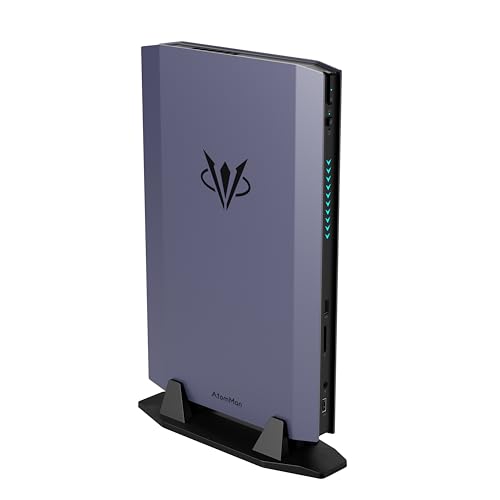
Where to buy
Check the latest price, availability and delivery on Amazon. Orders are placed on Amazon. We may earn a commission from qualifying purchases.
- Best overall compact gaming PC for a first-time buyer: AtomMan G7 Ti Mini PC, Core i9-14900HX, RTX 4070 Laptop, 32GB DDR5, 1TB SSD — Check on Amazon
- AtomMan G7 Pt Mini PC, Ryzen 9 7945HX, RX 7600M XT, 32GB DDR5, 1TB SSD — Check on Amazon
- MINISFORUM AtomMan G1 Pro, Ryzen 9 8945HX, Desktop RTX 5060, 32GB DDR5, 1TB SSD — Check on Amazon
- ASUS NUC 14 Performance Barebone (ROG NUC), Core Ultra 7 155H, RTX 4060 Laptop, Kit — Check on Amazon
See 2 more Amazon options
- Skytech Blaze4 Mini Gaming PC, Ryzen 7 5700, RTX 4060 Ti, 16GB DDR4, 1TB SSD — Check on Amazon
- HP OMEN 16L Gaming Desktop, Ryzen 7 8700F, RTX 5060, 1TB SSD (seller-upgraded listing) — Check on Amazon
Read the full guide ↓
Disclosure: As an Amazon Associate, reviewstook.com earns from qualifying purchases. Links to Amazon on this page are affiliate links; they cost you nothing extra. Listing details such as price and availability change often, so check the current Amazon listing before you buy.
If this is your first gaming PC, welcome — this corner of the market is confusing on purpose. You have $1,500 and you want the machine small. What the listings will not tell you plainly is that “compact gaming PC” describes two completely different kinds of computer. The first is a mini PC: a box about the size of a paperback, built from laptop parts, with its graphics chip permanently soldered inside. The second is a small desktop: a compact tower with a real, full-size graphics card — the kind that goes into big gaming PCs — which you could one day unplug and replace. Both sit happily under a TV or in the corner of a desk, but they play games differently and age differently — and the listings blur the difference, printing a famous graphics name in huge letters and the word “Laptop” nowhere at all.
So before the picks, the single most useful fact in this guide: an RTX 4070 Laptop GPU is not a desktop RTX 4070. They share a name and almost nothing else. The laptop version has about a fifth fewer processing cores (4,608 against 5,888), much less of its own memory (8GB against 12GB), and a much lower power ceiling. Run at its full allowed power it plays games about as well as a desktop RTX 4060 Ti — a genuinely good card — but a full step below the desktop 4070 its name makes you picture. Every mini PC below uses laptop graphics, and every review says so in plain words. One more honest note: there is no compact PC with a desktop RTX 4070 SUPER reliably selling under $1,500 — that card lives in full-size towers at this money.
What $1,500 honestly buys in a small box, checked against real Amazon listings: a mini PC with the fastest laptop graphics this budget covers — check price on Amazon; an AMD mini PC with a strong processor and mid-range laptop graphics positioned toward the value end of this tier — check price on Amazon; a slightly larger mini that fits a genuine desktop graphics card, but only belongs here when its current price on Amazon falls within this budget; a famous-brand kit that looks affordable until you account for the parts it still needs; the smallest true desktop tower in the guide, positioned toward the lower end of this budget — check price on Amazon; and a 16-liter tower from a big brand whose best-value listing has been opened and upgraded by a reseller — worth considering, as long as you know that is what you are buying. Below: a glossary, the quick picks, full reviews of all six, and a first-evening setup walkthrough. If your real limit is the room rather than the money, also see Best Compact Gaming PC For Small Spaces Under $1500.
The Words on the Box, in Plain English
Every term below appears in the listings for these six machines.
- GPU (graphics card / graphics chip). The part that draws the game on your screen; for gaming it matters more than anything else in the PC. In mini PCs it is a chip soldered to the board; in desktops, a card in a slot.
- Laptop GPU vs desktop GPU. The trap of this whole category. A “Laptop” or “Mobile” version of a graphics chip is a smaller, lower-power relative of the desktop card with the same name — roughly one performance class lower. A listing that just says “RTX 4070” on a mini PC is selling you the laptop chip. Always look for the surname.
- VRAM (video memory). The GPU’s own private memory, holding the game’s scenery and textures. It is separate from the PC’s main memory and, on every machine here, can never be increased. All six picks have 8GB — enough for 1080p and 1440p today, and the specification likeliest to feel tight in a few years.
- CPU (processor). The part that runs the game itself — the world, the physics, the other players — while the GPU draws it. More cores help streaming and multitasking more than raw game speed.
- RAM (memory). The PC’s short-term workspace, in gigabytes (GB): games, Windows and your browser live here while you play. At this budget 32GB is the comfortable standard, 16GB a workable minimum. In the mini PCs below it sits in removable laptop-style sticks (SO-DIMMs), so it can grow later; the graphics chip is the part soldered forever.
- SSD (storage). Where games and Windows are kept permanently; an SSD is the fast modern kind of drive, and every pick here has one. 1TB (roughly 1,000GB) holds a healthy library.
- Resolution. How many dots make up the picture. 1080p (1920 × 1080) is the standard gaming resolution and the easiest to run; 1440p (2560 × 1440) is sharper and harder work for the GPU; 4K is sharper again and mostly a TV resolution at this budget.
- Refresh rate. How many times per second your monitor can show a new picture, in hertz (Hz). A basic monitor is 60Hz; gaming monitors run at 144Hz and up, making motion smoother — but only if the PC can feed them, and only if you switch the higher rate on in Windows, because new PCs arrive set to 60Hz.
- Upscaling and frame generation. Two software tricks that make games run faster than the hardware could alone. Upscaling renders the game at a lower resolution and intelligently stretches it to your screen — NVIDIA’s version is DLSS, AMD’s is FSR — making 1440p possible on hardware that would otherwise manage 1080p. Frame generation (part of DLSS 4 on the newest cards) invents extra in-between frames so motion looks smoother; it does not make the game respond faster to your mouse.
- PSU (power supply). The part that feeds electricity to everything else. In desktops it is a box inside the case, and its wattage (650W, say) decides how powerful a future graphics card the machine could support. In mini PCs it is usually a separate brick on a cable, like a big laptop charger.
- Prebuilt and barebone. A prebuilt PC arrives complete: switch it on and it works. A barebone (or “kit”) arrives as a partial machine — case, processor and graphics, with memory, storage and Windows left for you to buy and fit. Its sticker price is therefore never its real price, and one pick below is exactly that trap, clearly labelled.
- Renewed, refurbished — and seller-upgraded. “Renewed” or “refurbished” means a used machine checked and resold, usually with a shorter warranty. To be plain: none of the six picks is renewed or refurbished. One pick is different — a brand-new machine a reseller opened to fit extra memory. That is a seller-upgraded listing, and it splits the warranty between seller and manufacturer, as its review explains.
In this guide
Quick Picks
Short on time? Each row below names a buyer type and the product that suits it, with a link to the listing.
| Buyer type | Pick | Why it stands out | Link |
|---|---|---|---|
| Best overall compact | AtomMan G7 Ti Mini PC (RTX 4070 Laptop) | The fastest verified mini at this budget — full-power laptop graphics in ~2.5 liters | Check on Amazon |
| Best value mini PC | AtomMan G7 Pt Mini PC (RX 7600M XT) | A 16-core desktop-class processor and laptop graphics at the value end of this tier — check price on Amazon | Check on Amazon |
| Best true desktop GPU in a mini | MINISFORUM AtomMan G1 Pro (Desktop RTX 5060) | A real desktop card at full power in 3.8 liters — only when the current price on Amazon falls within this budget | Check on Amazon |
| Best kit from a big brand | ASUS NUC 14 Performance Barebone (ROG NUC) | ASUS engineering in kit form — check price on Amazon, before the parts it still needs | Check on Amazon |
| Best upgrade path | Skytech Blaze4 Mini (RTX 4060 Ti) | A desktop GPU, a named 650W Gold PSU and standard parts in the smallest true tower here | Check on Amazon |
| Best big-brand compact tower | HP OMEN 16L (RTX 5060) | HP’s 16-liter case and a desktop RTX 5060 — via a seller-upgraded listing to read carefully | Check on Amazon |
How These Picks Were Chosen
The budget was applied to the complete, working machine — the total you pay before you can play a game, not the number in the listing’s headline. Every product below is a real Amazon listing positioned within the $1,500 budget for this guide — check the current price on Amazon before you buy, because listing prices change. Two picks need that check most, both flagged loudly in their reviews: the G1 Pro is often priced above this budget and only qualifies when its current price on Amazon falls within it, and the ASUS NUC is a barebone whose listing price excludes the memory, storage and Windows it needs before it can switch on. Its review explains the completion cost in qualitative terms, because a kit that finishes over this budget is not a PC within this budget.
A word about how this guide was researched. We did not use these products ourselves. We read the manufacturers’ listings and specification pages and independent reviews for each exact product, and compared what decides a compact PC: which graphics silicon is really inside and how much power it is allowed, processor, memory, storage, case size, and what can be changed later. Three filters specific to small machines sat on top. First, identity: a graphics chip’s real name — laptop or desktop, and at what wattage — had to be establishable from the listing or the maker’s specification, because a 45-watt and a 140-watt version of one chip are effectively two different products. Second, heat: a small case cannot move much air, so honest performance is what it sustains in hour four, not what it bursts to in minute one. Third, the exit: what can you change in two or three years? In the mini PCs the answer is memory and storage only — processor and graphics are soldered for life — while the towers accept replacement graphics cards.
Two tempting machines were left out on the evidence. Minisforum’s AtomMan G7 Pro, with the newer RTX 5070 Laptop GPU, is the obvious flagship of this class — but its configured version sits above this guide’s budget. And the mini PCs built on AMD’s Ryzen AI Max+ 395 chip, which held the “fastest integrated graphics” crown, have moved well above this budget on Amazon during the current memory shortage.
The 6 Best Compact Gaming PCs Under $1,500 for Beginners
AtomMan G7 Ti Mini PC — Core i9-14900HX, RTX 4070 Laptop, 32GB DDR5, 1TB SSD
Who it suits: A first-time buyer who wants the most gaming performance that fits in a shoebox — a machine for a living room or small desk that plays at 1440p today and asks nothing of you but a power socket.
Begin with the correction this guide is built around: the graphics inside the G7 Ti are an RTX 4070 Laptop GPU — 4,608 cores and 8GB of memory, not the desktop card’s 5,888 cores and 12GB. What rescues it is power. Minisforum lets that chip draw its full 140 watts, the highest NVIDIA allows, and at full power independent reviewers place it around desktop RTX 4060 Ti level: strong 1080p gaming at high settings, and 1440p genuinely playable with DLSS upscaling helping. Around the chip sit a Core i9-14900HX processor with 24 cores (far more than games need), 32GB of memory in two removable sticks that can later grow to 96GB, a 1TB SSD with a second empty slot waiting, Wi-Fi 7, HDMI 2.1 and USB4 — all in a box of roughly two and a half liters. For the configured 32GB/1TB version, check the current price on Amazon — it sits near the top of this budget tier.
The catch is permanence — the standing condition of every mini PC here. Processor and graphics are soldered to the board, so the performance delivered on day one is the performance the machine retires with; when it stops being enough, the upgrade is a whole new PC. Memory and storage are the only doors left open, and happily they are the two upgrades beginners actually end up wanting. Judged as a three-to-four-year 1440p appliance that takes up almost no room, it is the strongest verified compact gaming PC under $1,500.
- The full-power 140W version of the RTX 4070 Laptop GPU — the fastest laptop graphics verified at this budget.
- A 24-core Core i9-14900HX and 32GB of memory, with memory and a second SSD slot still upgradeable later.
- Roughly 2.5 liters with Wi-Fi 7, HDMI 2.1 and USB4 — it disappears next to a TV.
Honest limitation: The “RTX 4070” in the name is the laptop chip — around desktop 4060 Ti class, with 8GB of VRAM — and it is soldered, so the graphics can never be upgraded.
Choose it if performance per liter is your priority and a fixed lifespan is acceptable. Skip it if you already know you will want a faster graphics card in two years — that buyer needs the Blaze4 Mini or the OMEN below.

AtomMan G7 Pt Mini PC — Ryzen 9 7945HX, RX 7600M XT, 32GB DDR5, 1TB SSD
Who it suits: Beginners whose screen is 1080p and whose budget is shared with games and peripherals — and anyone who also wants serious processor power for work, study or creating, in the same small box.
The G7 Pt is the G7 Ti’s AMD sibling and the value pick of this guide: the configured 32GB/1TB version sits toward the lower end of this budget tier — check price on Amazon. Its processor is arguably the better one for mixed use — a Ryzen 9 7945HX with 16 full desktop-class cores, a chip that shrugs at video editing and heavy multitasking. The graphics are a Radeon RX 7600M XT, a laptop GPU again and named as one: 8GB of memory, run at a healthy 120 watts. That pairing is a strong 1080p machine outright and a selective 1440p one, using AMD’s FSR upscaling in demanding games and native resolution in lighter ones. The supporting hardware mirrors its sibling: memory sticks that can grow to 96GB, twin fans, the same roughly two-and-a-half-liter chassis, and 65-watt and 85-watt processor modes that trade a little speed for a quieter room.
The trades against the Ti are real. The 7600M XT sits a class below the full-power 4070 Laptop in raw speed, its ray tracing (the fancy lighting some games offer) is weaker still, and FSR upscaling, while good, appears in fewer games than NVIDIA’s DLSS. The external power brick is a 300-watt unit, the largest in this guide — a small irony for a machine bought to be unobtrusive, since the box is tiny but the brick needs a home too. Permanence applies in full: soldered graphics, memory and storage the only upgrades. What you receive for accepting all of that is one of the most accessibly positioned genuinely capable gaming minis in this tier, with room left in the budget for the rest of a first setup.
- Positioned toward the value end of this tier configured — an accessible route to a discrete-graphics gaming mini in this guide; check price on Amazon.
- Ryzen 9 7945HX: 16 full desktop-class cores, the strongest work processor here alongside the G7 Ti.
- The RX 7600M XT runs at a full 120W, with quieter 65W and 85W modes when you want them.
Honest limitation: A 1080p-first graphics chip — 1440p means upscaling and settings discipline — with weaker ray tracing than the NVIDIA picks and a bulky 300W power brick.
Choose it if your monitor is 1080p, or your money is shared with the rest of a first setup. Skip it if 1440p high-refresh gaming is the whole point — that is the G7 Ti’s job, at the top of this tier.

MINISFORUM AtomMan G1 Pro — Ryzen 9 8945HX, Desktop RTX 5060, 32GB DDR5, 1TB SSD
Who it suits: Beginners who have understood the laptop-graphics lesson and refuse to accept it — who want a genuine desktop graphics card inside a mini PC, and are patient enough to buy only when the price behaves.
The G1 Pro is the exception that proves this guide’s rule, because its graphics are the real thing: a desktop GeForce RTX 5060 — an actual low-profile card, made by Gigabyte, running at its full 145 watts, seated in a real slot — inside a 3.8-liter chassis. There is no translation needed with this pick: 8GB of the newest GDDR7 memory, DLSS 4 support including frame generation, and performance reviewers found good for fast, smooth 1080p gaming and solid 1440p with upscaling. Around it sit a 16-core Ryzen 9 8945HX processor, 32GB of memory, a 1TB SSD, Wi-Fi 7, 5-gigabit wired networking, and something no other mini here offers — a 350-watt power supply built inside the case, so there is no brick on the floor at all. It is the only mini here under four liters whose graphics are a card rather than a chip.
Now the price, which carries the loudest condition in this guide: buy this machine only when the current price on Amazon falls within the $1,500 budget for this guide — check price on Amazon before you buy. It is often priced above this budget, and at that level it does not belong in an under-$1,500 guide at all; it earns its place because it is the only true-desktop-GPU mini in this class that can fall within this budget, and when it does, it is arguably the best buy here. The machine ships in an 80-watt gaming mode that quietly withholds about a fifth of its performance behind a settings toggle — switch it on day one; the setup walkthrough below reminds you. And although the graphics card is technically a card in a slot, it is a low-profile card in a 3.8-liter case: treat replacement as theoretically possible and practically unlikely, because almost nothing faster is made in that shape.
- A genuine desktop RTX 5060 at full 145W — no laptop-GPU translation needed, ever.
- An internal 350W power supply (no floor brick), 5-gigabit Ethernet and Wi-Fi 7 in a 3.8-liter case.
- 32GB of memory and a 16-core processor fitted as standard.
Honest limitation: It is often priced above this budget — this is strictly a pick to buy only when the current price on Amazon falls within the $1,500 budget — and the low-profile graphics card is not a realistic future upgrade.
Choose it if you catch it within this budget and desktop silicon in mini form is the whole point. Skip it if the listing sits above this budget when you shop; in that case the G7 Ti is the stronger top-of-tier choice and the towers below sit lower in the tier.

ASUS NUC 14 Performance Barebone (ROG NUC) — Core Ultra 7 155H, RTX 4060 Laptop, Kit
Who it suits: Beginners with a technically confident streak — or a helpful friend — who already own laptop memory sticks and an SSD, or who like choosing those parts themselves.
This is the ROG NUC in barebone form, sold on Amazon as the NUC 14 Performance: a roughly 2.5-liter ASUS chassis containing a Core Ultra 7 155H processor and an RTX 4060 Laptop GPU — at up to the full 140 watts in ASUS’s specification, which matters, because a full-power laptop 4060 is a credible 1080p card and a cut-down one is not. What the box does not contain is the rest of a computer: no memory, no storage, and no Windows. It will not switch on and play games the evening it arrives. Check the current price on Amazon for the kit itself — and remember that figure covers the kit only.
So let us think through the full cost, because the full cost is the review. A 32GB DDR5 memory kit of the laptop SO-DIMM kind this machine takes is a significant extra purchase, especially in the middle of the current memory shortage — check price on Amazon for the kit and for the parts it still needs. Add a 1TB SSD and a Windows licence, and the completed machine can end up costing more in total than the complete G7 Pt, for slower graphics, and can push the total beyond this guide’s budget. When the kit itself is favourably priced, the completed build becomes more competitive, but not decisively so. This pick wins when the memory and drive are already in your drawer, or when the kit’s current price leaves enough room for the parts. Bought cold with parts at shortage-era prices, it can be the most expensive way in this guide to own a laptop RTX 4060. ASUS’s build quality and brand support are real, but they are not a substitute for working through the full cost — and once built, the graphics are soldered, so the machine you finish is the machine you keep.
- The kit alone sits toward the lower end of this tier — check price on Amazon — but it is only an entry ticket, and the parts still needed decide the real total.
- A full-power laptop RTX 4060 in a 2.5-liter ASUS chassis with toolless access for fitting your parts.
- You choose the memory and storage yourself — the only pick that lets a beginner spec their own.
Honest limitation: It is a barebone: at current memory prices the finished machine can exceed this guide’s budget and still trail the complete G7 Pt, and the laptop GPU is soldered once built.
Choose it if you have DDR5 SO-DIMMs and an SSD on the shelf, or the kit’s current price leaves room for everything it still needs. Skip it if you are buying every part new today — buy the G7 Pt complete instead and play games this week.

Skytech Blaze4 Mini Gaming PC — Ryzen 7 5700, RTX 4060 Ti, 16GB DDR4, 1TB SSD
Who it suits: Beginners who suspect — correctly — that they will want more in a few years: the smallest true desktop tower in this guide, for a desk that has a corner rather than a shelf that has a gap.
Everything the mini PCs ask you to give up, the Blaze4 Mini hands back, and its position in this tier is the surprise of this guide: it sits toward the lower end of this budget — check price on Amazon — while still offering a real desktop RTX 4060 Ti machine. The graphics card is a genuine desktop RTX 4060 Ti with 8GB: faster than any laptop chip in this guide playing the same name game, happy at 1080p on high settings and credible at 1440p with DLSS. The supporting parts are named where rival listings leave blanks — a 650W Gold power supply, enough for the next card up the range — and the machine is built from standard desktop components: the graphics card unplugs, the memory swaps, the storage expands. Shoppers aiming it at a 1440p monitor should also see Best Compact Gaming PC For 1440p Gaming Under $1500.
The honest cost is the age of the platform underneath. The Ryzen 7 5700 is an eight-core processor on AMD’s older AM4 platform with DDR4 memory — perfectly adequate behind a 4060 Ti today, but a dead end: there is no meaningful processor upgrade that does not also mean a new motherboard and new memory. And the 16GB of memory fitted is the minimum this guide is comfortable recommending, not a luxury; plan for a memory upgrade as part of the purchase, helped by its lower position in this tier compared with the minis. The upgrade it promises is therefore real but specific — graphics card, storage, memory capacity. Buy it as a 4060 Ti tower with a graphics swap in its future and it is the best-value machine here; expect to grow the whole platform and you will be disappointed in year three.
- A real desktop RTX 4060 Ti backed by a named 650W Gold PSU — the soundest upgrade foundation in this guide.
- It sits toward the lower end of this budget tier — check price on Amazon — and undercuts the minis here on positioning.
- Standard parts throughout: graphics, memory and storage all replaceable with a screwdriver.
Honest limitation: The AM4/DDR4 platform is a dead end for processor upgrades, and 16GB of memory is a floor, not a target — its lower position in the tier is what leaves room to fix that.
Choose it if a mini tower fits your space and you value a future graphics swap over liters saved. Skip it if the machine has to live on a shelf or behind a TV — that territory belongs to the AtomMan boxes.

HP OMEN 16L Gaming Desktop — Ryzen 7 8700F, RTX 5060 (Seller-Upgraded Listing)
Who it suits: Beginners who want a big brand’s case, cooling and support network behind a current-generation desktop graphics card — and who are willing to read one marketplace listing carefully before ordering.
The OMEN 16L is HP’s answer to the compact question from the tower side: a 16-liter chassis — small beside a normal mid-tower, a wardrobe beside the minis — holding standard desktop parts, including a desktop GeForce RTX 5060 with 8GB of the newest GDDR7 memory and DLSS 4 support. The configuration that makes it a pick within this guide’s budget is the one we verified: a seller-upgraded version of the Ryzen 7 8700F / RTX 5060 model — check the current price on Amazon — with 64GB of memory fitted, far more memory than gaming needs. HP’s own factory configurations of the same case exist on Amazon under separate listings, including a Core Ultra 5 225F build with the same RTX 5060 — so treat this pick as a recommendation of the 16L formula within this budget, with the linked listing the verified example of it, not the only door in.
Because the linked listing is seller-upgraded, its review carries the marketplace warnings at full size. A reseller has opened this new machine to fit that memory. The upgraded parts are covered by the seller’s one-year warranty while the rest of the machine keeps HP’s — so a fault in year one starts with the question of whose part failed, a support conversation split in two. Verify the exact style, specification and seller on the live page before ordering: listings in this family span several configurations, and the configuration described above is the one this recommendation is based on — verify it on the live page. The Ryzen 7 8700F is a capable eight-core processor, but a laptop-derived design with half the cache memory of HP’s desktop-class alternatives — fine for gaming, worth knowing. And a 16-liter brand tower’s cooling and power supply are built for this class of graphics card: a future jump to a much hotter card is not what this case is for. Within those lines, it is the lowest-risk route to current-generation desktop graphics in a compact brand case.
- A desktop RTX 5060 with GDDR7 memory and DLSS 4, inside a genuinely compact 16-liter brand-name case.
- The seller-upgraded configuration we verified sits within this budget tier — check price on Amazon — with 64GB of memory fitted.
- HP’s fit, finish and support network behind every part the seller did not touch.
Honest limitation: The linked listing is a reseller-upgraded unit — a split warranty, and the exact style must be verified live — while the case and PSU cap future graphics upgrades at around this class.
Choose it if you want HP’s small tower and current-generation desktop graphics under $1,500, from whichever verified listing is live. Skip it if a split warranty bothers you — the Blaze4 Mini is a single-seller machine with a bigger power supply.

Comparison Table
| Product | Size class | Graphics | Best use | Link |
|---|---|---|---|---|
| AtomMan G7 Ti Mini PC | Mini PC, ~2.5L | RTX 4070 Laptop, 140W, 8GB | Fastest compact gaming, 1440p with DLSS | Check on Amazon |
| AtomMan G7 Pt Mini PC | Mini PC, ~2.5L | RX 7600M XT, 120W, 8GB | 1080p value and heavy CPU work | Check on Amazon |
| MINISFORUM AtomMan G1 Pro | Mini PC, 3.8L | Desktop RTX 5060, 145W, 8GB | True desktop GPU in mini form, on promo | Check on Amazon |
| ASUS NUC 14 Performance Barebone | Mini PC kit, ~2.5L | RTX 4060 Laptop, up to 140W, 8GB | Kit builders and parts owners | Check on Amazon |
| Skytech Blaze4 Mini | Mini tower | Desktop RTX 4060 Ti, 8GB | Value in this tier and future GPU swaps | Check on Amazon |
| HP OMEN 16L | Compact tower, 16L | Desktop RTX 5060, 8GB | Big-brand compact tower, current-gen GPU | Check on Amazon |
Your First Evening: Setup, Step by Step
None of this requires experience. Work through it in order, and by the end of the evening you will have a correctly configured machine. A compact PC’s fans will get loud under a heavy game — that is the machine doing its job, not a fault.
- Unbox and place it. Place the PC where its vents have a few centimeters of clear air — desk, shelf, beside the TV — not sealed inside a cabinet. Mini-PC owners: find the power brick now; it needs a spot where its cable reaches. (ASUS NUC buyers: fit your memory and SSD and install Windows first, then join at step 2.)
- Connect the power. Brick or internal supply, the cable goes in before anything is switched on.
- Connect the monitor to the graphics — the step everyone gets wrong. On the two towers (Blaze4 Mini, OMEN 16L), the back panel has two clusters of display sockets: a vertical set belonging to the motherboard, and a horizontal set on the graphics card itself. Plug your monitor cable into the graphics card’s sockets. Plugged into the motherboard instead, your graphics card can sit idle. On the mini PCs there is only one set of outputs (HDMI and USB4 on the AtomMan boxes), all driven by the gaming graphics, so any socket is the right socket.
- First switch-on, then updates. Let Windows finish setting up and connect to your network. Then open Settings → Windows Update and run it, restart when asked, and run it again — a new PC typically needs several rounds.
- Install the graphics driver. This software lets games talk to your graphics hardware properly, and the version Windows installs by itself is rarely the best. NVIDIA machines (G7 Ti, G1 Pro, ASUS NUC, Blaze4 Mini, OMEN 16L): install the NVIDIA app from NVIDIA’s website and let it fetch the latest driver. AMD machine (G7 Pt): install AMD Software: Adrenalin from AMD’s website instead. One download, one restart.
- Set your monitor’s real refresh rate. Windows leaves new setups at 60Hz by default. Go to Settings → System → Display → Advanced display and choose the highest refresh rate your monitor offers. While you are there, confirm the resolution is your monitor’s native one — 1920 × 1080 or 2560 × 1440.
- Install a game store and one game. Steam is the standard starting point. Install one game you own or a free one, launch it, and in its graphics settings choose your monitor’s resolution, a High preset, and — on the NVIDIA machines — DLSS set to Quality, or FSR on the G7 Pt.
- Verify you received what you paid for. Open Settings → System → About and Task Manager (Ctrl+Shift+Esc, then the Performance tab) and read the machine’s own report: processor name, memory total, storage size, and the graphics name — including the word “Laptop” where it belongs. Compare each against the exact model and style on your order — the first evening is when a mismatch is easiest to fix.
- One pick-specific setting: G1 Pro owners, find the gaming power mode in the machine’s settings and switch it out of its 80-watt default — it withholds about a fifth of the performance you paid for until you do.
What Else You Will Spend
A PC’s price is the beginning of a first setup’s cost, not the whole of it, and honest budgeting means naming the rest now rather than at the checkout. None of the items below is included in any pick’s price above — that separation is deliberate.
- A monitor comes first. No pick here includes a screen, and the screen decides what the PC’s power is for. A good 1080p gaming monitor is the right partner for the G7 Pt and the ASUS NUC; a 1440p monitor is what the G7 Ti, G1 Pro, Blaze4 Mini and OMEN are built to feed. Buying the PC first and the monitor with whatever is left inverts the correct order — decide the screen, then the machine that suits it.
- Keyboard, mouse and sound. Some listings bundle basic peripherals and some do not; check the exact listing’s contents line rather than assuming, and budget for a keyboard, a mouse and headphones or speakers if yours does not.
- For the ASUS NUC only: the rest of the computer. Memory, an SSD and a Windows licence are not “extras” for the barebone — they are the machine, and, as its review explains, they add substantially to the kit’s own price before the machine can run.
- Games themselves. The machines arrive with no games installed.
Upgrades, in Plain Terms
“Can I upgrade it later?” is the beginner question with the most misleading answers in this category, so here is each pick’s truth.
- The mini PCs (G7 Ti, G7 Pt, ASUS NUC): memory and storage only. Their memory sits in removable SO-DIMM sticks — the G7 Ti and G7 Pt accept up to 96GB — and their SSDs sit in slots, with a second slot free in the G7 Ti. The processor and graphics, by contrast, are soldered to the board, permanently, with no upgrade path of any kind. When the graphics stop being enough, the upgrade is a new machine; that is the deal you sign with every mini.
- The G1 Pro: treat it like a mini. Its desktop graphics card is technically a card in a slot, but a low-profile card in a 3.8-liter case, and almost nothing faster is manufactured in that shape. Memory and storage upgrades are realistic; a graphics upgrade is not a plan, it is a hope.
- The Blaze4 Mini: the one real graphics upgrade here. Standard desktop parts throughout, and a named 650W Gold power supply with headroom for the next card up the range — a graphics swap in a few years is exactly what this machine is for, alongside memory and storage. What it will not take is a meaningful processor upgrade: the AM4 platform is finished, so a future CPU step means a new motherboard and memory too.
- The OMEN 16L: upgrades within its class. Memory and storage are straightforward, but the case’s cooling and the power supply were sized for this class of graphics card, so a future card should stay in that class.
How to Choose a Compact Gaming PC Under $1,500
- Decide which kind of compact you mean. A mini PC (under 4 liters, laptop graphics, power brick) and a small tower (desktop parts, internal power supply) are different products that happen to share a shelf. Settle the class first.
- Read the graphics chip’s surname. “Laptop GPU” or “Mobile” in the specification — or its suspicious absence from a listing that should state it — tells you which chip you are actually buying. Then check its wattage: 45-watt and 140-watt versions of one chip are effectively different products.
- Price the whole machine, not the box. Barebone kits, and any pick that needs a memory upgrade on arrival, carry a second receipt. Add it before comparing against complete machines.
- Treat 32GB of memory as this tier’s standard. At $1,500, 16GB is a compromise to note, not a feature. Four of this guide’s picks meet the standard as configured.
- Match the machine to the monitor you own. On a 1080p screen the G7 Pt is the smart buy and the G7 Ti a luxury; a 1440p screen reverses that, and makes the desktop cards’ honest wattage worth their extra liters.
- Count the power supply as a component. An internal supply with a published wattage (650W Gold in the Blaze4 Mini, 350W in the G1 Pro) is information you can plan around.
- Plan the exit before the entrance. If you expect to upgrade the graphics in three years, only the towers qualify, and only within their limits.
- Verify the exact style on shared listings. Listings in this category mix styles under one page — barebone beside configured minis, factory beside seller-upgraded towers. The price you saw belongs to a specific style; confirm yours before checkout.
Common Buying Mistakes
- Reading “RTX 4070” on a mini PC listing and pricing it against desktop 4070 towers. It is the laptop chip — around a desktop 4060 Ti.
- Comparing a barebone kit’s sticker against complete machines. The ASUS NUC looks like the cheapest pick in this guide until memory at current prices joins the receipt.
- Assuming a graphics card in a slot is a card you can upgrade. The G1 Pro’s low-profile card has almost no faster successors in its shape, and the OMEN’s case and power supply cap its class — only the Blaze4 Mini offers the swap beginners usually picture.
- Plugging the monitor into the motherboard. On a tower, the display cable belongs in the graphics card’s sockets; the motherboard’s set can leave your expensive card idle. Step 3 of the setup walkthrough exists to prevent it.
- Ignoring the power mode your machine ships in. The G1 Pro leaves a fifth of its performance behind an 80-watt default, and the minis’ silent modes do similar work. Ten minutes in the settings is time well spent.
- Treating 16GB of memory as finished at this budget. At $1,500 the standard is 32GB; if the pick you love ships with 16GB, price the upgrade into the purchase rather than discovering it mid-game.
- Paying mini-PC prices for a machine that will never move. If the PC will live in one tower-sized spot for five years, the Blaze4 Mini’s standard parts give you more performance and more future for less money; liters you never use are not a feature.
Final Recommendation
- Most compact buyers: AtomMan G7 Ti Mini PC.
- 1080p value: AtomMan G7 Pt Mini PC.
- Desktop GPU in a mini, only when within budget: MINISFORUM AtomMan G1 Pro.
- Kit builders with parts on hand: ASUS NUC 14 Performance Barebone.
- Upgrade path and value in this tier: Skytech Blaze4 Mini.
- Big-brand compact tower: HP OMEN 16L.
Our top two for a first compact gaming PC at this budget are the AtomMan G7 Ti, for the most performance per liter in this tier, and the Skytech Blaze4 Mini, for strong performance low in this tier with a future attached. Between them they frame the category’s real choice: play at 1440p now, or keep a path to whatever comes next. The G7 Pt is the pick we would hand a 1080p beginner without a second thought; the G1 Pro is the one to watch and check the current price on Amazon for; the ASUS NUC rewards a full parts drawer and punishes an empty one; and the OMEN 16L is the cautious beginner’s current-generation tower. Readers whose budget stretches further should compare Best Compact Gaming PC Under $2500, those watching the spend should start from Best Compact Gaming PC For Beginners Under $1200, and everyone should check the live price and the exact style before ordering — that homework is the difference between a compact PC and a small disappointment.
Frequently Asked Questions
I have never owned a gaming PC. Which of these is the safest first buy?
For most beginners, the AtomMan G7 Ti: it arrives complete and plays the widest range of games here. If your screen is 1080p and the budget is shared with a monitor and games, the G7 Pt delivers most of the experience while sitting lower in this tier. The two to approach carefully as a first machine are the ASUS NUC — a kit, not a computer, until you add parts — and the G1 Pro, which is worth considering only when its current price on Amazon falls within this budget.
Is an RTX 4070 Laptop GPU the same as a desktop RTX 4070?
No — they are different chips sharing a name. The laptop GPU has 4,608 cores and 8GB of memory against the desktop card’s 5,888 cores and 12GB, and runs at up to 140 watts against 200. At full power it plays like a desktop RTX 4060 Ti — very capable at 1440p with DLSS, and a full class below the desktop card.
Why is there no compact PC with a desktop RTX 4070 SUPER under $1,500?
Because that card in a prebuilt lives in full-size towers at this money. Small cases add cost rather than removing it, which pushes the compact version of that specification over this budget. The closest honest answers within this budget are the full-power RTX 4070 Laptop in the G7 Ti and the desktop RTX 5060 machines.
Can I upgrade the graphics card in a compact gaming PC later?
In the mini PCs, no — the graphics are soldered, and memory and storage are the only upgrades that exist. The G1 Pro’s card is technically replaceable but low-profile, and almost nothing faster is made in that shape. The OMEN 16L’s case and power supply cap upgrades at around the class fitted. Only the Blaze4 Mini offers the straightforward swap most buyers picture, backed by a named 650W Gold power supply.
Is the ASUS NUC barebone actually cheaper than the complete mini PCs?
Only sometimes. Check the current price on Amazon for the kit, but remember it needs memory, storage and an operating system before it is a computer: with memory positioned high during the current shortage, a kit bought on its own can complete above this guide’s budget in total, more than the complete G7 Pt. It wins for parts owners, or when the kit’s current price leaves enough room for everything it still needs. A barebone’s listing price is the beginning of its total cost, never the whole of it.
How much memory and storage should a compact gaming PC have at $1,500?
Thirty-two gigabytes of memory and 1TB of storage is our floor at this budget, and four of the six picks meet it as configured. The exceptions declare themselves: the Blaze4 Mini’s 16GB is part of its value positioning in this tier, with its lower position leaving room for the later upgrade, and the ASUS NUC takes whatever you fit — which should be 32GB and 1TB, accounted for before you compare its kit against complete machines.
- Best Compact Gaming PC Under $1500
- Best Compact Gaming PC Under $1200
- Best Compact Gaming PC Under $2500
- Best Compact Gaming PC For Small Spaces Under $1500
- Best Compact Gaming PC For 1440p Gaming Under $1500
- Best Compact Gaming PC For Streaming Under $1500
- Best Compact Gaming PC For Beginners Under $1200
- Best Compact Gaming PC For Beginners Under $2500
- Best Small Form Factor Gaming PC Under $1500
- Best Mini Gaming PC Under $1500
- Best Gaming PC Under $1500
- Best Prebuilt Gaming PC Under $1500
- Best Barebones Mini PC Under $1500


