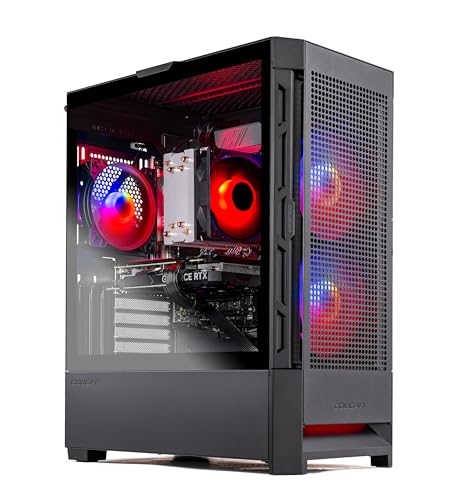
Where to buy
Check the latest price, availability and delivery on Amazon. Orders are placed on Amazon. We may earn a commission from qualifying purchases.
- Best value overall: Skytech Blaze4 Mini, Ryzen 7 5700, RTX 4060 Ti — Check on Amazon
- Thermaltake LCGS Quartz i1460, RTX 5060 — Check on Amazon
- CyberPowerPC Gamer Xtreme VR, RTX 4060, DDR5 (GXiVR8060A24) — Check on Amazon
- CyberPowerPC Gamer Xtreme VR, RTX 4060 Ti 16GB (GXiVR8040A14) — Check on Amazon
See 2 more Amazon options
- Skytech Archangel, RTX 4060, 32GB DDR5, 2TB SSD — Check on Amazon
- Skytech Nebula, Ryzen 5 5600X, RTX 4060 Ti — Check on Amazon
Read the full guide ↓
Disclosure: As an Amazon Associate, reviewstook.com earns from qualifying purchases. Links to Amazon on this page are affiliate links; they cost you nothing extra. Listing details such as price and availability change often, so check the current Amazon listing before you buy.
“Budget” is the most abused word in gaming PCs, and at $1,200 it needs redefining before it can mean anything. A budget PC at $400 is the cheapest machine that plays games at all. A budget PC at $1,200 is something different: it is the most performance you can extract from a four-figure budget without wasting money on parts that look good in a listing title and do nothing in a game. This guide is ranked by that standard — performance per dollar — not by who spends the whole $1,200, and not by who spends the least. Two of the six machines below sit toward the lower end of this budget rather than near its ceiling. They are in a $1,200 guide on purpose, because a value ranking that ignores them would be lying to you.
Here is the honest shape of this price band. The graphics cards that matter here are the GeForce RTX 4060, RTX 4060 Ti (in 8GB and 16GB forms) and the newer RTX 5060. Everything in this guide is a 1080p high-settings machine first, a strong high-refresh esports machine second, and a capable 1440p machine with DLSS upscaling third. What separates the picks is not the badge on the GPU — it is what the rest of the budget bought: 16GB of VRAM instead of 8GB, 32GB of system RAM instead of 16GB, a 2TB SSD instead of 1TB, a DDR5 platform with an upgrade path instead of a DDR4 platform at the end of its road, and a power supply with a name and a wattage instead of a mystery box. Value lives in those differences, and the reviews below weigh them one by one.
One warning belongs at the top, because it decides whether you should be reading this guide at all. If your monitor is a 1080p 60Hz or 75Hz panel and your games are the popular esports titles, a good machine from the lower end of this budget — two of which are reviewed below — will show you exactly the same picture as a machine near the top of this budget, and the money you do not spend is better spent on a 144Hz monitor, a second SSD later, or nothing at all. The extra money in this guide only earns its keep if you have (or plan to buy) a high-refresh display, play demanding single-player games at high settings, stream, or want the machine to stay comfortable for four or five years instead of two or three. If none of that is you, skip to the two value picks, check the current price on Amazon, and stop reading. That is what a budget guide is for.
In this guide
Quick Picks
Short on time, or comparing several options at once? Each row below names a buyer type and the machine that serves it best per dollar, with a link to the listing.
| Buyer type | Pick | Why it stands out | Link |
|---|---|---|---|
| Best value overall | Skytech Blaze4 Mini, RTX 4060 Ti | 4060 Ti performance positioned toward the lower end of this budget — check price on Amazon | Check on Amazon |
| Best current-generation value | Thermaltake LCGS Quartz i1460, RTX 5060 | Newest GPU in the guide with DLSS 4 — check the current price on Amazon | Check on Amazon |
| Best for stopping at $800 | CyberPowerPC Gamer Xtreme VR (GXiVR8060A24) | RTX 4060 on a DDR5 platform positioned at the lower end of this budget — check price on Amazon | Check on Amazon |
| Best VRAM value in this budget | CyberPowerPC Gamer Xtreme VR (GXiVR8040A14) | RTX 4060 Ti 16GB plus a Core i7 — check the current price on Amazon | Check on Amazon |
| Best RAM and storage value | Skytech Archangel | 32GB DDR5 and a 2TB SSD in a guide where 16GB/1TB is the norm | Check on Amazon |
| Best when positioned low in this budget | Skytech Nebula, RTX 4060 Ti | Strong value when positioned toward the lower end of this budget, weaker near the top — check price on Amazon | Check on Amazon |
How These Picks Were Chosen
Every machine below is a real Amazon listing. Prebuilt prices change often, so this guide does not print a fixed price for any pick. For linked picks, check price on Amazon and check the current price on Amazon before you buy; if a pick is currently positioned above this guide’s $1,200 budget ceiling, the correct budget move is to wait or buy a different pick, not to pay the premium.
The ranking metric is performance per dollar, applied in a specific order. First, the graphics card, because at 1080p and 1440p it decides most of what you see: the RTX 4060 Ti is meaningfully faster than the RTX 4060, and the 16GB version of the 4060 Ti removes the VRAM ceiling that the 8GB cards hit in newer games at high texture settings. Second, the platform around the card: a DDR5 motherboard with a current socket can take a faster CPU in three years; a DDR4 platform cannot, and that future upgrade is worth real value in a value calculation even though it never appears in a frame rate. Third, the supporting parts buyers forget to weigh — RAM capacity, SSD capacity, and whether the power supply is a named unit with headroom for a future GPU or an unbranded part you will replace the first time you upgrade.
We did not use these machines ourselves. We read the maker listings, model pages and specification records, and compared GPU model and VRAM, CPU, RAM type and capacity, storage, power supply ratings and case size. Where a listing is vague — and some are, particularly about power supplies and GPU brand — the review says so rather than filling the gap with a guess. One more filter sat on top of everything: no machine earned a place by spending the full $1,200 on decoration. RGB lighting, tempered glass and case styling are fine, but in a budget guide they rank below VRAM, memory and storage every time, and a machine that charges you for looks while shipping 8GB of VRAM and a 512GB drive did not make this list.
The 6 Best Budget Gaming PCs Under $1,200
Skytech Blaze4 Mini — Ryzen 7 5700, GeForce RTX 4060 Ti (ST-BLAZE4MINI-1266-B-AM)
Who it suits: The pure value hunter — the buyer who wants the fastest graphics card in this guide at the lowest documented price, and is willing to accept an older platform and a small case to get it.
Value rankings are usually arguments. This one is straightforward. The Blaze4 Mini pairs a GeForce RTX 4060 Ti — the fastest GPU tier in this guide alongside its 16GB sibling — with a position toward the lower end of this budget. For gaming today, the GPU is the part that decides your settings and your frame rate, and this machine puts the joint-best GPU tier in the guide at that lower-end position. Check price on Amazon before you buy. That is the whole case, and it is a strong one. The Ryzen 7 5700’s eight cores are plenty for gaming and light streaming, the 1TB SSD is the class norm, and the 650W Gold-rated power supply is a named, sensibly sized unit rather than a mystery — the part budget builders most often get cheated on, and did not here.
The compromises are real and they are all about tomorrow rather than today. The platform is DDR4 on AMD’s AM4 socket, which is at the end of its upgrade road: there is no meaningful CPU upgrade path that does not also mean a new motherboard and new RAM. The 16GB of DDR4-3200 is adequate now and will want a cheap second-hand upgrade in a few years. And the mini case that makes this machine desk-friendly also makes it the tightest working space in the guide — fine for a RAM or SSD swap, less fun for a future graphics card, whose length you will need to check against the case before ordering. None of that changes what this lower-end position in the budget buys you this year, which is why this is the top pick. It changes what the machine is worth in year four, and the review of the Thermaltake below is the counter-argument if longevity is your priority.
- RTX 4060 Ti performance positioned toward the lower end of this budget — check price on Amazon.
- Named 650W 80 Plus Gold power supply, not an unbranded unit.
- Compact mini case suits small desks and living-room setups.
Honest limitation: The AM4/DDR4 platform is a dead end for CPU upgrades, and the mini case limits future GPU size. You are buying today’s performance at a discount, not a upgrade platform.
Choose it if you want maximum frame rate per dollar now and expect to replace the whole machine rather than upgrade it. Skip it if you plan to drop a faster CPU or a large GPU into this case in three years — buy the DDR5 platform below instead.

Thermaltake LCGS Quartz i1460 — Intel Core i5-14400F, GeForce RTX 5060 (S2QT-B760-560-LCS)
Who it suits: Buyers who want the newest graphics technology in the guide — DLSS 4 with multi frame generation — on a current Intel platform, without paying the early-adopter premium this class of machine usually carries.
The RTX 5060 is the only current-generation graphics card in this guide, and Thermaltake’s Quartz i1460 sits comfortably inside this budget — check the current price on Amazon before you buy. In raw rendering terms the 5060 sits close to the RTX 4060 Ti machines here; what the newer card adds is DLSS 4 multi frame generation, which in supported titles can multiply displayed frame rates on a high-refresh monitor in a way the 40-series cards cannot match. Treat that feature honestly: it raises the number your monitor shows and the smoothness you perceive, it does not lower input latency the way real rendered frames do, and it only exists in games that support it. Judged without the feature, this is still a well-priced machine — a Core i5-14400F is a modern ten-core chip that will not bottleneck this GPU class, the 1TB NVMe drive matches the guide norm, and the 600W 80 Plus Gold power supply reported for this configuration is adequate for this card with modest headroom.
The value question with the Quartz is the memory: 16GB of DDR4, on an LGA1700 motherboard. That platform is newer than the AM4 machines here but it is also in its final generation, and DDR4 means the RAM cannot follow you to a future build. Against that, its position in this budget does the arguing — it sits as a current-generation alternative to the 16GB-VRAM CyberPowerPC below while offering a newer GPU and a newer CPU. Check the current price on Amazon for both on the day you buy; the choice is simple to state: the Quartz for current-generation features and high-refresh smoothness, the CyberPowerPC for double the VRAM and texture headroom in the heaviest games. Neither answer is wrong; they are answers to different questions about which future problem you would rather have.
- Only RTX 50-series machine in the guide — DLSS 4 multi frame generation for supported titles.
- Positioned comfortably inside this budget — check the current price on Amazon.
- Modern Core i5-14400F will not hold this GPU back at 1080p or 1440p.
Honest limitation: 16GB of DDR4 and a final-generation Intel socket limit the upgrade story, and frame generation is a smoothness feature, not a latency feature — competitive players should judge this machine on its rendered frame rate.
Choose it if you play supported single-player titles on a high-refresh monitor and want the newest feature set. Skip it if you mostly play competitive esports titles, where the 4060 Ti machines deliver their frames the old-fashioned way.

CyberPowerPC Gamer Xtreme VR — Intel Core i5-13400F, GeForce RTX 4060 (GXiVR8060A24)
Who it suits: The buyer this guide most wants to protect: the one with a $1,200 ceiling who does not actually need to spend up to that ceiling, and would be better off banking the difference.
This is the stop-at-$800 pick, and its case rests on two facts. First, its position: it sits at the lower end of this budget — check price on Amazon. Second, the platform: unlike the cheaper-feeling machines at this price, it is built on DDR5 with a Core i5-13400F, 16GB of DDR5 memory and a 1TB PCIe Gen4 SSD. That matters more to value than the badge suggests. The RTX 4060 inside is one tier below the 4060 Ti — at 1080p high settings the practical difference is real but modest, and at esports titles it is the difference between frame rates your monitor may not even display. What you get for accepting that one-tier step down is the newest memory platform in this price class, which keeps a genuine CPU and RAM upgrade path open, plus whatever you do not spend versus the top of this budget left in your pocket.
Spend a moment on what the money you do not spend is worth, because it is the heart of the budget argument. It can go toward a 144Hz 1080p monitor, which will improve every game you play more visibly than the step from a 4060 to a 4060 Ti. It can go toward a 2TB secondary SSD when the 1TB drive fills. It can go toward games, or toward the next GPU upgrade arriving earlier. A budget guide that cannot tell you when to stop spending is a sales brochure, and for the 60Hz-monitor owner, the esports player, and the first-time buyer who is not yet sure PC gaming is their hobby, this machine, when its current price on Amazon still sits at the lower end of this budget, is where to stop. If you later outgrow the 4060, the DDR5 platform means the rest of the machine does not need to be replaced with it.
- Positioned at the lower end of this budget — check price on Amazon.
- DDR5 platform at a DDR4-machine price — the upgrade path stays open.
- Leaves much of a $1,200 budget unspent for a monitor or storage, where it often does more good.
Honest limitation: The RTX 4060’s 8GB of VRAM is the ceiling you will feel first in newer games at high texture settings, and its value depends on its current position in this budget — if it is no longer positioned at the lower end, the value gap over the Blaze4 Mini narrows sharply.
Choose it if your monitor is 60–75Hz, you play esports or older titles, or this is a first gaming PC. Skip it if you already own a 144Hz+ monitor and play the newest single-player releases at high settings — that is what the 4060 Ti picks are for.
CyberPowerPC Gamer Xtreme VR — Intel Core i7-13700F, GeForce RTX 4060 Ti 16GB (GXiVR8040A14)
Who it suits: Buyers who play the newest, heaviest single-player games and want the one specification that cannot be upgraded later — VRAM — bought as cheaply as this guide can buy it.
Of everything in a gaming PC, the graphics card’s memory is the least forgiving shortcut, because it is soldered to the card and the card is the most expensive part to replace. The 8GB cards in this guide are fine today at 1080p with sensible texture settings; the trend of the last few years is that each year’s biggest releases ask for more. This CyberPowerPC is the guide’s answer: an RTX 4060 Ti with 16GB of VRAM — double every other pick — paired with a Core i7-13700F that is the strongest CPU in this guide, 16GB of DDR5 and a 1TB NVMe SSD. Check the current price on Amazon. When it sits within this $1,200 budget, no other machine here offers this combination of GPU memory and CPU headroom, and for a buyer who keeps a PC for five years, the extra VRAM is the single most likely reason this machine is still comfortable in year four while an 8GB card is turning textures down.
Now the honesty this pick demands, because it is the most price-sensitive machine in the guide. Its position in the market varies, and it can sit above this entire budget. When it sits within this $1,200 budget it is arguably the best value in the guide for a heavy-games player. When it sits above that ceiling it is not in this guide’s budget at all, and no amount of VRAM justifies pretending otherwise. So the rule is printed plainly: choose it only while its current price on Amazon keeps it at or under the $1,200 ceiling; if the live listing is above the ceiling, buy the Blaze4 Mini or the Thermaltake and do not look back. Note also what the extra money does not buy — storage and system RAM match the guide norm at 1TB and 16GB, so heavy multitaskers and big game libraries will still want the Archangel below, or an upgrade, before long.
- 16GB of VRAM — double every other pick — the longest-lived GPU specification in the guide.
- Core i7-13700F is the strongest CPU here, with headroom for streaming and background work.
- When positioned within this $1,200 budget, the value case is excellent — check the current price on Amazon.
Honest limitation: Its current price can cross above the $1,200 ceiling — this is a within-budget pick, full stop — and 16GB of system RAM and a 1TB SSD are merely average for this tier.
Choose it if you find it at $1,200 or below and play demanding new releases you want to keep at high texture settings for years. Skip it if the live price is above the ceiling, or your games are esports titles that will never touch the extra VRAM.

Skytech Archangel — Intel Core i5-14400F, GeForce RTX 4060, 32GB DDR5, 2TB SSD (ST-ARCH4-1247-W-AM)
Who it suits: Buyers whose bottleneck is not frame rate but capacity — big game libraries, streamers running a stack of background apps, and anyone who has ever uninstalled a game to install another one.
Most prebuilts in this class ship 16GB of RAM and a 1TB SSD, and most buyers discover the cost of that in year two: a second SSD, a RAM kit, an afternoon with the case open. The Archangel skips that chapter. It doubles both figures — 32GB of DDR5-5600 and a 2TB SSD — around a Core i5-14400F and an RTX 4060, with a named 650W Gold power supply. It sits near the top of this budget — check the current price on Amazon. Judge it as a bundle: weigh the RAM and storage upgrades the other picks will eventually need, and the Archangel’s premium positioning over a 16GB/1TB machine looks different, because that capacity arrives installed, matched and covered by one warranty instead of your own Saturday.
The trade is equally clear, and this guide will not hide it: the graphics card is the RTX 4060, not the Ti. In a guide ranked by performance per dollar, the Archangel is the one pick that spends its money somewhere other than the GPU, and a player choosing purely on today’s frame rate per dollar should buy the Blaze4 Mini and add storage later. The Archangel’s buyer is making a different, defensible calculation — that a machine balanced for the whole job, gaming plus streaming plus a 2TB library plus a browser with forty tabs, delivers more usable value than a faster card in a machine that keeps running out of room. If that description sounds like your desk, this is your pick; the white case and RGB are decoration on top of a genuinely practical specification.
- 32GB DDR5-5600 and 2TB SSD — double the guide norm on both, saving a near-certain future upgrade.
- Named 650W Gold power supply and a current Core i5-14400F.
- Capacity that other picks in this guide do not match without a later upgrade.
Honest limitation: You are paying for capacity, not speed — the RTX 4060 is a tier below the Ti machines, and near the top of this budget the value depends entirely on you actually needing the RAM and storage.
Choose it if you stream, multitask heavily, or keep a large installed library. Skip it if you play one or two games at a time and would rather have the faster GPU — buy the Blaze4 Mini instead.

Skytech Nebula — AMD Ryzen 5 5600X, GeForce RTX 4060 Ti (ST-NEBULA-0762-B-AM)
Who it suits: The patient buyer — someone willing to check the current price on Amazon rather than buy blind, because this machine’s value depends heavily on where it currently sits in this budget.
The Nebula’s hardware is easy to like. An RTX 4060 Ti, a Ryzen 5 5600X that remains a capable gaming CPU, 16GB of DDR4-3200, a 1TB NVMe SSD and a named 600W Gold power supply make a balanced 1080p and 1440p machine with no obvious corner cut. When it is positioned toward the lower end of this budget, it matches the Blaze4 Mini’s GPU tier with a roomier case, and this guide would rank it near the top — check price on Amazon to see where it sits today. The problem is the other position: when it sits near the top of this budget you are paying for a 4060 Ti and getting an older DDR4 platform, while the Thermaltake offers a newer GPU and the DDR5 picks offer a newer platform. That is poor value for this tier.
So the Nebula earns its place as a lesson as much as a pick. Prebuilt value is not a property of the machine alone; it is a property of the machine at its current position in this budget, on a day. Set your line before you shop — for this model, a position toward the lower end of this budget makes it competitive — and let the listing come to you. Skytech’s own note that the GPU brand may vary applies here as with its siblings; the GPU model and 8GB VRAM are the contracted specification, the badge on the cooler is not. If its current position in this budget is right on the day you check, buy with confidence. If it is sitting near the top of this budget, the correct budget decision is to close the tab.
- RTX 4060 Ti with a named 600W Gold PSU in a full-size case with easy access — check price on Amazon.
- When positioned toward the lower end of this budget, top-tier value in this guide.
- Balanced specification with no hidden corner cut.
Honest limitation: When positioned near the top of this budget it is poor value, on an end-of-life DDR4 platform. This is the most timing-dependent pick in the guide.
Choose it if you find it positioned toward the lower end of this budget and want 4060 Ti performance in an easy-to-service tower. Skip it if it is positioned near the top of this budget — in that position the Thermaltake and the 16GB CyberPowerPC are better buys.

Comparison Table
| Product | GPU / VRAM | Platform | Best use | Link |
|---|---|---|---|---|
| Skytech Blaze4 Mini | RTX 4060 Ti / 8GB | Ryzen 7 5700, DDR4 | Maximum frame rate per dollar — check price on Amazon | Check on Amazon |
| Thermaltake LCGS Quartz i1460 | RTX 5060 / 8GB | i5-14400F, DDR4 | Newest GPU features — check price on Amazon | Check on Amazon |
| CyberPowerPC GXiVR8060A24 | RTX 4060 / 8GB | i5-13400F, DDR5 | Stop-at-$800 value — check price on Amazon | Check on Amazon |
| CyberPowerPC GXiVR8040A14 | RTX 4060 Ti / 16GB | i7-13700F, DDR5 | VRAM longevity — check price on Amazon | Check on Amazon |
| Skytech Archangel | RTX 4060 / 8GB | i5-14400F, DDR5, 32GB, 2TB | RAM and storage capacity without upgrading | Check on Amazon |
| Skytech Nebula | RTX 4060 Ti / 8GB | Ryzen 5 5600X, DDR4 | Top value only when positioned low in this budget | Check on Amazon |
How to Choose a Budget Gaming PC Under $1,200
- Rank by GPU per dollar first. Note each machine’s graphics card, check the current price on Amazon, then compare like with like. A 4060 Ti positioned lower in this budget beats a 4060 positioned higher in this budget every day of the week, whatever the listing titles claim.
- Price the VRAM, not just the card. The 16GB 4060 Ti and the 8GB 4060 Ti share a name and little else in longevity. If you play new releases at high textures and keep machines for years, VRAM is the specification to pay for; if you play esports titles, it is money wasted.
- Check which platform your money is standing on. DDR5 machines here (both CyberPowerPC picks, the Archangel) can grow; DDR4 machines (Blaze4 Mini, Quartz, Nebula) are finished platforms bought for today’s price. Both are legitimate — at the right price. Never pay a platform premium for a dead platform.
- Count the upgrades you will not have to buy. A 2TB SSD and 32GB of RAM are worth real money in future parts. A machine that includes them is better value than its position in this budget suggests; a 512GB machine will cost you more later than its position suggests.
- Read the power supply line before the RGB line. Every pick in this guide names a wattage and, in most cases, an 80 Plus rating between 600W and 650W. If a listing outside this guide hides the PSU, assume it is the cheapest part in the box and budget to replace it before any GPU upgrade.
- Decide your walk-away point before you open the listing. Prebuilt prices in this band move substantially around sale events. Treat this guide’s $1,200 ceiling as that point; a machine above its ceiling is not a worse machine, it is a worse deal, and waiting is a legitimate buying strategy.
- Match the machine to the monitor you own, not the one in the advertisement. On a 60Hz display, everything in this guide shows the same frames. The extra tiers only pay off on 144Hz+ panels — so if you need a monitor too, the correct budget build may be a lower-end machine in this guide plus the display.
- Ignore the word “budget” in listing titles entirely. Sellers apply it to everything from $400 iGPU boxes to this entire price band. The specification table and the current listing are the only honest parts of any listing.
What “Budget” Means at $1,200: The Value Ladder
It helps to see this budget as a ladder with three rungs, because most buyers should stop on the first or second one. The first rung, at the lower end of this budget around the $800 tier, covers the RTX 4060 and 4060 Ti machines that open this guide. For 1080p gaming — which is what the large majority of players actually do — this rung is not a compromise. Esports titles run at frame rates beyond most monitors, and single-player games run at high settings. If your gaming looks like that sentence, the ladder ends here and the money you do not spend belongs to a monitor, storage, or your savings.
The second rung, in the middle of this budget, covers the current-generation RTX 5060. This is the rung for high-refresh players: the people with 144Hz and 240Hz monitors who can actually see the frames the extra money renders, and who benefit from DLSS 4’s frame generation in supported games. The third rung, near the top of this budget up to the $1,200 ceiling, buys insurance rather than speed — 16GB of VRAM, a stronger CPU, double RAM and storage. Insurance is worth buying if you keep machines for four or five years and play each year’s most demanding releases. It is worth nothing if you upgrade every two years or your games are a fixed handful of titles, because you will sell the machine before the insurance pays out. The most common budget mistake at this level is not buying too little PC. It is buying the third rung to use as the first.
Performance Per Dollar, Explained Honestly
Performance per dollar sounds like a single number, and sellers would love you to treat it as one. In practice it has a time dimension that listing pages never show. A machine’s value on day one is its frame rate for its position in this budget — by that measure the Blaze4 Mini wins this guide outright. Its value across five years adds everything you will spend to keep it current: the RAM kit the 16GB machines will want, the SSD the 1TB machines will fill, the platform replacement the DDR4 machines cannot avoid. By that measure the 16GB-VRAM CyberPowerPC and the 32GB/2TB Archangel close much of the gap, because their first owners will spend the least after purchase day.
Neither measure is the true one; the true one is the measure that matches how long you keep a PC and what you play on it. Short-cycle buyers and esports players should weight day-one value almost entirely. Long-keepers playing new releases should weight the five-year figure. What this guide refuses to do is blend the two into a single ranking that serves nobody — which is why each review names its buyer instead of pretending to be for everyone, and why two lower-end machines and four dearer ones can share one list without contradiction.
Common Buying Mistakes
- Spending the full $1,200 because it is there. A budget is a ceiling, not a target — two of the best machines in this guide sit around the $800 tier, and the money you do not spend is part of their value.
- Buying a $1,200 PC for a 60Hz monitor. The display shows sixty frames a second no matter what you spend; upgrade the monitor first or buy the cheaper machine.
- Comparing listing titles instead of specifications. “RTX 4060 Ti” in a title may be the 8GB or 16GB card; “budget” may mean anything; the spec table and model number are the truth.
- Paying a top-of-budget position for a machine whose value depends on sitting low in the budget. The Nebula positioned low in this budget and the same Nebula positioned near the top are different purchases wearing one name. Check the current price on Amazon against this guide’s ceiling, not against the ceiling in your head.
- Ignoring VRAM because today’s games fit. Textures only move one direction, and VRAM cannot be upgraded without replacing the card — the most expensive part in the box.
- Buying a dead-end platform at a premium position. DDR4/AM4 and final-generation Intel machines are fine value when positioned low in this budget and poor value when positioned near the top, because every future upgrade becomes a rebuild.
- Forgetting the cost of small storage. A cheap machine with a 512GB SSD is a machine plus a future SSD purchase; price the whole ownership, not the checkout total.
- Trusting frame-generation numbers as raw performance. DLSS multi frame generation raises displayed smoothness in supported titles; it does not reduce input lag, and it does nothing in unsupported games.
Final Recommendation
- Best value overall: Skytech Blaze4 Mini — 4060 Ti performance positioned toward the lower end of this budget; check price on Amazon.
- Best current-generation buy: Thermaltake LCGS Quartz i1460 — RTX 5060 and DLSS 4; check the current price on Amazon.
- Best reason to stop at $800: CyberPowerPC GXiVR8060A24 — DDR5 platform positioned at the lower end of this budget; check price on Amazon.
- Best long-term insurance: CyberPowerPC GXiVR8040A14 — 16GB of VRAM, but only at $1,200 or below.
- Best capacity value: Skytech Archangel — 32GB RAM and 2TB storage; check the current price on Amazon.
- Best for patient shoppers: Skytech Nebula — strong value when positioned low in this budget, a skip when positioned near the top.
Our top two value picks are the Blaze4 Mini, for the simple logic of the fastest GPU tier at a lower-end position in this budget, and the Thermaltake Quartz i1460, for buyers who would rather have the current generation’s features on a newer CPU. Between them they cover the two honest ways to be a budget buyer at $1,200: stay around the $800 tier brilliantly, or move higher in the budget for the newest platform your money reaches. If your monitor is a basic 60Hz panel, read Best Budget Gaming PC Under $800 before spending anything more, and if your ceiling is genuinely flexible, Best Budget Gaming PC Under $1500 shows what the next step actually adds. Set your walk-away point for the pick you choose, check the current price on Amazon against it, and let a poor position in this budget talk you out of a good machine — at this budget, patience is a specification too.
Frequently Asked Questions
Is $1,200 really a “budget” gaming PC?
Not in the entry-level sense — it is roughly triple the price of the cheapest machines that play games. At this level “budget” means value discipline: the most performance per dollar in the four-figure band, with no money wasted on decoration or on specifications your monitor and games cannot use. That is why this guide happily recommends staying around the $800 tier of a $1,200 budget when that tier buys the same picture.
Should I spend $1,200 or stop at $800?
Stop at $800 if your monitor is 1080p at 60–75Hz, if you mainly play esports or older titles, or if this is a first PC and you are unsure the hobby will stick — the CyberPowerPC GXiVR8060A24 and Skytech Blaze4 Mini in this guide are exactly those buys. Spend toward $1,200 if you own a 144Hz+ monitor, play demanding new releases at high settings, stream, or keep a PC for four-plus years and want the VRAM and platform headroom to match.
Which is the better value, the RTX 4060 Ti or the RTX 5060?
Judged by position in this budget, the 4060 Ti in the Blaze4 Mini is the stronger raw value — similar rendered performance from a lower position in this budget; check price on Amazon for both. The RTX 5060 in the Thermaltake adds DLSS 4 multi frame generation and a newer platform from a higher position in this budget. If your games support frame generation and your monitor is high-refresh, that step up can be worth it; for rendered-frame value alone, the Ti wins.
Is 8GB of VRAM a problem at this budget?
At 1080p with high (not maximum) texture settings, 8GB is workable today in most titles, and all the esports games run without issue. The pressure appears in the newest releases at ultra textures and grows each year. If you keep a PC a long time and play those releases, the 16GB 4060 Ti in this guide exists precisely for you; everyone else can treat 8GB as an acceptable place to save money.
Can a budget PC under $1,200 handle 1440p?
Yes, with the right expectations. The 4060 Ti and RTX 5060 machines here play many titles at native 1440p with high settings and most of the rest comfortably with DLSS upscaling; the plain RTX 4060 machines are better thought of as 1080p-first with 1440p available via upscaling. For a dedicated 1440p-first shortlist, see Best Budget Gaming PC For 1440p Gaming Under $1200.
Why does this guide not print a fixed price for each PC?
Because prebuilt prices move, and a single printed price would be wrong most of the time. Instead, each review describes where a pick sits in this budget — toward the lower end, in the middle, or near the $1,200 ceiling — and whether that position makes it good value. Check the current price on Amazon for the pick you choose, compare it with this guide’s $1,200 ceiling, and treat a position above that ceiling as a reason to wait.
- Best Budget Gaming PC Under $1200
- Best Budget Gaming PC Under $800
- Best Budget Gaming PC Under $1500
- Best Budget Gaming PC For Beginners Under $1200
- Best Budget Gaming PC For Streaming Under $1200
- Best Budget Gaming PC For Small Spaces Under $1200
- Best 1080p Gaming PC Under $1200
- Best Gaming PC Under $1200
- Best Prebuilt Gaming PC Under $1200


