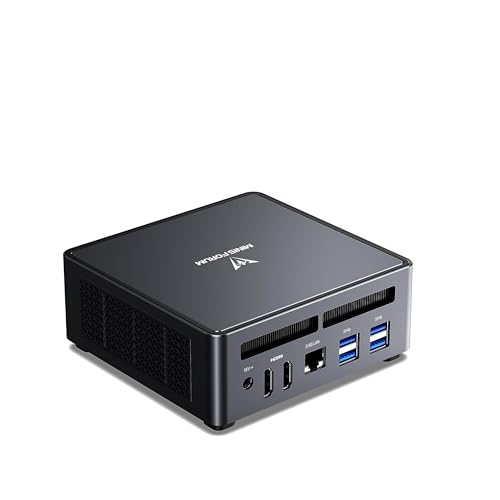
Where to buy
Check the latest price, availability and delivery on Amazon. Orders are placed on Amazon. We may earn a commission from qualifying purchases. Every product below is a barebones kit: the price buys the case, board, processor and cooler only — no RAM, no SSD and no operating system unless a review says otherwise, so budget for those parts before comparing any price here with a complete mini PC.
- Best overall for a small space: MINISFORUM UM790 Pro Barebone (Ryzen 9 7940HS, no RAM/SSD) — Check on Amazon
- ASRock DeskMini X600 (USB4) AM5 Barebone Kit — Check on Amazon
- AOOSTAR GEM12+ PRO Barebone (Ryzen 7 PRO 8845HS, OCuLink) — Check on Amazon
- MINISFORUM MS-01 Barebone (Core i5-12600H, dual 10GbE, PCIe slot) — Check on Amazon
See 2 more Amazon options
- ASRock DeskSlim X600 AM5 Barebone (PCIe 5.0 x16 slot for a low-profile GPU) — Check on Amazon
- MINISFORUM MS-A1 Barebone with Ryzen 9 9950X (no RAM/SSD) — Check on Amazon
Read on ↓
Disclosure: As an Amazon Associate, reviewstook.com earns from qualifying purchases. Links to Amazon on this page are affiliate links; they cost you nothing extra. Listing details such as price and availability change often, so check the current Amazon listing before you buy.
Small is the one thing every machine in this guide already is — a box measured in litres or fractions of one. So this variant grades the differences the headline size hides: which kit is genuinely smallest where it counts, which extra objects the setup recruits onto the desk (a GPU dock, a cooler the kit left out, 10-gigabit cabling), and whether the machine can vanish behind a monitor or must sit out in the open. Those differences decide whether a tiny PC solves a small-space problem or merely moves it six inches to the left.
Two honesty rules govern the whole list. First, the barebones rule: a kit’s sticker price is not a working PC’s price. Every pick below still needs memory and storage before it boots — and on the two ASRock kits, a processor as well; one ships without even a CPU cooler. For every pick, check the current price on Amazon, and remember that completing the kit — not the kit alone — is the real cost to plan against. Second, a measurement rule: where the research documents a volume or dimensions, those figures are printed; where it does not, the pick is graded by class — smallest soldered boxes, socketed kits, the single 5-litre exception — and the gap is stated openly instead of papered over. The same discipline covers mounting: no VESA pattern or bracket is documented for any pick, so none is promised.
Apply both rules and $1,200 still buys remarkably well: AMD’s Radeon 780M — the integrated chip that makes genuine 1080p gaming possible without a graphics card — fitted three different ways; a socketed AM5 platform whose footprint is documented to the millimetre; the flattest networked slab in the category; a 5-litre kit with a genuine internal graphics-card slot; and a 16-core desktop flagship completed inside the budget. Check the current price on Amazon before ordering, because listings change often. If you actually want a small PC with nothing left to build, finished machines live in Best Mini PC Under $1200 and Best Mini Gaming PC Under $1200; this guide is for buyers happy to trade twenty minutes with a screwdriver for the saving.
In this guide
Quick Picks
Short on time? Each row names the space problem and the kit that answers it. Every pick is the barebone alone — budget for the parts needed to complete it, and check price on Amazon for the current listing.
| Space problem | Pick | Why it stands out | Link |
|---|---|---|---|
| Smallest desk, real gaming | MINISFORUM UM790 Pro Barebone | Ryzen 9 7940HS and Radeon 780M in the smallest soldered class; just add RAM and SSD | Check on Amazon |
| A shelf or a narrow ledge | ASRock DeskMini X600 (USB4) | Documented 1.92 litres (155×155×80mm); socketed AM5 kit at the accessible end of this budget | Check on Amazon |
| Small now, GPU dock later | AOOSTAR GEM12+ PRO Barebone | OCuLink port and a status screen on top | Check on Amazon |
| Flat spaces: behind a monitor, under a shelf | MINISFORUM MS-01 Barebone (i5-12600H) | Documented ~1.78 litres at 48mm tall (196×189×48mm), with dual 10GbE and a PCIe slot | Check on Amazon |
| A TV stand with room to grow | ASRock DeskSlim X600 | 5 litres (95×235×220mm) — the biggest box here, and the only one with an internal GPU slot | Check on Amazon |
| Maximum CPU in a book-sized box | MINISFORUM MS-A1 (Ryzen 9 9950X) | A 16-core desktop Zen 5 chip included; the ceiling of this budget | Check on Amazon |
How These Picks Were Chosen
To qualify, a product had to be a genuine barebone on a real, verified Amazon US listing — case, board and power supply at minimum, with memory and storage left for the buyer to add. Not one of the six is a complete PC wearing a barebone label, and no marketplace listing, grey import or manufacturer-store-only product was admitted as a pick. The six are the same six verified in the base guide, Best Barebones Mini PC Under $1200 — the same ASINs and specification research — re-graded here on space.
So the six picks compare like for like, one standard basket is used everywhere: a 32GB DDR5 memory kit plus a 1TB NVMe SSD. Memory pricing is volatile — check the current price on Amazon for the kit and the drive before you total a build. Notebookcheck has reported the 2026 memory shortage driving exactly this squeeze, and the usual advice — wait for prices to fall — currently works backwards. No operating system is included in any completion: Linux and SteamOS cost nothing here, and Windows buyers should add a licence they do not already own.
This variant then layers the space grading over that shared method: documented volumes and dimensions where the research records them; form-factor class where it does not, stated as class and never dressed up as measurement; the adapter treated as part of the installation, with wattage variants flagged where a bundle’s contents change them; ports read as placement facts — what plugs in at the front, what projects from the back, what a port demands before it works; and every hidden second object — a dock, a cooler, a transceiver — counted in the footprint rather than discovered after delivery. For every pick, check the current price on Amazon: this market reprices with memory promotions and marketplace sellers, sometimes weekly.
The Space You Cannot See on the Spec Sheet
A listing measures the box. A small room has to accommodate the box, the brick, the cables and the heat — four tenants, only one in a product title.
The brick is furniture. All six picks run from an external adapter, and the adapters differ enough to plan around. The DeskMini’s 120W unit is the smallest brick in the guide. The DeskSlim’s standard adapter is a 240W unit, with a 330W option for hungrier graphics cards — the largest power object here, and the one that most needs a floor position or a low shelf of its own rather than a gap behind the TV stand. Every adapter also dictates a cable run: budget the brick a home — a floor corner, a cable tray, the back of a shelf — before you budget the computer one.
Heat is a placement rule, not a footnote. Small does not repeal physics: a mini PC’s watts leave as heat, through vents that need unblocked air. The documented case in point is the UM790 Pro, reported by owners and reviewers to run in the high 80s Celsius under sustained load — a machine that wants open air and will not forgive a sealed cabinet or a closed-back cubby. Keep clear space around the vents, never stack anything on a working mini PC, and treat “it fits in the drawer” as storage, not operation. A box that fits but cannot breathe has not solved a space problem; it has scheduled a failure.
Hidden boxes belong in the footprint. Three picks recruit a second object. On the GEM12+ PRO and the MS-A1, the OCuLink port’s promise is an external GPU dock — a desktop-sized box with its own power supply; the computer stays small, the installation does not. The DeskSlim arrives without a CPU cooler, making a low-profile cooler a fourth purchase before the case can close. The MS-01’s 10-gigabit ports are SFP+, so each needs a transceiver or DAC cable before anything connects, and those connectors project from the rear of a chassis only 48mm tall. None of this disqualifies a pick; all of it belongs in the space budget.
Mounting is a question, not an assumption. No VESA pattern or included bracket is documented for any of the six picks, so this variant promises no monitor-back or wall mounting for any of them. Confirm it on the live listing’s contents list before planning a floating setup — do not assume it from product photos.
The 6 Best Barebones Mini PCs for Small Spaces Under $1,200
MINISFORUM UM790 Pro Barebone — Ryzen 9 7940HS, Radeon 780M
Who it suits: The small-desk gamer who wants the least building and the most gaming: a top-tier mobile Ryzen and AMD’s strongest integrated graphics, in the smallest class of box here, with only memory and storage left to choose.
The processor is already fitted — a Ryzen 9 7940HS, eight Zen 4 cores and sixteen threads boosting to 5.2GHz — and the graphics need no apology: the Radeon 780M plays modern titles at 1080p under sensible settings and handles esports at high frame rates. Around it sit two DDR5 SO-DIMM slots good for 64GB, two M.2 2280 PCIe 4.0 slots, Wi-Fi 6E and Bluetooth 5.3, 2.5-gigabit Ethernet, twin USB4 ports and dual HDMI 2.1 outputs. No chassis dimension is documented for this pick, so it is graded by class — the smallest soldered class here — with the exact footprint left to the live listing. For the barebone itself, check the current price on Amazon: this is a pick that can repay a week of patience, because its listing moves within the middle of this budget.
Completion is the simplest arithmetic in the guide: add the standard basket and the finished PC still completes comfortably inside this budget, typically for less than the complete 32GB/1TB version — check price on Amazon for both. Its small-space case rests on absence: the finished installation is the PC, its adapter and your cables. The qualification is thermal: owners and reviewers report sustained-load temperatures in the high 80s Celsius, dictating placement — open desk or open shelf, vents clear, never a sealed cabinet or closed-back cubby. One hands-on warning: the bottom plate is wired to the motherboard with short, thin leads, so open the case slowly when your RAM and SSD go in; gently it is a careful ten minutes, rushed it becomes a repair.
- The gaming hardware is already inside: 7940HS plus 780M is the strongest pairing in this guide.
- Nothing else to house — no dock, cooler or card joins the setup later.
- Check the current price on Amazon — the barebone route leaves room in this budget for the parts you still need.
Honest limitation: Sustained-load heat (high 80s °C reported) rules out enclosed placement, the wired bottom plate punishes rushed upgrades, and graphics are soldered at 780M level for life.
Choose it if your small space offers an open desk or shelf and you want to be gaming tonight with the least building. Skip it if the PC must live inside furniture, or if you will want a discrete GPU later.

ASRock DeskMini X600 (USB4) — Socketed AM5 Barebone Kit
Who it suits: Builders with a shelf or ledge to fill, who want to choose everything — CPU included — and end with the cheapest genuinely modern finished PC in this guide.
The DeskMini is a different species of barebone: not a finished computer missing its memory, but a platform — case, Mini-STX motherboard, 120W adapter and a basic CPU cooler — waiting for a socketed AMD AM5 processor. Its size is properly documented, one of only three here: 1.92 litres, at 155×155×80mm — a 155mm-square base that parks on a shelf or bookcase ledge without overhang, and 80mm of height that must fit the shelf gap above it, a gap that must also hold its exhaust air. Into the socket go Ryzen 7000, 8000 and 9000 series chips up to 65W, so the same kit can become a frugal office box or, around a Ryzen 7 8700G, a gaming mini PC whose Radeon 780M matches the best integrated graphics here. Check the current price on Amazon for the kit — it sits at the accessible end of this budget. The board is current-generation: two DDR5 SO-DIMM slots (6400MHz+ with overclocking, up to 96GB); Gen5 and Gen4 M.2 slots; two 2.5-inch SATA bays; 2.5-gigabit Ethernet; and a 40Gbps USB4 port — subject to ASRock’s own caveat that USB4 runs through the processor and works with an 8000G-series APU fitted.
Honest costing here includes the processor: the natural partner is the Ryzen 7 8700G, so the realistic build is the kit, plus that APU, plus the standard basket — check the current price on Amazon for each part. The result is still the most accessible finished 780M gaming PC in this guide, well inside this budget, with a socket that lets you swap the CPU instead of replacing the PC. The cooler envelope is 47mm tall, so the included basic cooler or a low-profile replacement must fit inside it. There is no PCIe slot, so graphics stop at integrated level or continue via an external dock — and a dock is a second box. Wi-Fi is a build step here: the non-W model has an M.2 Key-E slot but no bundled card, so a Wi-Fi kit joins the parts list unless you buy the X600W variant, which bundles one. The central offer stands: the most shelf-friendly documented footprint in the guide, with a future inside it.
- A footprint you can plan around: 1.92 litres and 155×155×80mm, documented rather than estimated.
- The accessible socket: no other pick at this end of the budget lets you choose — and later replace — the CPU.
- Finished with an 8700G, the lowest completed total in the guide — check price on Amazon for the kit and the parts.
Honest limitation: Graphics stop at integrated level (no PCIe slot), the CPU ceiling is 65W, the cooler must fit 47mm, and Wi-Fi is a card you bring yourself on this version.
Choose it if a shelf or ledge is your space and building is part of the pleasure — the smallest documented footprint and the most future-proof platform here. Skip it if you need Wi-Fi without extra parts, a graphics card inside the case, or a machine that works the day it arrives.

AOOSTAR GEM12+ PRO Barebone — Ryzen 7 PRO 8845HS, OCuLink
Who it suits: The planner in a small room: strong integrated graphics now, an external-GPU door open for later — with the discipline to count the dock in the footprint before choosing it.
AOOSTAR is the smallest brand in this guide, and this is its flagship trick: a barebone built around the Ryzen 7 PRO 8845HS — eight Zen 4 cores boosting to 5.1GHz, Radeon 780M graphics, the same gaming-capable pairing as the UM790 Pro — in an aluminium shell with a 2.68-inch status screen on its top face, showing temperatures and load. That screen is a placement instruction in disguise: the top of this machine is its dashboard, so it wants to sit visible and reachable, not beneath a shelf where its one party trick faces the woodwork. Beneath the shell: two DDR5-5600 SO-DIMM slots rated up to 128GB, dual M.2 slots, dual 2.5-gigabit Ethernet, USB4, Wi-Fi and vapor-chamber cooling — and the port that defines the machine, OCuLink. As with the UM790 Pro, no chassis dimensions are documented, so it is graded in the smallest soldered class, exact footprint left to the live listing. Its price needs a pause: check the current price on Amazon, because this listing moves — and this is a pick where checking the live price matters more than usual.
Completed on integrated graphics with the standard basket, the machine completes well inside this budget — among the most accessible finished 780M routes here, and for less than the configured version of the same machine (24GB/1TB). Check price on Amazon for both. OCuLink docks a full desktop graphics card externally at far less performance loss than a Thunderbolt dock — and the dock is a desktop-sized box with its own power supply, living beside the mini PC it feeds. In a small room the real comparison is therefore not mini PC against mini PC; it is mini PC plus dock against the 5-litre DeskSlim with the card inside. OCuLink refuses to hot-plug: the eGPU ritual runs power down, connect, power up. Add PCIe 4.0-capped storage and a support network that is a minnow beside Minisforum’s or ASRock’s, and the pick is in focus: the smallest start in the guide, with the largest asterisk about where it can grow.
- 8845HS and 780M graphics now, with OCuLink holding the door for a desktop GPU.
- A top-mounted status screen and fingerprint login no rival here offers.
- Among the most accessible completed totals of any 780M machine here — check price on Amazon.
Honest limitation: Its graphics future arrives as a second box on the desk, its listing price can move, so the live listing needs a careful check, storage is capped at PCIe 4.0, and AOOSTAR’s support network is the smallest here.
Choose it if an external GPU is genuinely in your plans and the desk has a measured home for the dock when it comes. Skip it if the machine will live hidden (its screen wants an audience), if you need a strong support network, or if “later” means never.

MINISFORUM MS-01 Barebone — Core i5-12600H, Dual 10GbE, PCIe Slot
Who it suits: Anyone whose small space is flat — behind a monitor, under a shelf, on a shallow rack ledge — and whose “mini PC” is really a small server on a gaming desk.
The MS-01’s shape is documented, and no other pick shares it: roughly 1.78 litres at 196×189×48mm. The 48mm height is the headline for a small room — a chassis that slides into flat gaps other boxes cannot use, under a shelf or behind a screen, with a footprint closer to a hardback book stood on edge than to a computer. Inside that slab sit a Core i5-12600H (twelve cores, sixteen threads, up to 4.5GHz), two 10-gigabit SFP+ ports on an Intel X710 controller, two further 2.5-gigabit Ethernet ports, three M.2 slots including U.2 support, two USB4 ports, Intel vPro — and a low-profile PCIe 4.0 x16 slot, the feature that changes what a mini PC can become: the listing itself cites support for compact desktop graphics cards of the RTX 3050 class. Check the current price on Amazon for the barebone.
Its space caveats concern what hangs off the back. An SFP+ port does not accept an ordinary Ethernet cable: each needs a transceiver or a DAC cable, and those connectors and their cable bends form part of the depth you must leave behind a chassis this flat — measure the cable drop, not just the case. The base guide’s gaming honesty applies with equal force: as it leaves the box, graphics are Intel Iris Xe, the weakest gaming GPU in this line-up — capable with esports and older titles at modest settings and superb at driving monitors, but not a 1080p AAA chip. Add the standard basket and the finished machine still completes inside this budget; the complete 32GB/1TB version sits much higher in this budget, so the barebone route can save meaningfully — check price on Amazon for both. Buy it only if one of two conditions is yours: your real workload is the homelab — virtual machines, containers, a firewall, a NAS brain — with gaming as a side dish; or you intend to use the PCIe slot, fitting a low-profile card (an extra purchase on top of the totals above) and giving it a desktop GPU inside, with 10-gigabit networking besides.
- The flat-space specialist: a documented ~1.78 litres and only 48mm tall (196×189×48mm).
- Networking in another league: dual 10GbE SFP+ alongside dual 2.5GbE.
- Check price on Amazon — the barebone route leaves more of this budget for memory and storage than the complete 32GB/1TB version.
Honest limitation: Iris Xe is the weakest gaming graphics in the guide, and the SFP+ ports need transceivers or DAC cables whose bend radius adds genuine depth behind the chassis.
Choose it if your space is a flat gap and networking, storage or a homelab is the real job. Skip it if hard gaming on integrated graphics from day one is the plan.
ASRock DeskSlim X600 — The PCIe-Slot AM5 Kit
Who it suits: The builder whose “small space” is a TV stand or media unit with one honest compartment — and who refuses to accept “integrated graphics forever” as the price of using it.
The DeskSlim answers the DeskMini’s one structural compromise, and its dimensions are documented: 5 litres, at 95×235×220mm. It is the biggest box in this guide — nearly three DeskMinis — but big in the dimensions a TV stand forgives, wide and deep like AV equipment, under 100mm tall, taking a media-unit shelf like a console, not a PC. What the volume buys is a PCIe 5.0 x16 slot accepting a low-profile, dual-slot graphics card up to 200mm long, inside the case. Around it sits the most desktop-like platform here: a socketed AM5 board taking Ryzen 7000, 8000 and 9000 processors up to 120W — twice the DeskMini’s ceiling — four full-size DDR5 DIMM slots good for 256GB at 7200MHz and beyond with overclocking, one Gen5 and one Gen4 M.2 slot, two SATA ports, 2.5-gigabit Ethernet and USB4. Check the current price on Amazon for the kit — it sits at the accessible end of this budget.
Two space costs hide in this pick’s fine print. The first is the brick: a 240W adapter ships as standard and a 330W option exists, so confirm which adapter a bundle includes and what card it supports before ordering — in a 5-litre chassis the power budget is the real GPU compatibility list, and a 240W-class brick is a floor-or-low-shelf object with a cable run to plan. The second is the cooler, which this kit does not include: budget a low-profile unit up to 71mm tall as a fourth line item. The build maths: the kit, plus the same 8700G if you start on integrated graphics, plus the basket, plus the cooler — check the current price on Amazon for each part; the build still completes inside this budget. What the money and litres buy is a future no other pick offers: start on the 8700G’s 780M, and when a low-profile desktop card fits your budget, the DeskSlim grows a genuine internal discrete GPU — no dock, no cable, no second box. That trade — one bigger box now instead of a small box plus a dock later — is often the tidier answer in a small room, provided the compartment is ventilated: a 120W platform with a discrete card inside is the warmest setup in this guide, and a closed media cabinet is no place for it.
- The only internal route to a desktop GPU: a PCIe 5.0 x16 slot inside the case.
- AV-shelf proportions, documented: 5 litres at 95×235×220mm, under 100mm tall.
- A 120W socketed AM5 ceiling and four desktop DIMM slots — the most desktop-like platform here.
Honest limitation: The biggest box in the guide at 5 litres, a low-profile-only GPU envelope, no cooler in the box, and the largest adapter here at 240W.
Choose it if an internal graphics card is the plan, now or later, and your TV stand offers one ventilated compartment. Skip it if your space is a shallow shelf (this is the deepest box here), if you want the build finished in twenty minutes, or if a full-height graphics card is non-negotiable.

MINISFORUM MS-A1 Barebone with Ryzen 9 9950X — The Ceiling of the Budget
Who it suits: CPU-first buyers — compiling, rendering, virtual machines, heavy multitasking — who want the most processor completable under $1,200, in a box that asks for very little room.
One pick marks the ceiling. The MS-A1 listing used here has AMD’s Ryzen 9 9950X already fitted: sixteen Zen 5 cores and thirty-two threads boosting to 5.7GHz — a flagship desktop processor of the kind that anchors high-end workstations — inside Minisforum’s socketed AM5 mini workstation, sold barebone with no RAM and no SSD. Check the current price on Amazon; add the standard basket and the finished machine still completes inside this budget — the most expensive completion in the guide, near its ceiling, because it still fits. No chassis dimensions are documented for this pick, so it is graded by class — a book-sized workstation box. Around the processor sit four M.2 slots (one Gen5, three Gen4), OCuLink for an external GPU, dual 2.5-gigabit Ethernet and an active cooling system Minisforum claims holds CPU noise around 37dB at full load — the maker’s figure, quoted as a claim, not a measurement. The CPU-less version of the same barebone has been promoted through Minisforum’s own store at the lower end of this category; no pinnable Amazon listing for it was found, so it is context, not a seventh pick.
Its limitations decide whether the pick is genius or nonsense for you. Graphics first: the 9950X’s built-in Radeon graphics are a display adapter, not a gaming GPU — fine for monitors, video playback and desktop work, far behind the 780M machines above for games. As a gaming machine the MS-A1 only makes sense with an OCuLink eGPU budget on top, and a dock is the second box this variant keeps warning about: MS-A1 plus dock is a two-object installation, and the room must hold both. Sustained load second: sixteen desktop cores in a mini chassis will not hold tower-class boost clocks through an all-day render — the cooling is good, physics is physics, and a box working that hard wants open air. One honest alternative sits inside the budget: step sideways to the DeskMini with an 8700G and accept integrated graphics as the destination rather than the compromise.
- A 16-core Zen 5 flagship already fitted: more CPU than the rest of the guide combined, nearly.
- A workstation’s connections in a book-sized box: socketed AM5, four M.2 slots, OCuLink, dual 2.5GbE.
- The finished build sits near the ceiling of this budget — as far as the $1,200 budget verifiably goes in this category — check price on Amazon.
Honest limitation: Integrated graphics fit for displays rather than games — gaming only makes sense with an OCuLink eGPU budget on top, and that dock is a second box the room must hold.
Choose it if processor work is the point and gaming is secondary, or funded by an eGPU you have measured room for. Skip it if gaming comes first — at this money the 780M machines, or a small tower, serve you better.

Comparison Table
For every product in this table, check the current price on Amazon. Completing a kit adds the standard basket (32GB DDR5 plus 1TB NVMe) and, where a kit needs one, a CPU. No operating system is included in any completion. Volumes appear only where the research documents them; “not documented” means precisely that, so confirm the footprint on the live listing before committing a shelf.
| Product | Graphics | Documented size | Kit price | Completing it | Link |
|---|---|---|---|---|---|
| MINISFORUM UM790 Pro Barebone | Radeon 780M (integrated) | Not documented — smallest soldered class | Check price on Amazon | Kit + basket — completes well inside the budget | Check on Amazon |
| ASRock DeskMini X600 (USB4) | You choose the APU (780M with an 8700G) | 1.92L (155×155×80mm) | Check price on Amazon (+ an APU) | Kit + APU + basket — the lowest completed route here | Check on Amazon |
| AOOSTAR GEM12+ PRO Barebone | Radeon 780M (integrated), OCuLink for eGPU | Not documented — smallest soldered class | Check price on Amazon | Kit + basket — among the most accessible 780M completions | Check on Amazon |
| MINISFORUM MS-01 Barebone (i5-12600H) | Intel Iris Xe; PCIe slot for a low-profile card | ~1.78L (196×189×48mm) | Check price on Amazon | Kit + basket — completes inside the budget | Check on Amazon |
| ASRock DeskSlim X600 | PCIe 5.0 x16 slot for a low-profile desktop GPU | 5L (95×235×220mm) | Check price on Amazon (+ an APU, + cooler) | Kit + APU + basket, before the cooler | Check on Amazon |
| MINISFORUM MS-A1 (Ryzen 9 9950X) | Basic Radeon iGPU; OCuLink for eGPU | Not documented — book-sized class | Check price on Amazon | Kit + basket — near the ceiling of this budget | Check on Amazon |
How to Choose a Barebones Mini PC for a Small Space
Work through these in order. The first is the step most buyers skip.
- Measure the space before you shop — in this order. (1) Shelf or desk depth, and the height of the gap: the DeskMini needs 80mm of clear height, the MS-01 only 48mm, the DeskSlim 95mm — and every one needs breathing room beyond the bare dimension. (2) Ventilation clearance: an open surface or open-backed compartment, never a sealed cabinet; the warmest-running pick here is documented in the high 80s Celsius under load. (3) Brick placement: where the adapter will live and how its cable reaches the box — a 240W brick is furniture, not an afterthought. (4) Cable drop: what plugs into the back — display leads, Ethernet, SFP+ transceivers with their own connector depth — and how far the cables must bend. (5) Only then, order. For the three picks without documented dimensions, check the live listing’s product-information block before the shelf, not after delivery.
- Price the finished machine, not the box. Add memory, storage, an operating system if you need one, plus a CPU and cooler wherever the kit lacks them, and check the current price on Amazon for the kit and for each part. The gap between the kit alone and the completed machine is where bad purchases live.
- Count the whole installation, not just the computer. A dock for the OCuLink port, a cooler the kit left out, transceivers for SFP+ ports, the brick itself: each is an object with a home to find. If the plan only works when those objects are ignored, it fails in a small room.
- Decide the graphics first, because most minis cannot change them later. For gaming on integrated graphics, the Radeon 780M is the chip to want; Iris Xe and the entry Radeon iGPUs drive displays beautifully and treat gaming as a hobby. Whatever is soldered in on day one is the ceiling for life.
- Choose your discrete-GPU door while you can still choose. This class offers three: an internal PCIe slot (DeskSlim, MS-01), an OCuLink port feeding an external dock (GEM12+ PRO, MS-A1), or no door whatsoever (UM790 Pro, DeskMini). Know which one you are buying, and what opening it costs in space.
- Weigh the socket against the solder. ASRock’s kits and the MS-A1 let you replace the processor later; the soldered Minisforum and AOOSTAR machines are smaller and simpler, and age as a single unit. If you keep a PC six years, price that difference honestly.
- Memory goes in as a matched pair, bought first. An integrated GPU drinks from system memory, and a lone stick halves the bandwidth it depends on. On a 780M machine, two matched SO-DIMMs are the difference between the graphics you paid for and half of them.
- Confirm the memory format before anything else. All six picks use DDR5, but SO-DIMM and full-size desktop DIMM do not interchange: the DeskSlim takes the desktop format, everything else takes SO-DIMMs. A kit in your drawer only saves money if it physically fits.
- Treat the printed ceilings as hard walls. A 65W CPU cap and 47mm of cooler room on the DeskMini; an adapter’s wattage and a low-profile card envelope on the DeskSlim — a part outside the envelope is not a bargain at any price, because you cannot use it.
- Check the complete version’s price before you order the kit. Makers discount finished machines in ways they do not discount barebones, so check the current price on Amazon for the complete UM790 Pro and MS-01 too. If a sale closes the gap to your parts basket, the finished machine is the rational buy.
When a Small Barebone Is the Wrong Kind of Small
This search goes wrong in two honest ways. The first is wanting a finished computer. A barebone is a project with a parts list: memory, storage, an operating system, and on the ASRock kits a processor and (for the DeskSlim) a cooler as well. If the appeal of “small” was really “simple” — unbox it, plug it in, play — the barebone is the wrong product at any size, and the honest move is a complete mini PC: Best Mini PC Under $1200 and Best Mini Gaming PC Under $1200 cover finished machines at this money, including complete versions of two of these platforms. The complete UM790 Pro (32GB/1TB) and the complete MS-01 both sit higher in this budget than completing their barebone versions yourself, and a GMKtec K8 Plus in 16GB/1TB form is another complete machine in the middle of this budget. The barebone wins on price and on choosing your own parts; it loses, every time, on being finished when the doorbell rings.
The second wrong shape is the setup that quietly re-expands. A mini PC plus an eGPU dock the size of a shoebox, plus the dock’s power supply, plus a monitor arm’s worth of cabling, can occupy more desk than the compact tower it replaced. If your true destination is a discrete GPU and a full desk, the honest small answer is a different machine — a compact or small-form-factor tower keeps everything inside one box: see Best Small Form Factor Gaming PC Under $1200 and Best Compact Gaming PC Under $1200. The barebone’s smallness is real only while the installation stays small: count every object before you congratulate yourself on the footprint.
The Discrete-GPU Question, Answered Honestly
The search behind this keyword often means “a tiny PC with a real graphics card”. No discrete-GPU barebone mini PC could be verified on Amazon US at a price that completes under $1,200. They exist — in manufacturers’ own stores. Minisforum’s HX99G, a barebone with a Radeon RX 6600M inside, is listed in Minisforum’s store high in this budget; coverage and other store listings have placed it lower — configuration unconfirmed, so treat that lowest positioning as unconfirmed. Its successor, the HX100G with an RX 6650M, was listed in the same store, also high in this budget. AOOSTAR’s AtomMan G7 Pt, with an RX 7600M XT, was announced as a premium pre-sale option; its bigger sibling, the AtomMan G7 Pro with an RTX 5070M, was listed well over this budget before a single part is added — and although an Amazon listing for the G7 Pro exists (ASIN B0GM4SRKCQ), it is deliberately not linked here: a machine that cannot complete under $1,200 has no place in a guide with $1,200 in its title. What fits under $1,200 with a discrete GPU is a small tower. The next budget step up is covered in Best Barebones Mini PC Under $1500; the small-tower routes at this money live in Best Small Form Factor Gaming PC Under $1200 and Best Compact Gaming PC Under $1200.
Common Buying Mistakes
- Measuring for the computer and forgetting the power brick. An adapter — up to a 240W unit on the DeskSlim — needs a home and a cable run, and “nowhere for the power supply to go” is a genuine way for a small-space build to fail on day one.
- Shutting a working mini PC inside a cabinet, drawer or closed-back cubby. The warmest pick here is documented running in the high 80s Celsius under load; enclosed air turns a space saving into a thermal problem.
- Counting on a VESA mount because other mini PCs include one. No mount is documented for any pick in this guide — verify on the live listing, or plan for a shelf.
- Planning an OCuLink eGPU while budgeting space for the mini PC alone. The dock is a desktop-sized second box with a power supply of its own; measure for both, or take the DeskSlim’s internal slot instead.
- Setting a kit’s price beside a complete PC’s price and calling the kit half price. It is half a computer; the completed total is the price.
- Saving money with a single memory stick in an integrated-graphics machine, then wondering why games run nothing like the reviews of the same chip. Dual-channel memory is the GPU’s fuel line.
- Ordering DDR4, or desktop DIMMs for a SO-DIMM machine, because a listing title shouted “DDR5 kit” in large friendly letters. Check the form factor twice.
- Fitting a processor above a kit’s wattage ceiling — a DeskMini capped at 65W does not care that the 105W chip was on sale — or a cooler a millimetre too tall for its case: 47mm on the DeskMini, 71mm on the DeskSlim.
- Overlooking the DeskSlim’s missing cooler until build day. It is not in the box, and a build that discovers that late waits on a delivery.
- Paying over list for a barebone because a listing looked scarce. One pick in this guide has been listed above its own list positioning; few corners of PC hardware reward a week of patience like this one.
Final Recommendation
- Most small desks: MINISFORUM UM790 Pro Barebone — gaming graphics already inside, an installation of exactly one object, just add parts and open air.
- Shelves and ledges: ASRock DeskMini X600 — a documented 1.92-litre footprint and the cheapest finished modern PC here.
- Small now, dock later: AOOSTAR GEM12+ PRO — OCuLink today, a desktop GPU when you are ready and have measured for it.
- Flat gaps and homelabs: MINISFORUM MS-01 — 48mm tall, with dual 10GbE and a PCIe slot that change what a mini PC is.
- A real GPU inside, eventually: ASRock DeskSlim X600 — the only internal-slot upgrade path, in AV-shelf proportions.
- Processor above everything: MINISFORUM MS-A1 with Ryzen 9 9950X — the budget’s ceiling, spent on cores.
Our top two are the UM790 Pro, because it behaves like a product rather than a project — gaming graphics already inside, nothing else to house, the smallest class of box here — and the DeskMini, the only pick whose footprint you can verify to the millimetre before ordering, and the cheapest route to a finished modern PC here. Between them they cover two honest shapes: minimum building on an open desk, or maximum choosing on a measured shelf. Tighter budgets continue in Best Barebones Mini PC Under $800; first-time builders should read Best Barebones Mini PC For Beginners Under $1200 first; and the same six picks graded without the space lens live in the base guide, Best Barebones Mini PC Under $1200. Whatever you choose: measure first — depth, clearance, brick, cable drop — then price the finished PC, buy memory in pairs, and check the live listing before you order.
Frequently Asked Questions
What exactly does a barebone leave out?
RAM, an SSD and an operating system, at minimum. The Minisforum and AOOSTAR picks arrive with the processor fitted; the ASRock kits also leave the processor socket empty, and the DeskSlim leaves out the CPU cooler as well. Nothing here boots as delivered — budget the standard basket (32GB DDR5 plus 1TB NVMe) on top of every kit — check the current price on Amazon for memory and storage, because those prices move — plus a CPU for the ASRock kits.
Can I mount one of these behind a monitor or on a wall?
Not on the evidence available: the research documents no VESA pattern, bracket or mount for any of the six picks, so this guide promises none. If mounting decides your purchase, open the live listing, read its “what’s in the box” contents, and treat the mount as real only if it is listed there; otherwise plan for a shelf, a ledge, or the flat space behind the monitor the MS-01’s 48mm height was designed for. A finished machine with mounting documented is easier to find among complete mini PCs — see Best Mini PC Under $1200.
Can one of these barebones actually play games?
Yes — the Radeon 780M picks can. The UM790 Pro, the GEM12+ PRO and an 8700G-built DeskMini or DeskSlim all carry integrated graphics that play modern titles at 1080p under sensible settings and esports titles at high frame rates, with no graphics card and no extra box on the desk. The MS-01’s Iris Xe and the MS-A1’s built-in Radeon graphics are display-class: fine for older and lighter games, not a substitute for the 780M. Beyond integrated level, the doors are the DeskSlim’s and MS-01’s internal slots or an OCuLink dock — each measured above, with its current price to check on the live listing.
Is there a discrete-GPU barebone that completes under $1,200?
None that could be verified on Amazon US. The discrete-GPU barebones that exist — Minisforum’s HX99G and HX100G, AOOSTAR’s AtomMan G7 line — sell through manufacturers’ stores, at price points high in this budget, before parts, that leave too little of the $1,200 budget for memory and storage, or none at all. The full record, including the one Amazon listing deliberately not linked, is in the discrete-GPU section above; the small-tower alternative at this money is covered in Best Small Form Factor Gaming PC Under $1200.
What do the finishing parts actually cost?
The standard basket is a 32GB DDR5 kit and a 1TB NVMe SSD, and what it costs depends heavily on the memory market when you buy — check the current price on Amazon for both. Add a processor where the kit lacks one, such as the Ryzen 7 8700G for the ASRock kits, and, for the DeskSlim, a low-profile cooler. Your parts drawer rewrites the arithmetic: a compatible part already owned can take a meaningful chunk off what you still need to buy.
Where should a mini PC actually sit in a small room?
On an open surface, with unblocked air around its vents: a desk, an open shelf, a TV stand’s open compartment. Not in a drawer, not in a closed cabinet, not beneath other hardware. The flattest pick here, the MS-01 at 48mm tall, is built for the gap behind a monitor or under a shelf, provided the cables behind it have room to bend; the warmest-running pick, the UM790 Pro, wants the most open placement of all. Measure in this guide’s order — depth, clearance, brick, cable drop — before you order.
How hard is it to finish one of these, really?
Easier than the word “barebone” suggests. On the processor-included picks the work is two SO-DIMM sticks, one or two M.2 screws and an operating-system install — twenty careful minutes, the UM790 Pro’s wired bottom plate being the only fiddly moment in the guide. The ASRock kits add fitting a processor and cooler: ordinary desktop building, an hour and a screwdriver. True beginners may still prefer Best Mini Gaming PC For Beginners Under $1200, graduating to a kit for the second machine.
What about streaming, or a machine that lives by the TV?
The 780M picks play and stream from the same box, and the MS-01’s networking makes it a natural media-and-server hybrid. For a machine chosen primarily as a streamer, the wider field is compared in Best Barebones Mini PC For Streaming Under $1200; for the same six picks graded on 1440p output instead of footprint, see Best Barebones Mini PC For 1440p Gaming Under $1200.


