Where to buy
Check the latest price, availability and delivery on Amazon. Orders are placed on Amazon. We may earn a commission from qualifying purchases.
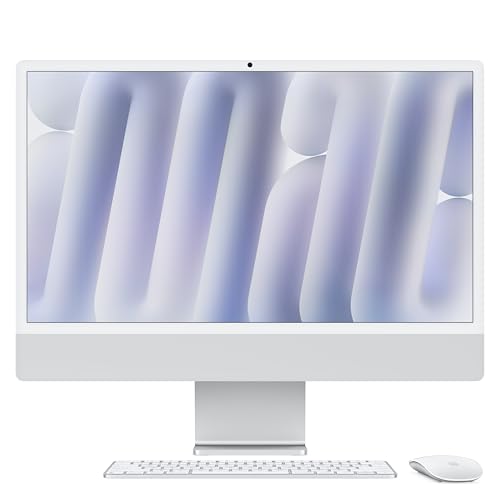
- Best first all-in-one under $1500: Apple 2024 iMac with M4 Chip, 16GB Unified Memory, 256GB SSD — Silver — Check on Amazon
- Dell 27 All-in-One ec27250, Core 7 150U, GeForce MX570A, 32GB DDR5, 1TB SSD — Check on Amazon
- HP OmniStudio X 27-cs0010, Core Ultra 7 155H, 16GB RAM, 1TB SSD — Check on Amazon
- HP 27-cr0012, Ryzen 7 7730U, 32GB RAM, 1TB SSD — Check on Amazon
See 2 more Amazon options
- Lenovo IdeaCentre 27, Core i7-13620H, 32GB RAM, 2TB SSD (seller-upgraded listing) — Check on Amazon
- Dell Inspiron 7710 All-in-One, Core i7-1255U, GeForce MX550, 32GB RAM, 1TB SSD — Check on Amazon
Read the full guide ↓
Disclosure: As an Amazon Associate, reviewstook.com earns from qualifying purchases. Links to Amazon on this page are affiliate links; they cost you nothing extra. Listing details such as price and availability change often, so check the current Amazon listing before you buy.
If this is your first computer purchase in years — or your first ever — an all-in-one is the friendliest kind of desktop there is, and this guide is written assuming you know none of the jargon yet. Every technical term below is explained in plain English the first time it appears, and there is a short glossary before the reviews that translates the whole spec sheet into everyday language. First, though, the one thing you need to understand before any brand names, because it decides whether this kind of computer is right for you at all.
An all-in-one is a screen with the entire computer built into the back of it. There is no separate tower box under the desk. You get one power cable, a keyboard, a mouse, and a machine that already has its camera, microphone and speakers inside it. That simplicity is what the money buys. Here is what the money does not buy, stated as plainly as we can put it: an all-in-one under $1,500 is not a gaming computer. Playing games is the most demanding thing a home computer does, and it needs a powerful separate graphics card — a component that takes up space, makes heat and costs real money. Five of the six machines below use the small graphics built into their main processor, which is fine for everyday tasks and gentle games. Two of them, both Dells, carry a small entry-level graphics chip of their own, which helps with photo and video work and with older or lighter games at modest settings — and that is still not a gaming machine. If a listing at this price calls an all-in-one a “gaming PC,” it is describing the advertisement, not the computer. For the same $1,500, a traditional tower PC would be dramatically faster for games. What the all-in-one gives you instead is a beautiful large screen, a tidy desk, and a computer that is genuinely pleasant to live with for work, study, family use, photos, video calls and media. If that is your life, read on — this is the right shelf.
One more thing beginners rarely get told: at this price, Amazon’s all-in-one shelf is really three different kinds of seller wearing the same search results. Some listings are factory machines, built and warranted by the company whose name is on the front. Some are seller-upgraded listings, where a marketplace seller has opened a factory machine and fitted extra memory and storage themselves — the warranty then comes from that seller, not the famous brand. And some are older premium models now sold through marketplace or renewed channels, where condition and warranty vary from seller to seller. None of the three is automatically a bad purchase, but they are different purchases, so this guide tells you which kind every pick is, in plain words, every time.
In this guide
Quick Picks
Short on time, or comparing several options at once? Each row below names a buyer type and the product that suits it, with a link to the listing.
| Buyer type | Pick | Why it stands out | Link |
|---|---|---|---|
| Best first all-in-one | Apple 2024 iMac with M4, 16GB, 256GB — Silver | The sharpest screen here and the simplest machine to live with | Check on Amazon |
| Best Windows all-rounder | Dell 27 All-in-One ec27250, MX570A, 32GB, 1TB | Factory Dell build with the strongest graphics chip in this guide | Check on Amazon |
| Best premium Windows design | HP OmniStudio X 27-cs0010, Ultra 7 155H, 16GB, 1TB | HP’s flagship all-in-one — a pick only when its price behaves | Check on Amazon |
| Best value for busy households | HP 27-cr0012, Ryzen 7 7730U, 32GB, 1TB | Lots of memory and storage for the tier — check price on Amazon | Check on Amazon |
| Most memory and storage | Lenovo IdeaCentre 27, i7-13620H, 32GB, 2TB | The biggest spec sheet here — from a seller-upgraded listing | Check on Amazon |
| Best older-model bargain | Dell Inspiron 7710, i7-1255U, MX550, 32GB, 1TB | A 2022 premium model with its own graphics chip — check price on Amazon | Check on Amazon |
How These Picks Were Chosen
The budget rule was simple: a machine belongs here only if it fits this guide’s $1,500 budget, judged on its live Amazon listing on the day you check — and one pick, flagged clearly in its review, comes with a strict instruction to buy only when the live Amazon price is at or under the budget. Prices in this category have been climbing, and several machines that launched under $1,500 have since been listed well above it elsewhere. So no product price is printed in this guide at all — for every pick, check the current price on Amazon before you judge it. If you check a link and the price has moved above the budget, that pick is not a pick today, whatever the rest of the review says.
We did not use these machines ourselves. We read the makers’ listings and specification sheets and compared the things that actually decide an all-in-one purchase, in the order a beginner should care about them: the screen first, because it is the one part you can never change later; then the processor, memory and storage, which decide how fast the machine feels and how long it stays feeling fast; then the graphics, described honestly as what they are; and finally who is selling the machine and who stands behind it if something goes wrong — which at $1,500 is a specification in its own right. Two rules shaped the final list. No pick is called a gaming machine, because no all-in-one under $1,500 is one. And no seller-upgraded or older-stock pick is dressed up as a factory purchase: where a listing’s specification is bigger than the maker’s own factory sheet allows, or a model year tells you the stock is marketplace or renewed, the review says so and tells you what extra checking that purchase deserves.
What got left out tells the same story from the other side. Seller-upgraded HP listings advertising enormous memory and storage sat well over budget at every recent check. Apple’s own higher iMac configurations, with more memory and storage, sit over budget too, which is why the iMac below is the entry model. And a long tail of unfamiliar brands offering “4K” screens with processors from a decade ago was set aside: a big resolution number on a listing is not the same thing as a good screen, and a screen you cannot verify from a maker you cannot find is not a $1,500 purchase.
A Beginner’s Glossary: The Spec Sheet in Plain English
Every listing below throws the same handful of terms at you. Here is what each one actually means for your daily life, so the reviews make sense.
- All-in-one (AIO). The whole computer — processor, memory, storage — built into the back of the screen. One box on the desk, one power cable. The opposite is a tower, a separate box that needs its own monitor.
- Processor (CPU). The machine’s brain; it does the general thinking. Names like Core 7, Core Ultra 7, Ryzen 7 and Apple M4 are just brands and generations. For everyday work, every processor in this guide is stronger than you need — this is not where beginners should worry.
- Integrated graphics. The picture-making part of the computer is built into the processor and shares its memory. It handles screens, video, photos and light games perfectly well. It is not built for demanding modern games.
- Discrete graphics (a graphics card, or GPU). A separate chip whose only job is pictures. Big ones power gaming PCs. The two Dells below carry small entry-level versions (the GeForce MX570A and MX550) — think of them as a helpful assistant for photo and video software and light games, not a gaming engine.
- Memory (RAM), measured in GB. The computer’s short-term workspace — how much it can hold open at once. 16GB is comfortable for everyday use; 32GB means dozens of browser tabs, documents and a video call all at once without anything slowing down. On most all-in-ones, the memory you buy is the memory you keep forever.
- Storage (SSD), measured in GB or TB. The computer’s filing cabinet — where your photos, files and programs live permanently. 1TB equals 1,000GB. 256GB fills up fast if you keep lots of photos and video; 1TB is roomy for most households.
- Display terms. FHD (also called 1080p) is the standard sharpness on most screens here. The iMac’s 4.5K Retina screen packs far more dots into its picture, so text and photos look noticeably crisper — the difference between a sharp printed page and a decent photocopy.
- Factory, seller-upgraded, renewed. Factory means the maker built and warrants it as listed. Seller-upgraded means a marketplace seller opened it and added parts; their warranty replaces the maker’s. Renewed means a pre-owned machine checked and resold — condition and warranty depend entirely on the seller.
The 6 Best All-in-One PCs Under $1500 for Beginners
Apple 2024 iMac with M4 Chip, 16GB Unified Memory, 256GB SSD — Silver
Who it suits: First-time buyers who want the machine that asks the least of them — the loveliest screen in this guide, almost no setup fuss, and a computer that stays quiet and quick for years — and who are happy living in Apple’s world of apps.
Start with the screen, because on an all-in-one the screen is forever. The iMac’s 24-inch display is what Apple calls 4.5K Retina, which in plain terms means it packs far more tiny dots into the picture than the standard screens below, so words look like print on paper and photographs look like photographs instead of posters. Sit it next to any 27-inch Windows machine in this guide and the difference is visible from across the room. The computer inside it is Apple’s own M4 chip — in this entry model, an 8-core processor with an 8-core graphics section — which handles everything a home or office machine is asked to do, from heavy web browsing to editing family videos, without noise or heat drama. The 16GB of memory is what Apple calls unified memory: one pool shared by the processor and the graphics, which the M4 uses efficiently. It cannot be added to later, and neither can the storage — which brings us to this pick’s one real catch.
The storage is 256GB, the smallest filing cabinet in this guide, and the honest way to think about it is as a plan rather than a problem. If your photos live in a cloud library and your documents are light, 256GB is fine for years. If you shoot a lot of phone video or keep big game and media libraries, you will want a fast external drive plugged into the back — a normal, inexpensive addition, but an extra purchase this guide counts separately rather than pretending it is included. The price needs a beginner’s warning too. This model launched within this budget, Apple later raised the entry iMac’s price, and this listing’s price on Amazon has moved around a good deal since. Translation: it normally lives under this budget, it has dipped well under it, and if the day you look it is sitting near the top of its range, history suggests patience is rewarded within weeks — so check the current price on Amazon before you decide. Two smaller notes: this entry configuration has two ports on the back rather than four, there is no touchscreen, and it runs macOS rather than Windows — if your work software or your habits are Windows, that matters more than any screen.
- The screen of the guide: 24-inch 4.5K Retina, visibly crisper than every rival here.
- Quiet, cool and simple to live with — the friendliest first computer on this page.
- Positioned as Apple’s entry iMac within this tier — check price on Amazon, as its price moves.
Honest limitation: 256GB of storage and 16GB of memory are fixed for life, this entry model has only two ports, and it runs macOS — if you need Windows, touch, or a big built-in filing cabinet, look at the Dell next.
Choose it if the screen matters most and your files live in the cloud or on an external drive. Skip it if you need Windows software, a touchscreen, or a terabyte of storage built in.

Dell 27 All-in-One ec27250 — Core 7 150U, GeForce MX570A, 32GB DDR5, 1TB SSD
Who it suits: Windows beginners who want the most complete, worry-free package here: plenty of memory and storage, a big touchscreen, the strongest graphics chip in the guide, and a warranty from the company whose name is on the machine.
If the iMac is the prettiest machine here, this Dell is the most sensible one, and for a first Windows all-in-one it is the one we would hand to a nervous beginner. The numbers translate kindly: 32GB of memory means you can leave everything open — browser, documents, photo library, video call — and nothing will sulk. The 1TB of storage is four times the iMac’s, so the filing-cabinet worry simply goes away. The 27-inch screen is bigger than the iMac’s and responds to touch, which families and anyone who pokes at maps and photos will use more than they expect. And it is sold as a proper factory Dell configuration — the model number is DEC27250-7277WHT-PUS — with Dell Onsite Service named in the listing, meaning if it breaks, Dell’s warranty process is who you deal with, not a stranger’s storefront.
The component that needs translating is the graphics. The GeForce MX570A is a discrete graphics chip — a separate picture-making chip with its own 2GB of memory — and it is the strongest graphics in this guide. Keep both feet on the ground about what that means: it is an entry-level chip of the kind found in slim laptops. It genuinely speeds up photo editing, makes video timelines smoother, helps graphics-aware programs, and plays older and lighter games at modest settings. It does not turn this into a gaming PC, and demanding modern games are beyond it. But in a row of machines whose graphics are simply built into the processor, having a real chip of its own is a genuine advantage, and it is a big reason this Dell should still feel capable in five years. Its position in the tier is reassuring too: this exact configuration has consistently sat under budget, rather than hovering at the ceiling — check the current price on Amazon to confirm it still does on the day you buy. Two cautions. Dell sells this same-looking machine in several configurations at very different prices, so before paying, check the listing’s model number and confirm it is the 32GB, 1TB, MX570A build — a cheaper near-twin is not this computer. And the screen, while big and touch-friendly, is standard 1080p sharpness: at 27 inches, text is a little softer than on the iMac’s display.
- The only discrete graphics chip with real muscle here — a genuine help for photo and video work.
- 32GB of memory and 1TB of storage: the headroom a first machine should have.
- A factory Dell with Dell service — check price on Amazon.
Honest limitation: The big screen is standard sharpness rather than Retina-crisp, and the MX570A is entry-level graphics — light gaming and creative acceleration, not modern games at high settings.
Choose it if you want one Windows machine that does a bit of everything well, with the maker’s own warranty behind it. Skip it if screen sharpness is your top priority, or if you were hoping the words “graphics chip” meant a gaming rig.

HP OmniStudio X 27-cs0010 — Core Ultra 7 155H, 16GB RAM, 1TB SSD
Who it suits: Beginners who want the fanciest Windows design in the guide and the quickest modern Intel processor — and who are willing to follow one simple rule about its price.
The OmniStudio X is HP’s flagship all-in-one range, its polished answer to the iMac, and this 27-cs0010 configuration (factory model A82XXAA#ABA) is a genuine factory HP machine. Its processor, Intel’s Core Ultra 7 155H, is the strongest Windows chip in this guide — the kind of processor that makes a computer feel instant for years — and it includes a small built-in helper for AI-flavoured tasks in modern apps. Its graphics are Intel Arc, built into the processor: the most capable integrated graphics on the Windows side of this list, a clear step above the basic built-in graphics of older machines, while remaining — honestly — integrated graphics, with the same light-gaming ceiling as every other non-Dell pick here. Around that you get a 27-inch touchscreen, 16GB of memory and a roomy 1TB of storage, in a design clearly built for people who spend their days on video calls and want to look good doing it.
Now the rule, and it is the whole point of this pick. HP launched this machine within this guide’s budget, and around launch it was discounted at big retailers — properly under budget. Since then, prices across the all-in-one market have climbed, and this model has recently been listed far above its launch position at some retailers. So: check the current price on Amazon, and treat this computer as a recommendation only while the live Amazon listing sits at or under the $1,500 budget. If the page shows a price above the budget on the day you look, the correct beginner move is not to stretch — it is to buy the Dell above, which sits under budget, or to wait. The machine did not get better when its price went up. One smaller consideration: its 16GB of memory is perfectly adequate for everyday work, but it is half the Dell’s, and on a premium machine bought to last, that is a fair tiebreaker in the Dell’s favour when both sit within budget.
- Core Ultra 7 155H with Intel Arc graphics: the fastest Windows processor in the guide.
- Factory HP flagship design with a 27-inch touchscreen and 1TB of storage.
- Launched within this tier — check price on Amazon and buy only at $1,500 or under, live.
Honest limitation: Its price has floated well above budget at times since launch, and 16GB of memory is merely adequate on a premium machine — this pick expires the moment the live price does.
Choose it if the live listing is at or under $1,500 and you love the design and the processor. Skip it if the price has drifted up, or if 32GB of memory matters more to you than the flagship badge.

HP 27-cr0012 — Ryzen 7 7730U, 32GB RAM, 1TB SSD
Who it suits: Beginners whose real life is thirty browser tabs, two documents, a spreadsheet and a video call all at once — and who would rather choose a pick that sits lower in this tier than pay for the flagship end of it.
Not every machine in a $1,500 guide has to cost $1,500, and this factory HP is the proof. Its processor is AMD’s Ryzen 7 7730U, a proper eight-core chip — think of cores as workers: eight of them means the machine can do many jobs at once without queuing. Paired with 32GB of memory and 1TB of storage, it has exactly the combination working people actually feel day to day: everything open, nothing closing itself, nothing grinding. It sits noticeably lower in this tier than the flagship picks — check price on Amazon to see its current position — which leaves real headroom in the budget unspent. The Dell above is the better machine, but for documents, calls, research and family admin the gap in everyday feel is small — and budget not spent here can go toward a comfortable chair, a second screen later, or nowhere at all.
The compromises are plain and fairly priced. The graphics are AMD’s built-in Radeon — perfectly fine for video, photos and casual games, nothing more. The 27-inch screen is the standard sharpness and does not respond to touch, and the stand only tilts rather than rising and falling, so if you annotate documents by hand or are fussy about posture, the Dell serves you better. Reviews of this model describe the same personality its spec sheet promises: clean, quiet, businesslike, with a camera and speakers that handle calls perfectly well without being a reason to buy it. One beginner-specific warning: HP’s cr-series shelf is crowded with seller-upgraded versions of similar-looking machines advertising bigger numbers at higher prices. This recommendation is for the factory 27-cr0012 configuration, in the lower part of this tier — check the current price on Amazon before you buy. If the listing in front of you shows different memory or storage figures, you are looking at a different offer — the glossary above explains how to tell, and the seller section below explains how to judge it.
- Eight-core Ryzen 7 with 32GB of memory and 1TB of storage — multitasking headroom in the middle-to-lower part of the tier.
- A factory HP configuration — check price on Amazon.
- Quiet, office-friendly manners that suit shared rooms and family desks.
Honest limitation: No touchscreen, a tilt-only stand, built-in graphics and previous-generation memory technology — a workhorse, not a showpiece, and it will look dated before it feels slow.
Choose it if your days are tabs, documents and calls, and money left over beats a glossy finish. Skip it if you want touch, a graphics chip of its own, or the premium feel of the three picks above.

Lenovo IdeaCentre 27 — Core i7-13620H, 32GB RAM, 2TB SSD (Seller-Upgraded)
Who it suits: Beginners who want the biggest numbers on this page — the most storage, a strong processor, a touchscreen — and who are willing to do three simple checks before ordering, explained step by step below.
First, why the numbers impress. The processor is Intel’s Core i7-13620H, a ten-core chip of the kind usually found in performance laptops rather than tidy desk machines. It comes with 32GB of memory, a 27-inch touchscreen, Windows 11, a wireless keyboard and mouse, a little 8-in-1 hub for plugging things in — and 2TB of storage, double anything else here. On paper, this is the most computer in the guide. Now the flag, in the open where it belongs, because a beginner deserves it in plain words: Lenovo’s own factory specification for this IdeaCentre family says the most storage Lenovo itself fits is 1TB. A 2TB machine therefore did not leave Lenovo’s factory the way it is listed. A marketplace seller opened it, fitted the bigger drive (and, in listings like this, often the memory too), and closed it up again. That means the warranty you would rely on is that seller’s promise, not Lenovo’s. Machines like this are a large, normal part of Amazon’s all-in-one market and often work happily for years — but it is a different kind of purchase from the factory Dell and HP machines above, and it should be checked like one.
That is also why the live listing matters more for this pick than for any other here: check the current price on Amazon on the day you order, because prices seen for its close relatives belong to those relatives, not to this machine. The rule: it is a recommendation only when the live listing sits at or under $1,500, and ideally comfortably under, because sitting lower in the tier is part of what offsets the warranty difference. Before ordering, do the three checks. One: read the seller’s own storefront feedback, not just the product reviews. Two: find the line in the listing that says who provides the warranty, and for how long. Three: when it arrives, open Windows settings and confirm the storage and memory inside match what you paid for — upgraded listings occasionally ship a sibling configuration by mistake. Do those, and this is the most computer in the tier here. Skip them, and you are paying factory money for a handshake.
- Ten-core i7-13620H, 32GB of memory and 2TB of storage — the biggest specification here.
- 27-inch touchscreen, with wireless keyboard, mouse and an 8-in-1 hub in the box.
- Buy only at $1,500 or under on the live listing, after the seller and warranty checks.
Honest limitation: It is a seller-upgraded machine whose specification goes beyond Lenovo’s factory maximums, so warranty and support rest with the marketplace seller — check the current price on Amazon and judge it against the budget yourself before ordering.
Choose it if maximum memory and storage matter most and you will do the three checks. Skip it if a factory warranty is non-negotiable — that is exactly what the Dell and HP picks are for.

Dell Inspiron 7710 All-in-One — Core i7-1255U, GeForce MX550, 32GB RAM, 1TB SSD
Who it suits: Patient bargain hunters — beginners included — who like the idea of a premium machine with its own graphics chip positioned well below the top of the budget, and who are comfortable following a short checklist about condition and warranty.
The Inspiron 7710 was Dell’s premium 27-inch all-in-one of its generation, and reading its specification today feels like finding last year’s flagship phone at a this-year budget price. It has a Core i7-1255U processor, 32GB of memory, 1TB of storage, a 27-inch touchscreen with slim borders and an anti-glare finish, fast Wi-Fi 6E, Windows 11 Pro — and NVIDIA’s GeForce MX550, a discrete graphics chip with its own 2GB of memory. The MX550 is a step below the newer Dell’s MX570A, but it is a real graphics chip: it helps photo and video software and plays light games the built-in-graphics machines cannot manage. As an older model it is positioned well under the top of this tier — check the current price on Amazon — and at that kind of position in the tier you are getting this guide’s second-strongest graphics and joint-biggest memory for well under budget.
The catch is a calendar, not a component: this is a 2022 model. Dell’s own shop has moved on to the EC27250 above, so the 7710 now reaches buyers through marketplace sellers and renewed stock, and your experience depends heavily on which seller you get. A sealed or properly refurbished unit with a clearly stated warranty is a bargain. A vaguely described “refurbished” unit from a seller with thin feedback is a lottery ticket. One specific trap for beginners: Dell’s original listing for this model mentioned Dell’s onsite hardware service, but that described Dell’s offer back when Dell sold it new — do not assume it follows a third-party sale in 2026. Instead, read three lines before you read the price: the condition grade, the returns window, and who provides the warranty. Prefer sellers who state all three plainly, and treat any listing that will not say who stands behind the machine as a listing to skip. Judged that way, this is the smart-money pick of the guide.
- GeForce MX550 discrete graphics alongside 32GB of memory and 1TB of storage.
- Check price on Amazon — a premium 2022 specification positioned well under the budget.
- Slim-bezel 27-inch touchscreen and Windows 11 Pro, from Dell’s premium design era.
Honest limitation: A 2022 model now sold mainly through marketplace and renewed channels, so condition and warranty vary by seller, and Dell’s original service terms may not apply to your purchase.
Choose it if you will check the seller, the condition grade and the warranty line before ordering. Skip it if you want this year’s model backed by Dell’s own warranty — its successor, the EC27250 above, is that purchase.
Comparison Table
| Product | Display | Processor | Memory / Storage | Graphics | Price signal | Link |
|---|---|---|---|---|---|---|
| Apple iMac M4 (2024), Silver | 24″ 4.5K Retina | Apple M4, 8-core CPU | 16GB / 256GB | M4 integrated, 8-core GPU | Check price on Amazon | Check on Amazon |
| Dell 27 All-in-One ec27250 | 27″ FHD touch | Intel Core 7 150U | 32GB DDR5 / 1TB | GeForce MX570A 2GB | Check price on Amazon | Check on Amazon |
| HP OmniStudio X 27-cs0010 | 27″ FHD touch | Intel Core Ultra 7 155H | 16GB / 1TB | Intel Arc integrated | Check price on Amazon; buy ≤ $1,500 only | Check on Amazon |
| HP 27-cr0012 | 27″ FHD | AMD Ryzen 7 7730U | 32GB DDR4 / 1TB | Radeon integrated | Check price on Amazon | Check on Amazon |
| Lenovo IdeaCentre 27 (seller-upgraded) | 27″ FHD touch | Intel Core i7-13620H | 32GB DDR5 / 2TB | Integrated | Check price on Amazon; buy ≤ $1,500 only | Check on Amazon |
| Dell Inspiron 7710 (2022) | 27″ FHD touch | Intel Core i7-1255U | 32GB DDR4 / 1TB | GeForce MX550 2GB | Check price on Amazon | Check on Amazon |
Your First Evening: Setting Up, Step by Step
The quiet advantage of an all-in-one is that setup is genuinely simple — there is no tower to connect to a monitor, because the monitor is the computer. Whichever pick you buy, your first evening looks like this.
- Step 1 — Unbox and plug in one cable. Lift the machine onto the desk, attach the stand if it ships separately, and plug in the single power cable. Connect the keyboard and mouse — most here are wireless with a tiny USB receiver in the box, or pair over Bluetooth during setup.
- Step 2 — Turn it on and answer the questions. The machine will walk you through language, Wi-Fi and creating your account. On Windows that is a Microsoft account; on the iMac, an Apple ID. Write the password down somewhere safe at home — beginners lock themselves out more often than machines break.
- Step 3 — Let it update, and do not fight it. A new machine almost always wants to download updates on its first day, and it may restart itself more than once. This is normal and healthy. Plug it in, connect to Wi-Fi, and give it an hour with a cup of tea nearby rather than judging its speed mid-update.
- Step 4 — Check you got what you paid for. Especially on the seller-upgraded Lenovo and the marketplace Dell 7710, open the system settings (Windows: Settings, then System, then About; Mac: the Apple menu, then About This Mac) and confirm the memory and storage figures match the listing. This takes two minutes and is far easier on day one than in month three.
- Step 5 — Where games come from. Games are not pre-installed; they come from stores you download. On Windows, the big ones are Steam and the Xbox app, plus the Epic Games Store; on the iMac, the App Store and Steam’s Mac catalogue. Download the store, make an account, and start with something gentle — remember from the top of this guide that these machines suit older, lighter and casual games, and every store lets you check a game’s requirements and refund window before you commit an evening to it.
- Step 6 — Turn on backup before you need it. Switch on the built-in cloud backup (OneDrive on Windows, iCloud on the Mac) or plug in an external drive for copies of your photos and documents. Ten minutes now is the difference between an inconvenience and a disaster later.
How to Choose an All-in-One PC Under $1500
- Choose the screen first, because it is the one part you can never change. At this budget the honest choice is between the iMac’s smaller, far crisper 4.5K screen and the bigger 27-inch touchscreens. Readers and photo lovers gain most from sharpness; families and shared desks gain most from size and touch.
- Draw your memory line at 16GB, and aim for 32GB. On most all-in-ones the memory can never be upgraded, so what you buy is what you retire with. 16GB is fine for everyday work; 32GB is what keeps a $1,500 machine feeling quick in year five.
- Treat 1TB of storage as this tier’s standard. The iMac’s 256GB is the exception that needs a plan — cloud storage or an external drive. On a Windows machine at this price, do not settle for less than 1TB.
- Read graphics words literally. “Integrated” or “built-in” means everyday work, media and light games. The MX550 and MX570A in the two Dells add real help for creative software and light gaming. Nothing in this form factor at this price plays demanding modern games properly — if that is your goal, the same money belongs in a tower.
- Know which kind of seller you are buying from. Factory, seller-upgraded, or older renewed stock — the same famous badge can hide all three. The seller’s name and the warranty line tell you which purchase you are actually making.
- Buy the live price, not the listing’s story. Prices across this whole market have climbed since these models launched. A machine that launched inside this budget is only a sub-$1,500 pick while it sells there; set your ceiling, check the current price on Amazon, and let the listings come to you.
- Count the whole desk, not just the PC. Camera, speakers, microphone, keyboard and mouse are included with every pick here. A tower comparison that forgets the monitor and those extras is not comparing the same purchase.
What $1,500 Does Not Include
The budget above is for the computer, its keyboard and mouse, and nothing else — so here is the honest extra list, kept separate on purpose rather than folded quietly into a pick’s cost. If you choose the iMac, budget for storage headroom: a fast external SSD to hold the photo and video library its 256GB internal drive cannot, or a cloud storage subscription, which is an ongoing cost rather than a one-off. Any pick can justify a height-adjustable VESA mount or a simple stand riser if its tilt-only stand leaves the screen at the wrong height for your neck — posture money is never wasted. A comfortable chair and a desk lamp are not computer parts, but buyers regularly tell us they mattered more by month two than any specification did. Software is the last item: the office suites and photo tools most people use are now subscriptions, and none of these machines includes a perpetual copy. None of this changes which pick is right — it just means the true first-year cost of the tidiest desk is the PC plus a short, plannable list.
Can You Upgrade It Later? In Plain Terms
Mostly, no — and it is better to hear that before buying than after. The iMac’s memory and storage are sealed in permanently on the day it is built; what you order is what you own for the machine’s whole life. Most Windows all-in-ones in this guide are built the same way in practice: the case is not designed for owners to open, and even where a determined technician could reach the parts, it is not a job to plan a purchase around. That sealed design is exactly why seller-upgraded listings exist — the upgrading is done before you buy, by the seller, instead of by you later. The practical rule follows: buy the memory and storage you will need in year five, not year one. The one upgrade that is always easy, on every pick, is outside the box: external drives for more storage, a second monitor on the machines with the ports for it, and better keyboard, mouse, speakers or camera whenever you like. Plan the inside at purchase; improve the outside whenever you wish.
All-in-One vs a $1500 Tower: The Honest Gap
Beginners deserve this section without sugar-coating, because it is the decision underneath the whole guide. Fifteen hundred dollars spent on a tower buys a graphics card several times faster than anything on this page, a processor in a big cooled box that can hold its top speed indefinitely, and parts you can replace one at a time for a decade. For games, the gap is not a percentage — it is a category. The tower plays modern games at high settings that the best machine in this guide cannot run acceptably at any setting, and heavy video rendering and AI work show the same gap. If performance is your only measure, the all-in-one loses, and it is not close.
What you get for conceding that gap is a different list of goods, and for many households it is the list that matters: a screen chosen and colour-matched by the maker, a desk with one cable instead of six, a machine that is quiet at the work it is actually for, a camera, microphone and speakers already inside, nothing to assemble, and a footprint that suits kitchens, studies, studios and small rooms where a tower and separate monitor look like clutter. The people who buy from this guide are not failed tower buyers; they are buying tidiness, simplicity and a good screen on purpose. The only real mistake is buying an all-in-one while secretly expecting a tower’s speed — which is why this guide names the gap here, in the introduction, and in the questions below, rather than in a footnote.
Common Mistakes to Avoid
- Believing a “gaming” all-in-one listing. Built-in and entry-level graphics do not become gaming hardware because a title says so.
- Judging by the discount percentage instead of the price. A launch price may have vanished while a risen one sits in its place; measure the live figure against your budget, never against the saving a listing advertises.
- Mistaking a seller-upgraded listing for a factory model. If the memory or storage is bigger than the maker’s own published maximums, the maker did not build it that way and will not warranty it that way.
- Buying small memory or storage at this tier. At $1,500, 8GB of memory or 256GB of storage on a Windows machine is not a saving; it is the machine’s expiry date. (The iMac’s 256GB is the deliberate exception, bought with a storage plan.)
- Ignoring the stand. Most all-in-ones only tilt. If you need the screen higher for your posture, budget for a mount or riser — your neck will have opinions by month two.
- Skipping the seller checks on older models. On marketplace and renewed stock, the condition grade, returns window and warranty provider matter more than the last few percent of discount.
- Judging the machine during its first-day updates. Every new computer spends its first hours downloading and restarting. Set it up in the evening, let it finish, and judge it the next morning.
Final Recommendation
For most beginners, the Apple iMac with M4 is the best first all-in-one under $1,500: the finest screen in the category, more than enough speed for everything this kind of computer is for — check the current price on Amazon, as its price moves — provided its 256GB of storage fits your life or your cloud plan. Windows beginners should start with the Dell 27 All-in-One ec27250, the most complete factory package here: 32GB of memory, 1TB of storage, a touchscreen, the guide’s best graphics chip and Dell’s own service — check price on Amazon. The HP OmniStudio X joins them on any day its live price returns to the budget it launched at; the HP 27-cr0012 is the sensible value play positioned lower in the tier; and the Lenovo and the older Dell reward buyers who do the simple seller checks with specifications nothing else here matches. Choose the kind of seller you understand, at a price you have verified on the day, and any of these will look after a beginner for years.
FAQ
I am a complete beginner. Which of these should I actually buy?
If you are happy in Apple’s world, the iMac — it is the simplest machine here to live with, and its screen is the best. If you need Windows, the Dell EC27250, because it is a complete factory package with the maker’s own service behind it. Both ask the least of a first-time owner.
Can any all-in-one under $1500 actually play games?
Lightly, at best. The Dell EC27250’s MX570A and the Inspiron 7710’s MX550 handle older, esports and indie games at modest settings, and the built-in-graphics machines handle casual games. Demanding modern titles at high settings are beyond every machine in this guide — that job belongs to a gaming tower.
What does “seller-upgraded” mean, in simple terms?
A marketplace seller bought a factory machine, opened it, and fitted more memory or storage than the maker offers — the giveaway is a specification bigger than the maker’s published maximums, like the Lenovo’s 2TB drive where Lenovo’s own sheet caps the family at 1TB. The warranty then comes from the seller, not the brand. It is not an automatic avoid, but it needs the three checks in that review.
Why has the OmniStudio X’s price gone up since it launched?
It launched within this guide’s budget and was discounted at the time, but all-in-one prices across the market have risen since, and this model has recently been listed far above its launch position at some retailers. Which is precisely why this guide only recommends it on days when the live price reads $1,500 or less — check the current price on Amazon before you decide.
Is 16GB of memory enough for a beginner?
For browsing, documents, email, photos and video calls, yes — including on the iMac, whose M4 uses its shared memory efficiently. If your household keeps everything open at once, or you want the machine to feel fresh in six or seven years, 32GB is the safer buy, which is why four of the six picks here include it.
Can I upgrade the memory or storage later if I run out?
Assume not. The iMac’s are sealed in for life, and most Windows all-in-ones here are built the same way in practice. Buy the memory and storage you will need in year five. What you can always add later sits outside the box: external drives, a second screen where the ports allow, and better accessories.
Is an all-in-one worth it compared with a tower and a separate screen?
For speed alone, no — a $1,500 tower is dramatically faster, especially for games. For a tidy desk, a maker-matched screen, a built-in camera, speakers and accessories, and quiet at everyday work, yes. Buy the all-in-one for simplicity, never expecting tower performance.


