Where to buy
Check the latest price, availability and delivery on Amazon. Orders are placed on Amazon. We may earn a commission from qualifying purchases.
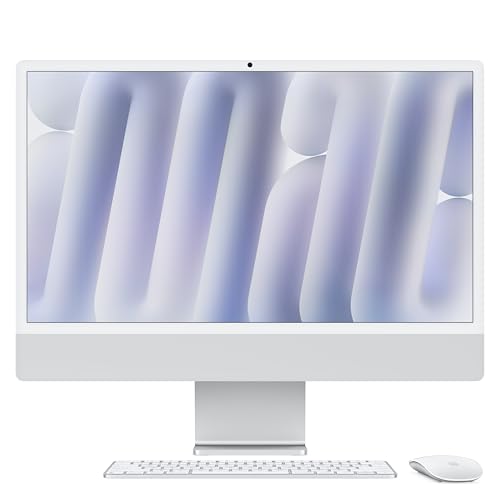
- Best overall under $1500: Apple 2024 iMac with M4 Chip, 16GB Unified Memory, 256GB SSD — Silver — Check on Amazon
- Dell 27 All-in-One ec27250, Core 7 150U, GeForce MX570A, 32GB DDR5, 1TB SSD — Check on Amazon
- HP OmniStudio X 27-cs0010, Core Ultra 7 155H, 16GB RAM, 1TB SSD — Check on Amazon
- HP 27-cr0012, Ryzen 7 7730U, 32GB RAM, 1TB SSD — Check on Amazon
See 2 more Amazon options
- Lenovo IdeaCentre 27, Core i7-13620H, 32GB RAM, 2TB SSD (seller-upgraded listing) — Check on Amazon
- Dell Inspiron 7710 All-in-One, Core i7-1255U, GeForce MX550, 32GB RAM, 1TB SSD — Check on Amazon
Read the full guide ↓
Disclosure: As an Amazon Associate, reviewstook.com earns from qualifying purchases. Links to Amazon on this page are affiliate links; they cost you nothing extra. Listing details such as price and availability change often, so check the current Amazon listing before you buy.
Fifteen hundred dollars is the budget where an all-in-one stops being a compromise appliance and starts being a genuinely premium desk computer — and it is also the budget where the category’s central trade needs saying out loud, before any product names. A $1,500 tower buys a gaming PC with a proper discrete graphics card, a Ryzen or Core processor with real cooling, and parts you can swap for a decade. A $1,500 all-in-one buys none of that raw performance. What it buys instead is the integration itself: a large, high-quality display that is also the computer, a desk with one power cable instead of a nest of them, a webcam, speakers and microphone built in, and a machine that looks like furniture rather than equipment. Every pick in this guide — including the two Dells with entry-level NVIDIA MX graphics — runs on integrated or near-integrated graphics. These are superb machines for office work, creative work at the lighter end, family computing, study and media. They are not gaming PCs, and any listing at this price using the word “gaming” about an all-in-one is describing the marketing, not the hardware.
The second thing to know before the picks is who is actually selling these machines, because at this tier Amazon’s all-in-one shelf is three different markets wearing one set of search results. There are factory configurations sold as the maker built them — the iMac, the Dell EC27250 and the HP OmniStudio X below. There are seller-upgraded listings, where a marketplace seller opens the factory seal, fits more RAM and storage than the maker ever offered, and provides the warranty themselves — the Lenovo below is one, and its specification literally exceeds what Lenovo’s own factory sheet allows. And there are older premium models, like the 2022 Dell Inspiron 7710, which now reach you through marketplace and renewed stock rather than Dell’s own channel. None of the three is automatically a bad buy. All three need to be bought with your eyes open, and this guide flags the seller type on every single pick, because at $1,500 the difference between a factory warranty and a seller’s promise has real consequences.
What this tier genuinely offers at the top of this category: the best display in the guide is not close — the iMac’s 24-inch 4.5K Retina panel is in a class the 1080p Windows machines cannot touch — while the Windows picks answer with bigger 27-inch screens, touch, double the memory and four times the storage in the same tier. Processors range from Apple’s M4 to Intel’s Core Ultra 7 and Core 7 mobile chips and AMD’s Ryzen 7 — all of them far stronger than this work requires, which is the point of the tier: a machine bought here should feel fast for six or seven years, not two. Below are the quick picks, detailed reviews of all six, a comparison table, a buying checklist, an honest all-in-one-versus-tower section, the mistakes that waste money in this category, and the questions buyers ask before spending at this level.
In this guide
Quick Picks
Short on time, or comparing several options at once? Each row below names a buyer type and the product that suits it, with a link to the listing.
| Buyer type | Pick | Why it stands out | Link |
|---|---|---|---|
| Best overall | Apple 2024 iMac with M4, 16GB, 256GB — Silver | 4.5K Retina display and M4 performance in the cleanest design here | Check on Amazon |
| Best Windows pick | Dell 27 All-in-One ec27250, MX570A, 32GB, 1TB | Factory Dell build with the strongest graphics in this guide | Check on Amazon |
| Best premium Windows design | HP OmniStudio X 27-cs0010, Ultra 7 155H, 16GB, 1TB | HP’s flagship all-in-one line — check price on Amazon | Check on Amazon |
| Best value for multitaskers | HP 27-cr0012, Ryzen 7 7730U, 32GB, 1TB | 32GB of RAM and an 8-core Ryzen 7 in the lower part of this tier — check price on Amazon | Check on Amazon |
| Most memory and storage | Lenovo IdeaCentre 27, i7-13620H, 32GB, 2TB | Seller-upgraded spec beyond Lenovo’s factory maximums | Check on Amazon |
| Best older-model bargain | Dell Inspiron 7710, i7-1255U, MX550, 32GB, 1TB | Discrete MX550 graphics and 32GB in the lower part of this tier — check price on Amazon | Check on Amazon |
How These Picks Were Chosen
The budget was applied the way a buyer experiences it: a pick belongs here only when you check the current price on Amazon and it sits at or under the $1,500 budget. Listing prices in this category change often, so where a pick belongs in this tier only when its live listing sits within the budget, the review says so in plain language. Always check price on Amazon before you buy — the live listing is the final word.
We did not use these machines ourselves. We read the makers’ listings and specification data and compared the things that decide an all-in-one purchase: display size, resolution and quality first, because the screen is the one component you can never upgrade; then processor generation, memory and storage; then the graphics, with integrated chips described as integrated chips; and finally the seller type and warranty route, which this guide treats as a specification in its own right. Two hard rules shaped the list. No pick is described as a gaming machine, because no all-in-one under $1,500 is one — the two MX-class NVIDIA chips below are entry-level laptop graphics that help with photo work, video timelines and very light gaming, nothing more. And no seller-upgraded or older-stock pick is presented as a factory purchase: where a listing’s specification exceeds the maker’s factory maximums, or a model year tells you the stock is marketplace or renewed, the review flags it and factors in the extra checking it deserves.
What was excluded is as informative as what survived. Maxed-out seller-upgraded HP 27-inch listings with 64GB of RAM and multi-terabyte drives sit well above this tier, whatever their titles imply about value. HP’s higher OmniStudio X configurations with QHD screens and 32GB of memory also sit far above this tier. Apple’s own higher iMac configurations — the 24GB and 1TB builds — are over budget or unavailable, which is why the iMac here is the entry configuration — check price on Amazon and buy only when it sits within the budget. And a long tail of no-name all-in-ones with 4K screens and previous-decade processors was set aside: a resolution figure is not a display, and a panel you cannot verify from a maker you cannot find is not a $1,500 purchase.
The 6 Best All-in-One PCs Under $1500
Apple 2024 iMac with M4 Chip, 16GB Unified Memory, 256GB SSD — Silver
Who it suits: Buyers who want the best screen and the most polished machine in this guide, work inside Apple’s ecosystem or are happy to move to it, and value design and longevity over ports and storage.
The iMac is the reference product for this entire category, and it earns the top spot on two things no Windows pick here can match. The first is the display: a 24-inch 4.5K Retina panel that renders text and photography at a sharpness the 1080p screens in this guide simply do not approach — side by side, it is the difference between reading print and reading a good photocopy of print, and since an all-in-one’s screen is a life-of-the-machine commitment, that gap matters more with every year of ownership. The second is the M4 chip itself, an 8-core CPU and 8-core GPU configuration in this entry model, which handles everything this class of machine is for — heavy browser work, office suites, photo editing, 4K video timelines at the hobbyist and prosumer level — with a silence and coolness the fan-cooled Windows machines work harder to achieve. The 16GB of unified memory is shared between CPU and graphics and is not upgradeable, ever; the 256GB SSD is the configuration’s real constraint, and it is why this pick comes with a condition attached.
Check the current price on Amazon before you buy, and buy only when it sits within the under-$1500 budget. The ownership caveats are Apple’s usual ones, stated plainly: two ports on this entry configuration rather than four, no touchscreen, no height adjustment beyond tilt, macOS rather than Windows, and memory and storage fixed at purchase — which is why heavy file hoarders should treat the 256GB drive as a plan (cloud storage or a fast external SSD) rather than a surprise. Bought with that plan, this is the all-in-one most likely to still feel premium in 2031.
- The display of the guide: 24-inch 4.5K Retina, visibly sharper than every 1080p rival here.
- M4 performance with silent, cool operation for work and light creative use.
- Check price on Amazon — buy only when the live listing sits within the under-$1500 budget.
Honest limitation: 256GB of storage and 16GB of memory are fixed forever, this entry model has two ports, and it runs macOS — if your software or your habits are Windows, no display closes that gap.
Choose it if the screen is your priority and your files live in the cloud or on an external drive. Skip it if you need Windows, touch, or a terabyte of local storage in this tier — the Dell below is your machine.

Dell 27 All-in-One ec27250 — Core 7 150U, GeForce MX570A, 32GB DDR5, 1TB SSD
Who it suits: Windows buyers who want the strongest all-round specification in this guide from a factory Dell configuration — big memory, big storage, a touchscreen, and the only graphics chip here with any real muscle.
This is the Windows pick we would buy first, and the reason is balance. The configuration sold under model DEC27250-7277WHT-PUS pairs Intel’s Core 7 150U with 32GB of DDR5 memory and a 1TB SSD — double the memory and quadruple the storage of the iMac in the same tier — behind a 27-inch Full HD touchscreen. The headline component, though, is the NVIDIA GeForce MX570A with 2GB of GDDR6: an entry-level discrete GPU, but a genuine one, and the strongest graphics in this guide. Calibrate expectations properly — an MX570A is laptop-class hardware for accelerating photo edits, smoothing video timelines, driving GPU-assisted apps and playing older or lightweight games at modest settings; it is not a gaming card and this is not a gaming PC. But in a field of integrated graphics, having any discrete GPU at all is a real advantage for creative software, and it is one reason this machine will age more gracefully than its spec-sheet rivals.
It is also a factory purchase in the way buyers in this tier deserve: a numbered Dell configuration sold with Dell Onsite Service named in the listing, not a seller’s upgrade wearing Dell’s badge. Check price on Amazon before you buy, and confirm it sits within the under-$1500 budget. Two cautions belong with it. The EC27250 line is sold in several near-identical configurations, so confirm the model number on the listing matches the 32GB, 1TB, MX570A build before ordering — a different sibling configuration is not this machine. And the screen, while large and touch-enabled, is a 1080p panel: at 27 inches that is visibly softer than the iMac’s Retina display, the one axis on which this otherwise complete package gives ground.
- The only discrete GPU in the guide — an MX570A that genuinely helps creative apps.
- 32GB DDR5 and 1TB SSD: the memory and storage headroom this tier should have.
- Factory Dell configuration with onsite service — check price on Amazon.
Honest limitation: The 27-inch screen is 1080p, so text is less crisp than on the iMac, and the MX570A is entry-level graphics — light gaming and acceleration, not modern titles at high settings.
Choose it if you want one Windows machine that does a bit of everything well, with a factory warranty. Skip it if display sharpness is your top priority, or if you were hoping “discrete GPU” meant a gaming rig.

HP OmniStudio X 27-cs0010 — Core Ultra 7 155H, 16GB RAM, 1TB SSD
Who it suits: Buyers who want HP’s premium all-in-one design and a genuinely fast modern Intel processor, and who will check price on Amazon first — this pick belongs here only when the live listing sits within the budget.
The OmniStudio X is HP’s flagship all-in-one line, and the 27-cs0010 configuration is a factory HP build (model A82XXAA#ABA) with the strongest Intel silicon in this guide: a Core Ultra 7 155H, whose performance cores, efficiency cores and built-in neural processor were designed for exactly the mixed office-and-creative workload these machines serve, backed by Intel Arc integrated graphics — the most capable integrated graphics on the Windows side of this list, a clear step above basic Intel UHD while remaining, honestly, integrated graphics. The 27-inch Full HD touchscreen, 16GB of memory and 1TB SSD complete a specification that launched as the premium Windows answer to the iMac, in a design that takes that rivalry seriously. For video calls, the OmniStudio X line was built with presence in mind — this is a machine aimed at people who present themselves on screen all day.
Placement in this tier is the key condition for this pick. Check the current price on Amazon before you consider it: it belongs in this guide only when the live listing sits at or under the $1,500 budget. If you check price on Amazon and the listing sits above the budget, the correct move is to buy the Dell above or wait. Also note the 16GB of memory: adequate for this workload and matched to the 1TB drive, but half the Dell’s, and on a premium machine bought for longevity that is a fair reason to choose the Dell even when both sit within the budget.
- Core Ultra 7 155H with Intel Arc graphics: the fastest Windows chip in the guide.
- Factory HP flagship design with a 27-inch touchscreen and 1TB SSD.
- Check price on Amazon — buy only when the live listing sits at or under $1,500.
Honest limitation: Its live listing does not always sit within this budget, and 16GB of RAM is merely adequate on a premium machine — this pick applies only while you check price on Amazon and find it within the budget.
Choose it if you check price on Amazon and the live listing is at or under $1,500, and you value the flagship design and processor. Skip it if the live listing sits above the budget, or if 32GB of memory matters more than the badge.

HP 27-cr0012 — Ryzen 7 7730U, 32GB RAM, 1TB SSD
Who it suits: Multitaskers and home-office workers who care about memory, storage and cores more than design polish — and who prefer a pick positioned lower in this tier.
Not every machine in an under-$1500 guide needs to sit at the top of the tier, and this factory HP configuration is the proof. The 27-cr0012 pairs AMD’s Ryzen 7 7730U — a proper 8-core processor, not the cut-down chips that pad out lower-tier all-in-ones — with 32GB of memory and a 1TB PCIe NVMe SSD behind a 27-inch Full HD display, running Windows 11 Home. That memory-and-storage combination is the one working people actually feel: thirty browser tabs, two office suites, a video call and a photo library open at once, with nothing swapping to disk and nothing closing itself. Positioned lower in this tier, it is the value anchor of the list — check price on Amazon before you buy. The Dell above is the more complete machine, but for a buyer whose work is documents, calls and research, this HP’s headroom is the part that matters most.
The trade-offs are visible and straightforward. The graphics are AMD’s integrated Radeon — fine for video, light photo work and casual games, nothing more. The display is a non-touch 1080p panel on a tilt-only stand, so buyers who annotate documents by hand or need height adjustment should look at the Dell. Secondary reviews of this model note the same things its specification implies: a clean, quiet, businesslike machine whose camera and speakers serve calls perfectly well without being a reason to buy it. It is also worth naming what this pick is not: HP’s cr-series shelf is crowded with seller-upgraded variants carrying larger memory and storage figures, and this recommendation is for the factory 27-cr0012 configuration — check price on Amazon for this exact configuration; if the listing in front of you shows different specifications, you are looking at a different offer, and the seller-type section below explains how to judge it.
- 8-core Ryzen 7 with 32GB RAM and 1TB SSD — multitasking headroom positioned lower in this tier.
- Factory HP configuration — check price on Amazon.
- 27-inch screen and quiet, office-friendly manners for shared spaces.
Honest limitation: No touchscreen, a tilt-only stand, integrated graphics and DDR4-era memory — it is a workhorse, not a showpiece, and it will feel its age in design before it feels it in speed.
Choose it if your workload is tabs, documents and calls, and you value headroom over gloss. Skip it if you want touch, discrete graphics, or the premium feel the top three picks provide.

Lenovo IdeaCentre 27 — Core i7-13620H, 32GB RAM, 2TB SSD (Seller-Upgraded)
Who it suits: Buyers who want the largest memory-and-storage specification on this page and a strong Intel H-series processor, and who understand — and accept — what a seller-upgraded listing is.
Start with the specification, because it is genuinely impressive: a 27-inch Full HD touchscreen, Intel’s Core i7-13620H — a 10-core H-series chip, the kind of processor makers put in performance laptops rather than appliance desktops — 32GB of DDR5 memory, a 2TB SSD, Windows 11, and a wireless keyboard and mouse bundled with an 8-in-1 hub. On paper, nothing else in this guide offers this much computer. Now the flag, in the open where it belongs: Lenovo’s own factory specification for this IdeaCentre family caps storage at 1TB. A 2TB unit therefore did not leave Lenovo’s factory in this configuration — a marketplace seller opened the machine, fitted the larger drive (and in listings like this, typically the memory too), and the warranty you rely on is that seller’s, not Lenovo’s. This is a large, legitimate segment of Amazon’s all-in-one market, and machines like this often work perfectly for years. But it is a different purchase from the factory Dell and HP picks above, and it should be checked like one.
The checking discipline for this pick is therefore stricter than for any other. Check the current price on Amazon first: it is a recommendation only when the live listing sits at or under $1,500, and a position lower in the tier suits it better, because the warranty here rests with the seller rather than the maker. Before ordering, read the seller’s own storefront feedback rather than the product reviews, confirm in the listing text who provides the warranty and for how long, and on arrival verify the fitted drive and memory in Windows settings against the listing — upgraded listings occasionally ship a sibling configuration. Do those things and this offers the most memory and storage in the guide. Skip them and you are relying on a handshake instead of a factory purchase.
- 10-core i7-13620H, 32GB DDR5 and 2TB SSD — the biggest specification here.
- 27-inch touchscreen with wireless keyboard, mouse and an 8-in-1 hub included.
- Check price on Amazon — buy only at or under $1,500, after checking the seller and warranty terms.
Honest limitation: It is a seller-upgraded machine whose specification exceeds Lenovo’s factory maximums, so warranty and support rest with the marketplace seller — check price on Amazon and the seller terms carefully before ordering.
Choose it if maximum memory and storage matter most and you will do the seller checks. Skip it if a factory warranty is non-negotiable — that is what the Dell and HP picks are for.

Dell Inspiron 7710 All-in-One — Core i7-1255U, GeForce MX550, 32GB RAM, 1TB SSD
Who it suits: Value-focused buyers who want discrete graphics and a full 32GB/1TB specification positioned lower in this tier, and who are comfortable buying a 2022 premium model through marketplace or renewed channels.
The Inspiron 7710 was Dell’s premium 27-inch all-in-one of its generation, and its specification still reads like this tier: a Core i7-1255U, 32GB of DDR4 memory, a 1TB SSD, and NVIDIA’s GeForce MX550 with 2GB of GDDR6 — the second discrete GPU in this guide, a step below the newer Dell’s MX570A but a real graphics chip that accelerates creative work and handles light gaming the integrated machines cannot. The 27-inch Full HD touchscreen has the narrow borders and anti-glare finish of a machine that sold at a premium, and this configuration runs Windows 11 Pro. Check price on Amazon for this configuration — it offers this guide’s second-strongest graphics and joint-largest memory, positioned lower in this tier.
The condition attached to all of that is in the model year: 2022. Dell’s own channel has moved on to the EC27250 above, so the 7710 now reaches buyers through marketplace sellers and renewed stock, and the experience depends on which of those you get. A sealed or manufacturer-refurbished unit with a stated warranty is a bargain; a vaguely described “refurbished” unit from a thin-feedback seller is a lottery ticket. The original Dell listing for this model described onsite hardware service, but that described Dell’s offer when Dell sold it — do not assume it transfers to a third-party sale in 2026. Read the condition grade, the seller’s returns window and the warranty line as carefully as the specification, prefer sellers who state all three plainly, and treat any listing that will not say who stands behind the machine as a listing to skip. Judged that way, this is the value pick of the guide: last generation’s flagship, positioned lower in this tier.
- GeForce MX550 discrete graphics with 32GB RAM and 1TB SSD.
- Check price on Amazon — premium 2022 specification positioned lower in this tier.
- 27-inch touchscreen and Windows 11 Pro in a premium-era design.
Honest limitation: A 2022 model now sold mainly through marketplace and renewed channels, so condition and warranty vary by seller and Dell’s original service terms may not apply.
Choose it if you will verify the seller, condition grade and warranty before ordering. Skip it if you want a current model with the maker’s own warranty — buy its successor, the EC27250, instead.

Comparison Table
| Product | Display | Processor | Memory / Storage | Graphics | Price | Link |
|---|---|---|---|---|---|---|
| Apple iMac M4 (2024), Silver | 24″ 4.5K Retina | Apple M4, 8-core CPU | 16GB / 256GB | M4 integrated, 8-core GPU | Check price on Amazon | Check on Amazon |
| Dell 27 All-in-One ec27250 | 27″ FHD touch | Intel Core 7 150U | 32GB DDR5 / 1TB | GeForce MX570A 2GB | Check price on Amazon | Check on Amazon |
| HP OmniStudio X 27-cs0010 | 27″ FHD touch | Intel Core Ultra 7 155H | 16GB / 1TB | Intel Arc integrated | Check price on Amazon — buy only within $1,500 budget | Check on Amazon |
| HP 27-cr0012 | 27″ FHD | AMD Ryzen 7 7730U | 32GB DDR4 / 1TB | Radeon integrated | Check price on Amazon | Check on Amazon |
| Lenovo IdeaCentre 27 (seller-upgraded) | 27″ FHD touch | Intel Core i7-13620H | 32GB DDR5 / 2TB | Integrated | Check price on Amazon — buy only within $1,500 budget | Check on Amazon |
| Dell Inspiron 7710 (2022) | 27″ FHD touch | Intel Core i7-1255U | 32GB DDR4 / 1TB | GeForce MX550 2GB | Check price on Amazon | Check on Amazon |
How to Choose an All-in-One PC Under $1500
- Choose the display first, because you can never change it. Resolution, size and panel quality are the machine for as long as you own it. At this budget the honest choice is between the iMac’s smaller, far sharper 4.5K screen and the larger 27-inch 1080p touchscreens — sharpness for readers and photo work, size and touch for shared and family use.
- Set a memory floor of 16GB and a target of 32GB. Most all-in-ones cannot be upgraded later, so the memory you buy is the memory you retire. 16GB is fine for office work; 32GB is what makes a $1,500 machine feel fast in year five.
- Treat 1TB of storage as the tier’s standard. The iMac’s 256GB is the exception that needs a plan. Everything else here offers 1TB or more, and in this tier you should not settle for less on a Windows machine.
- Read graphics claims literally. “Integrated” means office, media and light creative work. The MX550 and MX570A here add real acceleration and light gaming. Nothing in this tier in this form factor plays modern games properly — if gaming matters, that budget belongs in a tower.
- Identify the seller type before the specification. Factory configuration, seller-upgraded, or older/renewed stock: the same badge can hide all three. The warranty line and the seller’s name tell you which purchase you are actually making.
- Check the price on Amazon, not just the listing claims. A model belongs in this guide only while its live listing sits within the under-$1500 budget; check the current price on Amazon, set your ceiling and let listings come to you.
- Count the desk, not just the PC. Webcam, speakers, microphone, keyboard and mouse are included in every pick here — a tower comparison that ignores the monitor and peripherals is not comparing the same purchase.
All-in-One vs a $1500 Tower: The Honest Gap
It would be a disservice to end this guide without quantifying what the form factor costs. Fifteen hundred dollars in a tower buys a discrete graphics card several times faster than anything here, a desktop-class processor with cooling that lets it hold its speed indefinitely, and the ability to replace any single part for years. In gaming terms the gap is not a percentage; it is a category — the tower plays modern titles at high settings that the best machine in this guide cannot run acceptably at any setting. In rendering and AI workloads the same gap applies. If performance for the budget is your measure, the all-in-one loses, and it is not close.
What the all-in-one buyer gets for conceding that gap is a different list of goods: a display chosen and colour-matched by the maker, a desk with one cable, a machine that is silent and cool at the workloads it is actually for, no assembly, no cable management, no separate purchases of monitor, webcam, speakers and peripherals, and a footprint that suits kitchens, studios, reception desks and small rooms where a tower and monitor simply look wrong. The buyers in this guide are not failed tower buyers; they are people purchasing integration on purpose. The mistake is only ever buying an all-in-one while secretly expecting a tower’s performance — which is why this guide names the gap in the introduction, here, and in the FAQ, rather than in a footnote.
Common Mistakes to Avoid
- Believing a “gaming” all-in-one listing. Integrated and MX-class graphics do not become gaming hardware because a title says so.
- Assuming a listing still sits within the budget. Check the current price on Amazon against the budget, not against any promotional claim a listing advertises.
- Mistaking a seller-upgraded listing for a factory model. If the memory or storage exceeds the maker’s published maximums, the maker did not build it that way and will not warranty it that way.
- Buying 256GB or 8GB configurations at this tier. At $1,500, low memory and storage are not savings; they are the machine’s expiry date.
- Ignoring the stand. Most all-in-ones tilt only. If you need height adjustment for posture, budget for a VESA mount or choose accordingly — your neck will have opinions by month two.
- Skipping the seller checks on older models. Condition grade, returns window and warranty provider matter more than small differences between marketplace listings.
Final Recommendation
For most buyers, the Apple iMac with M4 is the best all-in-one under $1,500: the finest display in the category and performance to spare for everything this form factor is for — check price on Amazon, and consider it provided 256GB of storage fits your life or your cloud plan. Windows buyers should start with the Dell 27 All-in-One ec27250, the most complete factory package here — 32GB, 1TB, touchscreen, the guide’s best graphics and Dell’s own service — check price on Amazon. The HP OmniStudio X joins them whenever you check the current price on Amazon and find its live listing within the budget; the HP 27-cr0012 is the value play positioned lower in this tier; and the Lenovo and the older Dell reward careful, seller-checking buyers with specifications nothing else here matches. Buy the seller type you understand, check price on Amazon before you buy, and this tier will serve you for years.
FAQ
Is an all-in-one under $1500 worth it versus a tower and monitor?
For performance for the budget, no — a $1,500 tower is dramatically faster, especially for gaming. For a clean desk, a maker-matched display, built-in camera, speakers and peripherals, and silence at everyday workloads, yes. Buy the all-in-one for integration, never expecting tower performance.
Can any all-in-one under $1500 actually game?
Lightly, at best. The Dell EC27250’s MX570A and the Inspiron 7710’s MX550 handle older, esports and indie titles at modest settings, and integrated machines handle casual games. Modern AAA titles at high settings are beyond every machine in this guide — that workload needs a gaming tower.
What does “seller-upgraded” mean, and should I avoid it?
It means a marketplace seller opened a factory machine and fitted more RAM or storage than the maker offers — the tell is a specification beyond the maker’s published maximums, as with the Lenovo’s 2TB drive. The warranty then rests with the seller. It is not an automatic avoid, but it demands seller-feedback checks and a written warranty.
Why has the OmniStudio X’s price gone up since launch?
Listing prices for this model vary, and its live listing does not always sit within this tier. That is exactly why this guide recommends it only when you check the current price on Amazon and find it at $1,500 or less.
Is 16GB of RAM enough in a $1500 all-in-one?
For office work, browsing and calls, yes — including on the iMac, where the M4’s unified memory is used efficiently. For heavy multitasking, large photo libraries or a seven-year horizon, 32GB is the safer buy, which is why four of the six picks here include it.
Can I upgrade an all-in-one later?
Usually not. The iMac’s memory and storage are permanently fixed; most Windows all-in-ones are similarly sealed or impractical to open, which is precisely why sellers can charge for pre-upgraded units. Buy the memory and storage you will need in year five, not year one.


