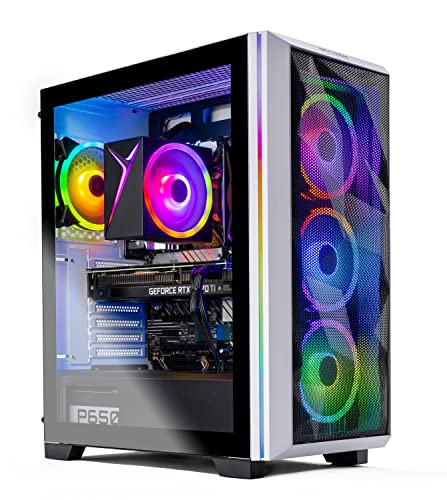
Where to buy
Check the latest price, availability and delivery on Amazon. Orders are placed on Amazon. We may earn a commission from qualifying purchases.
- Best overall for a beginner’s first 4K setup: Skytech Chronos Gaming PC, Ryzen 7 5700X, RTX 4070 Ti 12GB — Check on Amazon
- HOENGAGER Gaming PC, Intel Core i7-12700F, RTX 4070 12GB, 32GB DDR4 — Check on Amazon
- CYBERPOWERPC Gamer Xtreme VR, Intel Core i7-13700F, RTX 4060 Ti 16GB — Check on Amazon
- Thermaltake LCGS Quartz i1460, Intel Core i5-14400F, RTX 5060 — Check on Amazon
See 2 more Amazon options
- CYBERPOWERPC Gamer Master, AMD Ryzen 7 8700F, RTX 4060 Ti 8GB — Check on Amazon
- iBUYPOWER Scale, AMD Ryzen 5 7600, RTX 4060 Ti 8GB — Check on Amazon
Read the full guide ↓
Disclosure: As an Amazon Associate, reviewstook.com earns from qualifying purchases. Links to Amazon on this page are affiliate links; they cost you nothing extra. Listing details such as price and availability change often, so check the current Amazon listing before you buy.
If this is your first gaming PC, welcome — and before anything else, here is the one thing this entire guide is built around, stated as plainly as we can put it. A “4K gaming PC under $1,200” does not play modern games by drawing every one of the 8.3 million pixels on a 4K screen, one by one, at maximum settings. No $1,200 machine does that, and any advert that suggests otherwise is hoping you will not ask what the words mean. What these six machines actually do is smarter: they draw the game at a lower internal resolution — roughly 1440p-class, sometimes less — and use a technology called DLSS to rebuild a sharp 4K picture from it, which your 4K TV or monitor then displays. Played that way, at sensible settings, on the big screen most beginners already own, a $1,200 PC produces a picture that looks genuinely 4K and plays smoothly. Every review below grades its machine on exactly that: what it really renders, not what the box art implies.
Why build a whole guide around one honest sentence? Because beginners get hurt by this category in predictable ways. They buy the machine whose listing shouts “4K” loudest rather than the one with the right graphics card. They plug the screen into the wrong socket and conclude the PC is broken. They turn every setting to maximum, hit a stutter, and blame the hardware for a memory limit nobody explained. They spend the whole budget on the tower and forget the screen is a separate purchase. So: a plain-English glossary first, then six machines graded in beginner terms, then a first-evening setup walkthrough, an honest total-cost section, and the mistakes we would most like your first PC not to teach you the hard way.
First, the Words Nobody Explains
PC listings are written in a dialect nobody teaches you. Here is every term you need for this guide, in the order you will meet them.
- Resolution is how many dots (pixels) make up the picture. Full HD / 1080p is 1920×1080, about 2.1 million pixels. 1440p is 2560×1440, about 3.7 million. 4K is 3840×2160, about 8.3 million — roughly four times 1080p and about 2.25 times 1440p.
- Display resolution vs render resolution is the most important idea in this guide. Your screen always displays its full 4K grid. But the game can be rendered — actually drawn, pixel by pixel — at a lower resolution and then stretched and sharpened to fill the screen. Both are much easier work than true native 4K, where render and display resolution match.
- GPU (graphics card) is the part that draws the game. At 4K it does the overwhelming majority of the work, so in this guide the graphics card is the headline of every machine — an RTX 4070 Ti is a stronger drawer than an RTX 4070, which is stronger than an RTX 4060 Ti.
- VRAM is the graphics card’s own private memory, measured in gigabytes, and it holds the game’s textures — the detailed surfaces you see. At 4K-sized output, textures are big, and when VRAM fills up the symptom is not a gentle slowdown but stutter and surfaces that pop in late. In this guide: 8GB cards must manage textures carefully, 12GB is the comfortable working amount, and 16GB is headroom that buys smoothness rather than speed.
- CPU (processor) is the part that runs the game’s logic, physics and world. It matters, but at 4K the graphics card is the bottleneck long before the CPU is.
- RAM is the computer’s general memory (separate from VRAM). 16GB is the standard amount here. One beginner-critical detail: RAM works best in pairs. A single 16GB stick runs in what is called single-channel mode and quietly costs smoothness; two sticks run dual-channel.
- Upscaling and DLSS. Upscaling is the render-lower, display-higher trick above. DLSS is NVIDIA’s version, built into every graphics card in this guide — it uses AI to rebuild detail rather than just stretching the image. At 4K output, DLSS set to Quality renders the game internally at roughly 1440p (2560×1440); its Performance mode renders at 1920×1080.
- Frame generation is a separate trick that inserts extra, computer-invented frames between the real ones to make motion look smoother. It is a top-up, not an engine: it can only multiply a frame rate that is already healthy, and it does nothing for VRAM. Settings first, upscaling second, frame generation last — that order runs through the whole guide.
Hold onto one sentence from all of that and you can read the rest of this guide like an expert: the graphics card and its VRAM decide what a 4K PC really is; everything else is supporting cast.
In this guide
Quick Picks
Short on time, or comparing several options at once? Each row below names a buyer type and the machine that suits it, with a link to the listing.
| Buyer type | Pick | Why it stands out | Link |
|---|---|---|---|
| Best overall for a first 4K setup | Skytech Chronos, Ryzen 7 5700X, RTX 4070 Ti 12GB | The strongest graphics card here — closest to drawing real 4K; check price on Amazon before buying | Check on Amazon |
| Best balanced first PC | HOENGAGER, Intel Core i7-12700F, RTX 4070 12GB, 32GB DDR4 | A comfortable 4K card plus double the usual memory — only if the live price is at or under $1,200 | Check on Amazon |
| Best if your games are big and beautiful | CYBERPOWERPC Gamer Xtreme VR, i7-13700F, RTX 4060 Ti 16GB | The most graphics memory here, so detailed game worlds stay smooth instead of stuttering | Check on Amazon |
| Best newest technology | Thermaltake LCGS Quartz i1460, i5-14400F, RTX 5060 | The current-generation card with the newest upscaling tricks; check price on Amazon | Check on Amazon |
| Best value with a future | CYBERPOWERPC Gamer Master, Ryzen 7 8700F, RTX 4060 Ti 8GB | A value-focused pick on the platform that accepts future upgrades; check price on Amazon | Check on Amazon |
| Best simple, everyday purchase | iBUYPOWER Scale, Ryzen 5 7600, RTX 4060 Ti 8GB | An everyday option in this tier with no deal-hunting — with one small fix to budget for; check price on Amazon | Check on Amazon |
How These Picks Were Chosen
Three rules built this list, and all three exist to protect a first-time buyer. The first is about money. A machine belongs in this guide only if it fits this tier — but prebuilt prices wander a lot between deal events, so check price on Amazon before you buy and treat a pick as a buy only when its live price sits at or under the $1,200 ceiling. Where our research could not capture a reliable price for a listing at all, the review says so and makes no price claim. No price in this guide is a promise; the live listing is the only number that counts on the day you buy.
The second rule is about the graphics card, because at 4K the card is the computer. Every pick carries an NVIDIA RTX card with DLSS, because upscaling is not an optional extra at this budget — it is the mechanism that makes the whole tier work. Within that, we graded VRAM as a headline specification: 8GB machines are upscaling machines that must manage their textures, 12GB is the comfortable amount for detailed games at 4K output, and the single 16GB machine trades raw speed for the room to hold the biggest texture sets without stutter. The third rule is that the rest of the box had to be a proper PC: a modern multi-core processor, a fast 1TB SSD in every pick, and at least 16GB of system memory — with the configuration checked, not just the capacity, which is how one pick’s single memory stick got caught and flagged.
One more thing, because beginners deserve to hear it: we did not use these machines ourselves. We read the makers’ listings and specification pages and compared graphics card, VRAM, processor, memory, storage and platform. That is why this guide contains no frame-rate numbers — none were measured, and invented ones would be fiction. What can be stated confidently is the shape of the category: which card out-draws which, what DLSS Quality actually renders at 4K output, and where each machine’s ceiling sits.
The 6 Best 4K Gaming PCs Under $1,200 for Beginners
Skytech Chronos Gaming PC — Ryzen 7 5700X, RTX 4070 Ti 12GB
Who it suits: The beginner who wants the most genuine 4K this budget can produce — and who is patient enough to buy it on a deal day.
The RTX 4070 Ti is a full class stronger than everything else in this guide, with 12GB of fast memory behind it. In the plain language of the glossary, here is what it actually renders. In lighter and older games — and there are thousands of excellent ones — it can draw true native 4K, all 8.3 million pixels, which no other pick here can claim. In today’s heaviest games it holds DLSS Quality, rendering at roughly 1440p and rebuilding a 4K picture that is very hard to tell apart from native on a TV.
The rest of the machine is a generation older, and for a beginner that trade deserves a calm explanation rather than alarm. The Ryzen 7 5700X is an eight-core processor on AMD’s older AM4 platform, with 16GB of DDR4 memory, a 1TB SSD and a properly sized 750W Gold power supply. At 4K the graphics card does nearly all the work, so the older processor does not hold this machine back in games today. The honest cost is about the future: AM4 accepts no newer processors, so this PC is bought for what it is on delivery day. Skytech’s listing also notes the graphics card’s brand may vary — the model and its 12GB are guaranteed, the company that assembled the card is not, and that is normal and harmless.
Then the catch, which this review will not bury: the price. This listing often sits well above this tier, so check price on Amazon before you buy. Read that the beginner-proof way: treat it as a pick in this guide only when its live price sits at or under the $1,200 ceiling. Set a price alert, and if the live price fits the ceiling, buy with confidence. If the live price sits well above the ceiling, close the tab and choose from the machines below — at that money you would be shopping in the wrong guide entirely.
- RTX 4070 Ti 12GB — the strongest card here; native 4K in lighter games, comfortable DLSS Quality in heavy ones.
- 12GB of graphics memory holds detailed textures where 8GB cards must turn them down.
- A 750W Gold power supply — properly sized for the card.
Honest limitation: It only belongs in this guide when its live price fits the $1,200 ceiling — check price on Amazon — and its AM4 platform has no future processor upgrades.
Choose it if the live listing fits the $1,200 ceiling and you want the strongest 4K this budget can honestly claim. Skip it if the live price sits well above the ceiling — patience, or a different pick below, is the right move.

HOENGAGER Gaming PC — Intel Core i7-12700F, RTX 4070 12GB, 32GB DDR4
Who it suits: The beginner who wants the sensible, balanced version of entry-level 4K — a comfortable graphics card, a strong processor and double the usual memory — and who is willing to check one live price carefully before buying.
The RTX 4070 is where honest 4K becomes comfortable. What it actually renders: DLSS Quality as its easy default rather than its stretch goal, detailed textures that its 12GB of graphics memory can genuinely hold, medium-high to high settings in current games, and true native 4K across the enormous back catalogue of games from a few years ago.
What makes this particular build stand out is everything around the card. Its processor, the Core i7-12700F, has twelve cores. Its system memory is 32GB — double every other machine here — which sounds like a spec-sheet trophy until you live with a PC: the game, a browser full of guides, a chat app and recording software all open at once is exactly how beginners actually play, and 32GB is what makes that feel effortless. None of that draws a game faster — the card does that — but all of it makes a better everyday computer, and a 12GB card paired with 32GB of memory is an uncommon combination at this budget.
Now the condition: during this guide’s research, no reliable Amazon price could be captured for this listing, so this review makes no price claim for it at all. The machine earns its place on specification, with one rule attached — buy it only when the live listing shows it at or under $1,200. At or under the ceiling, this is arguably the most sensible purchase in the guide. Above it, do not stretch: the Chronos on a deal day, or the 16GB CyberPowerPC below, are the picks to act on instead.
- RTX 4070 12GB — the comfortable entry-4K card: DLSS Quality by default, detailed textures, no drama.
- 32GB of system memory — double the rivals, ideal for game-plus-everything-else play.
- Twelve-core processor, liquid cooling and Windows 11 Pro round out the specification.
Honest limitation: No verified price could be captured for this listing, so the pick carries a condition: excellent at or under $1,200 on the live listing, out of scope above it.
Choose it if the live price is at or under $1,200 and you value balance over deal-hunting. Skip it if the listing sits above the ceiling on the day you shop — the guide’s other picks exist for exactly that day.

CYBERPOWERPC Gamer Xtreme VR (GXiVR8040A14) — Intel Core i7-13700F, RTX 4060 Ti 16GB
Who it suits: The beginner whose games are the big, beautiful, open-world ones — where the problem is never speed, it is the world stuttering as its details load.
This machine teaches the most useful lesson in the guide, so let us make it clearly. Its graphics card, the RTX 4060 Ti, comes in two versions with the same name and the same drawing speed, differing only in memory: 8GB, and the 16GB fitted here. At 4K output it becomes functional, because the detailed texture sets of big open-world games can overflow 8GB even when DLSS is doing the rendering — and when graphics memory runs out, the failure is ugly: stutter, surfaces popping in late, settings quietly lowering themselves. The 16GB card simply does not have that failure mode at this tier. What it actually renders is the standard 4060 Ti method — DLSS Quality or Balanced, medium-high settings — but it renders it with the texture slider allowed to stay high, which on a 4K screen is the slider your eyes notice most.
Be just as clear about what the 16GB does not do: it does not make this card faster. Frame for frame, this machine draws games at 4060 Ti speed, behind the two 12GB cards above it. You are buying smoothness and detail within the upscaling method, not a higher class of rendering. The supporting specification is strong: a sixteen-core Core i7-13700F that will never be the limit, 16GB of modern DDR5 memory, a fast 1TB SSD, and one HDMI plus two DisplayPort outputs. One detail could not be confirmed from the listing material — whether the system memory is one stick or two — so check the live listing before ordering; if it is a single stick, the fix is the cheapest upgrade in PC gaming, and the setup section below shows you how to check on your first evening.
On price, treat it exactly like the Chronos: check price on Amazon before you buy. When its live price fits the $1,200 ceiling it is a distinctive, smart buy. Above the ceiling it is out of this guide’s scope and competing with stronger machines.
- 16GB of graphics memory — the most here; big game worlds keep their detail instead of stuttering at 4K output.
- Sixteen-core processor and DDR5 — nothing else in the box holds the card back.
- Three display outputs suit a monitor-plus-TV desk.
Honest limitation: The 16GB buys room, not speed — rendering is 4060 Ti class, so 4K still means DLSS and medium-high settings; and it belongs in this guide only when its live price fits the ceiling — check price on Amazon.
Choose it if your games are detailed open worlds and its live price fits the ceiling. Skip it if you want the fastest rendering above all — the 12GB cards draw faster — or if its live price sits above the ceiling.

Thermaltake LCGS Quartz i1460 — Intel Core i5-14400F, RTX 5060 8GB
Who it suits: The beginner who likes the newest technology — the current generation’s upscaling tricks, in a clean white build; check price on Amazon.
Every other card in this guide is from the previous RTX 40 generation. The Quartz carries an RTX 5060, the current generation’s entry card, and a beginner deserves the honest version of what that means: on raw drawing power it belongs in the 4060-class conversation, not secretly above the 4060 Ti machines. What the newer generation adds is the most advanced version of the technology this whole tier depends on — the latest DLSS upscaling, plus multi frame generation, which inserts extra generated frames between real ones. Follow it, and what this machine actually renders is the familiar 8GB method — DLSS doing the heavy lifting, medium-high settings — with the smoothest motion of any pick here in the games that support its newest features.
The rest of the build is tidy, with one deliberate old-fashioned choice to understand. The Core i5-14400F is a ten-core processor that will not limit this card at 4K. The memory is 16GB of Thermaltake’s own ToughRam — but it is DDR4, the older memory type, where the CyberPowerPC machines below offer DDR5. In games today, with the graphics card carrying the load, that difference is small. Its real meaning is about the future: DDR4 and this platform are at the end of their lines, so like the Chronos, this is a machine bought for what it is. For pricing, check price on Amazon — it is positioned as one of the more accessible picks here alongside the iBUYPOWER, so no heroic deal-hunting should be required.
Its ceiling is the number 8: 8GB of graphics memory. The memory is the fast new GDDR7 type, but capacity, not speed, is the constraint — the heaviest current games will ask this card for the same texture compromises as the 8GB 4060 Ti machines, and no new-generation badge changes that arithmetic. Buy the Quartz for its features, price and looks, with expectations set to the 8GB class it honestly belongs to.
- The newest card generation here — the latest DLSS upscaling and multi frame generation, which the older picks cannot offer.
- Positioned as an accessible, value-focused pick in this tier — check price on Amazon.
- The clean white build looks right beside a 4K TV.
Honest limitation: 8GB of graphics memory caps it at the upscaling class — DLSS, medium-high settings and texture discipline at 4K, with frame generation as a top-up, never a foundation; the DDR4 platform has no upgrade future.
Choose it if you want the newest features at an accessible price in this tier — check price on Amazon. Skip it if your games are the most texture-heavy ones — the 16GB CyberPowerPC above was picked for you.

CYBERPOWERPC Gamer Master (GMA2900A) — AMD Ryzen 7 8700F, RTX 4060 Ti 8GB
Who it suits: The beginner thinking past the first purchase — a value-focused pick, on the platform that will still accept upgrades years from now.
What it actually renders is the standard 8GB story, told as a value-focused option on the best platform. The RTX 4060 Ti 8GB draws games the same way the iBUYPOWER below does: at 4K output, DLSS Quality or Balanced, medium-high settings, textures managed rather than maxed in the games that punish 8GB. That is a genuinely enjoyable way to play on a 4K TV. Its Ryzen 7 8700F is an eight-core processor on AMD’s current AM5 socket, with modern DDR5 memory and a fast 1TB SSD. AM5 is the platform AMD is still building on: years from now, when a stronger graphics card turns this into a much more capable 4K machine, the socket and memory type will still accept modern parts — the one upgrade story in this guide that stays open-ended.
Value is the other half of its case — check price on Amazon before you buy. The warning that travels with it is about who is selling. Marketplace sellers can list this model at very different prices, so on this listing, checking the seller’s name and the cart total is part of the purchase, not paranoia.
Its weaknesses are the shared ones of its class, plus the discipline its pricing asks of you. The 8GB ceiling is permanent for this card. The processor’s virtue is its socket, not a speed crown. And a machine priced by deal events is bought on the category’s schedule, not yours. Accept those three things, and this is the most future-proof dollar in the guide
- A value-focused pick in this tier — check price on Amazon.
- AM5 platform with DDR5 — the longest upgrade runway in this guide.
- Eight-core processor and a fast SSD — nothing embarrasses the card.
Honest limitation: The 8GB of graphics memory defines its 4K life permanently — DLSS and texture discipline, forever; and marketplace sellers list it far above Amazon’s own deal prices, so the seller matters.
Choose it if you want entry-level 4K now with a real upgrade path later, at a value-focused position in this tier. Skip it if you will never open the case and simply want the best 4K on day one — that is the 12GB cards’ job.

iBUYPOWER Scale (SCA5N46T01) — AMD Ryzen 5 7600, RTX 4060 Ti 8GB
Who it suits: The beginner who wants the simplest transaction in the guide — a modern machine at an everyday price, with one small, cheap flaw to fix.
The Scale’s distinction is its straightforward, everyday positioning in this tier — check price on Amazon before you buy. For this budget the specification is properly modern: a six-core Ryzen 5 7600 on the upgrade-friendly AM5 platform, an RTX 4060 Ti 8GB, a 1TB SSD, Wi-Fi, Windows 11 Home, a keyboard and mouse in the box, and a one-year manufacturer warranty. What it actually renders is the familiar 8GB method — DLSS carrying the load, medium-high settings, textures set with the memory limit in mind — and on a 4K TV that is a satisfying experience for the money.
Now the flaw, which the listing itself states openly and which this guide treats as part of the purchase rather than a scandal: the 16GB of memory arrives as a single stick. Remember the glossary — one stick runs single-channel and quietly taxes exactly the minimum-frame-rate moments you feel as roughness. The fix is the cheapest in this guide: buy one matching 16GB stick, click it into the empty slot beside the first, and you have restored dual-channel and doubled your memory in a single step. Budget for the extra stick from the start — check its current price when you shop — and the Scale remains the value pick it claims to be. Its six processor cores are the fewest here: plenty for 4K gaming, where the graphics card leads, but the least spare capacity if heavy streaming joins the hobby later.
- Positioned as an everyday option in this tier — check price on Amazon.
- Modern AM5 platform with a six-core Ryzen 5 7600.
- Keyboard, mouse and a one-year warranty included in the box.
Honest limitation: The 16GB ships as a single stick, so memory runs single-channel until you add the second stick — budget for it on day one; and 8GB of graphics memory sets the same settings ceiling as the other 4060 Ti picks.
Choose it if you want entry-level 4K as a normal, everyday option in this tier and are willing to add one memory stick. Skip it if you refuse to open the case for any reason — the 32GB HOENGAGER, at or under the ceiling, is your pick instead.

Comparison Table
| Product | Graphics card / VRAM | What it really renders at 4K | Processor / Memory / Storage | Link |
|---|---|---|---|---|
| Skytech Chronos | RTX 4070 Ti / 12GB | Native 4K in lighter games; DLSS Quality in heavy ones — check price on Amazon | Ryzen 7 5700X / 16GB DDR4 / 1TB | Check on Amazon |
| HOENGAGER Gaming PC | RTX 4070 / 12GB | DLSS Quality as the easy default; native across the back catalogue — at/under $1,200 only | i7-12700F / 32GB DDR4 / 1TB | Check on Amazon |
| CYBERPOWERPC Gamer Xtreme VR 16GB | RTX 4060 Ti / 16GB | DLSS Quality or Balanced like the other 4060 Ti picks — but textures stay high | i7-13700F / 16GB DDR5 / 1TB Gen4 | Check on Amazon |
| Thermaltake LCGS Quartz i1460 | RTX 5060 / 8GB | DLSS upscaling at medium-high settings, with the newest frame generation on top | i5-14400F / 16GB DDR4 / 1TB | Check on Amazon |
| CYBERPOWERPC Gamer Master | RTX 4060 Ti / 8GB | DLSS Quality or Balanced, textures managed — a value-focused route to the 8GB method | Ryzen 7 8700F / 16GB DDR5 / 1TB Gen4 | Check on Amazon |
| iBUYPOWER Scale | RTX 4060 Ti / 8GB | The same 8GB DLSS method at an everyday price — add the second memory stick | Ryzen 5 7600 / 16GB DDR5 (1 stick) / 1TB | Check on Amazon |
Your First Evening: Setting It Up Right
Every machine in this guide arrives ready to run — but “ready” still leaves four beginner traps between the box and a good first game. Walk through these in order and you will skip all of them.
Step 1 — Check the delivery before you celebrate. Open the case side if the maker invites it (many prebuilts ship with protective foam inside the case — if yours has it, remove it before powering on; it is packaging, not a component). Confirm the graphics card is seated firmly and that what arrived matches the listing: card model, memory amount, storage size. Keep all packaging for the first few weeks, while returns are still simple.
Step 2 — Plug the screen into the graphics card, not the motherboard. This is the single most common beginner mistake in PC gaming, because the back of the PC has two sets of display sockets. The motherboard’s sockets sit in a vertical cluster near the USB ports; the graphics card’s sockets — HDMI and DisplayPort — sit lower, in a horizontal row on the card itself. Plug your TV or monitor into the card’s row. Plug into the motherboard instead and the game runs on the weak built-in graphics — or you get no picture at all —.
Step 3 — Tell Windows your screen’s real refresh rate. After the first boot and Windows setup, go to Settings, then Display, then Advanced display, and set the refresh rate to the highest your screen offers — 60Hz on most 4K TVs, higher on gaming monitors. If you are using a TV, also switch that HDMI input to its Game mode; it reduces the delay between your hands and the screen.
Step 4 — Update the graphics driver. Install NVIDIA’s app (or update through it if it is preinstalled) and let it fetch the current driver, then run Windows Update.
Step 5 — Set each game the beginner way. In the game’s display settings: output resolution 3840×2160 (4K), DLSS on and set to Quality, then textures according to your card — high on the 12GB and 16GB picks, medium on the 8GB picks — and other settings at high or medium-high rather than ultra. Turn frame generation on last, if the game offers it,.
Step 6 — Do the memory check. Open Task Manager, go to Performance, then Memory, and look at “Slots used.” If it says 1 of 4 (or 1 of 2) on a machine you bought with 16GB, your memory is a single stick running single-channel — expected on the iBUYPOWER Scale, possible on the CyberPowerPC Gamer Xtreme VR.
The Real Total Cost of a First 4K Setup
Here is the budget surprise nobody puts in the listing: the tower is not the whole purchase. Nothing below is hidden inside any pick’s price — these are separate items, costed separately, the way your bank account will meet them. The good news is that the biggest item is one most beginners already own.
- The screen — no extra cost if you own a 4K TV, and most beginners do. Every machine in this guide is happiest feeding a 4K TV at 60Hz, which is the natural partner for this tier. If you will buy a 4K monitor instead, budget separately for a decent one.
- Keyboard and mouse — often no extra cost, otherwise a modest set. The iBUYPOWER Scale includes both in the box; for the other picks, a perfectly serviceable basic set is a small purchase, and you can upgrade to nicer ones any time. Do not let anyone sell you an expensive keyboard as a “requirement.”
- Sound — a headset or your TV’s speakers. TV speakers cost nothing to start with.
- The memory stick — one pick only. If you choose the iBUYPOWER Scale, its second 16GB stick is part of the real cost: budget for that extra stick separately, as its review states. It is the only pick here with a planned extra.
Added up honestly: a beginner with a 4K TV already in the room can be playing for the price of the tower plus, at most, a basic keyboard-and-mouse set.
How to Choose a 4K Gaming PC Under $1,200
- Start from the honest definition. At this budget, 4K means a 4K screen fed by upscaled rendering at medium-high settings. If true native 4K at maximum settings is your requirement, the correct move is a bigger budget — see Best 4K Gaming PC For Beginners Under $1500 — or a different resolution target.
- Shop the graphics card first, the badge second. The ladder that matters: RTX 4070 Ti, then RTX 4070, then the RTX 4060 Ti and RTX 5060 class. Then check the number after it — VRAM. At 4K output, 12GB is the comfortable amount, 16GB is headroom, 8GB is workable with texture discipline.
- Never pay a deal machine its everyday price. Some picks here are recommendations only when their live price fits the ceiling. Check price on Amazon before you buy anything, and treat a price above the ceiling as a reason to wait or choose differently.
- Check who is selling, not just what. The same model can be listed by Amazon and by marketplace sellers at very different prices. A markup from an unfamiliar seller buys you nothing.
- Check the memory configuration, not just the amount. 16GB on one stick runs single-channel and costs smoothness. For any machine, confirm two sticks or plan the cheap second stick.
- Match the machine to the screen you actually have. A 4K TV at 60Hz flatters this whole tier. A high-refresh 4K monitor is a harder target that this budget serves only in lighter games.
- Decide whether you are an upgrader. If you will open the case in two years, the AM5 machines (both the Gamer Master and the Scale) keep their futures open. If you will never open it, buy the most complete day-one machine instead — the balanced HOENGAGER or, on its deal day, the Chronos.
- If $1,200 is a stretch, step down a tier, not down in quality. Best 4K Gaming PC For Beginners Under $800 covers the same honest approach at a lower ceiling, and Best Gaming PC For Beginners Under $1200 covers the wider beginner picture at this budget without the 4K requirement.
Common Beginner Mistakes
- Plugging the screen into the motherboard. The classic. Your games then run on weak built-in graphics — or nothing displays at all. The graphics card’s sockets are the horizontal row low on the back of the case.
- Believing “4K gaming PC” means native 4K at maximum settings. At $1,200 it means upscaled 4K at sensible settings.
- Turning every slider to ultra on day one. On an 8GB card, ultra textures overflow the graphics memory and the game stutters — and the beginner concludes the PC is faulty. That stutter is a settings choice, and the fix is one slider, not a return label.
- Leaving the screen at its default refresh rate. Windows often starts at a lower rate than your screen supports, quietly capping every game’s smoothness. Two minutes in Settings fixes it forever.
- Switching on frame generation to rescue a struggling game. Generated frames multiply a healthy frame rate; they cannot create one, and on a low base they add oddness instead of smoothness. Settings and DLSS first, frame generation last.
- Buying a deal pick at a high price. The Chronos and the 16GB CyberPowerPC are different, worse purchases when their live prices sit well above the ceiling. The recommendation travels with the live price, not the product name — check price on Amazon.
- Spending the whole budget on the tower. Screen, keyboard, mouse and sound are separate purchases.
- Leaving a single memory stick unfixed. If your machine’s 16GB is one stick, it runs single-channel until a second stick joins it. It is the cheapest performance upgrade in PC gaming, and skipping it taxes every game quietly.
Your Upgrade Path, in Plain Terms
A first PC is not a life sentence. Here is the order in which these machines grow, cheapest and easiest first — every step is a “one screwdriver, ten minutes” job, and none of them is required on day one.
Step one: the second memory stick. If your machine arrived with a single 16GB stick — the iBUYPOWER Scale by design, the Gamer Xtreme VR if its live configuration turns out that way — adding its twin restores dual-channel smoothness and takes you to 32GB in the same motion — the cheapest meaningful upgrade in this guide.
Step two: more storage. All six machines carry 1TB, and detailed modern games are large. When the library outgrows it, a second SSD is a simple, inexpensive addition.
Step three: a stronger graphics card. This is the upgrade that one day turns an upscaling machine into something closer to a native 4K machine, and it is a card swap, not a new computer. Here the platforms divide honestly. The AM5 machines — the Gamer Master and the Scale — sit on AMD’s current socket, so a future processor upgrade also stays possible; their runway is the longest. The AM4 and DDR4 machines — the Chronos, the HOENGAGER and the Quartz — are finished platforms: a graphics card swap still works and is still worthwhile, but when the processor’s turn eventually comes, it arrives as a new platform rather than a part.
And the screen, whenever you are ready. If you start on a TV and later want a desk setup, a good 4K monitor is a safe buy at any point.
Final Recommendation
- The most real 4K, on a deal day: Skytech Chronos, RTX 4070 Ti — only when its live price fits the ceiling; check price on Amazon.
- The balanced first PC: HOENGAGER, RTX 4070 with 32GB — provided the live price is at or under $1,200.
- For big, detailed game worlds: CYBERPOWERPC Gamer Xtreme VR 16GB — when its live price fits the ceiling; check price on Amazon.
- Newest tricks in this tier: Thermaltake LCGS Quartz i1460, RTX 5060.
- Value route with an upgrade future: CYBERPOWERPC Gamer Master on AM5.
- The no-drama everyday buy: iBUYPOWER Scale — with one matching memory stick added.
For most beginners, our top two are the HOENGAGER, when its live price sits at or under the ceiling and the iBUYPOWER Scale with its second memory stick added, the honest everyday route onto a 4K TV in this tier. Deal hunters should hold out for the Chronos when its live price fits the ceiling, which is a class above everything here, and players of big open-world games for the 16GB CyberPowerPC when its live price fits the ceiling. If, having read the glossary, you suspect your ambitions are really native rather than upscaled, the honest signposts are Best 4K Gaming PC For Beginners Under $1500 and a step down in resolution to Best 1440p Gaming PC Under $1200.
Frequently Asked Questions
Can a $1,200 PC really game at 4K?
Yes, genuinely — as long as you use the definition this guide has used from its first paragraph. It displays a 4K picture while rendering internally at a lower resolution and upscaling with DLSS, at medium-high settings and TV-friendly smoothness. It does not render native 4K at maximum settings; no $1,200 machine does. Judged on what it delivers, the tier is real — and for a first PC it is a genuinely good buy.
What does upscaling actually mean, and will it look blurry?
It means the game is drawn at a lower internal resolution — with DLSS Quality at 4K output, roughly 1440p — and then intelligently rebuilt to fill your 4K screen. It is not a simple stretch: DLSS uses AI reconstruction to recover detail, and at TV viewing distances, in motion, most players find Quality mode very close to native while running far faster. That trade is the entire reason this budget tier exists.
How much VRAM does a beginner need for 4K?
Treat 12GB as the comfortable amount for detailed games at 4K output, 16GB as headroom that keeps the biggest game worlds smooth, and 8GB as workable provided you set textures sensibly in the heaviest titles. VRAM is the specification first-time buyers under-weight most at this resolution.
Do I need a 4K monitor, or is my 4K TV enough?
Your TV is enough — for most beginners it is the ideal start. These are 4K60-class machines, and a 4K TV at 60Hz matches them perfectly; just use its Game mode and plug into the graphics card.
I plugged everything in and games run terribly — what did I do wrong?
Almost certainly the cable. If your screen is plugged into the motherboard’s sockets — the vertical cluster near the USB ports — your games are running on the weak built-in graphics instead of the graphics card you paid for. Move the cable to the card’s horizontal row of sockets, low on the back of the case, restart, and the machine you bought will appear.
Is 16GB of memory enough, and does the single-stick thing matter?
16GB is enough capacity for gaming at this tier, but the configuration matters: a single stick runs single-channel and costs smoothness in exactly the moments you feel it. The iBUYPOWER Scale ships that way and says so in its own listing; adding one matching stick fixes the channel and upgrades you to 32GB in a single step.
Should I wait for the Chronos deal, or buy something now?
That depends on your patience, not on the machines. The Chronos, when its live price fits the ceiling, is a class above everything else here, and if a price alert is likely to fire within your timeframe, waiting is rational. But when its live price sits well above the ceiling it leaves this guide’s category entirely — never buy it at that price as a substitute for waiting. The HOENGAGER at the ceiling, or the Scale at its everyday price, puts you on your 4K TV now with no regrets attached.
Would a beginner be happier with a 1440p PC at this price?
Possibly — it is the most sensible alternative in this guide. At $1,200, a 1440p machine runs higher settings at higher frame rates with no upscaling involved at all. Choose 4K if your screen is a TV across the room; choose 1440p if you sit close to a monitor and value smoothness over pixel count.


