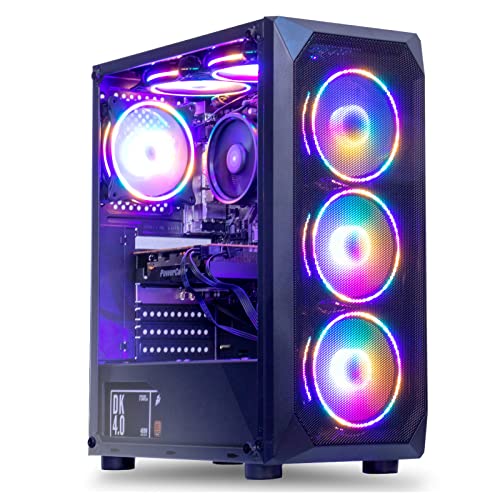
Where to buy
Check the latest price, availability and delivery on Amazon. Orders are placed on Amazon. We may earn a commission from qualifying purchases.
- Best overall for this budget: MXZ Gaming Desktop, Ryzen 5 5500, GTX 1660 Super 6GB, 16GB DDR4, 500GB NVMe SSD — Check on Amazon
- Beelink SER5 MAX Mini PC, Ryzen 7 7735HS, Radeon 680M, 24GB LPDDR5, 500GB SSD — Check on Amazon
- GMKtec NucBox M6 Ultra Mini PC, Ryzen 5 7640HS, Radeon 760M, 16GB DDR5, 512GB SSD — Check on Amazon
- STGAubron Gaming PC, Ryzen 5 5500, Radeon RX 580 8GB, 16GB DDR4, 512GB SSD — Check on Amazon
See 2 more Amazon options
- GMKtec M5 Plus Mini PC, Ryzen 7 5825U, 32GB RAM, 1TB SSD — Check on Amazon
- ACEMAGICIAN AM06 Pro Mini PC, Ryzen 7 5800U, 16GB RAM, 512GB SSD — Check on Amazon
Read the full guide ↓
Disclosure: As an Amazon Associate, reviewstook.com earns from qualifying purchases. Links to Amazon on this page are affiliate links; they cost you nothing extra. Listing details such as price and availability change often, so check the current Amazon listing before you buy.
Start with the sentence most guides in this category refuse to write: there is no true native-4K gaming PC for under $500. Not a hidden gem, not a refurbished miracle, not a mini PC with a heroic name. Rendering modern games natively at 3840 × 2160 — four times the pixels of 1080p — takes a graphics card in the class of an RTX 4070 or RX 7800 XT and up, and that card alone, bought new, costs roughly this entire budget before you have paid for a processor, memory, storage, a power supply or a case. Any listing that promises a “$499 4K gaming PC” is using the phrase to mean one of three lesser things: the machine can output a 4K picture to a TV, it can play video at 4K, or it can run games at a lower internal resolution and upscale them to fill a 4K screen. Those are real capabilities, and for the right buyer they are enough — but they are not native 4K gaming, and this guide will not pretend otherwise.
So what does $500 honestly buy, if your screen is a 4K TV or monitor? Four things, and they are worth having. First, flawless 4K media: every machine in this guide decodes and outputs 4K video, so the living-room half of a “4K PC” — films, streaming, a big sharp desktop — is fully delivered. Second, genuine gaming at 1080p, and in lighter titles at 1440p, displayed on your 4K screen: a good 1080p or 1440p image upscaled by the game or the TV looks far better than a slideshow rendered natively. Third, upscaled gaming that reaches the 4K panel with help: FSR and in-game resolution scaling let the stronger picks here render internally at 1080p–1440p and present a convincing 4K-sized picture in esports and older titles. Fourth, cloud gaming: services that render the game on a server and stream it turn even the cheapest mini PC in this guide into a front end for high-resolution play, limited by your internet connection rather than your graphics chip. Buy with those four expectations and $500 is a workable budget. Buy expecting native 4K ultra settings and no machine at this price — in this guide or anywhere else — will save you from disappointment.
The six picks below are the real verified families that exist under the line: two towers with actual discrete graphics cards (a GTX 1660 Super build and an RX 580 build, both honest about their age), and four Ryzen mini PCs whose integrated graphics range from the strong Radeon 680M down to the older Vega 8, chosen for RAM, storage, display outputs and price. Two of the six are sale-dependent — their prices cross above $500 in some weeks — and each review says so in plain words rather than burying it. If your $500 is a hard ceiling today, the guide flags which picks are safely under it at their commonly seen prices. And if what you actually want is real native 4K, the honest move is to save toward the budgets that deliver it — roughly $1,200 and up for a prebuilt that plays modern titles natively at 4K with sensible settings — a path this guide maps out in the buying sections below, with links to the higher tiers of this same series.
In this guide
Quick Picks
Short on time, or comparing several options at once? Each row below names a buyer type and the machine that suits it, with a link to the listing.
| Buyer type | Pick | Why it stands out | Link |
|---|---|---|---|
| Best overall for this budget | MXZ Gaming Desktop, Ryzen 5 5500, GTX 1660 Super | The only sub-$500 class here with real discrete-GPU headroom for upscaled play on a 4K screen | Check on Amazon |
| Best mini PC graphics | Beelink SER5 MAX, Ryzen 7 7735HS, Radeon 680M | Strongest integrated GPU in the guide, with 24GB of fast LPDDR5 feeding it | Check on Amazon |
| Best modern platform | GMKtec NucBox M6 Ultra, Ryzen 5 7640HS, Radeon 760M | Zen 4 CPU, DDR5, USB4 and dual 2.5GbE — the best future options, including external-GPU docks | Check on Amazon |
| Best cheap tower to upgrade | STGAubron Gaming PC, Ryzen 5 5500, RX 580 8GB | A standard tower you can later fit a real 4K-class GPU into; the card inside is a placeholder | Check on Amazon |
| Best RAM and storage value | GMKtec M5 Plus, Ryzen 7 5825U, 32GB RAM, 1TB SSD | Double the memory and storage of most rivals at a price seen well under the budget | Check on Amazon |
| Best budget media + cloud box | ACEMAGICIAN AM06 Pro, Ryzen 7 5800U | Triple 4K display output and the lowest pricing tier in the guide | Check on Amazon |
How These Picks Were Chosen
The budget was applied as a ceiling, with one documented exception pattern: in this corner of Amazon, prices swing weekly with coupons and Prime pricing, so a machine qualifies if it has been seen at or under $500 in recent listing and deal records — and where a pick is only in-budget on sale, the review says so explicitly rather than burying it. Anything whose “4K” claim dissolved on inspection — listings marketing a 4K badge on hardware that cannot game at all — was excluded. What remains is ranked by the thing that decides gaming outcomes at any resolution: graphics hardware first, its memory second, and everything else after.
We did not use these machines ourselves. We read the maker listings and specification pages and compared graphics chips, video memory, RAM configuration, storage, display outputs and upgrade paths. For integrated graphics, RAM configuration matters more than most listings admit: an iGPU borrows system memory, so the Beelink’s 24GB of fast dual-channel LPDDR5 and the GMKtec M5 Plus’s 32GB are gaming specifications, not just multitasking ones. For the towers, we weighted the upgrade path — a standard case and power supply you can later fit a genuine 4K-class graphics card into is worth real money to a buyer whose 4K ambition is currently ahead of their budget. We also favored listings that publish full specifications over those hiding behind a bare “Core i7” with no generation attached, a vagueness this price band is notorious for.
One filter sat on top of all of that, and it is the theme of the whole guide: the difference between displaying 4K and rendering 4K. Every pick here can put a 4K desktop and 4K video on your screen — that part is easy and cheap, and modern integrated graphics do it well. Rendering games is the expensive part, and each review grades its machine on the honest scale: what it renders natively, what it reaches by upscaling, and what it should not be asked to attempt.
The 6 Best “4K” Gaming PCs Under $500 — Honest Picks
MXZ Gaming Desktop — Ryzen 5 5500, GTX 1660 Super 6GB, 16GB DDR4, 500GB NVMe SSD
Who it suits: The buyer who wants the most actual game-rendering power $500 can reach, in a tower they can upgrade later — and who accepts that “4K” here means smart upscaling, not native resolution.
The GTX 1660 Super is the strongest graphics card that appears in complete PCs at this budget, and it changes what the machine can honestly attempt. It is a real discrete GPU with 6GB of GDDR6 memory: at 1080p it plays modern titles at medium-to-high settings and esports games at high frame rates; at 1440p it handles older and lighter games natively; and on a 4K screen its sensible mode is rendering at 1080p or 1440p with FSR or in-game scaling presenting the result at panel size. That upscaled picture, on a TV across a living room, is the closest thing to “4K gaming” this budget produces locally — visibly sharper and steadier than anything the integrated graphics below can sustain in the same games. The rest of the specification is the right supporting cast: a six-core Ryzen 5 5500, 16GB of DDR4 and a 500GB NVMe SSD, in a conventional tower with room — and, critically, a graphics slot — for the future.
Two honest limitations define this pick. The first is the card’s age and toolkit: the GTX 1660 Super is a 2019 design with no DLSS and no ray-tracing hardware, so its upscaling is FSR-class, and its 6GB of VRAM caps texture settings in recent releases at any resolution — at native 4K it would run out of memory and power simultaneously, which is why this guide never asks it to try. The second is price behavior: this listing dips into this budget on sale and sits above the $500 line at other times — check price on Amazon before you judge it. It is a sale-dependent pick, full stop. At or under $500 it is the strongest recommendation in this guide; well above that line, the smarter buy is patience or the next tier up.
- Real discrete GPU — the only pick with genuine headroom above 1080p rendering.
- Balanced platform: 6-core Ryzen 5 5500, 16GB RAM, NVMe storage, standard tower.
- The upgrade path is the point: a future GPU swap turns this into a true 4K machine.
Honest limitation: No native 4K gaming, no DLSS, 6GB VRAM — and the price only fits this guide when it is on sale.
Choose it if you catch it at or under $500 and want maximum local rendering now plus an upgrade path. Skip it if the live price is well above $500, or you want a silent, tiny living-room box instead of a tower.

Beelink SER5 MAX Mini PC — Ryzen 7 7735HS, Radeon 680M, 24GB LPDDR5, 500GB SSD
Who it suits: Living-room and small-desk buyers who want the strongest integrated graphics under $500 — a silent box behind the 4K TV that games honestly at 1080p and upscales from there.
The Radeon 680M is the headline: twelve RDNA 2 compute units integrated into the Ryzen 7 7735HS, and the fastest iGPU in this guide by a clear margin. Beelink feeds it properly — 24GB of dual-channel LPDDR5, which matters because integrated graphics borrow system memory and its speed; lesser mini PCs strangle the same chip with slow single-channel RAM. In practice the 680M is a genuine 1080p gaming chip: esports titles at high settings, older AAA games at medium, recent releases at low settings with FSR doing honest work. On a 4K television, the sensible configuration is exactly that — render at 1080p, let FSR or the TV upscale — plus flawless 4K video and a triple-4K-display desktop for work, which this box also delivers. Deal coverage has put this configuration inside the budget on sale days, though its price has also been tracked above the $500 line at other times — check price on Amazon — so treat it as the second sale-aware pick in the guide.
The compromises are the mini PC constants, plus one specific to this model. The RAM is soldered LPDDR5: 24GB is generous and well-chosen, but it is what you will have forever — storage, via the M.2 slots, is the only internal upgrade. There is no graphics upgrade path at all; when the 680M stops being enough, the whole box is replaced, which is why tower buyers should read the MXZ review twice. And nothing about the 680M changes the guide’s central fact: it renders games at 1080p-class resolutions. Its “4K” talents are output, video and upscaling — real talents, honestly labeled.
- Radeon 680M — the strongest integrated graphics in this guide.
- 24GB fast dual-channel LPDDR5 feeds the iGPU the way it needs.
- Triple 4K display support and quiet, tiny living-room manners.
Honest limitation: Soldered, non-upgradeable RAM and no GPU upgrade path; price has been seen above $500 between deals.
Choose it if you want the best small-box gaming under $500 and your resolution expectations are set at 1080p-plus-upscaling. Skip it if you plan to upgrade graphics later — buy a tower.

GMKtec NucBox M6 Ultra Mini PC — Ryzen 5 7640HS, Radeon 760M, 16GB DDR5, 512GB SSD
Who it suits: The forward-looking buyer: a modern Zen 4 mini PC whose USB4 port keeps an external-GPU future open — the one mini here with a genuine, if extra-cost, road toward real 4K.
The M6 Ultra’s silicon is a generation newer than the Beelink’s: a six-core Ryzen 5 7640HS (Zen 4, up to 5.0GHz) with Radeon 760M graphics — eight RDNA 3 compute units that land close to the 680M in real games despite the smaller count, thanks to the newer architecture and DDR5 memory. Gaming expectations are the same honest band: strong 1080p in esports and older titles, low-settings-plus-FSR in recent ones, upscaled presentation on the 4K screen, and perfect 4K video. The verified listing configuration is 16GB DDR5 and 512GB NVMe, with dual M.2 slots, dual 2.5GbE LAN, WiFi 6E and triple 4K display output. The under-$500 claim belongs to the 16GB configuration — check price on Amazon for the exact variant in your cart, because a 32GB variant of the same listing family has been tracked considerably higher.
What separates this pick is the port on the back: USB4. That connection allows an external GPU dock, which is the only way any mini PC in this guide ever renders native 4K — by borrowing a desktop graphics card later, at desktop-card prices. It is not a cheap path and this guide does not count it toward the $500; it is an option value the other minis simply do not offer. The honest limitations are the 760M’s ceiling (this is not a faster gaming chip than the 680M in most titles, despite the newer name), the modest 512GB storage in a world of 100GB game installs, and the same no-internal-GPU-upgrade rule as every mini PC.
- Newest platform in the guide: Zen 4 CPU, RDNA 3 graphics, DDR5 memory.
- USB4 opens the external-GPU door — a real, if later, route to native 4K.
- Dual 2.5GbE LAN, WiFi 6E and dual M.2 slots in a five-inch box.
Honest limitation: 760M gaming performance is 1080p-class, 512GB fills fast, and the 32GB variant breaks the budget — check the configuration before paying.
Choose it if you value the modern platform and the eGPU option over the Beelink’s extra RAM. Skip it if you want maximum integrated gaming today per dollar — the SER5 MAX edges it.

STGAubron Gaming PC — Ryzen 5 5500, Radeon RX 580 8GB, 16GB DDR4, 512GB SSD
Who it suits: The staged buyer: someone who needs a working gaming tower now for the least money, and plans to drop a real graphics card into it later — buying the chassis, CPU and platform first.
Read this pick the right way round. The RX 580 is a 2017 graphics card, and nothing in this review will dress it up as anything else: it is a strong 1080p card for older and lighter games, it carries a useful 8GB of VRAM, and at 1440p or 4K rendering it is out of its depth in modern titles — its 4K role is the desktop, video, and low-settings experiments with old games, full stop. What you are really buying is the tower around it: a six-core Ryzen 5 5500 that will not bottleneck a future mid-range GPU, 16GB of DDR4, a 512GB SSD, and a standard case with a PCIe slot and (verify on the live listing) a power supply with headroom. STGAubron’s RX 580 towers sit at the budget end of this guide’s pricing in Amazon deal coverage, typically undercutting the MXZ — check price on Amazon — while asking you to accept an older card and a no-name system integrator.
The caveats are the longest in this guide, because this brand demands them. STGAubron sells many configurations under near-identical titles — different CPUs, different cards, different storage — so the exact configuration on the live page, not the headline, is what you are buying; screenshot your order. The RX 580’s age also means legacy driver support and high power draw for its performance. And the upgrade story, while real, is not free: a genuine 4K-class GPU later costs more than this entire PC does today. Bought with open eyes — cheap tower now, honest 1080p today, platform for later — it makes sense. Bought because the listing said “4K,” it will disappoint by Friday.
- Cheapest route to a standard, upgradeable Ryzen 5 tower in this guide.
- 8GB of VRAM helps older titles at higher texture settings.
- Real 1080p gaming today in esports and back-catalogue games.
Honest limitation: A 2017 GPU with legacy drivers; the 4K in its future costs extra, and the exact variant must be verified on the live listing.
Choose it if your plan is explicitly staged — tower now, graphics card later. Skip it if you want the best finished machine today; that is the MXZ, or a mini PC.

GMKtec M5 Plus Mini PC — Ryzen 7 5825U, Radeon Graphics (Vega 8), 32GB RAM, 1TB SSD
Who it suits: The value pragmatist: a media-and-desktop-first 4K box with light gaming on the side, who would rather have 32GB of RAM and a full terabyte than the fastest integrated graphics.
Every guide has a pick that wins on the spreadsheet, and this is it. It sits at a mid-range tier that stays comfortably and reliably under budget — check price on Amazon — unlike the two sale-dependent picks above. For that money the specification is unusually complete: a Ryzen 7 5825U, 32GB of DDR4 in dual channel, a 1TB NVMe SSD with a second slot, dual 2.5GbE networking, WiFi 6E and triple 4K display output. As a 4K living-room and home-office machine — video, streaming, a huge sharp desktop across multiple monitors, cloud gaming front end — it is arguably the most complete box in this guide, and its generous RAM and storage are exactly what the stronger-graphics minis skimp on.
The trade is printed on the graphics line: the 5825U’s integrated Radeon graphics are Vega-generation, a clear step below the 680M and 760M in the Beelink and M6 Ultra. Gaming here means esports and older titles at 1080p low-to-medium, indie games happily, and modern AAA only via cloud streaming or aggressive upscaling from low internal resolutions. If local gaming is your first priority, this is the wrong pick and the guide says so; if gaming is third on your list behind media and desktop work, its value is hard to argue with. Note also that listing titles for this model family have appeared with closely related configurations — confirm the 32GB/1TB specification on the live page before paying.
- 32GB RAM and 1TB SSD — double the typical mini PC specification at this price.
- Reliably under budget at its usual selling tier — check price on Amazon.
- Triple 4K output, dual 2.5GbE LAN — a complete media and office hub.
Honest limitation: Vega-class integrated graphics are the weakest gaming hardware among the mini PCs here; local gaming is light-duty only.
Choose it if 4K media, desktop space and cloud gaming matter more than local rendering power. Skip it if you want to game locally every night — step up to the 680M or 760M picks.

ACEMAGICIAN AM06 Pro Mini PC — Ryzen 7 5800U, Radeon RX Vega 8, 16GB RAM, 512GB SSD
Who it suits: The cheapest honest entry: a first 4K-screen PC for video, cloud gaming and light local play, bought at the lowest prices in this guide.
The AM06 Pro has been a budget-chart regular for a reason. It is the lowest-priced pick in this guide — check price on Amazon — and the hardware is a coherent light-duty package: an eight-core Ryzen 7 5800U, Radeon RX Vega 8 graphics, dual-channel 16GB DDR4, a 512GB NVMe SSD with a 2.5-inch expansion bay, dual LAN, WiFi 6, and triple 4K output across HDMI, DisplayPort and USB-C. Bolted behind a 4K TV it is a genuinely good media PC and cloud-gaming terminal, and locally it plays the esports and indie catalogue at 1080p on low-to-medium settings.
Its place at the bottom of the gaming order is equally clear. Vega 8 graphics are the oldest architecture in the guide; recent AAA games are a cloud-streaming conversation, not a local one, and upscaling from very low internal resolutions to a 4K panel shows its seams on a big TV. Two standing budget-brand cautions apply: support from value mini PC brands is thinner than from the big names, and the standard advice for this class — run a security scan and consider a clean Windows install on any budget mini PC — is worth the half hour. At its budget-tier pricing, though, the expectations game is fair: nobody is pretending this renders 4K, and as the cheapest respectable front end for a 4K screen, it earns its place.
- Lowest pricing tier in the guide — check price on Amazon.
- Triple 4K display output and a 2.5-inch bay for cheap storage expansion.
- Eight-core CPU keeps the desktop and media work feeling quick.
Honest limitation: Oldest graphics architecture here — local gaming is light titles only, and modern games mean the cloud.
Choose it if your 4K screen mainly needs a smart, quiet, inexpensive driver for video and streamed games. Skip it if local gaming performance is the purchase — the gap to the 680M pick is the whole story.

Comparison Table
| Product | Graphics | Honest gaming level | Link |
|---|---|---|---|
| MXZ Gaming Desktop (Ryzen 5 5500) | GTX 1660 Super 6GB, discrete | 1080p high / 1440p light native; upscaled on 4K screens | Check on Amazon |
| Beelink SER5 MAX (Ryzen 7 7735HS) | Radeon 680M, integrated | 1080p esports/older AAA; FSR upscaling to 4K panel | Check on Amazon |
| GMKtec NucBox M6 Ultra (Ryzen 5 7640HS) | Radeon 760M, integrated | 1080p class; USB4 eGPU path to real 4K later | Check on Amazon |
| STGAubron Gaming PC (Ryzen 5 5500) | RX 580 8GB, discrete (2017) | 1080p older/esports; a platform to upgrade, not a 4K card | Check on Amazon |
| GMKtec M5 Plus (Ryzen 7 5825U) | Radeon Vega 8-class, integrated | Light 1080p; best at 4K video, desktop and cloud | Check on Amazon |
| ACEMAGICIAN AM06 Pro (Ryzen 7 5800U) | Radeon RX Vega 8, integrated | Light 1080p; cheapest 4K media + cloud front end | Check on Amazon |
How to Choose a PC for a 4K Screen Under $500
- Decide which “4K” you mean before you shop. 4K video and desktop: any pick here, today, no compromises. 4K-shaped gaming via upscaling: the MXZ tower or the 680M/760M minis. Native 4K gaming: not at this budget — see the last item on this list.
- Rank graphics hardware first, always. Discrete card, then the strongest integrated graphics (680M/760M class), then older Vega iGPUs. CPU core counts and RGB fans decide almost nothing at these resolutions.
- For integrated graphics, RAM is a gaming spec. The iGPU borrows system memory: dual-channel, faster RAM and a larger pool (24–32GB) all raise game performance. A 16GB single-stick configuration is a hidden downgrade.
- Learn the upscaling vocabulary. FSR works on all the hardware here; DLSS does not work on the GTX 1660 Super or any AMD chip in this guide. “4K” output produced from a 1080p render is the honest best case at this price — and on a TV at distance, it looks good.
- Treat cloud gaming as a real feature of cheap PCs. A streamed game is rendered elsewhere; even an inexpensive mini PC with a good wired connection can present high-resolution play that no local hardware at this price can match. Budget for the subscription and an Ethernet cable.
- Check the display outputs, not the marketing. You want HDMI or DisplayPort that carries 4K at 60Hz for desktop and video smoothness. All six picks drive 4K displays; several drive three at once.
- Price-check like a local. Two picks in this guide cross the $500 line between sales. Set a price alert, buy on the dip, and verify the exact configuration — RAM, SSD, CPU variant — in the cart, because this market runs multiple variants under one listing title.
- Match storage to your library. Modern games run 50–150GB each. A 512GB SSD holds a handful; the M5 Plus’s 1TB, or a tower’s easy second drive, is worth real money if your library is large.
- If you will upgrade, buy the upgradeable thing. A standard tower (MXZ, STGAubron) accepts a future 4K-class GPU; a mini PC, with the M6 Ultra’s USB4 eGPU exception, does not. Do not pay mini-PC prices for a tower’s ambitions, or vice versa.
- Know the real 4K budget. Comfortable native 4K in modern titles starts around the $1,200 prebuilt tier and gets genuinely good above it. If native 4K is the dream, the rational $500 purchase is the one that stays useful later — as a media box, a second PC, or an upgradeable tower — and the guides in this series cover those higher tiers directly.
What $500 Actually Delivers on a 4K Screen
It helps to walk through a week with one of these machines, because the gap between the marketing phrase and the lived experience is where returns are born. Films and streaming series at 4K: perfect, on every pick, with hardware decoding doing the work silently. A 4K desktop for work: perfect — sharp text, multiple windows, on the minis up to three 4K monitors at once. Esports and older games: genuinely good — rendered at 1080p or 1440p, upscaled to the panel, at frame rates the hardware sustains without drama. Recent big releases: playable on the stronger picks at low settings with FSR, honest fun if your expectations were set by this guide and a betrayal if they were set by a listing headline. Recent big releases at native 4K with high settings: not a settings combination that exists at this price, on any machine, from any seller. The buyers who are happy with a sub-$500 “4K PC” are the ones whose week looks like the first four items. The buyers who return them expected the fifth.
There is also a smarter way to read the budget. A 4K television or monitor is a ten-year purchase; a $500 PC is a three-to-five-year one. Nothing in this guide stops being useful when a stronger machine arrives: the minis retire into media and streaming duty they already excel at, and the towers accept the graphics card that turns them into the real thing. Spent that way, $500 is not a failed 4K PC — it is the first, fully useful installment on one.
Common Buying Mistakes
- Believing a “$499 4K gaming PC” headline. At this price “4K” describes the output signal or the video playback — never native game rendering in modern titles.
- Buying on CPU name alone. A “Ryzen 7” with old Vega graphics games far worse than a Ryzen 5 with a discrete card; the graphics line is the gaming line.
- Ignoring VRAM. The GTX 1660 Super’s 6GB and the RX 580’s age both cap texture settings; integrated graphics share system RAM, so a small or slow RAM configuration quietly caps them too.
- Paying the non-sale price for a sale-dependent pick. If the MXZ or Beelink is sitting well above $500 today, waiting or stepping a tier beats overpaying.
- Buying the wrong variant. Listings in this market stack multiple CPUs, RAM sizes and SSDs under one title — the configuration in your cart is the product, not the headline.
- Expecting DLSS on hardware that cannot run it. Neither the GTX 16-series nor AMD integrated graphics offer DLSS; plan around FSR and in-game scaling.
- Filling a 512GB SSD in a weekend and blaming the PC. Game sizes are the specification nobody reads; count your library before choosing storage.
- Skipping the return-window tests. Run your hardest game, your 4K video and every port in the first days, while Amazon’s return path is open — especially with value-brand towers and mini PCs.
Final Recommendation
- Most buyers with a 4K screen: MXZ Gaming Desktop (GTX 1660 Super) — bought on sale at or under $500.
- Best small-box gaming: Beelink SER5 MAX (Radeon 680M).
- Best future options: GMKtec NucBox M6 Ultra (USB4 / eGPU path).
- Staged upgrade plan: STGAubron Gaming PC (RX 580 tower).
- Media, desktop and value: GMKtec M5 Plus (32GB / 1TB).
- Cheapest honest entry: ACEMAGICIAN AM06 Pro.
Our top two depend on your room. For a desk setup where rendering power matters most, the MXZ tower is the strongest machine this budget reaches and the only pick whose graphics slot points at a genuine 4K future. For a 4K television, the Beelink SER5 MAX is the better citizen: silent, invisible behind the screen, flawless at 4K video, and honest 1080p gaming upscaled to fill the panel. Buyers whose dream is truly native 4K should treat this guide as the ground floor and read upward — start with Best 4K Gaming PC Under $700 and Best 4K Gaming PC Under $1200, where discrete GPUs with real 4K ambitions enter the picture, and compare against Best 1440p Gaming PC Under $500, because strong native 1440p upscaled to a 4K screen is what most of this guide’s buyers will actually enjoy. Whatever you choose, verify the live price and the exact configuration before you pay, and test everything inside the return window.
Frequently Asked Questions
Can you really buy a 4K gaming PC for under $500?
Not a native-4K one. Rendering modern games at 3840 × 2160 takes a graphics card that alone costs roughly this whole budget. What $500 genuinely buys is a PC that outputs and plays video at 4K, games well at 1080p (and lightly at 1440p), upscales that rendering to fill a 4K screen, and streams cloud games at high resolution. Bought for those jobs, it is a good purchase; bought for native 4K, it cannot satisfy anyone.
What budget does buy real native 4K gaming?
As a rule of thumb for prebuilt PCs, comfortable native 4K in modern titles — high settings, sensible frame rates — begins around the $1,200 tier and improves from there, driven almost entirely by the graphics card class. Between here and there, the $700–$800 tiers buy excellent native 1440p, which upscales to a 4K screen so cleanly that many players stop noticing the difference from the couch.
Is upscaled 1080p on a 4K TV actually any good?
Yes — it is the normal way this budget is meant to be used. A clean 1080p render with FSR or in-game scaling, upscaled by the PC or the TV, looks sharp at living-room distances and holds far better frame rates than a native 4K render the hardware cannot sustain. Sit at desk distance from a large 4K monitor and the softness is easier to spot; on a TV across the room, most players find it entirely convincing.
Mini PC or tower at this budget — which should I choose?
Choose the tower if local gaming power and future upgrades lead your list: the discrete GPU is faster today and replaceable tomorrow. Choose a mini PC if the machine lives with a TV, noise and size matter, or your gaming leans on esports, older titles and the cloud. The one hybrid consideration is the M6 Ultra, whose USB4 port allows an external GPU dock later — at extra cost that this guide does not hide.
Why does this guide include a graphics card from 2017?
Because the STGAubron tower is bought for its platform, not its card: a Ryzen 5 5500 tower with a working discrete GPU, at the lowest entry price, that accepts a modern graphics card later. The RX 580 itself is graded honestly throughout — a 1080p card for older games, with legacy drivers — and buyers who want a finished machine rather than a project are pointed to the MXZ instead.
Can these PCs play 4K video and run a 4K monitor properly?
Completely. Every pick outputs 4K at 60Hz or better and hardware-decodes 4K streaming video; the mini PCs drive up to three 4K displays at once. This is the sense in which the “4K PC” label is fully true at $500, and for media-first buyers it may be the only sense that matters.
What is the first upgrade I should make later?
Tower owners: the graphics card — it is the entire distance between this guide and native 4K, and both towers were chosen to accept one (confirm power-supply headroom on the live listing first). Mini PC owners: storage, if your model allows it, and an Ethernet cable today — wired networking is the cheapest gaming upgrade in this entire guide, for local play and cloud streaming alike.


