Where to buy
Check the latest price, availability and delivery on Amazon. Orders are placed on Amazon. We may earn a commission from qualifying purchases.
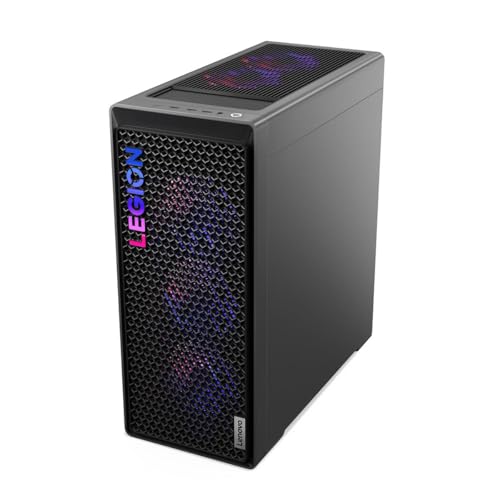
- Best first flagship for most beginners: Lenovo Legion T7 34IAS10, Core Ultra 7 265KF, RTX 5080 — Check on Amazon
- CLX Set Gaming PC, Ryzen 7 9800X3D, RTX 5080, 2TB SSD — Check on Amazon
- Lenovo Legion Tower 7i Gen 10, Core Ultra 9 285K, RTX 5080, 2TB SSD — Check on Amazon
- CyberPowerPC Gamer Supreme SLC8480A9, Ryzen 7 9800X3D, RTX 5070 Ti, 2TB SSD — Check on Amazon
See 2 more Amazon options
- Skytech King 95, Ryzen 7 9800X3D, RTX 5070 Ti, 850W Gold PSU — Check on Amazon
- Acer Nitro 60 N60-181-UR26, Ryzen 9 7900, RTX 5070 Ti, 2TB SSD — Check on Amazon
Read the full guide ↓
Disclosure: As an Amazon Associate, reviewstook.com earns from qualifying purchases. Links to Amazon on this page are affiliate links; they cost you nothing extra. Listing details such as price and availability change often, so check the current Amazon listing before you buy.
Buying your first gaming PC is exciting right up to the moment you open the listings and meet a wall of code numbers: 9800X3D, GDDR7, 360mm AIO, DLSS 4. This guide is the plain-language version of our flagship 1440p roundup. It covers the same six machines, at the same budget of $3,000, but it assumes you know nothing yet — every technical term is explained the first time it appears, the setup steps are spelled out, and the price rules are stated as simple instructions you can follow at the checkout page.
First, the honest headline, because $3,000 is a lot of money and you deserve to hear it before anything else: these are flagship machines. “1440p” means a screen resolution of 2560 × 1440 pixels — noticeably sharper than the 1080p screens most people start on — and every PC in this guide plays games at 1440p at high settings with room to spare. Most of them can also drive a 4K screen (3840 × 2160, sharper again) in many games. What $3,000 buys over a $1,500 PC is not a different hobby; it is speed you can feel in demanding games, parts that stay relevant for more years, and a machine that does not get louder or slower when you also record, stream, or keep twenty browser tabs open. If that sounds like more than you need, it may be — our Best 1440p Gaming PC For Beginners Under $1500 guide covers the sensible middle ground, and nothing in this guide will pretend otherwise.
Second honesty note, because beginners are exactly the readers most likely to be misled by it: there is no RTX 5090 in this guide, and you should not expect one at this budget. The RTX 5090 is the fastest graphics card NVIDIA sells, and complete PCs built around it start far above $3,000. Any listing that appears to offer a “5090 PC” near $3,000 is mislabelled, is selling the card’s name rather than the card, or is a mistake. The good news is that you do not need one. The RTX 5080 and RTX 5070 Ti machines below are the fastest verified options under $3,000, and for a first PC they are honestly more computer than most people will use for years.
Six Terms to Know Before You Spend Anything
Every listing in this guide uses the same handful of words. Learn these six and the whole page — and every Amazon listing you open from it — becomes readable.
- GPU (graphics card). The part that draws the game. It is the single biggest factor in how fast and how pretty your games run, and it is where most of your $3,000 goes. In this guide the GPUs are NVIDIA’s GeForce RTX 5080 and RTX 5070 Ti. Bigger number, faster card.
- VRAM (video memory). Memory that lives on the graphics card itself and holds the game’s textures and scenery. Too little VRAM forces a game to lower its texture quality. All six picks here carry 16GB of it, which is a comfortable amount for 1440p — one less thing for a beginner to worry about.
- DLSS. An NVIDIA feature that renders the game at a lower internal resolution and then uses AI to rebuild the picture at your screen’s full resolution. The result looks close to native quality and runs much faster. The newest version, DLSS 4, can also generate extra frames in supported games to make motion look smoother. Think of it as a quality-preserving speed boost you switch on inside the game’s settings.
- X3D. A label on certain AMD processors (the “CPU,” the computer’s general-purpose brain). X3D chips carry an extra layer of fast memory — AMD calls it 3D V-Cache — stacked onto the processor, and games benefit from it more than almost any other single feature. The Ryzen 7 9800X3D in four of these picks is widely regarded as the fastest gaming CPU you can buy; you do not need to understand why for it to work.
- Refresh rate. How many times per second your monitor redraws the picture, measured in hertz (Hz). A basic office monitor is 60Hz. A gaming monitor at 144Hz or 240Hz makes motion visibly smoother — but only if the PC can produce that many frames per second, which is exactly what these machines can do. One warning that previews a later section: a fast monitor often arrives set to 60Hz, and you have to switch it up yourself in Windows. It takes thirty seconds and thousands of beginners never do it.
- Ray tracing. A lighting technique that simulates how light actually bounces around a scene, producing more realistic reflections, shadows and glow. It is the prettiest setting in modern games and also one of the most demanding; the cards in this guide handle it at 1440p, usually with DLSS switched on to keep the speed up.
Two smaller terms will appear in the reviews. An SSD is the fast storage drive your games live on — 1TB (one terabyte) holds roughly a dozen big modern games, 2TB roughly twice that. A 360mm AIO is a liquid cooler: a pump and a wide radiator with three fans that carries heat away from the CPU quietly. It is a good sign in a powerful machine, because powerful parts make heat, and heat is the enemy of both speed and quiet.
In this guide
Quick Picks
Six machines, two graphics cards, three processor families. If you read nothing else, read this table and the price rule attached to your pick — at this end of the market, when you buy matters almost as much as what you buy, because flagship prices swing widely between sales events.
| Pick | Graphics card | Processor | Storage | Pricing | Buying note |
|---|---|---|---|---|---|
| Lenovo Legion T7 34IAS10 | RTX 5080 | Core Ultra 7 265KF | 1TB | Check price on Amazon | Best when discounted |
| CLX Set | RTX 5080 | Ryzen 7 9800X3D | 2TB | Check price on Amazon | Check price first — pricing is volatile |
| Lenovo Legion Tower 7i Gen 10 | RTX 5080 | Core Ultra 9 285K | 2TB | Check price on Amazon | Check the exact configuration |
| CyberPowerPC Gamer Supreme SLC8480A9 | RTX 5070 Ti | Ryzen 7 9800X3D | 2TB | Check price on Amazon | Power supply is unpublished |
| Skytech King 95 | RTX 5070 Ti | Ryzen 7 9800X3D | 1TB | Check price on Amazon | Match the model number |
| Acer Nitro 60 | RTX 5070 Ti | Ryzen 9 7900 | 2TB | Check price on Amazon | Only buy when discounted |
The short version of the whole guide: the Legion T7 is the easiest recommendation when its deal price appears, the CLX Set is the purist gaming build with a strict price ceiling, the Legion Tower 7i is the powerhouse for people who also create things, and the three RTX 5070 Ti machines trade a step of graphics speed for money back in your pocket — money a beginner is often better off spending on the monitor, as the starter-kit section below explains.
How These Picks Were Chosen
We started from the full flagship 1440p research behind our main Best 1440p Gaming PC Under $3000 guide and applied beginner-specific filters on top of it. Every pick had to be a complete, ready-to-run prebuilt PC from a verifiable Amazon listing — no parts lists, no “barebones” boxes that still need components, nothing a first-time buyer could order by mistake and find unusable. Every graphics card, processor, memory and storage figure in this guide comes from the verified listing research in the base guide; where a listing does not publish a detail, this guide says so rather than filling the gap, and you will see that happen once, with the CyberPowerPC’s power supply.
Three beginner priorities shaped the ranking. First, headroom: a first PC bought at $3,000 should not need replacing or upgrading for years, so every pick carries 16GB of VRAM and 32GB of system memory — the two specifications that age slowest. Second, cooling that is already solved: four of the six picks use 360mm liquid coolers, because a beginner should not have to think about temperatures, and a big radiator is how a powerful PC stays composed and reasonably quiet under load. Third, honest pricing: flagship prebuilts are sold on a deal cycle, so check price on Amazon for each pick and compare before you buy, instead of assuming a fixed “normal price.”
One thing this guide does not do: we did not use these PCs ourselves, and no pick’s position was bought. Prices change often and were unusually volatile during research in November 2026, so check the current Amazon listing before you buy. That is precisely why the guidance in this guide focuses on specifications, fit and checking the live price on the day you are actually shopping.
The 6 Best 1440p Gaming PCs Under $3,000 for Beginners
1. Lenovo Legion T7 34IAS10 (90Y6003KUS) — the easiest first flagship, when the deal is live
Who it suits: the beginner who wants the fastest graphics card in this guide, a big-brand warranty behind it, and the least possible thinking afterwards. Lenovo’s Legion line is its gaming range, and this machine — the Legion T7 34IAS10 — pairs an Intel Core Ultra 7 265KF processor with the RTX 5080, 32GB of memory, a 1TB SSD and Windows 11 Pro.
Start with the graphics card, because on this machine it is the story. The RTX 5080 is the second-fastest card NVIDIA sells and the fastest one that exists in a verified complete PC under $3,000. At 1440p it plays demanding games at high or ultra settings, handles ray tracing with DLSS switched on, and has enough spare power that stepping up to a 4K monitor later is a realistic plan rather than a fantasy — that is the “4K headroom” this budget is famous for. The Core Ultra 7 265KF behind it is a strong modern Intel processor: not the outright gaming champion in this guide (that is the 9800X3D, next pick), but fast in games and strong in everything else a PC does.
Pros:
- RTX 5080 graphics — the fastest card in any verified sub-$3,000 prebuilt, with genuine 4K headroom.
- Check price on Amazon — when this model is discounted during a limited-time event, it can offer flagship graphics for mid-tier money.
- Big-brand build, support and warranty, which matters more on a first PC than on a fifth.
- Windows 11 Pro rather than Home — a small bonus if you ever use the PC for work.
The honest limitation: storage. 1TB is the smallest drive in this guide, and modern games are large — a handful of big titles plus Windows will fill a noticeable share of it. The fix is easy and is covered in the upgrades section (a second SSD is the single simplest upgrade in PC gaming), but at $3,000 it is fair to notice that three other picks here include 2TB from the start. The second caveat is pricing itself: this model is most compelling when discounted, and at a higher live price the value argument gets thinner — the CLX and the Tower 7i below both add storage at that level. Check price on Amazon before deciding.
Choose it if you catch it discounted and want the strongest graphics in the guide from a household-name brand. Skip it if the live price is not discounted and the 2TB picks are close in price — take the storage instead. Check on Amazon
2. CLX Set Gaming PC — the gaming purist’s build, with a strict price ceiling
Who it suits: the beginner who has decided this PC is for games first and everything else second, and who is willing to follow one simple price rule. The CLX Set combines the Ryzen 7 9800X3D — the X3D gaming processor explained above — with an RTX 5080, 32GB of DDR5 memory, a 2TB SSD, a 360mm liquid cooler and Windows 11 Home.
On paper and in practice this is the most focused gaming specification in the guide. The 9800X3D’s extra cache is worth the most in exactly the situations beginners notice: busy multiplayer games, simulation and strategy titles, and older games that lean on the processor. Paired with the 5080, it is the combination an experienced builder would pick for a no-compromises 1440p machine, and the 2TB drive and big liquid cooler remove the two small compromises found elsewhere in this list. CLX is a specialist US system builder rather than a household name, which is normal in this tier — the trade for the focused spec is a smaller company’s support operation.
Pros:
- The fastest gaming CPU and the fastest available GPU in one box — the purist pairing.
- 2TB of storage and a 360mm liquid cooler included, so nothing needs adding on day one.
- A genuine flagship within this budget tier — check price on Amazon for the current figure.
The honest limitation: this listing’s price is the most volatile in the guide. The same configuration has been seen rising well above this budget as component prices climbed — far above what the machine is worth to a beginner. So the rule is simple: check price on Amazon, and only buy the CLX Set when its live price sits within this guide’s budget; walk away without debating it at anything higher. Priced well over budget it is not a slightly worse deal, it is a different and bad one, and every other pick in this guide becomes the better buy. There is no consolation-prize version of this advice — set a price alert if you have to, and let it go if it does not come back.
Choose it if the live price sits within this budget tier and gaming performance is your top priority. Skip it at any higher price, full stop. Check on Amazon
3. Lenovo Legion Tower 7i Gen 10 — the powerhouse for gamers who also create
Who it suits: the beginner whose PC will work as well as play — video editing, streaming, 3D work, programming, or simply dozens of things open at once. The Legion Tower 7i Gen 10 runs Intel’s Core Ultra 9 285K, a 24-core processor, alongside an RTX 5080, 32GB of memory, a 2TB SSD, a 360mm liquid cooler and a published 850W power supply.
“24-core” deserves a beginner translation. A core is one worker inside the processor. Games mostly use a few workers at a time, which is why the 9800X3D above can match or beat this chip in games despite having eight cores. But video rendering, streaming while gaming, and heavy multitasking can use all the workers at once — and there, this is the strongest processor in the guide by a clear margin. For pure gaming it is still excellent; the 5080 sees to that. You are choosing between “best at games alone” (the CLX) and “best at games plus everything else” (this Lenovo), and for a first PC that will also be a homework, work or creation machine, the second answer is often the right one.
Pros:
- 24-core Core Ultra 9 285K — unmatched here for streaming, editing and multitasking alongside gaming.
- RTX 5080 graphics and 2TB storage: no weak point in the specification.
- Published 850W power supply and 360mm liquid cooling — the support parts are as serious as the headline parts.
- Check price on Amazon and compare with Lenovo’s own store for comparable configurations before you buy.
The honest limitation: Legion towers ship in several lookalike configurations with similar names and different insides. Before you pay, read the checkout page carefully and confirm it says Core Ultra 9 285K, RTX 5080, 32GB and 2TB — that exact combination is the one this review covers. The channel difference cuts both ways, too: Lenovo’s own store prices this class of machine at a premium, so check price on Amazon, and if its live price has drifted well above this budget tier when you look, compare against the other 5080 picks before committing.
Choose it if your PC will create and multitask as well as game. Skip it if the PC is purely for games and the CLX is at its deal price — the specialist is the sharper tool for that one job. Check on Amazon
4. CyberPowerPC Gamer Supreme SLC8480A9 — top gaming CPU, one unpublished detail
Who it suits: the beginner who wants the celebrated 9800X3D processor and 2TB of storage, and is comfortable with a graphics card one step down from the 5080 in exchange. The Gamer Supreme SLC8480A9 pairs that X3D chip with an RTX 5070 Ti, 32GB of DDR5 memory and a 2TB PCIe 4.0 SSD — check price on Amazon.
The RTX 5070 Ti deserves a calm explanation, because “one step down” sounds worse than it is. It carries the same 16GB of GDDR7 video memory as the 5080 and supports the same DLSS 4 features. At 1440p — this guide’s resolution — it plays the same games at the same high settings; the 5080’s advantage shows most at 4K and in the heaviest ray-traced scenes. A beginner moving from a console or an old laptop will not feel short-changed by this card for years. CyberPowerPC is one of the largest US prebuilt brands, so support and parts availability are well-trodden ground.
Pros:
- Ryzen 7 9800X3D — the gaming-processor champion — with 2TB of storage included.
- RTX 5070 Ti with 16GB of VRAM: effectively the same 1440p experience as the 5080 picks for most players.
- Large, established builder with a wide support footprint.
The honest limitation: the listing does not publish the wattage of the power supply or the model of the motherboard, and this guide will not guess at either. The power supply matters to a beginner for one practical reason: it decides how much room you have to install a stronger graphics card years from now. The machine as sold is complete and covered by its warranty, so this is not a reason to avoid it — it is a reason to know what you are buying. If a future GPU upgrade is central to your plan, the King 95 below publishes its 850W Gold power supply openly, and that transparency is worth something.
Choose it if you want the X3D processor and 2TB storage and accept the 5070 Ti step. Skip it if a documented power supply matters to you, or if a 5080 pick is within a small step of its live price. Check on Amazon
5. Skytech King 95 — the spend-less pick with a published power supply
Who it suits: the beginner who has read this far, suspects — correctly — that the smartest version of this purchase leaves money for the monitor, and wants the cheapest machine here that gives up nothing essential. The King 95 (model ST-KING95-1671-W-AM) runs the 9800X3D with an RTX 5070 Ti, 32GB of DDR5-5600 memory, a 1TB Gen4 SSD, a 360mm liquid cooler and a published 850W Gold power supply. Check price on Amazon for the current figure.
Do the beginner arithmetic: as the spend-less pick in this guide, this machine typically leaves more of your overall budget for the rest of the setup than the 5080 picks, and the performance you give up at 1440p is the difference between the 5070 Ti and the 5080 — real, but modest at this resolution, and partly recoverable any time you switch DLSS on. What that saving buys on the desk is the difference between a basic monitor and a genuinely good 1440p high-refresh one, with the keyboard, mouse and headset covered too. Judged as a whole setup, this is frequently the best purchase in the guide.
Pros:
- Positioned as the spend-less option in this guide, with the same star processor as picks two and four.
- 850W Gold power supply published in the listing — upgrade headroom you can verify before buying.
- 360mm liquid cooling in the guide’s spend-less pick.
The honest limitation: two, and both are manageable. Storage is 1TB, like the Legion T7 — the second-SSD upgrade applies. More importantly, Skytech sells near-identical King 95 variants — including versions with 2TB drives, faster memory, and a different processor — under other listings. Match the model number ST-KING95-1671-W-AM on the listing before you pay; that exact variant is the one with these specifications. Buying the wrong twin is the easiest beginner mistake in this entire guide, and it is completely avoidable in ten seconds.
Choose it if you want flagship-class gaming plus a properly funded monitor and desk setup. Skip it if you can catch a 5080 pick at its deal price and already own a good monitor — then the graphics step is the better spend. Check on Amazon
6. Acer Nitro 60 N60-181-UR26 — the creator-leaning pick to buy only when discounted
Who it suits: the beginner who leans toward making things — video, music, streams — on a big-brand machine, and who is patient enough to buy on a discount cycle. The Nitro 60 combines a Ryzen 9 7900 processor with an RTX 5070 Ti, 32GB of DDR5 memory, a 2TB SSD, Wi-Fi 6 and wired gigabit ethernet.
The Ryzen 9 7900 is a 12-core processor: more workers than the gaming-focused 9800X3D, arranged for productivity rather than pure game speed. In games it is a step behind the X3D picks — a step most beginners will never perceive at 1440p with this graphics card — and in rendering, encoding and heavy multitasking it earns its keep. Acer is a household name with a normal retail support structure, which some first-time buyers will value over the specialist builders.
Pros:
- 12-core processor for creation and multitasking, with 2TB of storage for footage and projects.
- Big-brand machine with both Wi-Fi 6 and wired ethernet — use the wire for gaming; it is faster and steadier.
- Its discount history is deep — check price on Amazon and look for it in its discounted band rather than at a premium.
The honest limitation: this is the guide’s clearest pricing trap. When the Nitro 60 is priced close to the RTX 5080 machines, it is simply the wrong purchase, because it carries the slower graphics card. Its discount history shows why patience wins. The rule is: buy the Nitro 60 only when it is clearly discounted; when it is priced near the 5080 picks, buy a 5080 pick instead. No exceptions, and no “but it is in stock today” — at this budget, stock is not scarce enough to justify overpaying.
Choose it if it is discounted and creation matters alongside gaming. Skip it when it is not discounted, whatever the countdown timer on the page says. Check on Amazon
Comparison Table
| Machine | GPU | CPU | RAM | Storage | Cooler | Power supply | Best for |
|---|---|---|---|---|---|---|---|
| Lenovo Legion T7 34IAS10 | RTX 5080 16GB | Core Ultra 7 265KF | 32GB | 1TB | Not stated in sources | Not stated in sources | First flagship on a deal |
| CLX Set | RTX 5080 16GB | Ryzen 7 9800X3D | 32GB DDR5 | 2TB | 360mm liquid | Not stated in sources | Pure gaming — check price first |
| Lenovo Legion Tower 7i Gen 10 | RTX 5080 16GB | Core Ultra 9 285K (24-core) | 32GB | 2TB | 360mm liquid | 850W | Gaming plus creating |
| CyberPowerPC Gamer Supreme SLC8480A9 | RTX 5070 Ti 16GB | Ryzen 7 9800X3D | 32GB DDR5 | 2TB | Not stated in sources | Not published | X3D plus storage |
| Skytech King 95 (ST-KING95-1671-W-AM) | RTX 5070 Ti 16GB | Ryzen 7 9800X3D | 32GB DDR5-5600 | 1TB | 360mm liquid | 850W Gold | Spend less, fund the monitor |
| Acer Nitro 60 N60-181-UR26 | RTX 5070 Ti 16GB | Ryzen 9 7900 (12-core) | 32GB DDR5 | 2TB | Not stated in sources | Not stated in sources | Creation, discounted only |
Cells marked “not stated” are exactly that: details the verified listing research did not publish. They are left blank deliberately rather than filled with guesses — if one of them matters to you, it is a fair question for the seller’s listing page before you order.
How to Choose: A Beginner’s Decision in Four Questions
1. Is the live price inside this budget? Before comparing anything else, check price on Amazon for each pick. A CLX Set priced well above this budget tier is not a contender; an Acer Nitro 60 priced close to the 5080 picks is not a contender; a Legion T7 when discounted beats almost everything. At this tier the same machine can be the best buy in the guide on Tuesday and a bad buy on Friday, and no specification sheet will warn you — only checking the live price does.
2. RTX 5080 or RTX 5070 Ti? Both carry 16GB of VRAM and the same DLSS 4 feature set. At a 1440p screen, the 5070 Ti plays the same catalogue at high settings; the 5080 pulls ahead in the heaviest ray-traced games and is the safer card if you plan to move to a 4K monitor during this PC’s life. A useful beginner framing: the 5070 Ti is the right card for the monitor you are buying now; the 5080 is the right card for the monitor you might buy in three years.
3. Which processor shape fits your life? The 9800X3D (picks two, four and five) is the gaming specialist. The 24-core Ultra 9 285K (pick three) and the 12-core Ryzen 9 7900 (pick six) trade a little game speed for a lot of creation and multitasking strength. The Ultra 7 265KF (pick one) sits between the two camps. None of them will disappoint a beginner in games — the differences appear at the extremes, not in ordinary play.
4. 1TB or 2TB of storage? Count your intended library honestly. A dozen large games, Windows, and the photos and clips every PC accumulates will crowd a 1TB drive within a year or two. It is not a crisis — adding storage later is this hobby’s easiest upgrade — but if two otherwise-equal picks differ on storage, take the 2TB one and postpone your first upgrade by years.
Still torn between spending levels? The same machines’ sibling guides may help: the Best 1440p Gaming PC Under $2500 roundup shows what stepping down actually costs, the Best 1440p Gaming PC For Streaming Under $3000 guide re-grades this budget for broadcasters, and if your ambitions have quietly become 4K, the Best 4K Gaming PC Under $3000 guide is the honest next read.
Your First Evening: Setting Up, Step by Step
A prebuilt PC is genuinely close to plug-and-play, but “close” hides four steps that trip up first-time owners. Do these in order and the evening ends with games, not troubleshooting.
- Unbox on a table, and look inside before you switch on. Powerful PCs often ship with a protective foam pack or padding inside the case to keep the heavy graphics card safe in transit. Open the side panel (it usually thumbscrews off), remove any internal packing, and close it again. Powering on with packing inside is a classic first-day mistake — the fans cannot breathe through foam.
- Give it air. Place the tower somewhere air can move around it — on or under the desk with open space at the front and back, never inside a closed cabinet and ideally not sitting directly on thick carpet. These are powerful machines; under load they push out real heat and their fans will be audible in a quiet room. That is normal, not a fault — but a sealed cabinet turns normal warmth into a genuine problem, and a small room will warm up during long sessions. Position is the cheapest cooling you will ever buy.
- Plug the monitor into the graphics card, not the motherboard. On the back of the PC there are two clusters of display sockets: a vertical set on the motherboard panel, and a horizontal set lower down on the graphics card itself. Use the graphics card’s sockets (DisplayPort if your monitor offers it). Plugging into the motherboard is the single most common beginner error in PC gaming — the PC works, the picture appears, and the expensive graphics card sits idle while games run terribly.
- Connect keyboard, mouse, network and power; then switch on and let Windows finish. The first boot runs through Windows setup and may restart itself during updates. Let it. Use a wired network cable if you possibly can — it is faster and steadier than Wi-Fi for both downloads and online games.
- Install the NVIDIA app and let it update the graphics driver. The driver is the software that lets Windows and games talk to the graphics card, and a current one matters for new games. The NVIDIA app handles this in a couple of clicks and will also offer an in-game overlay for DLSS-supported titles.
- Set your monitor’s refresh rate — the thirty-second step everyone skips. In Windows: Settings → System → Display → Advanced display → choose the highest refresh rate listed (144Hz, 165Hz, 240Hz — whatever your monitor supports). Until you do this, a fast gaming monitor typically runs at 60Hz and your flagship PC’s extra frames are drawn and then thrown away.
- Install a game store (Steam is the usual first stop), download one game, and in its graphics settings set the resolution to 2560 × 1440. Turn DLSS on (Quality mode) in demanding titles. Then play. Everything else — recording, streaming, mods — can be next week’s project.
The Starter Kit: What the Tower Price Does Not Include
The tower price buys the tower alone, so budget the desk separately: a good 1440p gaming monitor sits in the mid-range tier, a 4K gaming monitor sits in the premium tier, and a serviceable keyboard, mouse and headset together sit in the budget-to-mid-range tier — check prices at your preferred retailer for current figures. That extra cost is real, and it is exactly why the King 95’s spend-less positioning matters: a flagship tower feeding a bargain screen is a worse experience than a slightly slower tower feeding a great one.
The monitor decision, explained simply. Your screen can only show what it is built to show. These PCs are designed for 1440p at a high refresh rate — 165Hz or 240Hz — and that combination is the sweet spot: sharp picture, very smooth motion, and every pick in this guide can feed it properly. Choose that unless one of these applies: if you mostly play slow, cinematic single-player games and sit close to a large screen, a 4K 144Hz monitor is the luxury alternative, and the three RTX 5080 picks are the ones with the headroom to drive it (the 5070 Ti machines will lean on DLSS there, which still looks good). What you should not do is pair any of these towers with an old 1080p 60Hz office monitor and conclude the PC is unimpressive — that is judging a sports car by a test drive in a car park. Readers planning the full desk from scratch may also find the Best Gaming PC Under $3000 and Best Prebuilt Gaming PC Under $3000 guides useful cross-checks of the wider market at this budget.
Your First Upgrades, In Plain Terms
The reassuring truth about this budget: you are buying years of not needing upgrades. When the day eventually comes, the order is simple. First, storage — adding a second SSD is the easiest job in PC ownership (one screw, one slot, and YouTube can teach it in ten minutes), and it is the natural first step for the two 1TB picks. Second, possibly nothing for a long time: 32GB of memory and 16GB of VRAM are specified generously here precisely so that RAM upgrades stay off your list. Last and largest, the graphics card — years from now, a future card can go into the same tower, which is where a published, generously sized power supply (850W on the Legion Tower 7i and the King 95) quietly pays off, and where the CyberPowerPC’s unpublished supply is worth a support call before you order parts. Everything else — the processor, the cooler, the case — is bought once at this tier, which is the entire point of spending flagship money as a beginner.
Common Beginner Mistakes at This Budget
- Overspending on the tower and underbuying the monitor. The most expensive mistake in this guide is not a PC at all: it is a flagship tower plugged into a basic budget screen. Budget the setup as one purchase. If the total has to shrink, shrink the tower first (the King 95 exists for this) — your eyes live at the monitor, not at the spec sheet.
- Ignoring live pricing because a listing “looks official.” The CLX Set’s live price can swing from within this budget to well above it; the Acer Nitro 60 can sit at a premium price even though it is often discounted. Beginners assume the price on the page is the price of the machine. At this tier it is merely the price of the machine today, and checking price on Amazon before you buy is the guide’s most valuable habit.
- Hunting for an RTX 5090 at $3,000. It does not exist in a verified complete PC anywhere near this budget. Listings implying otherwise are mislabelled. The 5080 is this budget’s flagship, and it is a genuinely flagship experience.
- Plugging the monitor into the motherboard. Covered in the setup steps because it deserves repeating: display cable into the graphics card’s sockets, always.
- Leaving the monitor at 60Hz. Also repeated on purpose. Check the advanced display settings on day one.
- Sealing the tower in a cabinet and wondering why it is loud. Heat with nowhere to go means fans working harder. Powerful PCs need airflow and will warm a small room; place the tower in the open and the noise drops with the temperature.
- Buying the wrong King 95. Skytech’s near-identical variants differ in storage, memory speed and even processor. Match model number ST-KING95-1671-W-AM before paying.
- Assuming a bigger budget removes the need to read. At $3,000 the mistakes are not slower computers — they are the right computers at wrong prices, the wrong twin of the right model, and a great tower strangled by a cheap screen. All three are avoidable, and all three are avoided above.
Final Recommendation
For most beginners spending $3,000, the answer is the Lenovo Legion T7 when it is discounted: the fastest graphics card in the guide, a big-brand safety net, and — when its live price leaves room in your setup budget — money left over for the monitor it deserves. Check price on Amazon before you buy. If gaming is the whole point and the price is right, the CLX Set when its live price sits within this budget tier is the purist’s version of the same idea, with 2TB of storage included. Creators and heavy multitaskers should take the Legion Tower 7i’s 24 cores. And the quietly smartest purchase here is the Skytech King 95 when discounted: near-flagship gaming, a published 850W power supply, and more of your budget redirected to the screen, keyboard and headset that complete the setup. Whichever you choose, check its live price on Amazon first, plug the monitor into the graphics card, set the refresh rate — and then enjoy the fact that a first PC at this level should not need replacing for a very long time. If your plans grow toward broadcasting, the sibling Best 1440p Gaming PC For Streaming Under $3000 and Best Streaming PC Under $3000 guides grade this same budget with a streamer’s priorities.
Frequently Asked Questions
Is $3,000 too much for a first gaming PC?
It is more than a first PC needs to cost — our Best 1440p Gaming PC For Beginners Under $2500 guide exists because excellent 1440p gaming starts well below this figure. What $3,000 buys is the flagship tier: the fastest verified graphics under the budget, processors that stay relevant for years, and a machine you upgrade by adding a drive rather than by replacing the box. Spend it if you value that longevity and have also budgeted for a monitor worthy of it; do not spend it by stretching to the tower and starving the screen.
Why is there no RTX 5090 in this guide?
Because no verified complete RTX 5090 PC exists anywhere near $3,000 — in our research complete 5090 systems sit far above this budget. A beginner loses nothing by this: the RTX 5080 machines here run 1440p at high settings with headroom to spare and can drive 4K in many games. If a listing appears to sell a 5090 PC at this price, treat it as mislabelled and move on.
What monitor should a beginner pair with these PCs?
A 27-inch 1440p monitor with a 165Hz or 240Hz refresh rate is the natural partner — sharp, smooth, and fully feedable by every pick. Choose a 4K 144Hz monitor instead only if you favour cinematic single-player games and are buying one of the RTX 5080 picks. Either way, set the refresh rate in Windows on day one, and plug the cable into the graphics card.
Do I need to build or upgrade anything myself?
No. All six picks are complete prebuilt PCs running Windows 11 — unbox, remove any internal shipping padding, connect the desk kit, update, and play. The only hands-on job this guide ever suggests is adding a second storage drive years from now on the 1TB picks, and even that is optional and simple.
Ryzen 7 9800X3D or Core Ultra 9 285K — which should a beginner pick?
For a PC that is purely for games, the 9800X3D: its X3D cache makes it the fastest gaming processor here. For a PC that also edits video, streams, or runs many heavy programs at once, the 285K’s 24 cores do that work faster while still gaming superbly. A beginner who is unsure usually leans gaming-first — but if “PC for everything” describes the purchase, the Lenovo Tower 7i is the safer long-term answer.
How long will a $3,000 PC stay good?
Years, and that is the honest reason to spend at this level. The specifications chosen here — 16GB of VRAM, 32GB of memory, current-generation graphics with DLSS 4 — are the parts of a PC that age slowest. Expect to add storage before you expect to replace anything, and expect the graphics card, when its day eventually comes, to be an upgrade rather than a rebuild.
Should I wait for a sale?
At this tier, yes — the guide’s own research shows the same machines swinging widely between events, and two picks (the CLX Set and the Acer Nitro 60) are only recommended inside their discounted bands at all. If a pick’s live price sits well above this budget tier, the correct move is to choose a different pick from this list or wait, never to pay the inflated figure and hope. More guidance for the step-down decision lives in our Best 1440p Gaming PC For Beginners Under $1500 guide.


