Where to buy
Check the latest price, availability and delivery on Amazon. Orders are placed on Amazon. We may earn a commission from qualifying purchases.
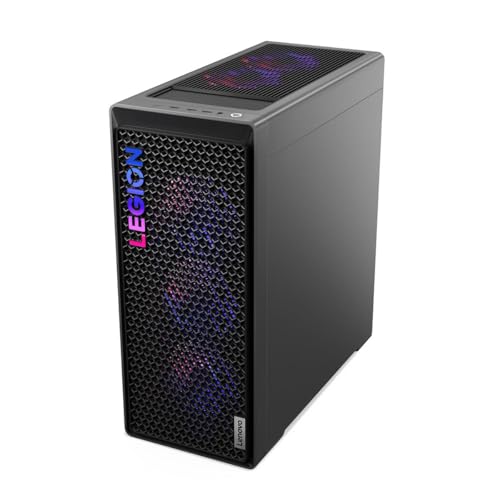
- Start here if the deal is live: Lenovo Legion T7 34IAS10, Core Ultra 7 265KF, RTX 5080 — Check on Amazon
- Skytech King 95, Ryzen 7 9800X3D, RTX 5070 Ti — Check on Amazon
- CyberPowerPC Gamer Supreme SLC8480A9, Ryzen 7 9800X3D, RTX 5070 Ti — Check on Amazon
- iBUYPOWER Y40 PRO, Ryzen 9 7900X, RTX 5070 Ti — Check on Amazon
See 2 more Amazon options
- CyberPowerPC Gamer Supreme SLC8480A3, Ryzen 7 7800X3D, RTX 4070 Ti Super — Check on Amazon
- CyberPowerPC Gamer Xtreme GXiVR8760A4, Core i7-14700KF, RTX 4070 Super — Check on Amazon
Read the full guide ↓
Disclosure: As an Amazon Associate, reviewstook.com earns from qualifying purchases. Links to Amazon on this page are affiliate links; they cost you nothing extra. Listing details such as price and availability change often, so check the current Amazon listing before you buy.
If this is your first gaming PC, $2,500 is a lot to spend before you fully understand what you are buying — so this guide is written differently from our others, with every technical term explained in plain language the first time it appears. The most important fact comes first: a $2,500 PC is far more than 1440p gaming strictly needs. “1440p” describes the sharpness of the picture — a 1440p monitor shows 2,560 × 1,440 pixels, about 78% more than a standard 1080p screen — and a good machine for it costs noticeably less. What the extra money buys is specific: higher frame rates (how smoothly motion moves, explained below), prettier lighting effects, and a machine that stays fast for more years before it feels old. What it does not buy is an easier first week, a better monitor, or immunity from next year’s new models. If some of that sounds like more than you need, that is useful too — several picks below deliberately cost less than the full budget, so the rest can go where a beginner actually feels it: the screen.
One more piece of honesty before the picks, because it catches out first-time buyers constantly: at this budget, the most powerful graphics card in the guide is only sometimes under $2,500. RTX 5080 systems normally sit in a premium tier above this budget; Lenovo’s Legion T7 is the flagship here to watch for when its live price fits the ceiling — check price on Amazon before you plan around it, because pricing at this level moves often. So this guide has two layers: one price-sensitive flagship to watch for, and five machines built around the RTX 5070 Ti, RTX 4070 Ti Super and RTX 4070 Super. The number on the listing the day you buy is the only one that is real, so check the current price on Amazon for every pick.
In this guide
Quick Picks
Short on time, or comparing several options at once? Each row below names a buyer type and the machine that suits it, with a link to the listing. The detailed reviews further down explain every term used here.
| Buyer type | Pick | Why it stands out | Link |
|---|---|---|---|
| Best if the deal is live | Lenovo Legion T7 34IAS10 (90Y6003KUS) | The strongest graphics card in the guide — but only under budget while its deal runs | Check on Amazon |
| Best all-round first flagship | Skytech King 95, Ryzen 7 9800X3D, RTX 5070 Ti | The fastest gaming processor in the guide, with every supporting part named | Check on Amazon |
| Best if you download big games | CyberPowerPC Gamer Supreme SLC8480A9 | Same flagship pairing as the King 95, with double the storage | Check on Amazon |
| Best if you might stream or edit video | iBUYPOWER Y40 PRO, Ryzen 9 7900X, RTX 5070 Ti | Extra processor cores for work beyond gaming; keyboard and mouse included | Check on Amazon |
| Best value | CyberPowerPC Gamer Supreme SLC8480A3 | Last generation’s flagship pairing at a value-tier position — check price on Amazon; the savings can go toward a monitor | Check on Amazon |
| Best when the budget also buys the screen | CyberPowerPC Gamer Xtreme GXiVR8760A4 | Strong 1440p performance that leaves real money for the monitor and desk | Check on Amazon |
How These Picks Were Chosen
The budget was applied as a ceiling for the whole machine: every system below is a real Amazon listing in the United States that is positioned to fit at or under $2,500 — check price on Amazon to confirm the live price on the day you buy, because prices at this level move constantly. One pick, the Legion T7, fits the ceiling only when its live pricing drops into this tier; its review says so plainly. Machines positioned above the ceiling were excluded, however impressive they looked — a guide for a $2,500 budget that recommends PCs from a higher tier has failed at its only job.
We did not use these PCs ourselves. We read the makers’ listings and specification pages and compared the parts that decide how a PC feels: the graphics card, the processor, the memory, the storage, the power supply and the cooling. For a first-time buyer, that list needs one paragraph of translation, because the same five ideas decide every pick below. The graphics card (GPU) draws the game world; it is the biggest factor in gaming performance, and the part numbers here (RTX 5080, 5070 Ti, and so on) rank roughly by the size of the number. VRAM is the card’s own memory, in gigabytes (GB): more VRAM holds sharper textures — the detailed surfaces on walls, armor and scenery — without slowing down, and 16GB is the comfortable figure at this budget. The processor (CPU) runs the game’s logic and everything else, measured partly in “cores,” separate work units inside the chip. RAM is short-term memory for everything running at once — 32GB is standard here — and storage is where games live permanently, in terabytes (TB); 1TB holds roughly eight to twelve large modern games. Finally, the power supply (PSU) feeds electricity to all of it; a good one is named, rated and boring, and a listing that hides it is a listing to question. Where a pick below hides one of these details, the review names the omission.
Two beginner-specific filters sat on top of that comparison. The first is the monitor test: a fast PC on a slow screen shows a slow picture, so every pick was judged as a partner for a 1440p monitor with a high refresh rate — how many times per second the screen redraws, in hertz (Hz). A 60Hz screen shows at most 60 frames per second however powerful the PC is; these machines are bought to feed 240Hz screens. If your $2,500 must cover the monitor too, the cheaper picks below plus a good screen beat the flagships plus a cheap one, every time. The second filter is forgiveness: first-time owners benefit from standard parts and fully published specifications. Where a pick asks more of its owner — checking a model number letter by letter, confirming an unnamed power supply — the review flags it as homework.
The 6 Best 1440p Gaming PCs Under $2,500 for Beginners
Lenovo Legion T7 34IAS10, Core Ultra 7 265KF, RTX 5080 (90Y6003KUS)
Who it suits: The beginner who wants to buy once, buy the strongest thing the budget can reach, and not think about graphics settings for years — provided its live price fits the budget on the day they shop.
Start with the graphics card, because it is the whole story here. The RTX 5080 is the most powerful card in this guide by a clear margin, with 16GB of the fastest current memory (GDDR7). Two terms explain what that power feels like. Ray tracing is a lighting technique that makes reflections, shadows and glow behave like real light; it is beautiful and expensive to run, and weaker cards usually soften it or switch it off — this card runs it at full strength at 1440p. DLSS is a trick built into NVIDIA’s RTX cards: the card draws the game at lower internal sharpness, then uses AI to rebuild a crisp 1440p picture, gaining smoothness for free; its newest version can also generate extra frames between real ones. On this machine both are headroom, not necessities — the card is strong enough at plain, native 1440p (every pixel drawn for real) that the tricks are bonuses. Around it, Lenovo fits an Intel Core Ultra 7 265KF processor running up to 5.5GHz, 32GB of RAM, a 1TB drive, Windows 11 Pro, Wi-Fi and Bluetooth, in a gray tower of about 39.7 pounds. The model’s published specification includes an 850W power supply — the right size for this card, and reassuringly stated rather than hidden.
Now the part that decides whether this pick exists at all: the price. This configuration is normally positioned in a premium tier above this guide’s budget, and it earns its place only when its live price on Amazon drops to at or under $2,500 — check price on Amazon before anything else. Read that as a beginner should read every PC gaming deal: a low live price today can be gone tomorrow. If the listing is at or under $2,500 when you check, this is the best buy in the guide and it is not close. If it is above the ceiling, nothing is wrong; it has simply moved back to its usual tier, and the correct move is an RTX 5070 Ti machine below, which at 1440p gives up far less than the tier gap suggests. Two smaller notes: the 1TB drive is the tightest storage in the guide’s top half (adding a second drive later is genuinely easy), and Lenovo’s towers use some maker-specific internal parts, so a full rebuild inside this case is less straightforward than in the standard cases below — the upgrades a beginner actually makes all remain open.
- RTX 5080 with 16GB of memory — the strongest card here; full ray tracing and high frame rates at 1440p without compromise settings.
- Check price on Amazon — this card fits the budget only when the live price is at or under the ceiling.
- Complete, published specification: fast Intel processor, 32GB RAM, Windows 11 Pro, and an 850W power supply in the model’s spec.
Honest limitation: It is under $2,500 only while its live price stays within the ceiling; above that, it belongs in a higher-tier guide. Storage is 1TB, and the maker’s case is less friendly to deep upgrades than the standard towers below.
Choose it if the listing shows it at or under $2,500 when you check, and you want the strongest machine this budget can reach. Skip it if its live price is above the ceiling — do not stretch beyond the budget; the picks below exist for exactly that day.

Skytech King 95, Ryzen 7 9800X3D, RTX 5070 Ti
Who it suits: The beginner who wants the strongest all-round gaming machine that is simply, reliably under budget — especially anyone drawn to fast, competitive games where smoothness is the point.
This is the guide’s standing recommendation, and its processor needs one explanation. The Ryzen 7 9800X3D is widely measured as the fastest gaming CPU of its generation, thanks to 3D V-Cache — the “X3D” in the name. Cache is a tiny, extremely fast memory shelf inside the processor; AMD stacks an extra-large shelf on these chips, and games, which constantly reach for the same data, run steadier because of it. The benefit a beginner can feel is not a higher average frame rate — it is the absence of dips. Frame rate is measured in frames per second (fps), the pictures drawn each second: a machine averaging 180fps but dipping to 90 in a busy fight feels worse than one holding a steady 160, and holding those minimums is what this processor does best. The graphics card is the RTX 5070 Ti with 16GB of memory — one step below the flagship above, with the same DLSS tricks including multi-frame generation, maxing out settings at 1440p in the great majority of games. The supporting parts are all named, which beginners should learn to value: 32GB of RAM, a 360mm liquid cooler (a radiator with fans that carries heat away quietly; the figure is its size class), an 850W Gold-rated power supply built to the current ATX 3.0 standard, Wi-Fi and Windows 11. Check price on Amazon for this configuration, model ST-KING95-1671-W-AM, first — and confirm the live price fits the budget on the day you shop.
Two habits will protect you with this brand. First, “King 95” names a case family, not one fixed PC: near-identical listings exist with different memory speeds, drive sizes and even processors, including a 2TB variant of this same pairing. The model number in the listing title is the product — compare it character by character before ordering. Second, Skytech notes the graphics card’s brand may vary; that is normal for PC assemblers, and it means you are guaranteed an RTX 5070 Ti, not one specific maker’s version. The one specification that reads low is storage: 1TB fills faster than new owners expect, and adding a second drive is the natural first upgrade — covered in the upgrade section below.
- Ryzen 7 9800X3D — the fastest gaming processor here, bought for steady frame rates rather than headline numbers.
- RTX 5070 Ti with 16GB of memory and the full DLSS feature set, including multi-frame generation.
- Every supporting part published: 360mm liquid cooling, 850W Gold ATX 3.0 power supply, 32GB RAM; check price on Amazon.
Honest limitation: The 1TB drive is small for this tier, its live price can move above the budget so it needs checking before you buy, and the many similar King 95 variants mean the exact model number must be checked carefully.
Choose it if you want the strongest gaming-first machine that lives under this budget as a matter of routine. Skip it if your library is huge and you hate managing storage — the next pick pairs the same parts with double the drive.

CyberPowerPC Gamer Supreme, Ryzen 7 9800X3D, RTX 5070 Ti (SLC8480A9)
Who it suits: The beginner who wants the same flagship pairing as the King 95 — same processor, same graphics card — but with storage sized for a real game library from day one.
Almost everything said about the pick above applies here, because the two components that decide gaming performance are identical: the Ryzen 7 9800X3D processor with its frame-rate-steadying cache, and the RTX 5070 Ti graphics card with 16GB of memory and the full DLSS feature set. The difference is the drive: 2TB, double the King 95’s. For a first-time owner that matters more than it sounds — modern games routinely occupy 80 to 150GB each, so a 1TB drive holds perhaps eight of them alongside Windows, and the quiet chore of deleting one game to install another begins within the year. Starting at 2TB removes that chore for a long while. The rest of the published specification is solid: 32GB of RAM, a motherboard on AMD’s B850 platform (which decides which future processors can drop in as upgrades), liquid cooling in CyberPowerPC’s Gamer Supreme line, Wi-Fi and Windows 11 Home. The model number to verify at checkout is SLC8480A9.
The honest gaps in this listing concern what the maker does not publish, and a beginner should understand why they matter rather than be scared by them. The listing does not state the power supply’s wattage in the material we could verify. The power supply is the one part whose failure can take other parts with it, and an unnamed one is the classic place prebuilt PCs quietly save money — so before ordering, find the wattage on the live listing or the maker’s page for this model, and look for a named 750W-or-better unit with an 80 Plus Gold rating. Memory speed is likewise stated only as a capacity; minor, but at this price it should be knowable. On price itself, the useful instruction is comparative — check price on Amazon for this model and compare it against the King 95 above; gaming performance is the same, so the better-priced of the two on the day wins, and this machine’s bigger drive breaks a tie in its favor.
- The flagship pairing — 9800X3D processor and RTX 5070 Ti 16GB — with the 2TB drive this budget deserves.
- 32GB of RAM on AMD’s current B850 platform, leaving a genuine processor upgrade path open.
- One clear model number, SLC8480A9, to verify at checkout against a crowd of similar variants.
Honest limitation: The listing does not publish the power supply wattage or memory speed in the material we verified — both must be confirmed on the live listing before buying, and the live price checked rather than assumed.
Choose it if its live price lands at or under the King 95’s and you want the storage question settled for years. Skip it if the power supply cannot be confirmed as a quality named unit — that one detail outranks the badge on the case.

iBUYPOWER Y40 PRO, Ryzen 9 7900X, RTX 5070 Ti (Y40BA9N57T01)
Who it suits: The beginner whose plans extend past gaming — streaming to friends or an audience, editing gameplay videos, school or work software — and who would rather buy the flexible machine now than discover the limit later.
The difference here is one word: cores. A processor’s cores are its parallel work units; games mostly use a handful, and the Ryzen 9 7900X has twelve. For gaming alone that is not better than the eight-core X3D chips above — in pure frame rates, particularly the minimums, it gives up a little to them, and this guide will not pretend otherwise. What the extra cores do is everything around the game. Streaming means broadcasting your gameplay live; the PC must run the game and prepare the broadcast at once. Video editing — trimming clips, exporting for YouTube — speeds up almost in direct proportion to cores. So do programming builds, virtual machines and heavy multitasking. The graphics side makes no compromise: the same RTX 5070 Ti with 16GB of memory as the two picks above, including NVENC, a dedicated encoding chip on the card that handles the broadcast without burdening the game. The supporting specification is complete and beginner-friendly: 32GB of RAM, a 2TB drive, Wi-Fi, Windows 11 Home, and — unique in this guide — a keyboard and mouse in the box. Check price on Amazon for this configuration, model Y40BA9N57T01. Pricing at this tier can move a lot, so timing matters — but at a live price that fits this budget, it is a great deal of capability.
Choose this machine with the trade understood. If it will only ever run games, the same money in the X3D picks above buys steadier frame rates, and twelve cores will spend their lives mostly idle — no shame in that, but no benefit either. Its memory runs at 5200MHz, a step slower than the 5600 kits in the flagship picks; a small difference, worth knowing rather than discovering. The Y40 case is a glass showcase design, chosen for looks; its cooling handles the parts as shipped. None of this dims the recommendation for the right buyer: if this PC may stream, edit or earn its keep between gaming sessions, this is the correct way to spend the same budget.
- 12-core Ryzen 9 7900X — the flexibility pick: streaming, editing and heavy multitasking alongside gaming.
- Same RTX 5070 Ti 16GB graphics card as the flagship picks, with its built-in streaming encoder.
- 32GB RAM, 2TB drive, and a keyboard and mouse included; check price on Amazon — worth timing your purchase.
Honest limitation: It gives up some gaming frame-rate steadiness to the X3D machines, and its memory is the slowest in this guide; a games-only buyer should pick above it in this list.
Choose it if the PC will stream, edit, render or work alongside gaming. Skip it if games are all it will ever run — the X3D picks aim the same money squarely at gaming.

CyberPowerPC Gamer Supreme, Ryzen 7 7800X3D, RTX 4070 Ti Super (SLC8480A3)
Who it suits: The beginner who is happy to buy last year’s flagship at a discount — which at 1440p turns out to be barely a compromise at all — and keep several hundred dollars for the monitor and desk.
Generations first, because this pick only makes sense once they are clear. PC parts refresh roughly yearly, and each new generation makes the previous one cheaper without making it slower than it was. The Ryzen 7 7800X3D here is the previous X3D flagship — the same stacked-cache design explained above, one step older — and remains within a few percent of its successor in most games. The RTX 4070 Ti Super is the previous generation’s near-flagship card, and it keeps the figure that matters most for longevity: 16GB of graphics memory, the same as the newer cards above. Its DLSS support includes frame generation (drawing extra frames to smooth motion) but not the newest multi-frame version, and its ray tracing is a step behind the 50-series cards. Around them the specification is complete: 32GB of RAM, a 2TB drive, liquid cooling, Wi-Fi and Windows 11 Home. The value positioning is the argument: this configuration, model SLC8480A3, is a previous-generation configuration, often found in clearance-style pricing — check price on Amazon, because its live price decides whether the value case holds. When it is priced well below the newer flagships, this machine delivers the large majority of the flagship experience and can leave meaningful room in the budget — not coincidentally, room for a very good 1440p 240Hz monitor, bought outright.
The compromises are real and specific, and a beginner should be able to name them. No multi-frame generation means that in the few games built around that feature, the newer cards pull ahead in smoothness. The ray tracing is a generation behind. And a clearing model is the least permanent listing in this guide — stock at a low live price may simply end, which is the nature of clearance rather than a trick. None of these are problems at 1440p today; they are why this machine is the value pick when its live price sits well below the newer flagships. Priced that way, it asks the newest generation an uncomfortable question — what exactly the step up to the newest tier buys at this resolution — and the honest answer is: less than the marketing suggests.
- 7800X3D processor plus RTX 4070 Ti Super with 16GB of memory — last generation’s flagship pairing, still near the front at 1440p.
- 32GB RAM, 2TB drive and liquid cooling; no part of the specification reads cut down.
- Check price on Amazon — as a value-tier pick, the room it leaves in the budget can buy the monitor this tier requires.
Honest limitation: No multi-frame generation, ray tracing a step behind the newest cards, and as a clearing previous-generation model its pricing and stock are the least permanent in this guide, so check the live price on Amazon.
Choose it if its live price on Amazon leaves real room in your budget and you would rather own the whole setup than the newest badge. Skip it if the newest features are the point of the purchase — that is what the 5070 Ti and 5080 picks above are for.

CyberPowerPC Gamer Xtreme, Core i7-14700KF, RTX 4070 Super (GXiVR8760A4)
Who it suits: The beginner buying the entire desk at once — PC, monitor, and everything else — who needs the tower to leave real money behind without leaving the high-performance tier.
This is the guide’s budgeting pick, and its logic deserves a plain statement: a PC is only half of a gaming setup. The RTX 4070 Super was the 1440p sweet spot of its generation — strong settings, frame rates that feed a 240Hz screen in competitive games and a 144Hz screen in demanding ones, DLSS with frame generation, and ray tracing that stays playable with sensible settings. Its 12GB of graphics memory is the figure to watch: enough for 1440p today, but the least headroom in this guide for the heaviest future games — exactly the kind of trade a lower price should come with, disclosed, not hidden. The processor is the interesting half: Intel’s Core i7-14700KF carries 20 cores (eight fast ones for games, twelve smaller ones for background work), making this, like the Y40 PRO, a genuinely capable streaming and productivity machine at a much lower price. The rest is complete rather than trimmed: 32GB of RAM, a 2TB drive, liquid cooling, Wi-Fi and Windows 11 Home. Check price on Amazon — it sits below the 5070 Ti machines in this guide’s pricing tiers, in the range where the room it leaves can cover the 1440p 240Hz monitor this tier requires, or go toward the monitor plus games.
Its limits are the ones its price admits, stated the way a friend would state them. The processor trails the X3D chips in gaming steadiness, and Intel’s platform here is at the end of its road: a future processor upgrade means a new motherboard too, where the AMD picks above can accept newer chips. The 12GB of memory will likely be the first specification that feels old. And if the Ti Super machine directly above is priced below this one on the day you shop, it is the better pure gaming buy — stronger gaming processor, 16GB card, less money. This machine’s case rests on its 20-core flexibility and on the two listings’ live prices on the day. Check both on Amazon, and let the current prices decide; that habit is worth more than any single recommendation in this guide.
- RTX 4070 Super 1440p performance plus a 20-core Intel processor — the flexible pick at the guide’s lower price.
- 32GB RAM, 2TB drive and liquid cooling; check price on Amazon.
- Leaves roughly a monitor’s worth of the budget unspent — the right trade when the whole desk is being bought at once.
Honest limitation: The 12GB of graphics memory is the least headroom in this guide, the processor trails the X3D chips for pure gaming, and the platform has no processor upgrade path without a new motherboard.
Choose it if one envelope has to cover the 240Hz monitor too, or the machine will split its days between games and core-hungry work. Skip it if the tower is the entire purchase and a long life matters most — every card above it carries 16GB and will age more gracefully.
Comparison Table
| Product | Graphics card | Processor | Best use | Link |
|---|---|---|---|---|
| Lenovo Legion T7 34IAS10 | RTX 5080, 16GB | Core Ultra 7 265KF | Strongest 1440p machine here — only on deal | Check on Amazon |
| Skytech King 95 | RTX 5070 Ti, 16GB | Ryzen 7 9800X3D | Best all-round first flagship; steadiest frame rates | Check on Amazon |
| CyberPowerPC Gamer Supreme SLC8480A9 | RTX 5070 Ti, 16GB | Ryzen 7 9800X3D | Flagship pairing with 2TB storage | Check on Amazon |
| iBUYPOWER Y40 PRO | RTX 5070 Ti, 16GB | Ryzen 9 7900X, 12-core | Streaming, editing and multitasking | Check on Amazon |
| CyberPowerPC Gamer Supreme SLC8480A3 | RTX 4070 Ti Super, 16GB | Ryzen 7 7800X3D | Best value when its live price is low | Check on Amazon |
| CyberPowerPC Gamer Xtreme GXiVR8760A4 | RTX 4070 Super, 12GB | Core i7-14700KF, 20-core | Whole-desk budgets; monitor money left over | Check on Amazon |
How to Choose Your First 1440p PC at This Budget
- Decide the monitor first, honestly. These machines exist to feed a 1440p screen refreshing at 240Hz. On a 144Hz screen, a cheaper PC produces the same visible experience in most games; on a 60Hz screen, everything in this guide is wasted money. If the screen is inside the same $2,500, the value picks plus a good panel are the correct purchase — see the mistakes section for what happens otherwise.
- Compare this tier with the one below before spending. A $1,500 1440p PC already plays modern games at high settings. The step to $2,500 buys four things: frame rates high enough for 240Hz and 360Hz screens, ray tracing at full strength, the newest frame-generation features, and parts chosen to still feel fast in four or five years. If none of those is on your list, Best 1440p Gaming PC Under $1500 is the more honest guide for you — it is the same resolution.
- Make 16GB of graphics memory your floor. Five of the six picks carry it, and it is the number that decides how gracefully a card ages. The one 12GB pick is a deliberate trade for a lower price; take it knowingly, never by accident from a headline name.
- Match the processor to your actual life. Games only: the X3D processors (9800X3D, 7800X3D) earn their price in steady frame rates. Games plus streaming, editing or demanding work software: the 12-core Ryzen 9 or 20-core Intel i7 convert extra cores into hours saved. “Fastest processor” headlines never say fastest at what — now you know to ask.
- Read the power supply line before the lighting line. Expect a named 750W to 850W unit with an 80 Plus Gold rating. If a listing hides it, finding it is required homework before checkout, not optional research.
- Verify the model number, not the family name. King 95, Gamer Supreme and Legion T7 are families spanning hundreds of dollars and several generations. The model number — ST-KING95-1671-W-AM, SLC8480A9, SLC8480A3, 90Y6003KUS, Y40BA9N57T01 — is the product. Compare it character by character between this guide, the listing title and the spec table.
- Treat low prices as perishable. The best pick here is under budget only while its live price stays within the ceiling, and the value pick is at its best only when its current price is low. Judge every machine by the price on your screen on Amazon when you buy.
- Start with 2TB of storage, or plan the second drive. At this budget 1TB is the low specification. Choose a 2TB configuration, or confirm a free slot for a second drive and budget roughly the cost of one large game for it later.
Your First Hour With the PC: A Setup Walkthrough
Every pick in this guide arrives as a finished, tested machine — no assembly required — but the first hour has steps that trip up nearly every first-time owner. Unbox on a table, and keep everything. Keep the box and packaging until the return window closes; if anything is wrong, you will need them. Remove the internal packing before switching on. Powerful PCs travel with foam or an inflatable pack inside the case protecting the graphics card, usually with a warning tag on the glass. Open the side panel, remove it gently, and check no cable has worked loose in transit. Plug the monitor into the graphics card, not the motherboard. The most common beginner mistake in PC gaming: the case back has two sets of display sockets, and the vertical motherboard set bypasses the expensive graphics card entirely, leaving games on weak built-in graphics. Use the horizontal sockets on the card itself, lower down. Set the screen’s refresh rate in Windows. New monitors default to 60Hz even if they are 240Hz panels; in Settings, under Display and Advanced display, choose the highest rate listed. Until you do, your fast PC is showing you a slow picture. Let Windows update, then install the latest graphics driver from NVIDIA’s app; drivers let games talk to the card, and new versions measurably improve new games. Install your game store — Steam, the Xbox app, Epic, Battle.net — and download one game you know well. Play it for half an hour in the first days, listening for strange noises and checking nothing overheats, while the return window is wide open. That is the whole ritual; everything else is preference.
What $2,500 Does Not Include: The Starter Kit
The prices in this guide buy the tower. A first-time buyer should budget for the rest of the desk separately, because none of it is optional and none of it is in the PC’s price. The big item is the monitor: a 1440p panel at 240Hz is the partner these machines are built for, and a panel worth pairing with them is a significant purchase in its own right — roughly the gap between the value picks and the flagships, which is why this guide keeps making that trade explicit. One pick, the iBUYPOWER Y40 PRO, includes a basic keyboard and mouse; with the others, budget a modest amount for a set you like. Add a headset or speakers (no pick here should be assumed to include either), a surge protector rather than a bare power strip, and desk space itself: these are full-size towers weighing up to about 40 pounds, needing airflow around them, not a sealed cabinet. A realistic all-in plan allows meaningful extra beyond the tower for the rest of the desk. Readers assembling the whole desk from one envelope should also compare Best Gaming PC For Beginners Under $2500 across all resolutions before deciding 1440p is where the money belongs.
Your First Upgrade, In Plain Terms
None of these machines needs an upgrade on arrival — that is rather the point of the budget — but beginners reasonably ask what wears out first, so here is the honest order. Storage goes first. Adding a second drive is the easiest job in PC ownership: it slots into a small connector on the motherboard, held by one screw, and Windows finds it automatically. The 1TB machines will ask in a year or so; the 2TB machines, much later. Memory goes second, and slowly. 32GB is ample now; years from now, 64GB is two small sticks swapped by hand — most owners will never need to. The graphics card is the mid-life upgrade. In four or five years, a new card in the same case gives a PC like this a second life; the named 850W power supplies in the flagship picks leave room for it, one quiet reason they were chosen. The processor depends on the platform. The AMD picks sit on a socket designed to accept future processors; the Intel picks would need a new motherboard too, turning a small job into a rebuild — a real difference, priced into their lower cost. If a seller suggests upgrades beyond these in the first year, they are selling, not advising.
Common Beginner Mistakes
- Spending the whole budget on the tower and underbuying the monitor. The classic error at this budget, and the most expensive: a flagship PC in this budget tier on a cheap, basic screen shows you a basic picture. The panel is half the experience. Reserve real money for a 1440p 240Hz monitor, or step the PC down to the value picks — or the $1,500 tier — and balance the desk.
- Paying above budget for a price-sensitive machine. The Legion T7 within this budget and the same machine above it are different purchases. Timing is a specification at this tier; if its live price does not fit, the standing picks are the recommendation, not a consolation.
- Plugging the monitor into the motherboard. Covered in the setup walkthrough because it is that common: games then run on weak built-in graphics and the flagship card sits idle. Card sockets, always.
- Leaving the monitor at 60Hz. Windows defaults there. Two minutes in Settings is the difference between the machine you bought and the machine you think you bought.
- Ordering the wrong variant of a familiar name. Near-identical listings differ in memory speed, storage and even processor under the same family name. The model number is the product; check it character by character.
- Choosing a processor by a single “fastest” headline. Fastest for games (X3D) and fastest for streaming and editing (many-core chips) are different processors. Buying either for the other’s job wastes the same money in opposite directions.
- Ignoring the power supply because the graphics card headline looked right. An unnamed power supply in a machine at this tier is a question to resolve before checkout, not after the first unexpected shutdown.
- Assuming the tower’s price is the setup’s cost. Monitor, keyboard, mouse, sound and a surge protector are all separate. The honest first-setup budget is the tower plus meaningful extra for everything around it.
- Skipping the first-week test. Run the heaviest game you own, confirm every fan spins and every port works, and do it while returning the machine is still easy. Problems found in month two are errands; in week one, they are exchanges.
Final Recommendation
- The standing recommendation for most beginners: Skytech King 95 (9800X3D, RTX 5070 Ti) — the strongest gaming pairing that lives under this budget routinely, with every part named.
- If the deal is live: Lenovo Legion T7 34IAS10 (RTX 5080) — at or under $2,500 it outranks everything here, full stop.
- Same flagship pairing, storage settled: CyberPowerPC Gamer Supreme SLC8480A9 — once its power supply is confirmed on the live listing.
- If streaming or editing is even a maybe: iBUYPOWER Y40 PRO (Ryzen 9 7900X, RTX 5070 Ti), with keyboard and mouse in the box.
- Best value, and the smartest whole-desk buy: CyberPowerPC Gamer Supreme SLC8480A3 (7800X3D, RTX 4070 Ti Super) when its live price leaves room in the budget, with the savings spent on the monitor.
- Whole-setup buyers on a fixed envelope: CyberPowerPC Gamer Xtreme GXiVR8760A4, for the money it leaves behind.
If you take one idea from this guide, take the allocation: at $2,500, the beginner’s winning move is rarely the most expensive tower — it is the balanced desk. The King 95 is our default answer because it asks the least homework of its owner while delivering the flagship experience, and the Legion T7 is the exception to watch for, because an RTX 5080 under $2,500 is the rare deal that rewrites a guide. For a first setup bought all at once, the SLC8480A3 — when its live price leaves room — plus a proper 240Hz monitor will feel better every day than a flagship tower plugged into a cheap screen. Beginners stepping up later can compare Best 1440p Gaming PC Under $3000, where the 5080 becomes an everyday price; those who suspect they are overspending can work through Best 1440p Gaming PC For Beginners Under $1500 and find the same logic at a gentler tier; and anyone whose plans grow toward broadcasting should read Best 1440p Gaming PC For Streaming Under $2500 before choosing a processor. Verify the model number, confirm the power supply, check the live price, plug the monitor into the card. Do those four things and a first PC at this budget is very hard to get wrong.
Frequently Asked Questions
Is $2,500 too much for a first gaming PC?
It is more than a first PC needs, and this guide has tried to be straight about that: a $1,500 machine already plays modern games well at 1440p. What the step up from that lower tier buys is higher frame rates for 240Hz and 360Hz monitors, full-strength ray tracing, the newest frame-generation features, and parts chosen for a longer life. If that list excites you and the budget is genuinely comfortable — monitor and desk gear included — it is a legitimate buy-once purchase. If it requires stretching, step down a tier; the experience difference is smaller than the price difference.
Can you really buy an RTX 5080 PC for under $2,500?
Only when a live price drops into this tier — not as the usual positioning for this class of machine. Complete RTX 5080 systems on Amazon are normally premium-tier products above this budget. Lenovo’s Legion T7 34IAS10 is the pick to watch here: check price on Amazon, and if its live price is at or under $2,500 when you check, it fits this guide. If it is above the ceiling, the moment has passed for now: wait and watch, or buy a 5070 Ti machine, which at 1440p gives up less than the tier gap suggests.
What do terms like VRAM, DLSS and X3D actually mean for me?
VRAM is the graphics card’s own memory: 16GB holds sharper textures and ages better than 12GB, which is why it is this guide’s floor with one disclosed exception. DLSS is NVIDIA’s AI upscaling: the card draws a slightly softer internal picture and rebuilds a crisp one, gaining smoothness — a very good autocomplete for pixels, with newer versions able to generate whole extra frames. X3D is AMD’s name for processors with an extra-large built-in memory shelf (3D V-Cache); games love it because it keeps frame rates steady in busy scenes. You do not need to master any of this — only to know which number to check, which is what each review above does for you.
Which processor should a beginner choose: 9800X3D, 7900X or i7-14700KF?
Ask what the PC does besides games. Games only: the 9800X3D, whose cache design holds frame-rate minimums steadiest, with its predecessor the 7800X3D close behind in the value pick. Games plus streaming, video editing or demanding work software: the 12-core Ryzen 9 7900X or the 20-core i7-14700KF, whose extra cores turn into faster exports and smoother broadcasts, at a small cost in gaming minimums. There is no wrong chip in this guide — only a chip matched or mismatched to a life.
Is 32GB of RAM and 1TB of storage enough to start?
Thirty-two gigabytes of RAM, yes — the correct amount for gaming and creation at this level, and most owners will never change it. One terabyte of storage is the tightest specification in the flagship picks: a modern library fills it within about a year. Prefer the 2TB configurations for a large library, or take the 1TB machines knowing the second drive is the planned first upgrade — cheap, easy, and explained above.
What monitor should a beginner pair with these PCs?
A 1440p monitor with a 240Hz refresh rate is the partner this tier is built for; 360Hz panels are a legitimate target for the X3D machines in competitive games, and a 4K monitor is a sensible future step for the RTX 5080 pick specifically. Two setup notes matter more than any brand: plug the cable into the graphics card’s sockets, not the motherboard’s, and set the refresh rate to its maximum in Windows settings, because it will not be set there by default. What not to buy is a 60Hz or basic 144Hz screen to “save money for now” — it caps every machine in this guide at a fraction of what you paid for.
Should a beginner build a PC instead of buying one of these?
Building your own buys complete choice of parts and the satisfaction of understanding your machine, at the cost of your time, your troubleshooting, and a warranty split across a dozen boxes. These prebuilts buy a single warranty, a system tested as a whole, and — in some cases — pricing a parts list cannot always match. For a first PC at $2,500, the prebuilt route is the lower-risk one, and nothing about it closes the door: the storage, memory and graphics upgrades described above are exactly how prebuilt owners learn the inside of a PC, one safe job at a time. Readers set on the highest-end route regardless of resolution can also compare Best 4K Gaming PC Under $2500 and Best Prebuilt Gaming PC Under $2500 before deciding.


