Where to buy
Check the latest price, availability and delivery on Amazon. Orders are placed on Amazon. We may earn a commission from qualifying purchases.
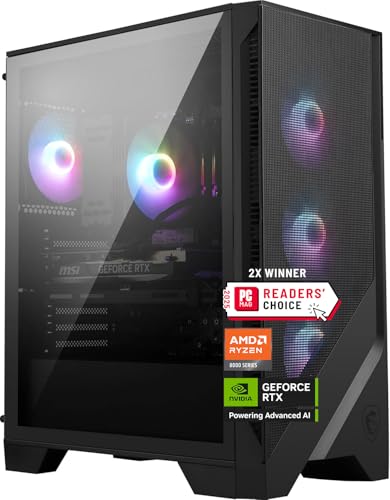
- Best overall for streaming: MSI Codex Z2 Gaming Desktop, Ryzen 7 8700F, RTX 5070, 32GB DDR5, 2TB SSD — Check on Amazon
- Best for play-and-broadcast: Skytech Omega Gaming PC, Ryzen 7 7800X3D, RTX 4070 Super, 32GB DDR5, 1TB NVMe — Check on Amazon
- Best CPU headroom for streaming: iBUYPOWER Slate 8 MESH Gaming PC, Intel Core i7-14700F, RTX 4070 Super, 2TB NVMe — Check on Amazon
- Best for production-heavy creators: Thermaltake LCGS View i4770 Gaming Desktop, Intel Core i7-14700KF, RTX 4070, 32GB DDR5 — Check on Amazon
See 2 more Amazon options
- Best value for streaming: Skytech Omega Gaming PC, Ryzen 7 7700X, RTX 4070 Super, 32GB DDR5, 1TB NVMe, White — Check on Amazon
- Brand-name pick: ASUS ROG Strix G15DS Gaming Desktop, Ryzen 7 7700X, RTX 4070, 16GB DDR5, 1TB SSD — Check on Amazon
Read the full guide ↓
Disclosure: As an Amazon Associate, reviewstook.com earns from qualifying purchases. Links to Amazon on this page are affiliate links; they cost you nothing extra. Listing details such as price and availability change often, so check the current Amazon listing before you buy.
A streaming PC is not simply a gaming PC with OBS installed. When you play at 1440p on a single machine, that machine is doing four jobs at once: rendering your game at 2560×1440, encoding a broadcast feed in real time, compositing your scenes — camera, alerts, overlays, browser sources — and, if you record your sessions for clips or uploads, writing a second, much higher-quality video file to disk at the same time. A gaming guide grades a PC on the first job. This guide grades on all four, and the order matters: the encoder hardware inside the graphics card is the streaming spec, the processor is the headroom spec, and memory and storage are the specs that decide whether your fourth hour of streaming feels like your first.
The good news at this budget is that the encoder question is largely settled. Five of the six machines here carry an RTX 4070-class graphics card, and every 4070-class card ships with two NVENC encoder units plus AV1 encoding — the hardware combination that lets one PC broadcast and record at the same time without either job stealing from the other. The sixth machine carries the newer RTX 5070, whose single encoder unit is a generation newer and also encodes AV1. Every pick in this guide can run the standard single-PC streaming workflow — play at 1440p, broadcast at 1080p60 — and every pick can encode AV1 for YouTube today. The differences that remain are about headroom: how much processor is left over for a VTuber model or a heavy scene collection, how much memory the whole stack can breathe in, and how many hours of footage the drive can hold before you are deleting recordings to make room for a game update.
One warning belongs at the top, because it shapes every recommendation below: prices at this tier are volatile, and several of these machines can move well above the $1,500 budget for this guide. Each recommendation applies only while the live listing fits the under-$1,500 budget — check the current price on Amazon before you buy. If the price has drifted above budget, wait, or take another pick in this guide that currently fits. If you are shopping for a gaming machine first and a streaming machine second, our companion guide to the Best 1440p Gaming PC Under $1500 grades this same tier on play alone; this page assumes the broadcast matters as much as the game.
In this guide
Quick Picks
Six machines, one streaming job each — check the current price on Amazon before you buy.
- Best overall for streaming — MSI Codex Z2, Ryzen 7 8700F, RTX 5070, 32GB DDR5, 2TB. The newest encoder generation in this guide and the largest recording drive, in the machine with the strongest gaming card here. Check the current price on Amazon — pricing at this tier is volatile, so the recommendation applies only while it fits the under-$1,500 budget.
- Best for play-and-broadcast — Skytech Omega, Ryzen 7 7800X3D, RTX 4070 Super, 32GB DDR5, 1TB. The best gaming processor in this guide paired with a dual-encoder 4070 Super: one encoder unit broadcasts, the other records. Check price on Amazon to confirm it currently fits this budget tier.
- Best CPU headroom — iBUYPOWER Slate 8 MESH, i7-14700F, RTX 4070 Super, 2TB. Twenty processor cores for VTubing, heavy scenes and everything else you stack on a stream, plus a 2TB drive. The trade is 16GB of memory, named openly in the review. Check price on Amazon.
- Best for production-heavy creators — Thermaltake LCGS View i4770, i7-14700KF, RTX 4070, 32GB DDR5. The same twenty-core headroom with the full 32GB of memory this tier should have. Strictly a pick only while it fits this budget tier — check the current price on Amazon.
- Best value for streaming — Skytech Omega, Ryzen 7 7700X, RTX 4070 Super, 32GB DDR5, 1TB, White. Positioned at the value end of this guide, for the same dual-encoder card and 32GB specification as the other picks in this tier. Check price on Amazon — pricing moves, so patience can be part of the deal.
- Brand-name pick — ASUS ROG Strix G15DS, Ryzen 7 7700X, RTX 4070, 16GB DDR5, 1TB. A dual-encoder RTX 4070 in a big-brand chassis with proper support behind it. Check price on Amazon, and verify the seller and warranty on the live listing, as this pick is listed through a marketplace seller; 16GB of memory is its named limitation.
How These Picks Were Chosen
Every machine here was graded on the streaming workload first and the gaming workload second, using the specifications documented in our research for this tier. We did not use these PCs ourselves, and no hands-on testing is claimed; the grading follows from verified hardware specifications, which for streaming is a more reliable guide than it might sound — encoder hardware is a fixed property of the graphics card, and it either has two encoder units or it has one.
Encoder hardware came first. The broadcast encode should never run on the same silicon that renders your game if it can be helped, and on NVIDIA cards it does not have to: NVENC is a dedicated encoder block. What separates the cards here is how many encoder units you get and which generation they are. The RTX 4070, 4070 Super and 4070 Ti class carry two eighth-generation NVENC units and AV1 encoding; the RTX 5070 carries one ninth-generation NVENC unit and AV1 encoding. Two units let OBS assign the broadcast encode and a simultaneous high-bitrate local recording to separate hardware. One unit — even a newer one — runs both sessions on the same block. Neither arrangement touches the CUDA cores rendering your game, which is the entire point, but the dual-unit arrangement has more headroom when both jobs run at once. Any machine whose card lacked AV1 encode or carried only a last-generation single encoder was not considered at this tier.
Processor headroom came second. With the encode on the GPU, the processor’s streaming job is everything else: OBS scene compositing that is not GPU-accelerated, your browser sources and alerts, chat and moderation tools, Discord, and — the heavy case — a VTuber model tracking your face and rendering a character in real time. Eight fast cores handle a conventional scene collection comfortably. Twenty cores, as in the two Intel picks here, are what you buy when the scene collection stops being conventional. We graded the processors on that basis, not on gaming benchmarks alone — though the 7800X3D’s gaming strength is real and noted where it matters.
Memory and storage were graded as streaming specs. A game, OBS with a working scene collection, a browser running dashboards and alerts, and a chat client together routinely use more than 16GB. At this budget 32GB is the tier standard, and the two 16GB picks are flagged rather than excused — for a pure game-and-broadcast setup they work; for VTubing or a heavy browser stack they are the first upgrade. Storage was graded in hours, not gigabytes: a high-quality local recording at 40–50 Mbps consumes roughly 20GB per hour, so a 1TB drive that also holds your game library is a recording archive of a few dozen hours, while the 2TB picks roughly double that before anything has to be deleted or moved.
The price rule was absolute. Each pick belongs in the under-$1,500 tier for this guide — check the current price on Amazon to confirm it still fits before you buy. Several listings in this class can move above budget; a pick is a recommendation only while its live price fits this tier. If every listing is above budget on the day you shop, the honest move is to wait for the next sale cycle or step down to the tier in our Best 1440p Gaming PC For Streaming Under $1200 guide rather than stretch for a name on this page.
Connectivity was checked, not assumed. Streaming over Wi-Fi is the single most common cause of dropped frames that streamers misdiagnose as a hardware problem, so every pick here was expected to offer wired Ethernet, and the rule in this guide is simple: the streaming PC gets a cable. Radio specifications vary by listing and change with revisions, so confirm the Ethernet port on the live listing of the exact configuration you are buying.
The Encoder Is the Streaming Spec
If you read one section before buying, read this one, because it explains why five of these six machines share a graphics-card class and why that is not a coincidence. When OBS sends your stream to Twitch or YouTube, something has to compress every frame of video in real time. There are three ways to do that job. The processor can do it in software (x264), which produces good quality but spends the very cores your game and your scene collection need. An AMD card can do it with its VCN encoder, which is competent but visibly softer than the competition at the low bitrates Twitch allows. Or an NVIDIA card can do it with NVENC, a dedicated encoder block that sits beside the rendering hardware and does not compete with it. NVENC at Twitch bitrates is the quality benchmark, it costs your game essentially nothing, and at this budget there is no reason to accept anything else.
Within NVENC, two things matter: generation and count. Generation decides quality per bit and which codecs exist. The eighth-generation NVENC in the RTX 4070-class cards here encodes H.264 for Twitch, HEVC, and AV1 — the newer codec that delivers visibly cleaner video at the same bitrate and that YouTube accepts for live streams today. The ninth-generation NVENC in the RTX 5070 encodes the same set with refinements. Count decides how much encoding can happen at once. A 4070-class card has two encoder units; OBS can put your broadcast on one and a high-bitrate local recording — the clean copy you cut clips and uploads from — on the other, and neither job can starve the other. The RTX 5070 has one encoder unit. It can still run a broadcast and a recording simultaneously, and for a 1080p60 broadcast plus a local record it has capacity to spare, but both sessions share one block of silicon, so it is the first place a truly extreme workload — say, broadcasting while recording at very high bitrate and resolution — would feel a ceiling. That is the honest trade inside the MSI’s newer card, and it is why “newest” and “best for streaming” are not automatically the same answer in this guide.
AV1 deserves a plain statement, because marketing blurs it. Today, AV1 live streaming is a YouTube feature: you can broadcast AV1 to YouTube now and get a cleaner picture at a given bitrate, which matters most at 1440p where YouTube’s bitrate allowance is more generous. On Twitch, the standard ingest remains H.264 at around 6,000 kbps for a 1080p60 stream; Twitch’s AV1 and HEVC support is arriving through its Enhanced Broadcasting programme rather than as a universal switch. Every card in this guide encodes AV1, so every pick is ready for both platforms’ directions — but if you stream to Twitch today, you will broadcast H.264 from any of them, and the dual-encoder layout is worth more to you than the codec list.
Finally, the fallback: x264 software encoding. On the twenty-core Intel picks, x264 at a fast preset is a genuinely usable backup — those processors have cores to spare after the game takes its share. On the eight-core picks, x264 beyond the veryfast preset will fight your game for resources, and there is no reason to use it while NVENC sits idle. Treat x264 as a diagnostic tool and an emergency option, not a plan.
The Workflow: Play at 1440p, Broadcast at 1080p
New streamers routinely misread this tier’s job as “streaming at 1440p,” so let us define the workflow precisely. Your monitor shows 1440p; your game renders at 1440p; your audience, on Twitch, watches 1080p60. That is not a limitation of these PCs — it is the platform’s shape. Twitch’s standard ingest is built around roughly 6,000 kbps with H.264, and at that bitrate 1080p60 is the ceiling that stays clean in fast motion; pushing a 1440p canvas into 6,000 kbps produces a softer picture than a well-encoded 1080p one. OBS handles the downscale from your 1440p game capture to a 1080p output canvas as a routine, GPU-cheap operation. On YouTube the picture is more flexible — higher bitrates are allowed, 1440p streams are supported, and AV1 ingest is available — so a YouTube-first streamer can broadcast at 1440p from any of these machines. But the hardware requirement barely changes, because in both cases the encode runs on NVENC and the game is the heavy job.
The settings that matter in OBS are few and stable: NVENC as the encoder, CBR rate control, a two-second keyframe interval (the platforms expect it), and bitrate matched to platform — around 6,000 kbps for Twitch 1080p60. Audio discipline matters more than video micro-tuning: a consistent, well-gained microphone at a sensible level will do more for how professional a stream feels than any encoder preset. When something goes wrong mid-stream, OBS tells you which of three problems you have, and each has a different fix. Dropped frames are network — the connection, which is why this guide insists on a cable. Skipped frames due to rendering lag mean the GPU is saturated — the game is taking everything, and the fix is capping the game’s frame rate or lowering its load, not touching the encoder. Skipped frames due to encoding lag mean the encoder is overloaded — the one problem these six machines are specifically specified to avoid, and the reason the encoder section above comes before everything else.
The Simultaneous-Load Test
Every review below grades its machine against the same test, so it is worth stating the test once. Picture a real evening: a current game running at 1440p with high settings; OBS broadcasting it at 1080p60 while simultaneously recording a high-bitrate local copy for later editing; a browser open with your dashboard, alerts and a second tab or three; Discord running; and, in the heavy version of the test, a VTuber application tracking your camera and rendering your model over the scene. Nothing in that list is exotic — it is a normal mid-size stream — but it touches every component at once, which is exactly why single-number gaming benchmarks do not predict streaming behaviour.
Under that load, the components fail in a predictable order. Memory goes first: the game, OBS, the browser stack and a VTubing application together can push past 16GB, and when memory runs out the whole system stutters, not just one app — that is why the two 16GB picks carry their flag in every section of this guide rather than a footnote. Storage fills second: at roughly 20GB per recorded hour, a 1TB drive shared with a modern game library reaches its limit in weeks of regular streaming, which is a management problem on the 1TB picks and a non-issue for months on the 2TB picks. Processor headroom goes third: scene compositing, browser sources and VTuber tracking are processor work, and the gap between the eight-core picks and the twenty-core Intel picks is invisible in a simple setup and obvious in a heavy one. The encoder, on these six machines, does not fail at all within this test — dual NVENC units split the broadcast and the record, the single ninth-generation unit in the 5070 carries both sessions, and the game never notices either way. That is what this budget is supposed to buy, and it is the standard each review is held to.
The 6 Best 1440p Gaming PCs for Streaming Under $1,500
1. MSI Codex Z2 Gaming Desktop, Ryzen 7 8700F, RTX 5070, 32GB DDR5, 2TB SSD — Best Overall for Streaming
The MSI Codex Z2 is the machine for the streamer who games first and broadcasts seriously: it has the strongest graphics card in this guide, the newest encoder generation, the joint-largest recording drive and the full 32GB of memory the tier standard demands. The RTX 5070 is a Blackwell card built for 1440p, and its ninth-generation NVENC encodes H.264, HEVC and AV1 with the most refined quality-per-bit of any encoder here. Paired with 32GB of DDR5 and a 2TB SSD, it passes the simultaneous-load test with room to spare on memory and storage — the two places the other picks most often feel pressure.
Who it suits: the single-PC streamer who plays demanding current games at 1440p, records everything for clips and uploads, and wants the newest platform in this guide rather than the previous generation. YouTube-first streamers get the most from it, since AV1 broadcasting is live there today and this is the newest AV1 encoder here.
Pros:
- Newest encoder generation in the guide — ninth-generation NVENC with AV1 for YouTube, H.264 for Twitch
- 2TB SSD: at roughly 20GB per recorded hour, the archive problem disappears for months
- 32GB DDR5 — the full tier standard, so the game, OBS, browser stack and chat all breathe at once
- Strongest gaming card here for the 1440p play half of the job
Honest limitation: the RTX 5070 has a single NVENC encoder unit, where the 4070-class picks have two. Broadcast and local record run as two sessions on that one unit — comfortably within its capacity at 1080p60 plus a high-bitrate record, but without the hardware separation the dual-encoder picks offer. Separately, this listing’s price is among the most volatile in the guide and can move above this budget tier. The pick only fits this guide while it is within the under-$1,500 budget — check the current price on Amazon. The listing also does not publish a PSU wattage in the material we verified, so check it on the live listing if that matters to you.
Choose it if it currently fits the under-$1,500 budget — check price on Amazon — and you want the newest platform with the biggest recording drive. Skip it if it has drifted above budget — at that point look to the dual-encoder picks below that currently fit this tier — or if hardware-separated dual encoding matters more to you than the newer card. The Codex Z2’s Amazon listing is where to confirm the current price and configuration.

2. Skytech Omega Gaming PC, Ryzen 7 7800X3D, RTX 4070 Super, 32GB DDR5, 1TB NVMe — Best for Play-and-Broadcast
The Skytech Omega with the 7800X3D pairs the finest gaming processor in this guide with the encoder layout this guide most recommends: the RTX 4070 Super’s two eighth-generation NVENC units, one for your broadcast and one for your local recording, with AV1 available for YouTube. The 7800X3D’s 3D V-Cache makes it the strongest play-side processor here — in CPU-sensitive games it keeps frame rates high and, just as usefully for a streamer, consistent, so the frames OBS captures are evenly paced. With 32GB of DDR5 behind it and a published 750W Gold power supply — one of only two picks whose PSU is documented in our sources — it is the most completely specified streaming machine in this guide.
Who it suits: the competitive or high-refresh streamer whose game comes first and whose broadcast has to keep up — the player whose audience notices a stutter because the gameplay itself is the content.
Pros:
- Dual NVENC encoders: broadcast and high-bitrate local record on separate hardware, plus AV1
- 7800X3D — the strongest and most consistent gaming processor in this guide
- 32GB DDR5 and a published 750W Gold PSU; the specification has no hidden gaps
Honest limitation: two, both manageable. The 1TB drive is the recording pinch: shared with a game library, it holds a few dozen hours of high-bitrate footage, so an archive habit — moving finished recordings to external or network storage — is part of owning it. And its position in the tier: it sits toward the top end of this budget, so check price on Amazon and treat it as a pick to choose while it fits the budget, not one to assume is in budget on any given day.
Choose it if you catch it within the under-$1,500 budget — check price on Amazon — and your stream is built around high-level play. Skip it if you record everything and never archive — take a 2TB pick — or if your scene stack is heavy with VTubing and browser sources, where the twenty-core Intel picks have more headroom.

3. iBUYPOWER Slate 8 MESH Gaming PC, Intel Core i7-14700F, RTX 4070 Super, 2TB NVMe — Best CPU Headroom
The iBUYPOWER Slate 8 MESH is built around the streaming half of the test rather than the gaming half. Its i7-14700F has twenty cores — eight performance and twelve efficiency — which is more processor than any game here needs and exactly what a heavy broadcast stack wants: OBS compositing, a VTuber model, a browser full of dashboards, chat tooling and recording overhead all find cores without queueing behind the game. The RTX 4070 Super provides the same dual-NVENC-plus-AV1 layout as the Omega above, and the 2TB NVMe drive matches the MSI for recording room. Check price on Amazon to confirm its current position in this tier, and note that a keyboard and mouse are included in the box.
Who it suits: the VTuber, the scene-heavy variety streamer, the creator whose stream runs a small production’s worth of software alongside the game — anyone whose bottleneck has ever been the processor rather than the graphics card.
Pros:
- Twenty cores: the most simultaneous-load headroom in this guide
- Dual NVENC encoders with AV1, and a 2TB drive for recordings
- Check price on Amazon; keyboard and mouse included
Honest limitation: it ships with 16GB of DDR5-5200, in a 2×8 configuration — the tier’s shortfall, and the one that matters soonest for this machine’s own audience, because the heavy-stack streamer it suits is precisely the user who will feel 16GB first. Budget for a memory upgrade to 32GB as a planned second purchase (replacing both sticks, since both slots are filled), and the machine becomes the most capable streaming platform here. Bought without that plan, it is a strong machine with a low ceiling on its best feature.
Choose it if your stream is production-heavy and you accept the memory upgrade as a planned second purchase. Skip it if you want the full specification on day one with nothing to add — the Thermaltake below pairs the same twenty cores with 32GB already fitted.

4. Thermaltake LCGS View i4770 Gaming Desktop, Intel Core i7-14700KF, RTX 4070, 32GB DDR5 — Best for Production-Heavy Creators
The Thermaltake LCGS View i4770 is the complete version of the Slate 8’s argument: the same twenty-core Intel processor class — here the i7-14700KF — with the full 32GB of DDR5-5600 fitted from the start, and an RTX 4070 providing the dual-NVENC, AV1-capable encoder pair. For a creator whose PC broadcasts, records, and then edits the recording, the twenty cores keep paying after the stream ends, in timeline scrubbing and export queues. Nothing in the specification needs a planned second purchase, which cannot be said of the pick above it.
Who it suits: the streamer-editor — someone whose workflow continues into cutting VODs and rendering uploads — and the heavy-stack broadcaster who wants twenty cores and 32GB in one transaction.
Pros:
- Twenty cores plus 32GB DDR5-5600: the simultaneous-load test passed with nothing left to upgrade
- Dual NVENC encoders and AV1 from the RTX 4070
- The twenty-core headroom doubles as editing and export capacity after the stream
Honest limitation: price positioning in this tier is strict. This pick sits toward the upper end of the tier and can move above this budget — check the current price on Amazon, and treat it as a pick only while it fits the under-$1,500 budget. The RTX 4070 is also a step behind the 4070 Super picks on the play side: still a proper 1440p card with the same encoder hardware, but the gaming margin is thinner in the heaviest titles. And its 1TB drive carries the same recording-archive caveat as the other 1TB picks.
Choose it if you find it within the under-$1,500 budget — check price on Amazon — where it is arguably the most complete streaming specification here. Skip it if it is above that budget; the walk-away rule is the whole point of this pick, and the Slate 8 plus a memory kit delivers most of the same platform in a way you can plan around.

5. Skytech Omega Gaming PC, Ryzen 7 7700X, RTX 4070 Super, 32GB DDR5, 1TB NVMe, White — Best Value for Streaming
The white Skytech Omega is positioned at the value end of this guide and gives up remarkably little for that position. The streaming hardware is identical in kind to the other picks in this tier: an RTX 4070 Super with dual NVENC encoders and AV1, 32GB of DDR5, and a published 750W Gold power supply. The Ryzen 7 7700X is an eight-core processor without the 7800X3D’s cache advantage, so the play side runs a step behind its sibling Omega in CPU-sensitive games; for the broadcast side — encode on the GPU, scenes on the CPU — eight fast cores are entirely sufficient for a conventional setup, and its value positioning in the tier can leave more of the overall setup budget for a proper microphone and webcam.
Who it suits: the streamer building the whole setup at once — PC, microphone, camera, second screen — who would rather have the complete broadcast than the last increment of gaming processor.
Pros:
- Value positioning in this guide — check price on Amazon
- Same dual-encoder RTX 4070 Super and 32GB specification as the other picks in this tier
- Published 750W Gold PSU — no specification gaps to check
- Its value positioning can leave more room in the overall setup budget for a broadcast kit; see the kit section below
Honest limitation: its value positioning is not guaranteed on any given day — like the Thermaltake, it is a pick to catch while it fits the budget, not a position to assume, so check price on Amazon. The 1TB drive carries the standard recording-archive caveat, and the 7700X gives VTubers and heavy scene stacks less headroom than the Intel picks. The white finish is also a commitment: it will show dust and dictate the look of everything beside it, which some desks will love and others will regret.
Choose it if it currently fits the budget — check price on Amazon — and your setup is a conventional game-plus-camera broadcast — it is the rational default of this guide. Skip it if your stack is production-heavy (take a twenty-core pick) or it is positioned above this budget tier on the day you shop. Check the current price on Amazon on the Omega’s Amazon page.
6. ASUS ROG Strix G15DS Gaming Desktop, Ryzen 7 7700X, RTX 4070, 16GB DDR5, 1TB SSD — Brand-Name Pick
The ASUS ROG Strix G15DS is the pick for the buyer who values the badge and the support structure behind it. Its streaming core is sound — an RTX 4070 with the dual-NVENC and AV1 layout this guide recommends, driven by the same Ryzen 7 7700X as the white Omega — inside an ASUS chassis with a multi-zone airflow design, a carry handle and the ROG ecosystem behind it, with a wired keyboard and mouse in the box per the listing record. For a streamer whose PC is also the household’s main computer, a major manufacturer’s warranty and service network are a real feature, not a logo tax.
Who it suits: the brand-conscious buyer, the gift purchase, and anyone who wants a single large company to call if something fails in the first year.
Pros:
- Dual NVENC encoders and AV1 — the recommended streaming hardware, in a big-brand machine
- ASUS build, chassis airflow design and support network
- Keyboard and mouse included in the box
Honest limitation: it carries the guide’s other 16GB configuration — DDR5-4800, the slowest memory specification here — so the same streaming warning applies: fine for game-plus-broadcast, tight for VTubing or a heavy browser stack, with a 32GB upgrade as the planned fix. It is also listed through a marketplace seller rather than Amazon itself, so check price on Amazon and verify the seller, the warranty terms and the exact configuration on the live listing before ordering; marketplace listings for big-brand desktops are where configuration drift hides.
Choose it if the brand and its support matter to you and you accept the memory caveat. Skip it if the live listing’s seller or configuration looks unclear — the white Omega offers the same encoder hardware and processor with 32GB fitted, from a cleaner specification sheet.

Comparison Table
| PC | GPU / Encoder | CPU | RAM | Storage | Price | Streaming role |
|---|---|---|---|---|---|---|
| MSI Codex Z2 | RTX 5070 — 1× NVENC (9th gen), AV1 | Ryzen 7 8700F, 8-core | 32GB DDR5 | 2TB | Check price on Amazon | Best overall; newest encoder, biggest archive |
| Skytech Omega (7800X3D) | RTX 4070 Super — 2× NVENC (8th gen), AV1 | Ryzen 7 7800X3D | 32GB DDR5 | 1TB | Check price on Amazon | Best play-and-broadcast |
| iBUYPOWER Slate 8 MESH | RTX 4070 Super — 2× NVENC (8th gen), AV1 | i7-14700F, 20-core | 16GB DDR5-5200 | 2TB | Check price on Amazon | Best CPU headroom; plan a RAM upgrade |
| Thermaltake LCGS View i4770 | RTX 4070 — 2× NVENC (8th gen), AV1 | i7-14700KF, 20-core | 32GB DDR5-5600 | 1TB | Check price on Amazon | Production-heavy creators; deal-only |
| Skytech Omega (7700X, White) | RTX 4070 Super — 2× NVENC (8th gen), AV1 | Ryzen 7 7700X, 8-core | 32GB DDR5 | 1TB | Check price on Amazon | Best value |
| ASUS ROG Strix G15DS | RTX 4070 — 2× NVENC (8th gen), AV1 | Ryzen 7 7700X, 8-core | 16GB DDR5-4800 | 1TB | Check price on Amazon; verify seller | Brand-name pick; verify seller |
How to Choose a 1440p Gaming PC for Streaming Under $1,500
Start with your scene, not the game. If your broadcast is a game, a camera and a few alerts, every machine here is more than sufficient and the choice turns on which listing currently fits the budget — check price on Amazon — and on play-side preference. If your scene includes a VTuber model, animated overlays and a wall of browser sources, start from the processor instead: the twenty-core Intel picks exist for you.
Decide whether you record. Streamers who clip and upload from local recordings should weight the dual-encoder picks and the 2TB drives heavily — the MSI and the Slate 8 hold months of footage; the 1TB picks demand an archiving habit. Streamers who only broadcast can ignore storage entirely and take the pick that best fits this budget tier on the day — check price on Amazon.
Treat 16GB as a planned upgrade, not a surprise. The Slate 8 and the ASUS are honest machines with a named shortfall. If either is your pick, plan for a 32GB memory kit as an added cost from the start; if that added cost undermines the pick’s value in this tier, buy a pick that already fits 32GB instead.
Apply the price rule without exceptions. Every recommendation on this page is conditional on a live price that fits the under-$1,500 budget — check the current price on Amazon. Pricing in this class can move above budget. A pick that is above budget is not a slightly worse deal; it is a different, worse recommendation, and the correct response is to wait or to look at the Best 1440p Gaming PC For Streaming Under $2500 tier if the budget has genuinely grown.
Run a cable. Whichever machine you buy, budget the ten minutes to run Ethernet to it. No pick in this guide can fix a congested Wi-Fi link, and dropped frames from wireless are the most common streaming fault there is. If a cable run is genuinely impossible, that constraint — not the PC — is what to solve next, and our Best Streaming PC Under $1500 guide discusses dedicated streaming setups for exactly that situation.
Match the pick to the platform. YouTube-first streamers can use AV1 today and benefit most from the MSI’s newest encoder; Twitch-first streamers broadcast H.264 either way and should weight the dual-encoder layout and processor headroom. New streamers who have not chosen a platform — or a game — will find the gentler on-ramp in our Best 1440p Gaming PC For Beginners Under $1500 guide.
What $1,500 Does Not Include
This guide’s budget buys the PC. A broadcast needs a small kit around it, and that kit is deliberately not inside any pick’s price — when a review says a pick leaves room in the overall setup budget for the kit, this is the kit it means. Buy in this order. A microphone comes first: audio quality is the largest perceived-quality jump a new stream makes, ahead of any camera. A webcam follows if your format puts you on screen. Lighting can start as a single inexpensive panel or a desk lamp you already own, aimed properly. A second monitor — even a modest one — is the quality-of-life item streamers consistently wish they had bought sooner, because chat and OBS stop competing with the game for screen space. A capture card is only for console streamers bringing an external source into the PC; a single-PC setup needs no such thing. Plan for the kit as a separate part of the overall setup budget beyond the PC, and think of the choice between picks in this tier in part as a choice about how much room the tower leaves for that kit. Neither answer is wrong; buying the tower and skipping the microphone is.
Common Buying Mistakes
- Buying a pick while it is above this budget tier. Several machines here are recommendations only while they fit the under-$1,500 budget — check the current price on Amazon. Buying one while it sits above budget because a guide listed it in this tier is the most expensive mistake this page can cause — the walk-away rules in the reviews are load-bearing.
- Streaming over Wi-Fi. Dropped frames blamed on the PC, the encoder and the platform are, most of the time, a wireless link under load. Cable the machine before troubleshooting anything else.
- Buying 16GB for a heavy stack. A VTuber model plus a browser dashboard will find the ceiling of a 16GB pick in the first week. The flags in this guide are placed where they are because the failure is stutter across the whole system, not a polite warning dialog.
- Chasing a 1440p broadcast on Twitch. At standard ingest bitrates a 1440p canvas looks worse than a clean 1080p60 encode. Play at 1440p, broadcast at 1080p60, and let YouTube be the platform where 1440p output makes sense.
- Recording to a nearly full drive. At roughly 20GB per hour, recordings fill the free corner of a 1TB game drive faster than expected, and a recording that stops mid-stream for lack of space takes the VOD with it. Archive finished footage or buy the 2TB pick.
- Letting the game run uncapped. An uncapped frame rate lets the game consume the entire GPU, and OBS’s rendering then skips frames even though the encoder is idle. A sensible frame-rate cap is the free fix for the most common “my stream lags but my game doesn’t” complaint.
- Spending the whole budget on the tower. A PC in this tier paired with only a headset microphone sounds worse than a pick positioned lower in the same tier paired with a proper standalone microphone. The kit is part of the purchase; see the section above.
Final Recommendation
For most streamers shopping this tier, the white Skytech Omega is the rational default — check price on Amazon: the same dual-encoder card and 32GB specification as the rest of the guide, with its value positioning leaving more room in the overall setup budget for the microphone and camera that the audience will actually notice. Catch the 7800X3D Omega within this budget instead if your gameplay is the content and you want the strongest play-side processor with its encoders split between broadcast and record. Take the iBUYPOWER Slate 8 — with its memory upgrade honestly planned for — or the Thermaltake while it fits this budget if your broadcast is a production: VTuber, heavy scenes, editing afterwards. Choose the MSI Codex Z2 when it currently fits this budget and you want the newest platform and the 2TB archive; choose the ASUS when a big name and its support are worth a memory caveat. And hold the line that runs through the whole guide: at a live price above the $1,500 budget, none of these is the pick — the sale will come back, or the Best 1440p Gaming PC Under $1200 tier will serve you honestly in the meantime. First-time buyers who would like the wider picture before deciding should also read our Best Gaming PC Under $1500 roundup, and those whose room cannot fit a tower at all will find the compact options in the Best 1440p Gaming PC For Small Spaces Under $1500 guide.
Frequently Asked Questions
Can these PCs stream at 1440p, or only play at 1440p?
Both, with a platform caveat. On YouTube, yes: higher bitrates and AV1 ingest make a 1440p broadcast practical from any pick here. On Twitch, the standard ingest of around 6,000 kbps makes 1080p60 the right output — the machines could encode 1440p, but the platform’s bitrate would make it look worse, not better. Play at 1440p either way; the broadcast resolution is a platform decision, not a hardware limit.
Do I actually need two encoder units?
Only if you record while you stream, which most growing streamers do — clips and uploads come from the local recording, not the broadcast. Dual NVENC lets the broadcast and a high-bitrate record run on separate hardware. If you never record, a single encoder is never the bottleneck, and the MSI’s newer single unit is an excellent choice. If you do record, the five dual-encoder picks remove a whole category of worry.
Is 16GB of RAM enough for streaming?
For a game, OBS and a light scene collection, yes — the two 16GB picks will broadcast properly. For VTubing, a browser full of dashboards, or several stacked applications, it is the first ceiling you will hit, and the failure mode is system-wide stutter. Both 16GB picks are upgradeable, and this guide treats the 32GB upgrade as a planned added cost rather than hiding it.
Why do some of these PCs cost far more than $1,500 when I click through?
Because prebuilt pricing at this tier is cyclical, and several of these listings can sit above this budget for much of the time. Every pick here belongs in the under-$1,500 tier — check the current price on Amazon to confirm it still fits. The recommendation travels with that budget fit: at a live price over the $1,500 budget, wait for the sale cycle rather than stretching.
Does AV1 matter if I stream on Twitch?
Not yet for the broadcast itself — Twitch’s standard ingest is H.264, with AV1 arriving through its Enhanced Broadcasting programme. AV1 matters today if you stream to YouTube, and it future-proofs the purchase either way. What matters on Twitch today is the dual-encoder layout and a wired connection, both of which this guide weights more heavily than the codec list.
Should I build a dedicated second PC for streaming instead?
Almost certainly not at this budget. A second PC splits the encode onto separate hardware, but every pick here already carries dedicated encoder hardware that does the same job without a second machine, a capture card or the sync and audio-routing complexity of a two-PC setup. Two-PC streaming solves problems these six machines do not have; focus on the broadcast kit instead.


