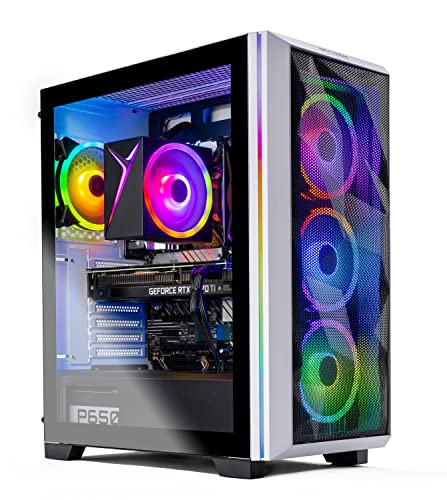
Where to buy
Check the latest price, availability and delivery on Amazon. Orders are placed on Amazon. We may earn a commission from qualifying purchases.
- Best native 1440p performance: Skytech Chronos Gaming PC, Ryzen 7 5700X, RTX 4070 Ti 12GB — Check on Amazon
- HOENGAGER Gaming PC, Intel Core i7-12700F, RTX 4070 12GB, 32GB DDR4 — Check on Amazon
- CYBERPOWERPC Gamer Xtreme VR, Intel Core i7-13700F, RTX 4060 Ti 16GB — Check on Amazon
- CYBERPOWERPC Gamer Master, AMD Ryzen 7 8700F, RTX 4060 Ti 8GB — Check on Amazon
See 2 more Amazon options
- iBUYPOWER Scale, AMD Ryzen 5 7600, RTX 4060 Ti 8GB — Check on Amazon
- Skytech Shiva Gaming PC, AMD Ryzen 5 5600X, RTX 4060 Ti 8GB, White — Check on Amazon
Read the full guide ↓
Disclosure: As an Amazon Associate, reviewstook.com earns from qualifying purchases. Links to Amazon on this page are affiliate links; they cost you nothing extra. Listing details such as price and availability change often, so check the current Amazon listing before you buy.
Most “1440p gaming PC” guides answer a shopping question: which machine, at which price. This one answers a rendering question, because that is the question a 1440p monitor actually asks. A PC can reach a 2560×1440 screen by two completely different routes — it can render all 3.69 million pixels itself, every frame, or it can render far fewer pixels and let an upscaler reconstruct the rest — and two systems with identical price tags can be doing opposite things while a listing calls both of them “1440p ready.” So every machine in this guide is graded on one scale only: what it renders natively at 1440p, in which class of game, at which settings — and where native rendering runs out, how good its upscaled fallback is. The six systems are the same proven sub-$1,200 set as our main 1440p guide: an RTX 4070 Ti, an RTX 4070, and four RTX 4060 Ti systems in 16GB and 8GB forms. What changes here is the lens — and the lens changes what the ranking means.
The framing deserves to be stated before any product names. Under $1,200 is the entry tier for real 1440p — the first budget where native rendering at this resolution is genuinely on the table rather than a marketing claim. It is not the tier where native rendering is free. In competitive titles everything here renders natively at high refresh; in lighter AAA games the stronger picks render natively and the rest come close; in the current crop of heavy AAA releases, native 1440p at high settings is the 4070-class picks’ territory, while the 4060 Ti systems split their work between settings discipline and DLSS. A reader who wants native ultra at 1440p as the default setting in every new release — no upscaling, no compromises, no per-game negotiation — is shopping one tier up, and this guide will keep pointing at Best 1440p Gaming PC For 1440p Gaming Under $1500 rather than pretend otherwise. What $1,200 buys, graded honestly, is the moment 1440p stops being upscaled 1080p wearing a bigger monitor and starts being the real thing in most of a library. Below: the definitions that make the grades precise, the quick picks, six reviews graded game-class by game-class, a comparison table, a how-to-choose section built around rendering modes, the mistakes specific to this resolution, and an FAQ.
Native 1440p vs Upscaled 1440p: The Definitions Behind Every Grade
Native 1440p means the graphics card renders the full frame at 2560×1440 — 3,686,400 pixels, roughly 3.69 million, about 78% more than 1080p’s 2,073,600. Every pixel your monitor shows was actually drawn by the GPU for that frame. Native rendering is the sharpest, most stable image a 1440p panel can display, and it is the most expensive thing a graphics card does — that 78% pixel increase is why a card that cruises at 1080p can labour one resolution up, and why “can it do 1440p” is meaningless without asking which games, at which settings, at what frame rate.
Upscaled 1440p means the card renders at a lower internal resolution and an AI or algorithmic upscaler — on every card in this guide, NVIDIA’s DLSS — reconstructs a 1440p image from it. The render resolutions behind the DLSS presets at a 1440p output are worth memorising, because they are the honest version of every “1440p performance” claim: DLSS Quality renders internally at about 1707×960, roughly 1.64 million pixels — about 44% of native. DLSS Balanced renders at about 1485×836. DLSS Performance renders at 1280×720 — 720p-class work, with the upscaler doing the rest. Modern DLSS is genuinely good — a Quality-mode image at 1440p is close enough to native that many players cannot separate them in motion — but it is not identical, and the gap shows first in fine detail, foliage, fences, hair and anything else made of thin lines. When this guide says a pick “does 1440p via DLSS Quality,” that is precisely the claim being made — a legitimate, often excellent way to play, and a different one from native.
Frame generation is a third thing, and listings blur it into the other two on purpose. DLSS Frame Generation — supported by every RTX 40-series card here — inserts AI-generated frames between rendered ones. The displayed frame rate rises and motion looks smoother, but the GPU did not render those frames, input latency still reflects the lower rendered rate underneath, and the feature consumes VRAM while it works. Treat it as a smoothness bonus layered on a render resolution you have already chosen, never as evidence that a card “renders 1440p” at the displayed number.
With those definitions fixed, the grading scale used in every review below has three title classes. Competitive titles — Counter-Strike 2, Valorant, Apex Legends, Fortnite, Rocket League and their peers — are built to run fast, and native 1440p at high refresh is the expectation, not the achievement. Lighter AAA covers the large middle of modern gaming: well-optimised releases, last-generation flagships, and the bulk of a typical library, where native 1440p at high settings separates the tiers in this guide. Current heavy AAA — the newest, least optimised, ray-tracing-forward releases — is where native 1440p at high settings becomes a 4070-class accomplishment and everyone else negotiates. A pick’s grade is its pattern across those three classes, stated per class, never averaged into a slogan.
In this guide
Quick Picks
Short on time, or comparing several options at once? Each row below names a buyer type and the system that suits it, with a link to the listing.
| Buyer type | Pick | Its 1440p mode | Link |
|---|---|---|---|
| Best native 1440p performance | Skytech Chronos, Ryzen 7 5700X, RTX 4070 Ti 12GB | Native high settings across all three title classes; DLSS held in reserve | Check on Amazon |
| Best native 1440p with 32GB RAM | HOENGAGER Gaming PC, i7-12700F, RTX 4070 12GB | Native high in lighter and most heavy AAA; 32GB for streaming at 1440p | Check on Amazon |
| Best 1440p texture headroom | CYBERPOWERPC Gamer Xtreme VR, i7-13700F, RTX 4060 Ti 16GB | Same speed as the 8GB card today; 16GB keeps ultra textures loaded years longer | Check on Amazon |
| Best modern AMD platform | CYBERPOWERPC Gamer Master, Ryzen 7 8700F, RTX 4060 Ti 8GB | Native esports; DLSS Quality is its main mode in heavy AAA | Check on Amazon |
| Best price stability | iBUYPOWER Scale, Ryzen 5 7600, RTX 4060 Ti 8GB | Native esports; DLSS Quality in heavy AAA; check price on Amazon | Check on Amazon |
| Best white build | Skytech Shiva, Ryzen 5 5600X, RTX 4060 Ti 8GB | Native esports; DLSS Quality in heavy AAA; the white option in this tier | Check on Amazon |
How These Picks Were Chosen
The set is the six systems from our main $1,200 1440p guide — real Amazon listings in this budget tier, carried over from that guide (reuse cited in this article’s sources file). Check price on Amazon for current pricing on each pick. The grading here ignores everything except the path pixels take to a 1440p screen. In order: first, native rendering power at 2560×1440 — the GPU tier, full stop, because no other component can substitute for it. Second, VRAM, because at 1440p memory decides which texture settings the native mode is allowed to use, and a card forced to drop textures is not delivering the native image its resolution promises. Third, upscaling quality — every card here supports DLSS, so the fallback mode is strong across the guide, and the differences are in how often each pick needs it. Fourth, and only fourth, the platform around the card: CPU headroom for high-refresh competitive play, memory configuration, and upgrade future.
Two honesty rules govern the grades. No frame-rate figures are claimed for any specific game on any specific system — none of these PCs was tested for this article — so performance is described by tier and title class, in terms a reader can verify against any reputable GPU review. And current pricing is part of the check, not a footnote to it: a pick belongs in this guide only when its current pricing fits this budget tier, so check price on Amazon before you decide, and treat any pick priced well above this tier as belonging in a higher-tier guide. The full, general-purpose assessment of these six systems, including streaming, productivity and value angles this variant deliberately sets aside, lives in Best 1440p Gaming PC Under $1200.
The 6 Best 1440p Gaming PCs for 1440p Gaming Under $1,200
Skytech Chronos Gaming PC — Ryzen 7 5700X, RTX 4070 Ti 12GB
Who it suits: The buyer who wants the question “native or upscaled?” to mostly stop coming up — the strongest native 1440p rendering this budget can contain, when its current pricing fits this tier.
Grade it class by class. Competitive titles: native 1440p at high settings and high refresh, without discussion — this is the card the 165Hz and 180Hz panels in this price conversation were made for, and esports engines will not trouble it. Lighter AAA: native 1440p at high to ultra settings is its default state, not its stretch goal. Current heavy AAA: this is the only pick in the guide whose native mode survives the heaviest current releases at high settings as a normal expectation — with settings discipline in the very worst optimised cases, ray tracing genuinely usable rather than decorative, and DLSS Quality available as a reserve it rarely needs rather than a crutch it leans on. The 12GB of GDDR6X VRAM completes the picture: at 1440p, ultra texture packs fit, so the native image the card renders is the full-fidelity one, not a texture-discounted version of it. The RTX 4070 Ti was designed for exactly this resolution, and in a guide where every other pick negotiates with 1440p somewhere, the Chronos is the one that simply renders it.
The machine around the card is balanced and honestly specified: a Ryzen 7 5700X — eight cores at 3.4 GHz, boosting to 4.6 GHz — which feeds high-refresh competitive play properly; a 1TB NVMe SSD; 16GB of DDR4 at 3200; a 750W Gold power supply with wattage and certification both stated; 802.11ac Wi-Fi; Windows 11 Home; model ST-CHRONOS-0638-W-AM. The platform is the caveat that has nothing to do with rendering: the 5700X is an AM4 processor and the memory is DDR4, so the CPU upgrade path ends with this generation — a trade whole-system replacers will never feel, and piece-by-piece upgraders should weigh against the AM5 reviews below.
Pricing is the other half of the grade, and it needs a live check. Check price on Amazon before you buy: when current pricing fits this budget tier, this is the best native-1440p purchase in the guide by a wide margin — a GPU tier that systems a class up routinely contain. When pricing sits well above this tier, it is not a pick for this guide at all and no grading in this article applies to it. In that case, take a pick that does fit the tier and check back on this listing later.
- RTX 4070 Ti 12GB — the tier’s native-1440p leader; high settings native across all three title classes.
- 12GB of VRAM means ultra textures at 1440p fit — the native image is the full-fidelity image.
- 750W Gold PSU stated in the listing, and a 5700X that feeds high-refresh play properly.
Honest limitation: Its pricing can sit well above this budget tier — check price on Amazon before deciding — and the AM4/DDR4 platform has no CPU upgrade path.
Choose it if check price on Amazon shows it within this budget tier and native 1440p rendering is the priority. Skip it if current pricing sits well above this tier, or you want a current platform to upgrade over years.

HOENGAGER Gaming PC — Intel Core i7-12700F, RTX 4070 12GB, 32GB DDR4
Who it suits: The native-1440p buyer who also streams, records or multitasks heavily — 4070-class rendering with double the system memory of everything else here.
Its 1440p grade sits one step below the Chronos and one clear step above everything after it. Competitive titles: native 1440p at high refresh, comfortably — the RTX 4070 is overqualified for esports engines. Lighter AAA: native 1440p at high settings is the default, with ultra available in the better-optimised releases. Current heavy AAA: native high settings in most of them; the step down from the Ti shows up precisely here, at the extremes — the heaviest ray tracing and the least optimised launches are where this pick reaches for settings discipline or DLSS Quality while the Chronos renders on. That is the whole difference, and for many libraries it will never appear. The 12GB of VRAM matches the Ti’s, so its texture grade at 1440p is identical: ultra packs fit, and the native image is undiscounted.
What surrounds the card is this system’s own argument. The Core i7-12700F is a 12-core processor — eight performance cores plus four efficiency cores — that handles gaming and a streaming stack simultaneously without strain. The 32GB of DDR4 at 3200MHz is double the guide’s standard fit, and at 1440p it earns its keep in a specific way: playing at this resolution while OBS, a browser full of alerts and chat, and a recording buffer all share the machine is where 16GB systems start to feel their ceiling. Storage is a 1TB M.2 PCIe SSD, cooling includes a 240mm AIO liquid cooler, and the specification rounds out with 802.11ac Wi-Fi and Bluetooth, HDMI and DisplayPort, a tempered-glass RGB case, and Windows 11 Pro.
The caveats are about evidence, not performance. HOENGAGER is a smaller integrator: its listing does not publish a power supply wattage in the material that could be verified, and support runs through the seller rather than a large domestic service network. More importantly for this guide, check price on Amazon for current pricing — following the precedent of the main guide, this review relies on that live check rather than any fixed figure. The rule is the reader’s to apply: when current pricing fits this budget tier, this is a native-1440p machine with a specification nothing else here matches; when it sits above this tier, pass without regret. The platform is mature — DDR4, a 12th-generation Intel socket — so buy it as the finished machine it is.
- RTX 4070 12GB — native high-settings 1440p across competitive and lighter AAA, most heavy AAA included.
- 32GB of DDR4 — the multitasking and streaming headroom the rest of the guide ships without.
- 240mm AIO cooling, Windows 11 Pro, and a 12-core CPU that never becomes the bottleneck.
Honest limitation: The PSU wattage is unpublished and the seller is a smaller integrator — it belongs on the shortlist only when check price on Amazon shows it within this budget tier.
Choose it if you want native 1440p plus a streaming or creator workload, and check price on Amazon shows it within this tier. Skip it if you want a large integrator’s support network, or current pricing sits above this tier when you shop.

CYBERPOWERPC Gamer Xtreme VR — Intel Core i7-13700F, RTX 4060 Ti 16GB (GXiVR8040A14)
Who it suits: The long-horizon buyer — the one asking not how a card renders 1440p this year, but which pick’s 1440p picture will have decayed least in four years.
Start with the fact this pick’s whole grade rests on: the RTX 4060 Ti 16GB is not faster than the 8GB version. Same core, same rendering speed, same native grades today. Competitive titles: native 1440p at high refresh, identical to the three 8GB systems below. Lighter AAA: native at high settings in the well-optimised majority, DLSS Quality in the rest — identical again. Current heavy AAA: DLSS Quality is its main mode, exactly like its siblings. If the grades stopped at rendering speed, this review could end here. They do not, because rendering at 1440p has a second constraint the speed grade hides: textures. At 2560×1440, ultra texture packs in the largest current releases can exceed 8GB of VRAM, and when memory runs out the failure is visual — stutter, pop-in, surfaces that resolve late or stay soft. The native frame is still 1440p, but it is a discounted version of it. Sixteen gigabytes removes that ceiling at this resolution for the foreseeable life of the machine. This pick’s 1440p grade is therefore the same as the 8GB picks’ on day one and better every year after: it is the only 4060 Ti here whose texture settings never have to come down to protect its frame rate.
CyberPowerPC builds around the card with more CPU than it needs, in the good direction: a Core i7-13700F, sixteen cores of Raptor Lake, which leaves the system strong for streaming, editing and a future graphics card long after the 4060 Ti is the part being replaced. The platform is current — 16GB of DDR5, a 1TB PCIe Gen4 NVMe SSD, the B760 chipset, Wi-Fi, Windows 11 Home, model GXiVR8040A14 — and CyberPowerPC’s scale brings a real warranty operation behind it.
Pricing needs a live check: check price on Amazon before you buy. When current pricing fits this budget tier, it is the thinking buyer’s 4060 Ti; when it sits above this tier, the 8GB systems deliver the same frame rates in this tier, and the longevity premium stops making sense. One verification before ordering: this class of system has shipped in the past with a single 16GB memory stick, which runs single-channel and costs performance until a second is added — the memory configuration on the live listing is the one that counts, so check it.
- RTX 4060 Ti 16GB — the texture-headroom pick: ultra textures at 1440p stay loaded, year after year.
- Core i7-13700F, 16 cores — CPU power well beyond the card, ready for streaming and a future GPU.
- DDR5 and a Gen4 NVMe SSD on a current Intel platform from a large US integrator.
Honest limitation: No faster than the 8GB card today — any premium buys longevity, not frames — and current pricing needs checking against this tier; the RAM stick configuration also needs confirming on the live listing.
Choose it if you keep PCs for four or five years, play the texture-heaviest releases at 1440p, and check price on Amazon shows it within this budget tier. Skip it if current pricing sits above this tier, or you upgrade GPUs often enough that VRAM longevity never gets a chance to matter.

CYBERPOWERPC Gamer Master — AMD Ryzen 7 8700F, RTX 4060 Ti 8GB (GMA2900A)
Who it suits: The upgrader — the buyer who wants this guide’s newest AMD platform under a card whose 1440p mode is honestly DLSS-first.
The 1440p grade, stated without decoration. Competitive titles: native 1440p at high refresh is this card’s home ground — esports engines at 144Hz and beyond are what the RTX 4060 Ti 8GB does without any assistance. Lighter AAA: native at high settings in the well-optimised majority; DLSS Quality joins in for the heavier end of the class. Current heavy AAA: DLSS Quality is the main mode, full stop — the card renders around 1707×960 and reconstructs, and at high settings that is a good-looking, fluid way to play, but this guide’s definitions apply: it is upscaled 1440p, not native. Layered on top is the 8GB texture ceiling, this pick’s defining constraint at this resolution: in the largest current releases, texture quality is the first setting that has to come down a notch to protect the frame rate, and that compromise grows slightly more common each year. None of this makes the card weak — it makes it a card whose honest description is “native where games are light, upscaled where they are heavy, textures managed throughout.”
What this system adds to that card is the platform. The Ryzen 7 8700F is an 8-core AM5 processor at 4.1 GHz on AMD’s current socket, with DDR5 memory — the foundation in this guide that accepts future Ryzen generations, cheap memory additions and a next-generation graphics card dropped into the same case. The rest is the standard done properly: 16GB of DDR5, a 1TB PCIe Gen4 NVMe SSD, the B650 chipset, Wi-Fi, Windows 11 Home, model GMA2900A. For a buyer whose plan is “this card for two years, then the GPU upgrade this platform is waiting for,” the 8GB ceiling has an expiry date the finished-platform picks cannot offer.
Pricing needs both a live check and a seller check. Check price on Amazon and confirm who is selling it: when Amazon is the seller and current pricing fits this budget tier, this is one of the best-balanced buys in the guide — a mid-range option in this tier. Through a third-party marketplace seller at pricing above this tier, it is a different and worse proposition wearing the same name. Verify the seller as carefully as the price on Amazon.
- Ryzen 7 8700F on AM5 with DDR5 — no other pick here offers a longer upgrade runway.
- Native 1440p at high refresh in competitive titles; DLSS Quality as a strong main mode in heavy AAA.
- Available through Amazon — check price on Amazon and confirm Amazon is the seller before you buy.
Honest limitation: 8GB of VRAM is a real ceiling at 1440p — textures come down a notch in the biggest releases — and marketplace sellers may price this system well above this tier.
Choose it if you want a current AMD platform to grow into a stronger GPU later, and check price on Amazon shows it within this tier from Amazon as seller. Skip it if texture-maxed native AAA gaming is the whole point — that is the 16GB system above or the 4070-class picks — or the only listings are third-party ones priced above this tier.

iBUYPOWER Scale — AMD Ryzen 5 7600, RTX 4060 Ti 8GB (SCA5N46T01)
Who it suits: The buyer who wants the 4060 Ti’s 1440p grade on a current platform, with a straightforward fix for its single flaw.
The GPU grade is the same honest pattern as the pick above, because the card is the same. Competitive titles: native 1440p at high refresh, unqualified. Lighter AAA: native high settings in the optimised majority, DLSS Quality at the class’s heavy end. Current heavy AAA: DLSS Quality as the main mode, rendering ~1707×960 and reconstructing to the panel, with the 8GB texture ceiling stated as plainly here as anywhere: the biggest releases will occasionally ask for textures one notch down, and that is the price of the 8GB card at this resolution, at any purchase price. What distinguishes the Scale is not the card but everything a buyer can plan around it.
Begin with the live check: check price on Amazon for current pricing, and consider it only when that pricing fits this budget tier. The machine is a current-platform build: a Ryzen 5 7600, six AM5 cores boosting to 5.1 GHz and well matched to the card, with the quiet bonus of integrated graphics that makes troubleshooting a future GPU problem a five-minute job; a 1TB NVMe SSD; Wi-Fi; Windows 11 Home; iBUYPOWER’s Scale mesh case with RGB fans and a tower air cooler; a gaming keyboard and mouse in the box; a one-year manufacturer warranty; model SCA5N46T01.
Then the flaw, printed in iBUYPOWER’s own title to the company’s credit: the 16GB of DDR5-5200 ships as a single stick — 16×1 — which runs in single-channel mode and costs real performance in CPU-sensitive games until it is fixed. At 1440p the GPU does most of the work, but “most” is not “all,” and a single-channel system leaves frames behind in exactly the competitive titles this card otherwise renders natively at high refresh. The fix is simple: a second matching 16GB DDR5-5200 stick, minutes to fit, arriving at dual-channel 32GB, the configuration the machine should have shipped with. Budget for the stick from day one; treat it as part of the purchase, because it is.
- A current-platform 4060 Ti pick in this tier — check price on Amazon for current pricing.
- Ryzen 5 7600 on AM5 — a current platform, plus integrated graphics for painless troubleshooting.
- Keyboard and mouse included, and the single-stick memory fix is simple to fit.
Honest limitation: The 16GB of RAM is a single stick running single-channel until you add a second — and like every 8GB 4060 Ti, its 1440p heavy-AAA mode is DLSS-first with a texture ceiling.
Choose it if you want a predictable price on a current platform and are happy fitting one memory stick. Skip it if you will never open the case — buy a dual-channel system instead — or you want more than 4060 Ti-class rendering.

Skytech Shiva Gaming PC — AMD Ryzen 5 5600X, RTX 4060 Ti 8GB, White
Who it suits: The white-desk builder who wants a genuine 1440p system in this tier, accepting the 8GB card’s rendering pattern as the trade.
Its 1440p grade is the 4060 Ti 8GB pattern this guide has now stated three times, and it does not change for the colour: competitive titles render natively at 1440p at high refresh; lighter AAA runs natively at high settings in the optimised majority with DLSS Quality at the heavy end; current heavy AAA is a DLSS Quality workload — render ~1707×960, reconstruct, play well — with texture settings managed against the 8GB ceiling in the largest releases. If that pattern fits your library, the Shiva delivers it in the one finish the rest of the guide forgot: a white case, housing a Ryzen 5 5600X — six cores at 3.7 GHz, the processor of a generation of well-regarded builds — a 1TB NVMe SSD, 16GB of DDR4 at 3200, a 600W Gold power supply with wattage and certification both stated, 802.11ac Wi-Fi and Windows 11 Home, under model ST-SHIVA2-0763-W-AM. Skytech notes the graphics card brand may vary, as integrators do; the model and its 8GB are the specification, the board partner is not guaranteed.
Pricing needs a live check: check price on Amazon, and check the final total at checkout if the listing shows any on-page offer, treating anything above this budget tier as a pass however the headline reads. The platform caveat is the familiar finished one: the 5600X and DDR4 perform well today and end where they are, with no CPU upgrade path beyond their generation. Judged as what it is — a buy-it-finished machine with a properly specified power supply, a proven CPU-and-card pairing, and the only white finish in the guide — it is coherent, and when current pricing fits this tier it is a strong route to real 1440p rendering from a large US integrator.
- The guide’s only white build — a non-black finish with the full specification intact.
- 600W Gold PSU stated in the listing, behind a proven 5600X and 4060 Ti pairing.
- A 1440p system in this tier when current pricing fits — check price on Amazon before you buy.
Honest limitation: Current pricing must be checked against this tier at checkout, and the AM4/DDR4 platform is finished — on top of the 8GB card’s DLSS-first pattern in heavy games.
Choose it if your setup is white, and check price on Amazon shows it within this budget tier when you shop. Skip it if current pricing sits above this tier, or an upgradeable platform matters more than the finish — the AM5 systems above are yours.

Comparison Table
| Product | GPU / VRAM | Native 1440p grade | Upscaled mode | Pricing | Link |
|---|---|---|---|---|---|
| Skytech Chronos | RTX 4070 Ti / 12GB | High settings in all three title classes | DLSS held in reserve; rarely needed | Check price on Amazon | Check on Amazon |
| HOENGAGER Gaming PC | RTX 4070 / 12GB | High in competitive and lighter AAA; most heavy AAA | DLSS Quality for the heaviest launches | Check price on Amazon — only within this tier | Check on Amazon |
| CYBERPOWERPC Gamer Xtreme VR | RTX 4060 Ti / 16GB | High in competitive and lighter AAA; ultra textures hold | DLSS Quality in heavy AAA | Check price on Amazon | Check on Amazon |
| CYBERPOWERPC Gamer Master | RTX 4060 Ti / 8GB | High-refresh competitive; high in lighter AAA | DLSS Quality is the main heavy-AAA mode | Check price on Amazon | Check on Amazon |
| iBUYPOWER Scale | RTX 4060 Ti / 8GB | High-refresh competitive; high in lighter AAA | DLSS Quality is the main heavy-AAA mode | Check price on Amazon | Check on Amazon |
| Skytech Shiva | RTX 4060 Ti / 8GB | High-refresh competitive; high in lighter AAA | DLSS Quality is the main heavy-AAA mode | Check price on Amazon | Check on Amazon |
How to Choose a 1440p PC for 1440p Gaming Under $1,200
- Start from your title class, not from a resolution logo. Every listing in this category claims 1440p. The useful question is which of your games must render natively. If your library is competitive titles and optimised releases, every pick here renders natively and the decision moves to price and platform. If your library is the newest heavy AAA on launch day, only the 4070-class picks render those natively at high settings, and the 4060 Ti systems are upscaling machines for exactly those games. Grade your own library first; the ranking follows.
- Decide how you feel about DLSS Quality before you shop. DLSS Quality at 1440p renders about 1707×960 — 44% of native pixels — and reconstructs an image that in motion is close to native for most players. If that trade is acceptable, the 4060 Ti systems are excellent value and their native esports mode is uncompromised. If you can see upscaling artefacts and they bother you, no discount makes an upscaling-first card the right card: buy the 4070-class native rendering and accept the live price checking it requires.
- Count VRAM as a texture budget, not a speed figure. At 1440p, 12GB and 16GB cards can load the ultra texture packs the games ship with; 8GB cards increasingly cannot, and the failure mode — stutter, pop-in, soft surfaces — degrades the native image even when the frame rate holds. Two cards with the same name and different memory are not a speed choice; they are a choice between settings today and headroom tomorrow.
- Match the card to your monitor’s refresh rate. A 1440p 60Hz panel is fed natively by everything here. A 1440p 165Hz or 240Hz panel changes the maths: competitive titles will use the refresh on any pick, but holding high frame rates natively in demanding games is what the 4070 Ti and 4070 are for. Buying a high-refresh monitor and an upscaling-first card is a mismatched pair — the panel will spend its life displaying reconstructed frames.
- Check the memory configuration, not just the capacity. Sixteen gigabytes in two sticks runs dual-channel and performs as specified. Sixteen gigabytes in one stick — the iBUYPOWER Scale’s documented configuration — runs single-channel and costs performance in CPU-sensitive games until a second stick is fitted. At 1440p the GPU leads, but competitive titles at high refresh are exactly where the CPU and memory subsystem get their say. The listing title or specification table tells you which you are buying; look for 16×1 versus 2×8.
- Check price on Amazon — and check who is selling. Pricing in this tier moves a lot, and the same model can be offered by Amazon or by a third-party seller at very different positioning. For every pick, check price on Amazon, confirm the seller, and check the cart total before you buy. Patience is worth more in this guide than any single component choice.
- Know the honest step up. If your answers above keep landing on “native, ultra, every new release, no negotiation,” that is a real preference and it has a real price: it starts a tier up. Compare Best 1440p Gaming PC Under $1500 before forcing a $1,200 machine to be something it is not — and conversely, if your library is lighter than your ambitions, Best 1440p Gaming PC For 1440p Gaming Under $800 shows how far the upscaling-first approach stretches downward.
Common Buying Mistakes
- Believing “1440p gaming PC” on a listing means native 1440p at ultra settings. It means the machine can output to a 1440p monitor. The rendering mode — native, DLSS Quality, DLSS Performance — is the product, and listings do not volunteer it.
- Comparing upscaled frame rates against native ones. A card rendering 1707×960 with DLSS Quality and a card rendering 2560×1440 are doing different amounts of work; headline numbers that hide the render resolution are not comparisons.
- Counting frame generation as performance. Generated frames smooth the picture; they do not make the game render faster, respond faster, or cost less VRAM — they cost more.
- Buying 8GB of VRAM for ultra textures at 1440p. The frame rate may hold while the image quietly degrades — pop-in, late textures, stutter on area transitions. The texture setting is the first thing an 8GB card spends, and listings never mention it.
- Assuming the two RTX 4060 Ti cards are one card. The 16GB and 8GB versions render at the same speed and age at different rates; at 1440p that difference arrives years before the machine is replaced.
- Paying well above this tier for the Chronos. At pricing far above this budget it is a fine PC in the wrong guide; when check price on Amazon shows it within this tier, it is the best buy here. The difference is entirely which day you buy it.
- Spending the whole budget on the tower and feeding it a 1080p monitor — or pairing a 240Hz 1440p panel with a card that will upscale everything it shows. The monitor and the rendering mode are one decision, not two.
Final Recommendation
- Most native 1440p, at the right price: Skytech Chronos, Ryzen 7 5700X, RTX 4070 Ti.
- Native 1440p plus streaming and creator work: HOENGAGER Gaming PC, i7-12700F, RTX 4070, 32GB RAM.
- Long ownership and texture-heavy games: CYBERPOWERPC Gamer Xtreme VR, RTX 4060 Ti 16GB.
- Newest platform, GPU upgrade planned: CYBERPOWERPC Gamer Master, Ryzen 7 8700F.
- Current platform, straightforward choice: iBUYPOWER Scale, Ryzen 5 7600.
- White setups: Skytech Shiva, Ryzen 5 5600X, White.
Graded purely as 1440p rendering machines, this tier resolves into two honest shapes. The first is the native shape: the Chronos when check price on Amazon shows it within this tier and the HOENGAGER when its live price qualifies — cards that draw all 3.69 million pixels themselves in the overwhelming majority of a modern library, with DLSS kept as a reserve instead of a routine. The second is the upscaling shape: four 4060 Ti systems that render competitive games natively at high refresh, render lighter AAA natively at high settings, and reconstruct their way through the heavy releases at a quality most players will happily accept — split between the 16GB Gamer Xtreme, whose texture headroom makes its version of that shape age slowest, and the 8GB systems, whose platforms and positioning in this tier argue for them today. Neither shape is a trick; the only mistake is buying one while believing you bought the other, and every grade in this guide exists to prevent exactly that. Readers who want the full picture — streaming, productivity, value and platform analysis alongside the rendering grades — should read Best 1440p Gaming PC Under $1200; readers whose standard is native ultra by default should step up to Best 1440p Gaming PC For 1440p Gaming Under $1500; and anyone building a channel on this tier should see Best 1440p Gaming PC For Streaming Under $1200. Check price on Amazon, confirm the seller and the memory configuration, and then hold every future listing to the standard this page uses: which pixels did the card actually render?
Frequently Asked Questions
What does “native 1440p” actually mean?
It means the graphics card renders every frame at the full 2560×1440 — about 3.69 million pixels — and the monitor displays exactly what was drawn. The alternative, upscaled 1440p, renders fewer pixels internally (DLSS Quality renders about 1707×960) and reconstructs the 1440p image. Both end at the same resolution on your screen; they differ in how much of that image the GPU actually rendered, which is why this guide grades them separately.
Is DLSS Quality “real” 1440p?
It is real 1440p output built from a ~44%-of-native render. In motion, at a normal viewing distance, DLSS Quality at 1440p is close enough to native that many players cannot reliably tell them apart, and it is a legitimate way to play demanding games on a 4060 Ti. It is not identical — fine detail, foliage and thin geometry are where reconstruction shows — and it should be compared honestly: a card that needs DLSS Quality for a game and a card that renders that game natively are not performing the same feat, even at the same displayed frame rate.
Which of these PCs render current heavy AAA games natively at 1440p?
The two 4070-class picks. The Chronos’s RTX 4070 Ti renders the heaviest current releases natively at high settings as a normal expectation, with discipline reserved for the worst-optimised launches. The HOENGAGER’s RTX 4070 does the same for most heavy titles, reaching for settings discipline or DLSS at the extremes. The four 4060 Ti systems treat DLSS Quality as their main mode in that title class — which is a good experience, honestly labelled as upscaled rather than native.
Is 8GB of VRAM enough for 1440p gaming?
For competitive titles and the optimised majority, yes. For the largest current releases at ultra texture settings, increasingly no — the symptom is not a low frame rate but a degraded image: texture pop-in, surfaces resolving late, stutter when new areas load. That is why this guide carries a 16GB 4060 Ti and two 12GB cards. If your library is the biggest releases and you keep PCs for years, treat 12GB as the comfortable floor; if it is lighter, an 8GB card with textures occasionally one notch down is a fair trade in this tier.
If the 4060 Ti 16GB is no faster, why does it cost more?
Because at 1440p the two versions age differently. They render at identical speed today, so in a speed-only comparison the premium buys nothing. The 16GB card’s advantage is that texture settings never have to be traded away to protect performance as games grow — its 1440p image in year four looks like its image in year one, while the 8GB card’s settings menu slowly fills with small compromises. Buy the 16GB for a long ownership run; buy the 8GB if you replace or upgrade GPUs on a shorter cycle.
Do I need the $1,500 tier instead?
Only if your standard is native ultra at 1440p as the default in every new release, with ray tracing up and no per-game negotiation. That standard is real, it is simply not what $1,200 buys: at this tier, native rendering covers competitive and lighter AAA completely and heavy AAA on the 4070-class picks, while the 4060 Ti systems upscale the heaviest games. If that split matches your library, $1,200 is the right spend. If it does not, Best 1440p Gaming PC For 1440p Gaming Under $1500 is the honest next step rather than a compromise here.
Can these PCs feed a 240Hz 1440p monitor?
In competitive titles, yes — native high-refresh rendering at 1440p is precisely what these GPU tiers produce in esports engines, and a 240Hz panel will be used properly there. In demanding AAA games, expect native or upscaled frame rates in the range a 144Hz or 165Hz panel uses fully, with DLSS and frame generation extending the displayed number further. A 240Hz monitor is a sensible purchase alongside the 4070-class picks; alongside a 4060 Ti it will spend much of its life displaying reconstructed frames, which is a pairing to choose knowingly.


