Where to buy
Check the latest price, availability and delivery on Amazon. Orders are placed on Amazon. We may earn a commission from qualifying purchases.
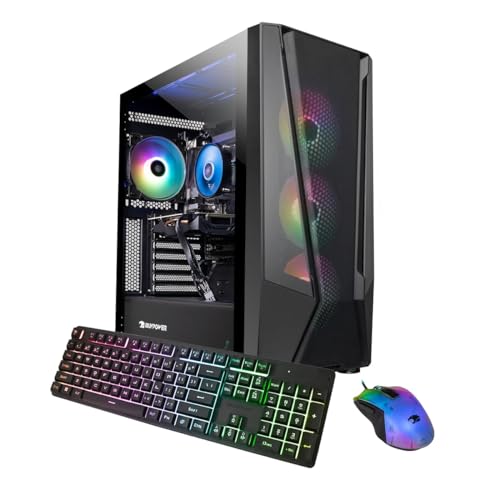
- Best first PC under $1,500 for most beginners: iBUYPOWER TraceMesh Gaming PC, Intel Core i7-14700F, RTX 4060 Ti — Check on Amazon
- Acer Nitro 70 N70-130-UR13, AMD Ryzen 9 7900, RTX 4070 — Check on Amazon
- CyberPowerPC Gamer Xtreme VR GXiVR8040A14, Intel Core i7-13700F, RTX 4060 Ti 16GB — Check on Amazon
- MSI Codex R2 A14NUD5-213US, Intel Core i5-14400F, RTX 4060 Ti — Check on Amazon
See 2 more Amazon options
- iBUYPOWER Slate Mesh SMA7N46T01, AMD Ryzen 7 5700, RTX 4060 Ti — Check on Amazon
- CyberPowerPC Gamer Xtreme VR GXiVR8060A24, Intel Core i5-13400F, RTX 4060 — Check on Amazon
Read the full guide ↓
Disclosure: As an Amazon Associate, reviewstook.com earns from qualifying purchases. Links to Amazon on this page are affiliate links; they cost you nothing extra. Listing details such as price and availability change often, so check the current Amazon listing before you buy.
Buying your first gaming PC is mostly an exercise in not knowing what the words mean. Listings throw processor names, graphics card tiers and memory speeds at you as if you had followed the market for a decade, and prices run from a few hundred dollars to several thousand with no explanation of what the extra money does. This guide is written for that exact position. Every machine below arrives fully built and tested — nothing to assemble, nothing to wire up, no compatibility puzzle to solve. You unbox it, plug in a monitor, keyboard and mouse, connect it to the internet, and play. What this guide adds is what the listings leave out: what each specification means in plain words, what happens on setup day, which settings to choose in your first games, and what you will eventually upgrade first.
First, the honest part, because $1,500 is a lot of money for a first PC and you deserve the framing straight. A perfectly good first gaming PC can be bought for $700 to $800, and Best 1080p Gaming PC Under $800 covers that tier properly. What the machines in this guide really are, whatever the title says, is 1440p computers — PCs built around the RTX 4060 Ti and RTX 4070 graphics cards, which are more powerful than a 1080p screen strictly needs. Buying one as a beginner is not buying performance you will use this month; it is buying years of headroom. These machines will play today’s games at high settings on a 1080p monitor without you ever opening a settings menu in worry, and when you eventually replace that monitor with a sharper 1440p one, the PC will not need a single part changed to keep up. If that sounds like buying once and being done for a long time, this is your guide. If you are not yet sure gaming on PC is for you, if the PC is for a younger player, or if your games are mostly older and lighter titles, the smarter first PC is the $700–$800 tier plus a decent monitor — step down without a shred of regret, and let Best Entry Level Gaming PC Under $1500 and the cheaper 1080p guides help you there.
One more thing before the picks: none of these PCs includes a monitor, and only some include a keyboard and mouse. The tower is the computer; the screen is a separate purchase, and it matters more than most beginners expect — a fast PC feeding a slow, old 60Hz monitor will look no smoother than a cheap PC would. One pick below deliberately spends less on the tower so the leftover money can buy that screen.
In this guide
Quick Picks
New to this and comparing several options at once? Each row below names the kind of beginner the machine suits, with a link to the listing.
| Beginner type | Pick | Why it stands out | Link |
|---|---|---|---|
| Best first PC for most beginners | iBUYPOWER TraceMesh TMI7N46T01 | Strong processor, RTX 4060 Ti and double the usual memory — nothing to worry about later | Check on Amazon |
| Best graphics, if you can wait for a deal | Acer Nitro 70 N70-130-UR13 | The only RTX 4070 here — the most powerful card in the guide, when it fits this budget only | Check on Amazon |
| Best for never touching texture settings | CyberPowerPC Gamer Xtreme VR GXiVR8040A14 | RTX 4060 Ti with 16GB of graphics memory — double the usual, so games just fit | Check on Amazon |
| Best if you want to learn and upgrade later | MSI Codex R2 A14NUD5-213US | Standard, easy-to-upgrade parts, a quality power supply, keyboard and mouse in the box | Check on Amazon |
| Best simple AMD option at a steady price | iBUYPOWER Slate Mesh SMA7N46T01 | Ryzen 7 5700 and RTX 4060 Ti, keyboard and mouse included — check price on Amazon | Check on Amazon |
| Best value — leaves money for the monitor | CyberPowerPC Gamer Xtreme VR GXiVR8060A24 | RTX 4060 power for less, so the budget can also buy a fast screen | Check on Amazon |
How These Picks Were Chosen
Every machine in this guide is a real, current Amazon listing. Prices for prebuilt PCs change often around promotions, so check the price on Amazon before you buy and compare it with this guide’s $1,500 budget. Two of the six picks regularly drift above $1,500 between sales; both carry an explicit condition, printed in their reviews and not hidden here: buy them at or under $1,500, and walk away when the listing says otherwise. A popular RTX 4070 configuration from another brand was left out entirely because it does not fit this budget — a guide for first-time buyers has no business listing a machine you cannot actually buy within the stated budget.
We did not use these machines ourselves. We read the manufacturer listings and specification pages, cross-checked each configuration against independent price trackers and deal coverage, and judged the systems the way a beginner will experience them: whether the graphics card is strong enough that settings can be left alone, whether the processor keeps up in fast games, whether the memory is the current DDR5 type or the older DDR4, how much storage you get, and how standard the parts are when you eventually want to change one. Because this is a beginners’ guide, we also weighted the unglamorous things: whether a keyboard and mouse are in the box, whether the warranty is one simple system warranty you can actually use, and whether the price sits still or needs catching on a deal day. Where a listing contradicts itself — one pick below does, in its own product data — the review says so and tells you how to check what arrived.
The vocabulary you will need is kept deliberately small, and each term is translated where it first appears. Graphics card (you will see “GPU”): the part that draws the game — the single biggest decider of how good games look and how smoothly they run. Processor (“CPU”): the part that thinks — it prepares each frame and runs everything else. Memory (“RAM”): the PC’s short-term workspace; more of it means the game, a browser and a voice chat can all live side by side. Storage (“SSD”): where games are kept; these fast drives are why modern PCs start in seconds. That is genuinely enough to read the rest of this guide.
The 6 Best 1080p Gaming PCs Under $1,500 for Beginners
iBUYPOWER TraceMesh Gaming PC (TMI7N46T01) — Intel Core i7-14700F, RTX 4060 Ti, 32GB DDR5
Who it suits: The beginner who wants to buy once and stop thinking about it — the strongest all-round specification in this guide, with enough of everything that no part of the machine becomes your problem for years.
If the whole idea of comparing specifications exhausts you, this is the machine the guide exists to point at. Its processor is an Intel Core i7-14700F, a 20-core chip — think of it as twenty workers, some specialised in speed, some in handling background jobs — and it is the strongest gaming processor among the 4060 Ti machines here. In fast games at 1080p, where the processor has to keep up with a very quick graphics card, that strength is what keeps everything feeling fluid. The graphics card is NVIDIA’s GeForce RTX 4060 Ti with 8GB of VRAM: at 1080p it plays modern games at high settings, and in competitive games it produces far more frames per second than a typical monitor can display, which is the comfortable direction for that problem to lean.
The specification beginners most often underrate is the memory, and here the TraceMesh quietly doubles the class standard: 32GB of DDR5 5600 RGB memory instead of the usual 16GB. In plain terms, 16GB is enough for a game by itself; 32GB is enough for the game, a browser with a wiki open, a voice chat and a recording behind them — the way people actually use a first PC. Storage is a 1TB NVMe SSD and Windows 11 Home comes installed, with Wi-Fi ready to connect. On price, this listing lives on a promotion cycle, so check the price on Amazon before you buy. When it sits within this guide’s budget, it is the best-balanced first PC here; when the listing climbs above the budget, wait for the next dip.
- The most complete specification in the guide: strong processor, 4060 Ti, and 32GB of memory.
- 32GB of RAM means games, chat, browser and recording all run at once without slowdowns.
- Frequently promoted well under the cap — check the price on Amazon before you buy.
Honest limitation: The graphics card’s 8GB of VRAM is the one merely-adequate line in the specification — fine at 1080p today, but the newest texture-heavy games already lean on it at maximum settings — and the price swings enough that buying at the wrong moment means paying over budget.
Choose it if you want one balanced machine for games, streaming, school or work, and you can time the purchase to a promotion. Skip it if the listing is above budget today, or if you play heavily modded games and never want to think about texture settings — the 16GB CyberPowerPC further down was picked for exactly that.

Acer Nitro 70 (N70-130-UR13) — AMD Ryzen 9 7900, RTX 4070, 32GB DDR5
Who it suits: The beginner who cares most about how games look — ray-traced lighting, maximum settings, no compromises — and who is patient enough to buy only when this machine falls within budget.
The reason this Acer is in the guide is a single line: its graphics card is the GeForce RTX 4070 with 12GB of GDDR6X memory, a full tier above every other card here and a card really designed for 1440p screens. For a beginner, what that buys is a luxurious kind of simplicity: in game settings menus, you can choose the highest options — including ray tracing, the lighting technology that makes reflections and shadows look real — and the machine will simply handle it at 1080p. Behind the card sit an AMD Ryzen 9 7900, a 12-core chip boosting to 5.4GHz, 32GB of DDR5 memory, a fast 1TB PCIe Gen 4 SSD and Wi-Fi 6E, the newest wireless standard in this guide. Acer is also a large manufacturer with a conventional support network, which counts for something on a first PC — and if a 1440p monitor arrives in a year or two, this pick asks for nothing else to be changed.
Now the condition, and it is not a small one: this machine only belongs in a $1,500 guide on its deal days. Its headline Amazon price often sits well above this budget, and it periodically falls into this budget and then climbs back out. So the deal is this: decide your ceiling is $1,500, check the price on Amazon, and if the listing is above that ceiling, close the tab and either wait or buy the TraceMesh above. One beginner-specific caution: the Nitro name covers several generations of Acer machines, and the newer Nitro 70 line is a different, pricier model — at checkout, confirm the listing says Ryzen 9 7900 and RTX 4070, the exact configuration reviewed here. Bought at $1,500 or under, it is the most powerful first PC in this guide by a clear margin. Bought above budget, it is a good PC that ignored the budget.
- The only RTX 4070 here — the strongest graphics card in the guide, with 12GB of VRAM.
- 12-core Ryzen 9 processor and 32GB of memory: nothing in the spec needs an apology.
- Wi-Fi 6E, a 1TB Gen 4 SSD, and a major manufacturer’s warranty behind it.
Honest limitation: The price, full stop. It only fits this budget occasionally, the everyday price is well over budget, and its DDR5 memory runs at a modest 4800MHz. This is a purchase you schedule, not one you make impulsively.
Choose it if graphics quality is your priority and you can wait for the price to fall into budget. Skip it if you need the PC this week at whatever the listing says — at its headline price it fails this guide’s brief outright.

CyberPowerPC Gamer Xtreme VR (GXiVR8040A14) — Intel Core i7-13700F, RTX 4060 Ti 16GB
Who it suits: The beginner who has heard the “8GB of VRAM” argument, does not want to become an expert in it, and would simply like the question to go away for the life of the PC.
Here is the one piece of graphics-card knowledge worth carrying into a first purchase. The RTX 4060 Ti comes in two versions that share a name: one with 8GB of VRAM — the graphics card’s private memory, where game textures live — and one with 16GB. Almost every prebuilt at this price ships the 8GB version; this CyberPowerPC ships the 16GB one. At 1080p, the extra memory does not make games faster today; it makes them keep working tomorrow. The newest games’ texture settings already press against 8GB, and games respond to running out by stuttering or quietly lowering texture quality — exactly the kind of mysterious behaviour a beginner should not have to diagnose. With 16GB, you set textures to high and the subject is closed. The card is paired with an Intel Core i7-13700F, a strong proven processor with cores to spare for background tasks, so the machine is balanced rather than a one-trick build.
The rest of the specification is sensible and conventional: 16GB of DDR5 system memory — enough for gaming alone, though half the TraceMesh’s, because the money visibly went into the graphics card instead — a 1TB PCIe Gen 4 NVMe SSD, Wi-Fi ready, and Windows 11 Home, in CyberPowerPC’s tempered-glass Gamer Xtreme VR case. On price, check the price on Amazon before you buy. For a beginner planning to keep a first PC for four or five years, it is arguably the smartest money in this guide; within this budget it remains the only way to get 16GB of VRAM without leaving the budget. If your gaming includes mods — community-made additions that often carry enormous texture packs — this is your pick, because mods are where VRAM disappears fastest and where this machine’s advantage is largest.
- RTX 4060 Ti with 16GB of VRAM — double every other 4060 Ti in this guide.
- Textures, mods and future games stop being something you have to think about.
- A premium pick within this budget — check the price on Amazon before you buy.
Honest limitation: In games that never use much VRAM, this card performs essentially like the cheaper 8GB version — you are paying for peace of mind and longevity, not for speed today — and its 16GB of system RAM is adequate rather than generous next to the 32GB picks.
Choose it if you keep PCs for years, play modded or open-world games, and hate the idea of settings menus. Skip it if your gaming is competitive and frame-rate-led — there, cheaper picks play the same games at the same smoothness for less.

MSI Codex R2 (A14NUD5-213US) — Intel Core i5-14400F, RTX 4060 Ti, DIY-Friendly
Who it suits: The beginner who suspects they might enjoy tinkering later — you want to play immediately, but you like the idea that your first PC can grow with you instead of being replaced.
MSI’s day job is making PC components, and the Codex R2 is what happens when a component maker builds the whole computer: a mid-tower assembled from standard, replaceable parts and sold explicitly as DIY-friendly. For a beginner, that phrase translates to one valuable promise — nothing inside is a weird proprietary shape, so when you eventually want more storage or memory, any ordinary part fits and any ordinary guide applies. The configuration pairs an Intel Core i5-14400F with a GeForce RTX 4060 Ti, 16GB of DDR5 memory and a 1TB M.2 NVMe SSD, powered by an 80 Plus Gold power supply, with Wi-Fi, Windows 11 Home, and a keyboard and mouse included in the box — one less thing to buy on day one. Do not be put off by the i5 in the name: for playing games it gives up nothing meaningful to the i7 machines in this guide. Where the i7s pull ahead is heavy background work like long video renders, which is not what a first gaming PC is for.
The specification a beginner should learn to look for hides in that power supply line. The power supply (PSU) feeds electricity to everything else; an 80 Plus Gold rating means a quality, efficient unit, and it decides whether a future graphics-card upgrade is a simple swap or an expensive complication. Independent review coverage of this Codex R2 line, tested with this same processor and graphics card pairing, praised its sensible assembly and room to work inside. Two cautions come with this pick, both beginner-manageable. First, Amazon’s own data for this listing contradicts itself — one field names the graphics card as an RTX 4060 while the title and description say RTX 4060 Ti. So when the PC arrives, check what is actually inside (the setup section below explains how, in two minutes) and do it inside the return window, while sending it back is still free and easy. Second, 16GB of memory and 1TB of storage are this tier’s floor — though in this case, both are the easiest upgrades in computing when you outgrow them.
- Standard parts from a component manufacturer — the easiest machine here to upgrade later.
- 80 Plus Gold power supply: quiet quality now, headroom for a future graphics card.
- Keyboard and mouse included, and the i5 gives up nothing in games to the i7 picks.
Honest limitation: Amazon’s listing data contradicts itself on the graphics card in one field, so you must verify what actually arrives — a five-minute job, but a necessary one — and the 16GB/1TB pairing is the minimum this budget should accept.
Choose it if you like the idea of learning to upgrade your own PC over the years. Skip it if you are certain you will never open the case — the TraceMesh gives you more of everything on day one.

iBUYPOWER Slate Mesh (SMA7N46T01) — AMD Ryzen 7 5700, RTX 4060 Ti, 16GB DDR4
Who it suits: The beginner who wants a clear price and a complete box — no deal-watching, no extras to buy — and who is happy to use a PC fully for its whole life rather than upgrade its insides midway.
After several picks whose prices must be caught on the right day, the Slate Mesh is a relief: it is an upper-tier pick in this guide, and it tends to simply sit inside the budget instead of visiting it — check the price on Amazon before you buy. The machine pairs an AMD Ryzen 7 5700 — an eight-core processor — with an RTX 4060 Ti 8GB, 16GB of DDR4 3200MHz memory and a 1TB NVMe SSD, running Windows 11 Home, with a keyboard and mouse in the box. In games that is a genuinely strong combination at 1080p: modern titles at high settings, competitive titles at high frame rates. Its case fronts mesh instead of sealed glass — the unglamorous choice that keeps components cooler and quieter, worth more than a light show in a PC that may live under a desk for years.
The limitation is about the future, and it deserves plain words. This machine is built on AMD’s older AM4 platform with DDR4 memory — the previous generation of the underlying standards. It performs well today, but that platform has reached the end of its road: no newer processor drops into it, so a future CPU upgrade would mean replacing the motherboard and memory too — effectively rebuilding the PC. There is also a naming trap worth learning, because it recurs across all PC shopping: the Ryzen 7 5700 here is a different, slightly slower chip than the similarly named 5700X sold elsewhere. Read spec sheets letter by letter; manufacturers rely on you not doing so. None of this makes the Slate Mesh a bad first PC — it makes it a finished one: buy it, use it happily for four or five years, and replace it whole when the time comes.
- RTX 4060 Ti gaming at a stable, predictable price — check the price on Amazon.
- Eight-core Ryzen 7 and a mesh front case that favours cool, quiet running.
- Keyboard and mouse included — the box is the whole purchase.
Honest limitation: The AM4/DDR4 platform underneath it is at the end of its upgrade road, and the Ryzen 7 5700 is a step below the 5700X its name invites comparison with. You are buying a complete appliance, not a foundation to build on.
Choose it if you want strong gaming at a predictable price and you replace your computers whole rather than upgrading them. Skip it if the option of a future processor upgrade matters to you — every DDR5 machine above it keeps that door open for similar money.

CyberPowerPC Gamer Xtreme VR (GXiVR8060A24) — Intel Core i5-13400F, RTX 4060
Who it suits: The beginner whose $1,500 has to cover the whole desk — PC and a good monitor — or whose games are the competitive titles most 1080p players actually live in.
Every beginners’ guide should include the machine that asks whether the budget itself is right, and this is that machine. It is built a sensible tier lower than the rest: an Intel Core i5-13400F (a ten-core processor), a GeForce RTX 4060 with 8GB of VRAM, 16GB of DDR5 memory and a 1TB PCIe Gen 4 SSD, positioned as the value pick in this guide. On a comparison table it loses to everything above it. On an actual desk, playing Valorant, Counter-Strike 2, Fortnite, Rocket League or Apex Legends, it does the thing those games ask for — very high frame rates at 1080p — and in modern single-player games it runs high settings with DLSS helping (DLSS is NVIDIA’s smart-upscaling feature: the card renders a smaller picture and intelligently enlarges it, buying smoothness for almost no visible cost). The honest gap against the 4060 Ti picks appears in the heaviest games at their highest settings, which for many beginners is a small part of the gaming week.
The argument for this pick is the monitor. A first-time buyer usually needs a screen too, and a screen is not a detail: its refresh rate, measured in Hz, is how many new pictures it can show per second, and any frame your PC produces beyond that number is invisible to you. Spending the whole $1,500 on a tower and connecting it to an old 60Hz monitor wastes most of what you bought; spending less here and putting the remainder toward a 1080p 240Hz monitor produces a setup that feels faster every single evening. The platform underneath is current DDR5, so storage, memory and eventually the graphics card can all be upgraded without a rebuild. If you already own a good high-refresh monitor, though, this pick’s logic flips — spend the full budget on the tower and take a 4060 Ti machine above.
- RTX 4060 and a ten-core i5 on a current DDR5 platform — real high-refresh 1080p for less.
- The value pick in this guide, leaving budget for the 240Hz monitor a beginner usually also needs.
- Same upgradeable chassis line as its pricier siblings, so nothing about it is a dead end.
Honest limitation: It is a tier down where it matters most: the newest games at maximum settings with ray tracing will need DLSS compromises the 4060 Ti and 4070 picks do not, and its 8GB of VRAM carries the same long-term ceiling as theirs.
Choose it if the budget must also buy the screen, or your gaming is competitive and fast rather than cinematic. Skip it if a good monitor is already on your desk and single-player eye candy is the point — that is who the top of this guide is for.
Comparison Table
| Product | CPU / GPU | RAM / Storage | Best use | Link |
|---|---|---|---|---|
| iBUYPOWER TraceMesh TMI7N46T01 | i7-14700F / RTX 4060 Ti 8GB | 32GB DDR5 / 1TB NVMe | Best all-round first PC — buy on promotion | Check on Amazon |
| Acer Nitro 70 N70-130-UR13 | Ryzen 9 7900 / RTX 4070 12GB | 32GB DDR5 / 1TB Gen 4 | Strongest graphics; buy only when it fits the budget | Check on Amazon |
| CyberPowerPC GXiVR8040A14 | i7-13700F / RTX 4060 Ti 16GB | 16GB DDR5 / 1TB Gen 4 | VRAM headroom for textures and mods | Check on Amazon |
| MSI Codex R2 A14NUD5-213US | i5-14400F / RTX 4060 Ti 8GB | 16GB DDR5 / 1TB NVMe | Standard parts and future upgrades | Check on Amazon |
| iBUYPOWER Slate Mesh SMA7N46T01 | Ryzen 7 5700 / RTX 4060 Ti 8GB | 16GB DDR4 / 1TB NVMe | Stable price on a finished platform | Check on Amazon |
| CyberPowerPC GXiVR8060A24 | i5-13400F / RTX 4060 8GB | 16GB DDR5 / 1TB Gen 4 | Value pick that funds a better monitor | Check on Amazon |
Setup Day: From Sealed Box to First Game
A gaming PC does not need expert setup — but it does have an order of operations, and two of the steps are famous traps. Allow about an hour, most of it waiting for downloads.
- Unbox and remove the packing inside the case. Many prebuilts ship with foam or an inflatable pack stuffed inside the tower to protect the graphics card in transit. Open the side panel (usually two thumb screws), take it out, and close the panel. A PC started with the packing inside will overheat — this is the single most common first-day disaster, and it is entirely avoidable.
- Connect the monitor to the graphics card, not the motherboard. On the back of the tower there are two clusters of display sockets: one up high with the USB ports (the motherboard’s) and one lower down on the graphics card itself. Plug your monitor cable into the graphics card’s socket. Plug into the motherboard instead and the expensive card sits idle while a weak backup chip does the work — the PC will seem mysteriously slow. This mistake is so common it has its own entry in the mistakes section below.
- Plug in keyboard, mouse and power, then switch on the power supply. A rocker switch on the back of the tower, by the power cable, must be on before the front button does anything. Press the front button and let Windows finish its first-run setup and updates, restarts included. Let it finish.
- Set your monitor’s refresh rate. Windows often defaults a fast monitor to 60Hz. Go to Settings, then System, then Display, then Advanced display, and choose the highest refresh rate your monitor offers. Until you do this, a 240Hz screen behaves like a 60Hz one.
- Update the graphics driver. Install NVIDIA’s app (it manages the “driver,” the software that lets Windows and games talk to the graphics card) and let it fetch the latest version. Fresh drivers fix game bugs and add support for new releases; this is the one piece of upkeep a gaming PC asks of you every month or two.
- Check what actually arrived. In Windows, open Task Manager (right-click the taskbar) and look at the Performance tab: it lists your processor, memory, storage and graphics card by name. Compare them with the listing you paid for — particularly on the MSI pick, whose listing data contradicts itself. Do this in the first days, inside Amazon’s return window, while a mismatch is a free return rather than an argument.
- Install a game store and one game. Steam is most players’ starting point. Install one game you know well, set it up as the next section describes, and play. Everything else can wait a week.
The Settings to Pick in Your First Games
PC games, unlike console games, hand you a menu of graphics options — and beginners tend to either max everything and wonder why it stutters, or fear the menu entirely. On any machine here, this approach gets you ninety percent of the best picture with none of the anxiety.
- Start with the game’s own High preset. On these PCs, High is the right default at 1080p — not Medium, and not Ultra. Ultra presets are usually built for screenshots and future hardware; High looks nearly identical in motion and runs far more smoothly.
- Turn DLSS on, set to Quality. In games that offer it, DLSS renders at a slightly lower resolution and intelligently rebuilds the image. Quality mode is the setting to choose: a meaningful smoothness gain for a difference you will struggle to see while playing.
- Treat ray tracing as a per-game treat, not a default. On the RTX 4070 Acer, switch it on freely at 1080p. On the 4060 and 4060 Ti machines, try it in slower, prettier games and leave it off in fast ones. There is no wrong answer — only a smoothness trade you are now making on purpose.
- Cap the frame rate to your monitor. If your screen is 144Hz, a frame-rate limit of 144 (or the game’s “match refresh rate” option) stops the PC wasting effort on frames you cannot see, and keeps things quieter and cooler.
- Turn off motion blur and film grain. Pure preference, but most players find the picture clearer and the game easier to read without them. Depth of field is the other common candidate.
- If a game feels choppy, lower shadows and reflections first. They cost the most performance and are noticed least in motion. Textures mostly use VRAM rather than speed — leave them high on the 16GB CyberPowerPC; on the 8GB cards, High rather than Ultra textures is the one compromise worth making in the newest games.
How to Choose a 1080p Gaming PC Under $1,500 as a Beginner
- Decide the real budget: tower alone, or the whole desk? If you need a monitor too, the value CyberPowerPC plus a 1080p 240Hz screen beats any $1,500 tower behind an old display. If a good monitor is already waiting, spend the full amount on the tower.
- Ask whether $1,500 is even your tier. Honestly: if your games are Minecraft, Roblox, older titles or esports at a casual level, or if this PC is a first machine for a younger player, Best 1080p Gaming PC Under $700 and the $800 tier will do everything you ask of them, and the leftover money buys games for a year. Spend $1,500 when you want high settings, high refresh rates, and years without another purchase.
- Let the graphics card lead, but check the memory figure after its name. RTX 4060, 4060 Ti and 4070 are the three rungs in this guide, in that order. Then look at the number after the card’s name: 16GB of VRAM outlasts 8GB, and at this budget you can have it — see the second CyberPowerPC.
- Prefer DDR5 unless you are knowingly buying a finished machine. DDR5 is the current memory standard and its platforms accept newer processors later. The one DDR4 pick here is good value bought with open eyes, as an appliance you will replace whole.
- Take 32GB of RAM if you multitask; 16GB if you purely game. A game alone is happy with 16GB. A game plus streaming, recording, a browser and chat is happier with 32GB — and adding memory later, while easy, is a job most beginners would rather not schedule.
- Do not pay for core counts you will not use. For games, a strong modern i5 is no compromise. The i7 and Ryzen 9 machines earn their place through balance and background muscle, not frame rates an i5 cannot match in most titles.
- Check what is in the box. Some picks bundle a keyboard and mouse; none bundles a monitor. Add up the true cost of your full setup before comparing prices between picks.
- Buy the price cycle, not the headline price. Two picks here are only good purchases when they fall within this budget. If the price on Amazon shows above $1,500 for the TraceMesh, or far above it for the Acer, wait or choose another pick — patience is a specification too.
- Plan the first upgrade now, calmly. For most beginners it will be storage — a second SSD when the library grows — then the monitor, and only much later the graphics card. Nothing in this guide needs upgrading in its first year.
- Keep the box and check the machine in week one. Your warranty is a single system warranty with the brand, and Amazon’s return window is your safety net for a wrong or faulty unit. Verify the configuration early (the setup section shows how), and a problem becomes a replacement rather than a repair saga.
Common Buying Mistakes
- Spending the entire budget on the tower and plugging it into an old 60Hz monitor. The screen decides how much of the PC you can see; frames beyond its refresh rate are invisible.
- Plugging the monitor into the motherboard’s socket instead of the graphics card’s. The PC then runs on a weak backup graphics chip and feels broken. The card’s sockets are the lower set on the back of the tower.
- Turning the PC on with the shipping foam still inside the case. Prebuilts travel with packing to protect the graphics card; remove it before first power-on or the machine overheats.
- Never setting the monitor’s refresh rate in Windows. Fast monitors frequently default to 60Hz in settings, quietly cancelling the upgrade you paid for.
- Paying a deal-cycle machine’s headline price. The Acer in this guide spends much of its life well over budget; buying it then, because a guide listed it under $1,500, is the most expensive mistake this page could cause.
- Assuming two listings with the same card are the same PC. An RTX 4060 Ti can have 8GB or 16GB of VRAM, sit beside 16GB or 32GB of RAM, and live on a current or a finished platform. Read every line.
- Being fooled by near-identical processor names. The Ryzen 7 5700 is not the 5700X; small suffixes mark real differences. Check the exact name at checkout.
- Skipping the arrival check. Listings aggregate variants, and at least one in this guide contradicts its own data. Two minutes in Task Manager during the return window is the cheapest insurance in PC gaming.
- Maxing every setting because the PC was expensive. Ultra presets are not a reward tier; High plus DLSS Quality is the picture these machines were bought for, and it runs better.
- Buying a $1,500 first PC for games that a $700 one plays identically. If the player is young, new, or plays light titles, step down a tier and keep the difference for the monitor and the games themselves.
Final Recommendation
- Most beginners spending the full budget: iBUYPOWER TraceMesh TMI7N46T01 — bought on promotion.
- Prettiest games, patient buyers: Acer Nitro 70 N70-130-UR13 — at $1,500 or less, only.
- Mods and zero texture worries: CyberPowerPC Gamer Xtreme VR GXiVR8040A14.
- Future tinkerers: MSI Codex R2 A14NUD5-213US.
- Simple price, complete box: iBUYPOWER Slate Mesh SMA7N46T01.
- Budget covers the monitor too: CyberPowerPC Gamer Xtreme VR GXiVR8060A24.
For a first PC at this budget, start with the TraceMesh: the machine with no weak line — the strongest processor among the 4060 Ti picks, double the usual memory, and a price that spends much of its life well under the cap if you catch a promotion. If how games look matters more than anything and you can wait, the Acer Nitro 70 is the upgrade: the only RTX 4070 here, bought strictly at $1,500 or below. The 16GB CyberPowerPC is the long-ownership alternative, the MSI is the one to grow into, and the cheaper CyberPowerPC is the honest answer when the monitor comes out of the same money. Whichever you choose, remember what you are really buying: not a 1080p PC, but a 1440p-capable machine with years of headroom — which is why the same money, viewed from the other side, appears in Best 1440p Gaming PC Under $1500. And if this guide has convinced you your needs are simpler, that is a success too — Best 1080p Gaming PC Under $1200 is where pure 1080p value lives.
Frequently Asked Questions
Do I have to build or assemble anything?
No. Every PC here is a prebuilt: it arrives assembled and tested, with Windows 11 installed. Your jobs are to remove the protective packing inside the case, plug in the monitor (into the graphics card’s socket), keyboard, mouse and power, connect to the internet, and let the first updates run. The setup section above walks through it in order; allow about an hour, mostly waiting on downloads.
Is $1,500 too much for a first gaming PC?
For many beginners, yes — and this guide says so in its introduction. A $700–$800 PC plays 1080p games well, and stepping down is the smarter move if the player is young, the games are light, or you are unsure PC gaming will stick. $1,500 makes sense when you want high settings and high refresh rates now, a machine that will not need replacing for years, and a free upgrade to 1440p later with nothing but a new monitor.
What else do I need to buy besides the PC?
A monitor — none of these PCs includes one, and a 1080p 165Hz or 240Hz screen is the right partner for them. Some picks bundle a starter keyboard and mouse (the MSI and the Slate Mesh do); the others assume you have or will buy your own. A headset is the usual next purchase. That is the complete list: no tools, no software — Windows is installed.
These are called 1080p PCs. Will they work with a 1440p monitor later?
Yes — that is the open secret of this budget, and the main reason to spend it. The RTX 4070 Acer was effectively built for 1440p, the 4060 Ti machines handle it well with DLSS on, and even the RTX 4060 value pick manages it in lighter games. Buying from this guide and upgrading only the monitor later is a legitimate, even savvy, first-PC plan; Best 1080p Gaming PC For Small Spaces Under $1500 covers the same tier if desk space is also a constraint.
What should I upgrade first, and when?
Most likely storage: a second SSD, when your game library outgrows 1TB — a simple, inexpensive job on every machine here, and the MSI especially. After that, the monitor. Memory only if you took a 16GB machine and find streaming or heavy multitasking tight. The graphics card is the last thing to change, years away, and the DDR5 platforms in this guide (all but the Slate Mesh) are built to accept one. Nothing in this guide needs an upgrade in its first year.
What if the PC arrives faulty, or different from the listing?
Check it in the first days: Task Manager’s Performance tab names the processor, memory, storage and graphics card, and you can compare them against your order while Amazon’s return window is open — a mismatch or fault is then a straightforward return or replacement. After that window, each machine carries its brand’s system warranty, which is one reason the big-name picks here are beginner-friendly: one company is responsible for the whole PC, not a shelf of separate parts. This check matters most on the MSI pick, whose Amazon listing data contradicts itself about the graphics card.
Will these PCs play my games?
Almost certainly, at 1080p. Competitive titles like Fortnite, Valorant, Counter-Strike 2 and Rocket League run at very high frame rates on every machine here, including the value pick. Modern single-player games run at high settings across the guide, with the RTX 4070 Acer adding comfortable ray tracing. The honest exceptions are the newest, heaviest releases at Ultra settings — where the answer is the High preset and DLSS, as the settings section explains, rather than a pricier PC. If streaming while you play is part of the plan, Best 1080p Gaming PC For Streaming Under $1500 argues the same budget from that angle.
How long will a PC from this guide last me?
Four to five years of high-settings 1080p play is a fair expectation for the 4060 Ti and 4070 machines, longer for lighter games — and the 16GB VRAM CyberPowerPC should age most gracefully, because graphics memory is the limit these machines will meet first. The DDR5 machines can extend their lives with a mid-life graphics card swap; the Slate Mesh will serve the same years and end its life as it began, complete and unupgraded.


