Where to buy
Check the latest price, availability and delivery on Amazon. Orders are placed on Amazon. We may earn a commission from qualifying purchases.
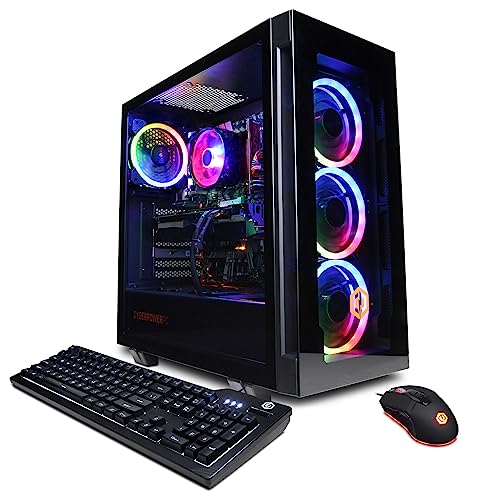
- Best floor tower for a small room: CyberPowerPC Gamer Xtreme VR, Intel Core i7-13700F, GeForce RTX 4060 Ti 16GB — Check on Amazon
- Thermaltake LCGS Quartz i1460, Intel Core i5-14400F, GeForce RTX 5060 — Check on Amazon
- Skytech Archangel, Intel Core i5-14400F, GeForce RTX 4060, 32GB DDR5, 2TB SSD — Check on Amazon
- Skytech Nebula, AMD Ryzen 5 5600X, GeForce RTX 4060 Ti — Check on Amazon
See 2 more Amazon options
- CyberPowerPC Gamer Xtreme VR, Intel Core i5-13400F, GeForce RTX 4060 — Check on Amazon
- Skytech Blaze4 Mini, AMD Ryzen 7 5700, GeForce RTX 4060 Ti — Check on Amazon
Read the full guide ↓
Disclosure: As an Amazon Associate, reviewstook.com earns from qualifying purchases. Links to Amazon on this page are affiliate links; they cost you nothing extra. Listing details such as price and availability change often, so check the current Amazon listing before you buy.
Here is the thing nobody tells you when you search for a gaming PC for a small space: at $1,200, the honest answer is mostly towers. Conventional tower cases, all the same — machines that need a real patch of floor or a generous corner of desk, honest ventilation clearance on at least two sides, and a plan for the warm air they will pump into a room that may only be ten feet square. Genuinely small gaming PCs exist — mini PCs that hide behind a monitor, small-form-factor boxes under 20 litres — but at this budget they follow different rules and different listings, and this guide will point you to them where they are the right answer. What it will not do is call a tower “compact” because its marketing department did.
So this is a placement guide as much as a performance guide. The six machines below are the same six verified listings from our main $1,200 1080p guide — same graphics cards, same processors, and the same buy-at-or-under-$1,200 rules — re-graded here on the questions a small room actually asks. How much floor or desk does it take? Where does its heat go during a three-hour session in a bedroom that already runs warm? How noticeable is it at arm’s length when the room is quiet? And where a listing does not publish dimensions we could verify, we say so, and tell you to measure from the live listing rather than trusting a product name — because one pick below carries the word “Mini” in its name while its own listing dimensions multiply out to roughly 43.7 litres: mid-tower volume by any honest arithmetic.
If your space is truly tight — a dorm desk, a studio corner, a living-room shelf — cross-shop the genuinely small machines in Best Small Form Factor Gaming PC Under $1200 and Best Mini Gaming PC Under $1200 before you commit. If you have a floor corner or a deep desk and need tower performance that behaves itself in a small room, stay here.
In this guide
Quick Picks
Short on time? Each row names a small-space situation and the product that suits it.
| Small-space situation | Pick | Space verdict | Link |
|---|---|---|---|
| Best floor tower for a small room | CyberPowerPC Gamer Xtreme VR (i7-13700F, RTX 4060 Ti 16GB) | Full tower footprint — plan a floor corner with clearance, and the strongest long-term spec here | Check on Amazon |
| Best desk-corner showcase tower | Thermaltake LCGS Quartz i1460 (i5-14400F, RTX 5060) | Tempered-glass tower that earns its desk space visually; newest GPU generation | Check on Amazon |
| Best for a PC that lives in the room full-time | Skytech Archangel (i5-14400F, RTX 4060, 32GB, 2TB) | Tower footprint, but 32GB/2TB means no external drives cluttering the desk | Check on Amazon |
| Best frame rate per dollar, floor placement | Skytech Nebula (Ryzen 5 5600X, RTX 4060 Ti) | Plain tower, no desk-presence pretensions — buy it on its discount cycle | Check on Amazon |
| Best value tower, smallest spend | CyberPowerPC Gamer Xtreme VR (i5-13400F, RTX 4060) | Same tower-class footprint, far less money — savings buy the compact desk setup around it | Check on Amazon |
| The “Mini” that is not mini | Skytech Blaze4 Mini (Ryzen 7 5700, RTX 4060 Ti) | Listing dimensions compute to ~43.7L — grade it as a tower, because that is what arrives | Check on Amazon |
How These Picks Were Chosen
The performance side of the selection is inherited from our main $1,200 guide, and its rules are unchanged. The budget is a ceiling across time, not a target: every machine here is a real Amazon listing that sells at, or has repeatedly been seen at or below, $1,200 in the United States. Two of them — the 16GB CyberPowerPC and the Skytech Nebula — drift above the ceiling between sales, and both carry their buy-at-or-under-$1,200 rules into this guide intact. Prebuilt prices swing sharply between deal events, so check the live price on Amazon before you buy; if a deal-cycle pick is sitting above the ceiling, the correct move is to wait.
The space grading layered on top uses only evidence we can stand behind. Where a listing’s own published dimensions exist, we multiply height by width by depth and divide by a thousand to get litres, and we grade the resulting volume — not the product name, not the marketing photo. Where verified dimensions were not available to this guide, the review says plainly that the exact size must be measured from the live listing before you plan around it, and the machine is graded as what it demonstrably is: a conventional tower needing a floor corner or a deep desk, clearance for intake and exhaust air, and cable room behind it. No dimension in this guide was invented to fill a table cell.
Three further small-room criteria were applied to every pick. Heat: every watt a gaming PC consumes becomes heat in your room, so stronger processors were graded as stronger heaters over a long session. Noise: a PC on a desk sits an arm’s length from your ears, while the same PC on the floor is measurably less present — so placement is graded as part of each pick, because in a bedroom or studio there is no “other room” for the noise to go to. And clutter: a machine that forces external drives, hubs and cable spaghetti costs more than its footprint, so internal storage and documented display outputs counted in a pick’s favour.
Finally, the honesty filter: where a genuinely small machine serves the need better than any tower, this guide says so and links out — see Best Compact Gaming PC Under $1200 and Best Mini PC Under $1200. What remains here is the honest middle: six towers, graded on how gracefully each lives in a room with no space to waste.
The Name Is Not the Size: A Short Lesson in Volume
One pick in this guide deserves its own section before the reviews, because it teaches the single most useful skill a small-space shopper can learn. The Skytech Blaze4 Mini sounds like the answer to this entire search: a “Mini” with a full RTX 4060 Ti inside. Now do the arithmetic its own listing invites. Take the case dimensions from the listing, multiply height by width by depth in centimetres, and divide by 1,000. The result is roughly 43.7 litres. For calibration: the small-form-factor category tops out around 20 litres, and the mini PCs in our mini guides run from under one litre to about three. A 43.7-litre box is a mid-tower. It will not fit where a mini fits, it will not hide behind a monitor, and it does not belong on a small shelf — whatever the product name says.
This is not an accusation against one listing; it is how the category is marketed. “Mini” in a tower name usually means “the smaller case in this maker’s line” — a relative claim with no standard behind it. The defence is always the same three steps: find the dimensions on the live listing, multiply them yourself, and compare the litre figure against the space you actually measured. Thirty seconds of arithmetic beats every adjective in the product title. We apply that arithmetic in the Blaze4 Mini’s review below and grade the machine as the tower it is — which also means grading its cooling and upgrade room as tower-like rather than cramped, because volume cuts both ways.
Keep the calibration in mind for the rest of the guide. When a review below calls a pick a tower, it means a box in the same broad class as that 43.7-litre example: a footprint roughly like a large briefcase stood on its end, ventilation clearance on the sides and rear, and a home on the floor or a deep desk — never in a closed cabinet, never wedged between furniture. When your measured space cannot offer that, the correct purchase is not a smaller-sounding tower. It is a machine from the SFF or mini guides linked above, bought on purpose.
The 6 Best 1080p Gaming PCs for Small Spaces Under $1,200
CyberPowerPC Gamer Xtreme VR — Intel Core i7-13700F, GeForce RTX 4060 Ti 16GB (GXiVR8040A14)
Who it suits: Small-room players with one good floor corner to give, who want the longest-lived specification at this budget and will buy on the deal cycle.
Let us place it first, because placement is this guide’s job. This is a conventional tower, and CyberPowerPC does not sell it as anything else. The exact dimensions must be confirmed on the live listing before you measure your corner — this guide does not invent figures a listing has not given us — but plan for the standard tower bargain: a floor footprint beside or under the desk, open air on the intake and exhaust sides rather than a wall pressed against either, and enough rear clearance that cables are not bent at hard angles. Under a desk in a small bedroom is the natural home, with one condition: keep the desk’s modesty panel and the wall off its vents, or it will recycle its own warm air all evening.
What that corner buys you is the strongest long-term specification in this guide. The RTX 4060 Ti here is the 16GB version — double the graphics memory of the 8GB cards that fill this price band — paired with a 16-core Core i7-13700F (8 performance cores, 8 efficiency cores), 16GB of DDR5 memory and a 1TB NVMe SSD. At 1080p that combination feeds a 144Hz or 240Hz monitor today and keeps feeding it for years, because the texture ceiling that ends 8GB cards’ useful lives sits much further away. The documented outputs — one HDMI and two DisplayPort — matter in a small room more than they appear to: two monitors plus a TV connect without a hub adding its own box and cables to the desk. The efficiency cores also give streaming, recording and browser work somewhere to run that is not your game’s cores, which is why this machine doubles as the room’s everything-PC without a second box anywhere.
The small-room cost is heat, and honesty requires naming it. Sixteen cores under a long gaming load make this the warmest pick in the guide; in a small, closed bedroom, a three-hour session will raise the temperature noticeably, and the fans will be audible at desk distance if you place it on the desk instead of the floor. Floor placement, a door or window cracked where possible, and clearance kept honest turn that from a complaint into a non-issue. The price rule is the main guide’s, unchanged: this model drifts above the ceiling between sales. Buy it at or under $1,200, or wait for the next deal event — check the live price on Amazon before you commit.
- RTX 4060 Ti with 16GB of VRAM — the longest-lived graphics specification at this budget.
- 16-core i7-13700F: strong minimum frame rates at 1080p, plus genuine streaming headroom.
- Documented 1× HDMI and 2× DisplayPort outputs — multi-display setups without a hub.
Honest limitation: It is a full tower that wants a floor corner with real clearance, it is the guide’s strongest room-heater under load, and its price crosses above $1,200 between sales — 16GB of system RAM is also merely adequate next to the Archangel’s 32GB.
Choose it if you have the floor corner, keep PCs for five years or more, and the live price is at or under the ceiling. Skip it if your only available spot is a small desk surface, or the listing is sitting at its between-sales price today.

Thermaltake LCGS Quartz i1460 — Intel Core i5-14400F, GeForce RTX 5060
Who it suits: Buyers whose PC must sit visibly on the desk in a small room — and who therefore want the machine to earn its square footage by looking like it belongs there.
Most towers in a small room are apologised for. The Quartz i1460 turns the placement problem into a design decision: a tempered-glass Thermaltake case from a maker whose core business is cases and cooling, with RGB memory visible through the panel, built to sit on a desk corner and be looked at. That is a legitimate small-space strategy — a machine you have to see all day should be one you like seeing — but it comes with the glass-tower conditions. Glass shows dust faster than mesh, the intake side must be kept clear of wall and desk clutter, and a showcase position puts the fans at ear level, an arm’s length away. Under light loads that is a non-event; under a sustained heavy load in a quiet studio at night, desk placement is simply the loudest seat in the house for any tower, and this one should be chosen with that understood rather than discovered.
The specification inside the glass is the current-generation argument. A GeForce RTX 5060 brings NVIDIA’s Blackwell architecture and DLSS 4 with multi frame generation, which at 1080p lifts supported titles into the frame-rate range where a 240Hz monitor earns its keep. Around it sit a 10-core Core i5-14400F, 16GB of Thermaltake ToughRam DDR4 at 3600MHz, a 1TB NVMe M.2 drive, Wi-Fi and Windows 11, with a 600W 80 Plus Gold power supply documented in coverage of this configuration. Pricing is the comfortable kind: it typically sits with genuine headroom under the ceiling — check the live price on Amazon — and in a small-space budget that headroom is money for the monitor arm and cable management that make a tower setup look intentional instead of squeezed in.
The trade is the same one the main guide names. The RTX 5060 carries 8GB of graphics memory, so its texture ceiling arrives years before the 16GB CyberPowerPC’s does, and the platform is DDR4 rather than DDR5. Neither matters much on a five-year, features-first horizon; both matter on a seven-year one. In space terms, add one more: confirm the exact case dimensions on the live listing before assigning it a desk corner — this guide grades placement on measurements, not photographs.
- RTX 5060 with DLSS 4 multi frame generation — the newest graphics feature set in this guide.
- Tempered-glass Thermaltake case designed to be seen — the desk-presence pick.
- Priced with headroom under the ceiling — check price on Amazon — leaving budget for the desk setup around it.
Honest limitation: 8GB of VRAM and a DDR4 platform set a nearer long-term ceiling than the top pick, and a glass showcase tower on a desk is the most noise-exposed and dust-visible placement in the guide.
Choose it if the PC will live on the desk in view, you value the newest GPU features, and your horizon is around five years. Skip it if the machine must disappear — acoustically or visually — or you keep PCs long enough for VRAM to decide their retirement date.

Skytech Archangel — Intel Core i5-14400F, GeForce RTX 4060, 32GB DDR5, 2TB SSD
Who it suits: Small-space players whose desk cannot afford the clutter that usually accumulates around a PC — external drives, docks and storage boxes — because this machine internalises all of it.
Measure a small-space setup honestly and the tower is rarely the whole problem. The problem is the ecosystem: the external drive for the game library, the second one for recordings, the hub because the first hub ran out of ports. The Archangel’s small-space case rests on eliminating that sprawl at the source. Its 32GB of DDR5 at 5600MHz is double the system memory of every other pick here, and its 2TB SSD is double the storage — at a time when modern games routinely pass 100GB each, that is the difference between a library of eight installed titles and sixteen, with nothing plugged in or trailing a cable across the desk to hold the overflow. For a bedroom or studio where every surface is spoken for, a bigger internal drive is a smaller setup.
The machine around that memory and storage is a Core i5-14400F with an RTX 4060 8GB, a 650W Gold power supply, Wi-Fi and Windows 11 Home, in a conventional tower whose exact dimensions — as with every tower here — should be confirmed on the live listing before you assign it floor or desk space. Its pricing suits patient buyers: it sits at the top of this guide’s range, just under the ceiling, and drops on its deal cycle — check the live price on Amazon before you buy.
The exchange is real and should be made with open eyes. The RTX 4060 is a step below the 4060 Ti cards elsewhere in this guide: fast at 1080p high settings, comfortable feeding a 144Hz monitor in most titles, but it reaches its limit sooner in the heaviest games, and its 8GB is the same long-term ceiling discussed throughout. Skytech moved money from the graphics card into the two upgrades owners most often buy in year one anyway. If your gaming is esports-first, that money is in the wrong place; if your PC is the room’s only computer and also holds your photos, recordings and work, it is arguably the smartest allocation here — and the tidiest desk in the guide.
- 32GB DDR5 and a 2TB SSD — the library and the recordings live inside the case, not on the desk.
- 650W Gold power supply leaves sensible room for a future graphics card upgrade.
- Sits just under the ceiling at the top of its range and drops on deal days — patience is rewarded; check price on Amazon.
Honest limitation: The RTX 4060 8GB is the weakest GPU among the top picks here, and the tower footprint itself is unremarkable — its space saving is in the clutter it prevents, not the box it ships in.
Choose it if your PC doubles as the room’s storage and streaming machine and desk clutter is a real constraint. Skip it if every dollar must become frame rate — the Nebula below converts the same money into a faster graphics card.

Skytech Nebula — AMD Ryzen 5 5600X, GeForce RTX 4060 Ti
Who it suits: Pure gamers in small rooms who will give a tower a floor spot without ceremony, want maximum frame rate per dollar, and buy on a discount cycle.
The Nebula makes no attempt to charm a small room, and that plainness is its placement virtue. It is a straightforward tower — confirm its dimensions on the live listing, give it a floor corner or the end of a desk with clearance at the vents, and forget about it. No glass to keep fingerprint-free, no showcase lighting competing with the bedroom’s own, nothing about its presence that demands management. For a lot of small-space buyers, especially in shared rooms and dorms, a PC that asks for a corner and then shuts up about it is worth more than a prettier box that needs curating.
What the corner gets is the focused formula this listing is known for: a Ryzen 5 5600X, an RTX 4060 Ti 8GB, 16GB of DDR4 at 3200MHz, a 1TB NVMe SSD and a 600W Gold power supply, with nothing spent on anything that is not gaming. At 1080p the 4060 Ti is a full tier above the plain 4060 systems that dominate this price band — higher settings at the same frame rate, or the same settings at rates that keep a 165Hz or 240Hz monitor busy in far more titles. Its pricing is the other half of the appeal: it has spent much of its life at or below the ceiling, and its best deal days land far below it — check the live price on Amazon.
The rules and compromises carry over from the main guide unchanged. It has also drifted well above the ceiling between sales, so the buy-at-or-under-$1,200 rule is not decoration — above the ceiling, this is a different guide’s machine. The AM4 platform and DDR4 memory are finished generations with no meaningful processor upgrade path, and the 8GB carries the standing texture caveat. On a three-to-four-year horizon of maximum frame rate per dollar, none of that outweighs the discount depth. On a longer horizon, the CyberPowerPC at the top of this guide is the better corner-tenant.
- RTX 4060 Ti performance on an all-gaming, no-filler Ryzen 5 5600X platform.
- Deep discount cycle — check price on Amazon; its deal days undercut rivals by a wide margin.
- Unshowy tower that asks for a corner and clearance, then stays out of the way.
Honest limitation: The AM4/DDR4 platform is end-of-life with no real upgrade path, and the listing drifts above the ceiling between sales — buy it at or under the ceiling, not above it.
Choose it if frame rate per dollar is the whole decision and the live price is in its under-budget range. Skip it if upgrade path and platform longevity matter as much as today’s performance.

CyberPowerPC Gamer Xtreme VR — Intel Core i5-13400F, GeForce RTX 4060 (GXiVR8060A24)
Who it suits: Small-space buyers whose total budget must cover the whole setup — desk, chair, monitor and PC — and who would rather spend less on the tower and more on making the corner work.
Every other pick in this guide spends the full $1,200 on the box. This one is the reminder that under $1,200 is a ceiling, not an obligation — and in a small room that restraint is a placement feature. The machine itself is a conventional CyberPowerPC tower — an i5-13400F with an RTX 4060 8GB, 16GB of DDR5 memory and a 1TB PCIe Gen4 SSD, with Wi-Fi and Windows 11 Home, and it is the value pick of this guide — check the live price on Amazon. It takes the same floor corner or desk end as any tower here (confirm dimensions on the live listing, as always), but the money it leaves unspent under the ceiling is precisely what a small-space setup needs elsewhere: the 144Hz monitor that makes any of these machines worthwhile, a monitor arm that returns desk surface, a compact desk that fits the room.
Performance gives up ceiling, not experience. Esports and competitive titles run at high-refresh rates; AAA titles run at high settings with frame rates that satisfy a 144Hz monitor in most cases, with DLSS in reserve. What arrives sooner than on the picks above is the day the heaviest future titles ask for texture or settings compromises, because the RTX 4060’s 8GB is the nearer ceiling, and the i5 is not the i7’s streaming partner. Against that, the platform is the easiest here to grow: DDR5 memory and a recent Intel socket mean more memory, a bigger drive and eventually a stronger graphics card all drop in without replacing the foundation — which matters in a small room, because a mid-life upgrade is one box opened on the bed, not a second machine to find space for.
Place it like the others: floor beside the desk beats on the desk for noise, vents kept clear of wall and curtain, cables given their bend room behind. Nothing about its smaller price makes its footprint smaller, and pretending otherwise would repeat the category’s favourite sin. What it makes smaller is the total cost of a small-room setup that actually works — for a first serious gaming corner, frequently the correct trade.
- Modern DDR5 platform at a value-tier price — check price on Amazon; the value outlier of this guide.
- i5-13400F’s 10 cores handle 1080p gaming plus everyday multitasking without strain.
- Money left over funds the monitor and desk furniture a small setup actually needs.
Honest limitation: Same tower-class footprint as the full-price picks — the saving is money, not space — and the RTX 4060 8GB sets a lower long-term ceiling than the 4060 Ti and 16GB picks above.
Choose it if the $1,200 must stretch across the whole setup, not just the tower. Skip it if the PC budget is fixed and separate from the furniture budget — then the headroom picks above use the money better.
Skytech Blaze4 Mini — AMD Ryzen 7 5700, GeForce RTX 4060 Ti
Who it suits: Buyers who came to this guide hoping the word “Mini” solves their space problem — and who deserve the arithmetic before they deserve a recommendation.
Start where the earlier section started: with the tape measure the listing itself provides. Multiply the Blaze4 Mini’s published case dimensions together and the case works out to roughly 43.7 litres. That is not a mini PC, and not a small-form-factor PC either — the SFF category ends around 20 litres. It is a mid-tower volume wearing a mini name, and every placement decision must be made on that basis: a floor corner or a deep desk, clearance at its vents, cable room behind it, exactly like the other five towers in this guide. If your space cannot offer a tower’s footprint, stop here and go to Best Mini Gaming PC Under $1200, where the machines are measured in single-digit litres and genuinely disappear behind monitors.
Now the fair other half, because volume cuts both ways. A 43.7-litre case is not cramped inside, and the specification sheet reads like the tower it is: a Ryzen 7 5700 with 8 cores, an RTX 4060 Ti 8GB, 16GB of DDR4 at 3200MHz, a 1TB SSD and a 650W Gold power supply, with Wi-Fi and Windows 11 Home. The 8-core processor gives it the multitasking and streaming depth the 6-core Nebula lacks, and on deal days it undercuts full-size towers while matching their graphics card outright — check the live price on Amazon. Judged as a tower, it is a good one. Judged as a mini, it is a cautionary tale with a power supply.
Two conditions survive from the main guide’s review. The AM4/DDR4 platform is a finished generation with no processor upgrade path, so buy it as a complete, closed system for its working life. And a future graphics card must fit the case’s actual internal clearance — a far less restrictive exercise at this volume than in a true small case, but still one to check against the live listing before ordering a card. Buy the Blaze4 Mini with your eyes open and a floor corner ready, and it is a strong value-tier machine on its discount days. Buy it for a shelf, and the shelf will win the argument.
- RTX 4060 Ti performance with an 8-core Ryzen 7 5700 — tower-grade specification throughout.
- Real discount depth on its deal cycle — check price on Amazon.
- 650W Gold power supply is generous, and tower volume means tower-like cooling room.
Honest limitation: The name is the limitation: at ~43.7 litres by its own listing dimensions it solves no space problem a tower does not solve, and the AM4 platform has no processor upgrade path.
Choose it if you want its specification and price and have a tower’s worth of room for it. Skip it if your space is genuinely small — that is a different category of machine, linked above and below.

Comparison Table
| Product | GPU / VRAM | CPU | RAM / Storage | Space verdict | Link |
|---|---|---|---|---|---|
| CyberPowerPC Gamer Xtreme VR (GXiVR8040A14) | RTX 4060 Ti / 16GB | Core i7-13700F | 16GB DDR5 / 1TB | Floor tower; strongest spec, most heat — give it the corner with the best airflow | Check on Amazon |
| Thermaltake LCGS Quartz i1460 | RTX 5060 / 8GB | Core i5-14400F | 16GB DDR4 / 1TB | Desk-corner glass tower; earns its visibility, fans at ear level | Check on Amazon |
| Skytech Archangel | RTX 4060 / 8GB | Core i5-14400F | 32GB DDR5 / 2TB | Tower footprint, minimal desk clutter — storage lives inside the case | Check on Amazon |
| Skytech Nebula | RTX 4060 Ti / 8GB | Ryzen 5 5600X | 16GB DDR4 / 1TB | Plain floor tower; buy at or under $1,200 on its discount cycle | Check on Amazon |
| CyberPowerPC Gamer Xtreme VR (GXiVR8060A24) | RTX 4060 / 8GB | Core i5-13400F | 16GB DDR5 / 1TB | Tower footprint at the lowest spend — savings fund the setup around it | Check on Amazon |
| Skytech Blaze4 Mini | RTX 4060 Ti / 8GB | Ryzen 7 5700 | 16GB DDR4 / 1TB | ~43.7L by its own listing dimensions — a tower, despite the name | Check on Amazon |
How to Choose a 1080p Gaming PC for a Small Space Under $1,200
- Measure the space before you open a single listing. Width, depth and height of the actual spot — floor corner, desk end, shelf — plus the clearance around it. A tower placed with its vents against a wall or a curtain is a tower slowly cooking itself, and no specification sheet survives that placement.
- Do the volume arithmetic yourself. Height × width × depth in centimetres, divided by 1,000, gives litres. Under ~3 litres is a mini PC; up to ~20 litres is small form factor; above that is a tower, whatever the product name claims. The Blaze4 Mini in this guide computes to ~43.7 litres from its own listing dimensions — the category’s standing warning.
- Decide desk or floor, honestly. Floor placement beside the desk is quieter at your ears, cooler for the machine and frees the entire desk surface; it asks only for a corner and a vacuum’s occasional visit. Desk placement is for machines you want to see — glass towers — and it costs you surface and puts fan noise at arm’s length.
- Never place a tower in a closed cabinet or TV stand. Enclosed furniture starves intake air and traps exhaust heat. If the only available spot is enclosed, the correct purchase is a mini PC from Best Mini Gaming PC Under $1200 or a genuinely small SFF machine, not a tower with the door left open and fingers crossed.
- Budget the room’s heat, not just the PC’s price. Every watt these machines draw becomes heat in the room. The 16-core top pick is the strongest heater here; in a small bedroom, plan the tower’s exhaust path away from the bed and the desk chair, and expect long summer sessions to warm the room.
- Count what else must live on the desk. If the setup needs external drives and hubs, its real footprint is the tower plus the sprawl — a pick with 32GB of memory and a 2TB internal drive can be the smaller setup in an identical case. Likewise, documented display outputs, like the top pick’s one HDMI and two DisplayPort, decide whether a second monitor joins without a hub: every avoided hub is a box and two cables that never happen.
- Match the machine to the room’s real job. A bedroom PC that streams needs CPU headroom and quiet placement; a dorm PC that only games needs frame rate per dollar and a corner; a living-room PC needs honesty about whether a tower belongs beside the TV at all.
- Keep the packaging until the second week. Run your heaviest game in the actual spot, at night, with the door closed, and verify the parts against the listing while returns are still easy — in a small room you will know quickly whether the noise, heat and footprint work.
Heat and Noise: The Two Small-Room Taxes
Performance guides talk about heat and noise as comfort footnotes. In a small room they are placement physics, and they decide whether a good PC is a good purchase. Heat first: a gaming PC converts essentially all the electricity it draws into heat in the room, so a long session on any of these six machines is a small space heater running beside your desk. The picks are not equal in this — the 16-core i7-13700F machine does the most work and sheds the most heat; the 6- and 8-core Ryzen and i5 machines shed less. None of it is a defect; it is the energy bill of the frame rates you bought. But it means the exhaust side of the case should point into open air, not at the bed, the chair or a wall two inches away, and a small bedroom with a closed door will feel a three-hour session in a way a larger room will not.
Noise obeys a simpler rule: distance and obstacles. The same tower is a background hum on the floor beside a desk and a presence on the desk beside your monitor, because your ears are roughly twice as close and nothing stands between them and the fans. Small rooms add a second effect — hard walls close on every side reflect sound rather than absorbing it, so a setup that seemed fine in a showroom feels louder in a ten-foot bedroom. The practical answers are boring and effective: floor placement where the room allows it, fan curves set in the maker’s software rather than left at maximum, and intakes kept dust-free so the fans do not work harder each month. If your room is also your recording space, weight the guidance in Best 1080p Gaming PC For Streaming Under $1200 alongside this guide — microphone distance punishes fan noise in ways a headset never will.
And if the taxes sound like more than your room can pay, that conclusion has a legitimate destination: machines built small from the first sketch, graded in Best Small Form Factor Gaming PC Under $800 and the $1,200 SFF and compact guides linked here, trade some headroom for single-digit-litre footprints. The worst outcome is not choosing them, nor choosing a tower — it is choosing a tower while believing you chose something else.
Common Buying Mistakes
- Believing the word “Mini” — or “compact,” or “slim” — in a product name. One pick in this guide carries that word at ~43.7 litres of case volume. Multiply the listing’s dimensions yourself, every time.
- Measuring the case and forgetting the clearance. A tower that exactly fits its alcove has nowhere to breathe; the fit you need is the case plus open air at the intakes and exhaust.
- Putting a tower inside a closed TV stand or cabinet and closing the door. Enclosed placement is the fastest route to high temperatures, loud fans and a shortened life for every part inside.
- Paying the between-sales price on a deal-cycle listing. The 16GB CyberPowerPC and the Nebula both cross above $1,200 between events; buying at the top of the swing is a self-inflicted price increase that also buys you nothing smaller.
- Placing a glass showcase tower on the desk for the look, then discovering fan noise at ear level in a quiet room at night.
- Counting only the tower’s footprint and ignoring the sprawl — external drives, hubs and cable runs a better-specified machine would have made unnecessary.
- Pointing the exhaust at the bed, the chair or a nearby wall, then blaming the PC for a hot room. Heat placement is placement.
- Forcing a tower into a genuinely small space because the performance looked better on paper, when a mini or SFF machine would have served the room — and most of the gaming — better.
- Skipping the in-place trial: the machine run in its real spot, at night, door closed, heaviest game loaded, inside the return window. Small-room problems announce themselves in week one or follow you for years.
Final Recommendation
- Best floor tower for a small room: CyberPowerPC Gamer Xtreme VR (i7-13700F, RTX 4060 Ti 16GB) — bought at its deal price, given the corner with the best airflow.
- Best desk-corner showcase: Thermaltake LCGS Quartz i1460.
- Least desk clutter: Skytech Archangel.
- Maximum frame rate per dollar: Skytech Nebula — at or under $1,200 only.
- Lowest total setup cost: CyberPowerPC Gamer Xtreme VR (i5-13400F, RTX 4060).
- The name to measure twice: Skytech Blaze4 Mini — a good tower, at ~43.7 litres no kind of mini.
Our top two for small spaces are the CyberPowerPC Gamer Xtreme VR with the 16GB RTX 4060 Ti, for the player who has one good floor corner and wants the machine in it to last five years, and the Thermaltake Quartz i1460, for the buyer whose PC must sit on the desk and might as well be worth looking at while it does. Between them they cover the two honest ways a tower lives in a small room: quietly in the corner, or proudly on the desk. If your desk cannot spare the surface for either, the Archangel’s internal storage keeps the setup tightest; if every dollar must become frame rate, the Nebula on discount is unbeatable; if the budget covers the whole corner and not just the box, the i5 CyberPowerPC makes the full setup possible; and if your room truly has no tower-sized corner at all, take that as the answer it is and start from Best 1080p Gaming PC For Small Spaces Under $800 or the mini and SFF guides linked throughout. Measure the space, do the litre arithmetic, check the live price on Amazon before you buy — the room will tell you which machine belongs in it.
Frequently Asked Questions
Will a gaming tower actually fit in my small room?
Almost always, if “fit” means a floor corner beside or under the desk with open air at the vents — that is where most towers in small rooms happily live. Fit fails when the only candidate spots are a shelf, a closed cabinet or a shallow desk. Measure the spot, multiply the listing’s case dimensions into litres, and compare like with like; if your spot cannot offer a tower’s footprint plus clearance, shop the mini and SFF guides instead of a smaller-sounding tower.
Is the Skytech Blaze4 Mini really a mini PC?
No. Its own listing dimensions multiply out to roughly 43.7 litres, which is mid-tower volume — the SFF category ends around 20 litres and true mini PCs run under 3. It is a good tower-grade specification (Ryzen 7 5700, RTX 4060 Ti) and worth buying as a tower when its deal-cycle pricing sits in the value tier — check the live price on Amazon. It is simply not a space-saving machine, and this guide grades it on that basis.
How much clearance does a gaming tower need?
Enough that no intake or exhaust sits against a wall, furniture or fabric — treat a clear hand’s breadth on the vented sides and more behind the rear exhaust as the working minimum, and never close it in a cabinet. Confirm your pick’s measurements on the live listing and add the clearance to them before measuring your spot, not after.
Desk or floor: which is better in a small room?
Floor, for most people: it returns the whole desk surface, puts distance and the desk itself between the fans and your ears, and gives the exhaust room to disperse. Desk placement suits glass showcase towers like the Thermaltake Quartz, and rooms where floor space is scarcer — but go in knowing the fans will be at ear level and the dust on display.
Will a gaming PC make a small bedroom too hot?
It will warm it, in proportion to the machine’s power and your session length — every watt drawn becomes room heat. The 16-core top pick is the strongest heater here; the mid-range picks are milder. Point the exhaust into open room air rather than at the bed or chair, keep a door or window cracked where you can, and expect long summer-evening sessions to be felt. If the room is tiny and already hot, that is a real argument for the lower-power mini PCs in Best 1080p Gaming PC For Small Spaces Under $1500 and the mini guides.
Why are there no true mini PCs in this guide?
Because at $1,200 the verified 1080p listings that meet this guide’s performance bar are towers, and padding the list with a token mini would repeat the category’s dishonesty in reverse. Mini PCs and SFF machines have their own dedicated guides — Best Compact Gaming PC Under $1200 is the natural next read — where their listings and trade-offs are graded on their own terms.
What should I check when the PC arrives?
First, the fit: place it in the measured spot and confirm the clearance is what the plan assumed. Then verify the graphics card model and memory, CPU, RAM and drive size against the listing, and run your heaviest game in place — at night, door closed — judging the noise and heat where you will actually live with them. Discrepancies of parts or of livability are a first-week conversation, not a month-three regret.
- Best 1080p Gaming PC Under $1200
- Best 1080p Gaming PC For Small Spaces Under $800
- Best 1080p Gaming PC For Small Spaces Under $1500
- Best Small Form Factor Gaming PC Under $1200
- Best Mini Gaming PC Under $1200
- Best Gaming PC For Small Spaces Under $1200
- Best 1080p Gaming PC For Beginners Under $1200
- Best 1080p Gaming PC Under $800


