Where to buy
Check the latest price, availability and delivery on Amazon. Orders are placed on Amazon. We may earn a commission from qualifying purchases.
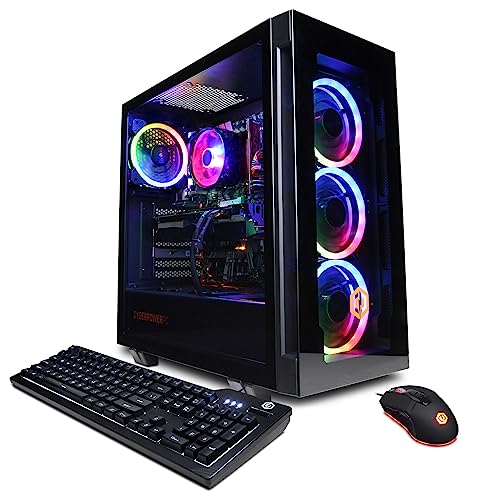
- Best overall for high-refresh 1080p: CyberPowerPC Gamer Xtreme VR, Intel Core i7-13700F, GeForce RTX 4060 Ti 16GB — Check on Amazon
- Thermaltake LCGS Quartz i1460, Intel Core i5-14400F, GeForce RTX 5060 — Check on Amazon
- Skytech Archangel, Intel Core i5-14400F, GeForce RTX 4060, 32GB DDR5, 2TB SSD — Check on Amazon
- Skytech Nebula, AMD Ryzen 5 5600X, GeForce RTX 4060 Ti — Check on Amazon
See 2 more Amazon options
- CyberPowerPC Gamer Xtreme VR, Intel Core i5-13400F, GeForce RTX 4060 — Check on Amazon
- Skytech Blaze4 Mini, AMD Ryzen 7 5700, GeForce RTX 4060 Ti — Check on Amazon
Read the full guide ↓
Disclosure: As an Amazon Associate, reviewstook.com earns from qualifying purchases. Links to Amazon on this page are affiliate links; they cost you nothing extra. Listing details such as price and availability change often, so check the current Amazon listing before you buy.
Twelve hundred dollars is a strange budget for a 1080p gaming PC, and it is worth saying why before any product names appear. At $500 or $700, a 1080p machine is a compromise you manage: you pick a graphics card that can hold 60 frames per second at high settings and accept that competitive titles, not cinematic ones, are where it feels fast. At $1,200 the question flips. Every credible machine in this guide can play at 1080p. The real question is what kind of 1080p you are buying — the smooth, high-refresh kind, where a 144Hz, 165Hz or 240Hz monitor is fed enough frames that aiming, tracking and turning actually feel different, or the wasteful kind, where you pay for resolution headroom you never use because your monitor is a 60Hz panel bought three years ago. This guide is written for the first kind of buyer. If you own or plan to buy a high-refresh 1080p monitor, $1,200 is not overkill; it is the budget where esports titles stop being the only fast games and demanding AAA titles join them at triple-digit frame rates.
The honesty note matters just as much here as at any other tier. If your monitor is 1080p at 60Hz and your games are single-player titles you play with a controller, you do not need to spend $1,200 — a machine from our $700 or $800 guides will show you exactly the same picture, because a 60Hz screen cannot display the extra frames a stronger PC produces. Spending up only makes sense in three situations: you play on a high-refresh monitor, you intend to keep this PC for five or more years and want the graphics memory and processor headroom to age well, or you stream, record or edit on the same machine that you game on. Where a cheaper tier genuinely suffices, this guide says so, in the reviews and again in the buying advice. Where $1,200 earns its money — 16GB graphics cards, 32GB of system memory, 2TB drives, current-generation GPUs with the newest upscaling — it says that too, and names the exact listings where those parts appear at or below the budget.
In this guide
Quick Picks
Short on time, or comparing several options at once? Each row below names a player type and the product that suits it, with a link to the listing.
| Buyer type | Pick | Why it stands out | Link |
|---|---|---|---|
| Best overall for high-refresh 1080p | CyberPowerPC Gamer Xtreme VR (i7-13700F, RTX 4060 Ti 16GB) | 16GB of VRAM and a 16-core CPU — the longest-lived spec here | Check on Amazon |
| Best current-generation GPU | Thermaltake LCGS Quartz i1460 (i5-14400F, RTX 5060) | Newest NVIDIA generation with DLSS 4 multi frame generation | Check on Amazon |
| Best memory and storage | Skytech Archangel (i5-14400F, RTX 4060, 32GB, 2TB) | 32GB DDR5 and a 2TB SSD at a budget where 16GB/1TB is normal | Check on Amazon |
| Best frame rates per dollar on discount | Skytech Nebula (Ryzen 5 5600X, RTX 4060 Ti) | 4060 Ti performance that has been seen well under budget | Check on Amazon |
| Best value DDR5 platform | CyberPowerPC Gamer Xtreme VR (i5-13400F, RTX 4060) | The cheapest route here to a modern DDR5 system | Check on Amazon |
| Best compact option | Skytech Blaze4 Mini (Ryzen 7 5700, RTX 4060 Ti) | 4060 Ti power in a mini case with a 650W Gold power supply | Check on Amazon |
How These Picks Were Chosen
The budget was applied as a ceiling, not a target: every product below is a real Amazon listing chosen for this budget in the United States — check the price on Amazon for the current figure before you buy. Prebuilt pricing is volatile and changes often, so this guide does not print a fixed number you should hold us to. Two machines in this guide can sit above the ceiling between sales; both are flagged in their reviews, and both earn their place because they return to this budget tier on discount. Anything that belongs in a higher tier was excluded, however good it might be, because it does not answer the search you actually made.
We did not use these products ourselves. We read the maker listings and specification pages and compared the parts that decide 1080p performance: graphics card model and, critically, its memory — 8GB versus 16GB is the single biggest longevity difference at this budget — then processor core count, system memory capacity and generation, storage size, and power supply wattage and rating. At 1080p the processor matters more than it does at 1440p or 4K, because lower resolution pushes frame rates up until the CPU, not the GPU, becomes the limit in many games. That is why this guide weights strong CPUs more heavily than a 1440p guide would, and why a 16-core Intel chip tops the list ahead of nominally similar graphics cards paired with weaker processors.
Two honesty filters sat on top of the spec comparison. The first is the monitor filter: a pick had to make sense for high-refresh 1080p, not just 1080p in the abstract — a machine whose extra power would be invisible on the screens most people own did not get credit for that power. The second is the cheaper-tier filter: where a $700–$800 machine would serve a stated use just as well, the review says so plainly rather than inventing a reason to spend up. What survives both filters is a short list with genuinely different strengths — VRAM, generation, memory and storage, discount depth, platform value, and physical size — rather than six copies of the same tower in different cases.
The 6 Best 1080p Gaming PCs Under $1,200
CyberPowerPC Gamer Xtreme VR — Intel Core i7-13700F, GeForce RTX 4060 Ti 16GB (GXiVR8040A14)
Who it suits: High-refresh 1080p players who keep a PC for five years or more, and anyone who games and streams or records from the same machine.
Start with the two numbers that decide how long a gaming PC stays good: sixteen gigabytes of graphics memory and sixteen processor cores. The RTX 4060 Ti in this CyberPowerPC is the 16GB version, not the far more common 8GB card, and that difference is mostly invisible today and decisive tomorrow. At 1080p, modern AAA titles with high texture settings are already brushing against 8GB; the 16GB card simply does not have that ceiling, so textures stay at high or ultra, stutter from memory swapping does not arrive, and the card’s useful life stretches by years rather than months. The processor makes the same argument from the other side: the Core i7-13700F pairs 8 performance cores with 8 efficiency cores, which at 1080p — where frame rates run high and the CPU does more of the work — keeps minimum frame rates, the ones you actually feel as smoothness, higher for longer. Around those two anchors sit 16GB of DDR5 memory, a 1TB NVMe SSD, Wi-Fi and Windows 11 Home.
For the high-refresh player this combination is the complete version of the $1,200 idea. Esports titles will run at frame rates that saturate a 240Hz monitor; demanding single-player games will hold triple figures at high settings with DLSS available when a title is unusually heavy; and the efficiency cores give streaming software, Discord, a browser and recording tools somewhere to live that is not the cores your game is using. Its pricing needs stating plainly: this model belongs in this guide at its deal pricing — check the price on Amazon, and if the live listing is above $1,200 when you read this, the correct move is to wait for the next deal event or choose the Thermaltake below, not to stretch the budget and pretend the ceiling moved.
- RTX 4060 Ti with 16GB of VRAM — double the graphics memory of most rivals here.
- Core i7-13700F with 16 cores: strong minimum frame rates at 1080p, plus real streaming headroom.
- DDR5 platform with a 1TB NVMe SSD and Windows 11 Home included.
Honest limitation: Its price crosses above $1,200 between sales, and 16GB of system RAM is merely adequate next to the Archangel’s 32GB below — heavy multitaskers may still upgrade memory later.
Choose it if longevity is the priority and the live price is at or under the budget. Skip it if the listing is sitting at its higher price today, or your monitor is 60Hz — in that case its headroom is money spent on frames you cannot see.

Thermaltake LCGS Quartz i1460 — Intel Core i5-14400F, GeForce RTX 5060
Who it suits: Buyers who want the newest graphics generation and its upscaling features, in a machine from a long-established case and cooling brand, comfortably inside the budget.
The Quartz i1460 is the current-generation argument in this guide. Its GeForce RTX 5060 brings NVIDIA’s Blackwell architecture and DLSS 4 with multi frame generation, which matters at 1080p in a specific way: in supported titles, frame generation can push an already-fast game into the range where a 240Hz monitor earns its keep, and in heavy titles it lifts high settings from playable to fluid without dropping resolution. The supporting cast is sensible rather than showy — a 10-core Intel Core i5-14400F, 16GB of Thermaltake ToughRam DDR4 at 3600MHz with RGB, a 1TB NVMe M.2 drive, Wi-Fi and Windows 11 — and the machine sits comfortably in this budget tier — check the price on Amazon — leaving genuine headroom under the ceiling for the monitor this class of PC deserves.
Thermaltake being Thermaltake also buys two quieter things: a case and power supply from a maker whose main business is cases and power supplies — the listing documents a 600W 80 Plus Gold unit in this configuration’s coverage — and internals you can actually look at through the tempered glass before you buy, in listing photos that show standard, replaceable parts. The trade to understand is graphics memory: the RTX 5060 carries 8GB, so in the longest view this machine’s GPU will meet its texture ceiling before the CyberPowerPC above does, even though its feature set is newer. Judge it as the best five-year feature bet rather than the best seven-year hardware bet, and it is priced like one.
- RTX 5060 with DLSS 4 multi frame generation — the newest upscaling in this guide.
- Core i5-14400F 10-core processor is a proven, well-matched partner for 1080p.
- Positioned comfortably inside this budget tier — real headroom left under the $1,200 ceiling; check the price on Amazon.
Honest limitation: 8GB of VRAM is the long-term ceiling, and the platform uses DDR4 memory rather than DDR5, so neither the GPU memory nor the system memory is the most future-proof version available at this budget.
Choose it if you value the newest GPU features and a price safely inside budget. Skip it if you keep PCs for six-plus years and texture headroom matters more than frame generation — that is the CyberPowerPC above.

Skytech Archangel — Intel Core i5-14400F, GeForce RTX 4060, 32GB DDR5, 2TB SSD
Who it suits: Players whose PC is also their everything machine — big game libraries, dozens of browser tabs, Discord, recording, light editing — and who hate managing storage.
Most prebuilts at this budget make the same quiet compromise: 16GB of memory and a 1TB drive, because both are easy places to shave cost. The Archangel is the listing that refuses both compromises at once. Its 32GB of DDR5 at 5600MHz with RGB is double the system memory of every other pick in this guide, and its 2TB SSD is double the storage — at a budget where modern games routinely demand 100GB or more each, that is the difference between a library of eight installed titles and a library of sixteen, and between closing your browser before you play and simply not thinking about it. The gaming core is a Core i5-14400F paired with an RTX 4060 8GB, cooled and powered by a 650W Gold power supply, with Wi-Fi and Windows 11 Home. Check the price on Amazon for the current figure: this is the memory-and-storage machine in this budget tier, and patient buyers watching for deal events have repeatedly been able to buy it at mid-tier positioning.
Be clear about the exchange being made, because it is a real one. The RTX 4060 is a step below the 4060 Ti cards elsewhere in this guide: at 1080p high settings it is still a fast card that will feed a 144Hz monitor in most titles, but in the heaviest games it reaches its limit sooner, and its 8GB of memory is the same long-term ceiling discussed above. What Skytech has done is move money from the graphics card into the two upgrades owners most often buy within the first year anyway — more RAM and a bigger drive — and charged less than those upgrades usually cost separately. If your gaming is esports-first, buy GPU instead; if your PC lives a double life, this allocation is arguably the smartest in the guide.
- 32GB of DDR5 memory — double every other pick here, and the multitasker’s upgrade done for you.
- 2TB SSD: room for a real game library without the delete-and-redownload cycle.
- 650W Gold power supply leaves sensible room for a future graphics card upgrade.
Honest limitation: The RTX 4060 8GB is the weakest GPU among the top picks here, so pure frame-rate-per-dollar hunters and 240Hz esports players should look at the 4060 Ti machines instead.
Choose it if storage and multitasking pain are your real problems. Skip it if every dollar must become frame rate — the Nebula and Blaze4 Mini below convert the same money into a faster graphics card.

Skytech Nebula — AMD Ryzen 5 5600X, GeForce RTX 4060 Ti
Who it suits: Pure gamers — no streaming ambitions, no editing — who want the most 1080p frame rate their money can buy and are willing to buy on a discount cycle.
The Nebula’s formula is old, proven and focused: take AMD’s Ryzen 5 5600X, a 6-core processor that spent years as the default recommendation for gaming builds, pair it with an RTX 4060 Ti 8GB, add 16GB of DDR4 at 3200MHz, a 1TB NVMe SSD and a 600W Gold power supply, and spend nothing on anything that is not gaming. The result, at 1080p, is a machine whose graphics card is a full tier above the RTX 4060 systems that dominate this price band on paper — higher settings at the same frame rate, or the same settings at frame rates that keep a 165Hz or 240Hz monitor busy in far more titles. Its discount positioning is the other half of the story: this listing is known for dropping well under this guide’s ceiling during deal events — check the price on Amazon — and few listings anywhere convert patience into performance as reliably.
The compromises are the honest, dated kind. The AM4 platform and DDR4 memory are finished generations: there is no meaningful processor upgrade path left in the socket, and when this machine eventually ages out, the memory and board age out with it. The 8GB of graphics memory carries the same texture caveat as every 8GB card here. Neither point matters much if your horizon is three to four years of maximum frame rate per dollar — by far the most common way people actually own gaming PCs — but five-plus-year keepers should weigh the CyberPowerPC’s 16GB card and newer platform above this one’s sharper price.
- RTX 4060 Ti performance on a Ryzen 5 5600X platform that is all gaming, no filler.
- Known for deep discounts in this budget tier — discount depth few rivals match; check the price on Amazon.
- 600W Gold power supply and 1TB NVMe storage cover the basics properly.
Honest limitation: The AM4/DDR4 platform is end-of-life with no real upgrade path, and the listing’s price has also been seen above $1,200 — buy it at or under the ceiling, not above it.
Choose it if frame rate per dollar is the whole decision and the live price is in its under-budget range. Skip it if upgrade path and platform longevity matter to you as much as today’s performance.

CyberPowerPC Gamer Xtreme VR — Intel Core i5-13400F, GeForce RTX 4060 (GXiVR8060A24)
Who it suits: Buyers who want a modern, upgradeable DDR5 system and high-refresh 1080p performance, while keeping several hundred dollars of the budget in their pocket.
This is the guide’s standing reminder that under $1,200 is a ceiling, not an obligation. CyberPowerPC’s i5-13400F configuration pairs a 10-core Intel processor with an RTX 4060 8GB, 16GB of DDR5 memory and a 1TB PCIe Gen4 SSD, with Wi-Fi and Windows 11 Home — a specification that at 1080p is not a compromise at all for the large majority of games. Esports and competitive titles will run at high-refresh rates; AAA titles will run at high settings with frame rates that satisfy a 144Hz monitor in most cases, with DLSS in reserve. And it is positioned at the value end of this guide — pricing more like a lower tier entirely; check the price on Amazon. The money it does not spend is money available for the 144Hz or 240Hz monitor that makes any of these machines worthwhile, a better headset, or the second SSD you will want in year two.
What you give up against the picks above is ceiling, not experience: the RTX 4060’s 8GB of memory and lower tier mean ultra textures and maximum settings in the heaviest 2027-and-later titles will ask for compromises sooner, and the i5, while strong, is not the i7’s streaming partner. What you gain, beyond price, is the platform: DDR5 memory and a recent Intel socket generation make this the easiest machine here to grow — more memory, a bigger drive, and eventually a stronger graphics card all drop in without replacing the foundation. For a first serious gaming PC, that combination of low entry price and open future is frequently the correct answer, and this guide would rather say so than pretend the most expensive pick is best for everyone.
- Modern DDR5 platform at value-tier positioning — the value outlier of this guide; check the price on Amazon.
- i5-13400F’s 10 cores handle 1080p gaming plus everyday multitasking without strain.
- 1TB Gen4 NVMe SSD and Windows 11 Home: the complete, ready-to-play package.
Honest limitation: The RTX 4060 8GB sets a lower long-term ceiling than the 4060 Ti and 16GB picks above, so ultra settings in future AAA titles will need adjusting sooner.
Choose it if you would rather spend the difference on a high-refresh monitor and peripherals. Skip it if the PC budget is fixed, total, and already includes the monitor — then the headroom picks above use the money better.
Skytech Blaze4 Mini — AMD Ryzen 7 5700, GeForce RTX 4060 Ti
Who it suits: Desk-space-limited players — small rooms, dorms, living-room setups — who refuse to accept small-PC performance as the price of a small PC footprint.
Compact gaming PCs usually ask for a sacrifice somewhere: a weaker graphics card, a hot and loud case, a power supply with no future. The Blaze4 Mini’s listing is interesting because the sacrifice is hard to find. Inside the mini case sit a Ryzen 7 5700 — an 8-core processor that gives this machine the multitasking and streaming depth the 6-core Nebula lacks — an RTX 4060 Ti 8GB, 16GB of DDR4 at 3200MHz, a 1TB SSD and a 650W Gold power supply, which is a full-size specification sheet by any measure, with Wi-Fi and Windows 11 Home. At its value-tier positioning — check the price on Amazon — it undercuts several full-size towers in this guide while matching their graphics card outright.
The mini format still imposes its two eternal conditions, and a fair review states them. Airflow in a small case is physics, not engineering failure: expect fan noise under sustained load to be more present than in a big tower, and expect a future graphics card upgrade to be a shopping exercise in card length and thickness, not just wattage. The AM4/DDR4 platform caveat from the Nebula applies here too. Within those conditions, this is the pick for the player whose PC must share a desk with textbooks, sit beside a TV, or travel between home and dorm — full 4060 Ti frame rates, in a box that does not dominate the room it is in.
- RTX 4060 Ti performance in a mini case — the compact pick that does not downsize the GPU.
- Ryzen 7 5700’s 8 cores add streaming and multitasking depth the 6-core picks lack.
- 650W Gold power supply is generous for the format, at value-tier positioning; check the price on Amazon.
Honest limitation: A mini case runs louder under load and constrains future GPU upgrades by physical size, and the AM4 platform has no processor upgrade path.
Choose it if space is a hard constraint but performance is not negotiable. Skip it if you have room for a tower and plan a mid-life graphics upgrade — the full-size picks make that easier.

Comparison Table
| Product | GPU / VRAM | CPU | RAM / Storage | Best use | Link |
|---|---|---|---|---|---|
| CyberPowerPC Gamer Xtreme VR (GXiVR8040A14) | RTX 4060 Ti / 16GB | Core i7-13700F | 16GB DDR5 / 1TB | Longest-lived high-refresh 1080p | Check on Amazon |
| Thermaltake LCGS Quartz i1460 | RTX 5060 / 8GB | Core i5-14400F | 16GB DDR4 / 1TB | Newest GPU features, safely under budget | Check on Amazon |
| Skytech Archangel | RTX 4060 / 8GB | Core i5-14400F | 32GB DDR5 / 2TB | Multitasking and big game libraries | Check on Amazon |
| Skytech Nebula | RTX 4060 Ti / 8GB | Ryzen 5 5600X | 16GB DDR4 / 1TB | Frame rate per dollar on discount | Check on Amazon |
| CyberPowerPC Gamer Xtreme VR (GXiVR8060A24) | RTX 4060 / 8GB | Core i5-13400F | 16GB DDR5 / 1TB | Modern platform, lowest spend | Check on Amazon |
| Skytech Blaze4 Mini | RTX 4060 Ti / 8GB | Ryzen 7 5700 | 16GB DDR4 / 1TB | Compact size, full performance | Check on Amazon |
How to Choose a 1080p Gaming PC Under $1,200
- Start with your monitor, not the listings. A 144Hz, 165Hz or 240Hz 1080p monitor is what makes this budget rational — it can display the frames these machines produce. On a 60Hz screen, cap your spend at our $700–$800 tier and put the difference toward the monitor upgrade first.
- Read VRAM before GPU tier names. At this budget the difference between an 8GB and a 16GB graphics card is the difference between adjusting texture settings in a few years and not thinking about them. If two machines cost the same, take the memory.
- Weight the CPU more than you would at 1440p. Lower resolution means higher frame rates, and higher frame rates mean the processor sets the floor. Strong minimum frame rates — the smoothness you feel — are a CPU product at 1080p.
- Decide your ownership horizon honestly. Three to four years: buy frame rate per dollar (the Nebula pattern). Five-plus years: buy headroom — VRAM, platform generation, power supply quality (the CyberPowerPC 16GB pattern).
- Count the upgrades you will actually buy. If history says you will add RAM and storage within a year, a machine that already has 32GB and 2TB may be cheaper than a faster GPU plus two upgrade orders. Buy your own behavior, not an ideal shopper’s.
- Check the power supply by name and rating. A stated wattage with an 80 Plus Gold rating, from a listing that publishes it, is real information. An unstated PSU in a sealed-spec listing is a question to ask before ordering, because it decides your upgrade future.
- Treat the ceiling as a ceiling across time. Prebuilt prices cycle. A machine that drops into this budget tier in deal events and sits in a higher tier between them is a purchase made patiently at its deal positioning — set the alert, wait for the event, and do not let a launch-week price redefine your budget.
- Match case size to the room and the plan. Mini cases solve real space problems and impose real ones: noise under load and physical limits on future graphics cards. Buy compact on purpose, not by accident.
- Value the newest features only if your games use them. DLSS 4 multi frame generation is genuinely valuable in supported titles and worthless in the ones that lack it. Check your actual library before letting a feature headline outrank memory or storage you will use every day.
- Keep the packaging until the second week. Run your heaviest game, check temperatures and noise, confirm the parts inside match the listing, and only then recycle the box. Prebuilt verification is a first-week job.
What $1,200 Buys at 1080p That $800 Does Not
Shoppers reasonably ask whether this tier is real or just the same machines in bigger boxes. At 1080p the step up from $800 is real, but it is specific, and naming it precisely is the best protection against wasting it. The first purchase is frame rate headroom: where an $800 machine plays demanding titles at high settings and 60–90 frames per second, this tier plays them at 100-plus and holds esports titles at the 240-plus rates a fast monitor can actually show. The second purchase is time: 16GB graphics cards, stronger processors and DDR5 platforms push the date when settings must come down years into the future. The third purchase is completeness — 32GB of memory, 2TB of storage, Gold-rated power supplies — the absence of the small compromises that generate upgrade orders in year one.
What the step up does not buy deserves the same clarity. It does not buy a different picture on a 60Hz monitor, where the extra frames are produced and then discarded by the screen sixty times a second. It does not buy a 1440p machine in any meaningful long-term sense — several picks here can visit 1440p with upscaling, but that is a bonus, and our dedicated 1440p guides are the honest route to that resolution. And it does not buy immunity from the oldest rule in PC gaming: a badly matched monitor, a listing bought above its recurring deal price, or a sealed spec sheet with an unnamed power supply can waste this budget as efficiently as any other. Spend the step up on refresh rate you can see, memory you will keep, and completeness you will not have to re-buy, in that order.
High-Refresh 1080p, Explained Honestly
The phrase “high refresh” does a lot of work in this category, so it deserves a plain explanation. A monitor’s refresh rate is how many times per second it can show a new image: 60Hz shows sixty, 144Hz shows a hundred and forty-four, 240Hz shows two hundred and forty. A game only benefits when the PC produces frames at least as fast as the screen can show them — which is precisely the relationship this budget is about. At 1080p, the resolution is light enough that a $1,200 machine’s graphics card is rarely the bottleneck in competitive games; the processor, the memory speed and the game’s own engine decide whether you see 180 frames or 260. That is why this guide’s top pick pairs its 16GB graphics card with a 16-core processor rather than chasing a bigger GPU tier that would sit underused at this resolution.
It is also why the honest advice runs in both directions. If you play competitive shooters, racing games or anything where tracking a moving target is the skill, high-refresh 1080p on this budget is one of the best-value setups in gaming — visibly, feelably faster than 1440p at 60Hz, and cheaper. If you play cinematic single-player games at a desk, slowly, with a controller, the same money moved to a 1440p monitor and a machine from a lower tier will show you more beauty per dollar. Neither buyer is wrong. They are simply buying different things, and a guide that cannot tell them apart is selling, not advising.
Common Buying Mistakes
- Spending $1,200 on a PC to feed a 60Hz monitor, then wondering why it feels identical to the old machine. The screen is half the system; budget for it as such.
- Comparing graphics cards by tier name alone and missing the memory: an 8GB and a 16GB card with similar names age completely differently.
- Paying the between-sales price on a deal-cycle listing. Machines in this guide have documented price swings between deal events; buying at the top of the swing is a self-inflicted price increase.
- Assuming a bigger GPU tier automatically wins at 1080p, where the processor so often sets minimum frame rates. Balance beats bragging at this resolution.
- Ignoring the power supply because it is not in the headline. Wattage and rating decide whether your year-three GPU upgrade is a drop-in or a rebuild.
- Buying 16GB of RAM and a 1TB drive at this budget without checking whether a 32GB/2TB listing exists at the same money — in this guide, it does.
- Choosing a mini case for looks, then discovering its noise under load and its limits on future graphics cards. Compact is a commitment, not just a dimension.
- Letting a frame-generation headline outrank fundamentals. Features help in supported games; VRAM, CPU cores and storage help in all of them.
- Skipping the first-week check: parts verified against the listing, temperatures under load, every port tested. Returns are easy in week one and arguments in month three.
Final Recommendation
- Most high-refresh 1080p players: CyberPowerPC Gamer Xtreme VR (i7-13700F, RTX 4060 Ti 16GB) — bought at its deal price.
- Newest features, safely under budget: Thermaltake LCGS Quartz i1460.
- Multitaskers and big libraries: Skytech Archangel.
- Maximum frame rate per dollar: Skytech Nebula.
- Lowest spend on a modern platform: CyberPowerPC Gamer Xtreme VR (i5-13400F, RTX 4060).
- Small spaces: Skytech Blaze4 Mini.
Our top two at this budget are the CyberPowerPC Gamer Xtreme VR with the 16GB RTX 4060 Ti, for the player keeping a machine for five years and feeding a fast monitor the whole time, and the Thermaltake Quartz i1460, for the buyer who wants the newest graphics generation at a price that leaves real money under the ceiling. Between them they cover the two honest shapes this search takes: maximum longevity, and maximum currency. If your library and your browser tabs are the real workload, the Archangel’s memory and storage are the smarter allocation; if every dollar must become frame rate, the Nebula on discount is unbeatable; if the budget must also stretch to the monitor, the i5 CyberPowerPC is the pick that makes the whole setup possible; and if the desk is small, the Blaze4 Mini gives up nothing that matters. Shoppers who realize their monitor is the limiting factor should also see Best 1080p Gaming PC Under $800, and those tempted to step up in resolution instead should start with Best 1440p Gaming PC Under $1200. Check your refresh rate, check the price on Amazon, and check the parts again when the box arrives — at $1,200, that homework is the whole difference between headroom and waste.
Frequently Asked Questions
Is $1,200 too much to spend on a 1080p gaming PC?
It depends entirely on your monitor. On a 144Hz, 165Hz or 240Hz 1080p display, no: this budget buys the frame rates those screens exist to show, plus years of headroom. On a 60Hz display, yes — the extra frames are never displayed, and a $700–$800 machine plus a monitor upgrade is the better purchase in that order.
Which matters more at 1080p, the CPU or the GPU?
More balanced than at any other resolution. The GPU sets what settings you can run; the CPU increasingly sets how high and how stable your frame rate is, because 1080p frame rates run into processor limits sooner. That is why this guide’s top pick pairs a mid-tier GPU with a 16-core CPU rather than the reverse.
Is 8GB of VRAM enough, or do I need 16GB?
For today’s 1080p gaming, 8GB works, with occasional texture adjustments in the heaviest titles. For a machine you intend to keep four or more years, 16GB is the safer buy and the main reason the CyberPowerPC tops this guide. Judge by your replacement cycle, not by fear.
Can these PCs handle 1440p if I upgrade my monitor later?
Several can visit it credibly — the 4060 Ti machines and the RTX 5060 with DLSS will play many titles at 1440p with sensible settings — but none was chosen for it, and texture memory is the first limit you will meet. If 1440p is a definite plan rather than a possibility, shop the 1440p guides and buy for that resolution directly.
Should I buy a discounted previous-generation machine or a full-price current one?
At 1080p, discounted previous-generation hardware is often the value winner — the Nebula’s discount positioning in this guide is the proof. Buy current generation when its specific features, like DLSS 4 multi frame generation, serve the games you actually play, not as a default.
How long should a $1,200 1080p PC last?
Realistically four to six years of high-setting play, longer for esports titles. The picks with 16GB of VRAM, DDR5 platforms and Gold-rated power supplies sit at the long end of that range because their first required upgrade is a graphics card, not a rebuild.
What should I check when the PC arrives?
Verify the graphics card model and memory, CPU, RAM capacity and drive size against the listing before removing protective packaging you may need; then run your heaviest game, watch temperatures and fan noise, and test every USB and display output. Discrepancies are a same-week conversation with the seller, not a discovery for month three.


