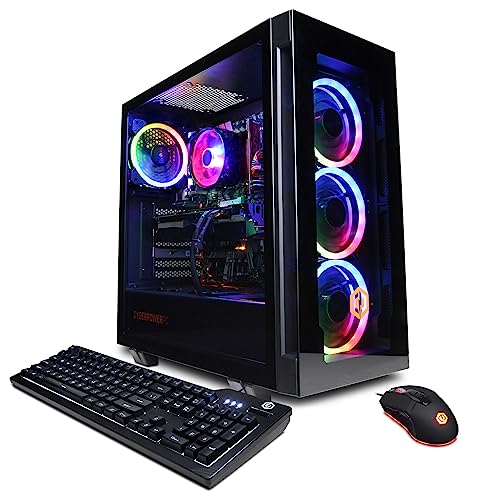
Where to buy
Check the latest price, availability and delivery on Amazon. Orders are placed on Amazon. We may earn a commission from qualifying purchases.
- Best streaming pick under $1,200: CYBERPOWERPC Gamer Xtreme VR, Intel Core i7-13700F, GeForce RTX 4060 Ti 16GB — Check on Amazon
- Skytech Chronos Gaming PC, AMD Ryzen 7 5700X, GeForce RTX 4070 Ti 12GB — Check on Amazon
- HOENGAGER Gaming PC, Intel Core i7-12700F, GeForce RTX 4070 12GB, 32GB DDR4 — Check on Amazon
- iBUYPOWER Scale Gaming PC, AMD Ryzen 5 7600, GeForce RTX 4060 Ti 8GB — Check on Amazon
See 2 more Amazon options
- Thermaltake LCGS Quartz i1460, Intel Core i5-14400F, GeForce RTX 5060 8GB — Check on Amazon
- CYBERPOWERPC Gamer Master, AMD Ryzen 7 8700F, GeForce RTX 4060 Ti 8GB — Check on Amazon
Read the full guide ↓
Disclosure: As an Amazon Associate, reviewstook.com earns from qualifying purchases. Links to Amazon on this page are affiliate links; they cost you nothing extra. Listing details such as price and availability change often, so check the current Amazon listing before you buy.
Streaming from a single PC is a specific workload, and it deserves to be defined before any machine is graded on it. One computer is doing four jobs at once: rendering your game, encoding the broadcast in OBS, running chat, alerts and browser sources on top of both, and uploading the result without interruption. The broadcast standard most new streamers actually live under is Twitch at roughly 6,000 kbps with constant bitrate and two-second keyframes, usually at 1080p60 or a downscaled 936p/864p. YouTube is the more generous platform — it accepts higher bitrates, takes 1440p ingest, and supports AV1 encoding where the hardware offers it — while live 4K streaming remains platform-limited rather than hardware-limited: no PC in this guide, and no PC at any price, changes what the platforms accept. So the streaming question at $1,200 is not “can it stream?” — everything here can. It is “what does the stream cost the game?” That cost is decided by the encoder silicon on the graphics card, by how much VRAM is left over after the game takes its share, and by whether the CPU has cores free once OBS, chat and a browser full of alerts are all running.
That is why this guide grades encoder-first. Every pick below carries an NVIDIA card with a hardware NVENC encoder, which is the single most important streaming fact in the guide: NVENC encodes the broadcast on a dedicated block of silicon, so the game’s rendered frames barely notice the stream exists. Two of the six picks — the RTX 4070 Ti and RTX 4070 machines — carry two NVENC encoder blocks, which lets one block run the live broadcast while the second records a clean local copy at a higher bitrate for editing later. The other four carry a single encoder block each, which is entirely sufficient for one broadcast but leaves no second hardware lane. What no pick here offers is an Intel Quick Sync safety net: the three Intel machines use F-suffix processors with integrated graphics disabled, and the AMD processors either have no integrated graphics or none that this guide’s research documents as a streaming encoder. The card is the encoder, on every pick, with nothing behind it. Graded that way, the six machines sort into a clear order — and the sections below walk through the encoder map, the OBS setup each pick wants, the kit costs that sit outside the PC’s price, and then the six reviews in full.
In this guide
Quick Picks
Short on time, or comparing several options at once? Each row below names a streamer type and the PC that suits it, with a link to the listing.
| Streamer type | Pick | Why it stands out for streaming | Link |
|---|---|---|---|
| Best overall streamer | CYBERPOWERPC Gamer Xtreme VR, i7-13700F, RTX 4060 Ti 16GB | 16GB of VRAM leaves the most room for game plus OBS; 16-core CPU absorbs chat and browser load | Check on Amazon |
| Best encoder, when in budget | Skytech Chronos, Ryzen 7 5700X, RTX 4070 Ti 12GB | Two NVENC blocks — stream and record at once — check price on Amazon; buy only when the live price fits this budget | Check on Amazon |
| Best for streamers who multitask | HOENGAGER, i7-12700F, RTX 4070 12GB, 32GB DDR4 | Two NVENC blocks plus double the system memory of every rival here | Check on Amazon |
| Best steady-price streamer | iBUYPOWER Scale, Ryzen 5 7600, RTX 4060 Ti 8GB | NVENC with AV1 at a price point within this budget; AM5 platform underneath | Check on Amazon |
| Newest encoder generation | Thermaltake LCGS Quartz i1460, i5-14400F, RTX 5060 8GB | Current-generation NVENC with AV1, checked comfortably under the ceiling | Check on Amazon |
| Best eight-core value streamer | CYBERPOWERPC Gamer Master, Ryzen 7 8700F, RTX 4060 Ti 8GB | Eight cores for the streaming desktop behind the game — check price on Amazon | Check on Amazon |
How These Picks Were Chosen
The starting set is the same six machines as our high end gaming PC guide at this budget — real Amazon listings that sell at or under $1,200 — re-graded from the encoder outward. That re-grading starts with the encoder hardware itself: which NVENC generation the card carries, whether it encodes AV1, and whether it has one encoder block or two. It then weighs the resources the stream shares with the game: VRAM capacity, because OBS, the game and the encoder all live on the same card; system memory, because a streaming desktop is a browser, a chat client, an alert stack and a game running simultaneously; and CPU headroom, because even with hardware encoding, OBS scene compositing, browser sources and background applications all draw on the processor. The price discipline from our gaming-first guide at this budget carries over unchanged, because it is load-bearing. The Skytech Chronos often lists well above this budget — check price on Amazon, because it is a streaming recommendation only when the live price fits this guide’s ceiling. The HOENGAGER’s listing was verified in full, yet no dependable price could be captured for it, so this guide claims none and instructs buying only when the live price sits at or under $1,200 — check price on Amazon before ordering. The Gamer Xtreme VR’s live price can straddle the ceiling, and it gets the same rule: check price on Amazon and buy only when the live price fits this budget.
We did not benchmark or broadcast from these systems ourselves. Encoder capabilities are stated from the documented silicon — NVIDIA’s published NVENC generations and the specifications in the verified listing research — and performance is described qualitatively, in class terms rather than invented figures. Two exclusions are worth stating. Software x264 encoding is treated throughout as a fallback, not a plan: at Twitch’s bitrate ceiling it asks the CPU to do, mid-game, work that every card here does on dedicated silicon for free. And no pick is credited with an encoder the research does not document — no Quick Sync on any F-suffix Intel chip, no integrated backup encoder on the AMD machines, and no second NVENC block on any card that carries one. Where a specification could not be confirmed — the Gamer Xtreme’s memory stick configuration is the standing example — the review flags it instead of guessing, because a streaming buyer running a game, OBS and a browser on 16GB needs to know whether that memory runs in dual channel.
The Encoder Map: What Each Card Actually Broadcasts With
Every streaming claim in this guide traces back to this section, so it is worth reading before the reviews. NVENC is NVIDIA’s hardware encoder: a fixed-function block on the graphics card that turns rendered frames into broadcast video without spending the card’s gaming muscle to do it. The practical consequences are the reason single-PC streaming works at all at this budget. Encoding stops competing with the game, the quality at Twitch’s ~6,000 kbps ceiling is consistent, and the same block can encode AV1 — the newer codec YouTube accepts — on every card in this guide. What separates the picks is how many of those blocks you get and how much card surrounds them.
The two RTX 4070-class machines — the Skytech Chronos with its RTX 4070 Ti and the HOENGAGER with its RTX 4070 — carry two eighth-generation NVENC blocks each, both with AV1 encode. Two blocks buy a specific, concrete workflow: OBS broadcasts the live stream from one encoder while the second records a separate, higher-bitrate local copy of the same session, so the footage you edit into videos afterwards is not limited to the compressed broadcast your viewers saw. For a streamer who also publishes edited content, that split is the single most valuable streaming feature in this guide, and it exists on exactly two picks. The four remaining machines — the Gamer Xtreme VR, the Scale and the Gamer Master with RTX 4060 Ti cards, and the Quartz with its RTX 5060 — carry a single NVENC block each, Ada-generation on the 4060 Ti cards and the current Blackwell generation on the 5060, every one with AV1 encode. A single block runs one broadcast at full quality without touching the game’s performance; it simply cannot run the independent second encode at the same time, so recording falls back to sharing the stream’s encoder settings or to a lighter CPU pass.
Just as important is what is absent. Intel’s Quick Sync — the integrated encoder that rescues many streaming setups — is unavailable on all three Intel picks, because the 13700F, 12700F and 14400F are F-suffix parts with their integrated graphics disabled. The Gamer Master’s Ryzen 7 8700F likewise has no integrated graphics at all, and the Chronos’s Ryzen 7 5700X has none either; the Scale’s Ryzen 5 7600 carries basic integrated graphics for display purposes, but the verified research documents no streaming encoder role for it, so this guide claims none. The consequence is uniform and worth internalising: on every machine here, if you set OBS to anything other than the card’s NVENC encoder, you have chosen the CPU fallback by hand. The OBS section below sets each pick up accordingly.
The 6 Best High End Gaming PCs for Streaming Under $1,200
CYBERPOWERPC Gamer Xtreme VR — Intel Core i7-13700F, GeForce RTX 4060 Ti 16GB (GXiVR8040A14)
Who it suits: The streamer who wants the fewest compromises in a single-PC setup — the most VRAM headroom in the guide for game plus broadcast, and the strongest CPU here for everything running behind the game.
Start with the 16GB of VRAM, because in a streaming build it does double duty. The game renders into that memory, OBS composites and encodes from the same card, and any recording, replay buffer or browser-source rendering shares the pool. On the 8GB cards in this guide that pool is managed; on this one it is simply roomy, and at 1440p — where this tier’s games already press against 8GB before a stream is added — that headroom is the difference between streaming the settings you play at and negotiating them down for the broadcast. The encoder itself is the RTX 4060 Ti’s single Ada-generation NVENC block with AV1 encode: one broadcast at full quality, Twitch H.264 today and YouTube AV1 when you want it, with no second hardware lane for a separate record encode. Around the card, the i7-13700F’s sixteen cores are the guide’s best answer to the streaming desktop — OBS scene compositing, chat, a browser of alerts and dashboards, and the game all draw on the CPU even when encoding is on the card, and this processor absorbs that load with the most room to spare. One documented practical plus matters more to streamers than to anyone: the card’s outputs are one HDMI and two DisplayPorts, so a main 1440p monitor and a second screen for chat and OBS run without adapters.
Check price on Amazon before ordering: this listing’s live price can sit on either side of the ceiling, so buy only when it sits at or under $1,200, and treat a live price above the ceiling as a reason to wait or step up a tier. The 13700F is an F-suffix chip: no integrated graphics, no Quick Sync, no fallback encoder if you misconfigure OBS — the walkthrough discipline of selecting NVENC is not optional on this machine. And the memory layout could not be confirmed from the listing material: whether the 16GB is one stick or two is unconfirmed, it matters for CPU-limited performance with a full streaming desktop running, and the live listing should be checked before ordering, with a second stick budgeted if it ships as one. None of that displaces it from the top of this guide. For a streamer spending $1,200 once, this is the machine whose resources run out last.
- 16GB of VRAM — double the pool the game, OBS and encoder share, and the tier’s best streaming longevity.
- Single Ada NVENC with AV1 encode — full-quality Twitch H.264 or YouTube AV1 from one block.
- i7-13700F: 16 cores, the strongest CPU here for the applications running behind the game.
- One HDMI and two DisplayPorts documented — main monitor plus chat screen, no adapters.
Honest limitation: A single encoder block means no independent second encode for recording — and its live price can straddle the ceiling — check price on Amazon — with the memory stick configuration unconfirmed.
Choose it if you stream and play on one machine and want the resource headroom that lasts. Skip it if you record high-bitrate local footage while streaming — that workflow wants the two dual-encoder picks below.

Skytech Chronos Gaming PC — AMD Ryzen 7 5700X, GeForce RTX 4070 Ti 12GB
Who it suits: The patient streamer-creator — the buyer who broadcasts live and edits the footage afterwards, and who can wait for an in-budget listing to get the guide’s best encoder setup.
The RTX 4070 Ti belongs to the tier above this guide, and its streaming hardware is why it leads the encoder map: two eighth-generation NVENC blocks, both with AV1 encode. Run the live broadcast on one and a clean, higher-bitrate local recording on the other, simultaneously, while the card still renders demanding games natively at 1440p and high settings. No other workflow in this guide matches that, because no other pick pairs a dual encoder with this much graphics performance — the recordings you edit are no longer capped at the ~6,000 kbps your viewers received, and the stream never competes with the record for encoder time. The supporting cast is older but adequate for the job: the Ryzen 7 5700X’s eight cores handle OBS compositing and the streaming desktop without drama, 16GB of DDR4-3200 is the guide’s standard memory fit, the 750W Gold power supply is the strongest documented here, and the 1TB NVMe drive holds the game library — though streamers who record every session will fill it faster than pure gamers do, and should plan storage accordingly.
None of that survives contact with its ordinary price, and streaming does not soften the arithmetic. Its live price often sits well above this guide’s budget, where the next tier up’s newer machines compete with it directly. Check price on Amazon, set an alert, and buy it only when the live price fits this budget — or do not buy it for this guide at all. The platform underneath is finished — the 5700X sits on AM4 with DDR4, so no CPU upgrade path exists, and the 5700X has no integrated graphics, meaning no backup encoder of any kind if the card is ever out of the machine. Skytech also notes the graphics card brand may vary; the 4070 Ti model, its 12GB and its dual NVENC are the contracted specification, the board partner is not. For the creator who streams tonight and publishes the edit tomorrow, caught at its price, nothing else here is close.
- RTX 4070 Ti: two NVENC blocks with AV1 — stream on one, record a clean local copy on the other.
- The fastest graphics card in the guide, with 12GB of GDDR6X for game plus broadcast at 1440p.
- 750W Gold power supply — the strongest documented in this guide.
Honest limitation: In-budget pricing is the exception rather than the machine’s normal state — check price on Amazon — and the finished AM4/DDR4 platform offers no integrated graphics and no CPU upgrade path.
Choose it if you record while you stream and your alert catches it when its live price fits this budget — check price on Amazon. Skip it if you need a machine this week at whatever it costs — at its usual above-budget pricing, the next tier up spends the money better.

HOENGAGER Gaming PC — Intel Core i7-12700F, GeForce RTX 4070 12GB, 32GB DDR4
Who it suits: The streamer whose desktop never closes — OBS, chat, browser sources, a Discord call and the game all live at once, on the machine that also edits the result.
This is the second dual-encoder pick, and the one with the memory to match the ambition. The plain RTX 4070 carries two eighth-generation NVENC blocks with AV1 encode, so the stream-and-record split the Chronos offers is available here too: broadcast from one block, keep a higher-bitrate local recording on the other, and let the card’s 12GB of VRAM carry the game at native 1440p while both run. What separates this machine from the Chronos is system memory — 32GB of DDR4-3200, double every other pick in the guide. RAM is where a streaming session actually lives: OBS with browser sources, the chat client, the alert stack, the game, and later the editing timeline with the capture open. On 16GB machines those loads are juggled; on this one they coexist, and for a creator whose PC is a workplace as much as a games machine, that is the specification that decides whether the stream feels effortless. The rest of the build supports the role — a twelve-core i7-12700F, a 1TB M.2 PCIe SSD, a 240mm liquid cooler keeping the CPU quiet under sustained load, and Windows 11 Pro.
One discipline governs this pick, stated plainly: its specifications were verified in full, yet no dependable price could be captured for it during research, so this guide claims none for it whatsoever. Machines built on the RTX 4070 have often listed well above this ceiling; check price on Amazon, and buy it only if the listing in front of you sits at or under $1,200, where it becomes arguably the best-configured streaming pick here. The 12700F is an F-suffix processor — no integrated graphics, no Quick Sync — so the dual NVENC is not a luxury layered over a fallback; it is the entire encoding story, and it is a good one. The LGA1700/DDR4 platform is finished, with no next-generation CPU to drop in, and the card’s brand goes unspecified in the listing material. Judge it as a complete, finished creator’s machine bought at the right price — if the price is right, it is the most complete streaming specification in the guide.
- RTX 4070: two NVENC blocks with AV1 encode — the stream-and-record split, like the Chronos.
- 32GB of system memory as standard — double every rival, sized for the full streaming desktop.
- A 240mm liquid cooler and Windows 11 Pro are part of the build, where most rivals ship air cooling and the Home edition.
Honest limitation: No price for this listing could be verified during research, so it belongs in this guide only when the live listing sits at or under $1,200 — and its LGA1700/DDR4 platform is at end-of-life, with no CPU upgrade path.
Choose it if its live price clears the ceiling test and your sessions run alongside editing and heavy multitasking. Skip it if its live price has climbed into the next tier up, where newer platforms compete for that money.

iBUYPOWER Scale Gaming PC — AMD Ryzen 5 7600, GeForce RTX 4060 Ti 8GB (SCA5N46T01)
Who it suits: The streamer buying for the long run — a reliable in-budget machine today on the platform that accepts tomorrow’s upgrades, encoder included.
The Scale’s streaming hardware is the tier standard done properly: an RTX 4060 Ti with a single Ada-generation NVENC block and AV1 encode. That is one full-quality broadcast — Twitch H.264 at the platform ceiling, or AV1 to YouTube — with the game running on the same card essentially unaware the stream exists. What the Scale adds is the steadiest context in the guide for that encoder to live in. Check price on Amazon: its live price has consistently sat within this budget, so the streaming setup you plan is the one you can actually buy this week, without waiting for a special offer. Underneath sits AMD’s AM5 platform with DDR5 memory — the only platform here with future CPUs still arriving — which matters to streamers specifically because the upgrade it eventually offers is the CPU, the component a growing streaming desktop leans on hardest. The Ryzen 5 7600’s six cores handle the game plus OBS compositing and chat today; the socket promises a stronger chip later without replacing the board or memory. A keyboard, mouse and one-year manufacturer warranty are in the box.
The known flaw deserves the same prominence here, because a streamer feels it more than a pure gamer: the 16GB of memory is a single stick, running single-channel, which costs real performance in CPU-limited moments — exactly the moments a full streaming desktop creates. Budget the second matching DDR5 stick from day one; it is the cheapest upgrade in this guide and it completes the machine. The card’s 8GB of VRAM asks the usual texture discipline at 1440p, with the stream sharing the same pool, and the single encoder block means local recording shares the broadcast’s encoder rather than running independently — record the stream’s output, or accept a lighter CPU recording pass. Neither caveat changes the shape of the recommendation: the encoder is right, the price is always right, and the platform outlives the guide.
- RTX 4060 Ti NVENC with AV1 encode — the tier-standard broadcast block, done properly.
- Check price on Amazon — its pricing sits within this budget, so no special timing is required.
- AM5 platform: the only pick whose CPU — the streaming desktop’s hardest-worked part — can be upgraded later.
Honest limitation: The 16GB is a single stick in single-channel mode until you add the second, the 8GB card needs texture discipline at 1440p, and the single encoder block means recording shares the stream’s encode.
Choose it if you want the dependable buy-and-stream machine with a future. Skip it if you record high-bitrate local footage every session — that workflow belongs to the dual-encoder picks.

Thermaltake LCGS Quartz i1460 — Intel Core i5-14400F, GeForce RTX 5060 8GB
Who it suits: The streamer who broadcasts to YouTube or cares about the newest codec path — the buyer who wants the current encoder generation and the latest feature set from day one.
The Quartz’s RTX 5060 is the only current-generation card in this guide, and its NVENC block is the newest here: a single Blackwell-generation encoder with AV1 encode. For streaming, the generation shows up in two honest places. The first is AV1 itself — YouTube accepts AV1 broadcasts, and the newest encoder generation is where that path is most at home, delivering cleaner fine detail at a given bitrate than H.264 for viewers on the platform that supports it. The second is the card’s wider DLSS feature set, including multi frame generation in supported titles — a presentation feature that smooths motion on a high-refresh monitor without reducing input latency, so it polishes a single-player stream’s look without pretending to be performance. The encoder remains a single block: one broadcast at full quality, no independent second encode for recording, and that limit should be understood before buying. Around it, Thermaltake fits a ten-core i5-14400F — ample for OBS compositing and the streaming desktop — 16GB of ToughRam DDR4-3600, a 1TB NVMe SSD and a 600W Gold power supply, in the white liquid-cooled showcase build that happens to look the part on camera, if your setup is visible to your audience.
Check price on Amazon: its pricing has been among the friendliest in the guide, sitting comfortably within this budget as a norm rather than an exception. The F-suffix discipline applies in full: the 14400F has no integrated graphics, so there is no Quick Sync fallback and no picture at all without the card; NVENC is the encoder, selected deliberately in OBS, or the CPU does the work the slow way. The platform compromises mirror the Scale’s in reverse — LGA1700 is finished and the memory is DDR4, so this is a machine to replace rather than upgrade — and the 8GB of VRAM carries the standard 1440p texture caveat, with the stream sharing the pool. For the streamer whose platform is YouTube and whose library is this year’s releases, the newest encoder at a stable price is a coherent, honest buy.
- RTX 5060: the newest NVENC generation in the guide, with AV1 encode for the YouTube path.
- Latest DLSS feature set, including multi frame generation, for current releases.
- Pricing that stays within this budget — check price on Amazon.
Honest limitation: A single encoder block — no independent record encode — on a finished LGA1700/DDR4 platform, with 8GB of VRAM and no integrated-graphics fallback.
Choose it if you stream to YouTube and want the current codec generation working from day one. Skip it if the stream-and-record split matters to you — it needs a dual-encoder pick.

CYBERPOWERPC Gamer Master — AMD Ryzen 7 8700F, GeForce RTX 4060 Ti 8GB (GMA2900A)
Who it suits: The streamer who wants eight current-generation cores behind the broadcast desktop, on the upgradeable AMD platform, at a value-focused AM5 entry point here.
The Gamer Master pairs the same encoder as the Scale — an RTX 4060 Ti’s single Ada NVENC block with AV1 encode — with a different CPU trade. Its Ryzen 7 8700F offers eight Zen 4 cores against the Scale’s six, and in a streaming build those extra cores are not decoration: OBS compositing, browser sources, chat, a voice call and the game all draw on the processor even when the encode itself sits on the card, and eight cores is where that contention stops being a planning problem. The platform is AM5 with DDR5 memory and a B650 board, so the CPU upgrade path stays open for years; storage is a 1TB PCIe Gen4 NVMe SSD, with Wi-Fi and Windows 11 Home. Value is the pick’s other argument: check price on Amazon — it is a budget-friendly way onto AM5 in this guide, typically leaving room under the ceiling for the streaming kit the final sections discuss.
Two caveats carry over from the base research, and both bite streamers specifically. The first concerns the 8700F itself: its F suffix means no integrated graphics, so the processor offers no encoder of its own to fall back on for a lighter stream. If the card is ever removed or fails, this PC has no picture and no broadcast until a card returns; the NVENC block is the whole encoding story. The second is family drift: CyberPowerPC now sells Gamer Master variants carrying RTX 5060 Ti cards, priced in a higher tier, on separate listings, so confirm on the live listing that the configuration in front of you is the verified one — 8700F, RTX 4060 Ti, DDR5 — and treat marketplace listings priced far above this budget with suspicion. With those checks done, this is the value route to an eight-core streaming desktop on the platform with a future.
- RTX 4060 Ti NVENC with AV1 encode, backed by eight Zen 4 cores for the streaming desktop.
- A budget-friendly way onto AM5 in this guide — check price on Amazon.
- The B650 board and DDR5 memory leave the multi-year CPU upgrade path completely open.
Honest limitation: With no integrated graphics on the 8700F, there is neither a display fallback nor a spare encoder, and the family now includes pricier 5060 Ti variants — confirm the exact configuration on the live listing before ordering.
Choose it if eight AM5 cores at the guide’s lowest platform price matter more to you than an integrated-graphics safety net. Skip it if a fallback encoder matters to you, or what you are looking at is a marked-up marketplace listing rather than the verified Amazon listing.

Comparison Table
| Product | Encoder | Best streaming use | Link |
|---|---|---|---|
| CYBERPOWERPC Gamer Xtreme VR (GXiVR8040A14) | Single NVENC + AV1 (RTX 4060 Ti 16GB) | One-PC streaming with the most VRAM headroom for game plus broadcast | Check on Amazon |
| Skytech Chronos | Dual NVENC + AV1 (RTX 4070 Ti 12GB) | Stream and record simultaneously — check price on Amazon; buy only when the live price fits this budget | Check on Amazon |
| HOENGAGER | Dual NVENC + AV1 (RTX 4070 12GB) | Stream-and-record with 32GB of memory for the full creator desktop | Check on Amazon |
| iBUYPOWER Scale (SCA5N46T01) | Single NVENC + AV1 (RTX 4060 Ti 8GB) | Dependable everyday streaming on the upgradeable platform | Check on Amazon |
| Thermaltake LCGS Quartz i1460 | Single NVENC + AV1 (RTX 5060 8GB) | Newest encoder generation for the YouTube AV1 path | Check on Amazon |
| CYBERPOWERPC Gamer Master (GMA2900A) | Single NVENC + AV1 (RTX 4060 Ti 8GB) | Eight cores behind the streaming desktop on the upgradeable AM5 platform | Check on Amazon |
Setting Up OBS on These Machines
The hardware grading above becomes real in one settings screen, so this section walks the setup every pick in this guide shares, then names where they differ. In OBS, set the encoder to the card’s NVENC — H.264 for Twitch, AV1 for YouTube where you broadcast there — and never to x264: on these machines the CPU encoder is a fallback for troubleshooting, not a plan, and on the F-suffix and no-integrated-graphics picks there is no Quick Sync option hiding in the menu to rescue a wrong choice. Use constant bitrate (CBR) at roughly 6,000 kbps for Twitch, with a two-second keyframe interval; YouTube accepts higher bitrates and rewards them, and its AV1 ingest is where the newer encoders here earn their keep. Keep the recording path in mind while you set up: on the Chronos and the HOENGAGER, assign the recording to the second NVENC block at a higher bitrate than the stream; on the four single-encoder picks, record using the stream’s encoder output or accept a lighter recording, because there is no second hardware lane.
When a stream stutters, OBS reports three different counters, and each has a different fix — treating them as one problem is how streamers waste evenings. Rendering lag means the GPU is saturated: the game is using the whole card and OBS cannot composite its scene. The fix is headroom — cap the game’s frame rate, lower its heaviest settings, or, on the 8GB picks, reduce texture load so the shared VRAM pool breathes; the 16GB Gamer Xtreme and the 12GB dual-encoder picks hit this wall latest. Encoding lag means the encoder itself is overloaded, which on NVENC almost always traces to a wrong setting — x264 selected by accident, an encoder preset pushed beyond the block, or two encodes asked of a single block. The fix is configuration, not hardware: NVENC selected, a sane preset, and on single-block picks, no simultaneous independent recording. Dropped frames (network) mean the upload path failed, and no component inside the PC fixes them: the fix is the connection — a wired Ethernet run to the router instead of Wi-Fi, a bitrate your upload actually sustains, and nothing else large uploading during the broadcast. On that last point this guide claims no port speed for any pick, because the verified research documents none; every machine here should be streamed wired regardless, and the cable is part of the setup, not an accessory.
The Kit Around the PC: What Else Streaming Costs
The $1,200 buys the tower. The broadcast needs a small amount of kit around it, and this section costs that kit in priorities rather than prices, because the honest order matters more than any figure. First, the microphone. Viewers tolerate an ordinary picture far longer than ordinary audio; a decent USB or XLR microphone, positioned close, is the first purchase after the PC and the one your audience will actually notice. Second, the connection: an Ethernet cable long enough to reach the router, because the network dropped-frames counter above is fixed at the wall, not in a settings menu. Third, the second screen — chat, OBS and alerts need somewhere to live that is not the game monitor; the Gamer Xtreme’s documented HDMI plus two DisplayPorts covers it directly, and on every pick the second display is a working tool, not a luxury. Fourth, lighting and camera, in that order, and only if you appear on stream: light improves a modest camera more than a better camera improves bad light. Last, and most misunderstood, the capture card: it does nothing for streaming the PC itself — the games are already inside the machine doing the encoding. A capture card earns its place only for bringing an outside source in — a console, a camera used as a capture device, or a second PC. If none of those is in your plan, it is the one streaming purchase this guide tells you to skip entirely.
How to Choose a Streaming PC Under $1,200
- Decide whether you record while you stream. That single answer splits this guide in two. Stream-only: any pick here works, because every card carries NVENC with AV1. Stream plus high-bitrate local recording: only the Chronos and the HOENGAGER, whose two encoder blocks run both jobs at once.
- Match the encoder to your platform. Twitch at ~6,000 kbps H.264 is served identically by every pick. YouTube’s higher bitrates and AV1 ingest reward the same NVENC hardware with more headroom — and the Quartz’s current-generation block is the newest implementation of it here.
- Count VRAM as a streaming resource, not just a gaming one. The game, the encoder and OBS share one card. At 1440p, 16GB (Gamer Xtreme) leaves the most room, 12GB (the 4070-class picks) is comfortable, and 8GB works with texture discipline — decide based on the games you actually broadcast.
- Budget the streaming desktop’s memory. OBS, browser sources, chat and the game together are what system RAM holds. The HOENGAGER’s 32GB is the only fit that never asks the question; on the 16GB picks, check the stick layout — the Scale ships single-channel, and the Gamer Xtreme’s layout is unconfirmed.
- Never plan on a fallback encoder that is not there. No pick in this guide offers Quick Sync: the Intel chips are F-suffix, the 8700F and 5700X have no integrated graphics, and the Scale’s integrated graphics carries no documented encoder role. NVENC is the plan; set OBS accordingly from the first session.
- Check the live price before you commit. The Chronos belongs here only when its live price fits this budget, and is a different, worse purchase at its usual above-budget pricing — check price on Amazon. The Gamer Xtreme earns its top-pick status when its live price fits this budget; above the ceiling, the same money argues for stepping up a tier. The HOENGAGER qualifies only at a live price at or under $1,200.
- Confirm the exact configuration on the live listing. The Gamer Master name now covers pricier RTX 5060 Ti variants on separate listings; what you are actually contracting for is the GPU model and its VRAM, the CPU and the memory type — verify all four before ordering.
- Wire the broadcast. No port speed is documented for any pick, and none is needed to act: run Ethernet to the router for every stream, on every machine here. Wi-Fi is for everything except the broadcast itself.
Common Buying Mistakes
- Leaving OBS on x264. Every card here encodes on dedicated silicon; the CPU preset is the single most common reason a capable streaming PC feels incapable. Select NVENC on day one.
- Buying a single-encoder machine for a stream-and-record workflow. If edited videos from local recordings are the plan, the second NVENC block on the Chronos and HOENGAGER is the feature — no setting adds it later.
- Paying the Chronos’s usual above-budget price just because a guide placed it under $1,200. Its place in this guide exists only when its live price fits this budget — check price on Amazon.
- Assuming an Intel processor means a Quick Sync fallback. The F in 13700F, 12700F and 14400F means the integrated graphics — and its encoder — are disabled. There is no backup encoder on those picks.
- Buying a capture card to stream PC games. The card adds nothing when the game and OBS are on the same machine; it is for consoles, cameras and second PCs only.
- Streaming over Wi-Fi and blaming the PC. Network dropped frames are a connection problem; the fix is a cable, not a component.
- Running 16GB as one stick leaves memory in single-channel mode and costs real performance in CPU-limited moments — the Scale’s stated homework, and the Gamer Xtreme’s live-listing check.
- Treating multi frame generation as streaming performance. Generated frames smooth presentation; they do not lower input latency and they do not touch the encoder. Grade the Quartz on its NVENC and its rendered pace.
Final Recommendation
- Most streamers at this budget: CYBERPOWERPC Gamer Xtreme VR (RTX 4060 Ti 16GB) — the headroom pick.
- Streamers who record for edited videos: Skytech Chronos when its live price fits this budget — check price on Amazon — or the HOENGAGER if its live price is under the ceiling.
- Creators with a heavy desktop: HOENGAGER — dual encoder plus 32GB of memory.
- Dependable buy-today streaming: iBUYPOWER Scale, plus the second memory stick.
- YouTube and AV1-first streamers: Thermaltake LCGS Quartz i1460.
- Eight-core AM5 value: CYBERPOWERPC Gamer Master.
Our top two for streaming at this budget are the Gamer Xtreme VR, for the combination that runs out last — 16GB of shared VRAM, sixteen CPU cores behind the streaming desktop, and a single excellent encoder — and the Skytech Chronos, for the creator whose workflow genuinely uses two encoders at once and who can wait for its price to arrive. Between them they cover the two honest streaming shapes at $1,200: one broadcast done with maximum headroom, and a broadcast plus a recording done simultaneously. Streamers whose budget is firm but smaller should see Best High End Gaming PC For Streaming Under $1000, and those who conclude they want the dual-encoder tier without waiting for an in-budget price should step to Best High End Gaming PC For Streaming Under $1500. For the dedicated streaming view at this exact budget, compare Best Streaming PC Under $1200; for the gaming-first view of the same machines, see Best High End Gaming PC Under $1200. Set OBS to NVENC, wire the connection, hold your budget discipline — at $1,200, that is the whole discipline.
Frequently Asked Questions
Can a $1,200 PC really stream and play at the same time?
Yes — that is precisely what the hardware encoder makes routine. NVENC encodes the broadcast on a dedicated block of the graphics card, so the game keeps the card’s rendering muscle and the CPU keeps its cores for the game and the streaming desktop. Every pick in this guide does single-PC streaming at Twitch’s standard settings; the differences are in headroom and in whether a second, independent recording can run at the same time.
What is the difference between one NVENC block and two?
One block runs one encode — your live broadcast — at full quality. Two blocks run two independent encodes simultaneously: the broadcast on one, and a separate local recording, usually at a higher bitrate for editing, on the other. In this guide the Chronos (RTX 4070 Ti) and the HOENGAGER (RTX 4070) carry two; the other four picks carry one each. If you never record locally while streaming, one block is not a limitation.
Should I use AV1 or H.264 for my stream?
It depends on the platform, not the PC — every card here encodes both. Twitch’s standard ingest is H.264 at roughly 6,000 kbps CBR, and that is what these machines should send it. YouTube accepts AV1 and higher bitrates, and rewards them with cleaner detail, which is where the AV1 support on all six cards — and the Quartz’s newest-generation encoder in particular — earns its place.
Why is there no Quick Sync option in OBS on the Intel picks?
Because the processors are F-suffix models — the 13700F, 12700F and 14400F — whose integrated graphics are disabled, and Quick Sync is the integrated graphics’ encoder. The same is true in effect for the Gamer Master’s 8700F and the Chronos’s 5700X, which have no integrated graphics at all. On every pick here, NVENC is the encoder; the buying mistake is assuming a fallback exists.
Do I need a capture card to stream from one of these PCs?
No. A capture card imports an outside signal — a console, a camera, a second PC. Games played on the same machine OBS runs on are captured directly by the software, and the encoding happens on the card’s NVENC block. Buy the microphone first, the Ethernet cable second, and a capture card only when an external source enters your setup.
Can these PCs stream at 1440p or 4K?
The platforms decide that, not the PCs. Twitch’s standard broadcast is 1080p-class at ~6,000 kbps; YouTube accepts 1440p ingest and higher bitrates, which these encoders can feed — most sensibly by rendering the game at 1440p and broadcasting at the platform’s supported settings. Live 4K streaming remains platform-limited across the industry, so no pick here is sold on it. Buy these machines to play at 1440p and broadcast at the settings the platforms actually reward.
Why does one pick carry no price?
For the HOENGAGER, research verified the listing completely — specifications, configuration, memory — yet no dependable Amazon price could be captured for it, and this guide does not invent prices. It counts for this guide only when the listing in front of you sits at or under $1,200 — a condition its review repeats wherever the pick appears — so check price on Amazon before ordering.
- Best High End Gaming PC Under $1000
- Best High End Gaming PC Under $1500
- Best High End Gaming PC For 1440p Gaming Under $1200
- Best High End Gaming PC For Beginners Under $1200
- Best High End Gaming PC For Small Spaces Under $1200
- Best Streaming PC Under $1200
- Best Gaming PC Under $1200
- Best Prebuilt Gaming PC Under $1200


