Where to buy
Check the latest price, availability and delivery on Amazon. Orders are placed on Amazon. We may earn a commission from qualifying purchases.
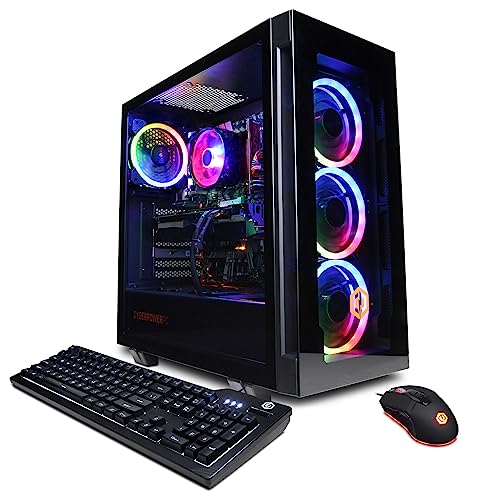
- Best overall high end gaming PC for small spaces under $1,200: CYBERPOWERPC Gamer Xtreme VR, Intel Core i7-13700F, GeForce RTX 4060 Ti 16GB — Check on Amazon
- Skytech Chronos Gaming PC, AMD Ryzen 7 5700X, GeForce RTX 4070 Ti 12GB — Check on Amazon
- HOENGAGER Gaming PC, Intel Core i7-12700F, GeForce RTX 4070 12GB, 32GB DDR4 — Check on Amazon
- iBUYPOWER Scale Gaming PC, AMD Ryzen 5 7600, GeForce RTX 4060 Ti 8GB — Check on Amazon
See 2 more Amazon options
- Thermaltake LCGS Quartz i1460, Intel Core i5-14400F, GeForce RTX 5060 8GB — Check on Amazon
- CYBERPOWERPC Gamer Master, AMD Ryzen 7 8700F, GeForce RTX 4060 Ti 8GB — Check on Amazon
Read the full guide ↓
Disclosure: As an Amazon Associate, reviewstook.com earns from qualifying purchases. Links to Amazon on this page are affiliate links; they cost you nothing extra. Listing details such as price and availability change often, so check the current Amazon listing before you buy.
Start with the tension in this search, because pretending it away would waste your money. “High end” and “small spaces” pull in opposite directions. The graphics cards that make a PC high end — the RTX 4060 Ti class and above that every pick below carries — are long, hot components housed in mid-tower cases, and at $1,200 there is no honest exception: no shoebox-sized machine with a true high-end card exists at this price, and any listing implying otherwise is describing a mini PC with integrated graphics wearing a gaming badge. So this guide grades these six machines on what “small spaces” can truthfully mean at this tier: how each tower actually installs in a small room. Where it stands — floor beside the desk, on the desk, under it. How much air it needs, what happens to a small room’s temperature when it works hard, where its cables fall, and whether the spot you have in mind will quietly cook it.
That grading changes the ranking in ways a pure specification sheet would not predict. All six picks are mid-tower-class machines with internal power supplies — none uses an external power brick, which removes one furniture problem (no brick to house, ventilate or trip over) and replaces it with another (all of the machine’s heat leaves through the case, into your room). None of the six listings in our verified research publishes dimensions we can stand behind, and none documents a VESA mount, so this guide prints no measurements and claims no mounting for any pick: if a seller’s page shows a bracket, that is the seller’s claim, not ours. What we can grade from verified material is form-factor class, cooling arrangement, documented power class, documented display outputs, and the placement discipline each machine demands. In a small room those things decide whether a powerful PC is a pleasure or a space heater with a fan problem. Below: the quick picks with an installation grade for each, six full reviews, a comparison table, a five-step measure-before-you-buy checklist, the mistakes that ruin small-room installations, and the questions buyers ask.
In this guide
Quick Picks
Short on time, or comparing several options at once? Each row names a buyer type and the PC that suits it, with its installation character stated up front.
| Buyer type | Pick | Why it stands out | Link |
|---|---|---|---|
| Best overall | CYBERPOWERPC Gamer Xtreme VR, i7-13700F, RTX 4060 Ti 16GB | 16GB of VRAM, 16 cores, and three documented display outputs for a tidy two-screen desk | Check on Amazon |
| Best graphics card, on deal | Skytech Chronos, Ryzen 7 5700X, RTX 4070 Ti 12GB | A 4070 Ti in a premium-tier build — check price on Amazon before you buy; the hardest-working cooler here | Check on Amazon |
| Best memory configuration | HOENGAGER, i7-12700F, RTX 4070 12GB, 32GB DDR4 | The only RTX 4070 here with 32GB of system RAM; liquid cooling moves its heat to a radiator | Check on Amazon |
| Best upgrade path | iBUYPOWER Scale, Ryzen 5 7600, RTX 4060 Ti 8GB | Current AM5 platform in this budget tier; check price on Amazon | Check on Amazon |
| Newest graphics generation | Thermaltake LCGS Quartz i1460, i5-14400F, RTX 5060 8GB | Current-generation card in a white liquid-cooled showcase build made to be looked at | Check on Amazon |
| Best eight-core AM5 value | CYBERPOWERPC Gamer Master, Ryzen 7 8700F, RTX 4060 Ti 8GB | Eight Zen 4 cores on AM5; check price on Amazon | Check on Amazon |
How These Picks Were Chosen
The performance bar is the same one our base $1,200 high-end guide applies, because a small room does not lower what “high end” means: every PC below is a real Amazon listing in this budget tier, and every graphics card is from the RTX 4060 Ti class upward — where native 1440p becomes the honest description of what the machine does. Prices at this tier move often, so this guide prints no fixed figure for any pick: check price on Amazon on the live listing before you buy. Two picks carry the tier’s deal discipline. The Chronos sits at the premium end of this tier, so it belongs here only while its live listing fits this budget. The HOENGAGER’s listing was verified in full; check its live price on Amazon and buy only if it sits within this budget tier.
On top of that bar sat the installation grading, and it is worth stating exactly what it could and could not use. It could use form-factor class: all six are upright mid-tower-class builds, so the placement question is floor-standing beside or under the desk versus on the desk itself, never shelf-or-mount mini-PC territory. It could use the cooling arrangement where the listing documents one — the HOENGAGER’s 240mm liquid cooler and the Quartz’s liquid-cooled build move heat differently from the air-cooled towers, and the reviews grade that. It could use documented display outputs — the Gamer Xtreme VR’s one HDMI and two DisplayPorts are verified, and they decide how many cables drop behind a small desk — and documented power-supply wattage where published, a fair proxy for the heat class a small room must absorb. What it could not use, because the verified research does not contain it, is measurements: no listing here publishes dimensions we can stand behind, no volume figure exists for any of the six, and no VESA or mounting provision is documented for any of them. This guide therefore prints no dimensions, no litres and no mounting claims — and treats that absence itself as buying information, because it makes the five-step checklist later in this guide non-optional: measure your space against the live listing’s figures yourself, before ordering, or you will be guessing with a $1,200 machine.
One rule overrode every grade, stated here so no review can be misread as softening it: none of these six machines may be installed inside a sealed or closed cabinet, a shut TV stand, a closed desk hutch or any other enclosed box. A 4060 Ti-class tower under gaming load exhausts heated air continuously; in an enclosure that air has nowhere to go, temperatures climb until the machine throttles itself slower than a cheaper PC in open air, and sustained heat shortens every component’s life. Open-backed, generously ventilated furniture is a different matter and the checklist grades it honestly — but a door that closes in front of the PC is a refusal, for all six picks, without exception. If your only spot is an enclosed cabinet, the correct purchase is not in this guide: it is a genuinely small machine from our small form factor coverage, accepting the performance step down, or a different room arrangement. We would rather lose the sale than bless the installation.
What “Installed” Actually Means in a Small Room
A PC’s footprint is not its case. Installed, a tower occupies the case plus the air it needs on every side, plus the cable drop behind it, plus the heat it pours into the room — and in a small room, the last of those is the one buyers forget. A gaming tower under load converts most of the electricity it draws into heat, continuously, for as long as the session lasts. In a large room that dissipates unnoticed; in a small bedroom or studio corner, a long session raises the room’s temperature perceptibly, the machine’s intake air warms with it, fans spin harder and noise rises — the installation degrades itself the longer you play. None of the six picks uses an external power brick, which simplifies one part of this: no second hot object to find a ventilated home for, no brick to bury in a cable tray where it will cook. The supplies are internal — the Chronos’s 750W Gold and the Quartz’s 600W Gold are the two ratings published in our verified material — so every watt of heat arrives through the case’s exhaust, in one place, where you can plan for it.
Plan for it in three placement classes. The default for all six is open floor-standing: beside the desk or under it, on a hard surface or a low board rather than deep carpet that chokes a bottom intake, with clear air behind for the exhaust and the cable drop. The second class is on the desk itself — legitimate for the showcase builds, the white Quartz especially — at the cost of desk area a small room usually cannot spare, and with noise and exhaust at ear and elbow height. The third class, inside furniture, is refused for every pick when the furniture is enclosed. Cable drop deserves its own sentence because small rooms hide it worst: each tower needs a power lead, one or two display cables, and usually Ethernet and USB runs, all falling behind the case — a bundle that needs slack, a route, and a few centimetres of depth that pure case measurements never include. Grade your spot for the installed machine, not the boxed one.
The 6 Best High End Gaming PCs for Small Spaces Under $1,200
CYBERPOWERPC Gamer Xtreme VR — Intel Core i7-13700F, GeForce RTX 4060 Ti 16GB (GXiVR8040A14)
Who it suits: Small-room buyers who want the most balanced machine at this budget and the tidiest multi-screen desk — strong CPU, the VRAM headroom that ages best, and documented display outputs that keep cabling simple.
The performance case is the base guide’s, and it is strong. The 16GB version of the RTX 4060 Ti is near-identical to its 8GB sibling in raw speed until memory runs out — but at 1440p, in current games with high-resolution texture packs, 8GB is where settings start being negotiated downward and 16GB is where the negotiation stops: the difference between a PC that feels high end for two years and one that feels it for four. Around the card sits an Intel Core i7-13700F — sixteen cores, eight performance and eight efficiency, the strongest all-round processor here for buyers who also edit, stream or run heavy background loads — with 16GB of DDR5, a 1TB PCIe Gen4 NVMe SSD, a B760 motherboard, Wi-Fi and Windows 11 Home. The installation case earns it first place in this variant, and it rests on the one fully documented output set in the guide: one HDMI and two DisplayPorts. In a small room that is a genuinely tidy desk — a 1440p main monitor and a second screen, both cabled directly, no adapters, and a cable drop of exactly three display-and-power runs behind the machine.
Placement grading: a mid-tower-class machine, so the honest options are floor-standing beside or under the desk in open air, or on the desk if your surface can spare the area — and like every pick here it is refused for enclosed furniture. Its heat class is the tier standard; a long session will warm a small room, and the exhaust needs a clear path behind the case rather than a wall pressed against it. Two checks before ordering, both carried from the verified research. Check price on Amazon before ordering: buy only while the live listing sits within this budget, and treat a listing that has moved above the tier as your cue to wait or step tiers. And the memory’s stick configuration could not be confirmed from the listing material: whether the 16GB is one stick or a matched pair matters for CPU-limited performance, so check the live listing, and if it is a single stick, budget for the second — the cheapest meaningful upgrade in this guide. Neither check is a reason to look elsewhere; both are the price of the most complete machine here.
- RTX 4060 Ti in its 16GB form — the tier’s best longevity buy, and the texture headroom small-room buyers will not have to think about for years.
- Documented outputs — one HDMI, two DisplayPorts — cover a two-screen desk with no adapters.
- Sixteen cores from the i7-13700F — more multitasking and creation headroom than any other CPU here.
Honest limitation: Its live price needs checking against this budget before you buy — check price on Amazon — and its memory stick configuration is unconfirmed, and as a mid-tower it needs open floor or desk space, never an enclosure.
Choose it if you want the balanced, longest-lived machine at this budget, installed in open air, and can buy on a deal. Skip it if the live listing sits above this budget when you shop, or your only spot is inside closed furniture.

Skytech Chronos Gaming PC — AMD Ryzen 7 5700X, GeForce RTX 4070 Ti 12GB
Who it suits: Patient deal-watchers with a genuinely open placement — the reader who sets a price alert, waits for the dip, and has the floor space and airflow to house the hardest-working machine in this guide.
The RTX 4070 Ti is a card from the tier above this one: faster than everything else here by a clear margin, a genuine high-end GPU of its generation with 12GB of GDDR6X memory, the raw pace for native 1440p at high settings in demanding games, and headroom for high-refresh 1440p in lighter titles. Skytech builds it around a Ryzen 7 5700X eight-core processor, 16GB of DDR4-3200, a 1TB NVMe SSD and a 750W Gold power supply, in the white Chronos case. That published 750W Gold rating matters to this variant’s grading, because it marks the set’s highest documented power class — and power class is heat class. Under a long gaming load the Chronos is the biggest continuous heat source in this guide, and in a small room that is a placement fact, not a footnote: it wants the most generous open placement here, floor-standing with unobstructed exhaust, ideally where its warmed air is not rising straight into your seat. Give it that and it is superb. Wedge it into a tight corner or — the recurring refusal — any enclosed furniture, and you have bought the fastest card in the guide and then throttled it.
The price discipline is the entire review in miniature, and it will not be softened. The Chronos is a premium-tier machine whose live price moves a great deal: it belongs in this guide only while its listing sits within this budget, so check price on Amazon before you buy. When it is priced in a higher tier, it does not belong in this guide at all. Buy only while the listing fits the budget, with an alert set and the willingness to walk away. The platform asks the same acceptance: the 5700X sits on AMD’s finished AM4 socket with DDR4, so the CPU upgrade path is closed — though the 750W Gold supply leaves room for a future graphics card — and Skytech’s listings note the graphics card brand may vary, meaning the 4070 Ti model and its 12GB are contracted but the board partner is not. Confirm at checkout that the live ASIN still resolves to this 5700X configuration, since other Chronos variants circulate. Deal-hunters with an open, airy spot get the fastest $1,200 gaming PC in this guide. Everyone else should read on.
- An RTX 4070 Ti with 12GB — nothing else in this guide is within reach of its pace; it belongs to the tier above.
- 750W Gold power supply published — real room for a future card upgrade, and a clear statement of its heat class.
- When its live listing fits this budget, no other machine in this class offers this much graphics performance.
Honest limitation: In-budget pricing for it is an event, not a norm — it often lists in a higher premium tier — the AM4/DDR4 platform is finished, and its power class makes it the pick most dependent on a generous open placement.
Choose it if you can wait for the dip, will check price on Amazon and buy only while the listing fits this budget, and have open floor space with clear airflow. Skip it if you are buying today at whatever it costs, or your room’s only spot is tight, enclosed or poorly ventilated.

HOENGAGER Gaming PC — Intel Core i7-12700F, GeForce RTX 4070 12GB, 32GB DDR4
Who it suits: Buyers who run more than games — streamers, editors and heavy multitaskers — who want a real RTX 4070, the system memory to feed everything at once, and cooling that moves heat on purpose.
What lifts this machine out of the pack is a pair of specifications. The first is the graphics card: a plain GeForce RTX 4070 with 12GB of memory, a step above the 4060 Ti class in raw performance — the difference shows at native 1440p in demanding games, where the 4070 holds high settings with more in reserve — with VRAM in the sensible middle of this guide. The second is memory: 32GB of DDR4-3200, double what every other pick fits as standard, the unglamorous specification that decides whether a gaming PC is also a working PC. A stream with browser sources and chat, a video timeline with a capture open, a dozen applications behind the game — on 16GB machines those loads are managed; on this one they are simply absorbed. The rest of the build is solid: a twelve-core i7-12700F (eight performance, four efficiency), a 1TB M.2 PCIe SSD, an RGB tempered-glass case, and Windows 11 Pro. The installation-relevant specification is the 240mm AIO liquid cooler. Liquid cooling does not make heat disappear — every watt still ends up in the room’s air — but it changes where the heat leaves the case: concentrated at the radiator’s exhaust rather than washed through the whole chassis. Placed with that exhaust aimed into open room air, the HOENGAGER is the most deliberate heat citizen in this guide; placed with the radiator breathing into a wall gap, it is merely another hot tower. The sealed-cabinet refusal applies to it exactly as to the others.
Now the discipline this pick demands, stated as plainly as the Chronos review stated its own: the listing’s specifications were verified in full, and this guide prints no fixed price for it: check price on Amazon on the live listing. RTX 4070 systems often list in a higher premium tier; if the live price is above this budget, this machine belongs to a higher-tier conversation. Buy it only when the listing in front of you sits within this budget — and at that point, no pick here is better configured. The platform caveat mirrors the Chronos: the 12700F sits on Intel’s finished LGA1700 socket with DDR4, so there is no next-generation CPU to drop in later, and the graphics card brand is not specified in the listing material. Judge it as a finished, well-balanced machine bought at the right price and installed with its radiator exhaust respected, not as a platform to grow.
- A real RTX 4070 with 12GB — clear water between it and the 4060 Ti class at native 1440p.
- 32GB of system memory fitted as standard, where every rival here ships half that.
- 240mm liquid cooling concentrates exhaust at the radiator, and Windows 11 Pro is fitted where rivals ship Home.
Honest limitation: Its place here is conditional on the live listing fitting this budget — check price on Amazon before you buy — and the LGA1700/DDR4 platform underneath it is finished, offering no CPU upgrade path.
Choose it if the live listing is under the ceiling, you multitask, stream or edit as well as game, and you can give the radiator a clear exhaust path. Skip it if it is priced into a higher tier, or your placement would trap its exhaust.

iBUYPOWER Scale Gaming PC — AMD Ryzen 5 7600, GeForce RTX 4060 Ti 8GB (SCA5N46T01)
Who it suits: Buyers thinking in years rather than months — anyone who wants today’s competent 1440p machine on the platform that accepts tomorrow’s CPUs, installed once and upgraded in place.
That last phrase is this pick’s small-spaces argument, and it is a real one. The Scale’s Ryzen 5 7600 sits on AMD’s AM5 platform — the current AMD standard, with DDR5 memory and a motherboard that will accept future Ryzen generations as they arrive. Every other platform in this guide is finished; this one is mid-life. In a small room, an upgradeable machine is a space decision as much as a money one: a CPU swap in a few years happens inside the same case, in the same spot, with the same cable runs — no second machine arriving, no full replacement to house, no old tower to store in a room that has nowhere to store it. The rest of the build is honestly mid-tier: an RTX 4060 Ti with 8GB of graphics memory, a native-1440p performer in most current games with texture settings watched in the heaviest; 16GB of DDR5-5200; a 1TB NVMe SSD; Wi-Fi readiness; Windows 11 Home; a keyboard and mouse in the box, which saves a small-room desk a separate purchase’s packaging and clutter; and a one-year manufacturer warranty. The six-core Ryzen 5 7600’s gaming pace punches at the level of much pricier processors, and in GPU-bound 1440p play it is rarely the limit. Placement grading is the tier standard: a mid-tower for open floor or desk placement, refused for enclosed furniture, with no documented dimensions in our research — measure your spot against the live listing using the checklist below.
Pricing is this pick’s quiet distinction: it is the machine here most consistently found within this budget tier. No deal-hunting, no walk-away discipline; check price on Amazon and it is simply in budget whenever you shop. That reliability buys room for its one real flaw, which the listing states openly and this review repeats at full size: the 16GB of memory is a single stick in single-channel mode, costing measurable performance in CPU-limited games, and it is the first thing to fix. A second matching DDR5 stick is the cheapest upgrade in this guide, fits inside the case without changing the installation by a millimetre, and budgeting for it from day one completes the pick.
- AM5 platform with DDR5 — the only pick here with a live CPU upgrade path, exercised inside the same case and the same spot.
- It is consistently priced within this budget tier — check price on Amazon — so no deal timing is needed.
- Keyboard, mouse and a one-year manufacturer warranty included.
Honest limitation: Its 16GB arrives as one stick running single-channel — a genuine performance cost, stated openly, until a second stick goes in — and the 8GB card asks for texture discipline in the heaviest 1440p titles.
Choose it if platform life, price certainty and an installation that never has to move matter more than today’s maximum specification. Skip it if you will never open the case to upgrade — buy a finished specification instead.

Thermaltake LCGS Quartz i1460 — Intel Core i5-14400F, GeForce RTX 5060 8GB
Who it suits: Buyers whose small space is also their showcase — the reader whose PC will sit visibly on the desk, who plays the latest releases on day one, and wants the current DLSS generation working from the start.
Against a field of NVIDIA 40-series cards, the Quartz’s RTX 5060 stands for the current 50-series generation — and what the newer generation buys is features rather than raw speed, since in plain rendering terms the 5060 and the 4060 Ti trade blows, with the Ti often ahead: the latest DLSS generation, including multi frame generation in supported titles, which multiplies displayed frame rates by generating additional frames between rendered ones. Used honestly, that is a presentation tool: it smooths motion on a high-refresh monitor without reducing input latency the way genuinely rendered frames do, so competitive players should treat it as polish rather than pace. In supported games it is the one capability here no 40-series card can be updated to match. Around the card, Thermaltake fits a ten-core i5-14400F, 16GB of its own ToughRam DDR4-3600, a 1TB NVMe SSD and a published 600W Gold power supply — the set’s lower documented power class, and therefore its gentler documented heat class — in a white liquid-cooled showcase build. That design intent decides this pick’s placement grade: of the six, this is the one built to live on the desk and be looked at through its glass, legitimate in a small room if — and only if — the desk can genuinely spare the area, because a tower on the desk puts exhaust and fan noise at elbow and ear height and takes the surface your keyboard and monitor were using. On the floor it remains a perfectly good machine; it simply stops being the picture it was bought as. The cabinet refusal applies unchanged.
Its pricing behaves better than most of this tier’s: check price on Amazon — it generally sits comfortably within this budget instead of straddling the ceiling. The compromises are the platform ones, the mirror image of the Scale’s: the 14400F sits on Intel’s finished LGA1700 socket, the memory is DDR4 on a generation that has moved to DDR5, and the card’s 8GB of VRAM carries the same 1440p texture caveat as the other 8GB picks. None of that prevents the Quartz from being the right buy for its intended reader — someone buying current-generation features and a build designed to be seen, at a stable price, who expects to replace rather than upgrade when it ages. Make the desk-versus-floor decision with a tape measure, not the product photos.
- An RTX 5060 — the guide’s sole current-generation card, carrying the newest DLSS with multi frame generation.
- Pricing that stays put within this budget tier — check price on Amazon.
- Published 600W Gold supply — the gentler documented heat class — in a white liquid-cooled build made to be displayed.
Honest limitation: Raw rendering pace is roughly 4060 Ti class rather than a step beyond it, the 8GB of VRAM needs texture discipline at 1440p, the LGA1700/DDR4 platform is finished, and its showcase design pressures you toward desk space a small room may not have.
Choose it if you play current releases, want the newest DLSS features from day one, and have honestly measured desk or open floor space for it. Skip it if you want maximum raw performance or the most VRAM, or the only home for it would be enclosed.

CYBERPOWERPC Gamer Master — AMD Ryzen 7 8700F, GeForce RTX 4060 Ti 8GB (GMA2900A)
Who it suits: Buyers who want eight current-generation cores on the upgradeable AMD platform at the most accessible entry point of any AM5 pick in this guide — and who will verify the exact configuration before ordering.
Think of the Gamer Master as the Scale’s platform argument rebalanced. The structural virtue is shared — AMD’s AM5 socket with DDR5 memory, the CPU path open for years, and, as the Scale review argues, future upgrades happening inside the same installed case — while the processor trade changes: a Ryzen 7 8700F with eight Zen 4 cores in place of the Scale’s six. In pure 1440p gaming the graphics card does the heavy lifting and the extra pair of cores seldom shows itself; hand the machine compiling, rendering, streaming or a busy desktop behind the game and those cores become the margin between headroom and contention. The graphics card is the tier-standard RTX 4060 Ti with 8GB, storage a 1TB PCIe Gen4 NVMe SSD, the chipset a B650, with Wi-Fi and Windows 11 Home. It is positioned as the most accessible AM5 machine here — check price on Amazon on the live listing before you buy. Placement grading matches its siblings: mid-tower class, open floor or desk, no documented dimensions in our verified research, refused for enclosed furniture. One installation-relevant consequence of its specification deserves plain statement: the 8700F has no integrated graphics, so the card does all display work — during installation that simply means the monitor cable goes into the graphics card’s ports from the first boot, and there is no motherboard port that will light up as a fallback while you are setting up.
Two caveats, both carried from the verified research because both matter. The first is that same F-suffix trade in full: no integrated graphics means no display fallback if the card ever fails or is removed for sale, and no integrated encoder for a lightweight stream; buyers who value that safety net should look at the Scale. The second is model-family drift: the family now includes RTX 5060 Ti variants — the GMA2900A2/A3 models — in a higher premium tier under different ASINs. The ASIN linked here, B0DCMMZS61, is the verified RTX 4060 Ti configuration; confirm on the live listing that the specification matches — 8700F, 4060 Ti, DDR5 — before ordering, and treat marketplace listings priced far above this tier with earned suspicion. Clear those two checks and what remains is the value route onto the platform with a future — eight cores, a current socket, tier-standard graphics, and the most accessible AM5 entry point in the guide.
- Eight Zen 4 cores on AM5 — more multitasking muscle than any other pick on the upgradeable platform.
- The most accessible way onto AM5 in this guide — check price on Amazon.
- DDR5 memory and a B650 board keep the multi-year upgrade path fully open, inside the same installation.
Honest limitation: With no integrated graphics on the 8700F there is no display fallback and no backup encoder to lean on — and because the model family also sells pricier 5060 Ti variants, the exact configuration has to be confirmed on the live listing.
Choose it if you want AM5 with eight cores at the most accessible entry point, accept the no-integrated-graphics trade, and will verify the configuration at checkout. Skip it if losing the display fallback worries you, or the price in front of you is a marketplace markup rather than the Amazon listing for this configuration.

Comparison Table
| Product | Graphics card | Best use | Installation grade | Link |
|---|---|---|---|---|
| CYBERPOWERPC Gamer Xtreme VR (GXiVR8040A14) | RTX 4060 Ti 16GB | Balanced power with the VRAM headroom that ages best | Open floor or desk; documented 1× HDMI / 2× DP keeps the cable drop tidy | Check on Amazon |
| Skytech Chronos | RTX 4070 Ti 12GB | Fastest graphics in the guide — check price on Amazon | Open floor with the most generous airflow of the six; highest documented heat class (750W Gold) | Check on Amazon |
| HOENGAGER | RTX 4070 12GB | Real 4070 pace plus 32GB of system memory | Open placement with the 240mm radiator’s exhaust aimed into room air | Check on Amazon |
| iBUYPOWER Scale (SCA5N46T01) | RTX 4060 Ti 8GB | AM5 upgrade path at a steady in-budget price | Install once, upgrade in place; open floor or desk | Check on Amazon |
| Thermaltake LCGS Quartz i1460 | RTX 5060 8GB | Newest DLSS generation in a showcase build | Designed for the desk if the surface can spare it; gentler documented heat class (600W Gold) | Check on Amazon |
| CYBERPOWERPC Gamer Master (GMA2900A) | RTX 4060 Ti 8GB | Eight AM5 cores at the most accessible platform entry point | Open floor or desk; monitor cable into the card from first boot (no integrated graphics) | Check on Amazon |
Measure Before You Buy: The Five-Step Checklist
Because none of the six listings in our verified research publishes dimensions we can stand behind, this checklist is how you close that gap yourself. Do all five steps before ordering, in this order — each step can veto the purchase, and finding the veto after delivery helps nobody.
- Step 1 — Measure the spot. Take the live listing’s stated case dimensions for the exact pick you are buying and measure your spot against them — width, depth, height, with the tape, not by eye. Then add what the case figure excludes: depth behind for connectors and cable bend, clearance above and behind for exhaust. If the figures and your tape disagree with the plan, the plan changes, not the physics.
- Step 2 — Check the ventilation clearance. Confirm the spot breathes: open air at the rear exhaust and at any intake face, no wall or furniture panel pressed against them, and no door that closes in front of the machine. This step is where enclosed cabinets, shut TV stands and closed hutches fail — for all six picks, without exception. Open-backed furniture with generous clearance passes; anything sealed does not.
- Step 3 — Give the power its address. All six picks use internal power supplies, so there is no external brick to house — the one installation simplification this tier offers. What remains is the mains lead itself: a reachable socket that the cable can drop to without stretching across the room, and a decision about surge protection that fits the same spot. If the only socket is behind the machine’s exhaust path or across a walkway, solve that now, on paper.
- Step 4 — Walk the cable drop. Count what will run behind the case: power, one or two display cables (the Gamer Xtreme VR’s documented one HDMI and two DisplayPorts cover a two-screen desk directly), Ethernet if you wire it — in a small room, wired is worth it — plus keyboard, mouse and USB runs. Each needs slack and a route that does not drape across the exhaust. A cable plan that only works pulled tight is not a plan.
- Step 5 — Then order. Only now: check price on Amazon for every pick and order only while the live listing fits this budget — the Chronos and the Gamer Xtreme included, and the HOENGAGER only if its live listing sits within this tier, confirm the exact configuration — for the Gamer Master, that it is the 8700F / RTX 4060 Ti build and not a 5060 Ti family variant — and order knowing the machine has a measured, ventilated home waiting.
How to Choose a High End Gaming PC for a Small Space
- Grade the installation before the specification. In a small room the order of questions reverses: where it stands, how it breathes and where its cables fall decide whether the specification ever gets to perform. A faster card in a throttled installation is a slower PC.
- Then grade the graphics card, and its VRAM second. Raw pace sets today’s tier; memory capacity sets how long the tier lasts. At 1440p, 16GB (the Gamer Xtreme) outlasts 12GB (the 4070-class picks), which outlasts 8GB — measured not in today’s frame rates but in years of texture settings kept.
- Treat published power ratings as heat information. Where a supply’s wattage is documented — the Chronos’s 750W Gold, the Quartz’s 600W Gold — it marks the machine’s heat class and therefore its placement demands. The highest class wants the most open spot in the room.
- Know whether you are buying a machine or a platform. AM5 (Scale, Gamer Master) accepts future CPUs inside the same case and the same spot; AM4 and LGA1700 (the rest) are finished. In a small room, upgrading in place is worth more than it is in a large one.
- Check the memory configuration, not just the capacity. A matched pair of sticks runs dual channel; a lone 16GB stick — how the Scale ships — surrenders performance you have already paid for. Where the listing does not state the layout, as with the Gamer Xtreme, verify before ordering and budget the second stick.
- Hold a walk-away price for every straddling pick. The Chronos inside this budget and the same Chronos priced in a higher tier are different purchases sharing a name; the Gamer Xtreme is this guide’s top pick while its listing fits the budget, and an argument for a higher tier when it does not. Decide your walk-away point before the deal event.
- Count the display outputs against your desk. A 1440p main monitor plus a second screen is the standard small-desk setup; the Gamer Xtreme’s two DisplayPorts plus HDMI covers it without adapters. Where outputs are not documented, check the live listing before the machine arrives.
- Never let furniture make the decision for you. If the spot that exists is enclosed, the answer is a different machine class or a different arrangement — not a high-end tower behind a closed door. See the checklist’s Step 2, and hold the line.
Common Buying Mistakes
- Installing any of these towers inside a closed cabinet, TV stand or desk hutch. The machine throttles, the fans scream, and the components age early. This is the single most expensive mistake in this guide’s category, and it is refused for every pick.
- Measuring the case and forgetting the installation — the cable drop behind, the clearance above, the exhaust path. The installed machine is bigger than the boxed one on every side that matters. And do not assume a listing’s photos tell you the size: get the figures from the live listing and use a tape measure, as the checklist directs.
- Expecting a VESA mount or monitor-back bracket that no listing documents. None is claimed for any pick here; if wall-mounting is the plan, this is the wrong category.
- Putting a tower on deep carpet and blocking a bottom intake, or pushing the rear exhaust flat against a wall. Small rooms make both errors easy and both cost real performance.
- Paying a higher-tier price for the Chronos because a guide listed it under $1,200. It belongs here only while its live listing fits this budget — check price on Amazon — and nowhere else.
- Buying a Gamer Master variant by name. RTX 5060 Ti models above this budget now sit inside the same family on separate listings — verify the ASIN and the specification rather than trusting the badge.
- Assuming the 8GB and 16GB RTX 4060 Ti are one card with two labels. Today’s speeds sit close; the 1440p texture headroom does not, and the gap widens with every year of new releases.
- Blowing the whole budget on the tower while keeping a 1080p 60Hz monitor. A cheaper PC paired with a proper 1440p screen would game better by a wide margin.
Final Recommendation
- Most buyers at this budget: CYBERPOWERPC Gamer Xtreme VR (RTX 4060 Ti 16GB) — the balanced machine, with the tidiest documented cabling.
- Deal-watchers with an open, airy spot: Skytech Chronos — only while its live listing fits this budget; check price on Amazon.
- Streamers and multitaskers: HOENGAGER, if the live listing fits this budget — check price on Amazon — with its radiator exhaust respected.
- Upgraders installing once: iBUYPOWER Scale, plus a second memory stick.
- Showcase desks and current-generation features: Thermaltake LCGS Quartz i1460.
- Eight AM5 cores at the most accessible entry point: CYBERPOWERPC Gamer Master.
Our top two at this budget are the Gamer Xtreme VR, for the combination no rival matches — the 16GB card, the sixteen-core CPU, and documented outputs that keep a small desk tidy — and the iBUYPOWER Scale, for the buyer whose five-year plan matters more than this month’s specification sheet, because a machine that upgrades inside its own case never asks a small room for more space. Readers whose room is genuinely tiny should be honest about the step down and look at Best Small Form Factor Gaming PC Under $1200 or Best Compact Gaming PC Under $1200, and those whose budget is smaller should see Best High End Gaming PC For Small Spaces Under $1000. For this tier from other angles, compare Best High End Gaming PC Under $1200 and Best Gaming PC Under $1200. Measure the spot, hold your walk-away number, and keep the cabinet door out of the plan — at $1,200 in a small room, the installation is half the purchase.
Frequently Asked Questions
Is there a truly small high end gaming PC under $1,200?
Not in any honest sense, and this guide will not invent one. The cards that define high end at this price — RTX 4060 Ti class and above — ship in mid-tower builds, and genuinely small machines at $1,200 use integrated or much weaker graphics. What this guide offers instead is the truthful version of the search: the six strongest machines at the budget, graded on how they install in a small room. If the room cannot take an open-standing mid-tower at all, small form factor is the honest destination, at a real performance cost.
Can I put one of these PCs inside a TV stand or cabinet to save space?
No — for all six picks, without exception, if the furniture is enclosed. A tower of this class exhausts heated air continuously under load; in a sealed space the heat recirculates, the machine throttles below the performance you paid for, fan noise climbs, and component life shortens. Open-backed furniture with generous clearance is acceptable — that is what the checklist’s Step 2 grades. A door that closes in front of the PC is a refusal.
Why does this guide print no dimensions for any pick?
Because none of the six listings in our verified research publishes dimensions we can stand behind, and this guide does not invent specifications. The absence is handled the honest way: the five-step checklist walks you through taking the live listing’s figures for the exact pick you are buying and measuring your own spot against them before ordering. A guide that prints measurements it cannot source is guessing with your money.
Can any of these PCs be VESA-mounted behind a monitor?
None of the six listings documents a VESA mount or any mounting provision, so this guide claims mounting for no pick. These are floor- and desk-standing mid-towers. If a seller’s page shows a bracket or a mounted photograph, treat it as the seller’s claim and verify it with them before building a plan around it.
Do any of these PCs use an external power brick I need to find room for?
No. All six use internal power supplies — the Chronos’s 750W Gold and the Quartz’s 600W Gold are the two ratings published in our research — so there is no brick to house, ventilate or keep off the floor. The installation cost of that convenience is that all of the machine’s heat leaves through the case, which is why exhaust clearance carries so much of this guide’s grading.
Will a tower like this heat up a small room?
Yes, perceptibly, during long sessions — every watt a gaming PC draws becomes room heat, and a small room has less air to absorb it. The mitigations are placement and airflow: open placement with a clear exhaust path, and the highest-power pick (the Chronos) given the most generous spot. What does not mitigate it is enclosing the machine, which heats the PC first and the room anyway.
Should I hold out for the Chronos to fall into this budget?
Only if waiting is genuinely free for you and your room suits it. Its pricing history says an in-budget listing recurs at deal events but is not the machine’s normal state, and its power class makes it the pick most dependent on a generous open placement. If a PC is needed this month, the Gamer Xtreme or the Scale, with the live price checked on Amazon, is the sensible buy.
- Best High End Gaming PC For Small Spaces Under $1500
- Best High End Gaming PC Under $1000
- Best High End Gaming PC Under $1500
- Best High End Gaming PC For 1440p Gaming Under $1200
- Best High End Gaming PC For Beginners Under $1200
- Best High End Gaming PC For Streaming Under $1200
- Best High End Gaming PC For Small Spaces Under $1000
- Best Small Form Factor Gaming PC Under $1200
- Best Compact Gaming PC Under $1200
- Best Prebuilt Gaming PC Under $1200


