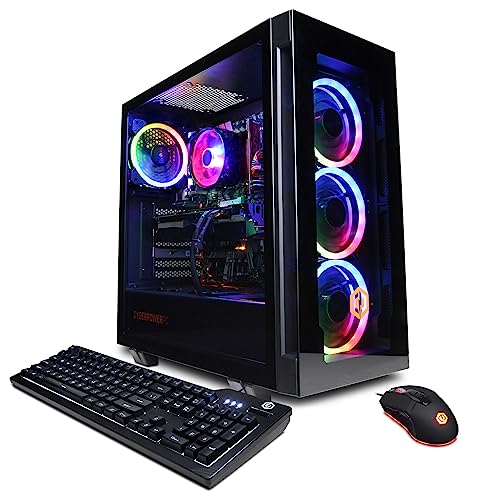
Where to buy
Check the latest price, availability and delivery on Amazon. Orders are placed on Amazon. We may earn a commission from qualifying purchases.
- Best overall high end gaming PC under $1,200: CYBERPOWERPC Gamer Xtreme VR, Intel Core i7-13700F, GeForce RTX 4060 Ti 16GB — Check on Amazon
- Skytech Chronos Gaming PC, AMD Ryzen 7 5700X, GeForce RTX 4070 Ti 12GB — Check on Amazon
- HOENGAGER Gaming PC, Intel Core i7-12700F, GeForce RTX 4070 12GB, 32GB DDR4 — Check on Amazon
- iBUYPOWER Scale Gaming PC, AMD Ryzen 5 7600, GeForce RTX 4060 Ti 8GB — Check on Amazon
See 2 more Amazon options
- Thermaltake LCGS Quartz i1460, Intel Core i5-14400F, GeForce RTX 5060 8GB — Check on Amazon
- CYBERPOWERPC Gamer Master, AMD Ryzen 7 8700F, GeForce RTX 4060 Ti 8GB — Check on Amazon
Read the full guide ↓
Disclosure: As an Amazon Associate, reviewstook.com earns from qualifying purchases. Links to Amazon on this page are affiliate links; they cost you nothing extra. Listing details such as price and availability change often, so check the current Amazon listing before you buy.
“High end” is the most abused phrase in gaming PCs, so this guide starts by defining it honestly. True high end — the tier of the RTX 4070 Super and RTX 5070 Ti systems in our $1,500 and $2,500 guides — means native 1440p at high settings with headroom to spare, and 4K within reach. Twelve hundred dollars does not buy that tier outright. What it buys, for the first time in the price ladder, is the genuine beginning of it: this is the budget where native 1440p stops being a negotiation. Every pick below carries a graphics card from the RTX 4060 Ti class upward, and two of them carry cards from the RTX 4070 family — and for both, the live listing is the only price that counts: check price on Amazon and buy only when it sits within this budget. Below $1,200, in the $700 and $800 guides, 1440p means upscaling compromises and settings turned down. At $1,200, a well-chosen machine renders the full 2560×1440 frame natively in most current games at high settings. That is a real threshold, and it is why this tier, not a cheaper one, is where a “high end” search should start.
The second thing this budget buys is a choice about what kind of almost-high-end you want, because no single machine here has everything. The CyberPowerPC Gamer Xtreme VR pairs the strongest all-round CPU in the guide with the 16GB version of the RTX 4060 Ti — the VRAM headroom that decides how long a PC keeps feeling high end as games grow heavier. The Skytech Chronos, when its price dips into this budget, is the fastest graphics card in this guide outright, an RTX 4070 Ti, on an older platform. The HOENGAGER is the only pick with a plain RTX 4070 and a full 32GB of system memory. The iBUYPOWER Scale and CyberPowerPC Gamer Master sit on AMD’s current AM5 platform, the one with years of CPU upgrades ahead of it. And the Thermaltake Quartz carries the newest graphics generation in the guide, an RTX 5060 with the latest DLSS feature set. Below are the quick picks, detailed reviews of all six, a comparison table, a buying checklist built around VRAM and platform life, an honest account of the gap that still separates this tier from true high end, the mistakes that waste money at $1,200, and the questions buyers ask before spending it.
In this guide
Quick Picks
Short on time, or comparing several options at once? Each row below names a buyer type and the PC that suits it, with a link to the listing.
| Buyer type | Pick | Why it stands out | Link |
|---|---|---|---|
| Best overall | CYBERPOWERPC Gamer Xtreme VR, i7-13700F, RTX 4060 Ti 16GB | 16GB of VRAM plus a 16-core CPU — the headroom pick | Check on Amazon |
| Best graphics card, on deal | Skytech Chronos, Ryzen 7 5700X, RTX 4070 Ti 12GB | A 4070 Ti in this budget tier — check price on Amazon and buy only when it sits within budget | Check on Amazon |
| Best memory configuration | HOENGAGER, i7-12700F, RTX 4070 12GB, 32GB DDR4 | The only RTX 4070 here with 32GB of system RAM fitted | Check on Amazon |
| Best upgrade path | iBUYPOWER Scale, Ryzen 5 7600, RTX 4060 Ti 8GB | Current AM5 platform in this budget tier — check price on Amazon | Check on Amazon |
| Newest graphics generation | Thermaltake LCGS Quartz i1460, i5-14400F, RTX 5060 8GB | Current-generation card with the latest DLSS features | Check on Amazon |
| Best eight-core AM5 value | CYBERPOWERPC Gamer Master, Ryzen 7 8700F, RTX 4060 Ti 8GB | Eight Zen 4 cores on AM5 — check price on Amazon | Check on Amazon |
How These Picks Were Chosen
The budget was applied as a ceiling, not a target: every PC below is a real Amazon listing positioned in this budget tier, and because prices at this tier move between deal events, this guide prints no fixed price for any of them — check price on Amazon on the live listing before you order, and hold a walk-away point rather than a number you should hold us to. Two picks need that discipline stated up front. The Skytech Chronos usually sits in a higher, premium tier: it belongs in this guide only when its live price dips into this budget, and its review says so in plain terms. The HOENGAGER’s listing was verified in full — specifications, configuration, the lot — but no reliable price could be captured for it, so the guide makes no price claim for it at all and instructs you to buy only if the live listing sits at or under $1,200. Anything whose graphics card fell below the RTX 4060 Ti class was excluded, however strong the rest of the build, because below that class native 1440p stops being the honest description of what the machine does.
We did not benchmark these systems ourselves. We read the maker listings and specification pages and compared the things that decide how close a $1,200 PC gets to high end: the graphics card’s tier and, just as importantly, its VRAM capacity; the DLSS generation the card supports; the CPU’s core count and single-thread pace; the platform underneath — whether the socket has future CPUs to upgrade to or is finished; the memory fitted and whether it runs in dual channel; and the power supply’s wattage and rating. Two of those deserve emphasis because they are where this tier is won and lost. The first is VRAM: the RTX 4060 Ti exists in 8GB and 16GB versions that are near-identical in raw speed today, but the 16GB card holds high texture settings at 1440p in the games that already press against 8GB, and that gap widens every year — at this budget, VRAM is a longevity purchase, not a benchmark purchase. The second is platform life: AMD’s AM5 socket, under the Scale and the Gamer Master, is AMD’s current platform with new CPUs still arriving for it, while the AM4 and LGA1700 machines elsewhere in the guide sit on finished sockets whose best upgrade is a card swap. Neither fact makes a machine good or bad today; both decide what it can become.
One more filter sat on top of all of that: honesty about the tier above. A $1,200 guide that pretends the $1,500 tier does not exist serves nobody, so each review names what the step up would add — principally the RTX 4070 Super class of card, with meaningfully more raw performance and the same 12GB of VRAM, and beyond it the RTX 5070 Ti tier at $2,500, where 16GB returns alongside a much faster GPU. If your games, your monitor or your patience point at that tier, the reviews say so and point you there. If they point at $1,200, the six machines below are the ones that spend it on the parts that matter.
The 6 Best High End Gaming PCs Under $1,200
CYBERPOWERPC Gamer Xtreme VR — Intel Core i7-13700F, GeForce RTX 4060 Ti 16GB (GXiVR8040A14)
Who it suits: Buyers who want the most balanced machine at this budget — strong CPU, the VRAM headroom that ages best, and no single weak point to upgrade around.
Start with the graphics card, because the 16GB version of the RTX 4060 Ti is the most quietly important specification in this guide. In raw rendering speed it sits close to its 8GB sibling — the two cards are near-identical until memory runs out — but at 1440p, in the current generation of games with high-resolution texture packs, 8GB is the point where settings start getting negotiated downward, and 16GB is where they stop being negotiated at all. That is the difference between a PC that feels high end for two years and one that feels high end for four. Around the card, CyberPowerPC fits an Intel Core i7-13700F — sixteen cores, eight performance and eight efficiency, the strongest all-round processor in this guide for buyers who also edit video, stream or run heavy background loads — with 16GB of DDR5 memory, a 1TB PCIe Gen4 NVMe SSD, a B760 motherboard, Wi-Fi and Windows 11 Home. The display outputs are a practical plus at this tier: one HDMI and two DisplayPorts, enough for a 1440p main monitor and a second screen without adapters.
On price, the honest instruction is the one the whole category runs on: check price on Amazon and buy it only when the live listing sits at or under $1,200. This model’s pricing moves with deal events and can sit above this guide’s ceiling; when it does, either wait for the next deal event or step to the $1,500 tier, where the extra money buys a genuinely faster card rather than the same machine at a worse price. One specification could not be confirmed from the listing material and is flagged rather than guessed: whether the 16GB of memory is fitted as a single stick or a matched pair. It matters — a single stick runs in single channel and costs real performance in CPU-limited games — so check the live listing’s memory configuration before ordering, and if it is one stick, budget for a second; it is the cheapest meaningful upgrade in this entire guide. When it sits within budget, this is the machine we would buy with our own $1,200: not the fastest card here, but the one with the fewest asterisks over a four-year ownership.
- RTX 4060 Ti in its 16GB form — double the VRAM of most rivals here, and the tier’s best longevity buy.
- i7-13700F: 16 cores, the strongest multitasking and content-creation CPU in the guide.
- 1TB Gen4 NVMe storage and two DisplayPorts plus HDMI for multi-monitor setups.
Honest limitation: Its pricing moves with deal events and can sit above the ceiling, so the live price needs checking first — and its memory stick configuration is unconfirmed, so both the price and the RAM layout need a live check.
Choose it if you want the balanced, longest-lived machine at this budget and can buy when it sits within budget. Skip it if the listing is sitting above the ceiling when you shop — at that point the $1,500 tier is the better spend.

Skytech Chronos Gaming PC — AMD Ryzen 7 5700X, GeForce RTX 4070 Ti 12GB
Who it suits: Patient buyers watching for a deal — the reader who sets a price alert, waits for the dip, and wants the single fastest graphics card this budget has ever touched.
The RTX 4070 Ti is a card from the tier above this one. It is faster than everything else in this guide by a clear margin — a genuine high-end GPU of its generation, with 12GB of GDDR6X memory, the raw pace for native 1440p at high settings in demanding games, and enough headroom to push high-refresh 1440p monitors in lighter titles. Skytech builds it here around a Ryzen 7 5700X eight-core processor, 16GB of DDR4-3200 memory, a 1TB NVMe SSD and a 750W Gold power supply, in the white Chronos case. On graphics performance for the budget when it dips into this tier, nothing else in this guide is close: this is the one pick that does not merely approach the high-end tier but borrows a machine from it. If you catch it at the right moment, the Chronos is the answer to the search that brought you here, full stop.
The moment, however, is the entire catch, and this review will not soften it. This machine usually sits in a higher, premium tier well above this guide, and at that level it does not belong here at all; the $1,500 tier offers newer platforms and the $2,500 tier offers a faster card again. Buy this machine only when the live listing sits within the $1,200 budget, with a price alert set and the willingness to walk away — check price on Amazon, and treat any listing above the ceiling as a different, worse purchase wearing the same name. The platform deserves the same clear eyes: the 5700X sits on AMD’s finished AM4 socket with DDR4 memory, so the CPU upgrade path is closed and a future platform change means a new motherboard and memory too. The 750W Gold supply, at least, has room for a future graphics card. And Skytech’s listings note the graphics card brand may vary — the 4070 Ti model and its 12GB are the contracted specification; the board partner is not. Deal-hunters who accept those terms get the fastest $1,200 gaming PC in this guide. Everyone else should read on.
- RTX 4070 Ti 12GB — the fastest graphics card in this guide by a clear margin, a tier-above GPU.
- 750W Gold power supply leaves real room for a future card upgrade.
- When it dips into this budget, the strongest graphics value anywhere in the $1,200 class — check price on Amazon.
Honest limitation: Its in-budget pricing is an event, not a norm — it usually sits in a higher tier — and the AM4/DDR4 platform underneath the card is finished, with no CPU upgrade path.
Choose it if you can wait for the dip and will buy only when it sits within this budget. Skip it if you are buying today at whatever it costs, or you want a platform you can upgrade for years.

HOENGAGER Gaming PC — Intel Core i7-12700F, GeForce RTX 4070 12GB, 32GB DDR4
Who it suits: Buyers who run more than games — streamers, editors and heavy multitaskers who want a real RTX 4070 and the system memory to feed everything at once.
Two specifications separate this machine from the rest of the guide. The first is the graphics card: a plain GeForce RTX 4070 with 12GB of memory. The 4070 is a step above the 4060 Ti class in raw performance — the difference shows at native 1440p in demanding games, where the 4070 holds high settings with more in reserve — and its 12GB of VRAM sits in the sensible middle of this guide: more headroom than the 8GB cards, less than the 16GB CyberPowerPC. The second is the memory: 32GB of DDR4-3200, double what every other pick here fits as standard. System RAM is the unglamorous specification that decides whether a gaming PC is also a working PC — a stream with browser sources and chat running, a video timeline with a game capture open, a dozen applications behind the game. On 16GB machines those loads are managed; on this one they are simply absorbed. The rest of the build is solid mid-tier hardware: a twelve-core Intel Core i7-12700F (eight performance cores, four efficiency), a 1TB M.2 PCIe SSD, a 240mm liquid cooler, an RGB tempered-glass case, and Windows 11 Pro — the Pro edition being a small genuine plus for buyers who use the PC for work.
Now the discipline this pick demands, stated as plainly as the Chronos review stated its own: we verified this listing’s specifications in full, but no reliable price for it could be captured during research, so this guide makes no price claim for it whatsoever. RTX 4070 systems usually sit in a higher tier, and if the live price is above the ceiling, this machine belongs to the $1,500 conversation, not this one. Buy it only if the listing in front of you is at or under $1,200 — at which point it is arguably the best-configured pick in the guide. The platform caveat mirrors the Chronos: the 12700F sits on Intel’s finished LGA1700 socket with DDR4 memory, so there is no next-generation CPU to drop in later, and the graphics card brand is not specified in the listing material. Judge it as a finished, well-balanced machine bought at the right price, not as a platform to grow. For the buyer who streams or edits alongside gaming and finds it under the ceiling, it is the most complete specification here.
- RTX 4070 12GB — a genuine step above the 4060 Ti class at native 1440p.
- 32GB of system memory as standard — double every other pick in this guide.
- 240mm liquid cooling and Windows 11 Pro fitted, where rivals ship air cooling and Home.
Honest limitation: No verified price could be captured for this listing, so it qualifies only if the live price is at or under $1,200 — and the LGA1700/DDR4 platform is finished, with no CPU upgrade path.
Choose it if the live listing is under the ceiling and you multitask, stream or edit as well as game. Skip it if it is priced into the $1,500 tier, where newer platforms compete for the same money.

iBUYPOWER Scale Gaming PC — AMD Ryzen 5 7600, GeForce RTX 4060 Ti 8GB (SCA5N46T01)
Who it suits: Buyers thinking in years rather than months — anyone who wants today’s competent 1440p machine on the platform that accepts tomorrow’s CPUs.
The Scale’s argument is the socket. Its Ryzen 5 7600 sits on AMD’s AM5 platform, the current AMD standard, with DDR5 memory and a motherboard that will accept future Ryzen generations as they arrive. Every other platform in this guide is finished; this one is mid-life, and for a buyer who keeps a PC five years and upgrades it once, that is the difference between swapping a processor in 2028 and replacing the machine’s core. The rest of the build is honestly mid-tier and none the worse for it: an RTX 4060 Ti with 8GB of graphics memory — the standard card of this tier, a native-1440p performer in most current games with texture settings watched in the heaviest — 16GB of DDR5-5200 memory, a 1TB NVMe SSD, Wi-Fi readiness, Windows 11 Home, a keyboard and mouse in the box, and a one-year manufacturer warranty. The Ryzen 5 7600 itself is a six-core chip whose gaming pace punches at the level of much more expensive processors; in GPU-bound 1440p play it is rarely the limit.
The pricing is this pick’s quiet distinction: it is positioned squarely in this budget tier, rather than straddling the ceiling. No deal-hunting, no walk-away discipline; it is simply in budget whenever you shop — check price on Amazon to confirm the live listing before you order. That reliability buys the room for its one real flaw, which the listing states openly and this review repeats at full size: the 16GB of memory is a single stick, running in single-channel mode, which costs measurable performance in CPU-limited games and is the first thing to fix. A second matching DDR5 stick is the cheapest upgrade in this guide and turns the Scale into the configuration it should have shipped as. Budget for it from day one and the pick is complete: the platform with a future, in this budget tier, with one known and inexpensive homework assignment.
- AM5 platform with DDR5 — the only pick here with a live CPU upgrade path.
- Positioned in this budget tier — check price on Amazon; no deal timing required.
- Keyboard, mouse and a one-year manufacturer warranty included.
Honest limitation: The 16GB of memory is a single stick in single-channel mode — a real, stated performance cost until you add the second stick — and the 8GB graphics card needs texture discipline in the heaviest 1440p games.
Choose it if platform life and in-budget certainty matter more than today’s maximum specification. Skip it if you will never open the case to upgrade — in that case, buy the finished specification instead.

Thermaltake LCGS Quartz i1460 — Intel Core i5-14400F, GeForce RTX 5060 8GB
Who it suits: Buyers who value the newest feature set — the reader who plays the latest releases on day one and wants the current DLSS generation working for them from the start.
Every other graphics card in this guide is from NVIDIA’s 40-series. The Quartz’s RTX 5060 is from the current 50-series generation, and what that buys is not raw speed — in plain rendering terms the 5060 and the 4060 Ti trade blows, with the Ti often ahead — but features: the latest DLSS generation, including multi frame generation in supported titles, which multiplies displayed frame rates by generating additional frames between rendered ones. Used honestly, that feature is a presentation tool: it makes motion look smoother on a high-refresh monitor, and it does not reduce input latency the way genuinely rendered frames do, so competitive players should treat it as polish rather than pace. In supported games, though, it is the one capability in this guide that no 40-series card can be updated to match, and the list of supported titles grows with every major release. Around the card, Thermaltake fits a ten-core Intel Core i5-14400F, 16GB of its own ToughRam DDR4-3600 memory, a 1TB NVMe SSD and a 600W Gold power supply, in a white liquid-cooled showcase build — the best-looking machine in this guide, if the desk view matters.
The pricing has been friendly: it sits comfortably within this budget tier rather than straddling the ceiling — check price on Amazon to confirm the live listing before you order. The compromises are the platform ones, and they are the mirror image of the Scale’s: the 14400F sits on Intel’s finished LGA1700 socket, and the memory is DDR4 on a platform generation that has moved to DDR5, so both the CPU path and the memory standard are end-of-line. The graphics card’s 8GB of VRAM carries the same 1440p texture caveat as the other 8GB picks. None of that prevents the Quartz from being the right buy for its intended reader: someone buying the current generation’s features in this budget tier, who expects to replace rather than upgrade when the machine eventually ages. If your game library is this year’s releases and your monitor is high-refresh, the newest DLSS is a real argument — just buy it knowing exactly which argument you are accepting.
- RTX 5060 — the only current-generation card here, with the latest DLSS including multi frame generation.
- Positioned within this budget tier — check price on Amazon.
- White liquid-cooled showcase build with Thermaltake’s own ToughRam memory.
Honest limitation: Raw rendering pace is roughly 4060 Ti class rather than a step beyond it, the 8GB of VRAM needs texture discipline at 1440p, and the LGA1700/DDR4 platform is finished.
Choose it if you play current releases and want the newest DLSS features working from day one. Skip it if you want maximum raw performance or VRAM per dollar — the 16GB CyberPowerPC spends the same money differently.

CYBERPOWERPC Gamer Master — AMD Ryzen 7 8700F, GeForce RTX 4060 Ti 8GB (GMA2900A)
Who it suits: Buyers who want eight current-generation cores on the upgradeable AMD platform, as the more accessible AM5 pick in this guide.
The Gamer Master is the Scale’s argument with a different balance struck. It shares the two structural virtues — AMD’s AM5 socket with DDR5 memory, so the CPU upgrade path stays open for years — and changes the processor trade: a Ryzen 7 8700F with eight Zen 4 cores against the Scale’s six. For pure gaming at 1440p, where the graphics card does most of the work, the extra two cores rarely show; for the buyer who also compiles, renders, streams or runs a busy desktop behind the game, they are the difference between headroom and contention. The graphics card is the tier standard RTX 4060 Ti with 8GB, the storage a 1TB PCIe Gen4 NVMe SSD, the chipset a B650, with Wi-Fi and Windows 11 Home. It is positioned as the more accessible entry point onto AM5 in this guide — check price on Amazon — which leaves room in a $1,200 budget for the second memory consideration below.
Two caveats, both carried over from the sibling research because both matter. The first is the 8700F itself: the F means no integrated graphics, so the processor cannot drive a display on its own. In daily gaming life that is invisible — the 4060 Ti does the work — but it removes a fallback: if the graphics card ever fails or is removed for sale, the PC has no picture until a card returns, and there is no integrated encoder to lean on for a lightweight stream. Buyers who value that safety net should look at the Scale. The second is model-family drift: CyberPowerPC sells newer variants under similar Gamer Master names with RTX 5060 Ti cards in a higher tier, under different listings. The ASIN linked here is the verified RTX 4060 Ti configuration; confirm on the live listing that the specification in front of you matches — 8700F, 4060 Ti, DDR5 — before ordering, and treat marketplace listings priced far above this budget with the suspicion they have earned. With those checks done, this is the value route onto the platform with a future: eight cores, current socket, tier-standard graphics, and an accessible entry point onto AM5 in this guide.
- Eight Zen 4 cores on AM5 — the strongest multitasking CPU on the upgradeable platform here.
- Accessible AM5 entry point in this budget tier — check price on Amazon.
- DDR5 memory and a B650 board keep the multi-year upgrade path fully open.
Honest limitation: The 8700F has no integrated graphics — no display fallback and no backup encoder — and the model family includes pricier 5060 Ti variants, so the exact configuration must be confirmed on the live listing.
Choose it if you want AM5 with eight cores in this budget tier and accept the no-integrated-graphics trade. Skip it if the display fallback matters to you, or the listing in front of you is a marketplace markup well above this budget.

Comparison Table
| Product | Graphics card | Best use | Link |
|---|---|---|---|
| CYBERPOWERPC Gamer Xtreme VR (GXiVR8040A14) | RTX 4060 Ti 16GB | Balanced power with the VRAM headroom that ages best | Check on Amazon |
| Skytech Chronos | RTX 4070 Ti 12GB | Fastest graphics in the guide — check price on Amazon | Check on Amazon |
| HOENGAGER | RTX 4070 12GB | Real 4070 pace plus 32GB of system memory | Check on Amazon |
| iBUYPOWER Scale (SCA5N46T01) | RTX 4060 Ti 8GB | AM5 upgrade path within this budget tier | Check on Amazon |
| Thermaltake LCGS Quartz i1460 | RTX 5060 8GB | Newest DLSS generation in a showcase build | Check on Amazon |
| CYBERPOWERPC Gamer Master (GMA2900A) | RTX 4060 Ti 8GB | Eight AM5 cores on the upgradeable AM5 platform | Check on Amazon |
How to Choose a High End Gaming PC Under $1,200
- Grade the graphics card first, and its VRAM second. The card decides the tier; the VRAM decides the tier’s lifespan. At 1440p, 16GB (the Gamer Xtreme) outlasts 12GB (the 4070-class picks), which outlasts 8GB — not in today’s frame rates, where raw speed rules, but in how many years of texture settings you keep.
- Define native 1440p before you shop. It means the game renders at 2560×1440 and is displayed at 2560×1440. Upscaling from a lower internal resolution is a legitimate tool — DLSS is excellent — but a machine that needs it everywhere is a 1080p machine with good software. Every pick here renders natively in most current games; that is the tier’s entry ticket.
- Separate raw speed from DLSS generation. The 40-series picks use DLSS 3 with frame generation; the RTX 5060 adds multi frame generation, which smooths presentation without cutting input lag. Buy raw speed for competitive play, features for single-player spectacle — and know which you are buying.
- Decide whether you are buying a machine or a platform. AM5 (Scale, Gamer Master) accepts future CPUs; AM4 and LGA1700 (the rest) are finished. A finished platform with a stronger card today (the Chronos) and a live platform with a standard card are both rational — for different owners.
- Check the memory configuration, not just the capacity. Sixteen gigabytes as two sticks runs dual channel; as one stick — the Scale, as shipped — it leaves performance on the table. The listing states it or it does not; where it does not, as with the Gamer Xtreme, verify before ordering and budget the second stick.
- Hold a walk-away price for every straddling pick. The Chronos inside this budget and the same Chronos in its usual higher tier are different purchases sharing a name. The Gamer Xtreme within budget is this guide’s top pick; above the ceiling it is an argument for the $1,500 tier. Decide your walk-away point before the deal event, not during it.
- Confirm the exact configuration on the live listing. Integrators revise components under the same model name, and families drift — the Gamer Master name now covers pricier 5060 Ti variants on other listings. The contracted facts are the GPU model, its VRAM, the CPU and the memory type; verify all four in the listing in front of you.
- Count the display outputs against your desk. A 1440p main monitor plus a second screen is the standard streaming and working setup; the Gamer Xtreme’s two DisplayPorts plus HDMI covers it without adapters. Check the port list before the machine arrives, not after.
- Leave the monitor in the budget conversation. A $1,200 PC on a 1080p 60Hz screen is half a purchase. If the display is not already a 1440p panel — ideally high-refresh — the honest comparison is a cheaper PC plus the monitor against this tier alone.
What Still Separates $1,200 From True High End
This guide’s picks are graded on their distance to the tier above, so the distance deserves its own honest paragraph. Step to $1,500 and the typical gain is the graphics card class: RTX 4070 Super systems live there, with raw performance a clear step beyond anything in this guide and the same 12GB of VRAM as the 4070-class picks here. That step buys higher settings held more comfortably at native 1440p, more high-refresh headroom, and the beginning of credible 4K with upscaling. Step to $2,500 and the RTX 5070 Ti tier restores 16GB of VRAM alongside a much faster GPU and the current DLSS generation — the first tier where nothing in the specification needs an asterisk, and where 4K stops being a negotiation. Neither step makes the machines in this guide bad. Native 1440p at high settings is where most gaming actually happens, and every pick here does it. What the steps buy is margin: settings you stop thinking about, and years before you start again.
The gap also explains this tier’s two recurring asterisks, because both are places where $1,200 stops short of the tier above. The first is VRAM: only one pick here carries 16GB, and it carries the slowest card of the three memory classes — the market simply does not currently sell a fast card with 16GB at this price, which is precisely the combination the $2,500 tier exists to provide. The second is price stability: the closer a machine gets to high end at $1,200, the more its presence here depends on deal events — a 4070 Ti at its usual pricing is a higher-tier machine, and this guide’s discipline about walk-away prices is not caution for its own sake but the actual mechanism by which this tier works. Buy the tier with open eyes and it is the best-value rung on the ladder. Buy it expecting the rung above, and no review can save the purchase.
Common Buying Mistakes
- Paying the Chronos’s ordinary higher-tier price because a guide listed it under $1,200. The listing belongs here only when its live price dips into this budget and nowhere else; check price on Amazon, not the headline.
- Treating the 8GB and 16GB RTX 4060 Ti as the same card because their names nearly are. The speed is similar today; the 1440p texture headroom is not, and the difference compounds every year.
- Reading multi frame generation as real performance. Generated frames smooth what you see; they do not lower input latency. Competitive players should grade the RTX 5060 on its rendered pace, which is 4060 Ti class.
- Ignoring the memory layout. A single 16GB stick in single-channel mode costs real performance in CPU-limited games; the fix is cheap, but only if you know to make it.
- Buying a Gamer Master variant by name. The family now includes RTX 5060 Ti models above this budget on separate listings — confirm the ASIN and the specification, not the badge.
- Assuming “F” processors drive displays. The 8700F and the Intel F-chips have no integrated graphics; the card does all display work, and there is no fallback if it is removed.
- Spending the whole budget on the tower and keeping a 1080p 60Hz monitor. At that point a cheaper PC and a 1440p screen is the better gaming purchase by a wide margin.
- Confusing a finished platform with a bad one — or a live one with a free upgrade. AM4 and LGA1700 machines here are complete purchases; AM5’s future CPUs will cost money when they arrive. Buy the trade you actually intend to use.
Final Recommendation
- Most buyers at this budget: CYBERPOWERPC Gamer Xtreme VR (RTX 4060 Ti 16GB).
- Deal-watchers who can wait: Skytech Chronos — only when its live price sits within this budget.
- Streamers and multitaskers: HOENGAGER, if the live price is at or under $1,200.
- Upgraders on a steady budget: iBUYPOWER Scale, plus a second memory stick.
- Current-generation features: Thermaltake LCGS Quartz i1460.
- Eight cores on AM5 for less: CYBERPOWERPC Gamer Master.
Our top two at this budget are the Gamer Xtreme VR, for the combination no rival matches — the 16GB card, the sixteen-core CPU and pricing that dips into this budget at deal events — and the iBUYPOWER Scale, for the buyer whose five-year plan matters more than this month’s specification sheet. Between them they cover the tier’s two honest shapes: the most complete finished machine, and the platform with the longest future. The Chronos is the exception that proves the tier’s rule — the fastest card here, available only to buyers patient enough to wait for its price to come to them. Readers whose budget is genuinely firm but smaller should see Best High End Gaming PC Under $1000, and those who conclude from the gap section above that they want the real tier should step directly to Best High End Gaming PC Under $1500. For the wider view of this exact budget, compare Best 1440p Gaming PC Under $1200 and Best Gaming PC Under $1200. Check the live price, confirm the configuration, and hold your walk-away number — at $1,200, that discipline is the difference between the beginning of high end and an expensive approximation of it.
Frequently Asked Questions
Is a $1,200 gaming PC really “high end”?
It is the beginning of high end, and this guide uses the phrase only with that definition attached. Native 1440p at high settings — the practical substance of high-end gaming for most players — starts at this budget and not below it. The full tier, with 4K in reach and no specification asterisks, lives at $1,500 to $2,500. Anyone selling you “high end” at $700 is selling you the words.
Is the 16GB RTX 4060 Ti really better than the 8GB version?
In raw speed today, barely — the two cards perform within a few percent of each other in most games. The difference is memory capacity: at 1440p with high texture settings, a growing list of current games presses against 8GB, and when VRAM runs out the cost is stutter and forced texture reductions, not a graceful slowdown. The 16GB card is a longevity purchase; over a four-year ownership it is the version that keeps its settings.
Should I wait for the Skytech Chronos to drop into this budget?
Only if waiting is genuinely free for you. Its pricing history says the in-budget dip recurs at deal events but is not the machine’s normal state — it usually sits in a higher tier. If you need a PC this month, buy the Gamer Xtreme when it sits within budget or the Scale in this tier. If your current machine still serves and you can set an alert and walk away from every higher price, the Chronos in budget is the best graphics value in this guide.
What does the $1,500 tier add that this one lacks?
Primarily the graphics card class: RTX 4070 Super systems, a clear raw-performance step above this guide’s cards, with 12GB of VRAM. In practice that means native 1440p held at higher settings in the most demanding games, more high-refresh headroom, and the start of credible 4K play with upscaling. If those are your games and your monitor, the step is real; if you play at 1440p on a 60–144Hz screen, this tier already covers you.
AM5 or a stronger card on a finished platform?
It depends on your upgrade habits, stated bluntly. If you have never opened a PC case and never will, buy the strongest finished specification — the Gamer Xtreme or, on deal, the Chronos. If you keep machines for years and upgrade in stages, AM5’s open CPU path (Scale, Gamer Master) is worth more than a small specification deficit today, because the expensive parts — board and DDR5 memory — are already bought.
Can these PCs handle 4K?
With upscaling and adjusted settings, several can produce an enjoyable 4K picture in lighter games — the Chronos’s 4070 Ti most of all. Native 4K at high settings is not what any $1,200 machine is built for, and this guide will not pretend otherwise; that is the $2,500 tier’s home ground. Buy these for 1440p, where they are genuinely strong.
Why does one pick carry no price?
The HOENGAGER’s listing was verified in full — specifications, configuration, memory — but no reliable Amazon price for it could be captured during research, and this guide does not invent prices. It is included because its specification (an RTX 4070 with 32GB of system memory) is exactly what this search asks for; it qualifies only if the live listing you see is at or under $1,200, and the review says so wherever the pick appears.
- Best High End Gaming PC Under $1200
- Best High End Gaming PC Under $1000
- Best High End Gaming PC Under $1500
- Best High End Gaming PC For 1440p Gaming Under $1200
- Best High End Gaming PC For Beginners Under $1200
- Best High End Gaming PC For Streaming Under $1200
- Best High End Gaming PC For Small Spaces Under $1200
- Best Prebuilt Gaming PC Under $1200


