Disclosure: As an Amazon Associate, reviewstook.com earns from qualifying purchases. Links on this page are affiliate links; they cost you nothing extra. Prices and availability change often, so check the current Amazon listing before you buy.
Security Camera vs Video Doorbell: Which One Does Your Home Actually Need?
The security camera vs video doorbell decision sounds simple until you stand in your own driveway and look at what you are actually trying to watch. A video doorbell is a specialist. It lives at eye level by your front door, greets visitors, records deliveries, and lets you answer the door from your phone when you are at work, in the garden, or on holiday. A security camera is a generalist. It can watch a driveway, a side gate, a back garden, a garage, or a hallway, and you can add more of them as your needs grow. Neither device is universally better. The right choice depends on where activity happens at your home, how much effort you want to put into installation, and whether you want a doorstep conversation tool, a wider watch over your property, or, as many households eventually decide, a thoughtful mix of both.
Here is the short verdict. Choose a video doorbell first if your main worries happen at the front door: missed deliveries, parcels left on the step, callers you want to screen, and visitors you want to speak to without opening the door. Choose a security camera first if your main worries are spread out: a car on the driveway, a side path that feels exposed, a back door, or a garden shed. If your front door already has a clear view of the driveway and the street approach, a doorbell can quietly cover more ground than people expect. If your front door sits in a recessed porch or faces a wall, it will watch very little beyond the step, and a well placed camera will tell you far more about what is happening around your home.
Key takeaways
- A video doorbell is a communication device as much as a camera: the doorbell press, the chime, and easy two-way talk are what you are really paying for.
- A security camera gives you freedom of placement, and placement matters more than almost any specification when it comes to useful footage.
- Most break-in and nuisance activity approaches from the street, the driveway, or a side path, so think in terms of approach routes rather than rooms.
- Battery models make starting easy, while wired models remove charging from your life but ask more of you on installation day.
- Storage choices shape the true long term cost and convenience of both device types, so decide how you want to keep clips before you buy hardware.
- Many homes end up happiest with a doorbell at the front door and one camera covering the driveway or back garden, added in stages.
In this guide
How Do the Two Compare at a Glance?
The table below sums up the honest differences between the two categories. It is deliberately written in plain terms, because the gap between these devices is mostly about role and placement rather than raw picture quality. Both can record clear video, both can send motion alerts, and both can let you look in live from an app. Where they separate is in what they are optimised to do all day, every day, without you thinking about them.
| Criteria | Video doorbell | Security camera |
|---|---|---|
| Primary job | Answer and record the front door | Watch a chosen area of your property |
| Typical placement | Beside the front door at about chest to eye height | High corner, eave, wall, or shelf overlooking a zone |
| Visitor interaction | Doorbell press, chime, and two-way talk built around visitors | Two-way talk on many models, but no doorbell function |
| View shape | Tall, doorstep-focused view that favours faces and parcels | Wider landscape view that favours driveways, gardens, and paths |
| Power options | Battery or existing doorbell wiring, sometimes solar add-ons | Battery, plug-in, wired, solar, or powered floodlight models |
| Scaling up | Usually one per entrance that needs a bell | Add cameras zone by zone as budget allows |
| Best first buy when | Deliveries and callers are the main concern | Coverage of the wider property is the main concern |
Read the table as a starting point rather than a scorecard. A doorbell that watches a long driveway from a well positioned front door can outperform a camera mounted in the wrong corner, while a camera pointed at the step can record visitors without ever ringing for them. The sections that follow take each criterion in turn and end with a clear edge verdict.
What Each Device Actually Watches: Field of View and Placement
This is the criterion that decides most real world outcomes, and it is the one shoppers most often skip in favour of resolution numbers. A video doorbell is fixed to one job by design. It mounts beside your front door, and its lens is shaped to capture a tall scene: the visitor standing on the step, the parcel at their feet, and as much of the path or driveway beyond as your door position allows. That tall framing is genuinely useful. Faces are captured at close range and at a natural height, which makes doorbell footage some of the most identifiable footage any home device produces. When someone leans in to press the bell, you get a clear, front-on view that a high mounted camera rarely matches.
The limitation is baked into the same design. The doorbell sees what the front door sees, and nothing else. If your door is set back in a porch, tucked around a corner, or aimed at a fence, the doorbell inherits that restricted view. It cannot watch the side gate where someone might try access, the back door that opens onto an alley, or the garage at the end of the garden. Households sometimes buy a doorbell expecting whole home coverage and then feel disappointed, not because the device is poor, but because they asked a doorstep specialist to do a perimeter job.
A security camera flips the equation. You choose the vantage point. Mounted high on a corner, a camera looks down a driveway, across a garden, or along a side path, and a single unit can supervise a surprisingly large area. If you are comparing options for that wider role, our guide to the best security cameras explains how placement shapes coverage across a whole property. Pan and tilt models go further still, sweeping across a space rather than staring at one slice of it. The trade-off is that a camera mounted high and wide captures scenes rather than portraits. People appear smaller in frame, faces are seen from above, and fine detail at distance depends heavily on zoom quality and lighting.
Think about your home in terms of approach routes. Walk from the street to each door and note what a stranger would pass. If nearly everything of value funnels past the front door, a doorbell covers the critical ground. If your driveway, parking area, or garden sits away from the front door’s line of sight, only a camera can watch it. Renters should also weigh permission: a doorbell replaces or sits beside an existing fitting, while cameras may need screws into exterior walls wherever they are placed.
Edge: Security camera, for coverage flexibility. A doorbell wins the doorstep itself, but a camera can be placed wherever your home actually needs eyes, and that freedom matters more for most properties.
How Do They Compare on Video Quality and Night Vision?
On paper, modern examples of both device types record sharp, detailed video, and in daylight most owners would struggle to declare a dramatic winner. Doorbells increasingly offer high resolution sensors paired with wide-angle lenses designed to keep both a visitor’s face and the ground at the step in frame at once. The representative doorbell profiled later in this guide, the Ring Battery Doorbell 2K, is described by its maker as offering Retinal wide-angle video with up to 6x enhanced zoom, which reflects the direction of the category: capture the whole doorstep scene, then let the owner zoom into the part that matters when reviewing a clip.
Security cameras spread wider in capability. A compact wireless model such as the Blink Outdoor 4 records 1080p HD live view, which is plenty for recognising activity in a garden or driveway at moderate distances. Wired models such as the Tapo C120 step up to 2K+ resolution, and floodlight cameras such as the Ring Floodlight Cam 2K pair a wide-angle Retinal video feed with ultra-bright floodlights, so the scene is lit as well as recorded. If identifying detail at distance is your priority, browsing the best outdoor security cameras category shows how much variation exists between basic and higher resolution outdoor models.
Night changes the picture, sometimes literally. Doorbells typically rely on infrared night vision, producing clear black and white footage of the step and the path immediately beyond. That is usually enough, because the doorbell’s world is small and close. Cameras face bigger night challenges: a whole driveway or garden in darkness. Here the models diverge. Infrared models see in monochrome and can wash out faces that come too close to the lens. Colour night vision models use available ambient light or a built-in light to keep colour information, which helps enormously when describing clothing or a vehicle. The WYZE Cam Pan v3, for example, is built around vibrant colour night vision, and floodlight cameras simply bring their own daylight, startling intruders and producing full colour footage at useful distances.
The practical advice is to match the night solution to the size of the scene. For a doorstep and a short path, a doorbell’s infrared view is honest and effective. For a long driveway, a wide garden, or an unlit side path, choose a camera with colour night vision or its own lighting, and position it so its light or sensor covers the approach rather than a blank wall.
Edge: Security camera, narrowly. Doorbells are excellent at close range day and night, but cameras offer the stronger night tools, including colour night vision and floodlight models, for larger and darker areas.
Which Is Smarter About Motion Detection and Alerts?
Both device types watch for movement and send alerts to your phone, but they think about motion differently, and the difference shows up in how many useless notifications you receive. A video doorbell lives in a busy spot. Every passer-by on the pavement, every neighbour walking a dog, and every delivery van slowing down can fall inside its view. Good doorbells therefore invest heavily in sorting: motion zones you draw yourself, sensitivity controls, and person detection that tries to alert you about people rather than swaying branches. When it works well, the experience is calm. Your phone buzzes for a caller, a parcel, or someone lingering on the step, and stays quiet the rest of the day.
Security cameras face the same challenge across bigger scenes, and the better models answer it with smarter classification. The Tapo C120, to take one profiled example, offers person, pet, and vehicle detection, which lets a driveway camera tell you a car has arrived while ignoring the cat that crosses the lawn an hour later. That kind of sorting is the difference between a camera you trust and a camera you mute. If you are researching always-recording wired setups, the roundup of the best PoE security cameras covers systems built for continuous watching rather than event clips, and the guide to the best NVR security camera systems explains how recorder-based systems handle alerts across many cameras at once.
There is also a difference in what triggers a useful alert. A doorbell has a secret weapon no camera can copy: the button. A press is an unambiguous signal that a person is at your door wanting attention, and it can trigger a chime indoors, an alert on your phone, and a prompt to talk, all at once. Cameras only have motion and intelligence. They are very good at telling you something moved, and increasingly good at telling you what it was, but they cannot tell you that someone is politely waiting for you to answer.
Alert fatigue is the hidden risk with both. A badly tuned device that pings forty times a day trains its owner to ignore it, which quietly defeats the purpose of owning it. Whichever type you choose, plan to spend the first week adjusting zones and sensitivity. Block out the public pavement where you can, aim alerts at people and vehicles rather than all motion, and accept slightly fewer alerts in exchange for alerts you actually read.
Edge: Video doorbell, for visitor alerts, because the button press is the clearest signal in home security. For area monitoring across a property, camera detection and classification are stronger, but for knowing someone is at your door, the doorbell is unmatched.
What About Power and Installation?
Installation day is where these two categories feel most different in your hands. A battery video doorbell is one of the easiest home upgrades there is. Charge it, fit the bracket beside the door with a couple of screws, clip the doorbell in, and connect it to your Wi-Fi and app. Most owners are done in well under an hour, and renters often prefer this route because removal leaves little trace. The ongoing cost of that convenience is charging. Depending on traffic and settings, a battery doorbell needs periodic removal and recharging, and a busy front door shortens the interval. Wired doorbells avoid charging entirely by drawing power from existing doorbell wiring, and if your home already has a working wired bell, the swap is straightforward. Our guide to the best wired video doorbells walks through what that wiring involves and who it suits.
Security cameras span the full range from trivial to genuinely involved. A wireless camera such as the Blink Outdoor 4 is built around convenience, with a two-year battery life from its included setup that makes fit-and-forget placement realistic even at the far end of a garden. At the other end, a wired floodlight camera such as the Ring Floodlight Cam 2K needs a proper electrical connection where an exterior light already exists or where an electrician adds one, and that is a half-day project rather than a coffee-break task. Between those poles sit plug-in cameras such as the Tapo C120 and the WYZE Cam Pan v3, which need a nearby socket and a tidy cable run but no battery management at all. Pan and tilt models add one more consideration: they need a position where their moving view is not blocked by the very wall they are mounted on, a point covered in our look at the best pan tilt security cameras.
Wi-Fi reach quietly governs both categories. A doorbell sits just outside your front wall, usually within comfortable range of the router. A camera at the bottom of a long garden may not be, and weak signal means delayed live view and missed uploads. Before choosing camera positions, stand in each spot with your phone and check the signal honestly. Extenders, mesh systems, or a sync module placed sensibly can rescue a marginal position, but it is better to know before the ladder comes out.
Weather exposure differs too. Doorbells live a sheltered life under porches and eaves. Cameras often sit fully exposed, so look for proper outdoor construction and a sensible mounting that sheds water away from the lens and cable entry points.
Edge: Video doorbell, for most households. A battery doorbell is the simplest install in the category, while cameras range from equally easy battery models to wired floodlight projects that may need an electrician.
How Do Storage and Subscription Costs Really Differ?
This section contains no prices, deliberately, because plans and bundles change and the honest differences between these devices are structural rather than numerical. Both doorbells and cameras record clips when motion occurs, and both need somewhere for those clips to live. The two broad answers are cloud storage, where clips are kept online by the manufacturer and viewed in the app, and local storage, where clips are saved on a memory card or a home recorder that you own.
Video doorbells lean heavily toward the cloud model. Many doorbells record event clips that are only kept, and in some cases only fully usable, while an optional subscription plan is active. Without a plan, you may still get live view and real time alerts, but the ability to look back at yesterday’s visitor can be limited or absent. Owners should therefore treat the plan as part of the product rather than an afterthought: the doorbell experience you see demonstrated usually assumes the plan is running. That is not a criticism, because cloud storage brings real benefits. Clips survive even if the doorbell itself is stolen, reviewing footage from anywhere is effortless, and smarter alert features are often bundled into the same plan.
Security cameras give you more choice. Many models, including the Tapo C120 profiled in this guide, offer subscription-free local storage on a memory card alongside an optional cloud service, so you can keep recordings at home and skip a plan entirely if you prefer. If you go the card route, our guide to the best micro SD cards for security cameras explains card endurance and capacity in plain terms, and for multi-camera wired systems the overview of the best surveillance hard drives covers drives built for round-the-clock recording. Local storage flips the trade-offs: no ongoing plan is needed and your footage stays in the house, but the card or recorder is on site, fills up over time, and asks a little more of you when you want to review or save something important.
Some battery camera ecosystems sit between the two worlds, offering a sync module that stores clips locally as an alternative to a cloud plan. The Blink Outdoor 4 system, which includes a Sync Module Core, reflects that modular approach.
The decision to make before buying is simple to state and easy to skip: do you want to pay a modest ongoing amount for effortless cloud history and bundled smart features, or do you prefer to own your storage and manage it yourself? Neither answer is wrong, but buying a cloud-first doorbell while expecting free local recording, or buying a card-based camera while expecting polished cloud history, leads to the most common disappointments in this whole category.
Edge: Security camera, for choice. Cameras more often let you pick between local storage with no required plan and optional cloud services, while doorbells more often assume a plan for full recording history.
Which Works Better With Smart Home Integration and Apps?
Both device types live inside apps, and for most owners the app is the product they actually touch every day. Doorbell apps are built around a single, focused routine: an alert arrives, you tap it, you see the visitor, and you talk or dismiss. The best of them are fast, because a slow doorbell app is a doorbell you stop answering. Doorbells also integrate naturally with smart displays and speakers, so a press can show the doorstep on a screen in the kitchen or announce a visitor through the house. If your home already runs on a particular assistant ecosystem, choosing the doorbell from that same family keeps setup painless and routines simple.
Camera apps have a harder job. They may need to present several cameras, a timeline of events across a property, live views, recorded clips, and settings for detection, lighting, and recording schedules. Good camera apps make a multi-camera home feel calm and searchable. Weaker ones bury the clip you need under menus. When you compare camera systems, spend as much time judging the app experience as the hardware, because you will open that app far more often than you will touch the camera itself.
Ecosystem loyalty matters more with cameras than with doorbells, simply because of numbers. One doorbell from a different brand is a minor inconvenience. Four cameras split across two brands means two apps, two alert styles, and possibly two plans, and that friction adds up daily. Many owners sensibly pick a camera family and grow within it, adding a floodlight model for the driveway and a pan and tilt model for the garden while keeping one app and one set of rules. The profiles later in this guide reflect that pattern: the Ring doorbell and Ring floodlight camera share an ecosystem, while Tapo, Blink, and WYZE each anchor their own.
Automation is where cameras pull ahead for enthusiasts. Motion from a camera can trigger lights, routines, and notifications in ways that suit a whole property, and a floodlight camera is itself an automation: detection and bright light in one fitting. Doorbells trigger useful routines too, announcing visitors and lighting the porch, but their stage is the front step rather than the whole home.
Edge: A draw, leaning security camera for larger setups. A single doorbell integrates beautifully and simply, but cameras offer broader automation across a property, provided you keep them within one ecosystem and one app.
What About Privacy and Reliability?
Any device that records outside your home records a little of your neighbours’ lives too, and both categories ask you to be a decent citizen as well as a protected one. A doorbell points at the street by nature. Its view usually includes the pavement, part of the road, and sometimes a neighbour’s frontage. Privacy zones, which black out areas the device should not record, and carefully drawn motion zones help keep recording focused on your own property. Aim the doorbell at your step and path, avoid capturing a neighbour’s windows or garden in detail, and remember that audio recording carries its own sensitivities, since a doorstep microphone can pick up conversations well beyond your boundary.
Cameras offer more aiming freedom, which cuts both ways. You can angle a camera tightly onto your driveway and away from everyone else, which is the privacy-friendly outcome. You can also, carelessly, end up recording a neighbour’s patio in high detail. The rule of thumb is to record what you need to protect your own home and no more, to tell household members and regular visitors that recording is in place, and to check the guidance that applies where you live, since rules about cameras overlooking public or neighbouring spaces vary by place.
Reliability separates the devices in quieter ways. A doorbell has one job at one fixed post, and a wired doorbell in particular is a model of stability: constant power, constant connection, no charging gaps. Battery doorbells introduce a small but real failure mode, the flat battery during a busy week, and their wireless link must cross the front wall reliably. Cameras multiply both the strengths and the risks. A wired or plug-in camera on a stable connection records tirelessly, while a far-flung battery camera depends on signal strength, battery state, and weather. Floodlight and wired models need sound electrical work, and any camera mounted in full weather depends on seals and fixings staying sound year after year.
Neither device should be treated as a guarantee of anything. They record, alert, and deter, and they help you understand what happened and respond sooner. They work best alongside the unglamorous basics: solid locks, working exterior lighting, and doors and windows that are actually closed and secured at night. A camera that documents a problem clearly is valuable, but a home that makes the problem difficult in the first place is better still.
Finally, protect access to the footage itself. Use a strong, unique password and two-step verification, keep software updated, give family members their own logins rather than sharing yours, and remove access when circumstances change.
Edge: Video doorbell, slightly, for simplicity. One fixed device with privacy zones is easier to run responsibly and reliably than several cameras, though a well aimed camera setup can be just as considerate and far more capable.
What Are the Strengths and Trade-Offs of Each Side?
After the head-to-head criteria, it helps to step back and look at each side whole. The lists below are deliberately balanced. Every strength here is real, and so is every trade-off, and your job as a buyer is to decide which trade-offs you mind least.
Video doorbell: strengths
- It answers the door for you, combining a bell, a chime, a camera, and two-way talk in one device that visitors instantly understand.
- It captures faces at close range and natural height, producing some of the clearest identifying footage available from any home device.
- Battery models are quick and tidy to install, and the device earns its keep daily through deliveries and callers, not just rare incidents.
Video doorbell: trade-offs
- It only watches what the front door faces, so side gates, back doors, and detached garages stay out of view.
- Full recording history often depends on an ongoing plan, which makes the true long term cost higher than the box suggests.
- Battery models need periodic charging, and a busy doorstep with heavy motion can shorten the time between charges.
Security camera: strengths
- Placement freedom means one camera can supervise a driveway, garden, or side path, and extra cameras can be added zone by zone.
- The range of types is wide, from long life battery models to plug-in pan and tilt cameras to wired floodlight models that light the scene.
- Local storage is commonly available, so you can keep recordings at home without a required plan if that is your preference.
Security camera: trade-offs
- A camera cannot ring a bell or announce a visitor, so it is a weaker tool for the everyday business of callers and deliveries.
- High, wide mounting captures scenes rather than faces, and detail at distance depends on lighting, zoom, and careful positioning.
- Installation effort varies enormously, and wired models in particular can turn a simple purchase into a proper project.
Notice how the strengths mirror each other. The doorbell’s focus is its power and its limit; the camera’s flexibility is its power and its complexity. Regret usually comes from a mismatch: a doorbell bought for perimeter coverage, or a camera bought to handle the front door’s social job.
Who Should Choose Each Option, and Who Should Skip It?
Choose a video doorbell first if your front door is the centre of the action. Households that receive frequent deliveries, live in homes where the doorbell cannot be heard from the garden or an upstairs office, or want to screen callers before deciding whether to answer will use a doorbell every single day. It also suits anyone who wants a single, simple device that a partner, teenager, or visiting relative can understand without a tutorial. If your driveway and street approach pass directly in front of the door, the doorbell quietly doubles as a front-of-house camera as well.
Skip the doorbell as your only device if the areas you worry about sit away from the front door. A home with a side gate used for access, a back door opening onto an alley, a detached garage, or a driveway that parks cars out of the door’s sightline will leave its real risks unwatched. Likewise, if you dislike the idea of an ongoing plan for recording history, read the storage section again before committing, because the doorbell category leans that way.
Choose a security camera first if your concern is an area rather than an entrance. Driveway parking, a garden with sheds and equipment, a side path that feels exposed, or a rear entrance all argue for a camera you can aim at the problem. Cameras also suit patient builders: owners who want to start with one zone this month and add coverage later, inside one app and one ecosystem. If local storage without a required plan matters to you, cameras give you the clearest path to it.
Skip a camera as your only device if your real frustration is the front door itself. If missed parcels, unanswered callers, and not knowing who knocked are the daily irritations, a camera will record those moments without solving them, because nobody presses a camera to announce themselves. Households that want the least possible maintenance should also think carefully about multi-camera setups, since every added device is another battery, lens, and set of settings to look after.
Many readers will recognise themselves in both descriptions, and that is normal. The staged approach works well: start with the device that solves your most frequent problem, live with it for a month, and let real alerts, rather than imagined ones, tell you what to add next.
How Do You Decide? A Simple Branching Guide
Work through the questions below in order. Each answer narrows the choice, and by the end most households have a clear first purchase and a sensible second step.
Where does the activity you care about happen? If it is callers, deliveries, and visitors, start with a doorbell. If it is vehicles, gardens, gates, or rear access, start with a camera. If it is genuinely both, start with whichever happens more often each week.
What can your front door actually see? Stand at the door and look. A clear view down the path and across the driveway means a doorbell covers valuable ground. A porch wall, a corner, or a hedge in the way means it does not, and a camera takes the lead.
How do you feel about installation? If you want the job done today with basic tools, choose a battery doorbell or a battery camera. If you have existing doorbell wiring, a wired doorbell removes charging forever. If you have an exterior light position where you want coverage, a wired floodlight camera becomes practical; without one, budget for proper electrical help.
How do you want to keep recordings? If effortless cloud history and bundled smart alerts appeal to you, a plan-based doorbell or camera will feel painless. If you prefer to own your storage, look at cameras with memory card recording or a local hub, and accept a little more hands-on management.
Which ecosystem already runs your home? If your speakers, displays, and assistant come from one family, staying in that family makes alerts, announcements, and routines smoother for both device types. Consistency beats novelty here.
What will you add later? If a second and third device are likely, choose the first one as the foundation of a system. A doorbell and camera from the same ecosystem share one app and one set of alert rules, which you will appreciate every day.
If you still feel torn after those questions, your home probably needs both, in sequence. Buy the doorbell first if deliveries and callers dominate your week. Buy the camera first if an unwatched area genuinely worries you at night, because peace of mind about a real exposed spot outranks convenience at the door.
Where to Buy: Representative Models for Each Side
The models below are verified representatives of each side of this comparison, chosen to show the range of forms each category takes. Check price on Amazon for each one, and read the current listing carefully for the exact configuration, since several of these products are sold in different bundles and system sizes.
The doorbell side
Ring Battery Doorbell 2K
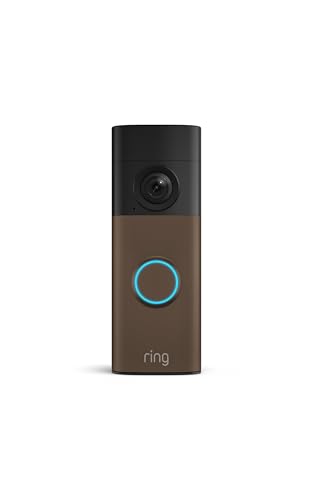
This is the doorbell representative for this comparison, and it shows what the category does best. It is a battery model with a built-in battery, so installation follows the simple bracket-and-clip route described earlier, with no doorbell wiring required. Its maker describes Retinal wide-angle video with up to 6x enhanced zoom, a combination aimed squarely at the doorstep job: take in the visitor and the parcel at their feet together, then zoom into the detail that matters when you review the clip. Two-way talk is built in, so answering a courier from your phone is a normal part of its day. Best for: households that want the full doorbell experience with the easiest possible install. Not suited for: homes that want to watch areas beyond the front door’s line of sight, where a camera should lead instead. Check price on Amazon.
The camera side

Blink Outdoor 4
The Blink Outdoor 4 represents the fit-and-forget end of the camera world. It is a wireless smart security camera with a two-year battery life, which makes it realistic to place at the far end of a garden or on an outbuilding where no power runs. It offers 1080p HD day and infrared night live view and two-way talk, and the system includes the Sync Module Core that anchors it indoors. Its footage is about dependable coverage of an area rather than fine detail at long range. Best for: wide, low fuss coverage of gardens, yards, and side areas where running power is impractical. Not suited for: owners who want the sharpest possible detail for identifying faces or plates at distance. Check price on Amazon.

Ring Floodlight Cam 2K
The Ring Floodlight Cam 2K is the heavyweight camera option here, a wired model that combines a camera with ultra-bright floodlights. Its maker describes wide-angle Retinal video with 6x enhanced zoom, and the floodlights change the night equation completely, lighting the scene so footage is recorded in colour and the area itself feels occupied. Because it is wired, it belongs where an exterior light fitting already exists or where proper electrical installation is planned. It also shares an ecosystem with the Ring doorbell above, which makes it a natural second step for Ring households. Best for: driveways and larger front or rear areas that need light as much as recording. Not suited for: renters or anyone who cannot arrange wired electrical installation. Check price on Amazon.

WYZE Cam Pan v3
The WYZE Cam Pan v3 shows the value of movement. It is an indoor and outdoor security camera with 360 degree pan, tilt, and zoom, a 360 degree pan scan, vibrant colour night vision, two-way audio, and an IP65 build for outdoor use. Instead of staring at one fixed slice of a room or garden, it can sweep the space and follow activity across it, which makes a single unit cover ground that might otherwise need two fixed cameras. As a plug-in model it needs a socket within cable reach. Best for: covering a whole room, patio, or garden area from one position, indoors or out. Not suited for: positions with no nearby power, or owners who prefer a completely fixed, set-and-forget view. Check price on Amazon.

Tapo C120
The Tapo C120 represents the wired, storage-flexible camera. It is a 2K+ indoor and outdoor wired security camera with person, pet, and vehicle detection, colour night vision, and a choice of subscription-free local storage or cloud recording. That storage choice is its headline act: it is the clearest example in this guide of a camera that does not assume a plan. The detection categories make its alerts more useful on a driveway, where telling a vehicle from a pet saves real attention. Best for: owners who want sharper footage and local storage without a required plan, and who have power near the mounting point. Not suited for: spots far from any socket, where a long battery camera is the practical answer. Check price on Amazon.
What Is the Final Recommendation by Use Case?
For delivery-heavy households: start with the video doorbell. Parcels, couriers, and callers are its home turf, and the ability to speak to a driver and watch a parcel until you get home solves a daily problem rather than a rare one. Add a camera later only if the driveway or side path still feels unwatched.
For driveway and vehicle watch: start with a security camera, and lean toward a floodlight model if the area is dark. A doorbell pointed the wrong way will not watch your car, while a well placed camera with light will watch it all night and make the area less inviting to approach.
For renters and first-time buyers: start with a battery doorbell or a battery camera, whichever matches your main concern. Both install with minimal fixing, both can move with you, and living with one for a month teaches you more about your home’s real patterns than any amount of research.
For larger homes and keen smart home owners: plan for both from the start, inside one ecosystem. A doorbell at the front door, a floodlight camera over the driveway, and a pan and tilt or local-storage camera for the rear covers the approach routes that matter, all in one app with one set of alert rules.
Whichever side you choose first, judge it after a week of real alerts rather than on unboxing day. Tune the motion zones, set the sensitivity so the alerts stay meaningful, and check the night footage once from the area you most care about. A device you have tuned properly will quietly earn your trust, and that trust, not any single specification, is what home security actually feels like.
Frequently Asked Questions
Can a security camera replace a video doorbell entirely?
For recording, mostly yes; for answering the door, no. A camera aimed at the front step will record visitors and deliveries and can offer two-way talk, so you will see what happened. What it cannot do is ring. There is no button for a visitor to press, no chime to tell you someone is waiting, and no tidy alert that means a person wants your attention rather than simply passed by. If callers and couriers matter, the doorbell function itself is the feature worth having.
Do I need both a doorbell and a camera?
Many homes benefit from both, but rarely on the same day. Start with the device that matches your most frequent problem, deliveries and callers for a doorbell, or an unwatched driveway, gate, or garden for a camera. Live with it for a few weeks and watch the alerts. If the same blind spot keeps appearing in your thinking, that is your second device. Buying in stages keeps costs sensible, keeps one app and ecosystem, and means every device you own was bought to solve a problem you actually have.
Which is better for watching parcels and deliveries?
The video doorbell, and it is not especially close. A doorbell watches the exact spot where parcels are left, records the delivery as it happens, sends an alert while the driver is still there, and lets you speak to them if an instruction would help. Its tall view is designed to include the ground at the step, which is precisely where packages sit. A camera can watch a porch too, but it lacks the doorbell press and the delivery-focused routine that makes the doorbell feel purpose built for this job.
What happens to recordings if the internet goes down?
It depends on the storage model. Cloud-based recording needs a working connection to upload clips, so an outage can leave gaps in event history even though the device itself still has power. Cameras recording to a local memory card or a home hub can often keep saving through an outage and show you the footage once you are back on the local network. Live view and phone alerts need the internet either way. If outages are common where you live, local storage is a genuine practical advantage worth weighing.
Are battery or wired models more reliable?
Wired models have the simpler reliability story: constant power, no charging routine, and no gaps while a battery is on the charger. Battery models have become genuinely dependable, and long life designs can run for many months or, in the case of the camera profiled in this guide, far longer between charges, but they still depend on you noticing low battery warnings. If a device guards your only entrance and you know you will forget charging, wired is the safer temperament match. If placement flexibility matters more, battery is a fair trade.
Will a doorbell or camera put off intruders on its own?
A visible device can make a casual opportunist think twice, and a floodlight camera adds light, which changes how exposed an approach feels at night. But no camera or doorbell physically stops anyone, and none should be treated as a promise of safety. Their real value is awareness: an alert while something is happening, clear footage afterwards, and the ability to check your home from anywhere. Pair them with solid locks, secured windows, and decent exterior lighting, and treat the technology as one layer in a sensible overall setup.
Related Guides
Once you know which side fits your home, compare models within that category and plan storage properly, keeping this framework in mind: placement first, power second, storage third, and specifications last. The best first device is the one aimed at the problem your home actually has.