Disclosure: As an Amazon Associate, reviewstook.com earns from qualifying purchases. Links on this page are affiliate links; they cost you nothing extra. Prices and availability change often, so check the current Amazon listing before you buy.
Every nursery purchase involves a trade, and baby security camera pros and cons are worth laying out plainly before you spend anything, because the same feature that delights one family genuinely bothers another. A live video feed of the crib can mean deeper sleep for a parent in the next room — or a glowing screen checked forty times a night. This article works through baby security camera pros and cons honestly: the real advantages, the real drawbacks, and how the balance shifts depending on your home, your baby, and your temperament.
The short verdict: a baby security camera is worth it for most families who want to check a noise without opening the nursery door, and it is least worth it for parents who know a live feed will feed their anxiety rather than settle it. Either way, one boundary never moves. A camera is a monitoring convenience, not a safety or medical device. It cannot prevent SIDS or any other harm. Safety comes from safe sleep — baby on their back, bare crib, firm flat mattress — and no feature list in this article changes that.
Key Takeaways
- The biggest pro is information: seeing a stirring baby lets you wait instead of rushing in, and waiting protects everyone’s sleep.
- The biggest con is the flip side of that information: a feed that invites constant checking and turns normal baby noises into events.
- Wi-Fi models add remote access and smart features; they also add network dependence, accounts, and often subscriptions.
- Non-Wi-Fi models remove the privacy and reliability worries but cannot be viewed from outside the home.
- Most cons are manageable with the right model choice, placement, and alert settings — the wrong model choice is the one mistake that is genuinely hard to fix later.
- A camera observes; it does not protect. Safe sleep does the protecting, every single night, without exception or substitute.
In this guide
The Pros
You Can Check Without Waking
The core advantage, and the reason these cameras outsell audio monitors, is the silent check. Babies are noisy sleepers. They grunt, rustle, cry out briefly between sleep cycles, and settle again — and a parent listening to audio alone cannot tell a resettling baby from a waking one. So the parent goes in, the door creaks, the light spills, and a baby who would have slept is now fully awake and so is everyone else. A camera breaks that cycle. One glance shows a baby stirring in their sleep, face clear, position fine, and the parent stays put. Multiplied across months of nights, those avoided wake-ups are the single largest quality-of-life gain the product offers, and parents consistently describe it as the feature they would not give back.
You Can Be Anywhere in the House — or Away From It
An app-based camera like the Nanit Pro or the Owlet Cam turns any phone into the nursery screen: the garden, the home office, the kitchen, a partner’s workplace across town. That freedom changes the texture of an evening. Instead of hovering within earshot of the nursery door, parents cook, work, exercise, and sit outside while the baby sleeps, with the feed a glance away. For parents returning to work, the lunchtime check-in is a small, real comfort. Hybrid and parent-unit systems give the in-home version of the same freedom — the VTech VM901’s screen works on the sofa and in the garden within its range — while closed systems like the Infant Optics DXR-8 Pro deliberately trade the away-from-home part away, which is a con for some families and, as we will see, a pro for others.
Alerts Come to You
An audio monitor requires you to be listening; a camera system watches on your behalf. Sound and motion alerts push to your phone or sound on the parent unit when the nursery gets loud or active, and the better systems tune those alerts so a cry stands out from background noise. Cry detection on the premium app-based models goes a step further, attempting to label the event rather than merely report noise. Used well, alerts invert the parent’s job: instead of monitoring a feed, you live your evening and let the system interrupt you when it matters. Temperature alerts on models that offer them add a quieter service, flagging a nursery that has drifted too warm or too cool while you are downstairs.
Two-Way Talk and Soothing From the Next Room
Many babies settle for a parent’s voice, and two-way talk lets you test that without a trip down the hall: a few calm words through the camera’s speaker, and a stirring baby sometimes drifts back to sleep. Some cameras add built-in lullabies and white noise, which can cover household sounds that might otherwise wake a light sleeper. The honest caveat belongs in the cons section — some babies wind up rather than down when a disembodied voice appears — but when it works, it works at the exact moment parents are most desperate for it to work: the almost-asleep baby at the edge of a wake-up.
A Record of the Night
App-based systems that save clips or summarise the night give parents something no audio monitor could: evidence. When did she actually fall asleep? How long was that wake-up, really — it felt like an hour? Is the new bedtime routine working? Sleep summaries on systems like the Nanit turn those questions from exhausted guesswork into something approaching data, which helps parents adjust routines and helps them give a pediatrician a clearer picture of sleep patterns at check-ups. Recorded clips also catch the moments nobody wants to miss — the first time a baby rolls, stands in the crib, or talks to themselves at dawn. Treat all of it as convenience information rather than health measurement, and it is a genuine, durable plus.
It Grows With Your Child
A crib camera is not a single-stage purchase. The same unit that watches a newborn later watches a toddler in a bed — is he asleep or reading, is she in bed or building a tower — and later still serves as a playroom camera or a general indoor camera for a pet or a front room. Pan-and-tilt models like the TP-Link Tapo C210 make that second career especially easy. Spread across years of use, the cost per night of a good camera becomes trivially small, which is part of why the value question, explored in is a baby security camera worth it, so often resolves in the camera’s favour.
Peace of Mind for Other Caregivers
Grandparents and babysitters benefit as much as parents. A sitter with a parent unit or app access can check a sleeping baby without risking a wake-up, and can show a worried parent a live, calm crib instead of describing one. For a grandparent providing regular care, being handed a simple screen — the Infant Optics and VTech parent units excel here — is far kinder than being handed an app login. The shared visibility lowers everyone’s stress, including, indirectly, the baby’s.
The Cons
The Checking Habit Is Real
The most honest con is psychological. A live feed invites looking, and looking invites looking again. Parents who expected reassurance sometimes find the opposite: every stir becomes a small decision, every quiet stretch a reason to open the app and confirm breathing-adjacent stillness, every alert a spike of adrenaline at a baby who was merely dreaming loudly. Sleep tracking can feed the same loop, turning a rough night into a scored failure by morning. None of this is the camera’s fault, exactly, but it is a predictable effect of putting a nursery window in your pocket. Parents who know they are anxious checkers should weigh a screen-based system they can set down — or even an audio-first setup — and our baby security camera buying guide discusses matching the system to the temperament, not just the house.
Wi-Fi Models Depend on Your Network and Their Cloud
An app-based camera is a chain: camera, router, broadband, provider’s servers, phone. Any link can fail, and the failures cluster at bad times. A router that reboots for a firmware update at midnight takes the Nanit or Owlet feed with it; a provider outage darkens every camera on that platform at once; a weak signal in a back-bedroom nursery produces the stuttering, freezing feed that parents describe with feeling. Parent-unit systems sidestep most of this — the DXR-8 Pro does not know what a router is — and hybrids keep a local screen alive when the internet dies. But the pure app-based design carries this dependency permanently, and no software update removes it.
The Subscription Creep
The camera you buy is not always the camera you keep. On premium app-based systems, the features that headline the box — extended video history, detailed sleep insights, richer alerts — commonly sit behind a paid plan once an included trial ends. The hardware price is the entry fee; the plan is the rent. Over two or three years, and especially across two cameras, the rent becomes a real line item that the sticker never mentioned. Closed systems and local-recording cameras like the Tapo C210 avoid this entirely, which is a structural advantage, not a small one. Before buying any connected camera, list the features you actually intend to use in year two and check which side of the paywall each one lives on.
Privacy and Security Exposure
A connected camera in a bedroom is a device that sees and hears your family’s most private room, streams it through a company’s servers, and stores clips in an account protected by a password. The reputable brands invest seriously in security, and the practical risk with a strong unique password and two-factor authentication is low — but it is not zero, and it is categorically different from the risk of a closed system, where the feed never leaves the house and there is no account to attack. There is also the softer privacy question inside the family: the camera hears adult conversations near the nursery, older siblings grow up in its view, and guests are rarely told it is there. None of this need be disqualifying, but it deserves a deliberate decision rather than a default, and it is the strongest single argument for the non-Wi-Fi design.
False Alerts and Alert Fatigue
A monitor that cries wolf trains its owner to ignore it, and badly tuned motion and sound detection cries wolf constantly: the white-noise machine’s swell, a car passing, a parent walking past the nursery door, the family cat conducting its own surveillance. The result is alert fatigue — notifications muted, sensitivity buried, and the one alert that mattered arriving silently. Better systems mitigate this with adjustable sensitivity and smarter detection, and placement helps, as how to install baby security camera explains. But out of the box, most cameras alert too much, and taming them is an evening’s work that belongs in the honest cost column.
Two-Way Talk Can Backfire
The soothing voice from the wall works beautifully on some babies and disastrously on others. A baby who hears a parent but cannot see or be picked up by them may escalate from stirring to full protest, and a toddler may treat the speaker as a communication channel — calling back, requesting services, negotiating. Parents learn their child’s response within a few tries, and for a substantial minority the feature simply goes unused after the first week. It is a minor con, but it illustrates a wider truth: several headline features sound universal and prove personal.
It Is One More Device to Manage
Cameras need firmware updates, apps need accounts, passwords need remembering, and feeds occasionally need the unplug-and-replug ritual. Parent units need charging and their batteries fade over years. Mounts loosen, lenses gather dust, and a camera moved for a holiday needs re-aiming and a fresh cord-safety check in the new room. None of this is heavy labour, but it is not zero, and it lands on people who are, by definition, already short of sleep and time. The closed systems minimise this burden to nearly nothing; the app ecosystems carry the most of it.
Baby Security Camera Pros and Cons: The Models Behind This Article
The balance above is not abstract — it shifts noticeably between the main designs on the market. Here is how the leading models sit within it.

Nanit Pro
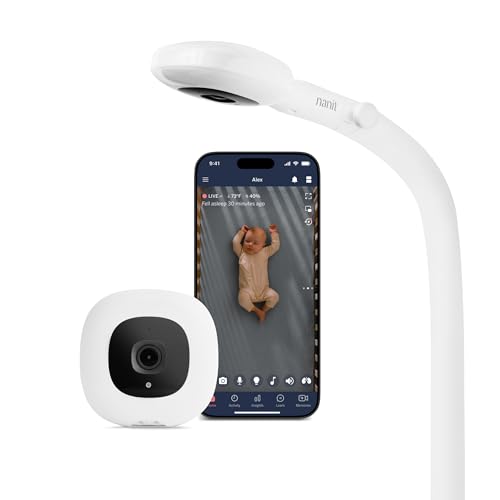
The Nanit Pro collects the most pros of any model here: the richest app, sleep summaries, well-tuned alerts, and mounting designed around the crib. It also concentrates the cons: premium tier, the plan behind its best features, and total dependence on Wi-Fi and phone. For the parent who wants maximum information and accepts the ongoing relationship with a cloud service, its ledger is strongly positive. Check price on Amazon.
Owlet Cam
The Owlet Cam’s ledger is balanced in the middle: a capable app camera with temperature sensing and background audio, plus the ecosystem pro of living alongside Owlet’s other nursery products in one app. Its cons are the generic ones of its class — network dependence, account, plan considerations — without the Nanit’s depth of sleep analysis to offset them. For a household already in that ecosystem, the balance tips clearly positive. Check price on Amazon.

VTech VM901
The VM901 hedges the ledger deliberately. Its parent unit cancels the network-dependence con for in-home viewing and the phone-dependence con entirely, while its Wi-Fi side keeps the remote-viewing pro. What it adds to the con column is bulk and a two-part setup, and an app experience that is serviceable rather than lovely. For shared-care households, few models balance the books better. Check price on Amazon.

Infant Optics DXR-8 Pro
The DXR-8 Pro’s ledger is the mirror image of the Nanit’s: it deletes the privacy con, the subscription con, and the network con outright, and pays for the deletions with the absence of remote viewing, smart alerts, and night records. Whether that reads as a stripped product or a purified one depends entirely on the buyer, which is why it inspires the most loyal following in this group. Check price on Amazon.
TP-Link Tapo C210
The Tapo C210 captures the core pros — silent check, alerts, remote view, local recording without a plan — at an entry-level tier, and its cons are omissions: no cry-specific detection, no nursery-centred app, no crib-designed mounting. As a first camera or a second-room camera, its ledger is easy to justify; as a primary nursery tool for an information-hungry parent, the omissions accumulate. Check price on Amazon.
The Trade-Offs Nobody Mentions
Beyond the headline pros and cons sit quieter ones that only appear after weeks of use. The first is light. Cameras announce themselves at night with small status lights and, on some models, the faint click and glow change as night vision engages. Most babies ignore all of it; a few light sleepers do not, and some parents end up covering an indicator light with tape — a small, telling compromise between the product’s design and the room’s purpose. The second is sound leakage in the other direction: two-way talk means the nursery can receive audio, and a parent unit or app left open on a kitchen counter broadcasts the nursery’s sounds to whoever is making tea, including guests. The third is the partner asymmetry — one parent checks the feed, the other does not, and the checker becomes the household’s night manager by default, a division of labour worth discussing rather than drifting into.
There is also the matter of the feed’s emotional weather. A camera shows you the hard moments as faithfully as the calm ones: the cry you have decided to give two more minutes, the restless hour you cannot fix. Some parents find witnessing-without-acting harder than not knowing, and there is no spec sheet line for that. Against it sits a countervailing quiet pro — the camera also shows you the good you would have missed entirely: the baby who talks herself back to sleep, the dawn babbling, the first unassisted roll caught on a saved clip. Families tend to remember the product for whichever of these dominated their house, which is another way of saying the temperament match matters more than the model.
How the Balance Changes as Your Baby Grows
The pros and cons are not static across the camera’s life. In the newborn weeks, the alert and audio features dominate: feeds are frequent, nights are fragmented, and the camera’s job is mostly to tell you a cry is real. The checking habit risk peaks here too, because everything is new and every sound is a question. In the middle of the first year, as sleep consolidates, the silent check becomes the star — long stretches of quiet punctuated by stirs that the camera resolves in seconds — and the night record starts earning its keep as routines form and parents experiment with bedtimes.
The toddler transition reshuffles the ledger again. The crib becomes a bed, the subject becomes mobile, and pan-and-tilt or a wide view moves from luxury to necessity; the question shifts from “is she asleep” to “is he in bed at all”. Two-way talk gets its second audition as a genuine communication channel with a verbal child — with the negotiation risk noted earlier. And the privacy questions grow teeth: a camera that was unremarkable over a crib deserves a fresh family decision over a four-year-old’s bedroom. The products that age best through all three phases are the flexible ones — movable, re-mountable, and honest about their features — which is worth weighting at purchase time, when the toddler phase feels impossibly distant and is actually about eighteen months away.
What the Trade-Offs Mean for You
The pros and cons do not weigh the same for every household, and the honest way to use this article is to find your row in the table of temperaments below.
The first-time parent, home mostly, anxious mostly. For you the pros dominate if you choose deliberately: the silent check will save your sleep weekly, and the record of the night will answer questions you will definitely ask. Your risk is the checking habit, so favour a system whose alerts are well tuned, set the sensitivity once, and consider a parent-unit or hybrid design — the VTech VM901 gives you a screen you can leave in the kitchen rather than a feed welded to your phone.
The parent returning to work. Remote viewing moves from nice to central, which pushes you to the app-based pros and makes the network con worth engineering around: good Wi-Fi in the nursery, a mesh node if needed, and acceptance of the subscription as the price of the insights. The Nanit Pro is built for exactly this profile.
The privacy-first parent. Your weighting inverts the usual ranking. The cloud con and the privacy con are not footnotes; they are the decision. The Infant Optics DXR-8 Pro’s limitations — no remote view, no smart features — read to you as the absence of everything you did not want. That is a coherent, respectable position, and the product exists precisely for it.
The budget-first parent. A general camera like the Tapo C210 captures the largest pros — silent check, alerts, anywhere viewing — at an entry-level tier, and its cons are the absence of refinements rather than the presence of problems. If the budget later grows, it retires gracefully to a playroom.
How the Alternatives Compare
| Option | What you gain | What you give up |
|---|---|---|
| Audio-only monitor | Simplicity, lowest cost, no feed to obsess over | The silent check — every noise requires a decision or a door opening |
| Dedicated video monitor (this article) | Silent checks, alerts, records, room awareness | Cost, some setup, and the trade-offs above |
| General smart camera | Most video benefits at the lowest tier | Baby-tuned alerts, nursery temperature focus, crib mounting design |
The audio-only row deserves respect: for a small home where the nursery is steps away, audio may genuinely be enough, and the camera’s pros shrink accordingly. The general-camera row is the value play. Readers comparing camera categories more broadly may also find security camera vs video doorbell useful for understanding which camera jobs exist in a home and why they are not interchangeable.
How to Buy Smart
Buying smart starts with choosing the architecture before the model, because most cons attach to the architecture, not the brand. Decide first whether the nursery goes on the internet. Then decide who else watches — a household with grandparents points to a parent unit; a household of two phone-carrying parents points to an app. Then interrogate the ongoing costs with the scepticism they deserve: which features are free forever, which are trialling, and what the plan costs per camera per year. Read the alert story carefully — sensitivity controls and cry detection are worth more than a longer feature list. Check the mounting plan for your actual crib and wall, and confirm the cord can be routed completely out of reach in your room, not the photographed one. Finally, buy from a retailer with a painless returns window and treat the first week as a trial: several real nights, one router reboot, one evening of guests, and an honest conversation about whether the feed is calming or winding up the adults. If it is winding you up, that is data, not failure — return it and choose the simpler system. The structured version of this process lives in how to choose a baby security camera.
Setup and Care That Reduce the Cons
Half the cons shrink with an hour of deliberate setup. Alert fatigue falls when you set sensitivity in the evening, in the real room, with the white-noise machine running — tune for the environment the camera actually lives in, not the silent afternoon of installation day. Network fragility falls when the camera gets a strong signal: position the router or a mesh node with the nursery in mind, and confirm the feed survives a router reboot before you need it to. The checking habit falls when the feed has a place: a parent unit on its charger, a tablet on the kitchen counter — a designated screen invites less compulsive glancing than the phone that also holds your messages and feeds.
Privacy risk falls with the basics done properly: unique password, two-factor authentication, firmware updates on, sharing granted to named accounts only, and access reviewed when a babysitter arrangement ends. The management burden falls when care becomes routine — a monthly lens wipe, a glance at the mount when you change the crib sheet, a cord check every time anything in the room moves. And the deepest con — expecting the camera to keep your baby safe — falls away entirely when the household is clear about the division of labour: safe sleep protects, the camera informs, and the two never swap jobs.
One more reduction is worth the small effort: decide the household’s checking rules while you are calm and rested, because rules made at 3 a.m. are rarely good ones. A workable set looks like this — alerts on, feed off, unless an alert fires or a full five minutes of noise passes; one designated checker per night, so the other parent can genuinely stand down; and a standing agreement that a quiet screen is good news to be enjoyed, not a prompt to go looking for reassurance. Households that adopt even a loose version of this report that the anxiety con shrinks to a shadow of its first-week size, while the sleep pro — the one that matters — survives intact.
The Scorecard: Pros and Cons by Category
Sleep
Net positive, with a condition. The camera protects sleep when it resolves stirs silently and delivers alerts reliably; it harms sleep when its alerts are twitchy or its feed invites midnight scrolling. The difference is tuning and habit, both within the household’s control. Parents who set the system up once, properly, report the sleep ledger as the strongest argument in the product’s favour; parents who never tame the notifications report the opposite, about the same hardware.
Money
Net neutral to positive, depending on architecture. The closed systems and local-recording cameras are one-and-done purchases whose lifetime cost is the sticker. The connected flagships are the sticker plus a plan, possibly per camera, possibly for years — still modest against the cost of the nursery as a whole, but no longer trivial, and the honest comparison is total cost across the years you will actually use it. Against the money sits the multi-year, multi-stage usefulness described earlier; few nursery purchases work as long.
Privacy
The one category where the connected models simply lose. A closed system has no account to breach and no cloud holding nursery clips; a connected camera has both, mitigated by good security practice but never eliminated. Households weigh this differently — some treat a well-secured account as an acceptable, ordinary modern risk, others treat a camera in a child’s room as a line they will not connect to the internet at all. The category has no universal winner because the values underneath it are genuinely different. It is also the category most likely to change a household’s mind over time: a compromise that felt fine over a newborn’s crib can feel different over a five-year-old’s bedroom, which is why the wisest connected-camera households schedule the privacy conversation to repeat as the child grows, rather than treating the installation-day decision as permanent. The camera’s role should shrink as the child’s own claim to privacy grows, and planning that arc from the start is a quiet pro in itself.
Convenience
Net positive, unevenly distributed. The daily conveniences — glanceable checks, alerts that find you, a voice from the doorway without the doorway — accumulate into a real easing of the evening. The inconveniences arrive in lumps: setup day, the occasional reconnection ritual, the sharing-permission puzzle when a new caregiver arrives. Parents who are comfortable with apps barely register the lumps; parents who are not may find a parent unit’s dumb reliability the most convenient thing of all.
Confidence
The subtlest category, and the one that decides satisfaction. A camera should make its household more confident — about leaving the room, about the sitter, about the routine that is or is not working. When it instead manufactures doubt, through noisy data or a feed that turns every stir into a referendum, the product has failed at its actual job regardless of its technical quality. This is why the returns window matters so much for this category: confidence is only measurable in your own house, at your own 3 a.m.
Second-Hand and Hand-Me-Down Cameras
Nursery gear circulates, and cameras are no exception, so the second-hand ledger deserves its own honest look. The pros are obvious: a premium camera at a fraction of its tier, waste avoided, and a product whose job does not wear out quickly. The cons are specific to connected devices. An app-based camera arrives tied to ecosystems and accounts; confirm it can be factory-reset and registered cleanly to your own account before money changes hands, and be aware that included subscription trials do not transfer. Parent-unit systems hand down cleanly — there is no account at all — though batteries age and a faded parent-unit battery is the most common disappointment. Whichever route you take, treat a second-hand camera like a new one on arrival: reset it, update it, set your own credentials, and give the mount and cord the same fresh-eyed safety check you would give a new installation.
Three Households, Three Verdicts
The flat with thin walls. A couple in a small two-bedroom flat, nursery six steps from the sofa, baby a famously loud sleeper. They bought a mid-tier app camera and found the ledger nearly balanced to zero: the silent check was worth little when the door was already ajar, the alerts duplicated what their ears told them free, and the feed mostly served the checking habit. Their verdict, honestly reached: an audio monitor would have done the job, and the camera money belonged elsewhere. The lesson is that proximity shrinks the pros — the smaller and more open the home, the less a camera adds.
The house with the garden office. Two parents, one working from a converted garage, baby napping in a far bedroom. Here the same category of product was transformative: the working parent took the midday shift entirely by app, the alerts were tuned once and trusted, and the evening parent unit freed both adults from the upstairs hover. Their con column filled with small change — a mesh node bought to fix the far-bedroom signal, a plan renewed without much thought — and their verdict was that the camera effectively added a room to the house. Distance and divided attention are what the pros are made of.
The grandparents’ rota. A baby cared for by three adults across two houses. The winning setup was the least smart: a parent-unit system at the grandparents’ house, where no one wanted an account, and the hybrid at home, where the parents used the app from work. The pros that mattered were social — a screen anyone could operate, a check anyone could perform — and the cons that mattered were the ones the simple systems do not have. Their verdict underlines the article’s recurring point: the right ledger is the household’s, not the market’s.
How to Test the Balance in Your Own Home
Because so many of these pros and cons are household-specific, the wisest purchase process treats the first fortnight as an experiment with pre-agreed measures. Before the camera arrives, agree on what success looks like: fewer door-openings per night, alerts you trust enough to act on without checking twice, an evening reclaimed for the sofa or the garden. Then run the experiment honestly. Keep the feed off for the first evening and listen, so you have a baseline. Turn alerts on at a middle sensitivity and count, for two nights, how many were real — real meaning a parent actually needed to know. Deliberately test the failure modes: reboot the router, take the parent unit to the far end of the garden, let the phone battery run low and see what the evening feels like then.
At the fortnight’s end, ask the two questions that decide the ledger. Are we sleeping better, in total, than before the camera? And do we trust it — would we leave it in charge of our attention for a whole evening at a friend’s house down the street? If both answers are yes, the pros have won in the only venue that counts. If either is no, the remedy is usually architectural — a different form factor, not a different brand of the same one — and a good returns window makes that remedy painless. Parents who run this small experiment rarely regret the purchase, whichever way it resolves, because the verdict is theirs and it is earned.
Bottom Line
Weighed honestly, the pros of a baby security camera are concrete and nightly — silent checks, freedom of movement, alerts that come to you, a record of the night — while the cons are real but mostly manageable: dependence on networks and clouds for the connected models, subscription creep, privacy exposure that good hygiene reduces, and a checking habit that self-knowledge and the right form factor can tame. The families who regret the purchase are rarely those who chose the wrong brand; they are those who chose the wrong architecture for their temperament, or who expected a safety device and received a window. Choose the architecture that fits your household, keep safe sleep doing the protecting, and the balance lands firmly in the camera’s favour. For model-level detail behind this balance, see baby security camera reviews.
If you take one sentence from this entire article, take this one: the camera is a window, not a guard. Windows are wonderful — they let in light, information, and reassurance — and nobody regrets a well-placed window. Regret arrives when a household leans on the window to do the guard’s job, or installs it in a room, or a temperament, where it mostly shows them things that make the night harder. Place yours well, in every sense, and it will earn its place on the wall for years.
After the First Month: Baby security camera Trade-Offs Owners Actually Notice
Every honest list of advantages and drawbacks hides a second list: the trade-offs that only appear after the first month, when the novelty has worn off and the baby security camera has become part of the furniture. Those are the ones worth examining before you decide. None of what follows is a reason to buy or avoid on its own; it is the texture of daily ownership that a summary table cannot hold.
Judge a baby camera first by the reliability of its connection in the room where it will live, then by image clarity in low light, since most checking-in happens in a darkened nursery. Sound behaviour matters too: how the monitor handles background noise and how quickly it wakes when the baby stirs. Walk the nursery and pick the mounting point before buying: the camera needs a view of the whole crib, a safe cable route well out of reach, and a signal path to the parent unit or router that does not cross the whole house. Check viewing angle against the crib position you actually use, not the one in the brochure.
For night checks, a monitor that wakes instantly and shows a clear low-light picture saves you opening the nursery door and risking a full wake-up. For a toddler room, a wider view and a talk-back feature earn their keep as the child moves from crib to bed. For travel to family homes, a camera that sets up without tools and joins a guest network easily is worth more than extra features. Notice how few of these points are about the product in isolation. Most trade-offs are really about the match between the baby security camera and the household, which is why the same model collects glowing and furious feedback from different homes.
Apply all of this to the listings in front of you. When a listing such as the Nanit Pro, Owlet Cam and VTech VM901 catches your eye, resist judging it by its headline claim and instead run the checks above against it: does its stated role match the room you measured, does its control path suit your household, and does the maker’s own guidance support the job you have in mind. A model that answers those questions cleanly on paper usually answers them cleanly in the home, and one that dodges them in the listing will dodge them on your wall, shelf or desk as well.
Thick walls, metal doors and a router at the far end of the house are the classic recipe for dropouts, whatever the range claim says. A camera placed for a newborn’s crib may frame a standing toddler badly, so plan a second mounting position from the start. If the picture freezes at night, test the camera closer to the router for one night to separate a signal problem from a faulty unit. Audio lag or echo usually comes from the monitor and camera being in earshot of each other; distance and lower volume fix most cases.
- List the drawback most likely to touch your daily routine and test for it first for your baby security camera.
- Decide which advantage you will genuinely use every week for your baby security camera.
- Check the ongoing chore the product creates and who in the house will own it.
- Confirm the fallback when the smart features or network fail for your baby security camera.
- Compare the ownership cost in time, not just the purchase decision for your baby security camera.
- Ask whether the same benefit is available from something you already own for your baby security camera.
If the app shows the camera offline while the local monitor works, the home network, not the camera, is the weak link. Wipe the lens with a soft dry cloth, keep firmware updated through the maker’s app, use a strong unique password for any account-based camera, and re-check the mount’s tightness whenever the crib position changes.
Weigh the drawbacks against your specific routine, not against an imaginary average owner. A drawback that never touches your day costs you nothing, and an advantage you will use daily is worth more than three you will use once.
It also helps to think in seasons rather than in days. A baby security camera that seems ideal in the week it arrives may face different light, different temperatures, different routines and different demands a few months later, and the models that age well are the ones chosen with that longer view in mind.
Keep the household in the loop as you decide. The person who did not choose the baby security camera is usually the person who discovers its most annoying habit first, and a two-minute conversation before buying can surface the objection that saves a return.
Documentation is an underrated feature of ownership. Keep the manual, the receipt and a note of your settings together, because the day something needs adjusting is never the day you want to reconstruct how it was set up.
When two models seem equal, prefer the one whose maker publishes clearer guidance, steadier updates and easier access to spares or support. That difference is invisible in a feature table and decisive in the third year of ownership.
Finally, resist upgrading the whole room around a single purchase. Live with the baby security camera as it is for a few weeks, learn what it actually changed, and only then decide what else, if anything, the room still needs.
Frequently Asked Questions
What is the biggest advantage of a baby security camera?
The silent check. Most baby noises are a sleeping baby resettling, and a camera lets you confirm that at a glance instead of opening the door and risking a full wake-up. Over months of nights, those avoided disturbances protect the baby’s sleep and yours. Alerts, remote viewing, and night records are valuable, but parents consistently rank the simple ability to look without entering as the benefit they would keep if they could keep only one.
What is the biggest disadvantage?
For connected models, it is the combination of dependence and temptation: dependence on your Wi-Fi, the provider’s cloud, and often a subscription for the best features, plus the temptation to check the feed compulsively. Both are manageable — strong home networking, honest budgeting for the plan, and a form factor you can set down — but they are structural. A closed non-Wi-Fi system removes the dependence entirely, at the cost of remote viewing and smart features.
Are Wi-Fi baby cameras a privacy risk?
They carry a different kind of risk than non-Wi-Fi monitors. The feed travels through the manufacturer’s cloud and sits behind your account, so account security matters: a unique strong password and two-factor authentication reduce the practical risk substantially. A closed system like the Infant Optics DXR-8 Pro eliminates the category — no account, no cloud, no internet connection. Neither choice is irrational; the right one depends on how much the remote features are worth to your household.
Can a baby camera increase anxiety instead of reducing it?
Yes, for some parents, and it is worth knowing yourself before you buy. A live feed and detailed sleep summaries reassure many parents and wind up others, who find themselves checking constantly and scoring every night. If that sounds like you, consider a parent-unit system you can leave in another room, turn alerts to sound-only overnight, or start with a simpler monitor. The goal is a calmer household; a product that achieves the opposite is the wrong product, however good its reviews.
Do the pros outweigh the cons for most families?
For most, yes — provided the model matches the household. The nightly benefits are tangible and repeat for years as the camera follows the child into the toddler stage, while the main cons attach to specific architectures and can be avoided by choosing the other one. The mismatch cases are predictable: a cloud camera bought by a privacy-first parent, a closed system bought by a parent who travels. Match architecture to temperament and the balance is comfortably positive.
Is a baby security camera a safety device?
No, and this distinction matters more than any pro or con in this article. A camera is a monitoring convenience: it shows and tells you things. It does not prevent SIDS or any other harm, and it does not make an unsafe sleep setup safe. Safe sleep — back sleeping, a bare crib, a firm flat mattress — is what protects your baby. Buy the camera for awareness and convenience, keep it in that role, and never let a reassuring feed substitute for safe practice.
Related Reading
Continue with the hands-on companion: baby security camera review examines the category’s leading approach in depth, from setup to the third month of nightly use.