Disclosure: As an Amazon Associate, reviewstook.com earns from qualifying purchases. Links on this page are affiliate links; they cost you nothing extra. Prices and availability change often, so check the current Amazon listing before you buy.
A baby security camera buying guide exists for one reason: the nursery camera market mixes three genuinely different kinds of products — app-based Wi-Fi monitors, hybrid systems with a dedicated parent unit, and simple general-purpose smart cameras — and sells them all under the same “baby monitor” label. Choosing well means knowing which kind fits your home, your network, and your habits before you compare a single feature. This baby security camera buying guide walks through the types, the criteria that actually matter, and the models worth shortlisting, in plain language.
One honest note before anything else. A baby security camera is a monitoring convenience. It lets you see and hear your baby from another room, and that is genuinely useful. It is not a safety device and not a medical device. No camera prevents SIDS or any other harm, and no camera replaces safe-sleep practice: baby on their back, in a bare crib or bassinet with a firm, flat mattress and nothing soft inside. Buy a camera for awareness and convenience, and keep safe sleep as the foundation it can never substitute for. Everything else in this guide is about choosing the convenience well.
Key Takeaways
- The first decision is architecture, not features: app-based Wi-Fi, hybrid Wi-Fi plus parent unit, or a closed non-Wi-Fi system with its own screen.
- Video clarity at night matters more than headline daytime resolution, because most checking-in happens in a dark room.
- Two-way talk, temperature display, and sound alerts are the everyday features parents actually use; exotic extras fade fast.
- Subscription plans are common on premium Wi-Fi models — factor the ongoing plan into the real cost of ownership.
- Placement and cord safety matter more than any spec: any cord must stay well out of your baby’s reach at all times.
- A general smart camera can work as a nursery camera for far less money, but it gives up baby-specific alerts and polish.
- Buy for the toddler years as well as the newborn weeks, because the right camera keeps earning its place long after the crib stage ends.
In this guide
What a Baby Security Camera Does and the Main Types
At its core, a baby security camera watches the crib and sends you the picture and sound — to your phone, to a dedicated screen, or both. Around that simple job, manufacturers have built several distinct product families. Understanding the families first makes every later comparison easier, because features that look identical on a box behave very differently depending on the architecture underneath.
App-Based Wi-Fi Monitors
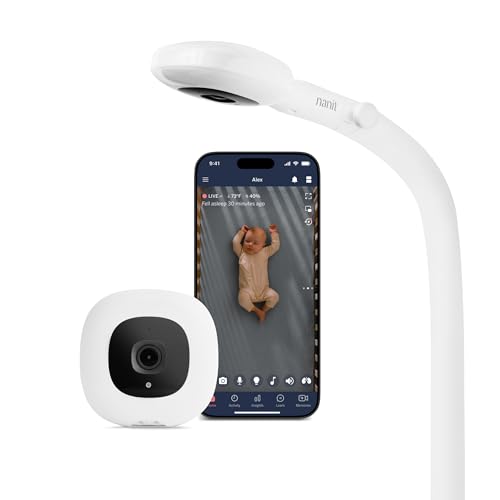
The app-based model is the modern default. The camera joins your home Wi-Fi and streams to an app on your phone, so you can check in from the next room or from another city. The Nanit Pro and the Owlet Cam are the best-known examples of this style. The strengths are obvious: your phone is always with you, the apps are polished, and the better systems layer on sleep tracking, recorded clips, and smart alerts that learn to distinguish a cry from a passing car. The weaknesses are just as real. Everything depends on your network and the manufacturer’s cloud. A router hiccup, an outage at the provider, or a phone on silent can interrupt the feed. Most premium app-based cameras also reserve their best features — longer video history, sleep insights, multi-user access — for a paid plan after an included trial period.
Hybrid Systems: Wi-Fi Plus a Parent Unit
Hybrid systems try to give you both worlds. The VTech VM901 is the textbook example: it connects over Wi-Fi so the app works when you want it, but it also ships with a dedicated parent unit — a handheld screen that talks to the camera directly and keeps working even if the internet drops. For many families this is the most forgiving design. The parent unit lives on the nightstand, always on, no unlocking a phone at 3 a.m.; the app covers travel, grandparents, and checking in from work. The trade-off is cost and complexity: you are buying two viewing systems, and setup involves pairing both.
Closed Non-Wi-Fi Systems
The Infant Optics DXR-8 Pro represents the third family: no Wi-Fi at all. Camera and parent unit communicate over a direct radio link, nothing touches the internet, and there is no account, no app, and no subscription. Parents choose this style for privacy, for simplicity, and for independence from routers and cloud services. The picture quality and feature set are more modest than the app-based flagships, and you cannot check in from outside the home. But within the house, the connection is steady, the screen wakes instantly, and there is nothing to hack because there is nothing connected.
General Smart Cameras Used as Nursery Cameras
The fourth option is not a baby monitor at all: a mainstream indoor smart camera, such as the TP-Link Tapo C210 or Tapo C120, pointed at the crib. These pan-and-tilt cameras cost a fraction of the dedicated monitors, record locally to a memory card, and include motion and sound detection. What they lack is baby-specific refinement — cry-specific alerts, nursery temperature readouts presented front and centre, lullabies, and the careful mounting hardware designed around cribs. Plenty of parents use them happily, especially for a second room or a tight budget, and our wider testing of the best indoor security cameras for phones covers how these general cameras behave day to day.
Top Picks at a Glance
The shortlist below reflects the four families above. Every model here is treated in prose in this guide; match the badge to your situation rather than chasing a single winner.
| Model | Badge | Type | Tier |
|---|---|---|---|
| Nanit Pro | Best Overall | App-based Wi-Fi | Premium |
| VTech VM901 | Best of Both Worlds | Hybrid Wi-Fi + parent unit | Mid to premium |
| Infant Optics DXR-8 Pro | Best Without Wi-Fi | Closed system | Mid |
| Owlet Cam | Best for the Owlet Ecosystem | App-based Wi-Fi | Mid to premium |
| TP-Link Tapo C210 | Best Budget | General smart camera | Entry |
How Clear Does the Picture Need to Be?
Resolution headlines sell cameras, but the nursery is a forgiving subject: your baby is a few feet from the lens, mostly still, and usually asleep. What matters is whether you can answer three questions at a glance — is she on her back, is her face clear of bedding, and is she stirring or settled? Every camera on the shortlist answers those easily in daylight. The real separation happens in the dark.
Night vision is the specification to weight most heavily. Infrared night vision turns the room into a black-and-white image; the better implementations keep the crib evenly lit without a blown-out bright spot in the middle and darkness at the edges. Look for cameras described as having clear, even night illumination across the whole crib rather than a narrow spotlight effect. Also consider how the camera handles the transition at dawn and dusk — a camera that hunts between day and night modes, clicking and flickering as light changes, can disturb a light sleeper and annoy you. A wide field of view helps you see the whole crib plus the door and the rocking chair without repositioning, and digital zoom lets you lean in on the detail that matters. Pan-and-tilt, offered by the Tapo C210 and the VTech VM901, trades a fixed wide view for a movable one; it is most useful in a toddler room, where the subject no longer stays in one place.
How Will You Watch and Listen?
The viewing experience decides whether you love or abandon a monitor within a month. App-based systems assume your phone is the screen, which is convenient until your phone is charging, silenced, or in use. Parents who go app-only often end up dedicating an old phone or tablet as a permanent nursery display — a perfectly good solution worth planning for. Background audio is the feature that makes app-based monitoring livable: the good apps keep the nursery’s sound playing while you use other apps or lock the screen, so a cry reaches you without the video open.
A dedicated parent unit, as on the VTech VM901 and the Infant Optics DXR-8 Pro, is dumber and better at the same time. It does one thing, it wakes instantly, its battery is sized for an evening of carrying around the house, and its volume knob works without menus. If a grandparent or babysitter will use the monitor regularly, a parent unit is dramatically easier to hand over than your unlocked phone. Audio quality deserves a mention too: you want to hear breathing-adjacent quiet sounds — rustling, whimpering — without a constant hiss, and you want the microphone sensitive enough that a cry in a closed-door nursery is unmistakable. Two-way talk lets you soothe with your voice; some babies settle for a parent’s voice, others wind up more, and you will learn which child you have within a week.
Which Alerts and Extras Actually Earn Their Keep?
Alert quality separates a helpful monitor from an anxiety machine. Sound and motion alerts are standard; the tuning is everything. A camera that pings your phone for every blanket rustle trains you to ignore it, which defeats the purpose. Better systems let you set sensitivity, and the premium app-based models add cry detection that tries to distinguish crying from other noise. Temperature sensing is the quiet hero of the feature list — a small readout that confirms the nursery is in a comfortable range without opening the door and risking a wake-up. Humidity appears on some models and is a nice extra. Lullabies and white noise built into the camera can help, though most families already have a preferred sound machine.
Sleep tracking is the headline extra on the Nanit Pro: the app analyses the night and reports sleep patterns and insights. Treat it as interesting information, not as health data — it is a consumer convenience feature, and any real concern about your baby’s sleep or breathing belongs with your pediatrician, not an app. If you are weighing a camera against a dedicated view of the crib from a door camera, our comparison of security camera vs video doorbell explains why the two jobs call for different tools.
What Does It Really Cost Over Two Years?
The sticker is only the first payment on many Wi-Fi monitors. Premium app-based cameras commonly include a trial of their insights or history plan, after which the best features sit behind a subscription. Before buying, read exactly which features are free forever, which are free for a limited period, and which need the plan — on the Nanit in particular, the sleep insights that headline the marketing are a plan feature. Storage works the same way: cloud history costs money, while local recording to a memory card, as the Tapo cameras offer, costs only the card. If you go the memory-card route, endurance-rated cards handle always-on recording far better than basic ones.
Also count the second camera. A camera for the nursery often becomes two — one for travel, one for the toddler’s room, one for the grandparents’ house. Systems differ in how gracefully they add cameras and whether a second camera needs a second plan. Finally, weigh the resale and hand-me-down factor: closed systems like the Infant Optics hand down easily because there is no account to transfer, while app-based cameras tie to accounts and plans.
How to Prioritise by Use Case
The First-Time Parent Who Wants Maximum Awareness
If this is your first baby and you know you will check the app often, lean into the premium app-based experience. The Nanit Pro’s combination of a clear picture, thoughtful mounting options, and sleep reporting matches that temperament. Budget for the plan from day one so there are no surprises, and read our full baby security camera review before deciding.
The Parent Who Distrusts Apps and Clouds
If the idea of a cloud camera in the nursery bothers you, the Infant Optics DXR-8 Pro is the honest answer: no account, no internet, a screen that simply works. You give up remote viewing and smart alerts, and for many families that is a trade made gladly. The deeper balance of arguments is in baby security camera pros and cons.
The Household With Babysitters and Grandparents
Where other caregivers share the watching, the VTech VM901’s hybrid design shines. The parent unit is the shared household screen; the app is your private window when you are out. Nobody needs your phone password, and nobody needs a tutorial.
The Budget-Conscious or Second-Room Buyer
The TP-Link Tapo C210 covers the essentials — live view, night vision, alerts, local recording — at an entry-level tier. It is also the pragmatic choice for a playroom or a second child. Just go in knowing the alerts are generic motion and sound, not baby-tuned. If budget is the deciding question, is a baby security camera worth it works through the value maths honestly.
The Shortlist in Detail

Nanit Pro — Best Overall
The Nanit Pro is the most complete app-based nursery camera in this guide. Its mounting system is a genuine differentiator: the floor stand and wall mount position the camera directly over the crib with a clear, full view, and the app experience — live view, background audio, sleep insights on the plan — is the most polished of the group. The camera’s night picture is even and detailed, and its alerts are well tuned out of the box. The honest limitations: it is a premium-tier purchase, the headline sleep features need the subscription after the included period, and it is entirely dependent on your Wi-Fi and phone. Best for: first-time parents who want the richest app experience. Not suited for: anyone avoiding subscriptions or cloud cameras. Check price on Amazon.

VTech VM901 — Best of Both Worlds
The VM901 hedges every bet sensibly. The parent unit gives you an always-available screen with pan, tilt and zoom controlled from the handset; the Wi-Fi side adds app viewing when you are away from home. Picture quality is strong day and night, the temperature sensor is built in, and VTech’s long history in audio baby monitors shows in the sound quality. The trade-offs are a chunkier setup than a single camera, an app that is functional rather than delightful, and a mid-to-premium price for what is effectively two systems. Best for: households sharing monitoring duties. Not suited for: minimalists who want one device and nothing else. Check price on Amazon.

Infant Optics DXR-8 Pro — Best Without Wi-Fi
The DXR-8 Pro is the privacy-first, simplicity-first choice. Its interchangeable lens system is unique in this group — swap lenses to change the view rather than relying on digital zoom — and the parent unit’s screen and battery life are built for all-evening use. There is no app, no account, and no way to view from outside the home, and the feature list stops at the essentials. For the right buyer those are features, not omissions. Best for: parents who want zero internet exposure in the nursery. Not suited for: parents who need to check in from work or travel. Check price on Amazon.
Owlet Cam — Best for the Owlet Ecosystem
The Owlet Cam is a capable app-based camera — clear video, two-way talk, temperature sensing, background audio — whose real appeal is context: it lives in the same app as Owlet’s other nursery products, so families already in that ecosystem get one dashboard instead of two. On its own merits it is a solid mid-to-premium camera; against the Nanit it offers less in the way of sleep analysis, and like all app-based models it leans on your network. Best for: families already using Owlet products. Not suited for: buyers wanting the deepest sleep reporting. Check price on Amazon.
TP-Link Tapo C210 — Best Budget
The Tapo C210 is a general indoor camera that happens to cover the nursery basics well: motorised pan and tilt, clear night vision, motion and sound alerts, two-way talk, and local recording to a memory card with no subscription required for the core features. What you give up versus the dedicated monitors is refinement — alerts are not cry-specific, there is no nursery temperature readout in the baby-monitor sense, and the app is a general smart-home app rather than a nursery tool. At its entry-level tier, many families accept that trade happily. Best for: tight budgets and second rooms. Not suited for: parents who want baby-tuned alerts and insights. Check price on Amazon.
First Setup and Care Essentials
Whatever you buy, the first evening’s setup follows the same rhythm. Position the camera for a full crib view before you mount anything permanently — hold it, check the app, adjust. Route the power cord so it is completely out of reach: cords near a crib are a strangulation hazard, so keep the camera and every cord well away from the crib — at least three feet from the crib’s edge is the commonly advised minimum distance — and secure any slack along the wall. Connect on your 2.4 GHz network band if the camera asks, since most nursery cameras prefer it for range. Then test the failure modes: kill the app, check background audio, and confirm alerts arrive. Our step-by-step how to install baby security camera walks the whole process, and how to choose a baby security camera turns the criteria above into a decision sequence.
Care is light: wipe the lens monthly with a dry microfibre cloth, keep firmware updated on Wi-Fi models, use a strong unique password and two-factor authentication on the account, and reboot the camera occasionally if the feed gets sluggish. When the camera moves rooms — nursery to toddler room is the usual journey — re-check the cord routing in the new spot with fresh eyes.
One more setup decision deserves a moment: who else gets access, and how. Decide the sharing list on day one rather than in a tired moment later — partner, regular grandparent, occasional babysitter — and prefer the app’s built-in guest or family sharing over handing anyone your own login, because guest access can be revoked cleanly when circumstances change. If the monitor has a parent unit, decide where it lives and where it charges; a screen that is always in the same place, charged, is a screen you can find in the dark. And if your household includes older children, tell them the camera exists and what it is for. A nursery camera is a household object, and treating it openly — rather than as a secret — keeps trust intact as the baby it watches grows into a child who asks questions.
Mistakes to Avoid
The most common buying mistake is paying for the wrong architecture: a cloud camera for a parent who hates accounts, or a closed system for a parent who travels for work. The second is ignoring the subscription — comparing sticker prices between a camera whose best features are included and one whose best features rent by the month. Third is mounting for the prettiest picture rather than the safest one, with a cord draped within reach of a standing toddler. Fourth is expecting the camera to do a parent’s job: it reports, it does not protect. And fifth is skipping the returns-window test — run any new monitor through several real nights, including a router reboot, before the window closes. A sixth, quieter mistake is buying for the newborn phase alone: the camera you choose will likely serve a climbing toddler and possibly a sibling, so a little headroom in mounting options and multi-camera support pays for itself sooner than most parents expect.
Understanding Connectivity and Reliability
The specification parents underrate most is not on the box: how the camera behaves when things go wrong. A nursery camera earns its place at 3 a.m., half asleep, when the house is dark and your patience is thin. Reliability has three layers — the link between camera and viewer, the behaviour of the app or parent unit, and the recovery after something fails — and each product family handles them differently.
Start with the link. A closed system like the Infant Optics DXR-8 Pro has the simplest story: a direct radio connection between camera and screen, working through typical interior walls across a normal house, indifferent to your router, your broadband, and the manufacturer’s servers. Its limits are distance and building materials, and you discover them on the first evening, not the worst one. A hybrid like the VTech VM901 layers two links: the parent unit’s direct connection for in-home viewing, and Wi-Fi for the app. If the internet drops, the parent unit keeps working, which is exactly the failure mode that matters overnight. Pure app-based cameras — Nanit Pro, Owlet Cam, the Tapo models — live and die by your home network. That is usually fine, because home Wi-Fi is usually up. But “usually” concentrates its exceptions at bad moments: the router firmware update at midnight, the broadband outage during a storm, the dead zone in the back bedroom where the nursery happens to be.
You can de-risk an app-based choice before you buy. Stand in the nursery with your phone and check the Wi-Fi signal strength there; run a video call from that room and see whether it holds. If the nursery is a weak spot, a mesh Wi-Fi node in or near the room transforms the experience of any app-based camera, and it improves everything else in the house too. Also check which band the camera uses: most nursery cameras connect on the 2.4 GHz band, which travels further through walls than 5 GHz but is more crowded. That is a sensible design choice for a fixed camera, and it means your network needs a healthy 2.4 GHz side — most routers provide one automatically.
The second layer is app and screen behaviour. For app-based viewing, background audio is the feature that decides daily satisfaction, and both the Nanit and Owlet apps handle it well. Alert latency matters too: when your baby cries, how long before your phone knows? On a healthy network the better systems alert within moments. Parent units have no latency story at all — the sound is simply there, which is a large part of their enduring appeal. The third layer is recovery. After a power cut or router reboot, does the camera reconnect on its own? The reputable models in this guide do. Test it during your first week: pull the router’s plug, wait, restore it, and time the camera’s return. A camera that needs manual intervention after every outage will eventually be discovered offline at the worst moment.
Privacy and Account Security, Taken Seriously
A camera in your child’s bedroom deserves a higher security standard than a camera watching your driveway, and the honest differences between families matter here. A closed non-Wi-Fi system removes the entire category of internet risk: there is no account to compromise, no cloud storing clips of your nursery, and no feed that exists anywhere beyond the radio link between camera and screen. For parents who feel that difference in their gut, it is a legitimate, decisive argument, and it is the core reason the Infant Optics design still sells.
If you choose a Wi-Fi model — and there are good reasons to — you control more of the risk than you might think. Use a unique, strong password for the camera account, different from every other password you own. Turn on two-factor authentication where the app offers it; both major ecosystems here do. Keep the camera’s firmware updated, since updates routinely patch security issues, and set them to install automatically if the option exists. Be deliberate about sharing: most apps let you grant viewing access to a partner or grandparent, which is genuinely useful, and each shared account is another door — share with named accounts, not by lending your own login, and remove access when it is no longer needed. Think about clip storage as well. Cloud history means footage of your nursery sits on a provider’s servers under your account’s protection; local recording, as the Tapo cameras offer with a memory card, keeps footage in your house under your physical control. Neither is automatically right; the point is to choose consciously rather than by default.
One more privacy angle is easy to miss: the camera hears as well as sees. Microphones pick up conversations near the nursery, and two-way talk means the camera is also a speaker. None of this is sinister — it is the product working as designed — but it is worth a household conversation, especially if the camera will live in a room that later becomes an older child’s bedroom. Many families retire or reposition the camera as children grow, and building that expectation in early is healthy.
Do You Actually Need Video, or Is Audio Enough?
It is worth asking the unfashionable question, because generations of parents raised children with audio-only monitors, and audio still does the core job: it tells you your baby needs you. Video adds a different, quieter benefit — it tells you when your baby does not need you. The rustle that sounds like waking is a baby resettling; the cry that sounds urgent is a thirty-second protest between sleep cycles. Video lets you see the difference and wait, and that waiting is where much of the value lives: fewer unnecessary room entries, fewer fully-woken babies, better sleep on both sides of the door.
Video also changes the toddler years. Once your child is in a bed rather than a crib, the questions change — is he in bed, is she reading or climbing — and a camera answers them without a creaking door. Against that, weigh the checking habit. Some parents find a video feed invites constant glancing that audio never did, and a few put the parent unit face-down for whole evenings to break the habit. If you know you are an anxious checker, a system with a screen you can set aside, or an app you can close, may suit you better than an always-on feed — and the honest self-knowledge is worth more than any feature comparison.
Twins, Siblings and Multi-Camera Homes
Second children and twins complicate the purchase in ways single-baby reviews rarely mention. If you expect to monitor two rooms, decide the architecture now, because retrofitting a second camera into a single-camera system is where the families diverge. Parent-unit systems differ in how many cameras one screen can pair with and whether the screen can show both rooms at once or must cycle between them; the VTech ecosystem is built with multi-camera households in mind, and scan modes that rotate audio between rooms are the feature to look for. App-based systems handle multi-camera gracefully in software — the Nanit and Tapo apps both present multiple cameras in one list — but subscriptions may apply per camera, which doubles the ongoing cost line you calculated earlier.
Twins in one room are the easier case: a single wide-view camera positioned to see both cribs covers it, and this is where field of view and mounting flexibility earn their money. Twins in separate rooms, or a baby plus a toddler, is the two-camera case. Also think about audio collisions: two parent units or two apps alerting in the same house need distinguishable alerts and a parent who can tell which room is crying at a glance. Naming cameras clearly in the app — by child or by room, not “Camera 2” — sounds trivial until 3 a.m. proves otherwise.
Travel, Grandparents and the Second Location
Monitors travel more than product pages admit: holidays, grandparents’ houses, the rental with the unfamiliar room layout. App-based cameras travel best in principle — connect to the new network and go — but hotel and guest networks with sign-in pages can defeat camera setup entirely, and re-pairing a camera to a new network and back again is a chore you will feel twice per trip. A closed system travels with zero setup: plug in the camera, turn on the screen, done, which is a real argument for keeping a simple non-Wi-Fi unit as the travel monitor even if your home setup is app-based. Hybrid systems split the difference — the parent unit pair travels as-is, no network needed.
For grandparents’ houses, the same logic applies with extra weight on simplicity. A parent unit that a grandparent can operate without instructions beats an app invitation they will never accept. If the camera will live permanently at a second location, treat it as its own purchase with its own placement and cord-safety check, and remember that a camera positioned by a well-meaning relative deserves your own fresh look at the view and the cord routing before the first nap there.
Reading the Spec Sheet Without Getting Fooled
Spec sheets for nursery cameras are written to sell, but a few translations make them honest. When a listing leads with resolution, ask instead how the camera performs in the dark, because the nursery’s defining condition is darkness and the daytime picture on every shortlisted model is already good enough to read a sleeping position. When a listing advertises range for a parent unit, remember that range figures are measured outdoors with nothing in the way; inside a house, walls and floors divide that number substantially, and the only range test that counts is your own home during the first week. Battery claims for parent units assume the screen sleeps most of the time; a screen left on continuously drains far faster, so treat the headline figure as the optimistic case and plan to keep the charger in the room where you spend evenings.
Field of view is quoted in degrees and wider is not automatically better: a very wide lens sees the whole room but shrinks the crib within the frame, while a narrower view fills the screen with your baby at the cost of context. The DXR-8 Pro’s interchangeable lenses exist precisely because this trade-off is real — different rooms genuinely suit different views. Zoom claims need the same scepticism: digital zoom enlarges pixels rather than adding detail, which is fine for confirming a position and useless for reading anything fine. Pan and tilt ranges matter if the camera will follow a toddler; for a crib-bound baby they mostly help at setup time, letting you aim from the app instead of climbing back up the ladder.
Finally, treat every “smart” claim as a request for a demonstration rather than a fact. Cry detection, sleep insights, and movement tracking vary widely in how well they work in a real nursery with a real baby, a white-noise machine, and a parent walking past the door. The returns window is your laboratory: a feature that mislabels your baby’s normal stirring as an event ten times a night is not a feature, whatever the box says, and the models in this guide earned their places by keeping that noise low.
Baby Security Camera Buying Guide: The Decision in One Page
If you have read this far, the decision compresses into a short sequence. First, choose the architecture by temperament and household: app-based if you want your phone to be the monitor and value smart features, hybrid if other caregivers share the watching, closed if you want the nursery off the internet entirely, and a general smart camera if the budget rules. Second, within that family, judge the night picture and the alert tuning before any headline specification, because darkness and false alarms are where monitors succeed or fail in real homes. Third, price the whole ownership — plan, second camera, mounts — not the sticker. Fourth, plan the placement before the parcel arrives: the view of the whole crib, the cord routed well out of reach, the network checked in that room.
Run that sequence honestly and the shortlist in this guide narrows itself. The Nanit Pro rewards the parent who wants the deepest app experience and accepts the plan. The VTech VM901 rewards the household that shares the watching. The Infant Optics DXR-8 Pro rewards the parent who values privacy and simplicity over remote access. The Owlet Cam rewards the family already living in Owlet’s app. The Tapo C210 rewards the buyer who wants the essentials covered at an entry-level tier. None of them will keep your baby safe — that is your safe-sleep practice, every night — but the right one will let you rest in the next room with genuine peace of mind, and that is what you are actually buying.
Before You Buy: The Baby security camera Fit Audit Most Shoppers Skip
A buying guide earns its keep in the checks it makes you do before money changes hands, and this is the check most shoppers skip with a baby security camera: verifying the fit in your own home, on your own routine, rather than in a showroom or a listing photograph. Work through what follows with a tape measure, your phone and ten quiet minutes in the room where the baby security camera will live.
Judge a baby camera first by the reliability of its connection in the room where it will live, then by image clarity in low light, since most checking-in happens in a darkened nursery. Sound behaviour matters too: how the monitor handles background noise and how quickly it wakes when the baby stirs. Walk the nursery and pick the mounting point before buying: the camera needs a view of the whole crib, a safe cable route well out of reach, and a signal path to the parent unit or router that does not cross the whole house. Check viewing angle against the crib position you actually use, not the one in the brochure.
For night checks, a monitor that wakes instantly and shows a clear low-light picture saves you opening the nursery door and risking a full wake-up. For a toddler room, a wider view and a talk-back feature earn their keep as the child moves from crib to bed. For travel to family homes, a camera that sets up without tools and joins a guest network easily is worth more than extra features. Use this as a pre-purchase audit: any model still standing after these checks has earned its place on your shortlist, and any model that fails one should be dropped without regret, however strong its other features look.
Apply all of this to the listings in front of you. When a listing such as the Nanit Pro, VTech VM901 and Infant Optics DXR-8 Pro catches your eye, resist judging it by its headline claim and instead run the checks above against it: does its stated role match the room you measured, does its control path suit your household, and does the maker’s own guidance support the job you have in mind. A model that answers those questions cleanly on paper usually answers them cleanly in the home, and one that dodges them in the listing will dodge them on your wall, shelf or desk as well.
Thick walls, metal doors and a router at the far end of the house are the classic recipe for dropouts, whatever the range claim says. A camera placed for a newborn’s crib may frame a standing toddler badly, so plan a second mounting position from the start. If the picture freezes at night, test the camera closer to the router for one night to separate a signal problem from a faulty unit. Audio lag or echo usually comes from the monitor and camera being in earshot of each other; distance and lower volume fix most cases.
- Measure the space and note the constraint that most limits your choice for your baby security camera.
- Confirm the control path works for everyone in the household, not just the buyer for your baby security camera.
- Check what still works when the home network is down for your baby security camera.
- Read the maker’s guidance for your exact room and load type before ordering for your baby security camera.
- Plan where accessories, chargers or spares will live from day one for your baby security camera.
- Keep the return window in mind and schedule your own checks inside it.
If the app shows the camera offline while the local monitor works, the home network, not the camera, is the weak link. Wipe the lens with a soft dry cloth, keep firmware updated through the maker’s app, use a strong unique password for any account-based camera, and re-check the mount’s tightness whenever the crib position changes.
Finish the audit by writing down the one requirement you will not compromise on and the one feature you are willing to drop. A shortlist built on that honesty is short, and choosing from it stops feeling like a gamble.
It also helps to think in seasons rather than in days. A baby security camera that seems ideal in the week it arrives may face different light, different temperatures, different routines and different demands a few months later, and the models that age well are the ones chosen with that longer view in mind.
Keep the household in the loop as you decide. The person who did not choose the baby security camera is usually the person who discovers its most annoying habit first, and a two-minute conversation before buying can surface the objection that saves a return.
Documentation is an underrated feature of ownership. Keep the manual, the receipt and a note of your settings together, because the day something needs adjusting is never the day you want to reconstruct how it was set up.
When two models seem equal, prefer the one whose maker publishes clearer guidance, steadier updates and easier access to spares or support. That difference is invisible in a feature table and decisive in the third year of ownership.
Finally, resist upgrading the whole room around a single purchase. Live with the baby security camera as it is for a few weeks, learn what it actually changed, and only then decide what else, if anything, the room still needs.
Frequently Asked Questions
Do I need a Wi-Fi camera, or is a non-Wi-Fi monitor better?
Neither is universally better; they suit different households. Wi-Fi cameras give you app viewing from anywhere, smarter alerts, and features like sleep reporting, at the cost of network dependence and often a subscription. Non-Wi-Fi systems like the Infant Optics DXR-8 Pro give you a private, simple, always-on screen that works without internet. If you travel or want phone access, choose Wi-Fi. If you value privacy and simplicity, choose the closed system.
Can a baby security camera prevent SIDS or keep my baby safe?
No. A camera is a monitoring convenience that lets you see and hear your baby; it is not a safety or medical device and cannot prevent SIDS or any other harm. Safety comes from safe-sleep practice: baby on their back, on a firm flat mattress, in a bare crib with no pillows, blankets, or soft toys. Use the camera for awareness — checking a noise, confirming a position — and never as a substitute for safe sleep or supervision.
Where should I place the camera in the nursery?
Place it where it sees the whole crib — typically mounted high on the wall facing the crib, or on a stand designed to look down into it. The critical rule is cord safety: the camera and its power cord must stay completely out of your baby’s reach, at least three feet from the crib is the standard guidance, with slack secured along the wall. Test the view in the app before fixing mounts permanently, and re-check placement as your baby learns to stand.
Do I need a subscription for a baby camera?
Only for some models and only for their advanced features. App-based cameras typically stream live for free, while longer video history and sleep insights sit behind a paid plan after a trial. Closed systems like the Infant Optics have no subscription at all, and general cameras like the Tapo C210 record locally to a memory card. Before buying, list which features you actually want and check which side of the paywall each one sits on.
Can I use a regular security camera as a baby monitor?
Yes, with eyes open about the trade-offs. A general indoor camera gives you live video, night vision, alerts, and often local recording for much less money. What you give up is baby-specific tuning: cry-aware alerts, a prominent nursery temperature readout, lullabies, and crib-focused mounting hardware. For a second room or a tight budget it is a sensible choice; for a primary nursery, many parents prefer the dedicated tool.
What should I check during the first week with a new monitor?
Run it through real life. Confirm the night picture is clear across the whole crib, that alerts reach your phone with the screen locked, and that background audio keeps playing while you use other apps. Reboot your router once and watch how the camera recovers. Check the temperature readout against a room thermometer. If anything annoys you in week one, it will annoy you for two years — use the returns window.
Related Reading
Go deeper with the companion piece in this series: baby security camera reviews for extended model-by-model assessments.