A wired video doorbell draws power from your existing doorbell wiring, so there is no battery to recharge and no need to take the unit down every few weeks. In return, it needs a compatible transformer and chime setup, and fitting it takes a little more care than sticking a battery model beside the door.
We have not used these products ourselves, so this guide makes no claims about video quality or results. It sets out how to choose by looking at your current wiring, the shape of your doorway and the features you will use every day. Begin by checking the voltage listed on your doorbell transformer and the type of chime inside, since those details limit which models can work.
As an Amazon Associate we earn from qualifying purchases. Links on this site are affiliate links, and they do not change the information we give.

Quick Picks
| Pick | Product | Best For |
|---|---|---|
| Best Overall | eufy Security Video Doorbell E340 | Dual cameras and a head-to-toe view with no monthly fee |
| Best No-Subscription Pick | REOLINK Video Doorbell WiFi (Wired) | Local storage and dual-band WiFi without a plan |
| Best Budget | Wyze Video Doorbell v2 | 2K video that rings your existing mechanical chime |
| Best Wide View | Tapo Smart Video Doorbell D205 | A 160° view and subscription-free local recording |
| Best for Smart Homes | ecobee Smart Doorbell Camera (Wired) | Person and package detection with a tall vertical view |
Our Picks
Top pick
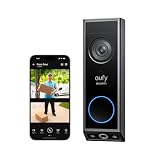
1. eufy Security Video Doorbell E340 — Best Overall
The E340 is the most complete wired option here because it watches the door from two angles at once. A main 2K camera covers faces and the street while a second, downward-facing package camera watches the doorstep itself, giving a genuine head-to-toe picture that single-lens models struggle to match. It can run on its battery, but wiring it to a 16–24V AC transformer (30VA) removes charging from your routine and keeps the doorbell ready around the clock. Footage is stored locally with 8GB of built-in memory, expandable via a HomeBase, so there is no monthly fee for basic recording. Delivery Guard adds package-specific alerts on top of person and motion detection, and the color night vision keeps the porch readable after dark. Two-way talk, Alexa and Google Assistant support, and quick responses round out a pick that suits busy front doors with frequent deliveries.
2. REOLINK Video Doorbell WiFi (Wired) — Best No-Subscription Pick
Reolink’s wired doorbell is built for owners who want their recordings kept at home rather than in a paid cloud. It records 2K video in a 4:3 aspect ratio, a taller frame than most widescreen doorbells, so more of the porch and the package area stays in view. Clips save to a microSD card or a Reolink Home Hub or NVR, and person, vehicle and pet detection run without any subscription. Dual-band 2.4/5GHz WiFi is a real advantage at the front door, where the faster 5GHz band often gives a smoother live view than crowded 2.4GHz networks. The doorbell hardwires to your existing doorbell wiring for always-on power and ships with a plug-in chime, so you are not relying on phone alerts alone. Two-way audio, infrared night vision and Alexa and Google Assistant support complete a sensible pick for privacy-minded homes that already have wiring in place.

3. Wyze Video Doorbell v2 — Best Budget
The Wyze v2 is the wired pick for homes that want to keep their existing indoor chime. It is a wired-only model that needs a 16–24V AC transformer of at least 10VA and a mechanical chime, and the included chime controller lets that chime ring when someone presses the button — something several wired rivals skip. The 2K sensor records a tall, head-to-toe view, and because power is constant it captures a few seconds of pre-roll before motion events, useful context when a package is taken. A microSD card slot enables continuous local recording with no plan required, while color night vision handles dark porches better than plain infrared. It carries an IP65 weather rating, offers two-way talk, and works with Alexa and Google Assistant. Some smart alerts sit behind the optional Cam Plus plan, but as a low-cost way to modernize a traditional wired setup, it is hard to beat.

4. Tapo Smart Video Doorbell D205 — Best Wide View
Tapo’s D205 is a fully wired doorbell aimed at porches where a narrow frame misses too much. Its 160° ultra-wide field of view takes in visitors, the doorstep and a good stretch of the front path, and the 2K resolution keeps faces usable at the edges of that wide picture. Because it is hardwired, it stays powered full time with no battery to manage. Recording goes to a microSD card for subscription-free local storage, with optional cloud storage if you prefer it, and on-device person detection helps cut alerts from passing cars and swaying plants. A press triggers a Ring Call to your phone so you can answer the door like a call, alongside standard two-way talk. Night vision covers the dark hours, and Alexa support is built in. Choose the D205 if your doorway is wide, your entry sits at an angle, or you simply want the broadest view a single wired camera can give.
View Tapo Smart Video Doorbell D205 on Amazon
5. ecobee Smart Doorbell Camera (Wired) — Best for Smart Homes
ecobee’s wired doorbell suits households already invested in a smart home setup. Its camera pairs Full HD video with HDR and an expansive 175° vertical field of view, so it frames visitors head-to-toe along with the packages at their feet. Dedicated person and package sensors drive the alerts, and two-way talk lets you answer from the app or a compatible display. It wires into a standard 16–24V AC transformer for continuous power and round-the-clock awareness, and night vision keeps watch after dark. Video recording and richer smart notifications are tied to the optional ecobee Smart Security subscription, so factor that in if you want saved clips rather than live view and snapshots. The unit itself is a clean, single finish design that sits neatly on most door frames. Pick it if you use ecobee thermostats or want one of the tallest, most delivery-aware views in a wired doorbell.

What to Look For
| Factor | Why it matters | What to check |
|---|---|---|
| Power compatibility | Models need a certain voltage range | Compare the maker’s required range with your transformer label |
| Chime type | Mechanical and digital chimes behave differently | Check whether an adapter is included or needed for your indoor chime |
| Field of view | Decides how much of the porch and package area is visible | Look at the view angle, and whether the picture is wide or head-to-toe |
| Video quality and night view | Detail and low light matter at the door | Compare stated resolution, infrared or color night modes and handling of bright backgrounds |
| Storage and subscriptions | Some features need ongoing plans | Check for local storage and which features sit behind a paid plan |
| Alerts and zones | Busy streets trigger too many alerts | Look for motion zones, schedules and person detection |
| Mounting and finish | It must suit your door frame | Check mounting plates, angle wedges and available colors |
Setup and Care Tips
- Switch off the power at the breaker before touching any doorbell wiring.
- Photograph the old wiring before you disconnect it, so you can match each wire later.
- Use an angle mount if your doorway sits to one side of the camera view.
- Set motion zones so the road or a neighbor’s yard does not trigger constant alerts.
- Wipe the lens and the sensor window with a soft damp cloth now and then.
Mistakes to Avoid
- Skipping the transformer check and finding the new unit does not power on.
- Forgetting the indoor chime, which may need an adapter to ring.
- Ignoring which features need a paid plan.
- Mounting the unit too high or too low, which crops faces and packages from view.
- Using a weak WiFi spot at the door without checking the signal first.
How a Wired Doorbell Gets Its Power
A wired video doorbell does not run on household current directly. It connects to a low-voltage circuit fed by a small transformer, usually mounted near your electrical panel, in a basement or in an attic. That transformer steps mains voltage down to a level that is safe to handle, typically between 16 and 24 volts AC. The picks above state voltage ranges like this, and it is the first number to compare with what you already have.
Voltage and VA rating
Two figures matter. Voltage is the output, and VA, short for volt-amps, is how much power the transformer can supply. An older transformer that only has a 10VA rating may be enough for a plain button and chime, but a camera that is always on, with infrared lights and a wireless radio, draws more. Models in this guide quote minimum ratings in their listings, so read them before you buy. If your transformer is under the minimum or is a DC unit, replacing it with a suitable AC transformer is a common fix, though one best done by someone comfortable with low-voltage wiring.
Reading what you already have
The label on the transformer usually states the output. If you cannot find it, look at the chime box inside the house, which sometimes prints the voltage range on its cover. Photograph the wiring before you disconnect anything. Always switch off the circuit at the breaker, not just at the button, before touching any wires.
Mechanical and digital chimes
A mechanical chime has a small solenoid that strikes tone bars. A digital chime is an electronic module that plays a recorded tone. Some doorbell cameras only work properly with one type and need an additional adapter or a bypass for the other. If the listing mentions a chime kit or an included plug-in chime, that is a sign the maker has thought about compatibility. A camera that cannot ring your existing chime still sends alerts to your phone, but the indoor sound is worth confirming if you want the house to react when someone arrives.
Matching a Doorbell to Your Doorway
The camera’s field of view and the way the unit mounts matter as much as the specs. Look at your entry before you click through the list.
- Narrow porch with a single door: A standard field of view is enough. Head-to-toe framing helps you see packages on the mat, which is why several picks here advertise a tall, 4:3 or vertical picture.
- Wide or angled entry: A wider angle captures visitors approaching from the side. This is where a 160 degree lens earns its keep, though very wide lenses can bend straight lines at the edges.
- Frame with thin trim: A narrow door frame can make a standard-size doorbell look cramped. Check the dimensions on the listing, and consider a wedge mount if the trim will not support the unit flat against the wall.
- Brick, stucco or stone walls: You will need a masonry bit and the correct anchors. Some models include a mounting plate meant for siding, so check what is in the box. A small drill bit is cheaper than a repair job.
- Apartment or rental: Wired installs usually involve the building’s transformer, which you may not be allowed to change. If you rent, ask the landlord before you swap the existing button, and keep the old one so you can restore it when you move out.
- Doors that face the afternoon sun: Strong backlight can wash out faces. HDR processing helps in theory, but the position of the camera matters too. A slight downward tilt can reduce glare from the sky.
Storage, Subscriptions and Privacy
Wired power removes the battery problem, but it does not remove the cost question. Video has to be stored somewhere, and the choices change what you pay over several years.
Local storage
A microSD card in the doorbell, a hub in the house or a small recorder on your network keeps clips under your control. It avoids a monthly fee and works without an internet connection for recording. The downsides are limited capacity, the need to replace cards over time, and the risk that footage is stolen with the device. A card is a consumable part, and high-endurance cards last longer under constant writes.
Cloud plans
Cloud storage keeps clips even if the doorbell is removed. It usually costs a monthly or annual fee and may be needed for features like package alerts, which is the case on some picks in this guide. Compare the plan’s history length and the number of cameras it covers, and read the cancellation terms.
Account security and privacy
- Use a strong, unique password and turn on two-factor authentication on the camera account.
- Check where the camera points. Facing a neighbor’s door or a public sidewalk can raise legal and social concerns, and some regions have rules on audio recording.
- Look for activity zones, which let you ignore the street and focus on your porch.
- Keep the firmware current so security fixes reach the device.
Wi-Fi, Smart Home Fit and Reliability
A wired doorbell still relies on a wireless link to your phone. The front door is often the farthest point from the router, and thick walls or a metal door can make the signal weaker. Before you order, stand at the door with your phone and run a speed test. If the signal is poor, consider a mesh node or an extender nearer the entry, or choose a model that supports 5 GHz, which is faster but shorter-range than 2.4 GHz. Dual-band support, noted on some picks here, gives you the choice.
If you use a smart speaker or display, check that the platform you own is supported for live view. Alexa and Google Assistant support is common, but features such as showing the camera on a display are not always included. Apple Home support is less common in this price range, so verify it if that is your ecosystem.
Think about what happens when something fails. A power cut will knock out the doorbell, but a model with a built-in battery or a backup path may keep working a while. Internet outages prevent cloud clips and phone notifications, but local recording can continue. A mechanical chime that rings regardless of your network is a useful fallback and part of why wired systems appeal to many households.
A short pre-install checklist
- Note the transformer voltage and VA, and the chime type.
- Confirm the doorbell’s voltage range is a match.
- Test Wi-Fi strength at the door.
- Decide how you want to store video, and what you are willing to pay monthly.
- Gather a screwdriver, drill, level and wire stripper.
- Switch off the breaker before starting.
If any of that feels uncertain, a local electrician can handle the transformer step in a short visit, and the rest of the install is usually straightforward. Taking an hour to plan avoids calling it quits halfway with wires hanging out of the wall.
Budget Versus Premium: What Extra Money Buys
Wired video doorbells span a modest price range, and the differences show up in a few places rather than across the board. Spending more usually adds a taller or wider field of view, a second camera for the doorstep, better night imaging, smarter person and package detection, and a more polished app. Lower-cost models often cover the basics well but may put smart alerts behind a subscription or offer fewer chime options.
Rather than paying for every feature, decide which two or three you will use daily. A household with frequent deliveries gains the most from package detection and a downward view, while someone who simply wants to see who is at the door can do well with a plain model and local storage. Also weigh long-term cost, since a cheap unit with a required monthly plan can end up costing more over several years than a pricier one that stores video locally. Add up the plan fee across the time you expect to keep the doorbell before you compare totals.
Finally, think about support. A doorbell sits outside in weather for years, and a maker with a clear warranty and ongoing app updates is easier to live with. Look at how long the maker has supported its older devices, and whether the app is still updated, before you commit to an ecosystem.
FAQ
Can I fit a wired doorbell if I rent?
Often yes, if the building already has doorbell wiring and the owner allows changes. Check your lease and ask before drilling or swapping fittings.
Do wired models still need WiFi?
Yes. Wire supplies the power, but the doorbell still sends video over your home network. A strong signal near the door matters, so a mesh unit or extender may help.
How do I know if my existing doorbell wiring works with a video doorbell?
Find the transformer or the chime box and read the voltage and VA ratings. Most wired video doorbells call for roughly 16 to 24 volts AC and a minimum VA rating given on the listing. If your system is DC or has a lower rating, a new transformer may be needed.
Can I install a wired video doorbell myself?
Many homeowners do, since the work involves low voltage and basic tools. Turn off the breaker first, photograph the existing wires and follow the maker’s instructions. If you need to replace a transformer or the wiring is hard to reach, an electrician can do it in a short visit.
Will a wired video doorbell work during a power outage?
Usually not for long. The transformer loses power, so the doorbell goes offline unless the model has a backup battery. Internet outages also stop phone alerts and cloud clips, though local recording to a card may keep going. A battery backup adds resilience.
What is the best height to mount a video doorbell?
Most makers suggest placing the camera around 48 inches above the ground, near eye level for an adult. Models with a tall or downward-facing view can help show packages at your feet. Check the instructions, and use a wedge mount if the door frame forces an awkward angle.
Do wired video doorbells record all day?
Most record when they detect motion or a button press rather than continuously. Some models support continuous recording to a memory card, though it fills the card faster and shortens its life. Check the listing for event-based versus continuous recording and the storage options.
The Short Version
Check your transformer and chime first, then compare view angle, night viewing, storage and alert controls. A wired doorbell suits homes with existing wiring and owners who would rather skip regular charging.
Related Guides
- 5 Best Wired Doorbell Cameras and Video Intercoms (2026)
- 6 Best Wireless Doorbells and Chimes: Philips, GE, SURFOU (2026)
- How to Choose the Best On Camera Video Monitors: A Buyer's Guide
- How to Choose the Best Video Camera Tripods: A Buyer's Guide
- How to Choose the Best Video Cameras: Buyer's Guide (2026)