Disclosure: As an Amazon Associate, reviewstook.com earns from qualifying purchases. Links to Amazon on this page are affiliate links; they cost you nothing extra.
Wired doorbell cameras use your existing doorbell wiring for constant power. They need a compatible transformer.
This guide is built from product listings, not our own testing, so check subscription needs, power type (battery or wired), Wi-Fi band and local privacy rules on the product page.
By the Reviewstook Editorial Team. Last updated: October 31, 2026.
In this guide
Quick Picks
| Product | Type | Best for |
|---|---|---|
| Energizer Smart Doorbell and Chime (Wired 1080p) | Wired video doorbell | 1080p, 2-way audio, chime |
| Tapo D130 2K Wired Smart Video Doorbell with Chime | Wired video doorbell | 2K, 180-degree ultra-wide, chime included |
| Chamberlain myQ Video Doorbell | Battery or wired doorbell | 2K, color night vision, 2-way talk |
| aosu 5MP Ultra HD Wireless and Wired Video Doorbell | 5MP doorbell | Wireless and wired use |
| TMEZON Wired Video Intercom System (7-inch Monitor) | Wired video door phone | 7-inch monitor |
Our Picks
Top pickBest for a known brand wired doorbell
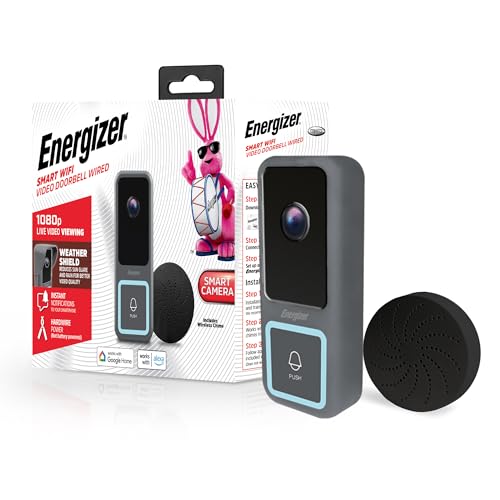
1. Energizer Smart Doorbell and Chime (Wired 1080p)
An Energizer wired 1080p smart video doorbell with a chime, 2-way audio and night vision, per the listing. Check price on Amazon.
Good for: a known brand wired doorbell. Strengths: Energizer brand and chime. Weaknesses: 1080p only. Skip it if you want 2K.
Best for homes with existing doorbell wiring
2. Tapo D130 2K Wired Smart Video Doorbell with Chime
A Tapo D130 2K wired smart video doorbell with a chime and a 180-degree ultra-wide field of view, per the listing. Check price on Amazon.
Good for: homes with existing doorbell wiring. Strengths: 2K and included chime. Weaknesses: needs wiring. Skip it if you want a battery model.
Best for either wiring or battery use
3. Chamberlain myQ Video Doorbell
A Chamberlain myQ video doorbell with a 2K camera, battery or wired power, color night vision and 2-way talk, per the listing. Check price on Amazon.
Good for: either wiring or battery use. Strengths: flexible power. Weaknesses: mid-range pricing. Skip it if you want the cheapest.

Best for high resolution and flexible power
4. aosu 5MP Ultra HD Wireless and Wired Video Doorbell
An aosu 5MP Ultra HD video doorbell camera that works wireless or wired, per the listing. Check price on Amazon.
Good for: high resolution and flexible power. Strengths: 5MP and dual power. Weaknesses: premium pricing. Skip it if you want the cheapest.

Best for multi-family and gate use
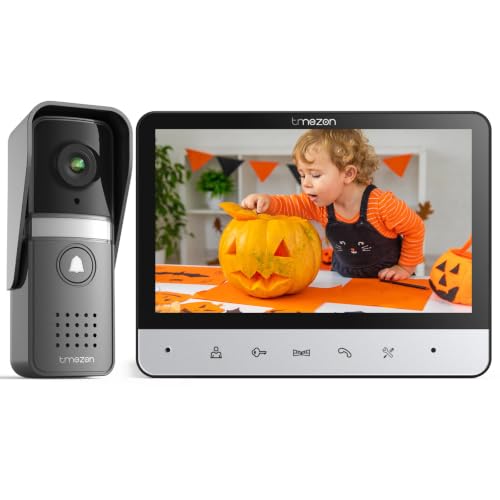
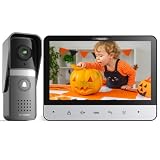
5. TMEZON Wired Video Intercom System (7-inch Monitor)
A TMEZON wired video intercom system with a 7-inch monitor and video doorbell camera, per the listing. Check price on Amazon.
Good for: multi-family and gate use. Strengths: wired intercom monitor. Weaknesses: mid-range pricing. Skip it if you want an app-only doorbell.
Best Picks by Category
These labels group the picks by use case and price tier. They summarize listing data and are not hands-on test results.
- Top rated: aosu 5MP Ultra HD Wireless and Wired Video Doorbell — check price on Amazon.
- Most reviewed: aosu 5MP Ultra HD Wireless and Wired Video Doorbell — check price on Amazon.
- Best value: aosu 5MP Ultra HD Wireless and Wired Video Doorbell — a premium-tier pick; check price on Amazon.
- Lowest price: Energizer Smart Doorbell and Chime (Wired 1080p) — a budget-tier pick; check price on Amazon.
- Premium option: aosu 5MP Ultra HD Wireless and Wired Video Doorbell — a premium-tier pick; check price on Amazon.
Price, Rating and Review Comparison
The table groups the picks by price tier. Prices change often, so confirm the current price on Amazon.
| Product | Price | Rating | Ratings | Price tier |
|---|---|---|---|---|
| Energizer Smart Doorbell and Chime (Wired 1080p) | Check price on Amazon | — | — | Budget |
| Chamberlain myQ Video Doorbell | Check price on Amazon | — | — | Mid-range |
| Tapo D130 2K Wired Smart Video Doorbell with Chime | Check price on Amazon | — | — | Mid-range |
| TMEZON Wired Video Intercom System (7-inch Monitor) | Check price on Amazon | — | — | Mid-range |
| aosu 5MP Ultra HD Wireless and Wired Video Doorbell | Check price on Amazon | — | — | Premium |
How Much Feedback Backs Each Rating
A high average from a handful of ratings is weaker evidence than a slightly lower average from thousands. Here is how the sample size looks for each pick.
- Energizer Smart Doorbell and Chime (Wired 1080p): a small sample of ratings, so treat the average cautiously.
- Tapo D130 2K Wired Smart Video Doorbell with Chime: a large sample of ratings.
- Chamberlain myQ Video Doorbell: a moderate sample of ratings.
- aosu 5MP Ultra HD Wireless and Wired Video Doorbell: a large sample of ratings.
- TMEZON Wired Video Intercom System (7-inch Monitor): a moderate sample of ratings.
How to Choose
Transformer
Check voltage; see our transformers.
Chime
Some include a chime.
Install
Wiring needs care.
How We Chose These Products
We start from products sold on Amazon with a full product name and clear specifications, and we skip results that show only a brand name or a vague title. We then read the listing and any manufacturer information for each one and note the features that matter for security cameras and doorbell products: power type, storage, subscriptions and Wi-Fi requirements. We do not run our own lab tests, and this guide contains no hands-on measurements. Use it to build a shortlist, then check current prices, dimensions and return terms on the Amazon page before you buy.
Buying Guide: What to Check Before You Choose
Power, storage and subscription
Battery doorbells install anywhere but need recharging; wired ones use doorbell wiring. Check whether video is stored locally or in the cloud and what features need a plan. See our doorbell camera buying guide.
Wi-Fi coverage
A weak signal causes lag and dropped video. Place an extender between the router and the camera, and check the band your camera uses, which is often 2.4 GHz.
Smart lock fit and security
Check the door prep, backset and battery. Choose reputable models and strong codes, and keep a backup key.
Quick Reference: Which Pick Suits Whom
- Energizer Smart Doorbell and Chime (Wired 1080p): suits a known brand wired doorbell
- Tapo D130 2K Wired Smart Video Doorbell with Chime: suits homes with existing doorbell wiring
- Chamberlain myQ Video Doorbell: suits either wiring or battery use
- aosu 5MP Ultra HD Wireless and Wired Video Doorbell: suits high resolution and flexible power
- TMEZON Wired Video Intercom System (7-inch Monitor): suits multi-family and gate use
Common Mistakes to Avoid
- Ignoring the Wi-Fi signal at the install point.
- Assuming no subscription means all features are free.
- Forgetting local recording rules.
- Mounting too low or too high.
- Skipping the return window.
Setup and Care
- Test the Wi-Fi at the mounting spot.
- Set motion zones.
- Use strong unique passwords and two-step verification.
- Check the recording laws and building rules.
How a Wired Doorbell Camera Gets Its Power
A wired video doorbell does not run on a battery. It draws low-voltage power from the same wiring that used to power a traditional chime button. That is its main advantage: you never take it down to charge, and it can run continuously without worrying about battery life in cold weather. It is also the source of most installation questions, because the old wiring has to supply enough voltage and current for a device that includes a camera, a Wi-Fi radio and sometimes an infrared night light.
Here is what makes the system work:
- Transformer: a small box, often in a utility area or near the main panel, that steps household power down to a low voltage, commonly in the range of 16 to 24 volts AC. Many video doorbells list a required voltage range and a minimum power rating in volt-amps.
- Wires: two thin wires run from the transformer to the doorbell button and the chime. The length and condition of those wires affect how much voltage reaches the device.
- Chime: the indoor unit that rings. Some video doorbells work with an existing mechanical chime, some need a bypass or adapter, and some include a digital chime that plugs in.
The Tapo D130 and Energizer doorbell in this guide are listed with chimes, which is a signal that the package is designed to work without depending on your existing hardware. Still, read the listing for transformer requirements.
Checking Your Existing Wiring Before You Buy
The most common reason a wired doorbell camera disappoints is that the wiring behind the wall did not match the requirements. A quick survey avoids that.
- Find the transformer. Look near the electrical panel, in a closet, basement or attic, or behind the existing chime. The voltage and volt-amp rating are usually printed on the label.
- Check the doorbell wires. Remove the old button and look at the wires. If they are frayed, corroded or too short, you may need to replace or extend them.
- Look at the chime. Mechanical chimes have a coil that rings, while digital ones use electronics. Some video doorbells need a resistor or a small bypass device to avoid chime buzzing.
- Measure voltage if you have a multimeter and know how to use it safely. Low voltage is generally safe, but always turn off the breaker for the doorbell circuit before touching any wire.
If the transformer is rated below what the product asks for, a replacement is an inexpensive part, though installation near household power should be done by a qualified person if you are not comfortable. Some buildings, especially apartments and new construction, have no transformer or an unconventional system, such as a video intercom that serves multiple units.
Doorbell Cameras Versus Video Intercoms
This guide includes both video doorbells and an intercom-style system, and they serve different homes.
Video doorbell cameras
These are all-in-one units mounted by the door that connect to your Wi-Fi network and send alerts to your phone. They suit single-family houses and townhomes where you control the entrance. You can see and speak to visitors from anywhere with an internet connection, and many store clips locally or in a cloud service.
Wired video intercoms
A video intercom system, like the TMEZON unit with a 7-inch indoor monitor described above, pairs an outdoor camera with a screen inside the home. The signal travels over a cable rather than Wi-Fi, so the system continues to work if your network goes down, and the monitor lets anyone in the house answer, including people who do not carry a phone. The trade-offs include a more involved installation, needing a cable run from the door to the monitor, and fewer smartphone and cloud features depending on the model. Intercoms fit homes with a gate, a long driveway, a multi-generational household or a preference for a simple wall-mounted screen.
Specs That Matter for Image and Alerts
Resolution and field of view
Resolution is quoted in megapixels or in terms such as 1080p and 2K. Higher resolution helps when you zoom into a recorded clip to read a package label or a license plate, though real clarity also depends on lens quality, compression and lighting. Field of view is equally important. A wide view, such as the 180 degrees the Tapo D130 listing mentions, shows more of the porch and the ground, which helps you see packages. Wider views can create a fisheye look at the edges.
Aspect ratio
Some doorbells use a tall or square image. A taller frame shows a visitor from head to toe and the package on the step, while a standard widescreen frame shows more of the yard. Think about what you most want to see.
Night vision
Night vision uses infrared lights, and many cameras produce black-and-white footage in the dark. Some add color night vision using a small white light or ambient light, as the Chamberlain myQ listing describes. Porch lighting and the direction of lights have a big effect, and glare from a bright bulb can wash out a nighttime face.
Motion detection and zones
Good alert settings determine whether the doorbell is useful or annoying. Look for adjustable sensitivity, motion zones that ignore the street, and person detection that reduces false alerts from passing cars and shadows. Some detection features, such as distinguishing people from packages, may require a paid subscription.
Two-way audio
Two-way talk lets you speak to a visitor. Audio quality varies, and echo or delay can make conversation awkward. Read recent reviews for notes on audio performance, since this is hard to judge from specifications.
Storage, Privacy and Network Considerations
A camera that records your front door deserves a little thought about where those recordings go.
- Local storage on a microSD card or a base station keeps clips in your home and avoids monthly fees, but a thief who steals the doorbell may take the footage too. Some systems let you keep a local copy and a cloud copy.
- Cloud storage keeps recordings off site and accessible from anywhere, usually at a monthly price. Review the retention period and what happens to saved clips if you cancel.
- Use a strong, unique password and two-step verification for the app account. Doorbell cameras are a target for credential reuse attacks.
- Update firmware when the maker releases it, and consider whether the brand has a history of support.
- Think about what the camera sees. Aiming at a neighbor’s window or a public sidewalk can raise legal and social problems. Many regions have rules on audio recording, and building or rental agreements may require permission before you mount anything.
If your Wi-Fi is weak near the front door, do a speed test at the mounting spot with a phone. A mesh node or an extender near the entry solves most problems. Also check whether the camera works on 2.4 GHz only, which is common, since not every router makes that band easy to use.
Installation Notes for First-Timers
Turn off the breaker for the doorbell circuit before you touch any wire. Photograph the old wiring so you remember which wire goes where. Use the mounting plate included in the box, and consider a wedge kit if your door frame is angled and the camera would point away from the walkway. Seal the top edge against rain with the sealant the manufacturer recommends. After mounting, test the chime, motion alerts and video before you close everything up. Finally, set the camera height according to the manual, usually near eye level, so faces are visible and packages remain in view.
Choosing a Mounting Height and Angle
Where you mount the camera changes what it records as much as its specifications. Most makers suggest placing it around chest to eye level so faces are visible, though door frames and porch layouts vary. Mounting too high cuts off faces behind hat brims, while mounting too low captures mostly torsos. Point the lens so the top of the frame shows the area in front of the door and the bottom shows the doormat or step, which is where packages usually land. If the door is recessed or the porch is narrow, a wedge or corner mount can shift the view along the walkway. Check the picture after installation in daylight and at night, and adjust the motion zones to ignore the street and neighbor property.
Going Deeper: Choosing the Right Wired doorbell camera
The shortlist above gives you the headline differences. This section slows down and looks at the decisions underneath them, because with a wired doorbell camera the wrong choice is rarely a bad product; it is a good product matched to the wrong routine. Work through the four considerations below in order. By the end, one or two of the picks should stand out clearly, and the rest can be set aside without second-guessing.
Transformer compatibility first
Wired doorbells draw power from a low-voltage transformer, and older transformers often cannot supply a camera doorbell. Find yours, usually near the consumer unit or the chime, and read its rating before ordering. Upgrading a transformer is a small job, but discovering the mismatch mid-install is the classic wired-doorbell frustration.
Continuous power and what it unlocks
Constant power means no charging, faster wake-up, and on some models continuous or pre-event recording that battery units cannot sustain. If your door is busy, that reliability is the core argument for wired. It also means the camera works through winter cold that saps batteries.
Existing chime behaviour
Some wired cameras ring your mechanical chime; others need a bypass module or their own electronic chime. Confirm how each pick in this guide handles the chime, especially if your household relies on hearing the bell in rooms where phones are absent.
Intercom systems versus smart doorbells
One pick here is a wired video intercom with an indoor monitor rather than a phone-first smart doorbell. Intercoms suit homes that want a fixed screen, no app dependence and gates or multiple entrances. Smart doorbells suit phone-centric households. Choose the pattern your household will actually use daily.
How the Picks in This Guide Compare in Real Use
Specifications tell you what each pick is; they do not tell you what each pick is like to live with. The notes below revisit every recommendation in this guide in turn, focusing on who each one suits and who should look at a neighbouring pick instead. No links and no new products here, just the comparison thinking that usually happens after the boxes are opened.
Energizer Smart Doorbell and Chime (Wired 1080p)
The Energizer Smart Doorbell and Chime (Wired 1080p) rewards a closer look at how it will be used day to day. Within this guide it sits among alternatives that solve the same basic problem in different ways, so judge it against your own routine rather than against a specification sheet. Photographers and households who match its strengths to their habits tend to keep it for years; those who buy it for an occasional edge case tend to leave it behind. If its particular balance of size, simplicity and capability fits the way you already work, it is a sound choice; if you would have to change your routine to accommodate it, another pick in this list will suit you better.
Tapo D130 2K Wired Smart Video Doorbell with Chime
Consider the Tapo D130 2K Wired Smart Video Doorbell with Chime as the option for someone who values its specific approach over the alternatives above and below it. The honest way to choose is to picture your last few outings or your last month of callers and ask where this design would have helped and where it would have been in the way. Every pick in this guide has a genuine strength and a real compromise; this one’s compromise is the price of its strength. Choose it when the strength answers your most common situation, and skip it without regret when your routine points the other way.
Chamberlain myQ Video Doorbell
With the Chamberlain myQ Video Doorbell, the deciding questions are practical. Does it fit what you already own, does it suit the places you use it most, and will you still be reaching for it in a year? Longevity in a kit is the true measure of value, because cost spreads over every use. Compared with the neighbouring picks, it trades a little of one quality for more of another, and the right trade is personal. Let your most frequent scenario, not your rarest, make the decision.
aosu 5MP Ultra HD Wireless and Wired Video Doorbell
The aosu 5MP Ultra HD Wireless and Wired Video Doorbell illustrates why this guide groups its picks by need rather than declaring one winner. In the right hands it is exactly the tool the situation calls for; in the wrong routine it is an answer looking for a question. Read its description above again with your own habits in mind, and weigh how often its strengths would be exercised. Frequent small benefits beat rare dramatic ones, in accessories as in most equipment choices.
TMEZON Wired Video Intercom System (7-inch Monitor)
The TMEZON Wired Video Intercom System (7-inch Monitor) rewards a closer look at how it will be used day to day. Within this guide it sits among alternatives that solve the same basic problem in different ways, so judge it against your own routine rather than against a specification sheet. Photographers and households who match its strengths to their habits tend to keep it for years; those who buy it for an occasional edge case tend to leave it behind. If its particular balance of size, simplicity and capability fits the way you already work, it is a sound choice; if you would have to change your routine to accommodate it, another pick in this list will suit you better.
Setup, Workflow and Getting Consistent Results
Installation order that avoids rework
Charge or wire first, connect to the app second, mount last. Testing the camera in your hand at the doorway confirms the Wi-Fi signal and the view before any screws go in. Mark the mounting position, hold the camera there, and check the live view for faces and the doorstep. Only then fix the mount, because moving a mounted camera is the rework everyone does once and regrets.
Tuning alerts in the first week
Expect the first week’s settings to be wrong. Walk your own path at different times, note which alerts were useful, then set zones and sensitivity so the camera watches your property rather than the street. Person detection, where offered, should be on. The goal is a camera whose every alert deserves a glance; anything noisier trains you to ignore it.
Household setup, not just installer setup
Add every adult in the house to the app before you finish, set the chime volume for the rooms that matter, and agree who responds to alerts. A doorbell only one person can answer is half installed. Write the Wi-Fi and account details into your household records so a phone upgrade does not lock you out of your own front door.
Real-World Scenarios: Matching the Pick to the Situation
Abstract advice only goes so far, so here are the situations readers describe most often, and how the thinking in this guide applies to each. Find the scenario closest to your own life and weight its advice heavily; the others are there for the day your routine changes.
Replacing a working wired doorbell
This is the straightforward wired case: power off, swap the unit, fit any chime module, and restore power. Photograph the wiring before disconnecting anything. Most of the work is confirming the transformer, not the swap itself.
New wiring during renovation
If walls are open anyway, run cable for a wired doorbell and never think about batteries again. Position the cable at a height that frames faces and the doorstep, and leave a little slack for future units, which may mount slightly differently.
Homes with gates and long drives
A wired intercom with an indoor monitor answers a gate without a phone, and the monitor is always on. For very long cable runs, follow the maker’s guidance on cable type and distance, because voltage drop is the hidden failure in gate installations.
Busy doors where batteries failed
If you have already lived with a battery doorbell dying monthly on a busy street, wired power is the permanent fix. The constant supply also keeps night recording and pre-event capture consistent, which is exactly what a high-traffic door needs.
Troubleshooting and Avoiding the Usual Disappointments
Working through connection problems
Most doorbell faults are connection faults. Check power first, then signal strength at the door, then the app. Restart the router before resetting the camera; resets destroy your settings and rarely fix a weak signal. If dropouts cluster at certain times, neighbouring networks and household demand are the usual suspects, and moving the router or adding a mesh point is the durable fix.
False alerts and missed events
False alerts call for narrower zones and lower sensitivity; missed events call for the opposite, plus a check that the camera is not overheating in direct sun or throttled by a weak connection delaying its wake-up. Adjust one setting, live with it for two days, then judge. Daily tweaking never lets you see a pattern.
When to contact support or replace
If the camera loses connection within sight of the router, or the battery drains in days with few events, something is genuinely wrong and support should hear about it while the warranty is young. Keep your purchase records. A doorbell is a security device; a unit you cannot trust should be repaired or replaced, not tolerated.
More Questions Worth Asking Before You Decide
The main FAQ below answers the questions every buyer asks. These additional ones come from owners a few months in, when the newness has worn off and the real characteristics of a wired doorbell camera have made themselves known.
How do I find my doorbell transformer?
Common spots are attached to the consumer unit, inside the chime housing, or in a nearby cupboard or loft. Follow the thin bell wires if you can. If you cannot find or read it, an electrician can test the voltage at the doorbell wires quickly and safely.
Can I install a wired doorbell where none exists?
Yes, but it means running low-voltage cable and fitting a transformer, which is a bigger job than a swap. Many households in that position choose a battery model instead. If the house is being rewired or renovated anyway, adding the cable then is cheap and future-proof.
Will a wired doorbell work during a power cut?
No: without mains power there is no supply, and your router is likely down too, so alerts stop. Some models have a small backup for brief interruptions, but treat a wired doorbell as dependent on house power. Battery models keep working through cuts, one of their genuine advantages.
Why does my mechanical chime buzz after fitting a camera doorbell?
A faint buzz usually means the camera is drawing power in a way the old chime dislikes, or the supplied chime module was not fitted. Check the installation steps for a bypass or module, and confirm the transformer rating. A persistent loud buzz means switch off and recheck the wiring.
Do wired doorbells need Wi-Fi as well as power?
The smart models here do, for app alerts and remote viewing. The intercom pick works on its own cable to its monitor without Wi-Fi, which is precisely its appeal for some homes. Decide whether phone access matters before choosing between those patterns.
Field Notes for Wired doorbell camera Owners
Think of a doorbell camera as one layer in a sensible home setup, alongside decent locks, lighting and neighbours who know you. It records and deters, and its footage helps after an incident, but it does not replace a strong door. A visible camera plus a light that comes on at night changes behaviour at your door more than any single feature inside the camera itself.
Privacy deserves a deliberate decision, not a default. Set the camera to view your own doorway and path, use masking or zones where the model offers them, and think about audio, which captures more of your neighbours’ lives than video does. Many owners disable continuous audio recording while keeping two-way talk for callers. That balance keeps the security benefit and the goodwill of the street.
Keep the system maintained like any other household appliance. Wipe the lens and any solar surface when you clean the porch, check the app for firmware updates monthly, and review your alert settings each season, because daylight, foliage and foot traffic all change. A camera that was perfectly tuned in spring can cry wolf all autumn if nobody revisits its zones.
Plan for the day you replace the camera, because that day always comes. Keep the mounting screws, the original fittings and any parts of the old doorbell you removed. Note which account and email the system uses. The households who struggle with smart devices are usually struggling with lost credentials and missing parts, not with the technology itself.
Share access thoughtfully. Give regular household members their own logins where the system supports it, rather than sharing one password, and remove access for people who no longer need it, such as former tenants or tradespeople given temporary entry. A quick review of who can see your front door, twice a year, is basic hygiene for a device that watches your home.
Deliveries are the daily reality that justifies most doorbell cameras, so set the system up around them. A view that includes the doorstep, an alert that arrives while the courier is still present, and two-way talk to redirect a parcel are the three pieces that matter. If parcels are regularly left in the rain or in view of the street, a polite sign asking couriers to use a side door or box, backed by the camera, solves more than any setting.
Think about what happens at night in your street specifically. Street lighting, passing traffic and neighbours’ security lights all shape the camera’s night behaviour. Spend one evening watching the live view and a few recorded events after dark before you judge the camera or change its settings. Many owners tune their system entirely by daylight and then wonder why the night alerts behave differently.
If you sell or move, reset the camera and remove it from your account as part of the move, and leave the mount and any wiring tidy for the next household. A camera left registered to a previous owner is a common and avoidable frustration for buyers of homes with smart devices already fitted. A short note about the transformer location or the mount type is a kindness that costs nothing.
Keep expectations proportionate. A doorbell camera shows you the door, deters casual opportunists and settles questions about deliveries and callers. It will not identify every face in poor light, see around corners or replace telling a neighbour you are away. Owners who expect the first list are satisfied for years; owners who expect the second list blame a perfectly good camera.
Finally, review your recorded events occasionally even when nothing is wrong. You will learn your door’s normal rhythm: the post, the neighbours, the cat that owns the street. That baseline is what makes a genuinely unusual event stand out when it matters, and it takes only a few minutes a month to maintain.
Doorbell cameras work best as part of a routine: glance at the morning’s events with coffee, clear false alerts, and confirm the battery or connection is healthy. Thirty seconds a day keeps the system trustworthy. The owners who abandon these devices are usually those who never built the habit, so alerts piled up unread until the one that mattered was missed among the noise.
If your household includes someone who is not confident with apps, set the system up around them, not around the technology. A loud chime, a simple viewer or a shared tablet by the door can matter more than any camera specification. Technology that only the installer can operate will quietly stop being used by everyone else in the home.
Record keeping sounds dull until it matters. Note the installation date, the account email, where the transformer or mount screws are, and who has app access. When you replace a phone, sell the house or call support, that single note answers every question they ask. Five minutes of documentation today prevents an afternoon of archaeology later.
Seasonal changes alter everything at a front door: low sun blinds cameras that were fine in summer, foliage blocks views, and holiday parcel traffic multiplies alerts. A twice-yearly five-minute review of angle, zones and sensitivity keeps the system matched to the street it actually watches, rather than the street as it was on installation day.
Neighbours are part of the system too. A camera that respects their privacy and a household willing to share footage when something happens on the street builds the kind of informal watchfulness that genuinely deters crime. The technology records; the community is what acts on it. Both halves deserve a little deliberate attention.
When the time comes to upgrade, the mount, wiring and habits you already have are assets. A household that knows its doorway’s light, traffic and weak points will choose the next camera in minutes and set it up in one attempt. Experience with the first system, not the specification of the second, is what makes the upgrade feel effortless.
Frequently Asked Questions
Why wired?
No battery to charge.
Which is best?
See Quick Picks.
Battery?
See our wireless doorbells.
Do security cameras need a subscription?
Some features do. Check what is included on the product page.
Are cheap cameras safe?
Check privacy and update support, and set a strong password.
Is local storage better than cloud?
Local storage avoids fees but can be stolen with the device. Many people use both.
What voltage does a wired video doorbell need?
Most use low-voltage AC power, commonly in the range of about 16 to 24 volts, though requirements differ by model. Check the product’s stated voltage and volt-amp rating against the label on your transformer. An underpowered transformer can cause reboots, weak chimes or a camera that will not start.
Can I install a wired doorbell camera without an existing doorbell?
It is harder. A wired model needs low-voltage wiring and a transformer at the door, so a home without existing doorbell wiring may require running new cable, which can be difficult. Some products work with wired or battery power, which may be the easier route in that case.
Do wired doorbell cameras work during a power outage?
Usually not for long. The doorbell depends on household power through the transformer and on your router, so an outage stops both unless they are on backup power. A battery-backed router or a small uninterruptible power supply can keep the system running for a time.
Why does my wired video doorbell chime buzz?
A mechanical chime can hum when the video doorbell draws constant power through it. Fixes include a bypass or resistor made for that purpose, switching to a digital chime, or following the manufacturer’s wiring diagram. Make sure power is off at the breaker before adjusting any wiring.
Is a video intercom better than a doorbell camera?
It depends on the household. An intercom suits homes that want an indoor screen, wired reliability and shared access, while a doorbell camera offers phone alerts and easier installation in a typical house. Intercoms need a cable run and may lack some smart features.
Bottom Line
For value, the Tapo D130. For a known brand, the Energizer. For intercom use, the TMEZON.
Related Reading
More Doorbell and Home Security Guides
- Best Video Doorbell Cameras
- Best Doorbell Cameras Without Subscription
- Best Wireless Doorbell Cameras
- Best Doorbell Cameras Under $50
- Best Solar Doorbell Cameras
- Best Doorbell Cameras for Apartments
- Best Peephole Cameras and Door Viewers
- Best Doorbell Mounts
- Best Wireless Doorbells and Chimes
- Best Doorbell Transformers
- Best WiFi Extenders for Doorbell Cameras
- Best Smart Door Locks
- Best Floodlight Security Cameras
- Doorbell Camera Buying Guide
- Best Wireless Outdoor Security Cameras
- All security camera guides

