An NVR system pairs a network video recorder with wired IP cameras. The cameras send video over network cable to a box with a hard drive, so recordings stay in your own building rather than depending on a monthly cloud plan. Many kits bundle the recorder and several cameras, and the cable often carries power too.
We have not used these products ourselves, so this page does not report results from the field. It is a guide to the choices that shape a kit: how many channels the recorder supports, whether it powers cameras itself, what resolution and lens you need, and how much disk space your recording habits call for. Work through the list before you compare bundles.
As an Amazon Associate we earn from qualifying purchases. Links on this site are affiliate links, and they do not change the information we give.

In this guide
Quick Picks
| Pick | Product | Best For |
|---|---|---|
| 1 | REOLINK RLK8-800B4 4K PoE Security Camera System | Best overall 4K kit for most homes |
| 2 | Amcrest 4K PoE Security Camera System (NV4108E-IP8M-T2599EW4-2TB) | 4K turret cameras with a surveillance-grade drive |
| 3 | Amcrest 5MP Security Camera System (NV4108E-IP5M-D1188EW4-2TB) | Vandal-resistant domes for exposed spots |
| 4 | Hiseeu 4K PoE Security Camera System (8 Cameras, 16CH NVR) | Wide coverage with eight cameras in the box |
| 5 | REOLINK RLK8-520D4 5MP PoE Security Camera System | A lower-cost dome kit that still records 24/7 |
Our Picks
1. REOLINK RLK8-800B4 4K PoE Security Camera System — Best overall 4K kit for most homes
This kit bundles the RLN8-410 8-channel NVR with four B800 8MP (4K) bullet cameras. The recorder has eight built-in PoE ports, so each camera gets power and data from a single cable, and a 2TB hard drive is pre-installed for 24/7 recording with H.265 compression. The cameras record at 3840×2160, carry an IP66 weather rating for outdoor mounting, and support person and vehicle detection, which cuts the false motion alerts the guide warns about. Four channels stay free for extra cameras later, answering the spare-channel advice above. Remote viewing runs through the Reolink app and desktop client with no subscription needed for local recording. Note the kit cameras are designed to work with Reolink NVRs, so plan to stay within that ecosystem as you expand.
View REOLINK RLK8-800B4 4K PoE Security Camera System on Amazon
2. Amcrest 4K PoE Security Camera System (NV4108E-IP8M-T2599EW4-2TB) — Best 4K turret kit with a surveillance-grade drive
Amcrest’s 4K kit pairs its NV4108E-A2 8-channel PoE NVR with four IP8M-T2599EW 8-megapixel turret cameras. The recorder’s eight PoE ports power the cameras over the same network cable that carries video, and the pre-installed 2TB drive is a Seagate SkyHawk surveillance model built for continuous writing; the NVR accepts drives up to 10TB when you need a longer recording history. H.265 compression helps stretch that space, and the Amcrest View app handles remote viewing on phone and tablet. Turret cameras are a practical middle ground for the mounting advice in this guide: easier to aim than domes and less prone to spider-web glare than bullets. It suits homes and small shops that want full 4K detail at doors and driveways.
View Amcrest 4K PoE Security Camera System on Amazon
3. Amcrest 5MP Security Camera System (NV4108E-IP5M-D1188EW4-2TB) — Best for vandal-resistant domes in exposed spots
This system uses the same NV4108E-A2 8-channel 4K-capable PoE recorder as the kit above, with a 2TB hard drive pre-installed and support for drives up to 10TB, but swaps the cameras for four 5MP vandal dome models (IP5M-D1188EW). The domes sit in metal housings rated IK10 for impact resistance and IP67 for weather, with a 2.8mm wide-angle lens, which makes them the sensible choice for low, reachable mounting points such as porches, shopfronts and parking areas where a camera could be grabbed or struck. Resolution is 5MP rather than 4K, so files are smaller and the drive holds more days of footage. The Amcrest View app covers remote viewing, and four spare channels leave room to add cameras later.
View Amcrest 5MP Security Camera System on Amazon
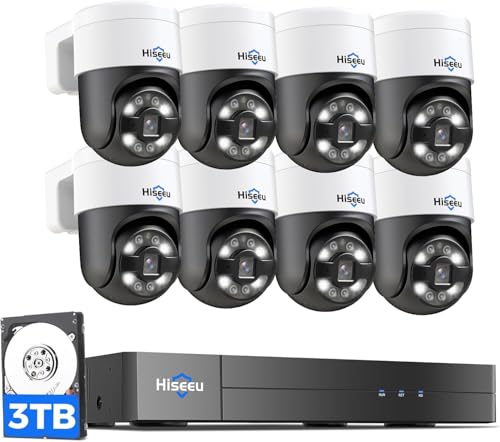
4. Hiseeu 4K PoE Security Camera System (8 Cameras, 16CH NVR) — Best for wide coverage out of one box
Most kits in this guide start with four cameras; this Hiseeu system (PK-8YHC275-AT) includes eight 5MP PoE cameras and a 16-channel NVR with a 1TB hard drive pre-installed. The recorder has eight built-in PoE ports and can grow to 16 channels with an added PoE switch, which fits the guide’s advice to size the recorder for the larger plan. Each camera uses a wide 121-degree lens, so fewer cameras are needed to cover a yard or storefront, and the system records around the clock to the local drive with app-based remote access and no monthly fee. The trade-off is the smaller 1TB drive: with eight cameras recording, expect a shorter history before old footage is overwritten, so heavy recorders may want to budget for a bigger drive.

5. REOLINK RLK8-520D4 5MP PoE Security Camera System — Best lower-cost dome kit
The RLK8-520D4 is Reolink’s 5MP alternative to the 4K kit at the top of this list. It combines an 8-channel NVR with a 2TB hard drive pre-installed and four D500 5MP dome cameras, powered over the same single-cable PoE runs. You still get person and vehicle detection to filter motion alerts, 24/7 recording to the local drive, and remote viewing through the Reolink app without a subscription. Dome housings sit neatly on ceilings and soffits, suiting porches and interiors as well as outdoor eaves. Choosing 5MP over 4K means less fine detail for identifying faces at a distance, but smaller files and a longer recording history on the same drive. It is the sensible pick for smaller homes that want the recorder-based setup without paying for resolution they will not use.

View REOLINK RLK8-520D4 5MP PoE Security Camera System on Amazon
What to Look For
| Factor | Why it matters | What to check |
|---|---|---|
| Channel count | Each camera uses one channel on the recorder. | Pick a recorder with a few more channels than cameras today. |
| Built-in PoE ports | They power and connect cameras through one cable. | Confirm the ports match your camera count and cable lengths. |
| Resolution and lens | Detail and field of view decide what you can identify. | Match the lens angle and resolution to the area each camera covers. |
| Hard drive space | Higher resolution and more cameras fill a drive sooner. | Check the included drive size and the maximum the recorder accepts. |
| Night vision | Dark yards need usable images after sunset. | Read the stated infrared range and any color night mode. |
| Remote viewing | Many people want to check cameras from a phone. | Look for an app, and for local access that works without a subscription. |
| Weather resistance | Outdoor cameras face rain, dust and heat. | See the stated ingress protection class for each camera. |
Setup and Care Tips
- Sketch each camera location and measure the cable run before ordering.
- Place the recorder in a dry, ventilated spot out of casual reach.
- Change default passwords and keep the recorder firmware current.
- Adjust motion zones so trees and roads do not fill the drive.
- Clean lenses and spider webs from outdoor housings once in a while.
Mistakes to Avoid
- Buying a recorder with no spare channels for later cameras.
- Ignoring cable length limits, which can cause a camera to drop out.
- Choosing a small drive and then finding footage overwritten sooner than expected.
- Mounting cameras too high, so faces are seen only from above.
- Leaving the system on its factory login.
Should an NVR security camera system be 4K or 5MP?
Choose 4K when you need to pick out faces, plates or small details at a distance, and choose 5MP when you want longer recording history and smaller files. For most NVR security camera systems the difference matters far more at doors and driveways than in a hallway or on a porch.
Resolution is only part of image quality. Lens angle, sensor quality, night lighting and how far the subject is from the camera all change what you can actually read in a clip. A wide lens spreads the same pixels over a larger scene, so a wide-angle 4K camera may show less detail on a distant person than a narrower lens aimed at one gate.
- Pick 4K for entrances, driveways, gates and any spot where identification matters.
- Pick 5MP for porches, interiors, soffits and wide yard views where a general record of events is enough.
- Mix where the recorder allows it. Some homes use sharper cameras on the front door and simpler ones elsewhere, as long as the recorder supports every camera you plan to connect.
Higher resolution also raises the load on the recorder, your drive and your network. Check the maximum resolution the recorder can handle across all channels at once, not just per camera. If the listing only gives a single headline number, look in the manual or specification sheet for the total supported throughput before you decide.
How much hard drive space does an NVR camera system need?
An NVR needs enough drive space to hold the number of days you want to keep, and that depends on camera count, resolution, compression and whether you record all day or only on motion. There is no single right size, so work backward from how far back you expect to look.
Most people only review footage within a few days of an event, but some want a longer window for shops, rentals or travel. Decide that window first. Then compare it with the drive size included in each kit and the largest drive the recorder will accept.
- Continuous recording gives a complete timeline but fills a drive fastest.
- Motion recording stretches storage, but poorly tuned zones can still fill it with passing cars and swaying branches.
- H.265 compression reduces file size compared with older formats, which helps the same drive hold more days.
- A surveillance-rated drive is built for constant writing, unlike a general desktop drive.
Plan for growth. If you may add cameras later, the same drive will cover fewer days each time. The Hiseeu kit above shows the trade-off clearly: more cameras on a smaller included drive means a shorter history, so budget for a bigger drive if you record around the clock. Also keep a habit of exporting important clips to a separate device so they are not overwritten.
How do you install PoE cameras and run the cable?
Install an NVR system by choosing camera spots first, running network cable from each spot back to the recorder, then connecting and aiming the cameras. The single cable carries both power and video, which is why PoE kits are popular for outdoor mounting.
Before drilling, test each camera at the recorder with a short patch cable so you know the pieces work. It is much easier to fix a faulty unit on a bench than on a ladder.
- Measure real cable paths, not straight lines, and keep to the maximum run length the maker states for network cable.
- Use cable rated for the location. Outdoor runs and walls with sunlight exposure call for cable made for that use.
- Seal cable entry holes and connectors so water cannot travel along the cable into the house.
- Leave a small loop of slack at each camera so you can re-aim or replace it later.
- Avoid running cable right beside mains wiring for long stretches.
Aim cameras slightly downward, away from bright lights and glass that cause glare at night. Walk through the scene on the live view before finishing, and check that faces are visible at the distances that matter. If a cable run is awkward, ask whether a small PoE switch near the far end would shorten it, and confirm the recorder supports that setup.
What to check before you buy an NVR security camera system
Before you buy, confirm that the channel count, power method, drive size, camera type and app access all match your plan. A short checklist now prevents the most common returns and add-on costs.
- Channels: does the recorder have more channels than the cameras included, so you can expand?
- PoE ports: are there enough built-in ports for every camera, and does your layout stay within cable limits?
- What is included: check whether the listing includes cable, a mouse, mounting hardware and a power adapter, because some kits leave cable out.
- Hard drive: note the included size, whether it is installed, and the largest drive the recorder accepts.
- Camera style: bullet, turret or dome, and whether it suits the mounting height and exposure.
- Ecosystem: if the cameras are designed to work with that maker’s recorder, expect to stay with that brand when you expand.
- Remote access: look at how the app works and whether local recording needs any subscription.
- Warranty and returns: read the terms on the listing, and keep the packaging until you have tested every camera.
- Care needs: plan for changing default passwords, updating firmware and cleaning lenses.
Also consider where the recorder will live. It needs ventilation, a power outlet and a network connection to your router if you want phone viewing. Test remote access soon after setup rather than waiting for the first time you need it.
Which NVR camera kit should you buy?
If you want one balanced 4K kit for a typical home, go for the REOLINK RLK8-800B4. If you care about a surveillance-rated drive and turret cameras, choose the Amcrest 4K PoE Security Camera System. Match the rest of the list to your mounting spots and how much ground you need to cover.
- Most homes wanting sharp detail and room to grow: REOLINK RLK8-800B4 4K PoE Security Camera System, with spare channels for later cameras.
- Full 4K detail at doors and driveways with an easy-to-aim camera: Amcrest 4K PoE Security Camera System (NV4108E-IP8M-T2599EW4-2TB).
- Low, reachable mounting points that could be struck or grabbed: Amcrest 5MP Security Camera System (NV4108E-IP5M-D1188EW4-2TB), with vandal-resistant domes.
- A yard, storefront or larger property you want covered in one purchase: Hiseeu 4K PoE Security Camera System (8 Cameras, 16CH NVR), as long as you accept the smaller included drive.
- Smaller homes that want recorder-based security without paying for extra resolution: REOLINK RLK8-520D4 5MP PoE Security Camera System.
If you are unsure, start by counting camera spots and checking which of them need identification-level detail. That usually points clearly to one kit. The two Amcrest kits share a recorder, so you can think of the choice there as turrets for detail versus domes for toughness.
Is an NVR system worth the effort, and who should skip it?
An NVR system is worth it when you want several cameras, local storage and no dependence on cloud plans, but it is not worth it if you only need to watch one door. The honest trade-off is more setup work in exchange for more control.
The main downsides are real. You need to run cable, find a good place for the recorder, and take responsibility for passwords, updates and drive health. Cameras that are designed to work with one maker’s recorder can limit how freely you mix brands. And a drive that is too small means older footage disappears sooner than you expect.
Is it worth paying more for higher resolution or a bigger drive? Pay more where it solves a problem you actually have. Spend on 4K for entrances, spend on storage if you want a longer history, and skip both where a general view is enough.
You may want to skip a recorder system if you rent and cannot drill or run cable, you only need one camera, or you prefer a plug-in device you can move between rooms. A simple standalone camera can suit those cases better.
If an NVR still fits, compare the picks above, check the current listing for the channel count and what is included, then choose the kit that fits your camera spots and how long you want to keep footage.
Going Deeper: Judging NVR Security Camera Systems in Real Life
An NVR system is a commitment to wired, always-on recording that keeps working when the Wi-Fi sulks and keeps footage in your own hands. Choosing a kit well means thinking like an installer for an afternoon: where cables can run, what each camera must actually prove, and how you will find the thirty seconds that matter inside weeks of recordings.
Longevity belongs in the same conversation. Materials, moving parts, firmware support and the availability of ordinary consumables decide whether a purchase stays satisfying or slowly becomes a chore. A slightly less exciting option that is easy to clean, easy to update and easy to live with will usually beat a fragile showpiece once the novelty has worn off.
The Buying Criteria That Deserve a Second Look
Earlier sections of this guide cover the headline checks. The points below are the quieter ones that experienced owners raise after months of use, and they are worth working through before you commit to any of the picks above.
Camera count today versus channels tomorrow
Kits bundle cameras, but the recorder’s channel count is the real ceiling on your system. Count the views you need now, then the ones experience will add: the side gate, the garage interior, the parcel spot. A recorder with spare channels turns future additions into a small job instead of a second system, while spare cameras in a drawer are simply waste. In practice this matters more than a headline specification suggests, because it shapes how the setup feels every single day rather than only on the first afternoon. Judge it against the way you actually work and live, not against an idealised demo, and be honest about which compromises you will notice after a month and which ones will fade into the background within a week.
Resolution matched to the job of each view
Identifying a face at a door, reading a plate in a driveway and noticing movement in a garden are three different tasks needing three different levels of detail. Judge each camera position by its job rather than demanding maximum resolution everywhere, because storage, bandwidth and night performance all trade against pixel counts in ways that matter at two in the morning. A useful test is to picture the busiest, least convenient moment this product will face in your home or studio, then ask whether this point still holds up under that pressure. Buyers often optimise for the best case and then live with the worst case, so weighing this factor for tired evenings, rushed mornings and guests who know nothing about the gear leads to a far better long-term match.
Storage capacity and retention honesty
Decide how many days of footage you genuinely need to keep, then size storage for continuous recording at your real settings, not for optimistic motion-only estimates. Holidays, investigations and insurance claims have a way of reaching back further than a long weekend. A system that quietly overwrites the evidence before you knew you needed it has failed at its only job. Treat this as a check you can perform before ordering rather than a hope you carry afterwards. Measure, list or sketch the relevant details of your space and routine, compare them with what the maker publishes, and only then decide. Ten minutes of checking at this stage routinely saves a return, a workaround purchase or years of low-level frustration with an otherwise capable product.
Night performance where it will actually be used
Night is when these systems earn their money, and night quality depends on lighting, distance and mounting as much as the camera. Consider which views have ambient light, which need the camera’s own illumination, and how far the subject will be. Plan the demanding views first; the easy daylight views will look after themselves. This is also where households and shared spaces diverge from solo setups. A choice that suits one careful owner can annoy a partner, a bandmate, a colleague or a visiting relative who interacts with the same equipment casually. If other people will use it, favour the option that stays forgiving and predictable in untrained hands, even when a more specialised alternative looks cleverer on paper.
The app and playback experience
You will live in the playback timeline, scrubbing for events, exporting clips and checking in from elsewhere. Responsive apps, sensible event marking and painless clip export matter more over years than small specification differences. If you can, watch a demonstration of finding and saving a clip, because that thirty-second task is the one you will repeat in every moment of stress. Longevity belongs in the same conversation. Materials, moving parts, firmware support and the availability of ordinary consumables decide whether a purchase stays satisfying or slowly becomes a chore. A slightly less exciting option that is easy to clean, easy to update and easy to live with will usually beat a fragile showpiece once the novelty has worn off.
Use Cases, Worked Through in Detail
The detached house with a driveway and garden
Typical coverage means the front approach, the driveway, the back garden and one side passage, each with a different identification job. Wired PoE cameras suit the fixed nature of these views, and the recorder can live with the home’s networking gear. Plan cable routes through the loft or under eaves before choosing camera positions, because the best view is worthless if no cable can reach it. The lesson from this scenario is that context beats raw capability. The same product can feel generous in one setting and cramped or fussy in another, so match the pick to the setting you have rather than the setting you imagine building one day. If your situation sits between two scenarios, favour the more demanding one, because headroom in space, power or capacity is rarely regretted once real life starts adding clutter and people.
The small business that needs evidence-grade footage
Shops and workshops need reliable continuous recording, longer retention and cameras positioned for faces at entrances and detail at tills or stock areas. Here the discipline is procedural: retention policies, restricted access to footage and regular checks that every camera is still recording. The kit is only the start; the routine around it creates the protection. Notice how little of this scenario is about the product alone. Placement, habits, the other gear already in the room and the people passing through it all shape the result as much as any specification. Work through those surrounding details before ordering and the product itself usually falls into place, while skipping them is how capable gear ends up blamed for a planning problem.
The large property built in stages
Farms, multi-building homes and growing premises benefit from a recorder with headroom and a cabling plan that anticipates the next building. Installing spare cable runs while ladders and drills are already out is far cheaper than returning later. This scenario rewards thinking of the first kit as phase one of a system rather than a finished purchase. If this scenario sounds familiar, write down its two or three hardest constraints and keep them beside you while comparing the picks in this guide. Constraints have a way of quietly changing as you shop, and the shortlist drifts toward whatever is newest or shiniest. Returning to your own list keeps the decision anchored to the problem you actually set out to solve.
How the Picks in This Guide Differ in Daily Use
Specifications make the picks in this guide look closer than they feel in a real room. The notes below compare them only on ground this guide has already covered, focusing on the kind of owner each one suits and the trade-off that owner accepts in return.
REOLINK RLK8-800B4 4K PoE Security Camera System. This is the balanced flagship kit of the group, giving most homes a complete, coherent system with headroom in quality where it matters most. Compared with the Amcrest 4K PoE Security Camera System (NV4108E-IP8M-T2599EW4-2TB), the difference shows up less in headline capability than in routine: how much attention it asks for, how forgiving it is of imperfect placement or habits, and how well it tolerates the other people and equipment around it. Choose it when its particular balance matches your priorities rather than because it wins on a single specification.
Amcrest 4K PoE Security Camera System (NV4108E-IP8M-T2599EW4-2TB). This turret-based kit suits owners who prefer that camera style and value a recorder package built around dependable, businesslike components. Compared with the Amcrest 5MP Security Camera System (NV4108E-IP5M-D1188EW4-2TB), the difference shows up less in headline capability than in routine: how much attention it asks for, how forgiving it is of imperfect placement or habits, and how well it tolerates the other people and equipment around it. Choose it when its particular balance matches your priorities rather than because it wins on a single specification.
Amcrest 5MP Security Camera System (NV4108E-IP5M-D1188EW4-2TB). This dome-oriented kit answers exposed positions where a vandal-resistant form and a lower profile are worth more than raw specification chasing. Compared with the Hiseeu 4K PoE Security Camera System (8 Cameras, 16CH NVR), the difference shows up less in headline capability than in routine: how much attention it asks for, how forgiving it is of imperfect placement or habits, and how well it tolerates the other people and equipment around it. Choose it when its particular balance matches your priorities rather than because it wins on a single specification.
Hiseeu 4K PoE Security Camera System (8 Cameras, 16CH NVR). This is the coverage maximiser, putting more cameras in the box for larger properties that need many views covered from day one. Compared with the REOLINK RLK8-520D4 5MP PoE Security Camera System, the difference shows up less in headline capability than in routine: how much attention it asks for, how forgiving it is of imperfect placement or habits, and how well it tolerates the other people and equipment around it. Choose it when its particular balance matches your priorities rather than because it wins on a single specification.
REOLINK RLK8-520D4 5MP PoE Security Camera System. This kit trims the specification sensibly to lower the entry point, suiting smaller homes that still want proper wired recording rather than toy cameras. Compared with the REOLINK RLK8-800B4 4K PoE Security Camera System, the difference shows up less in headline capability than in routine: how much attention it asks for, how forgiving it is of imperfect placement or habits, and how well it tolerates the other people and equipment around it. Choose it when its particular balance matches your priorities rather than because it wins on a single specification.
Setup, Placement and the First Week
Plan every camera position on paper first, marking each view’s job and its cable route back to the recorder, then install the recorder and one camera to learn the system’s menus before mounting anything permanently. Use temporary fixings or a helper holding each camera while you check the live view on a screen, day and night if possible, before final tightening. Label every cable at the recorder end, record which port serves which view, and only then tidy the runs into their final paths.
Work slowly through the first setup even when the steps look simple, because most later problems trace back to a rushed first hour. Keep the manual open, keep packaging until everything has been tested in its real position, and change one thing at a time so that when something improves or worsens you know exactly which adjustment caused it. Once the basics work, spend a few sessions deliberately testing the edges: the far seat, the longest cable run, the busiest time of day, the least experienced user. Small weaknesses are easy to correct while your layout is still flexible, and far more annoying to fix after furniture, mounts or habits have settled around them.
Care, Maintenance and Troubleshooting
Every month or two, confirm each camera is recording, check that the recorder’s clock is correct, and glance at storage health warnings. Clean lenses and housings seasonally, clear spider webs that bloom in night vision, and test playback of an older clip to prove retention is what you believe it is. After any power cut or router change, verify remote access and recording have resumed as expected.
One camera shows no signal
Swap its cable to a known-good port at the recorder: if it wakes, the port or original cable run is at fault; if not, test the camera on a short cable at the recorder to separate camera failure from installed cabling. Most field failures are connectors and damaged runs, not cameras, so this isolation order saves ladders and money.
Night footage is foggy or full of glare
A bright halo usually means the camera’s night illumination is reflecting off a nearby wall, soffit or its own housing dirt. Clean the lens, angle the camera slightly away from the reflective surface, and check that no new light fitting shines into the view. Webs and dust that are invisible by day glow brightly at night, so inspect after dark with the live view open.
Recordings have gaps
Check whether the gaps affect all cameras or one, since system-wide gaps point to power, storage or recorder restarts, while single-camera gaps point to its cable or supply. Review the recorder’s logs and storage health, and confirm the recording schedule has not been changed accidentally. A recorder on a stable power supply with healthy storage should record boringly continuously.
Remote viewing stopped working
Local recording usually continues during remote faults, so verify that first and stay calm. Then work outward: the recorder’s network connection, the router, and any changed passwords or app updates. Router replacements and provider changes are the usual culprits, and reconnecting the recorder to the new network settings restores most systems without touching a single camera.
Planning the space around the purchase
Before anything arrives, clear and measure the exact spot the new equipment will occupy, including the unglamorous margins: door swings, cable paths, ventilation gaps, walking routes and the reach of the person who will clean around it. Photograph the space and keep the measurements with your order notes. This simple record answers most fitting questions instantly, prevents the classic mistake of discovering a clash only after unboxing, and gives you a baseline to compare against when you later wonder whether a wobble, shadow, echo or blind spot was always there or arrived with a later change.
Building a simple routine around it
New equipment settles into a home best when it gains a small, repeatable routine: a weekly glance, a monthly clean, a seasonal check, a fixed home for its remote, cable or accessories. Attach those moments to habits you already keep, such as the weekend tidy or the first evening of the month, rather than relying on memory. Routines like this are what separate gear that still delights after two years from gear that slowly degrades, drifts out of alignment or gathers dust in a corner while everyone assumes someone else is looking after it.
Knowing when to stop adjusting
There is a point in every setup where further tweaking stops improving anything a normal viewer, listener or user can perceive, and starts costing evenings. Learn to recognise it: when changes become a matter of preference between two good outcomes rather than a fix for a visible or audible problem, stop, save or note your settings, and simply enjoy the equipment for a few weeks. You can always revisit with fresh eyes later, and you will judge far better after real use than after an afternoon of anxious comparison.
More Questions Worth Asking
Is wired really better than wireless cameras?
For fixed positions and continuous recording, wired PoE is more reliable, needs no battery care and cannot be jammed by a struggling Wi-Fi signal. Wireless still wins for temporary views and impossible cable runs. Many strong systems are mostly wired with one or two wireless exceptions, chosen deliberately rather than by default.
How much footage should I keep?
Match retention to your life: how long you holiday for, how slowly incidents come to light, how long insurers or police may take to ask. Many homes settle on several weeks as a comfortable buffer. Whatever you choose, verify the system actually achieves it at your recording settings, because estimates and reality often differ.
Can I mix cameras from different kits?
Sometimes, where standards and compatibility allow, but features like smart detection and easy configuration work best within one ecosystem. If expanding matters to you, choose the recorder platform you trust and add its compatible cameras over time. Test any outside camera thoroughly before relying on it for an important view.
Where should the recorder live?
Somewhere dry, ventilated, secure and reachable for maintenance, ideally with the networking equipment and a stable power supply. Avoid lofts with extreme heat and cupboards so hidden that warning lights go unnoticed for months. The recorder holds your evidence, so treat its location with the same seriousness as its specification.
FAQ
Is an NVR system better than a cloud camera?
It depends on your priorities. An NVR keeps video on a local drive and usually avoids recurring fees. Cloud cameras are simpler to install but often rely on a subscription for stored clips.
Do I need to run network cable myself?
Wired systems need cable from each camera to the recorder. If running cable is difficult, consider how long the runs are before choosing a wired kit.
How many cameras can an 8-channel NVR support?
An 8-channel recorder supports up to eight cameras, one per channel. Check the listing for how many cameras come in the box and how many channels stay free for later additions. Some recorders can grow further with a network switch, so confirm that in the manual.
Do NVR cameras work without internet?
Yes, wired NVR cameras record to the local drive without internet access. You only need an internet connection for remote viewing on a phone or for firmware updates. Local recording and viewing on a connected monitor keep working if your connection drops.
What is the difference between an NVR and a DVR?
An NVR records digital video from network cameras, while a DVR records analog video from coax-cable cameras. NVR systems usually offer higher resolution and can power cameras over the network cable. Check which type a kit uses, because the cameras and recorders are not interchangeable.
How long does an NVR keep recordings?
It keeps recordings until the hard drive is full, then overwrites the oldest footage. The number of days depends on camera count, resolution, compression and whether recording is continuous or motion-based. Use the maker's storage guidance and your own plan to estimate it.
Can I add more cameras to an NVR system later?
Yes, if the recorder has free channels and enough PoE ports or a compatible switch. Also check that the new cameras work with that recorder, since some are designed for one maker's system. Added cameras will shorten recording history on the same drive.
Should I put the NVR in a locked or hidden spot?
Yes, place the recorder somewhere out of casual reach, such as a closet or cabinet with airflow. If a thief finds and removes the box, the footage goes with it. Make sure the spot is dry and ventilated so the drive does not overheat.
Do I need a professional to install an NVR camera system?
Not always. Many people install PoE kits themselves because one cable per camera keeps wiring simple. Hire help if you cannot access attics, walls or exterior surfaces safely, or if the cable runs are long and complicated.
Questions to Ask Before You Buy
A recorder-based camera system is a small project. These questions help you plan it properly.
- How many cameras do I need now, and how many might I add later?
- Which areas need coverage: doors, driveway, yard, garage or interior rooms?
- How long should recordings be kept, and how much storage does that call for?
- Can the cameras be powered through the same network cable?
- Do I want to view footage on a phone while away from home?
- Where will the recorder sit, and is that spot ventilated and out of sight?
Compatibility Checks
Confirm the number of channels on the recorder, so it matches or exceeds your camera count. Check that the cameras and recorder use the same power method, whether network power or separate adapters. If you plan to add a hard drive, verify the supported size and mounting. Look at the supported resolution of the recorder too, because it limits how much detail each camera can deliver. Mixing devices from different makers can work, but it needs common standards and careful checking.
Feature Trade-offs
| Choice | Advantage | Drawback |
|---|---|---|
| More cameras | Wider coverage | More cable and storage use |
| Higher resolution | Clearer detail | Larger files, needs bigger storage |
| Network power | One cable per camera | Needs a compatible recorder or switch |
| Larger drive | Longer recording history | Extra expense and heat |
Who Should Skip It
If you rent a small apartment and only want to watch a single doorway, a simple standalone camera may be easier. A recorder system suits homes and small businesses that need several cameras and local storage. It is also a larger commitment if you dislike running cable or working in an attic or crawl space.
Storage Notes
Recording time depends on the number of cameras, the resolution and whether footage is saved all day or only on motion. Plan for more space than you think you need, and decide whether older clips should be overwritten automatically. Keep the recorder where heat can escape, and consider a backup copy of important clips on a separate drive.
Matching It to Your Use
A small home with a front door and a back yard may only need two or four cameras. A shop or workshop often calls for more channels and longer recording history. Choose the recorder size for the larger plan, since adding capacity later is simpler than replacing the whole box.
The Short Version
Count your camera spots, add spare channels, size the drive for your resolution and retention, and decide whether you want phone access. With those answers in hand, compare the six options below.
Related Guides
- How to Choose the Best Wired Security Camera Systems (2026 Guide)
- 6 Best Security Camera Mounts (October 2026)
- 6 Best Security Camera Signs (October 2026)
- 6 Best Security Camera Power Adapters (October 2026)
- 5 Best Security Camera Junction Boxes (October 2026)