Disclosure: As an Amazon Associate, reviewstook.com earns from qualifying purchases. Links on this page are affiliate links; they cost you nothing extra. Prices and availability change often, so check the current Amazon listing before you buy.
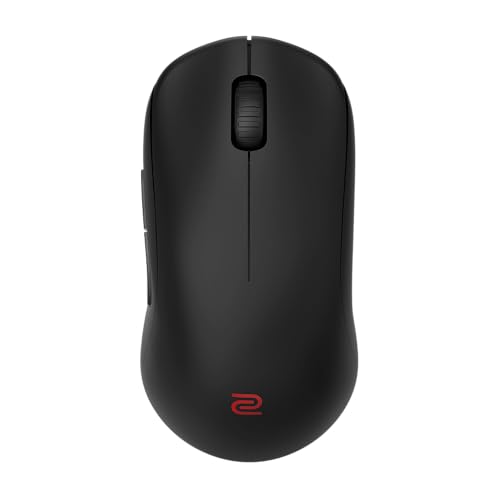
The zowie u2 is an esports mouse built by a company that behaves as if features were a distraction from the point. BenQ’s Zowie line skips the software suites, the rainbow lighting, and the specification theatre that dominate gaming mice, and instead obsesses over shape, weight balance, and a wireless link a professional can trust mid-match. The U2 is its claw-grip statement: a symmetrical 60-gram wireless mouse shaped with input from sports science, sold in an original version and a newer DW revision with a 4K enhanced receiver. This review explains who that shape serves, how the two versions differ, and why driverless simplicity is a feature serious players actively seek.
The short answer: if you claw or fingertip a symmetrical mouse, play competitive shooters, and want equipment that disappears from your attention, the U2 belongs on your shortlist. If you palm a large ergonomic mouse, want remappable everything, or play at a desk where a cable never bothered you, other shapes will make you happier — and the sections below are honest about those boundaries, because a mouse is the most personal purchase in a gaming setup and no review can fit it to your hand by prose alone.
Key Takeaways
- Symmetrical shape tuned for claw and fingertip grips, at a light 60 grams in both verified listings.
- Driverless by design: settings live on the mouse, so it behaves identically on a tournament PC, a friend’s rig, or your own.
- The original U2 pairs an enhanced receiver with a sensor configuration listed up to 3200 DPI and a battery figure of 70 hours in its title.
- The U2-DW revision moves to a 3950 sensor and a 4K enhanced receiver with 4K wireless polling, for players who value that link refinement.
- Five buttons and no software theatre: the restraint is deliberate, and whether it delights or frustrates you is the real buying question.
- Shape fit beats specification order; use the grip guidance in this guide, and the sibling ZA13-DW review, to triangulate your hand before ordering.
In this guide
Quick Picks: original or DW revision?
| Pick | Listing highlights | Best suited to | Link |
|---|---|---|---|
| BenQ Zowie U2 wireless | 60g, enhanced receiver, 3200 DPI sensor, five buttons, 70-hour battery figure, driverless | Players who want the proven original at its tier | Check price on Amazon |
| BenQ Zowie U2-DW 4K wireless | 60g, 3950 sensor, 4K enhanced receiver, 4K wireless polling, driverless | Players wanting the newest link and sensor revision | Check price on Amazon |
Two versions of one shape is the correct table for this mouse. The choice between them is about revision preference and budget tier, not about different hands, and the detailed sections treat them that way: one shape discussion, two equipment discussions.
How were these picks chosen?
Both listings were confirmed through marketplace data, with titles naming the BenQ Zowie U2 and the U2-DW 4K respectively, along with their weights, sensors, and receiver types. Each pick is shown with its official product image before its review. No other mouse is linked on this page, and the many similarly named esports mice that crowd search results were left in prose where comparisons are useful but a purchase link would be guesswork dressed as guidance.

BenQ Zowie U2 wireless — the original claw-grip statement
Badge: Best for claw players who value proven simplicity. The original U2 pairs the shape with an enhanced receiver for a steadier wireless link, a sensor configuration whose listing speaks of 3200 DPI, five buttons, and a 70-hour battery figure — a specification set that reads modest beside rivals and is, on inspection, simply the set a competitive player actually uses.
- Shape: symmetrical, claw-oriented, sports-science informed
- Weight: 60 grams
- Sensor: listed up to 3200 DPI
- Buttons: five, driverless configuration
- Battery: 70-hour figure in the listing title
- Link: wireless with enhanced receiver
Strengths
- The shape’s inward-curved sides give claw fingers a secure, repeatable purchase that flat-sided rivals rarely match.
- Driverless operation means your settings survive any computer, any reinstall, any tournament machine.
- At 60 grams with balanced mass, fast stops and micro-corrections feel crisp on a control pad without arm fatigue.
Trade-offs
- Palm-grip players with larger hands may find the silhouette small and the hump placement unhelpful.
- Players who live in software — macros, layered profiles, per-game DPI — will feel the absence of a suite immediately.
- The restrained styling will not satisfy anyone who wants their desk to glow in team colours.
What the original offers, beyond its parts, is a philosophy you can evaluate in one evening: plug the receiver in, set your sensitivity on the mouse itself, and play. Nothing updates, nothing syncs, nothing asks for an account. For a striking number of competitive players that absence is the luxury, and the U2’s continued presence in serious setups suggests the philosophy has an audience that specification races keep underestimating.
Best for: claw and fingertip players in competitive shooters who want proven, portable, no-fuss wireless. / Not suited for: palm-grip players, macro-heavy MMO players, or anyone whose setup joy depends on customisation software.

BenQ Zowie U2-DW 4K — the refined revision
Badge: Best for players wanting the newest sensor and link. The DW revision keeps the 60-gram symmetrical shape and answers the two requests original owners made most: a newer 3950 sensor and a 4K enhanced receiver delivering 4K wireless polling, for the smoothest link the line offers while staying resolutely driverless.
- Shape: symmetrical U-series silhouette
- Weight: 60 grams
- Sensor: 3950 generation
- Buttons: five, driverless configuration
- Link: 4K enhanced receiver, 4K polling wireless
- Design language: esports, sports-science informed
Strengths
- The 4K wireless link tightens the connection’s report cadence for players sensitive to micro-stutter on high-refresh monitors.
- The newer sensor generation brings modern tracking headroom while the shape and weight stay reassuringly familiar.
- Existing U2 owners can migrate without relearning a silhouette, which protects hard-won muscle memory.
Trade-offs
- Higher polling draws more power, so marathon wireless sessions at the top setting ask more of the battery than the original’s gentler link.
- It sits in a higher tier than the original, and the premium buys refinement rather than a different experience category.
- The same palm-grip and software caveats apply unchanged; a revision cannot fix a shape mismatch.
Choose the DW as you would choose a facelift of a car you already love: the fundamentals were the point, and the refinements polish the two places time had dated. Players building a fresh setup around high-refresh play, or replacing an ageing esports mouse outright, will usually find the revision the natural buy. Players offered the original at a friendlier tier lose nothing essential, which is precisely what a good revision should arrange.
Best for: high-refresh competitive players, U2 owners upgrading, and anyone buying once for the long term. / Not suited for: bargain hunters better served by the original, or players who need ergonomic shaping or software depth.
Zowie U2: why the shape is the whole argument
Every gaming mouse is a shape with electronics attached, and the U2’s shape has a specific thesis. The sides curve inward where claw fingers grip, giving the fingertips a ledge to pull against during lifts and micro-adjustments, while the back stays low enough that the palm hovers rather than rests. That geometry encourages the fingertip-driven control style tactical shooters reward: the wrist plants, the fingers steer, and the crosshair moves in small, exact increments. Sports science language in the listings is not decoration here; it reflects a design process that measured hands and grips rather than sketching an aggressive silhouette for a product photograph.
Test the thesis against your own hand honestly. If you rest your whole palm on a mouse and steer from the shoulder, this shape will feel like a pebble and no sensor can rescue it. If your fingers do the steering and your palm barely kisses the shell, the U2 will feel like it was drawn around your habits. Hand size mediates everything: smaller and medium hands typically find the proportions natural in claw, while very large hands may prefer the taller ZA family profile examined in the sibling review at Zowie ZA13 DW. Grip honesty, applied before purchase, is the cheapest accuracy upgrade in this entire category.
What does driverless actually change in daily life?
It removes a layer of software from between you and consistency. Settings adjusted on the mouse itself travel with the mouse: plug into a practice-room PC, a laptop, or a freshly built rig and your sensitivity, polling behaviour, and lift-off preferences are already correct. There is no suite to reinstall after a Windows refresh, no cloud profile to fail to sync before a match, no background updater competing for attention. The cost is equally real: no macros, no per-application profiles, no button remapping beyond what the hardware offers. Zowie’s bet is that competitive players value the first list more, and the U2 is that bet in physical form.
The polling question deserves its own sentence, because the DW revision’s 4K link invites it. Higher polling smooths the stream of position reports your PC receives, which some players perceive as cleaner tracking on very high refresh displays, at the cost of battery and a little system overhead. Readers who want the full trade-off, including when 1000 Hz remains entirely sensible, will find it in mouse polling rate explained and in the dedicated roundup at best 8KHz polling rate mice.
How to set up the U2 for competitive play
Place the receiver close and unobstructed — on the desk, in line of sight of the mouse, away from metal hubs and crowded USB clusters — because wireless quality is mostly geometry. Charge fully before a long session block and adopt a rhythm, such as topping up during a midweek non-gaming evening, so the battery never becomes a mid-match thought. Set your sensitivity on the mouse, then verify it in your game with a measured turn test rather than by feel alone, and write the figure down somewhere outside the game; driverless hardware rewards owners who keep their own records.
Pair the mouse with a pad that suits its weight and your style. At 60 grams on a control cloth, stops are crisp and corrections are calm; on a very fast surface the same lightness can feel skittish until your hand adapts. The pad discussion in the sibling guide at Xraypad Origin Pro Cerberus covers that pairing logic in depth. Finally, keep the feet clean and replace them when edges fray, because a light mouse telegraphs foot wear more honestly than a heavy one does.
Common mistakes when buying an esports mouse
Copying a professional’s mouse without copying their hand is the classic error; a shape that fits a smaller claw hand will not fit your palm grip no matter how many trophies it has held. The second mistake is specification tunnel vision — ranking mice by sensor numbers while ignoring that your top three candidates all track far beyond human need, and differ mainly in the silhouette your fingers must live with. The third is ignoring the return window: a mouse deserves a week of real matches before verdict, and buying from a route with a sane returns policy is part of buying well.
Fourth, players pair a new mouse with a new sensitivity, a new pad, and a new game in the same week, then cannot attribute their aim’s mood swings to anything. Change the mouse alone, keep the rest frozen, and let a week of ordinary play deliver the verdict. Fifth, wireless anxiety lingers from an older era of laggy links; the enhanced receivers in both listings here exist precisely because that era ended, and modern esports wireless is trusted on stages where a single lost round costs real money — context the broader roundup at best gaming mice explores across brands.
How do the two versions compare side by side?
| Factor | U2 original | U2-DW 4K |
|---|---|---|
| Shape and weight | Symmetrical, 60g | Symmetrical, 60g |
| Sensor | Listed up to 3200 DPI configuration | 3950 sensor generation |
| Receiver and polling | Enhanced receiver | 4K enhanced receiver, 4K wireless polling |
| Battery character | 70-hour figure in listing title | Higher polling asks more of the battery |
| Configuration | Driverless, on-device | Driverless, on-device |
| Natural buyer | Value-conscious claw player | Long-term, high-refresh competitive player |
The table’s story is continuity with polish. Nothing about the DW asks an original owner to relearn their aim, and nothing about the original embarrasses its owner beside the revision. Choose by tier and by how much the link refinement matters to your setup — and complete the desk with the seating side of the equation in best chair for CS2 if long sessions are your norm.
Final recommendation
If your grip is claw or fingertip and your games are competitive shooters, the U2 family is one of the safest shapes in esports — buy the DW revision for the newest sensor and link if the tier suits you, and the original without a moment’s guilt if it does not. If your grip is a relaxed palm on a large hand, honour that fact and look at taller or ergonomic shapes instead, starting with the ZA sibling review. A mouse chosen for the hand you have beats a mouse chosen for the player you admire, every single time.
How does the U2 behave across different games?
In tactical shooters, its home genre, the mouse’s virtues compound: the curved sides reward the fingertip corrections that crosshair placement is made of, the weight keeps flicks honest, and the absence of software means the mouse you practised on is the mouse that shows up in the server. In tracking-heavy arena titles, the same lightness demands a disciplined stopping hand, and some players add a touch of in-game sensitivity headroom or choose a slightly faster pad to keep long tracking arcs fluid. In real-time strategy and MOBA play, the five-button layout is adequate rather than generous — ability-heavy players will bind their keyboards more creatively — while the shape’s comfort across a long ladder session remains a genuine asset.
For desktop work interleaved with play, the mouse is a precise, unobtrusive tool whose only productivity sins are the deliberate ones: no tilt wheel, no gesture button, no infinite scroll. Many owners keep the U2 as their play-and-work mouse and accept those borders, because a shape your hand trusts has a way of colonising the whole desk. Others keep a productivity mouse for the workday and let the U2 be the evening instrument. Both arrangements are sane; the mouse does not insist on being your only one, which is a humility more gaming products should learn.
What should you know about switches, feet, and living with it?
The click feel on an esports mouse is a personality trait: players who main a mouse for years can identify its actuation blindfolded, and the U2’s clicks are tuned for the crisp, unambiguous registration competitive players ask for when a single tap must mean exactly one shot. The feet, as with any light mouse, are consumables with an outsized influence — fresh feet glide evenly and quietly, worn feet scratch and wander, and replacing them is the cheapest restoration in gaming. Keep a spare set in the drawer from the day you buy the mouse, and the question of whether the mouse has aged will usually answer itself in the feet.
Battery life follows the rhythm described earlier: generous in the original’s configuration, more demanding when the DW’s 4K link is worked hard. The ownership habit that dissolves the issue is a standing charge appointment — the same evening each week, cable in, while you do something else — rather than a reactive scramble when a warning appears mid-session. Wireless mice reward owners with rituals, and punish owners with surprises; choose which owner to be on day one and the U2 will meet you more than halfway.
Frequently asked questions
Is the U2 good for palm grip?
Generally no, and honesty here saves returns. The silhouette is a symmetrical, relatively low shape designed around claw and fingertip control, with curved sides that reward fingertip purchase. A committed palm player, especially with a larger hand, will usually prefer a taller profile such as the ZA family or an ergonomic right-handed shape from the broader gaming mouse roundups.
What is the difference between the U2 and the U2-DW?
Same shape family and the same 60-gram weight, with the DW revision updating the sensor to the 3950 generation and the wireless link to a 4K enhanced receiver with 4K polling. Think of it as the refined edition of the same idea rather than a different mouse, which is why this guide reviews the shape once and the equipment twice.
Does driverless mean I cannot change DPI?
No. It means changes happen on the mouse through its own controls rather than in a software suite, so your settings live in the hardware and travel with it to any computer. What you give up is the software layer around the settings — macros, stored profiles, and elaborate remapping — which is the deliberate trade at the heart of this line.
How long does the battery last in real play?
The original’s listing carries a 70-hour figure, and real life will vary with polling settings, session length, and receiver distance. The DW’s higher polling options draw more power, as all high-polling wireless does. A simple charging rhythm — a regular top-up evening each week — makes the question academic for most players, which is the healthiest relationship to have with any wireless mouse.
Which pad should I pair with a 60-gram mouse?
A control-leaning cloth pad is the classic pairing, giving the light shell a calm, exact stop; very fast surfaces suit players who already have a disciplined stopping hand. What matters most is consistency: one pad, kept clean, learned deeply. The pad family guide linked earlier in this article explores that logic at length.
Is the U2 suitable outside shooters?
For general desktop work and most genres, yes, comfortably — it is a precise, light, well-built mouse. Where it steps aside is for MMO and MOBA players who rely on many thumb buttons and macro layers, and for productivity users who want horizontal scroll wheels and gesture controls. Five buttons and no suite is a shooter’s toolkit, and this mouse makes no apology for that focus.
How does the U2 fit into a full competitive desk?
Think of the desk as an instrument panel where each part either protects or taxes your attention. The monitor at the right distance keeps your neck neutral so your shoulders can stay down. The keyboard, angled as shooter players angle it, frees the wide mouse territory this shape exploits. The pad gives the 60-gram shell a consistent stopping language. The chair holds the whole posture for the session’s length. The U2’s contribution to that panel is subtraction: no software to babysit, no lighting to configure, no profile to load — one less thing asking for your attention before the match, which is why so many competitive desks, assembled independently, end up containing a mouse from this family.
If you are building that desk in stages, buy in the order of contact: the surface your hand touches all evening first, the pad beneath it second, and the refinements after. A U2 on a worn pad in a bad chair will feel like a rumour of itself; the same mouse in a tuned setup feels like an extension of intention. This guide’s sibling pages exist to tune the rest of the panel — shape alternatives, pads, seating — and reading them together will cost you an hour and save you a season of attributing setup problems to your aim.
How do you know whether your hand is a claw hand?
Watch yourself play, or better, ask a friend to watch a replay of your hand rather than your screen. Claw players show a recognisable silhouette: knuckles raised, fingertips hooked down onto the buttons, palm floating or barely grazing the shell’s rear, with corrections visibly originating in the fingers. If that is your silhouette at the end of a long session — not your posed grip for a photograph, but your tired, honest, third-hour grip — the U2 was drawn for you. If your palm is planted and your fingers lie long and flat, you are reading the wrong sibling’s review, and the ZA page will greet you like a relative.
Hand measurement helps at the margins. Players whose hands fall in the small-to-medium range typically find the U2’s proportions immediately fluent in claw, while larger hands may need to check that the fingers do not overshoot the front edge and cramp. No measurement replaces a trial week, but measurements prevent the silliest returns — the ones where a tape measure could have voted correctly in advance. Measure from wrist crease to middle fingertip, compare honestly with the size guidance around this shape class, and let the numbers narrow the shortlist before your heart commits.
What is the honest case against buying it?
Every strong product deserves its prosecution paragraph. The U2 asks premium money for deliberate restraint: no software ecosystem, no lighting, a button count that MMO players will find austere, and a shape that excludes palm players by design. Its wireless link, while excellent, still asks for charging rituals that a wired mouse never will. Its very focus means a player whose tastes migrate across genres may outgrow its specialism. And its styling will not photograph like a spaceship for anyone building a desk as a visual project. If several of those sentences land, the correct conclusion is not that the mouse is overrated — it is that you are not its reader, and the wider market surveyed in this site’s mouse roundups holds shapes drawn for your hand and your habits instead. A review that cannot tell you who should walk away has not finished its job.
How does the U2 compare with the wider esports mouse market?
Stand the U2 beside its famous rivals and a pattern emerges: the market’s flagships chase universality — software ecosystems, swappable everything, shapes averaged toward everyone’s second preference — while Zowie chases a specific hand with unusual discipline. Rival mice will beat it in a feature census every time, and lose to it in a claw player’s third hour with suspicious regularity. That is not a paradox; it is a reminder that mice are worn, not operated, and worn things are judged by fit over features in every category humans have ever made, from shoes to gloves to the grips of tools. The U2’s specification modesty is the visible price of its fit obsession, and whether the trade profits you depends entirely on whether your hand is the one being obsessed over.
There is also a cultural difference worth naming for younger players building their first serious setup. A software-led mouse teaches you to solve discomfort in menus; a driverless mouse teaches you to solve it in your hand, your pad, and your posture. The second education transfers to every future mouse you will ever own, including the software-led ones, because it builds the diagnostic instinct that separates players who iterate their setup from players who merely replace it. Buying the U2 early in a competitive life is, among other things, buying that education — with a very good mouse attached.
What happens when you take it to a LAN or a friend’s house?
The driverless design has its finest hour away from home. You arrive with the mouse in a jacket pocket, plug the receiver into an unfamiliar PC, and your sensitivity, your polling behaviour, your whole pointing personality arrive intact, because they never lived in the PC to begin with. There is no account to sign into, no suite to install on a borrowed machine, no profile mismatch to discover during warm-up. Tournament players built this requirement; travelling friends inherit it free. Even the shape plays a part — a 60-gram symmetrical mouse is an undemanding guest in any bag, and its lack of lighting makes it a discreet one in any room.
Prepare for travel the way the pros do, minus the entourage: charge the night before, pack the receiver in the same small pouch every time, carry spare feet if the trip is long, and bring your own pad if the surface matters to your game — it does. On arrival, give the receiver clear sight of the mouse on whatever desk you are given, and spend your warm-up on the game rather than on configuration. That calm is the product working as designed, far from the desk it was bought for, which is the truest test any esports tool can pass.
What do you give up and gain by going wireless at this level?
The cable’s last argument was latency, and modern enhanced receivers have largely retired it for the players this mouse serves; what remains is a fair trade stated plainly. You gain a desk without drag, a mouse that travels between machines like a pen between notebooks, and a setup whose geometry is not negotiated with a cable’s memory every time you sit down. You pay with a charging ritual, a receiver that wants a clear view of its partner, and a small but real weight and cost premium over wired equivalents. Players who have made the trade consciously rarely reverse it; players who drifted into wireless while resenting the ritual sometimes do. The U2’s battery figures and receiver design are built to make the ritual as forgettable as the category allows — a weekly top-up rather than a nightly tether — and that forgettability, like the shape, is a design decision aimed at your attention.
One practical corollary deserves emphasis: keep the cable. It charges, it rescues a forgotten week, and on some desks it serves as the wired fallback during a long session when the battery warning finally wins an argument you postponed. A wireless mouse with its cable coiled in the drawer is not a compromise; it is a system with a spare. The players who look serene about wireless are the ones who planned the unglamorous details in advance, and serenity, in a competitive setup, is a performance feature.
How should a younger player budget for a first esports mouse?
Honestly, and in the order of contact this guide has preached throughout. The mouse matters, but it matters inside a system: a tired pad will tax a great mouse, a bad chair will tax the arm that holds it, and a monitor’s distance will tax the eyes guiding it. If the budget forces sequencing, buy the mouse when your current one is genuinely limiting — double-clicking, skating, shaped against your grip — and let the pad follow within the season, because those two are one instrument played by one hand. Resist the borrowed-setup fantasy in which a professional’s entire desk must arrive at once or not at all; professionals accumulated their panels across years of exactly the incremental, evidence-led upgrading this page recommends, and their oldest habit is the one worth copying first: change one thing, learn it completely, then decide what still hurts.
How do you adapt your aim when switching to this shape?
Expect the first days to feel like playing with borrowed hands, and plan for it the way this site’s keyboard comparison plans for a new layout: keep everything else frozen, practise in low-stakes modes, and measure weekly rather than hourly. The specific recalibration on a claw shape is stopping distance. Your fingers, newly in charge, will initially stop the mouse a fraction late, because the muscles doing the braking have changed their leverage. Short, deliberate flick drills between fixed targets rebuild that braking quickly — far quicker than ranked matches, where the lesson arrives disguised as frustration. By the second week the shape stops being a topic, which is the precise moment to judge it: not by whether it feels exciting, but by whether it has become invisible while your scores quietly return to their trend and then pass it.
If invisibility never arrives — if the fingers still report the shape’s presence in week three — believe them. Fit is not a loyalty programme, and the return window exists for exactly this evidence. The same honesty, applied in reverse, protects you from returning a mouse during its awkward second day that would have become your five-year instrument. Time, notes, and one variable at a time: the method is unglamorous and it has never once been wrong about a mouse.
What is the U2’s place in a player’s longer equipment story?
Most competitive players pass through three equipment eras. The first is imitation — copying the desk of whoever won last Sunday. The second is accumulation — owning several of everything, fluent in specifications, restless in a way that feels like research. The third, when it arrives, is curation: one mouse, one pad, one sensitivity, each chosen from personal evidence and then left alone for seasons at a time. The U2 belongs emphatically to the third era, and buying it is often the moment a player notices they have entered it — the purchase is boring, specific, and made for reasons they can state in one sentence about their own hand. If you are still happily in era two, the market’s glittering generalists will serve your exploration better. If era three is calling, this mouse — or its humped sibling, if your palm settles — is what its doorway looks like.
How do you choose between the U2 and its humped sibling, finally?
Strip the decision to one observation made honestly at the end of a long session on your current mouse. If your palm is hovering and your fingers are curled like a pianist’s over the keys — steering, tapping, alive — the U2 is your family’s branch. If your palm has settled and your hand looks asleep in the best way, draped and supported, the ZA branch is calling and the sibling review is your next page. Players who cannot tell should film their hand from the side during a real match; the camera has no loyalty and will report the grip you actually use, which is the only grip a mouse purchase should serve. Everything else in both reviews — sensors, receivers, polling, batteries — is shared technology wearing two silhouettes, and a silhouette decision made from evidence is a decision you will not revisit for years.
Closing note: the mouse that wants to be forgotten
The U2’s ambition is unusual in a market of attention-seekers: it wants to be forgotten by the hand that owns it, remembered only when a borrowed mouse feels wrong. Its shape serves one grip superbly, its electronics refuse to demand administration, and its two versions let you choose how new the invisible machinery should be. Buy it for the hand you have, in the version your tier prefers, pair it with a pad that speaks its language, and then go and think about the game for a few years. That is the whole review, and the mouse would approve of its brevity.
One more test: what your second mouse tells you
Here is a diagnostic the professionals use without naming it. After a month with a new mouse, pick up your old one for a single session. If the old mouse feels like a stranger’s shoe — wrong in ways you can enumerate — the new shape has been adopted by your hand, and the verdict is in. If the old mouse feels like coming home and the new one still feels like an assignment, believe that too, while the return window is open. Hands vote in sensations, not in arguments, and a month is long enough for the vote to be honest in either direction. The U2, being a strong shape with a clear thesis, tends to produce unusually clear votes — which is why its owners sound so certain, and why its detractors are equally sure. Both certainties are the product working as designed: it is a mouse with a point of view, and points of view are for agreeing or disagreeing with, completely.
Frequently revisited: original or DW, one last time
Since it is the only decision this page truly asks of you, it deserves a rule of thumb with its exceptions attached. If you are buying your first serious esports mouse and the budget must also stretch to a pad, take the original and complete the instrument; a U2 on a good surface beats a U2-DW on a tired one, every evening of the week. If the rest of your setup is already finished — pad fresh, monitor fast, chair honest — take the DW and let the mouse be the system’s newest link rather than its oldest. And if you already own the original and it fits your hand like a rumour of itself, upgrade only when its age shows in the feet, the battery, or your curiosity, in that order; shape loyalty is an asset, and this family’s revisions are deliberately built to honour it rather than to tax it.
The glossary this mouse deserves
Claw grip: fingers hooked, knuckles raised, palm hovering — the hold this shape was drawn around. Symmetrical: the same silhouette for either side, favouring neither hand’s contour. Driverless: settings stored and adjusted on the device itself, with no software suite in the chain. Polling: how often the mouse reports its position, the figure the DW revision’s 4K link raises. Enhanced receiver: the maker’s sturdier wireless bridge, happiest with a clear view of the mouse across the desk. Lift-off: the height at which the sensor stops tracking when the mouse is raised, a small number with an outsized effect on low-sensitivity repositioning. Feet: the sliding pads beneath the shell, consumables whose condition quietly governs glide. Read any esports mouse listing with those seven terms defined and the marketing fog thins considerably — what remains is shape, weight, and fit, which is where this guide came in.
What a great esports mouse should leave behind
Judge this mouse, a season from now, by what is absent. Absent: the software icon you never open, the profile that failed to load before a match, the cable’s tug in the final round, the shape doubts that used to visit during warm-up. Absent, too, the shopping — the tabs of rival mice, the comparison charts, the sense that your hand is a problem still being researched. In their place: a sensitivity you could recite in your sleep, a pad whose stopping language your fingers speak fluently, and a hand that reports for duty without commentary. That is the state the U2 was engineered to produce, and it is why its specification sheet looks so quiet beside louder rivals: everything loud about this mouse was deliberately removed, because everything loud was competing with the game for your attention. If your grip is the grip it serves, few purchases in a gaming life pay out so completely in the currency of nothing going wrong.
And if it is not your grip, this page’s honesty about that boundary is part of the same engineering. A mouse that fits everyone a little fits no one completely, and the U2’s refusal to be that mouse is why its owners sound like converts. Be one, knowingly — or be its sibling’s convert, or another maker’s entirely — but be converted by your hand’s evidence rather than by anyone’s prose, this review emphatically included. The hand is the critic; the rest is footnotes.
A parting checklist for the day you order
Confirm your grip from footage or from an honest third-hour look at your own hand. Measure the hand if the size class is in doubt. Decide the version by the state of the rest of your setup — original to complete an instrument, DW to crown a finished one. Plan the receiver’s home on the desk, in sight of the mouse, before the box arrives. Order spare feet in the same breath as the mouse itself. Freeze every other variable for the trial week, keep the notes, and run the swap test at the month’s end before the verdict hardens into habit. A purchase conducted with that much intention tends to stay purchased — for years, in this family’s case — and the hand that conducted it will feel the difference every single evening, in the form of nothing at all going wrong between intention and crosshair. That is the whole promise, kept small and kept completely, the way esports equipment should be.
How the U2 rewards the player who keeps a log
One habit separates players whose setups improve yearly from players whose setups merely change: the log. A single page, kept wherever you keep durable things, recording sensitivity, polling choice, pad, feet-change dates, and one line per month about how the hand feels. On a driverless mouse the log is not a convenience but the configuration file the hardware declines to keep for you, and it pays out at every transition — new PC, new pad, a borrowed desk at a friend’s house — when the numbers walk back in from the page instead of being reinvented from vibes. The log also ends arguments with yourself. When a slump whispers that the mouse has changed, the page testifies that nothing has changed since March, and the slump is sent back to the game where it belongs. Buy the mouse, start the page the same evening, and in a year you will own the rarest asset in competitive gaming: evidence about your own equipment, written by the only witness who was there for every round.
What to do in the first ten minutes after it arrives
Charge it while you read nothing at all. Then place the receiver where it can see the desk’s mouse territory, set your sensitivity on the mouse itself, and play one unranked, unscored, entirely disposable session whose only job is to let your fingers learn the sides’ curve without a result attached to the lesson. Notice the breakaway on micro-corrections, the stop at the end of your natural flick, and the way lifts re-seat themselves — the three sensations this shape was built to deliver — and write one honest line about each in the log you are starting. Resist changing anything that evening. The mouse you judge on day seven, after a week of ordinary play, is the mouse you actually bought; the one you judge in the first ten minutes is mostly your old mouse’s ghost, complaining about the furniture. Give the ghost its week, and let the hand decide.
A note for the player who is still deciding between wired and wireless
Some readers arrive at this family from the wired side of an old argument, holding a beloved cable mouse and a suspicion that wireless is a tax on the serious. The honest update is that the argument ended while nobody was watching: enhanced receivers, modern sensors, and batteries measured in days have moved the trade from performance to preference. What wireless buys here is a desk geometry with no negotiation and a mouse that travels like a notebook. What it costs is a ritual — small, weekly, and entirely manageable — plus the discipline of keeping the receiver in sight of its partner. Players who try the trade with the trial week’s honesty usually settle it permanently, in whichever direction their own evenings vote. The U2 does not need you to be a wireless believer; it needs you to be a claw player with a week to spare for evidence. Give it the week, and let the hand — as this guide has insisted from its first section to its last checklist — cast the only vote that counts.