Disclosure: As an Amazon Associate, reviewstook.com earns from qualifying purchases. Links on this page are affiliate links; they cost you nothing extra. Prices and availability change often, so check the current Amazon listing before you buy.
Meet the xm2 8k: Endgame Gear’s argument that the wired esports mouse is not a nostalgia act but a precision instrument, and it makes that argument with unusual purity: a 52-gram symmetrical shell drawn for claw grips, Kailh GX switches chosen for their speed and consistency, a PixArt PAW3395 sensor, and a wired connection that reports at a true 8000 Hz without asking a battery or a radio link for permission. In a market drifting toward wireless everything, this mouse exists for the player who wants the shortest, most predictable path between hand and game that current technology allows, and who is willing to accept a cable as the price of that certainty. This review works through the mouse the way its owners live with it — shape and grip first, then clicks, sensor, and the 8000 Hz question itself — and then places the newer XM2 8k v2 beside it, because Endgame Gear’s own revision, built on the PAW3950 generation, is the comparison every buyer of the original now has to make. Both models are verified listings, reviewed under their own names, and the buying guidance at the end is blunt about who should choose which, and who should choose neither and go wireless instead.
Key takeaways
- The XM2 8k’s identity is its wired 8000 Hz connection: no battery management, no receiver placement, no wireless variables between your hand and the game.
- Its shell is a medium symmetrical shape tuned for claw and fingertip grips, at a weight — 52 grams — that suits fast, finger-led corrections.
- Kailh GX switches give it a click character built for rapid, repeated actuation with optical-grade consistency.
- The PAW3395 sensor in the original and the PAW3950 generation in the v2 are both flagship-class; the revision’s gains are refinement rather than revelation.
- Choosing between the original and the v2 is a value and finish decision more than a performance one, and choosing between this mouse and a wireless flagship is a lifestyle decision about cables and charging.
- Players with palm grips or very large hands should look elsewhere in the shape market; this shell knows exactly whose hand it wants.
In this guide
Xm2 8K: what kind of mouse is it, exactly?
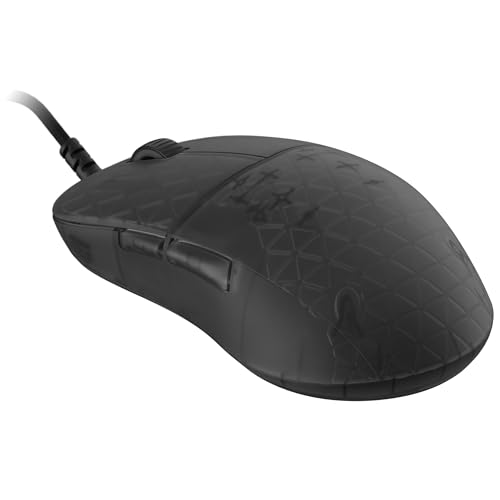
Endgame Gear is a German peripheral maker that built its reputation the slow way, by releasing few products and engineering each one around a clearly stated competitive purpose. The XM2 line is its wired flagship family, and the 8k model is the family’s purest statement: take the XM2’s claw-oriented shape, keep the weight at the floor of what a solid shell allows, and spend the entire engineering budget on the input chain — switches, sensor, and a polling rate that most mice of its generation could only offer wirelessly through special receivers, if at all. The Dark Frost finish of the verified listing gives the shell a translucent, technical appearance that suits the instrument it is.
The shape deserves first attention because it will decide your verdict before the electronics get a vote. The XM2 shell is symmetrical in outline with a wide rear that fills the base of the palm just enough to anchor a claw grip, a waist that narrows where the fingers steer, and a front end that stays low for fingertip control. Its size sits in the medium class that suits the broad middle of hand sizes in a claw or fingertip posture, while committed palm grippers will find the rear support more suggestion than embrace. That specificity is a virtue rather than a limitation: esports mice that try to fit every grip fit none of them memorably, and the XM2’s following exists because it picked its hand and served it completely. Readers still mapping their own grip should start with the fundamentals at choosing a gaming mouse by hand and grip before falling for any flagship, this one included.

ENDGAME GEAR XM2 8k — the wired flagship itself
Badge: The subject pick — wired 8K done without compromise. Everything about this mouse is arranged around the number in its name. The 8000 Hz polling runs over the cable as a native behaviour rather than a special mode, the Kailh GX switches actuate with the crisp, rapid character competitive players ask optical-class switches for, and the PAW3395 tracks with the flawless, unadorned character that made it the sensor generation’s reference. At 52 grams the whole instrument feels like it is barely there until the moment a correction is needed, at which point it is exactly there.
At a glance: Wired connection with 8000 Hz polling; 52 g weight; PixArt PAW3395 optical sensor; Kailh GX switches; symmetrical claw-oriented shell; Dark Frost edition finish.
Strengths
- The input chain is as short and consistent as the category offers: no battery sag, no radio interference, no receiver rituals.
- Click feel is fast and even across both main buttons, suiting rapid repeated fire and ability spam alike.
- The shape’s claw support and low front make micro-corrections feel unusually direct.
Trade-offs
- The cable is a permanent fact of the desk, and players who have tasted wireless freedom may not forgive it.
- 8000 Hz asks something of your CPU and your game’s input handling, as the polling section below explains.
- The shape’s specialisation excludes palm grips and the largest hands by design.
Best for: competitive players who want wired certainty and a claw-grip shell at the top of the polling class. / Not suited for: cable-free desks, palm grippers, or anyone whose PC already struggles in busy fights.
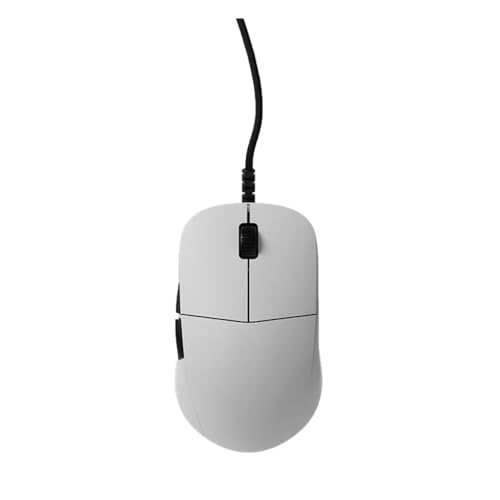
Endgame Gear XM2 8k v2 — the revision, judged fairly
Badge: The newer sensor generation in the same spirit. The v2 refreshes the formula around the PixArt PAW3950 U sensor with headroom to 30K DPI, trims the weight slightly to 51.5 grams, and presents the mouse in a clean white finish as a right-handed build. It is best understood as the same argument restated with newer components: identical philosophy, marginally modernised internals, and a finish that will suit bright desks better than the original’s Dark Frost.
At a glance: Wired connection with 8 KHz polling; 51.5 g weight; PixArt PAW3950 U optical sensor up to 30 K dpi; right-handed symmetrical-style shell; white finish.
Strengths
- The newer sensor generation brings the platform’s tracking and efficiency fully up to date.
- A whisper of weight saved and a fresh finish keep the design feeling current.
- It inherits the original’s entire rationale, so the shape’s following transfers without translation.
Trade-offs
- Owners of the original gain refinement rather than transformation, which makes upgrading a taste decision.
- The white finish will show a season of heavy use more honestly than the darker original.
- It shares every wired caveat of the original, by design rather than by oversight.
Best for: new buyers who want the newest internals in this shape, and white-desk builders. / Not suited for: original owners expecting a revolution, or anyone solving a problem the v2 does not address.
How does 8000 Hz polling feel on a wired mouse?
This mouse is the cleanest possible test of the high-polling idea, because the wire removes every wireless variable from the experiment. What remains is the pure exchange described in this site’s polling explainer: reports every eighth of a millisecond instead of every millisecond, bought at the price of more work for your CPU and your game’s input thread. On a modern desktop with a high-refresh monitor, the XM2 8k’s tracking has the particular smoothness that high polling promises at its best — slow corrections render as a continuous glide rather than a staircase, and fast flicks arrive with a freshness that makes the crosshair feel less like it is following your hand and more like it is attached to it. On a struggling system or in a title whose input handling dislikes very high report rates, the same mouse should simply be run lower; the XM2’s settings allow stepping down, and a stable 4000 Hz or 1000 Hz on this shell still leaves you with a superb esports mouse. The full decision framework — monitors, processors, genres, and an honest testing routine — lives at the complete polling rate guide, and this mouse is one of the instruments that guide was written about.
Cable management is the other half of the wired experience, and the XM2 rewards a small investment of thought. A lightweight bungee or a well-routed overhead path removes the cable’s drag and weight from the equation almost entirely, and on a large pad with the cable given slack in the right places, most players stop perceiving the wire within a session or two. What never disappears is the certainty: the mouse performs identically in hour one and hour ten, in a quiet room and in a radio-noisy arena, today and next season. For a certain kind of competitor, that sentence is the entire review.
How do the clicks and scroll wheel behave under pressure?
The Kailh GX switches are this mouse’s second headline, and they earn it in the details players feel rather than the ones brochures print. Actuation is crisp with a short, decisive travel, the two main buttons match each other closely in force and sound, and rapid repeated clicking — the burst-fire and ability-spam test — stays consistent without the mushiness that creeps into lesser switches over a long session. The side buttons sit within the claw grip’s natural thumb territory and actuate without shifting the shell in the hand, a small courtesy that cheaper mice routinely fumble. The scroll wheel’s steps are defined enough for weapon cycling and jump-timing techniques, and its click has the same engineered certainty as the main buttons.
Underneath, the stock skates glide with the even, quiet character a 52-gram mouse needs, and the sensor’s placement and the shell’s balance make the mouse pivot around the grip rather than drag from its nose. None of these observations will appear in a specification table, and all of them are why owners describe the XM2 as an instrument rather than a peripheral. Maintenance follows the esports pattern: keep the skates clean, replace them when their glide goes uneven — the guidance at replacement skates and glide care applies directly — and let the cable live without sharp bends.
Original or v2: how should a buyer actually decide?
Strip the question to its essentials and it answers itself. The shape, the philosophy, the polling, and the wired bargain are shared, so the decision rests on three smaller things. First, the sensor generation: the v2’s PAW3950-class internals are the newer platform, with the tracking polish and headroom that implies, while the original’s PAW3395 remains a flagship sensor that no honest reviewer can call a weakness. Second, finish and condition: a white desk argues for the v2, a dark setup for the original’s Dark Frost, and any buyer should weigh which finish their hands and their cleaning habits will keep handsome longer. Third, availability and the terms of the specific listing in front of you on the day you buy, which this guide will not pretend to predict. What the decision does not rest on is a performance chasm, because there is none: a player who would win with one will win with the other, and the v2 is best read as the line’s continuation rather than its correction. Owners of the original who are happy should stay happy; new buyers choosing freely will usually take the newer internals and the finish that suits their desk.
How do you set up an XM2 for competitive play?
Begin with the physical layer: a bungee or routed cable path, a pad with the friction character your stopping technique prefers — the survey at gaming mouse pads by speed and size covers the field — and a grip audit in which you confirm the claw posture the shell was drawn for rather than forcing your old mouse’s grip onto it. Then the settings layer: choose DPI in the sensor’s comfortable range and set sensitivity in game from your established physical turn distance, leaving both untouched while you evaluate the mouse itself. Then the polling layer, last and deliberately: start at the rate your system sustains calmly — for most modern desktops that can be the full 8000 Hz — verify stability in your busiest game scenes across several sessions, and step down a tier without drama if frame pacing objects. Record the final configuration outside the mouse’s software, as with any instrument you intend to keep for years.
Adaptation deserves its own warning. A 52-gram claw mouse will expose grip tension and stopping habits that a heavier ergonomic mouse concealed, and the first evenings may feel worse before they feel revelatory. Give the shape a week of real matches, relax the squeeze your old mouse trained into your fingers, and let the corrections shrink to the scale this mouse was built for. Players who complete that week rarely go back; players who judge on the first evening often sell a mouse their hands would have loved by the second weekend.
What mistakes do buyers make with this mouse?
Buying it for the number rather than the shape is the classic error: 8000 Hz is a property of the connection, but the shell is what your hand marries, and a palm gripper with an 8K mouse is simply a person holding the wrong mouse very responsively. Expecting the polling rate to transform a struggling PC is the second; the mouse reports faithfully into whatever system receives it, and a CPU-limited game will not be rescued by fresher input. Third is neglecting the cable, then blaming the mouse for drag that a bungee and two minutes of routing would have erased. Fourth is comparing it to wireless flagships on features — docks, buttons, battery theatre — when its entire proposition is the absence of everything between hand and game. And fifth is skipping the adaptation week and reviewing the shape on a first impression its designers never intended it to be judged by.
PAW3395 versus PAW3950: how much does the sensor generation matter?
Because the original-versus-v2 decision turns on it, the sensor question deserves more than a shrug. The PAW3395 in the original XM2 8k was the reference flagship sensor of its generation: flawless tracking character at competitive sensitivities, mature behaviour across surfaces, and a reputation earned in thousands of tournament mice. The PAW3950 generation in the v2 extends the platform’s ceiling — higher maximum sensitivity figures for those who use them, refinements in efficiency and in tracking behaviour at the margins — without changing the fundamental contract, which is that the sensor disappears and only your hand’s motion remains. In blind play at ordinary competitive settings, the two are effectively indistinguishable, and this review will not manufacture a difference to justify a newer box. Where the newer generation earns its place is in headroom and currency: a buyer planning to keep a mouse for many years is marginally better served by the platform that will be supported, discussed, and built upon for longer, and players who run unusually high DPI figures have more room above them. That is the whole of it — a real but modest edge, priced and finished differently, which is why the decision section above sent you to your desk’s colours and your listing’s terms rather than to a benchmark chart.
How does the XM2 shape compare with rival claw mice?
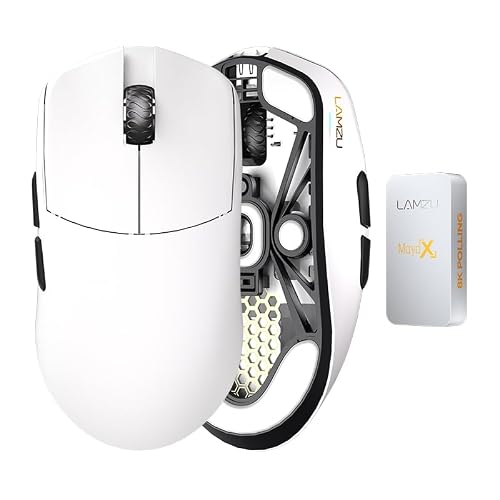
The claw-grip congregation is the most contested parish in gaming mice, and the XM2’s place in it is distinctive. Against the small symmetrical specialists like Lamzu’s Maya family, the XM2 offers a somewhat larger, more anchored shell — less of a fingertip whisper, more of a palm-braced claw — which makes it the easier recommendation for medium hands and for players whose claw is relaxed rather than aggressive. Against the big wireless flagships, it trades their ecosystems and button counts for a purity of purpose and a weight their batteries cannot reach. Against its own wireless sibling, the XM2w, it offers the same shape philosophy with the variables removed, at the cost of the cable the sibling exists to delete. The honest summary is that the XM2 does not win the parish on any single specification; it wins a particular pew — medium-handed claw players who want wired certainty — and wins it completely. Players outside that pew are not being excluded by marketing but by geometry, and the shape-first shopping method in gaming mice chosen by fit, not fame will route them to their own pew’s champion.
Build quality, coating, and the cable itself
A 52-gram mouse invites a durability question, and the XM2 answers it the way the serious ultralights do: the shell feels dense rather than fragile, without the creaks and side flex that betray careless weight saving, and the Dark Frost finish gives the surface a technical texture that manages grip in warm hands better than a gloss would. The coating will polish where fingers live over a long season, as all coatings do, and the mouse asks the usual ultralight courtesies in return — clean hands’ worth of care, a wipe-down habit, skates replaced when their glide goes. The cable deserves its own sentence because it is half the product: it is a light, flexible lead designed to disappear under a bungee rather than to announce itself, and its connector and strain relief are built to the standard the rest of the mouse sets. Treat it without sharp bends, route it once and well, and it will behave like the permanent installation it is meant to be.
It is worth pausing on the sensor’s placement and the mouse’s balance, two invisible decisions that separate the serious ultralights from the merely light. The XM2’s mass sits where a claw grip’s control lives, so the shell pivots around the fingers instead of seesawing from its nose, and the sensor’s position translates that pivot into cursor motion without the rotational surprises that plague badly balanced mice during diagonal flicks. Players rarely name these qualities in their first impressions; they name them in their sixth month, when they try another mouse and feel, without immediately knowing why, that their corrections have become approximate. Precision at this level is a system of small honesties, and balance is one of the easiest to overlook and the hardest to retrofit.
Which games flatter this mouse most?
Tactical shooters reward its settled stops and the confidence of an input chain that never has an off night. Tracking-heavy arena and hero shooters reward the finger-led corrections its shape and weight were drawn for, and they are where the 8000 Hz polling earns its keep most visibly on a suitable system. Battle royale endgames — close, vertical, chaotic — suit it for the same reasons. Beyond the shooter world it is a precise generalist: excellent wherever aim is the interface, unremarkable wherever a dozen extra buttons are the interface, and honest about the difference. A player whose library is shooters first and everything else second is holding this mouse’s exact brief; a player whose library inverts that ratio should buy for the library they have.
Why do wired flagships still exist in a wireless era?
Because the wireless revolution solved convenience so completely that it revealed what it could not solve, and the XM2 8k is built on that remainder. A wireless flagship, however excellent, is a system of managed variables: a battery whose state changes the mouse’s weight distribution not at all but whose charge governs your evening, a radio link whose quality depends on the room, a receiver whose placement is a small permanent negotiation. None of those variables is large, and top wireless mice manage them superbly, which is why they dominate the market. But a wired mouse deletes them rather than managing them, and for players whose competitive lives are built on eliminating variance — the same instinct that makes them practise the same angle a hundred times — deletion beats management. There is also a plainer argument: the wired mouse is ready the instant it is plugged in, at full specification, forever, with no firmware-mediated relationship between its best mode and its battery’s mood. The XM2 does not argue that wireless is worse; it argues that certainty is a feature, and it is the flagship of that argument.
A first week with the XM2, honestly narrated
Day one humbles most converts. The mouse feels startlingly light, the cable — before the bungee is adjusted — makes its presence known at the worst moments, and the claw posture the shell requests is a few degrees different from the one your old mouse taught you, so your stops land long and your corrections overshoot. Day two is for the desk, not the aim: route the cable properly, confirm the polling rate your system sustains, and set the sensitivity you arrived with rather than a new one, so the shape is the only variable under judgement. By day four the stops have shortened to the mouse’s scale, the fingers have taken over the fine work the arm used to supervise, and the polling smoothness — if your monitor and system support it — stops being a topic and becomes a texture. By the end of the week the mouse has either disappeared into your play, which is its entire ambition, or it has told you plainly that its shape is not your shape, which is also valuable information delivered honestly. Reviews that skip this week do their readers a disservice; this one insists on it, because the XM2 is a mouse whose verdict lives on day seven, not day one.
Where does the XM2 sit in Endgame Gear’s own range?
The maker’s catalogue is small enough to read as an argument. The wired XM line carries the flagship shapes for players who want the input chain at its shortest; the wireless XM2w line translates the same shapes for players who want the cable gone; and the earlier XM1 generation remains the ancestor whose shape language the current mice refined. Within that map, the XM2 8k is the wired line’s purest current statement, and the v2 is its rolling refinement rather than a separate tier. A buyer choosing inside the brand is therefore really choosing two things — wired or wireless, and original or revised — in that order, because the connection decision changes daily life more than the sensor generation ever will. This review has deliberately spent most of its length on the wired case for exactly that reason, and its sibling review gives the wireless case the same full hearing.
What does long-term ownership look like?
Esports mice are consumables in the professionals’ world and heirlooms in nobody’s, but the XM2’s ownership curve is gentler than most. There is no battery to age, which removes the slow decline that eventually retires every wireless flagship regardless of its shell’s condition. The switches’ performance character is built for repetition, the sensor asks nothing, and the consumables list is the short, cheap one shared by all mice in this class: skates when their glide goes, a cable treated kindly so it never joins the list, and a coating that will show its seasons honestly. Software needs are minimal by design — this is a mouse that expects to be configured briefly and then forgotten — and firmware updates, when they come, are maintenance rather than a subscription to novelty. Priced as a flagship and built to be kept, the XM2 makes its economic case across years rather than across a launch window, and the players who buy it tend to be the players who keep mice longest, because a shape that fits and a chain that never varies give the upgrade itch very little to feed on.
Sensitivity and settings pairings for this particular mouse
A final practical note, because the XM2’s lightness changes the sensitivity conversation in a specific direction. A 52-gram mouse moved by the fingers invites a slightly calmer sensitivity than the same player used on a heavier shell, not because the sensor cares but because the hand’s fine layer is now contributing movement at a scale where an ambitious sensitivity turns corrections into oscillations. The productive experiment, after the adaptation week and not during it, is a small step down paired with several days of play, watching close-range tracking for the tell-tale wobble of a sensitivity the fingers cannot govern. DPI itself should stay in the sensor’s most comfortable territory with the real adjustment made in game, and the polling rate — this mouse’s headline — should be set by the system test described earlier rather than by the box. Players who treat those three dials in that order, shape first and numbers last, arrive at the configuration this mouse was built to deliver.
Original and v2, set side by side
| Attribute | XM2 8k (original) | XM2 8k v2 |
|---|---|---|
| Sensor | PixArt PAW3395 | PixArt PAW3950 U, up to 30K DPI |
| Polling | 8000 Hz wired | 8 KHz wired |
| Weight | 52 g | 51.5 g |
| Switches | Kailh GX | Same performance-switch philosophy |
| Finish | Dark Frost | White |
| Connection | Wired | Wired |
Tables flatten what ownership rounds into a life, but this one earns its place by showing how narrow the genuine differences are: a sensor generation, half a gram, and a colour. Everything else — the shape’s intent, the wired bargain, the polling headline, the audience — is shared inheritance, which is why this review keeps steering the decision toward finish, availability, and whether you already own the original. A comparison that cannot be settled by a table must be settled by a hand and a desk, and both mice reward exactly that kind of deciding.
Travelling and second machines: the wired mouse’s quiet advantages
One more ownership scene deserves a paragraph, because it recurs in this mouse’s community: the second setup. A wired flagship is the ideal travel and LAN instrument precisely because it carries no ecosystem with it — no receiver to forget, no charge state to check in the hotel, no pairing ritual on a borrowed machine. It plugs into a tournament PC, a laptop, or a friend’s rig and is itself within a minute, at full specification, with its settings philosophy intact. Players who compete away from home, who coach, or who simply maintain a desk at two addresses will find that the XM2’s supposed limitation reads, in those weeks, as its most practical feature. The cable that anchors it at home is the same cable that makes it stateless everywhere else, and more than a few owners bought the wireless sibling for the main desk and kept the wired original for the road — a division of labour this review endorses as the best of both philosophies.
What a season on a 52-gram mouse does to your aim
The XM2’s deepest effect is not visible in the first week this review keeps prescribing, so it deserves a longer lens. Across a season, a mouse this light and this consistent changes where a player’s aim lives. Corrections migrate from the arm to the fingers, because the instrument rewards the small muscles with instant obedience and punishes nothing; long tracking engagements grow calmer, because the hand is no longer managing momentum it never asked for; and fatigue redistributes, with the shoulder doing less and the fingers doing more, which most players experience as later, gentler tiredness across long sessions. The consistency of the wired chain compounds the effect quietly: because the mouse never has an off day, every change in performance is legible as the player’s own, and that legibility is a training asset no specification can price. Players keep practice journals for a reason, and a perfectly stable instrument is the journal’s best friend.
There are honest costs across the same season. The fingers that take over the fine work need their own conditioning, and players who jump straight into marathon sessions on a light claw mouse sometimes meet a forearm or finger tiredness their heavier mouse never introduced; the remedy is the unglamorous one of building session length gradually while the grip relearns its trade. The cable, however well routed, remains a physical fact that a house move or a desk reorganisation will renegotiate. And the mouse’s focus means the rest of the desk must supply what it refuses to: media controls live elsewhere, extra buttons live elsewhere, and the player who secretly wanted an all-purpose device will spend the season discovering it. None of these costs is hidden, and this review has now named all of them twice, because a flagship bought with open eyes is kept, and a flagship bought on a headline is resold.
The inheritance: what the XM2 learned from the XM1
Endgame Gear’s first mouse, the XM1, earned its following by treating a gaming mouse as a solved problem to be executed perfectly rather than a canvas for features, and the XM2 line is that philosophy’s second draft. The shape language — symmetrical, claw-led, honest about its audience — descends directly, refined in the places owners asked for refinement. The component choices follow the same doctrine: best-in-class switches and sensors, chosen for behaviour rather than for brochure novelty, and replaced across generations only when the replacement is measurably the better instrument, which is the entire story of the PAW3395 giving way to the PAW3950 in the v2. Even the polling headline fits the doctrine when read correctly: 8000 Hz is not a gimmick bolted to the XM2 but the natural endpoint of a company that has always treated the input chain as the product. Buyers who understand the inheritance understand the mouse — and understand why its revisions are evolutions, why its feature list is short, and why its owners speak about it the way musicians speak about a well-made instrument rather than the way consumers speak about a gadget.
A note on sound, for shared rooms and late nights
Performance switches have a voice, and the XM2’s is purposeful rather than hushed: clicks with a crisp attack that reads clearly through a headset’s open back and across a quiet room. For most of its audience that voice is part of the instrument’s feedback, as informative as a mechanical keyboard’s bottom-out. For players whose ranked hours share a wall with a sleeping household, it is a fact to plan around rather than a flaw to discover — the mouse will not be the loudest thing in a firefight, but it will not whisper either, and no setting changes the acoustics of a switch doing its job well. Judge it as you would a keyboard’s sound: a character to be matched to a room, not a defect to be forgiven.
Final recommendation
Buy the XM2 8k if you are a claw or fingertip player who wants the most direct wired input chain in the category and a shell drawn precisely for your grip; choose the v2 if you prefer the newest sensor generation and its white finish, and the original if its Dark Frost suits your desk or its listing suits your day. If your life is wireless — if the cable’s absence is worth more to you than the last sliver of input certainty — buy the family’s wireless counterpart instead and read the wireless XM2w 4K reviewed before deciding. This mouse was never trying to be for everyone, and that is exactly why it is so good for the players it is for. In a category addicted to addition — more buttons, more features, more theatre — the XM2’s discipline reads as confidence: a shape that knows its hand, a chain that knows its job, and a cable that knows its place. Players who share that discipline will recognise the mouse immediately, the way you recognise a tool that was made by someone who does the same work you do, and who refused to stop refining it until nothing unnecessary remained anywhere in the design.
Frequently asked questions
Is the XM2 8k wireless?
No. It is a deliberately wired mouse, and the wire is the point: the 8000 Hz polling runs natively over the cable with no battery to manage, no receiver to place, and no radio environment to consider. Players who want this shape philosophy without the cable should look at Endgame Gear’s wireless XM2w line, which is reviewed separately on this site.
Will 8000 Hz polling slow my PC down?
It adds interrupt work for the processor, and on a modern desktop in a well-behaved game the cost is negligible, while on an older or CPU-limited system it can show up as frame-pacing trouble in busy scenes. The mouse can be run at lower rates, so the practical approach is to test 8000 Hz across several real sessions and step down a tier if your frame times object. The polling guide linked in this review explains the trade in full.
What grip and hand size does the XM2 shape suit?
A medium symmetrical shell tuned for claw and fingertip grips on small-to-medium and medium hands. The wide rear anchors a claw posture, the low front serves fingertips, and the weight suits players who steer with their fingers as much as their arm. Committed palm grippers and very large hands will find the support insufficient and should choose a shape drawn for them instead.
Should I buy the original XM2 8k or the v2?
New buyers choosing freely should lean toward the v2 for its newer PAW3950-generation sensor and choose the finish that suits their desk, while recognising that the performance difference is refinement, not transformation. Owners of the original who are satisfied have no performance reason to upgrade. Either way, verify the exact model name on the listing, because the family’s names differ by small suffixes with real meanings.
How do the Kailh GX switches feel compared with ordinary mouse switches?
Crisper and more uniform, with a short, decisive actuation that stays consistent under rapid repeated clicking. They belong to the class of performance switches competitive players seek out for spam-heavy games and long sessions, and their evenness across the two main buttons is one of the details owners mention most. As with all click feel, preference is personal, but the quality of execution here is not in dispute.
What mousepad pairs best with the XM2 8k?
A balanced cloth pad is the safest starting point, offering a clean initial glide and a dependable stop for a light mouse, with faster hard surfaces as a second-phase experiment once your stopping technique adapts to 52 grams. Control-leaning pads suit players who find the mouse lively at first. The pad matters more with an ultralight than with a heavy mouse, so treat the pairing as part of the purchase rather than an afterthought.
How can I verify my XM2 is really polling at 8000 Hz?
Use one of the widely available polling-rate checkers, which graph the intervals between reports as you move the mouse in steady circles, and look for a stable rate at the tier you selected rather than brief spikes toward it. Test over the cable you actually play on, through the port you actually use, because the point of the exercise is to certify your setup rather than the mouse in the abstract. If the delivered rate falls short, work the usual suspects in order — direct motherboard port, firmware currency, background processor load — before doubting the hardware, since a wired mouse has fewer places for the rate to hide than a wireless one.
Is the XM2 8k a good first esports mouse?
For a player whose grip is already claw or fingertip and whose desk welcomes a cable, it is an excellent one, because it removes variables a beginner does not yet know how to manage and lets them learn their own aim on a stable instrument. For a player still discovering their grip, its specialisation is a risk: the same money spent after a month of grip self-knowledge, guided by the fit-first advice linked throughout this review, buys a mouse chosen by evidence rather than by reputation.
Does the XM2 8k need software to run at full specification?
Its essential behaviour is available with minimal fuss, and configuration — polling tier, DPI steps, and the like — is handled through the maker’s lightweight software, after which the mouse simply performs. That lightness is deliberate and consistent with the brand’s philosophy: the less time the owner spends administering the mouse, the more the mouse is doing its job. Keep the software installed for firmware and the occasional adjustment, and expect to open it rarely.
How does the Dark Frost finish behave in daily use?
Its textured, technical surface manages grip well in warm hands and hides the micro-marks of daily use more gracefully than a gloss finish would, while showing its owner the internals’ suggestion that gives the edition its character. Like every coating it will polish at the main contact points across a long season, which owners tend to read as patina rather than damage on a mouse built this honestly.
What should I do if a game behaves strangely at 8000 Hz?
Step the mouse down to 4000 Hz for that title and play on, without treating it as a defeat. A minority of games, particularly older ones, consume very high report rates awkwardly, and the XM2’s lower tiers remain superbly responsive. Per-game thinking beats global retreat: keep the full rate where your main titles welcome it, and let the exceptions run at the rate they handle cleanly.
How long should the XM2 last in heavy daily use?
Years, with the ordinary consumables attended to. The absence of a battery removes the component with the shortest natural life in a wireless mouse, the switches are built for repetition at competitive volumes, and the shell’s honest construction does not rely on coatings or gimmicks for its feel. Replace skates when their glide fades, keep the cable kindly routed, and the mouse’s second season will feel like its first — which is precisely the ownership promise a wired flagship exists to keep.
Is a mouse bungee really necessary with this mouse?
Not necessary, but close to transformative for the price of a small desk accessory, because it lifts the cable’s weight and drag out of the mouse’s path and lets the XM2’s 52 grams feel like the whole story. Players who route the cable carefully over a monitor arm or a raised path can achieve much of the same effect without one. What is not optional is giving the cable some deliberate arrangement; an XM2 played with its lead dragging across the pad’s edge is a flagship being reviewed for its worst habit rather than its character.
Can I use the XM2 8k for work as well as gaming?
Comfortably, provided your working day does not depend on a scroll wheel with free-spinning modes or a thicket of extra buttons. The clicks are precise, the wheel’s steps are clean for documents, and the shape supports long sessions for the grips it was drawn for. Players who split their desk between spreadsheets and shooters often keep the XM2 as the single mouse for both, accepting its esports focus as the price of never swapping instruments.
What is the difference between the XM2 8k and the XM2w 4k?
Connection and ceiling. The XM2 8k is wired and polls at 8000 Hz as a native, permanent behaviour; the XM2w 4k is the wireless sibling, polling up to 4000 Hz through its receiver and carrying a battery’s weight and management in exchange for a cable-free desk. The shape philosophy and the audience are shared, which is why this site reviews them as siblings rather than rivals, and why the choice between them is honestly about your desk’s habits rather than about which mouse is better.
Does the XM2 8k suit left-handed players?
Its symmetrical outline presents the same curves to either hand, which makes it one of the more welcoming flagships for left-handed play, though the side buttons follow the right-handed convention as they do on nearly every mouse in this class. Left-handed claw and fingertip players who can live with that button arrangement will find the core aiming experience fully theirs.
Keep reading: the 8K polling field compared · the Maya family’s take on ultralight claw aim · control pads for precise stopping