Disclosure: As an Amazon Associate, reviewstook.com earns from qualifying purchases. Links on this page are affiliate links; they cost you nothing extra. Prices and availability change often, so check the current Amazon listing before you buy.
What happens when Endgame Gear’s claw-grip flagship shape is allowed to cut the cable? That is the question the xm2w 4k answers — the one its wired sibling deliberately refuses to ask. The answer is a wireless mouse of about 63 grams that polls at up to 4000 Hz through its dedicated receiver, keeps the Kailh GX switches and the PixArt PAW3395 sensor of the wired XM2 8k, and accepts a battery’s weight and a radio’s management as the price of a clean desk. This review treats that bargain seriously rather than as a compromise to be apologised for, because for a great many competitive players the wireless version is not the lesser XM2 but the right one — the same shape philosophy, the same component pedigree, translated into the connection style modern desks are built around. The newer XM2w 4k v2, which refreshes the platform with a newer sensor generation and a white finish at a slightly lower weight, is reviewed beside the original, and the closing guidance separates the three decisions a buyer actually faces: this shape or another, wireless or wired, and original or revision.
Key takeaways
- The XM2w 4k is the wireless expression of the XM2 idea: medium symmetrical shell, claw-first ergonomics, flagship components, nothing decorative.
- Its 4000 Hz wireless polling sits at the tier where high-refresh players gain real smoothness without the steep battery and system costs of the highest rates.
- At roughly 63 grams it remains a genuinely light mouse, with the battery’s presence felt more in balance and routine than in raw mass.
- The v2 revision updates the sensor generation, trims a little weight, and changes the finish, leaving the shape and the philosophy untouched.
- Receiver placement and charging rhythm are the whole of wireless ownership here; set them up once and the mouse disappears into the desk.
- Palm grippers and players who want a dozen buttons should shop elsewhere; this shell serves claw and fingertip hands and minds its own business.
In this guide
Xm2W 4K: what changes when the XM2 goes wireless?
Three things change, and only three, which is the design’s discipline. The connection changes, obviously: a radio link and a receiver replace the cable, and with them arrive the two household chores of wireless life, charging and receiver placement. The weight changes modestly, because a battery is a physical object with mass that no engineering can wish away, and the XM2w carries its cell with the honesty of a maker that publishes real figures. And the polling ceiling changes, from the wired model’s 8000 Hz to 4000 Hz here — a difference whose practical size this review will examine carefully rather than theatrically, because the gap between those numbers on a spec sheet is much larger than the gap between them on a suitable screen.
Everything else is inheritance. The shell’s geometry — medium symmetrical outline, rear that anchors a claw, waist that invites the fingers to steer, low front for fingertip work — is the XM2’s own. The Kailh GX switches bring the same crisp, rapid, even actuation. The sensor is the same flagship PAW3395 platform. Even the aesthetic is shared, with the verified original finished in the family’s Dark Frost. A player who has read the wired model’s review on this site should therefore spend their attention here on the wireless questions alone, because the shape and component verdicts transfer, and it is the wireless execution — receiver quality, battery behaviour, polling stability — on which this mouse stands or falls.

ENDGAME GEAR XM2w 4k — the wireless flagship itself
Badge: The subject pick — the XM2 shape, set free. In daily play this mouse’s achievement is how little drama its wirelessness creates. The 4000 Hz link, through a receiver placed as this review’s setup section prescribes, delivers tracking with the smoothness high polling promises, the clicks land with the GX switches’ characteristic certainty, and the shell’s balance keeps the battery from announcing itself during the flicks and lifts that fill a claw player’s hour. It feels, in the best sense, like the wired mouse on the days the cable behaved.
At a glance: Dark Frost finish; symmetrical shell shaped for claw grip; Kailh GX switches; PixArt PAW3395 sensor; approximately 63 g; wireless connection polling at 4000 Hz.
Strengths
- The full XM2 component pedigree survives the translation to wireless without dilution.
- 4000 Hz hits the practical sweet spot of smoothness gained versus battery and system cost paid.
- The desk is simply cleaner: no bungee geometry, no cable route to renegotiate when the setup moves.
Trade-offs
- Charging becomes a rhythm you own; a neglected battery is a session interrupted, and the mouse cannot argue.
- The receiver wants a good home close to the pad, and rewards anything less with a lesser link.
- It is heavier than its wired sibling by roughly the battery’s honest mass.
Best for: claw and fingertip players who want flagship wireless performance in this shape. / Not suited for: players who refuse battery routines on principle, or palm grips shopping by polling number alone.
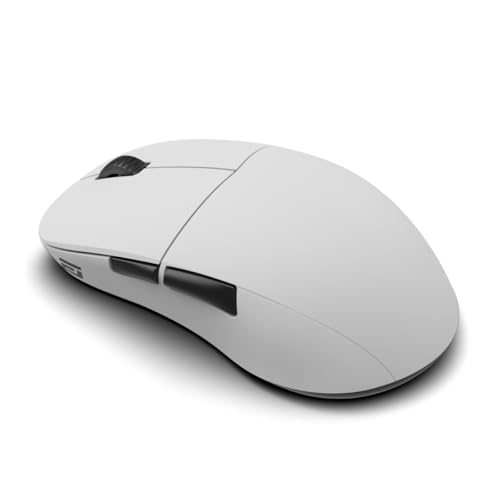
ENDGAME GEAR XM2w 4k v2 — the refreshed revision
Badge: Newer internals, lighter hand, brighter finish. The v2 keeps the brief and updates the execution: a newer optical sensor generation rated to 30K DPI, a weight trimmed to 61.5 grams, an explicit claw-grip design brief for medium to large hands, and a white shell that will anchor a bright desk the way the original’s Dark Frost anchors a dark one. As with the wired line’s revision, the honest description is continuation rather than correction.
At a glance: Wireless connection with 4000 Hz polling; 61.5 g weight; optical sensor up to 30K DPI; claw-grip shell for medium to large hands; white finish.
Strengths
- The updated sensor platform brings the mouse fully current for a long ownership.
- A small weight saving moves it closer to the wired model’s lightness while keeping the battery.
- The white finish and hand-size clarity make the shortlist decision easier at a glance.
Trade-offs
- Existing owners of the original are buying refinement, and should price their enthusiasm accordingly.
- White shells show a season’s contact honestly and ask for a wipe-down habit.
- Every wireless caveat of the original applies unchanged, because the platform’s bargain is unchanged.
Best for: new buyers who want the freshest internals and a bright finish in this shape. / Not suited for: original owners hunting a transformation, or dark-desk minimalists.
Is 4000 Hz enough, or will you miss 8000 Hz?
This is the question the model’s name invites, and it deserves the calm answer the numbers support. The step from the traditional 1000 Hz to 4000 Hz quarters the reporting interval and delivers most of the smoothness the high-polling idea has to offer; the further step to 8000 Hz halves an already tiny interval and returns a fraction of that gain, at full price in battery and system load. On the wireless side of the fence the arithmetic sharpens, because the radio pays for every report it carries. A wireless mouse that polls at 4000 Hz with a stable link and a sane battery rhythm is, for the overwhelming majority of competitive players on 240 Hz and 360 Hz displays, the correctly engineered answer — not a compromise awaiting an 8000 Hz apology. The complete reasoning, with the monitor and processor conditions that can move the verdict, is set out in the polling rate decision framework, and the wired sibling’s review at the wired XM2 8K in full covers the case for the higher ceiling on its own terms.
There remains a narrow audience for whom the wired model’s ceiling is the point — players on the fastest displays, in the most tracking-intensive titles, who have tested both rates on their own systems and kept the higher one with clear eyes. This review does not begrudge them their mouse. It simply insists that the far larger audience, the one that plays superbly at 4000 Hz and charges a battery twice a week without thinking about it, should not be talked out of the wireless XM2 by a number whose benefit they would struggle to identify in a blind test.
Battery life and the charging rhythm, in real terms
Wireless ownership succeeds or fails on habits, so here is the honest shape of this one’s. Polling at the headline rate is the expensive mode, and the mouse’s endurance should be planned around match-day usage at 4000 Hz with lower rates for the desktop hours around it, a split most owners automate through profiles or simple routine. Charging is a between-sessions act: the cable that ships with the mouse turns it into a wired XM2 while it feeds, so a forgotten charge costs a cable for an evening rather than the evening itself. The battery’s long game is the familiar chemistry of small cells — capacity that fades across years of cycles — and the kindest habits are the dull ones: avoid leaving the mouse flat for weeks, top it up rather than rescuing it, and let the desk’s layout make plugging in a two-second gesture rather than a furniture rearrangement.
One practical pattern deserves recording because so many owners independently invent it: the two-cable week. The charging cable lives permanently at the desk’s edge, and the mouse is plugged in during the day’s last session or while the machine does its evening work, so the battery begins every competitive session effectively full and the owner never performs a deliberate charging act at all. Wireless purists sometimes call this a wired mouse with extra steps; owners call it the routine that made the battery disappear from their attention entirely, which was the goal. A habit that removes a chore by absorbing it into an existing one is not a compromise of the wireless idea but its completion, and this mouse’s play-while-charging ability is what makes the pattern available.
Judged against the category, the XM2w’s proposition is that its battery serves a light mouse rather than a heavy one, and 63 grams with a managed cell will feel fresher in the hand at hour three than a heavier wireless flagship feels at hour one. Endurance figures belong to the listing and to your chosen polling tier, and this review will not invent a number the variables cannot support; what it can promise is that the rhythm, once built, disappears — which is the only battery review that has ever mattered.
How should the receiver and desk be arranged?
The receiver is this mouse’s cable, and it deserves the same deliberate placement a wired player gives a bungee. Use the extension adapter to bring it to the pad’s edge, in clear air, away from the radio noise of USB 3 storage and the metal shadow of the PC case; plug it into a back-panel motherboard socket instead of a front-panel one; and then leave it there, because a 4,000 Hz wireless link holds its character through geometry — short distance, clear air, nothing metallic in between. Players who move between machines should treat the receiver and the mouse as a married pair that travels together, in the same pouch, every time — the classic wireless tournament mishap is not electronic but logistical. With that small stage set, the link’s behaviour in play is the absence of behaviour: no stutters to diagnose, no distance anxiety at the pad’s far corner, and a tracking feel that lets the shape and switches take the credit they deserve.
Original or v2: the wireless edition of the same question
The revision logic here mirrors the wired line’s, and can be stated briefly because the shape and the bargain are shared. The v2 brings the newer sensor generation, a gram and a half of weight relief, an explicit medium-to-large hand brief, and the white finish. The original brings the Dark Frost finish and a sensor platform — the PAW3395 — whose flagship credentials are not in question. A new buyer choosing freely will usually take the v2’s currency and the finish their desk prefers; an owner of the original deciding whether to move should ask what problem the v2 solves for them, and will often find the honest answer is none, which is a compliment to the original rather than an insult to its successor. In both generations, verify the exact model name at the point of purchase, since this family’s suffixes carry real differences in shape size and internals.
How do you set up an XM2w for competitive play?
Set the stage before the settings: receiver placed as above, charging cable routed to a parking spot at the desk’s edge, and a pad chosen for the friction your stopping technique prefers — balanced cloth first, with the field surveyed at the wider pad field from speed to control. Then the grip audit this family always demands, confirming the claw or fingertip posture the shell serves and relaxing the squeeze a heavier mouse may have trained into your hand. Then sensitivity, imported from your established physical turn distance at a comfortable DPI, untouched while the mouse itself is judged. Then polling, set to 4000 Hz for competitive sessions if your system and your battery rhythm welcome it, with a lower everyday tier for desktop life. And finally the journal entry: rates, DPI, and charging day, written down where a firmware reset cannot take them from you. A week of real matches completes the setup, as it does for every serious mouse, and players who grant that week tend to stop shopping for a long while afterwards.
What mistakes do buyers make with this mouse?
Judging it against the wired sibling’s spec sheet rather than against their own desk is the founding error; the two mice are answers to different lives, and the spec sheet cannot tell you which life is yours. Neglecting the receiver’s placement and then reviewing the radio is the second, and it is the wireless category’s most preventable tragedy. Third is running the headline polling rate around the clock, draining the battery for desktop hours that cannot perceive it, and concluding the mouse has an endurance problem that its owner’s habits authored. Fourth is buying the shape for a palm grip because the reviews were kind. And fifth is forgetting that a wireless mouse is a small system — mouse, receiver, cable, and routine — and that the system’s weakest part, usually the routine, sets the experience’s ceiling.
How do the clicks, wheel, and glide feel in wireless form?
The wireless translation could have diluted the XM2’s tactile identity and, creditably, does not. The GX switches keep their crisp, even, rapid character, the kind of click that makes burst control and ability rhythms feel metronomic rather than approximate, and the two main buttons match each other with the consistency competitive players check instinctively in the first minute. The side buttons live where a claw grip’s thumb already rests, and they fire without rocking the shell — a detail that matters more on a light wireless mouse than on a heavier one, because there is less mass to absorb a careless press. The wheel’s steps are cleanly defined for cycling and timing techniques, and its middle click has the same deliberate certainty as the mains. Underneath, the skates deliver the quiet, even glide a 63-gram mouse needs, and the balance — the battery placed where the grip’s pivot expects weight — keeps diagonal flicks honest. Taken together, the tactile report is that this is an XM2 that happens to be wireless, rather than a wireless mouse wearing an XM2’s name, and that ordering of priorities is the entire reason the model exists.
Is wireless latency still a real concern at this level?
At this tier of the market, the honest answer is that the radio stopped being the interesting variable some time ago. A modern flagship wireless link, fed by a well-placed receiver, delivers its reports with a consistency that human hands and current displays cannot indict, and the differences that remain between a mouse like this and its wired sibling live in the polling ceiling and the battery column rather than in any perceptible lag. What players sometimes misread as wireless latency is usually one of three impostors: a receiver exiled behind the PC case, a polling tier the system cannot sustain calmly, or a battery at the edge of its charge changing the evening’s rhythm. All three are addressed by the setup discipline in this review, and none of them is a property of radio itself. The players who still choose wired for latency reasons are, at this level, really choosing the polling ceiling and the absence of chores — both legitimate, both covered in the sibling review — and this wireless model loses nothing by conceding those two honest points while winning the desk.
How does the XM2w sit among wireless rivals?
The wireless esports field offers three broad churches, and the XM2w’s parish is easy to identify. The ecosystem flagships wrap their mice in suites, docks, and matched peripherals, and they are the right answer for a desk that wants to be a system. The driverless purists strip features in the name of tournament simplicity and ask nothing of the owner’s software life. Endgame Gear’s wireless entry belongs to a third, smaller church: the instrument makers, whose mice are specified like tools, weigh what they weigh without apology, and treat software as a brief errand rather than a residence. Against the Maya family’s wireless offerings, the XM2w is the larger, more anchored claw option; against the big brands, it is the quieter, more specialised one; against its own wired sibling, it is the same argument with the cable clause struck out. Buyers should choose their church before their mouse, because the daily texture of ownership — suites or silence, systems or instruments — is decided at that level, and the XM2w rewards the owners who knew they wanted an instrument.
A season of wireless ownership, narrated plainly
The first week belongs to placement and rhythm: the receiver finds its home, the charging cable finds its parking spot, and the player’s hands run the same adaptation the whole XM2 family asks for, relaxing into the shell’s claw geometry and letting the fingers take over the fine work. The first month is when the wirelessness stops being a feature and becomes a fact — the desk stays clear, the mouse travels to the sofa-side laptop and back without a thought, and the polling tier settles into the two-mode habit of match trim and desktop trim. By the first season’s end, the ownership report is mostly about absences: no cable drag in the summer’s long sessions, no receiver drama, no battery emergency that the charging-while-playing escape hatch did not solve in seconds. The costs, honestly totalled, are a charging gesture repeated a few times a week and a receiver that must be remembered when the mouse travels. Players who find that ledger attractive will keep this mouse for years; players who find even that small liturgy annoying now know, cheaply and in advance, that their mouse is the wired one.
There is one more quiet dividend of the wireless translation that owners mention and spec sheets cannot: posture. A cable, however well managed, exerts a faint, variable pull that the hand unconsciously corrects for, and across a long evening those corrections are a real, if small, tax on the shoulder and forearm. Removing the cable removes the tax, and players who alternate between this mouse and its wired sibling for a month often report that the wireless evenings simply end fresher. It is not a performance argument and this review makes no medical claim for it; it is a comfort argument, and comfort across a season is a competitive asset of its own kind.
Original and v2, set side by side
| Attribute | XM2w 4k (original) | XM2w 4k v2 |
|---|---|---|
| Sensor | PixArt PAW3395 | Newer optical generation, up to 30K DPI |
| Polling | 4000 Hz wireless | 4000 Hz wireless |
| Weight | Approximately 63 g | 61.5 g |
| Switches | Kailh GX | Performance switches in the same spirit |
| Finish | Dark Frost | White |
| Stated hand brief | Medium symmetrical claw shell | Claw grip, medium to large hands |
The table’s lesson is the family’s usual one: the revision modernises internals and finish while the identity — shape, connection bargain, audience — carries over untouched. Buyers choosing between them are choosing a sensor generation, a gram and a half, a colour, and a hand-size brief, and should let whichever of those four matters most to them cast the deciding vote without inventing larger differences to justify the deliberation.
Which games suit the wireless XM2 best?
The same library that flatters the whole family, with the wireless dividend added. Tactical shooters gain a desk that never snags during the wide, low-sensitivity sweeps their angles demand. Tracking-heavy arena and hero titles gain the freedom of a mouse that can be lifted and replaced a dozen times a fight without a cable’s opinion on the matter, and their close-range chaos is exactly where 4000 Hz smoothness shows itself. Battle royale play, with its alternation of looting calm and frantic endgames, suits the two-mode polling habit this review recommends — economy rates for the quiet kilometres, full rate for the circles that matter. Beyond shooters, the mouse is a precise, button-modest instrument that serves aim-centric games of every genre and politely declines the button-census titles. Its ideal owner plays shooters first, keeps a tidy desk, and regards the charging cable the way a guitarist regards a tuner: a small tool that keeps the instrument honest.
Travelling, LANs, and the second-desk life
Wireless mice travel differently from wired ones, and the XM2w’s version of the trip is worth describing because its owners disproportionately live it. The kit is three pieces — mouse, receiver, cable — and the discipline is to keep them in one pouch, because each piece alone is a paperweight’s cousin. At the destination, the mouse asks for ninety seconds: receiver into a port near the pad, cable parked, and it is itself, at full specification, on a machine it has never met. That portability is the counterweight to the wired sibling’s famous statelessness, and reasonable players land on both sides of it — some prize the wired mouse’s single-piece simplicity, others the wireless mouse’s freedom at home, where most of life happens. This review’s position is that the home desk should win the argument, because the home desk is where the mouse will spend ninety percent of its life, and a tool should be optimised for its ordinary days rather than its adventures.
How does 63 grams feel different from 52?
Owners cross-shopping the siblings always ask about the eleven grams, and the honest answer is that they are felt less as weight than as distribution. The wired mouse’s lightness is a pure absence; the wireless mouse’s slightly greater mass sits centred where the battery lives, and in a claw grip that centre is close to the hand’s own pivot, so the mouse feels planted rather than heavy — a distinction players notice most in lifts, where the XM2w’s composure is arguably the calmer of the two. In motion, the difference shrinks below the threshold of a blind test for most players within a session, which is why this review refuses to score the siblings on grams. What the extra mass buys is visible across the desk rather than felt in the hand, and what it costs is a charging habit rather than an aiming one. Players for whom every gram is a creed have a wired flagship waiting; players for whom grams are a means to an end will find these eleven already spent on exactly the freedom they wanted.
Sensitivity, DPI, and the wireless XM2 in practice
The settings counsel for this mouse rhymes with the family’s, with one wireless accent. Build sensitivity from your physical turn distance at a comfortable DPI, as always, and leave it untouched while the shape is judged. The wireless accent is to treat polling as a session decision rather than a permanent one: the full 4000 Hz for the hours where tracking decides outcomes, a gentler tier for the desktop’s long calm, and the discipline to make that switch a habit rather than a discovery. Players who stream or record should add one check — that their capture and overlay load leaves the processor the headroom high polling asks for — because a wireless mouse at full rate on a saturated system will be blamed for a frame-pacing problem it merely reported faithfully. Set in that order, the XM2w’s configuration takes one evening and lasts for years, which is the correct lifespan for a settings page in a player’s life.
Who should skip this mouse entirely?
A review that cannot name its product’s wrong buyers is an advertisement, so here they are. Palm-grip players, whose whole hand wants a tall, filled shell, will find this mouse’s support politely insufficient no matter how kind the components are. Button collectors — MMO and productivity players whose left hand expects a dozen side inputs — are shopping in the wrong aisle entirely. Players whose desks are shared, chaotic, or frequently reconfigured will lose the receiver-placement discipline this mouse’s best behaviour depends on, and should either choose wired or accept a lesser link with open eyes. Players who know, from experience, that any charging routine in their life decays within a month should believe themselves and buy the wired sibling, whose readiness does not negotiate. And players on the tightest budgets should note that this is flagship territory, where the money buys instrument-grade execution rather than features per coin; the wider field surveyed at 8K-era gaming mice compared includes the value end of the high-polling world. Naming these readers is not a dismissal — it is the same fit-first honesty the mouse itself practises, and every one of them has a better mouse waiting in a neighbouring review.
Software, firmware, and the quiet life of a driverless-leaning mouse
The XM2w asks little of your software life, and what it asks is worth doing well. Configuration — polling tiers, DPI steps, and the handful of behaviours the platform exposes — is a short session in the maker’s utility, after which the mouse carries its settings with it. Firmware deserves a standing appointment a few times a year, because wireless behaviour at high polling rates is precisely the territory firmware refines, and an owner who updates on that rhythm will quietly collect improvements that launch-day reviews could not have described. Beyond that, the mouse’s software philosophy is abstinence: no ecosystem to feed, no overlay to appease, no account standing between you and your own settings. Players arriving from suite-heavy flagships sometimes mistake that abstinence for absence, until the first month passes without a single software interruption and the mistake corrects itself. In a category where the mouse is supposed to disappear, a maker whose software disappears too has understood the assignment completely.
Three grips on one shell: how the XM2w wears them
Because fit decides this mouse, its three intended grips deserve individual auditions in prose. The relaxed claw is its home address: fingers gently arched, palm’s base resting on the shell’s wide rear, steering shared between arm and fingers in the proportion most medium-handed players find natural within a day. On this grip the mouse’s balance and rear support make immediate sense, and the side buttons fall under the thumb as though the shell had been measured from it. The aggressive claw — fingers curled harder, palm lifted, control concentrated in the hand — is served nearly as well, with the waist’s taper giving the curled fingers their purchase and the low front keeping the fingertips authoritative; players who live here will feel the mouse’s weight least, because their grip carries it actively. The fingertip grip is the shell’s third citizen: no palm contact at all, steering entirely from the fingers, with the mouse’s lightness and centred balance doing the work. It asks the most of the player’s conditioning and returns the finest micro-control in the family’s repertoire, particularly on the larger pads the wireless desk now permits. What unites the three auditions is that each grip finds the shell cooperating rather than merely tolerating it — the mark of a shape that was drawn from hands rather than from a spreadsheet — and what divides them is only how much of the player’s arm reports for duty.
What this mouse says about its maker’s doctrine
Every product is an argument, and the XM2w’s argument is that wireless done properly is an engineering discipline rather than a feature checkbox. The evidence is in what the mouse refuses: it refuses a headline polling figure its battery could not honour gracefully, settling on the tier the platform can sustain with dignity; it refuses to hide its weight, publishing an honest figure that includes the cell; it refuses ecosystem theatre, asking nothing of the owner’s software life beyond a short configuration and the occasional firmware visit. In a market where wireless flagships compete on the length of their feature lists, a mouse that competes on the shortness of its compromise list is making a distinctive claim — that competitive players, given honesty, will choose the instrument whose every specification survives contact with a Tuesday evening. The XM2w’s following suggests the claim is sound. Whether it is your claim depends, as this review has insisted from its first section, on the shape of your hand and the habits of your desk, and on nothing else that a reviewer can decide for you.
Finishes, coating, and the mouse as a desk object
A mouse is looked at more than it is looked for, and this family’s two finishes stage genuinely different desks. The original’s Dark Frost has a technical, translucent character that disappears into dark setups and forgives the visible evidence of heavy use with unusual grace. The v2’s white is the opposite wager: a bright anchor for a bright desk, more striking on day one and more honest on day ninety, asking its owner for the wipe-down habit that keeps white hardware handsome. The coatings beneath both finishes manage the grip-versus-sweat negotiation that decides long-session comfort, with a texture that holds a warm hand without the rubberised stickiness that ages badly. Neither finish changes a duel; both change how the desk feels across a working year, and this review counts that as a legitimate axis of choice rather than a vanity — particularly in a wireless mouse, whose whole purpose is the desk’s cleanliness, and whose appearance is therefore not decoration but part of the product’s actual function.
A word for competitors who carry a spare
Serious players in every equipment sport eventually confront the spare question, and this mouse makes the answer unusually easy to reason about. Because its settings live in a short configuration and its shape is a known quantity, a second XM2w — or the wired sibling as the spare, sharing the shell — can be made match-ready in minutes and kept in the travel pouch against the day a battery, a receiver, or a baggage carousel fails at the wrong hour. The family’s cross-compatibility of feel is the asset here: a spare that aims identically is a spare that actually insures you, unlike the drawer of unlike mice most players accumulate by accident. Whether the insurance is worth its premium depends on how much of your life is played away from home, but competitors who travel will recognise the logic immediately, and it is one more way the XM2 family’s discipline — few models, shared shapes, honest parts — pays its owners back in the currency of fewer surprises.
Final recommendation
Buy the XM2w 4k if your grip is claw or fingertip, your desk is ready to be cable-free, and you want Endgame Gear’s flagship discipline in wireless form; take the v2 for the newest internals, the lighter hand, and the white finish, or the original for Dark Frost and a sensor platform with nothing to prove. If your heart belongs to the last increment of polling and a chain with no variables at all, the wired XM2 8k remains the family’s other answer, and choosing between them says more about your desk than about either mouse. Both are instruments for players who know their grip — and this one adds, to that select company, the simple pleasure of a desk with nothing trailing across it. There is a moment, a few weeks into owning a mouse like this, when the player stops evaluating it entirely: the receiver has vanished into the desk’s geography, the charging gesture has become as thoughtless as hanging up a coat, and what remains is only the shape in the hand and the game on the screen. That disappearance is the highest verdict a wireless mouse can earn, and the XM2w earns it the way its maker earns everything — by refusing, at every step, to be more complicated than the job requires, and by trusting its owners to value that refusal as highly as any specification printed on its box or debated in its forums.
Frequently asked questions
How long does the XM2w 4k battery last?
It depends principally on the polling tier you run, with the headline 4000 Hz mode costing far more endurance than standard rates, and on your daily hours. The sustainable way to own the mouse is a rhythm rather than a figure: high polling for competitive sessions, lower rates for desktop life, and charging between sessions as a habit. Check the current listing for the maker’s own endurance guidance for each mode, and plan your week around the mode you actually play in.
Can the XM2w 4k be used while charging?
Yes — connected by its cable it plays as a wired mouse while it charges, which converts a forgotten charge from a cancelled evening into a cabled one. Many owners build this into the routine deliberately, playing wired on charging evenings without any sense of penalty, since the shape and switches are identical in both modes.
Is 4000 Hz wireless as good as 8000 Hz wired?
For most players on most systems, the practical difference is small enough to vanish inside a blind test, while the wireless freedom is noticeable every minute. The wired ceiling retains a real but narrow edge for the highest-refresh, most tracking-intensive setups. This site’s polling guide works through the conditions in full, and the honest summary is that connection lifestyle, not the number, should decide between these siblings for nearly everyone.
What hand size and grip does the XM2w suit?
A medium symmetrical shell for claw and fingertip grips, with the v2’s brief stated explicitly for medium to large hands. Relaxed claw players will find the rear support natural, fingertip players will find the low front cooperative, and palm grippers will find the shell underfilled, as with the whole XM2 family. Measure your hand and name your grip before ordering, because this mouse’s excellence is fit-conditional.
Does the XM2w 4k need a special receiver for 4000 Hz?
Its high-polling wireless runs through the receiver supplied with the mouse, placed close to the pad on its extension for a stable link. Keep the pair together when travelling and resist substituting generic dongles, because the headline rate is a property of the matched system. If the delivered rate ever disappoints, work the placement, port, and firmware checks in this review’s setup section before suspecting the mouse.
Should I upgrade from the original XM2w to the v2?
Only for a reason you can name: a preference for the white finish, a wish for the newest sensor platform at your next natural replacement, or a hand that fits the v2’s stated brief better. As a performance upgrade for a satisfied owner, the v2 is a refinement, and the money is usually better kept until the original’s battery or skates genuinely ask for retirement.
What mousepad suits the XM2w 4k best?
Start on balanced cloth, whose dependable stop suits a light mouse’s liveliness, and let a month of play decide whether you want more speed or more braking. Wireless freedom makes one pad consideration new: with no cable crossing the desk, a larger pad becomes practical in a way it never was, and many owners use the reclaimed territory. The control-pad family reviewed at the Aqua Control pads examined is a frequent pairing for this mouse’s stopping style.
Can I use the XM2w 4k on a laptop while travelling?
Yes, and it travels well: the mouse, its receiver, and its cable pack as a small kit, the receiver gives a laptop the full-performance link, and the cable covers both charging and wired play on arrival. Players who game on the road should keep the trio in one pouch and treat the receiver as the kit’s irreplaceable member, since the mouse’s headline behaviour travels with it.
Does the XM2w 4k work for left-handed players?
Its symmetrical shell presents identical curves to either hand, making it more welcoming than any sculpted ergonomic flagship, though its side buttons follow the right-handed convention shared by nearly the whole category. Left-handed claw and fingertip players who accept that button arrangement gain the full aiming experience the mouse was built to deliver.
What should I check if the wireless connection ever stutters?
Work the short list in order: receiver distance and placement first, since a high-polling link is only as calm as its geometry; then the port, favouring a direct rear motherboard connection; then interference from nearby high-bandwidth USB devices and their cables; then battery state and firmware currency. In the great majority of cases the first two steps restore the link’s invisibility, because the mouse itself is rarely the author of its connection’s troubles.
How does the XM2w 4k handle fast lifts and repositioning?
Confidently, which is the trait its grip was designed around. The shell’s tapered waist gives the fingers a ledge for lifting, the sensor maintains its composure through the quick drops and resets of low-sensitivity play, and the wireless link’s stability means a repositioned mouse resumes reporting without a hiccup at exactly the moment a fight resumes. Players whose style lives on constant repositioning will find the mouse an accomplice rather than an obstacle.
Is the XM2w 4k good for work as well as gaming?
Yes, within its instrument’s limits: precise tracking, comfortable claw ergonomics across long days for the hands it fits, and a clean desk that offices appreciate. It offers no productivity button array and no free-spinning wheel, so spreadsheet athletes should weigh those absences honestly. For the common mixed life of documents by day and ranked matches by night, it is a single mouse that never asks to be swapped, which many owners count among its chief virtues.
What is the first thing to do when the mouse arrives?
Place the receiver before you judge anything: extension adapter fitted, pad’s edge, clear of the case and of other dongles. Then charge the mouse fully, set your established sensitivity, and play the adaptation week this review prescribes before touching the polling tier. Most disappointed first impressions of wireless flagships are placement problems wearing a product’s name, and the XM2w deserves its fair hearing on a properly set stage.
How often should the skates be replaced?
When their glide turns uneven or scratchy under the mouse’s light weight, which arrives sooner on hard pads and later on cloth, and announces itself as a faint inconsistency in slow tracking before it becomes audible. Keep a spare set in the travel pouch; on a mouse this light, fresh skates restore a surprising share of the new-mouse sensation for very little money or effort.
Does the XM2w 4k suit a standing desk or a shared family computer?
A standing desk suits it beautifully, since the absent cable never snags on a moving desktop, and a shared computer suits it provided the receiver keeps its assigned port and the charging habit is a household agreement rather than one player’s private system. In genuinely chaotic shared setups, the wired sibling’s indifference to all of this remains the safer family answer.
Sibling reading: the wired XM2 8K reviewed in full · ultralight claw aim in the Maya family · keeping wireless skates and glide in order