Disclosure: As an Amazon Associate, reviewstook.com earns from qualifying purchases. Links on this page are affiliate links; they cost you nothing extra. Prices and availability change often, so check the current Amazon listing before you buy.
One of those products that exists at the crossing of two reputations is the x lamzu maya 8k: Lamzu, the boutique mouse maker whose shapes have become fixtures on competitive desks, and Fnatic, the esports organisation whose name on a product promises it was shaped with professional hands in the room. Their collaboration takes Lamzu’s Maya — a small, symmetrical, claw-grip favourite — and pushes it into the 8K polling era, which is exactly what the name advertises. One fact must be established before anything else, because it governs how this page is built: the Fnatic x Lamzu Maya 8K itself has no Amazon listing that could be verified for this guide, so the mouse is covered here in full, honest prose — its shape, its audience, its technology, and how to buy it through its proper channels — while the two linked products below are its closest verified family members, the Maya X and the Maya Champion Edition, presented under their own names as family alternatives. Neither of them is the Maya 8K, and this page will never call them that; they are the routes to the same shape philosophy through Amazon, for readers who decide the collaboration model itself is not how they want to buy.
Key takeaways
- The Maya 8K is a collaboration flagship built on Lamzu’s small symmetrical Maya shape, aimed squarely at claw-grip competitive players.
- Its headline technology is true 8000 Hz wireless polling, delivered through a dedicated high-speed receiver rather than a standard dongle.
- The Fnatic collaboration model is not sold through an official Amazon listing, so this guide covers it in prose and links only its named family members.
- The Maya X enlarges the shape slightly for bigger hands and longer fingers, while the Maya Champion Edition refines the original small blueprint with premium touches.
- Shape fit matters more than polling specification in this family; the right Maya is the one whose hump and waist suit your grip, not the one with the largest number attached.
- Players new to ultralight symmetrical mice should expect an adjustment week before the shape’s advantages in micro-correction become obvious.
In this guide
X Lamzu Maya 8K: what exactly is this mouse?
Start with the shape, because with Lamzu the shape is always the story. The Maya blueprint is a compact symmetrical shell with a centred hump, gently pinched sides, and a low overall stance that invites a claw or fingertip grip and rewards small, precise corrections. It was designed for the kind of aim that lives in the fingers as much as in the arm — tracking adjustments in close fights, tidy counter-movements, quick vertical flicks in games with jetpacks and wall-rides. The Fnatic collaboration keeps that blueprint’s soul and dresses it in the organisation’s identity, with the internal specification pushed toward the current competitive ceiling: a flagship optical sensor of the PAW3950 class, optical main switches for consistent clicks, and wireless reporting at up to 8000 Hz through its high-polling receiver.
The collaboration aspect deserves a sentence of its own, because it is more than a logo. Esports organisations lend their names to many products, but the Maya line’s following was built by players first, and the Fnatic edition is best understood as a tournament wardrobe version of a mouse the scene already trusted — the same fundamental instrument, specified and finished for the stage. Readers who want the collaboration’s competitive background can also browse this site’s existing coverage of the Fnatic and Lamzu partnership at the Fnatic and Lamzu Maya story so far, which follows the joint line’s earlier chapter.
Weight and construction follow the family’s creed: as light as the structure honestly allows, with a shell that feels dense rather than hollow despite the missing grams, and a coating that manages the grip-versus-sweat bargain better than most ultralight finishes. The mouse is driverless in spirit — its essential settings live where competitive players want them, reachable without a software suite mediating every session — and its battery expectations follow the physics this guide’s polling explainer describes: run the full 8000 Hz and you are trading endurance for freshness, run it lower and the mouse becomes a far more relaxed companion. That trade is not a flaw in the product; it is the honest price of the headline feature, and the Maya 8K is aimed at players who will pay it gladly on match days.
Why is the Maya 8K itself not in the picks?
Because the verification standard behind this guide is mechanical about it: a product is linked only when its exact listing can be confirmed through Amazon’s own catalogue data, with the title and image matching the product being discussed. Searches for the Fnatic x Lamzu Maya 8K surfaced the wider Maya family — genuinely related mice, reviewed below — but not the collaboration model itself under its own name. The correct response to that result is the one you are reading: cover the subject completely in prose, tell you plainly where it is actually sold, and link only the family members that could be verified, labelled as what they are. Any page that attaches a Maya X link to a Maya 8K headline is hoping you will not notice the substitution; the shapes are cousins, not twins, and the difference matters to exactly the players this mouse is built for.
Practically, the collaboration model is obtained through Lamzu’s and Fnatic’s own channels and specialist retailers, in the waves of availability that boutique hardware tends to follow. If that route suits you, the rest of this guide still earns its keep: the shape analysis, the grip guidance, the polling discussion, and the setup advice all describe the mouse you will receive. If you would rather buy through Amazon today, read the family alternatives next and choose between a slightly larger Maya and a refined edition of the original blueprint. It is worth adding that this pattern — a boutique flagship sold direct, its family sold widely — is common across specialist gaming hardware, from keyboards to racing wheels, and learning to read it calmly is a durable shopping skill. The flagship’s absence from a marketplace is information about the maker’s distribution choices, not about the product’s legitimacy, and the family’s presence there is an opportunity rather than a compromise, provided the names are read carefully and each mouse is bought as itself.
The verified family alternatives

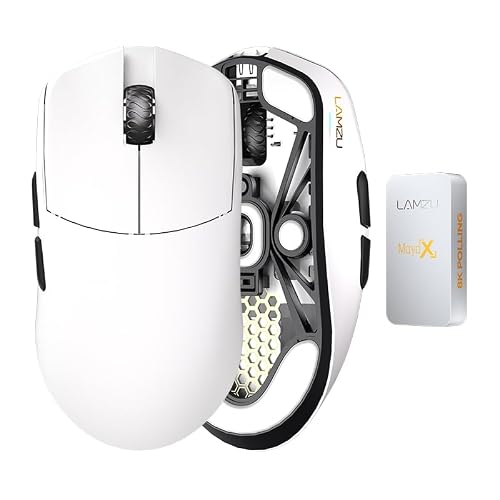
Lamzu Maya X — the same philosophy, scaled for larger hands
Badge: Best family alternative for medium-to-large hands. The Maya X is Lamzu’s own answer to the players who loved the Maya’s ideas and found its shell a fraction small. It stretches the blueprint into a larger symmetrical body while keeping the family’s creed intact: an ultralight 47-gram build, the PAW3950 sensor, optical switches, a dust-proof encoder, and the Nordic-based wireless platform the brand’s competitive mice share. Think of it not as a lesser Maya 8K but as the sibling whose hand it fits better.
At a glance: Larger symmetrical shell; 47 g weight; PixArt PAW3950 optical sensor up to 30000 DPI; optical main switches; wireless with the family’s receiver platform; white finish.
Strengths
- The enlarged shell supports fuller claw and relaxed grips that the compact original cramps.
- Sensor and switch specification sit at the same flagship level as the collaboration model’s class.
- Verified Amazon availability makes it the family’s easiest serious purchase.
Trade-offs
- It is not the Fnatic collaboration mouse, in branding, finish, or headline 8K billing.
- The bigger shell trades away some of the original’s fingertip agility for small hands.
- Its polling ceiling through the standard package should be checked against your 8K ambitions before ordering.
Best for: players with larger hands who want the Maya shape language without compromise. / Not suited for: small-handed fingertip players chasing the collaboration model specifically.

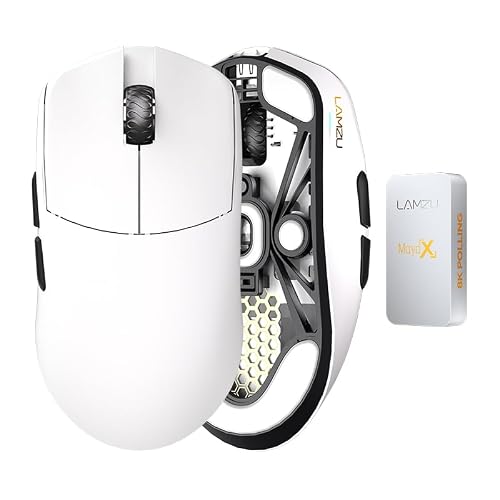
Lamzu Maya Champion Edition — the original blueprint, refined
Badge: Closest family alternative to the 8K’s small-shape brief. The Champion Edition takes the compact Maya formula and finishes it to a celebratory standard: a 45-gram shell aimed at small-hand users, the PAW3950 sensor, a golden TTC dust-proof encoder, optical switches, and explicit 8K compatibility in its wireless platform, all in a distinctive purple shadow finish. Of the verified family, this is the mouse whose brief rhymes most closely with the collaboration flagship’s.
At a glance: Compact symmetrical shell for smaller hands; 45 g weight; PixArt PAW3950 sensor; 8K-compatible wireless; golden TTC dust-proof encoder; optical switches.
Strengths
- The small blueprint plus 8K-compatible platform mirrors the flagship’s competitive intent most faithfully.
- Premium encoder and finish touches give it a special-edition feel beyond the spec sheet.
- Its size honesty — designed for small hands and proud of it — makes fit decisions easy.
Trade-offs
- Players with medium or large hands will find the shell genuinely too small, not merely snug.
- The distinctive colourway is a commitment your whole desk must live with.
- It remains a family alternative, not the Fnatic model, however close the brief.
Best for: small-handed claw players who want the Maya experience at its most refined through Amazon. / Not suited for: larger hands, or buyers for whom only the collaboration badge will do.
How does the Maya shape actually feel in play?
Symmetrical mice live or die by the details of their curves, and the Maya family’s reputation rests on getting three of them right. The hump sits toward the middle-rear, where a claw grip’s fingers can brace against it for pulling the mouse back into the palm during vertical corrections. The sides taper inward at the waist, giving the thumb and ring finger a ledge to lift and reposition the mouse without squeezing, which matters in low-sensitivity play where lifts are constant. The front stays low and unobtrusive, so fingertip players can steer with their fingertips alone during micro-adjustments without the shell arguing back. Together those choices produce the family’s signature sensation: a mouse that feels smaller than its dimensions when you are flicking and more stable than its weight when you are tracking.
The shape is not universal, and this guide will not pretend otherwise. Palm-grip players who rest their whole hand on the shell will find the Maya’s compact stance underfilled and its hump in the wrong conversation entirely; they belong with larger, taller mice, and the Maya X only partly answers them. Players with larger hands who claw aggressively may find the original blueprint’s length forces their fingers into a steeper arch than an evening of play forgives, which is precisely the gap the X was drawn to fill. And players coming from ergonomic right-handed shapes should expect the symmetrical neutrality to feel strange for the first days, until their grip relearns that both sides of the mouse now offer the same information. The family’s own size ladder — compact original and Champion Edition at one end, the X at the other — is the honest map of who should buy what, and the standalone guide at the Lamzu Maya X examined on its own goes deeper on the larger sibling.
What does 8000 Hz polling change on a mouse like this?
The Maya 8K’s headline deserves the same clear-eyed treatment this site gives the topic generally. Polling at 8000 Hz means the mouse reports its position every eighth of a millisecond rather than every millisecond at the traditional gaming standard, which smooths the stream of positions a game uses to draw your aim’s path and trims the average reporting wait to a sliver. The players positioned to feel that are the players this mouse is built for: high-refresh-monitor competitors in tracking-heavy fights, where the crosshair is in constant motion and each frame can consume several fresh reports. The costs are equally real — a dedicated receiver that must be placed with care, and battery endurance that falls steeply at the top rate — and the full reasoning, including when to step down to 4000 Hz or 1000 Hz without losing anything you can actually perceive, is laid out at choosing the best mouse polling rate for your setup.
What this guide will add is the shape-specific note: on a mouse steered largely by the fingers, the smoothness dividend of high polling shows up in the smallest movements you make, the two-millimetre corrections during a track, which are exactly the movements a Maya exists to perfect. That synergy is the real argument for the 8K flagship over its own family — not the number on the box, but the number meeting the grip the shell was drawn for. Players whose style is arm-led and sweeping will extract less of it, and should weigh the Champion Edition’s and the X’s other virtues accordingly.
How do you choose between the collaboration mouse and its family?
Decide in this order. First, hand and grip: measure your hand honestly and name your grip without aspiration, because the family’s shells divide cleanly by size and no specification compensates for the wrong shell. Small hands and a claw or fingertip grip point to the original blueprint, which means the collaboration 8K through its own channels or the Champion Edition through Amazon. Medium-to-large hands point to the Maya X, at which point the collaboration question mostly dissolves, because the flagship’s compact shell was never drawn for you. Second, channel and timing: the collaboration model follows boutique availability, while the family alternatives can be ordered through Amazon on an ordinary schedule with an ordinary returns path, and for a first ultralight purchase that returns path has genuine value while your grip verdict is still provisional.
Third, the polling question, which should be asked last rather than first: if your monitor, your games, and your practice habits place you in the narrow audience that extracts real value from 8000 Hz wireless, the flagship and the 8K-compatible Champion Edition are your shortlist; if not, let shape and channel decide and run whatever you buy at the rate your system sustains most calmly. Readers comparing the wider ultralight field will find the context at mice built around 8K polling compared, and those still choosing a first gaming mouse should start from fit fundamentals at how to choose a gaming mouse that fits.
How should you set up and adapt to a Maya-family mouse?
Give the shape a structured first week. Begin at a moderate polling rate and your established sensitivity, and spend the first sessions in familiar content, because the shell’s lower stance and lighter mass will change your stopping distances before they change your accuracy. Move your grip experiments one variable at a time: a slightly more relaxed claw, fingertips a few millimetres further forward, the mouse angled a touch straighter in the hand. Ultralight mice expose grip tension mercilessly, and many players discover in week one that they were steering their old, heavier mouse partly by leaning on it; the Maya family asks for a lighter touch and rewards it with corrections that feel telepathic once the tension leaves your fingers.
Then tune the technology to the desk. Place the high-polling receiver close to the pad on its extension, keep the charging cable’s route tidy for the wired sessions that top up the battery, and set your match-day and everyday polling rates as distinct habits rather than a single compromise. Skates deserve a check after the first fortnight, because ultralight mice glide on small feet that wear into their glide; the maintenance guidance at keeping mouse skates fast and even applies to this family exactly. Finally, record your settings somewhere outside the mouse, so a firmware reset or a second machine never costs you the configuration your hands have memorised.
What mistakes do buyers make with this family?
The substitution mistake heads the list: ordering any Maya-family mouse while believing it is the Fnatic 8K, a confusion this guide has been careful to prevent and which less careful pages actively encourage. The size mistake follows: buying the celebrated compact shell for a hand it does not fit, then blaming the shape philosophy rather than the size choice the family itself warns about. Third is the polling fixation, purchasing the flagship for its headline rate while owning a monitor and a library that cannot reveal it. Fourth is grip stubbornness, forcing a full palm grip onto a shell drawn for claws and fingertips and concluding the mouse is unstable. And fifth is neglecting the receiver and battery habits that high-polling wireless demands, then reviewing the mouse’s connection rather than the desk’s arrangement of it.
What do the clicks, wheel, and sensor feel like?
A shape earns the first week; the clicks and wheel earn the first year. The family’s optical main switches give the Maya line a click character that competitive players tend to describe as crisp and immediate, with the consistency across the two buttons that optical actuation is bought for, and without the double-click wear anxiety that haunts mechanical switch mice in heavy service. Pre-travel and post-travel are tuned short, suiting the rapid, repeated clicking of ability-heavy games, and the side buttons sit where a claw grip’s thumb can find them without shifting the hold that the shell works so hard to establish. The scroll wheel is the quiet overachiever: the family uses dust-proof encoders — the Champion Edition’s is a golden TTC unit — and the steps are defined enough for weapon cycling and bunny-hop timing while staying smooth enough for document work, a balance many ultralight mice fumble by treating the wheel as an afterthought.
The sensor’s behaviour completes the picture. The PAW3950-class optical sensor in these mice tracks with the flawless, unaccelerated character modern flagships are expected to deliver, and its practical virtues for this family are two: it holds that character at the low lifts and quick repositions a claw grip produces constantly, and it does so without demanding software mediation. Lift-off behaviour, surface tuning, and the rest of the sensor’s manners are set-and-forget territory for most owners, which is exactly what a driverless-leaning esports mouse should offer. Players migrating from an older sensor generation will notice the improvement less as a single revelation than as an absence — no spin-outs, no strange smoothing at their usual sensitivity, no excuses left in the hardware column of their post-match reflections.
One more tactile note belongs here, because it decides long-session comfort more than any switch specification: the mouse’s balance. Ultralight shells can feel nose-heavy or tail-heavy depending on where the battery and board sit, and a claw grip, which steers from the rear half of the mouse, is unusually sensitive to that distribution. The Maya family’s balance sits where its grip expects it, so the mouse pivots around the fingers rather than dragging its front through every correction, and the sensation over a long evening is of a tool that keeps asking less of the hand as the hours pass. It is the kind of detail that never appears in an advertisement and always appears in the second month of ownership, which is when this family’s owners tend to become its evangelists.
How does the Maya family sit among rival ultralights?
The ultralight esports field divides by philosophy as much as by specification. The big-ecosystem flagships from the major brands sell completeness: software suites, charging docks, and shapes refined across many generations for the broadest possible hands. The boutique makers, Lamzu among them, sell specialisation: fewer models, each drawn tightly around a grip and a size, with the scene’s word of mouth doing the work that retail distribution does elsewhere. Zowie’s school of thought removes features in the name of driverless purity, while Endgame Gear’s wired and wireless flagships — covered at the wired XM2 8K flagship — pursue the same claw-grip congregation from a German engineering angle. The Maya family’s ground inside that field is the small symmetrical shell done with unusual care, plus a collaboration line that carries tournament branding without diluting the shape that earned it.
Choosing among these philosophies is a temperament test disguised as a product comparison. Players who want their mouse to be one appliance inside a matched, maintained desk ecosystem will be happier with a major brand’s flagship and should not let boutique romance talk them out of it. Players who shop by shape first, who know their grip’s name and their hand’s measurements, and who enjoy hardware with a point of view, are the Maya family’s natural citizens. Neither temperament is more serious than the other; they simply spend their seriousness in different places, one on systems and one on instruments.
What surface should a Maya run on?
An ultralight mouse is half of a friction system, and the other half is the pad. The Maya family’s small stock feet and low mass make it livelier on fast, low-friction surfaces than heavier mice feel, which suits the micro-correction style the shape encourages but can feel unruly to players arriving from a heavy mouse on a control pad. The balanced starting point is a hybrid or balanced cloth surface that offers a firm initial glide and a dependable stop, letting the mouse’s lightness read as agility rather than skate. Players who chase pure speed can move to harder, slicker surfaces once their stopping technique has adapted, and players who want more inherent braking should choose a control-leaning cloth rather than adding grip tape weight to the mouse to slow it down. The pad survey at gaming mouse pads across speeds and sizes covers the field, and the control-pad specialist reviewed at the X-Raypad Aqua Control family is a pairing this family’s owners reach for often, for reasons that review explains.
Why does the Fnatic name carry weight in this category?
Fnatic is one of the founding organisations of professional esports, with championships across multiple eras of competitive gaming, and its equipment choices have been scrutinised by rivals and copied by fans for two decades. That history cuts both ways for a collaboration product, and this guide should say so. On one side, an organisation whose players compete for a living cannot afford to badge a mouse its professionals would refuse to use, and the Maya’s pre-existing reputation in the scene made it a credible partner rather than a licensing exercise. On the other side, a famous badge is not itself a specification, and the correct way to read this mouse is the way this guide has read it: shape first, sensor and switches second, polling third, and the logo as a reason to look rather than a reason to buy. Players who follow that order will find the collaboration earns its badge more often than not, which is the most that should ever be claimed for a name on a shell.
How does the family hold up over a season of heavy use?
Ultralight mice ask a fair durability question, because grams removed can be structure removed if a maker is careless. The Maya family’s answer, in owners’ accumulated experience of the line, is a shell that resists the creaks and flex that betray cheap weight saving, buttons whose optical actuation does not develop the double-click decay of mechanical switches, and an encoder protected against the dust that makes wheels erratic. The consumables are the familiar ones: the stock skates wear into their glide and eventually want replacing, the battery’s capacity follows the chemistry of all small cells and rewards owners who avoid leaving the mouse flat for weeks, and the coating, while better than most at resisting shine, will polish where fingers live. None of that is a warning so much as a maintenance rhythm, and it is lighter than the rhythm most gaming hardware imposes. A player who charges sensibly, keeps a spare set of skates in a drawer, and wipes the shell down weekly will find a Maya-family mouse essentially unchanged, in feel and in behaviour, across a full competitive season and beyond.
What should a first-time ultralight buyer expect?
The first surprise is how little there is in the hand, and the second is how much work the fingers suddenly have to do. A heavier mouse carries momentum that forgives sloppy stops; a mouse in this family’s weight class stops when you stop, which is the entire point and also, for the first evenings, faintly exhausting. Scores dip before they rise. The players who come through that valley share a few habits: they lower nothing else while they adapt, they give the shape at least a week of real matches before judging it, and they pay attention to grip tension, relaxing the squeeze that a heavier mouse trained into them. On the far side of the adjustment, the rewards this family promises are concrete — corrections that start and end where intended, a hand that tires later into long sessions, and a mouse that feels less like equipment and more like an extension of the fingers doing the aiming. Players whose hands or grips the shell does not fit will not find those rewards at any level of patience, which returns the decision, as every section of this guide eventually does, to fit.
How should sensitivity and DPI be paired with this shape?
A fingertip-and-claw mouse changes the sensitivity conversation, because so much of the aiming happens in small muscles with short travel. Players arriving from an arm-aimed setup often find their established sensitivity feels coarse on a Maya, not because the number is wrong but because the fingers are now contributing movement they never used to make, adding a fine layer on top of the arm’s coarse one. The productive experiment is a modest reduction — a small step, not a reinvention — paired with a week of play, watching whether close-range tracking settles without the long flicks suffering. DPI choice itself should stay boring: run the sensor in its comfortable native range, set your sensitivity in game, and resist the folk belief that extreme DPI figures make a flagship sensor more accurate. What the sensor rewards is a clean surface, a sane lift distance for your lift-heavy grip, and a polling setting your system sustains, all of which this guide has covered; the sensitivity number is a personal signature, and the Maya’s job is to transcribe it faithfully at small scales, which it does as well as anything in its class.
Where does the Maya sit inside Lamzu’s own range?
Lamzu’s catalogue is a study in shape specialisation, with different models drawn around different hands and grips rather than around price tiers, and the Maya occupies the small symmetrical claw position in that map. Sibling models serve larger hands, taller humps, and more palm-friendly curves, and the brand’s following navigates the range the way climbers navigate shoe lasts — by fit, with fierce loyalty to the model that matches. Understanding that map protects buyers from the commonest boutique mistake, which is treating the most famous model as the flagship for everyone. Inside Lamzu’s own logic, the Maya 8K is not the top of a ladder; it is the sharpest expression of one particular fit, sharpened further by the Fnatic collaboration and the 8K platform. If your hand belongs to a different position in the range, the correct Lamzu for you is a different model entirely, and the family alternatives in this guide are best read as the Maya position’s ambassadors rather than as the whole brand in miniature.
Charging, cables, and the daily rhythm of a high-polling wireless mouse
Ownership of a mouse like the Maya 8K includes a small daily liturgy that wired players never learn, and setting it up well in the first week saves a year of minor irritations. Give the receiver a permanent home close to the pad rather than a rotating cast of ports, because a high-polling link’s stability is a property of distance and interference, and consistency is what you are buying. Decide where the charging cable lives — ideally routed so that plugging in takes two seconds and the mouse can keep playing wired while it charges — and let the battery’s rhythm become a habit, topped up between sessions instead of rescued mid-match. Keep the firmware current through whatever lightweight utility the maker provides, since wireless behaviour at extreme polling rates is an area firmware genuinely improves. And if you travel to events, pack the receiver and cable as a pair in the same pouch every time; the most common tournament disaster in this category is not a failed sensor but a receiver left in another city’s hotel room. None of this is burdensome once arranged, and all of it is the difference between a wireless flagship that feels like freedom and one that feels like a chore with excellent specifications.
Which games suit this mouse best?
The Maya blueprint was drawn in the ecosystem of tactical and arena shooters, and those remain its home fixtures. In tactical play, its gifts are the tidy ones: settled stops, exact micro-corrections onto a held angle, and a hand that stays fresh through long defensive halves. In movement shooters with verticality, the low front and easy lift come into their own, because the mouse repositions constantly and weighs almost nothing while doing it. Hero shooters with tracking-heavy heroes reward the finger-led control the shape encourages, and battle royale endgames — close, chaotic, vertical — play to the same strengths. Outside the shooter world, the mouse is a precise generalist rather than a specialist: MOBA players who click rapidly and accurately will feel at home, while MMO players who live on a dozen side buttons will not, because the Maya’s button count is as disciplined as its weight. Strategy and simulation players can use it happily and gain little from it, which is true of every esports mouse and no criticism of this one. The honest summary is that the Maya family sells a specific excellence — finger-led aim in fast shooters — and buyers whose libraries centre that excellence will understand the following this mouse has earned, while buyers whose libraries do not should spend their money where their hours actually go.
Buying boutique hardware without regrets
Because the flagship’s channel is boutique, a closing word on buying this class of hardware well. Confirm the exact model name on the listing or store page, letter by letter, because this family’s names differ by a suffix and mean different shells. Confirm what the package includes — receiver class, cable, spare skates — since high-polling features depend on the right receiver being in the box. Read the seller’s returns terms before the mouse ships rather than after your grip delivers its verdict, because fit is this category’s great unknown and a fair returns path is the only true insurance against it. And when the mouse arrives, resist reviewing it for at least the adaptation week this guide prescribes; boutique mice are bought on the strength of considered opinions, and they deserve the same consideration from their owners. Follow those four habits and the boutique channel’s one real risk — commitment without recourse — is managed as well as it can be, leaving only the pleasure of a shape that was drawn, unmistakably, for hands like yours.
A symmetrical shell and the players it quietly serves
One constituency deserves explicit mention because symmetrical mice serve it almost by accident: players who aim with either hand across different setups, and the smaller number who play left-handed with the mouse in the left hand. A symmetrical shell presents the same curves to both hands, which no ergonomic right-handed sculpt can claim, and while side-button placement still favours the right-handed majority, the core aiming experience — the part this family is bought for — transfers completely. The same neutrality helps players whose grip is still migrating, since a symmetrical mouse does not punish experimentation the way a committed ergonomic shape does; you can audition claw, fingertip, and relaxed variations on one shell and let your hand vote over a fortnight. That versatility is easy to overlook in a specification table and hard to overvalue in a first serious mouse, and it is one more reason this blueprint, in whichever family member’s size fits you, makes a defensible long-term instrument rather than a fashionable detour.
How the collaboration finish lives on a real desk
Special editions are usually judged in photographs and lived with in peripheral vision, so a word about the Maya 8K as a desk object is in order. Collaboration finishes walk a line between identity and noise: strong enough to be recognised across a stage, restrained enough not to shout across a work call. The Fnatic wardrobe, applied to a shell this small, reads more like a team jersey’s trim than a billboard, and the mouse’s size means the finish occupies very little of your visual field in any case. Owners who build a desk around a theme will find it an easy anchor; owners who prefer their hardware invisible should know that the family’s standard finishes, on the Maya X and the standard line, offer the same shapes in quieter clothes, while the Champion Edition goes deliberately in the other direction with its purple shadow identity. None of this changes a single duel, and all of it changes how the desk feels at hour six of a working day, which is why this guide treats finish as a legitimate, if final, selection criterion rather than as an embarrassment to be skipped.
Final recommendation
If the collaboration itself is what you want — the Fnatic edition of the small Maya blueprint, with 8000 Hz wireless as its banner — buy the Maya 8K through Lamzu’s or Fnatic’s own channels, in the knowledge that no Amazon listing carries it. If you want the family’s shape philosophy through Amazon, choose the Maya Champion Edition for small hands and the closest match to the flagship’s brief, or the Maya X for larger hands and a fuller grip. Every route in that paragraph leads to a genuinely competitive mouse; the only wrong turns are pretending the alternatives are the collaboration, or buying any of them in the wrong size. Buy the shape your hand votes for, run the polling rate your system sustains with a clear conscience, and give the pairing a proper week to become invisible — because a mouse in this family, correctly chosen, stops being a product you own and becomes simply the way your aim feels from the inside, which is the quiet ambition behind every gram this family worked so hard to remove, and behind every curve it refused to compromise along the way.
Frequently asked questions
Is the Lamzu Maya X the same mouse as the Fnatic Maya 8K?
No. They are relatives within the Maya family that share a shape philosophy and a flagship sensor class, but the Maya X is a larger shell under Lamzu’s own name, while the Maya 8K is the compact Fnatic collaboration model with 8000 Hz wireless as its headline. This guide links the Maya X under its own name precisely because the two should never be confused at the point of purchase.
Where can I actually buy the Fnatic x Lamzu Maya 8K?
Through the makers’ own channels and specialist gaming retailers, in the availability waves typical of boutique hardware. It has no official Amazon listing that could be verified for this guide, which is why it is covered in prose here. Check the Lamzu and Fnatic stores for current stock and regional shipping rather than trusting marketplace listings that use the name loosely.
What grip and hand size is the Maya shape designed for?
The original blueprint serves small to medium hands using a claw or fingertip grip, with a centred hump for bracing and tapered sides for easy lifting. The Maya X extends the same ideas to larger hands and fuller grips. Committed palm-grip players and those with very large hands should look beyond the family or test the X carefully before committing.
Does 8000 Hz polling drain the battery quickly?
Yes, meaningfully. Transmitting eight times as many reports keeps the radio working far harder, and endurance at the top rate is a fraction of what the same mouse returns at standard gaming rates. The sensible habit, described in this guide’s setup section, is to treat 8000 Hz as a match-day mode and run everyday play lower, charging between sessions as part of the desk routine.
Are the Maya Champion Edition’s 8K credentials the same as the flagship’s?
The Champion Edition is listed as 8K compatible within the family’s wireless platform, which makes it the closest verified alternative for a player whose priority is high-polling play in the compact shell. It is still a different product from the Fnatic collaboration, with its own finish, encoder, and edition identity, and it should be bought as itself — which, on the evidence of its specification, is no hardship.
How does the Maya family compare with other ultralight esports mice?
Its distinguishing ground is shape and specialisation: a small symmetrical shell refined for claw and fingertip play, boutique distribution, and a following built through the competitive scene rather than through retail presence. Rival flagships compete on ecosystems, software, and availability. Players who value the Maya’s particular curves and lightness will not find them replicated elsewhere; players indifferent to those curves have a wide field to choose from.
Should I add grip tape or aftermarket skates to a Maya?
Only to solve a named problem. Grip tape earns its place if your fingers slip on the coating during long, warm sessions, and it should be applied to the contact patches your grip actually uses rather than wrapped over the whole shell by default. Aftermarket skates earn their place when the stock glide wears unevenly or when you want a specific friction character for a specific pad. What neither should be is a day-one ritual performed because the community does it; the stock configuration is the reference the mouse was tuned around, and a week in that reference tells you precisely which problem, if any, you are solving.
Is a wired mouse still better for tournament play?
The practical gap has narrowed to the point where the honest answer is logistical rather than technical. A modern high-polling wireless platform, with its receiver placed properly, delivers performance that players at the highest level trust on stage, and the Maya family’s platform belongs to that generation. Wired play retains two plain advantages — no battery to manage and no radio environment to think about — which is why many competitors still plug in when the desk allows it. Choose by the habits you will actually keep, because the best connection is the one whose routine you never fail to perform.
How long does the adaptation to an ultralight mouse really take?
Plan for a week of real matches before the shape stops being a topic of conscious thought, and a second week before the new stopping distances feel like your own. Players who drill deliberately — short daily sessions of tracking and counter-movement in a practice environment — compress that timeline noticeably, while players who change sensitivity, pad, and grip in the same week stretch it, because the hand cannot tell which change it is adapting to. If the mouse still feels foreign after a fortnight of honest play, the verdict is fit rather than effort, and the family’s other size is the next experiment rather than a sterner lecture to your fingers.
Does the Maya family work well on glass or hard pads?
The sensor tracks on hard surfaces without complaint, and the family’s light weight makes it a natural partner for fast hard pads, but the pairing is intense: every tremor and correction arrives undamped, and players new to ultralight mice usually settle faster on balanced cloth. Treat a hard pad as a second-phase experiment once the shape itself feels like home.
What is in the box with a mouse in this class?
Expect the mouse, its wireless receiver with an extension adapter for close placement, a charging and wired-play cable, and usually a set of replacement skates and grip material, though the exact contents vary by model and edition and should be confirmed on the listing or store page before ordering. The receiver and its adapter are the pieces to guard most carefully, because the high-polling experience depends on them.
More on this desk: grip tapes for players who customise their hold