Disclosure: As an Amazon Associate, reviewstook.com earns from qualifying purchases. Links on this page are affiliate links at no extra cost to you; prices and availability change frequently, so check Amazon for the latest.
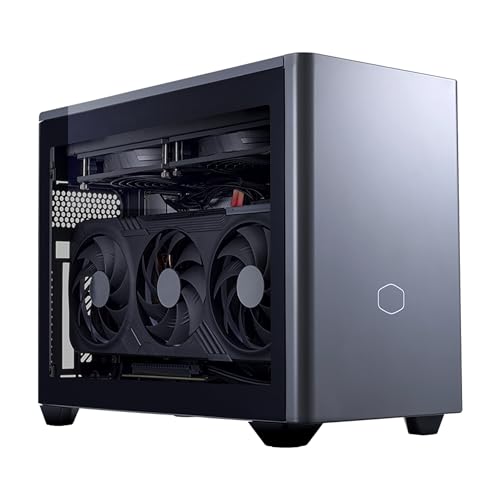
Small Form Factor Gaming PC Reviews: Six Machines, Reviewed and Ranked
These small form factor gaming pc reviews exist because the category cannot be understood from any single machine. A 3-litre mini and an 18-litre Mini ITX desktop share a label and almost nothing else, so this roundup reviews six current machines across both families — each verified against Amazon’s own product data before inclusion — and ranks them by the only standard that survives ownership: how well each one does the job its design promises, for the buyer that design was made for. There is a winner. There are also five machines that beat the winner for somebody, and the reviews below are written to find out whether that somebody is you.
The field, briefly: the Cooler Master NR2 Pro, a Mini ITX desktop with a desktop RTX 5070 Ti, takes the lead review because it is the least compromised small PC we have assessed in this programme. The ASUS ROG NUC 16 represents the premium mini at its best. The MINISFORUM G1 Pro carries the mid-tier argument. The Corsair ONE i600 is the design-led compact for buyers who want their PC to look like furniture. The Empowered PC LAN Gamer is the portable desktop built for events and small desks. And the TOPGRO T1-MAX, built on previous-generation flagship mobile silicon, tests whether yesterday’s high end at today’s lower tier beats today’s mid-range. Our single-machine deep dive on the NUC is at Small Form Factor Gaming PC Review; the buying method behind these rankings is at Small Form Factor Gaming PC Buying Guide.
In this guide
Verdict Summary
Best overall: Cooler Master NR2 Pro Gaming PC (Ryzen 7 9800X3D, RTX 5070 Ti) — desktop performance, desktop cooling and a desktop future, in a Mini ITX case.
- Best premium mini: ASUS ROG NUC 16 (RTX 5070 Ti) — the 3-litre format executed with flagship care and a three-year warranty.
- Best mid-tier: MINISFORUM G1 Pro — a 16-core processor and a discrete RTX 5060 at the tier most buyers should actually spend.
- Best looking: Corsair ONE i600 — liquid-cooled, wood-finished, and designed to be seen rather than hidden.
- Best for LANs and small desks: Empowered PC LAN Gamer 8.1L — a proper desktop GPU in a case built to be carried.
- Best previous-generation value: TOPGRO T1-MAX — an i9 and RTX 4070 combination whose tier has fallen faster than its performance.
Where to Buy
All six reviewed machines, in ranked order. Every specification in these reviews comes from the verified listing data for the exact configuration linked here.
- Lead review — best overall: Cooler Master NR2 Pro Gaming PC (Ryzen 7 9800X3D, RTX 5070 Ti) — check the latest price on Amazon from the product page.
- Best premium mini: ASUS ROG NUC 16 Gaming Mini PC (RTX 5070 Ti) — check the latest price on Amazon from the product page.
- Best mid-tier mini: MINISFORUM G1 Pro Gaming Mini PC (RTX 5060) — check the latest price on Amazon from the product page.
- Best design-led compact: Corsair ONE i600 Liquid Cooled Gaming PC (RTX 5070) — check the latest price on Amazon from the product page.
- Best LAN-party desktop: Empowered PC LAN Gamer 8.1L Mini ITX Desktop (RTX 5070) — check the latest price on Amazon from the product page.
- The previous-generation value play: TOPGRO T1-MAX Mini Gaming PC (RTX 4070) — check the latest price on Amazon from the product page.
Every machine named on this page was checked against Amazon’s own product data before it was included, and the links above go to the listings on reviewstook.com’s retail partner, Amazon, where you can confirm the exact configuration, current availability and delivery options before you spend anything.
How We Review Small PCs
Three principles govern these reviews. First, family before figures: a machine is judged against what its architecture promises — a mini against other minis and against the laptop class it derives from, a Mini ITX desktop against desktops — because cross-family benchmark tables punish small machines for their defining feature and reward big ones for theirs. Second, sustained over peak: cooling design, and the performance still available in the second hour of play, outweighs any burst figure. Third, ownership over unboxing: warranty, storage headroom, noise character and upgrade paths are scored as heavily as the silicon, because they are what the second year of ownership is made of. Performance is characterised by resolution class rather than by invented frame-rate precision; any reviewer who quotes you an exact number for ‘gaming performance’ without naming the game, settings and room is selling you a fiction, whatever their chart says.
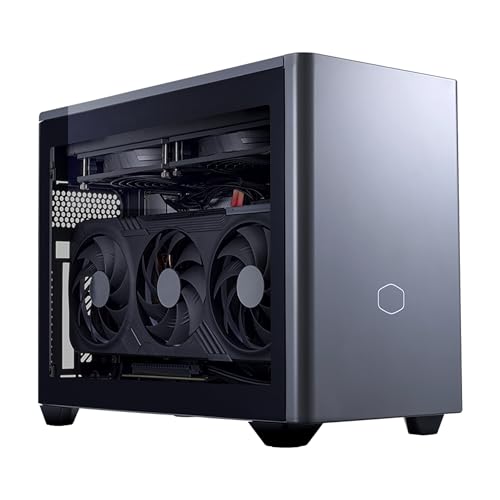
Lead Review: Cooler Master NR2 Pro (Ryzen 7 9800X3D, RTX 5070 Ti)
| Processor | AMD Ryzen 7 9800X3D |
|---|---|
| Graphics | NVIDIA GeForce RTX 5070 Ti 16GB (desktop GPU) |
| Memory | 32GB DDR5 6000MHz |
| Storage | 2TB M.2 SSD |
| Cooling | 280mm AIO liquid cooler |
| Form factor | Mini ITX |
| Operating system | Windows 11 |
Strengths
- A desktop RTX 5070 Ti with 16GB of memory — the strongest graphics in this roundup, with no laptop asterisk
- The Ryzen 7 9800X3D is the finest gaming processor in the field, in a socket that gives the platform a future
- 280mm liquid cooling in a Mini ITX case delivers sustained performance and civilised noise simultaneously
- 2TB of storage and 32GB of DDR5-6000 remove every capacity caveat this roundup raises elsewhere
Trade-offs
- It is the joint-largest machine here — small by desktop standards, enormous by mini standards
- Liquid cooling asks for gentle handling and a settled position; it is not a travel machine
- The specification overshoots 1080p gaming entirely, so part of its price buys headroom some buyers will never spend
Begin with the fact that defines it: nothing in this machine is a compromise made for size except the case’s internal volume. The processor is the desktop gaming flagship of its generation, the graphics card is a full desktop RTX 5070 Ti with 16GB of memory, and the cooling is a 280mm liquid system with the thermal surface area to hold both at full performance indefinitely. In a roundup full of asterisks — laptop this, sealed that, fixed the other — the NR2 Pro has none, and that is why it leads. It is the answer to the reader who wants a small PC and means a small desktop.
In use, its character is consistency. Where the minis in this field manage heat, the NR2 Pro dismisses it; where they ask for upscaling and settings judgement at 1440p, it has the headroom to be generous; where they schedule their own replacement, it schedules a graphics card swap some years from now. The 9800X3D deserves its sentence: in processor-bound games and in the late-game phases of strategy titles, it is simply the best tool any of these machines offers, and it will outlive the graphics card it ships with — which, in this machine alone among the sealed-format rivals, is a plan rather than a problem.
The criticisms are the family’s, stated plainly in the trade-offs: it will not hide, it will not travel casually, and it costs flagship money. Buyers for whom those are disqualifications should keep reading — this roundup has five other answers. Buyers for whom they are footnotes have found the machine this entire category is usually measured against, and the one we would buy with our own money for a desk with room for it. Best for: performance-first buyers with Mini ITX space / Not suited for: buyers who need a PC that disappears or travels.
The Rest of the Field, Reviewed

Best Premium Mini — ASUS ROG NUC 16 Gaming Mini PC (RTX 5070 Ti)
Strengths
- The 3-litre chassis remains the class’s most impressive piece of packaging
- Laptop RTX 5070 Ti with DDR5-6400 and a flagship Intel processor is the mini specification done completely
- QuietFlow cooling and a three-year warranty are the ownership details rivals skip
Trade-offs
- Its graphics ceiling is fixed, and its 1TB drive is the roundup’s tightest fit at this tier
- Premium pricing buys size and support, not frames — the NR2 Pro above is faster for similar money
- Port count means a hub joins most setups
| Processor | Intel Core Ultra 9 290HX Plus |
|---|---|
| Graphics | NVIDIA GeForce RTX 5070 Ti (laptop GPU) |
| Memory | 32GB DDR5-6400 |
| Storage | 1TB SSD |
| Chassis | 3-litre, black |
| Cooling | Triple-fan QuietFlow |
| Operating system | Windows 11 |
| Warranty | 3 years (per listing title) |
Reviewed at full length in our dedicated deep dive, the NUC earns its place here as the mini family’s standard-bearer. Everything the format promises — silence at rest, invisibility in a room, real 1440p gaming — it delivers with the fewest rough edges in the field, and its warranty answers the sealed format’s sharpest question. It loses the lead in this roundup for one reason only: the NR2 Pro exists, and for buyers with the space, a desktop’s balance sheet beats a mini’s magic. For buyers without the space, the order reverses, and this is the machine to buy. See Small Form Factor Gaming PC Review for the complete assessment.
Best for: small desks, shared rooms and living rooms where the PC must vanish / Not suited for: buyers planning a mid-life graphics upgrade

Best Mid-Tier Mini — MINISFORUM G1 Pro Gaming Mini PC (RTX 5060)
Strengths
- The 16-core Ryzen 9 is the hardest-working processor in the mini field
- RTX 5060 discrete graphics with GDDR7 memory clear the 1080p bar completely
- Networking — 5GbE and Wi-Fi 7 — embarrasses desktops costing far more
Trade-offs
- Under full load its compact cooling is the most audible in this roundup’s mini class
- 8GB of graphics memory asks for settings discipline in the heaviest releases
- Support pedigree is shorter than ASUS’s or Corsair’s
| Processor | AMD Ryzen 9 8945HX, 16 cores / 32 threads, up to 5.4GHz |
|---|---|
| Graphics | NVIDIA GeForce RTX 5060 8GB GDDR7 |
| Memory | 32GB DDR5 |
| Storage | 1TB SSD |
| Networking | 5GbE LAN, Wi-Fi 7 |
| Displays | Quad 4K output |
| Power | 245W (per listing title) |
The G1 Pro is the review we find ourselves writing most warmly, because it is the machine the most readers should buy. Its specification has no theatre in it — a serious processor, a sensible discrete GPU, the right memory, a proper drive — and its networking is quietly the best here. It games at 1080p without apology, stretches to 1440p with upscaling, streams and works on its sixteen cores, and asks a mid-tier price for the package. Its cons are the format’s cons at normal strength. If this roundup has a sweet spot, the G1 Pro is sitting in it.
Best for: 1080p gamers who also stream, create or work on the same compact machine / Not suited for: high-refresh 1440p players and silence obsessives

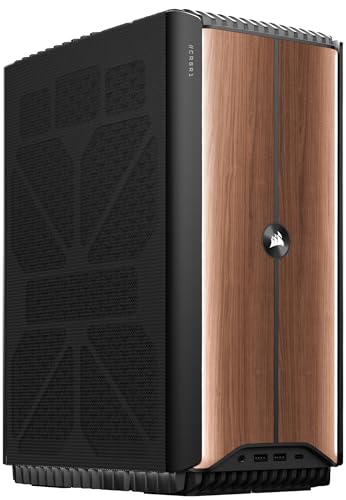
Best Design-Led Compact — Corsair ONE i600 Liquid Cooled Gaming PC (RTX 5070)
Strengths
- Liquid cooling for both processor and RTX 5070 in a compact tower format
- The Wood Dark finish makes it the only machine here designed to be looked at
- Corsair’s Vengeance memory and the maker’s ecosystem polish show in the details
Trade-offs
- 1TB of storage is modest for a machine at this tier
- Its vertical compact-tower format serves desks, not shelves or mounts
- Design and liquid cooling are paid for in the tier — performance-per-money is not its argument
| Processor | Intel Core Ultra 7 270K Plus |
|---|---|
| Graphics | NVIDIA GeForce RTX 5070, liquid cooled |
| Memory | 32GB Vengeance DDR5 |
| Storage | 1TB M.2 SSD |
| Finish | Wood Dark (per listing title) |
The Corsair ONE line has always sold a proposition the rest of this field ignores: that a gaming PC can be an object of industrial design, closer to hi-fi equipment than to office hardware. The i600 continues it — an Ultra 7 processor and a liquid-cooled RTX 5070 in a compact enclosure finished in wood, quiet by design and intended to stand visibly on a desk rather than crouch beneath it. Judged as furniture that games, it has no rival here. Judged on the spreadsheet, the NR2 Pro’s desktop muscle and the NUC’s miniaturisation both out-argue it. The ONE’s buyer is not confused about that; they are buying the one machine in the roundup they want to look at every day, and on those terms it delivers completely.
Best for: design-conscious desk setups and buyers who want liquid-cooled quiet without building / Not suited for: shelf, mount and TV-unit placements

Best Portable Desktop — Empowered PC LAN Gamer 8.1L Mini ITX Desktop (RTX 5070)
Strengths
- A desktop RTX 5070 in an 8.1-litre case is a remarkable amount of portable power
- 24GB of DDR5 and 2TB of Gen4 storage are generous, practical choices
- Three-year warranty and bundled keyboard and mouse make it a complete, movable kit
Trade-offs
- 24GB is an unusual memory figure — ample for gaming, short of the 32GB standard elsewhere here
- Its maker is a specialist rather than a giant, so support is capable but smaller in scale
- 8.1 litres travels by hand or car, not by backpack pocket
| Processor | AMD Ryzen 7 8700F, 8 cores |
|---|---|
| Graphics | NVIDIA GeForce RTX 5070 |
| Memory | 24GB DDR5 |
| Storage | 2TB Gen4 NVMe SSD |
| Chassis | 8.1-litre Mini ITX |
| Networking | Internal Wi-Fi 6E |
| Operating system | Windows 11 Pro |
| Warranty | 3 years (per listing title) |
The LAN Gamer is the roundup’s most honest name: an 8.1-litre Mini ITX desktop designed to be picked up and taken where the games are, with a desktop RTX 5070, an 8-core Ryzen 7, storage for a real library and a warranty that suggests its maker expects it to be used hard. As a static desk machine it is very good; as a machine whose life includes events, friends’ houses and two-household weeks, it is the only desktop here built for the journey. It also quietly makes the value argument against the premium minis: desktop graphics and an upgrade path, in a case that still fits a shelf, at a tier below the NUC’s. Buyers who move should start here.
Best for: LAN-goers, students and anyone whose gaming PC has two addresses / Not suited for: buyers who need a sub-4-litre machine for a mount or TV unit

The Previous-Generation Play — TOPGRO T1-MAX Mini Gaming PC (RTX 4070)
Strengths
- The i9-13900HX and RTX 4070 were flagship mobile hardware recently, and games have not stopped respecting them
- 32GB of memory and 1TB of PCIe 4.0 storage are the right capacities
- Windows 11 Pro and Wi-Fi 6E round out a specification with no embarrassing line
Trade-offs
- Previous-generation silicon means previous-generation features and efficiency
- DDR4 memory marks the platform’s age against the DDR5 field
- A lesser-known maker: verify warranty and support terms on the listing before buying
| Processor | Intel Core i9-13900HX (13th Gen) |
|---|---|
| Graphics | NVIDIA GeForce RTX 4070 8GB GDDR6 (laptop GPU) |
| Memory | 32GB DDR4 |
| Storage | 1TB PCIe 4.0 SSD |
| Networking | Wi-Fi 6E, Bluetooth 5.3 |
| Displays | HDMI 2.0, DP 1.4 |
| Operating system | Windows 11 Pro |
Every roundup needs its sceptic’s pick, and the T1-MAX is ours. Its components headline an older generation — a 13th-gen i9 mobile flagship and a laptop RTX 4070 — and its memory is DDR4 in a DDR5 field. But generations in this class do not expire like milk: the RTX 4070 remains a strong 1080p and capable 1440p GPU, the processor is still fast by any honest measure, and the machine’s tier has fallen to reflect its age in a way its performance has not. Buyers who shop by capability rather than by launch date — and who check the support terms with the care this review keeps recommending — will find the T1-MAX the roundup’s quiet bargain. Buyers who want the current feature set should pay for the G1 Pro or above.
Best for: value hunters comfortable buying proven previous-generation hardware / Not suited for: buyers who want the newest platform features and DDR5
The Field by Use Case: Four Buyers, Four Winners
Rankings flatten people, so here is the field re-sorted by the lives it will actually live. For the competitive player — high-refresh monitor, esports library, a desk in a bedroom — the contest is between the NR2 Pro’s ceiling and the G1 Pro’s sufficiency. The honest review answer is that the G1 Pro’s discrete RTX 5060 already feeds a 1080p high-refresh panel everything it can display in the titles that matter, and the NR2 Pro’s extra tiers buy insurance for a 1440p future rather than victories today. Competitive buyers on a budget of attention as much as money should also weigh the NUC: a silent-at-rest machine in a bedroom you sleep in is a competitive advantage of the domestic kind.
For the living-room player, the field re-sorts completely. The NUC leads, the LAN Gamer’s portability charms, and the NR2 Pro — the roundup’s overall winner — finishes last, because a liquid-cooled desktop with visible gaming intent is simply not what a television unit wants. This is not a paradox; it is the thesis of the whole cluster. A review that crowns one machine for every room is a review that has not visited the rooms.
For the student or two-household player, the LAN Gamer and the G1 Pro divide the honours by family: the desktop that travels by hand and upgrades later, or the mini that travels by backpack and asks nothing. Both are defensible; the deciding factor is whether the journey is across town by car or across the country by train, and whether the owner’s ambitions are growing. For the creator who games — the editor, the streamer, the developer with a hobby — the G1 Pro’s sixteen cores make it the field’s working machine, the NR2 Pro’s processor makes it the field’s fastest one, and the EVO-class integrated machines covered elsewhere in this cluster enter the conversation for memory-bound work. Reviews that ignore the working half of a PC’s life are reviewing half a PC.
What This Generation Changed — and What It Did Not
Read as a group, these six machines describe a category that has matured in specific, nameable ways. Discrete graphics in minis have normalised: three of the four minis here carry real GPUs rather than integrated apologies, and the fourth class of machine — the strong-integrated design — has become a deliberate product rather than a deception. Memory has standardised at 32GB in the serious tiers, storage at 1TB or better, and networking has quietly become a small-PC strength, with Wi-Fi 7 and multi-gigabit Ethernet appearing in boxes that cost less than the towers they out-connect. Cooling, the category’s original sin, is now a designed feature with names and engineering behind it rather than a hope.
What has not changed is the physics the first small PCs faced. A laptop GPU is still a laptop GPU, whatever the badge; a sealed box still ends its gaming life as a unit; small fans still work harder than big ones; and the price of miniaturisation is still itemised in every tier. The maturity of the category is not that these truths have been abolished but that they are now disclosed, engineered around and priced honestly by the serious makers — which is why this roundup could exclude, on verification grounds, the listings that still pretend otherwise. The category grew up. These reviews are written for buyers who intend to as well.
Also-Rans: Capable Machines That Missed This Field
A roundup of six excludes more than it includes, and three exclusions deserve a sentence each so their absence is not misread as a verdict. ASUS’s own GR70 — Ryzen 9, RTX 5070, 2TB in a sub-3-litre chassis — is reviewed in this cluster as the NUC’s alternative and would place between the NUC and the G1 Pro here on the strength of its storage alone; it missed the field only to keep two ASUS minis from crowding it. GMKtec’s EVO-X3, with its Ryzen AI Max+ processor, Radeon 8060S integrated graphics and 128GB of memory, is the field’s most interesting absentee: a machine for memory-bound creators and lighter libraries whose review belongs with workstations as much as with gaming PCs. And GMKtec’s K12, the OCuLink-equipped expandable mini, is the one machine whose review cannot be finished yet by anyone, because its value depends on an upgrade its owners have not yet bought. All three are covered across this cluster’s buying guide and pros-and-cons analysis; none was excluded for quality.
Comparison Table
| Machine | Processor | Graphics | Memory | Storage |
|---|---|---|---|---|
| Cooler Master NR2 Pro 9800X3D | AMD Ryzen 7 9800X3D | NVIDIA GeForce RTX 5070 Ti 16GB (desktop GPU) | 32GB DDR5 6000MHz | 2TB M.2 SSD |
| ASUS ROG NUC 16 RTX 5070 Ti | Intel Core Ultra 9 290HX Plus | NVIDIA GeForce RTX 5070 Ti (laptop GPU) | 32GB DDR5-6400 | 1TB SSD |
| MINISFORUM G1 Pro | AMD Ryzen 9 8945HX, 16 cores / 32 threads, up to 5.4GHz | NVIDIA GeForce RTX 5060 8GB GDDR7 | 32GB DDR5 | 1TB SSD |
| Corsair ONE i600 | Intel Core Ultra 7 270K Plus | NVIDIA GeForce RTX 5070, liquid cooled | 32GB Vengeance DDR5 | 1TB M.2 SSD |
| Empowered PC LAN Gamer 8.1L | AMD Ryzen 7 8700F, 8 cores | NVIDIA GeForce RTX 5070 | 24GB DDR5 | 2TB Gen4 NVMe SSD |
| TOPGRO T1-MAX | Intel Core i9-13900HX (13th Gen) | NVIDIA GeForce RTX 4070 8GB GDDR6 (laptop GPU) | 32GB DDR4 | 1TB PCIe 4.0 SSD |
The table’s most instructive column is the one it cannot show: upgradability. The two desktops — NR2 Pro and LAN Gamer — can replace their graphics cards; the four minis cannot, and that single invisible row predicts more about ownership in year four than any figure printed here. Read the table with that row imagined at the bottom, and the rankings above explain themselves.
Noise, Heat and Power: The Field Compared in Words
Numbers would mislead here — fan noise depends on the room, the distance and the listener — so this section compares the field the way owners experience it. At idle, the ranking is simple: the minis are silent or nearly so, the liquid-cooled desktops are quiet, and nothing in the field is obtrusive at a desk. Under sustained gaming load the ranking reshuffles. The NR2 Pro and the Corsair ONE, with radiators doing the work, hold a low, steady note. The ASUS minis rise to an even working hum that distance dissolves. The G1 Pro, packing 245 watts of compact ambition, is the most present under load — never unreasonable, always audible in a quiet room. The LAN Gamer sits between, a small desktop with a desktop’s manners.
Heat follows the same order, with the same moral: the machines that manage it best are the ones whose makers spent money on the unglamorous parts. Power draw tells the minis’ favourite story — at idle and in media use they sip where desktops gulp, and for a machine left running as a household’s download box, server or media centre, that difference compounds across years into a real, if modest, running-cost advantage. None of these factors appears on a specification headline, and all of them appear in the second month of ownership, which is why a reviews roundup that skipped them would be reviewing the boxes rather than the machines.
Ownership Costs Beyond the Purchase
A review that stops at the purchase price has told you the cheapest part of the story. These machines differ in what ownership adds. The minis will likely add a hub, possibly a mount, and — for the 1TB models — a storage expansion or an external drive within the first year or two; budget those as part of the machine, not as surprises. The desktops may add nothing for years, then add the category’s best bargain: a single graphics card that resets the machine’s gaming life. The previous-generation T1-MAX may add an earlier replacement date, which is a cost, or none at all, which is its bargain — the uncertainty itself is what its lower tier is compensating you for.
Electricity, as noted, mildly favours the minis. Resale mildly favours the desktops, whose components hold individual value. Warranty risk favours the long-warranted machines — the ASUS pair and the LAN Gamer carry three-year terms as listed — because a sealed machine’s failure is a total event. Add those lines to each machine’s tier before declaring any of them expensive or cheap, and several rankings in this roundup shuffle: the NUC’s premium shrinks once its warranty is priced, the LAN Gamer’s value grows once its completeness is counted, and the T1-MAX’s bargain narrows once its horizon is discounted. Reviews owe you the whole ledger, not the headline.
What We Would Buy at Three Budget Levels
Reviews should eventually spend imaginary money, so here is the field re-cut by tier, in words rather than figures because the figures move weekly. At the value tier, the contest is the T1-MAX’s proven previous-generation power against the G1 Pro’s current platform at a step up — and our money, narrowly, goes to the G1 Pro for buyers who will keep the machine, because its platform, memory standard and networking have years more relevance in them; the T1-MAX wins only when the budget is truly hard and the horizon truly short. At the mid-to-premium tier, the G1 Pro and the LAN Gamer divide by family: mini convenience against desktop future, at similar money, and the tiebreaker is the upgrade question this cluster never stops asking.
At the flagship tier the NR2 Pro and the NUC face off as they have throughout these reviews, and the deciding instrument is a tape measure. If the shelf, desk or unit offers Mini ITX room, the desktop’s completeness wins and it is not close. If it does not — if the machine must mount, vanish or ride in a bag — the NUC is not a consolation prize but the correct flagship, and its premium is the price of a room constraint honestly met. The Corsair ONE stands slightly outside this ladder as the aesthetic choice at a flagship tier: buy it when the looking matters, and know that you did.
Scores by Category, in Plain Language
For readers who want the roundup compressed: on raw gaming performance, NR2 Pro first, NUC second, then a close pack of G1 Pro, LAN Gamer and Corsair ONE, with the T1-MAX’s older GPU still respectable at its tier. On silence across a whole day, the minis lead at rest and the liquid-cooled pair lead at work. On upgradability, the two desktops stand alone. On portability, the NUC laps the field, the G1 Pro follows, and the LAN Gamer leads the desktops by design. On storage generosity, the 2TB machines — NR2 Pro and LAN Gamer — embarrass the 1TB premium minis. On support and warranty, the three-year terms listed for the ASUS and Empowered machines set the standard the others are measured against. No machine wins more than three of those lists, which is the roundup’s real conclusion: this field has no default answer, only well-matched ones.
Longevity Forecast: The Field in Three Years
Reviews are written on day one and read as if they were prophecies, so here is the honest forecast, machine by machine. The NR2 Pro in three years: still fast, probably wearing its original graphics card comfortably at 1440p, with a card swap available whenever its owner wants another era from it — the field’s safest long-term hold. The NUC in three years: unchanged in every daily pleasure, a tier further from the graphics frontier, still silent at rest and still the tidiest object in its room; its owners’ satisfaction will depend on whether they bought its headroom knowingly, which this cluster has done its best to ensure. The G1 Pro: the mid-tier ageing curve, settings judgement deepening at 1440p, untroubled at 1080p, its networking still ahead of most homes.
The LAN Gamer in three years: a graphics swap away from renewal, like the NR2 Pro, with its portability undiminished — the quiet longevity winner among the mortals. The Corsair ONE: ageing as furniture does, gracefully, its liquid cooling still civilised, its fixed specification the one line in its future it cannot revise. The T1-MAX: the first machine in the field to feel its years, by design and by bargain — its buyers purchased a shorter horizon at a lower tier, and a review’s job is to confirm they got the exchange they signed for. None of these futures is a failure. Each is a term of the original contract, printed here so the signing is informed.
Which Reviewed Machine Should You Actually Buy?
Buy the NR2 Pro if your desk fits it and performance leads your priorities; it is the roundup’s winner because it asks the fewest compromises of any small PC we reviewed. Buy the ROG NUC 16 if the PC must disappear — behind a monitor, under a TV, into a shared room’s peace — and buy the G1 Pro if it must merely be small, because the mid-tier mini is where most households’ needs and budgets actually meet. Buy the Corsair ONE if the machine will be looked at daily and you want it to deserve the attention, and the LAN Gamer if it will be carried to where the games are. Buy the T1-MAX if your shopping is guided by capability per tier rather than by generation, and you have verified its support terms to your satisfaction.
And buy none of them until the choosing questions have been asked in order — space, family, graphics tier, floors — because this roundup ranks machines, and only the method ranks them for your room. That method is set out step by step in How To Choose A Small Form Factor Gaming PC, the trade-offs behind it are weighed in Small Form Factor Gaming PC Pros And Cons, and once a machine is chosen, How To Set Up Small Form Factor Gaming PC configures it properly. Finish the desk with the right pointer while you are at it: Best Lightweight Gaming Mice suits the compact setups these machines create.
Common Mistakes Readers Make With Roundups
- Reading the ranking as universal, rather than as a ranking for the priorities stated — your room may reverse it, correctly.
- Comparing a mini’s laptop GPU against a desktop’s card of the same name and scoring the mini down for its format’s physics.
- Skipping the warranty and support lines on sealed machines, where they are structural rather than decorative.
- Treating the previous-generation pick as either junk or a steal, when it is a calculation about features versus tier.
- Buying the lead review’s winner for a shelf it does not fit — the only genuinely wrong purchase in this entire roundup.
Final Recommendation
Ranked for the average reader, the field finishes: NR2 Pro first, on completeness; NUC 16 second, on execution of the mini format; G1 Pro third and first for value-conscious buyers, on balance; LAN Gamer fourth overall and first for movers; Corsair ONE fifth on points and first on beauty; T1-MAX sixth on specification and considerably higher on capability per tier. A closing word about what would change these rankings, because reviews should state their sensitivities. A price movement of one tier in either direction reorders the middle of this field overnight — the G1 Pro and LAN Gamer are close enough that a promotion decides between them for a month at a time — while the top is stable, because the NR2 Pro’s lead is architectural rather than commercial. A new mini with a desktop-class upgrade path would overturn the field entirely, and the OCuLink machines elsewhere in this cluster are the first draft of that disruption. Until then, the rankings stand as written.
It is a strong field with no dishonest machine in it, which is itself the headline: small form factor gaming PCs, reviewed properly, are not a compromise category any more. They are a set of distinct, well-made answers to distinct questions — and the reviews above exist so you can tell which question is yours.
If you take one habit from this entire roundup, let it be verification: check the exact configuration in front of you against verified listing data, as every machine here was checked, because in a category of dense variant grids the difference between the reviewed machine and a lesser namesake is a single line in a specification table. The reviews will still be true next month; make sure the machine in your cart is the one they were true about.
And when the machine arrives, give it the setup hour this cluster prescribes — placement, cables, refresh rate, fan profile, one honest hour of testing — because a reviewed machine deserves a configured one, and the difference between the two is the difference between the experience these reviews describe and the lesser one their careless twins report online.
Rankings age, rooms change and next season’s field is already being manufactured, but the method underneath this roundup — family first, sustained over peak, ownership over unboxing — will review next year’s machines as fairly and as usefully as it reviewed these six, and it is yours to keep long after the specific winners here have been succeeded by theirs.
Frequently Asked Questions
What is the best small form factor gaming PC overall?
On the evidence of these reviews, the Cooler Master NR2 Pro with the Ryzen 7 9800X3D and desktop RTX 5070 Ti. It is the only machine in the field with no architectural asterisk: desktop processor, desktop graphics, liquid cooling, generous storage and an upgrade path. It wins for buyers whose space fits a Mini ITX case; for tighter spaces, the ASUS ROG NUC 16 is the best machine that fits them.
Which small gaming PC is best for most people?
The MINISFORUM G1 Pro, because most people’s monitors are 1080p or modest 1440p, most people’s budgets are mid-tier, and most people’s PCs also work, stream and create. Its 16-core processor, discrete RTX 5060 and excellent networking cover that whole life in a compact box, at the tier where the category’s value is strongest.
Are mini PCs as good as small desktops?
They are as good at different things. A mini like the ROG NUC 16 is smaller, quieter at rest and tidier than any desktop, and genuinely capable at 1080p and 1440p. A small desktop like the NR2 Pro or LAN Gamer is faster, cooler under sustained load and upgradable. Neither is the other’s failure; they are the category’s two families, and these reviews score each against its own promise first.
Is a previous-generation gaming mini PC worth buying?
It can be the smartest purchase in the field, provided the tier has fallen further than the performance has. The TOPGRO T1-MAX’s RTX 4070 and i9-13900HX remain strong hardware for 1080p and much 1440p gaming. The costs are real — older platform features, DDR4 memory, and a maker whose support terms need checking — so it suits value-led buyers who verify before they buy.
Which reviewed machine is quietest?
At idle, the minis — laptop hardware sips power and their fans rest. Under gaming load, the liquid-cooled machines, the NR2 Pro and the Corsair ONE i600, hold the civilised line best, because radiators move heat with less fan drama than compact air cooling. The honest summary: minis win the quiet hours, liquid-cooled desktops win the loud ones.
Which small gaming PC is best for a living room?
A sub-3-litre or 3-litre mini: the ROG NUC 16 in this field, or its GR70 sibling covered elsewhere in this cluster. They fit TV units, wake fast, run from a controller and drive a 4K television convincingly through upscaling. The LAN Gamer and NR2 Pro are better machines by several measures and worse living-room citizens by the only measure that matters there — presence.
How were the machines in these reviews chosen?
Each was verified against Amazon’s own product data through the Creators API before inclusion, and the field was balanced deliberately: two Mini ITX desktops, three current minis across the tiers, one design-led compact and one previous-generation value play. Specifications quoted are from the verified listings. Machines that could not be verified, or whose listings misdescribed their hardware, were excluded regardless of their popularity.


