Disclosure: As an Amazon Associate, reviewstook.com earns from qualifying purchases. Links on this page are affiliate links at no extra cost to you; prices and availability change frequently, so check Amazon for the latest.
How to Choose a Small Form Factor Gaming PC: A Step-by-Step Decision Guide
Learning how to choose a small form factor gaming pc is mostly learning how to ignore the category label, because that label covers machines with almost nothing in common beyond being smaller than a tower. A 3-litre box with a laptop graphics chip and a 15-litre Mini ITX desktop with a full desktop GPU are both sold as small form factor gaming PCs, and a buyer who cannot tell them apart is a buyer about to be disappointed by one of them. This guide exists to make sure that is not you: it walks through the decision in the order the decision actually has to be made, one step at a time, with the test to apply at each stage.
Work through the steps in order, because each one narrows the next. Where the PC will live decides its maximum size. Its size decides which family of hardware can fit inside it. The family decides the graphics performance honestly available to you. Only after those three steps should you look at individual models, memory, storage and ports — the details that fill buying guides, including our own companion Small Form Factor Gaming PC Buying Guide, which compares the current shortlist model by model. If the whole category is still on trial in your mind, Small Form Factor Gaming PC Pros And Cons and Is A Small Form Factor Gaming PC Worth It argue the case before you commit to choosing within it.
By the end of this page you will have a personal specification — a size band, a graphics tier, a memory and storage floor, and a shortlist logic — that you can apply to any listing, including models that did not exist when this guide was written. That is the point of a how-to: not a list to obey, but a method that keeps working.
In this guide
Key Takeaways
- Choose in this order: place, size, family, graphics tier, then details. Reversing the order — falling for a model first — is how buyers end up with the wrong machine.
- Measure your space in litres before you shop. Under about 4 litres means laptop-class hardware; desktop graphics cards need roughly 8 litres and up.
- Treat a laptop GPU as about a tier below the desktop card sharing its name when you plan which resolution and settings it can drive.
- Set hard floors before browsing: 32GB of memory and 1TB of storage for a keeper, a free M.2 slot if you can get one, and the exact display outputs your monitors need.
- Decide your upgrade expectation in writing. If you want a future graphics upgrade, only a Mini ITX desktop — or an OCuLink mini planning an external GPU — can promise it.
Where to Buy
This guide ends with six machines, each illustrating one outcome of the decision process below. They are gathered here for convenience; work through the steps first, then see which of the six your answers point to.
- Choose this if you decided desktop: Cooler Master NR2 Pro Gaming PC (Ryzen 7 9800X3D, RTX 5070 Ti) — check the latest price on Amazon from the product page.
- Choose this if you decided mini, premium: ASUS ROG NUC 16 Gaming Mini PC (RTX 5070 Ti) — check the latest price on Amazon from the product page.
- Choose this if you decided mini, mid-tier: MINISFORUM G1 Pro Gaming Mini PC (RTX 5060) — check the latest price on Amazon from the product page.
- Choose this if your graphics needs are integrated-class: GMKtec EVO-X3 AI Mini PC (Ryzen AI Max+ 395) — check the latest price on Amazon from the product page.
- Choose this if budget leads: Rmatamini SFF Gaming PC (i5-14400F, RTX 5060) — check the latest price on Amazon from the product page.
- Choose this if expansion leads: GMKtec K12 Gaming Mini PC (Radeon 780M, OCuLink) — check the latest price on Amazon from the product page.
Every machine named on this page was checked against Amazon’s own product data before it was included, and the links above go to the listings on reviewstook.com’s retail partner, Amazon, where you can confirm the exact configuration, current availability and delivery options before you spend anything.
Step 1: Where Will the PC Actually Live?
Start with a tape measure, not a product page. The honest location of the machine — on the desk beside the monitor, on a shelf, inside a TV unit, mounted behind a display, or in a bag that travels — sets a hard physical ceiling that no specification can negotiate with. Measure the space in centimetres and convert it to litres by multiplying length by width by height and dividing by a thousand. Then subtract a margin for air: a PC that exactly fills its shelf will cook itself, because every design in this category breathes through its panels. Leave several centimetres around the vents, and treat a closed cabinet as a smaller space than its dimensions suggest.
Be honest about the runner-up locations too. A PC bought for the desk that migrates to the living room every weekend needs to be small enough for the TV unit and light enough to carry without resentment, which pushes you toward a mini. A PC that will sit in one place for five years should not pay the miniaturisation tax at all. Write the primary location and its litre measurement down; it is the first line of your specification and the filter every later step passes through.
Step 2: Which Family Does That Space Allow — Desktop or Mini?
Now translate litres into architecture. Below roughly 4 litres, physics decides for you: only laptop-class processors and graphics fit, in sealed designs from makers like ASUS and MINISFORUM. These minis are superb appliances — quiet at idle, invisible in a room, powerful enough for 1080p and much 1440p gaming — but their graphics are fixed for life. Between about 8 and 20 litres, Mini ITX desktops become possible: real desktop graphics cards, real cooling, and components you can replace. The 8.1-litre class and larger ITX cases are where upgradability lives.
The test to apply is a single question: in three years, when a game arrives that your graphics cannot handle, do you want to replace a card or replace the computer? If replacing the card matters to you, your space must fit the desktop family, full stop — no mini, however premium, can offer it. If you would happily replace the whole box, or if the box will hand down to a lighter role, the mini family’s size and simplicity win. There is one deliberate exception: a mini with an OCuLink port can add an external desktop GPU later, which is a genuine, if costlier, middle path.
Step 3: What Graphics Tier Does Your Monitor Actually Need?
With the family settled, size the graphics to the screen you own — or the screen you are genuinely buying next, not the one you vaguely fancy. For a 1080p monitor, even at high refresh rates, an RTX 5060-class card or a strong laptop equivalent is the sweet spot, and anything above it is headroom rather than necessity. For 1440p, plan on an RTX 5070-class card as the comfortable tier, with a 5070 Ti giving high-refresh room to breathe. For a 4K television, be realistic: in this category you are planning around upscaling from a lower internal resolution, which looks excellent at TV distance, rather than native 4K at maximum settings.
Apply the laptop discount honestly at this step. When a mini lists an RTX 5070 Ti, plan its performance as if it were a tier lower than the desktop card of the same name, because its power budget is a fraction of the desktop part’s. This single correction prevents most small-PC disappointment. Also check the graphics memory figure in the listing: 8GB cards ask for sensible texture settings in the heaviest current releases, while 12GB and 16GB cards give you more years before those compromises arrive. Match the tier to the monitor, write it down, and refuse to be upsold past it without a reason you can say out loud.
Step 4: What Are Your Memory, Storage and Cooling Floors?
Details now, but as floors, not wishes. Memory: 16GB is the working minimum for gaming alone, and 32GB is the correct target for a machine you will keep, because small PCs are the hardest machines to upgrade later — in many minis the memory is soldered and the question is settled forever at checkout. Storage: modern games are enormous, so set 1TB as your floor and 2TB as your comfort figure, and check whether a second M.2 slot exists and is empty. A machine with a free slot forgives an optimistic purchase; a sealed machine with a full 512GB drive does not.
Cooling deserves the same floor-setting treatment, because in a small chassis the cooler is a performance component. Ask how the machine moves heat: a liquid radiator in an ITX case, a multi-fan engineered system in a premium mini, or a single small fan in a budget box. Then ask where the machine will sit while it does so — a metre from your ears at a desk demands a better answer than a TV unit across the room. If a listing says nothing about cooling at all, that silence is information: budget machines cut here first.
Step 5: Do the Ports and the Networking Fit Your Real Setup?
List everything you will plug in during an ordinary week — do not shop from memory. Monitors first: count them, note their inputs, and confirm the PC’s display outputs match, including the version where it matters, such as HDMI 2.1 for a high-refresh 4K television. Then peripherals: headset dongles, controllers, capture cards, external drives, a racing wheel or flight stick if you own one. Small PCs have fewer ports than towers, and a hub is a fine solution only if you have planned for it rather than discovered the need on setup day.
Networking is the other quiet decider. If the PC will live at a wired desk, gigabit Ethernet is standard everywhere and multi-gigabit ports on machines like the MINISFORUM G1 Pro future-proof a fast home network. If it will live in a living room or rented room where cabling is impractical, the Wi-Fi generation matters: Wi-Fi 7 and 6E machines hold up far better under the congestion of shared housing than older Wi-Fi 5 designs. Choose for the network you actually have, in the room the PC will actually occupy.
Step 6: How Do You Compare Two Finalists Honestly?
When two machines survive the filters, compare them on the evidence of their listings rather than their marketing. Verify every specification against the retailer’s own product data — this guide’s picks were each checked that way before inclusion, and you should hold any listing to the same standard. Compare graphics tier first, then cooling design, then memory and storage against your floors, then warranty: on a sealed mini, a three-year warranty is a feature with real monetary value, because you cannot repair what you cannot open.
Then do the ownership test. Picture the machine in month eighteen: the drive filling, a new game testing the graphics, dust in the vents. Which finalist handles that month better — the one with the free M.2 slot, the one with the cooling headroom, the one whose maker will answer the phone? Small PCs are bought with the heart, because they are lovely objects, but they are lived with as appliances. Choose the one that ages better, and you will still be pleased with it when the novelty of its size has worn off — which, in our experience, takes about a week, after which it is simply your PC. The setup guide at How To Set Up Small Form Factor Gaming PC picks up exactly where this decision leaves off.
Six Machines That Show the Decisions Working
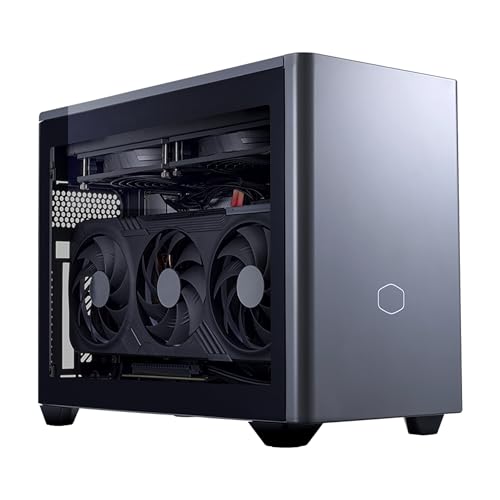
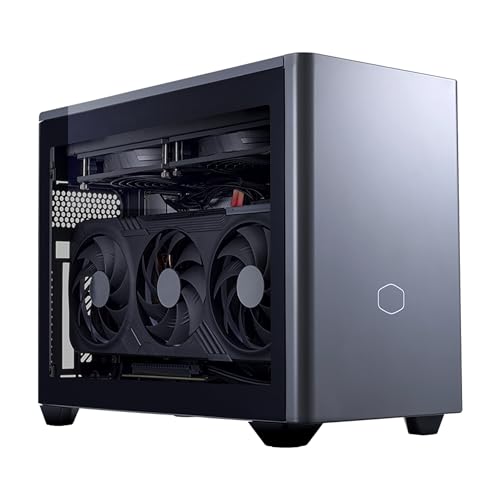
The Desktop-Family Answer — Cooler Master NR2 Pro Gaming PC (Ryzen 7 9800X3D, RTX 5070 Ti)
Strengths
- Desktop RTX 5070 Ti 16GB and a desktop 9800X3D — the ceiling of this category
- 280mm liquid cooling gives it sustained performance small air coolers cannot match
- Fully a desktop inside: the upgrade question answers itself
Trade-offs
- Needs Mini ITX space — if your measurement came out under 8 litres, this family is closed to you
- More machine than a 1080p-only setup can use
- Liquid cooling is one more thing to seat carefully if the PC travels
| Processor | AMD Ryzen 7 9800X3D |
|---|---|
| Graphics | NVIDIA GeForce RTX 5070 Ti 16GB (desktop GPU) |
| Memory | 32GB DDR5 6000MHz |
| Storage | 2TB M.2 SSD |
| Cooling | 280mm AIO liquid cooler |
| Form factor | Mini ITX |
| Operating system | Windows 11 |
Choose this outcome if Step 2 ended with the desktop family and Step 3 pointed at 1440p or high-refresh gaming. The NR2 Pro is what the decision process produces when space allows roughly a shoebox and the budget allows the top tier: nothing in its specification is a laptop compromise wearing a desktop name. It is the benchmark finalist — the machine other finalists must justify themselves against on size or price.
Best for: choosers whose space fits Mini ITX and who want the longest-lived specification / Not suited for: choosers whose measured space is a shelf, a mount or a TV unit under 8 litres

The Premium Mini Answer — ASUS ROG NUC 16 Gaming Mini PC (RTX 5070 Ti)
Strengths
- 3-litre chassis passes almost any space test a home can set
- Laptop RTX 5070 Ti, correctly understood, is strong 1080p and 1440p hardware
- Three-year warranty covers the sealed-machine risk properly
Trade-offs
- The graphics ceiling is fixed at purchase — Step 2’s question must be answered first
- 1TB storage sits exactly on the floor, with no room for a growing library’s optimism
- Premium tier pricing buys size and finish, not desktop performance
| Processor | Intel Core Ultra 9 290HX Plus |
|---|---|
| Graphics | NVIDIA GeForce RTX 5070 Ti (laptop GPU) |
| Memory | 32GB DDR5-6400 |
| Storage | 1TB SSD |
| Chassis | 3-litre, black |
| Cooling | Triple-fan QuietFlow |
| Operating system | Windows 11 |
| Warranty | 3 years (per listing title) |
Choose this outcome if your measurement came out in single-digit litres and your budget reaches the premium tier. The ROG NUC 16 is the mini family executed by a maker with deep small-system experience: flagship mobile silicon, DDR5-6400 memory, engineered triple-fan cooling and support measured in years. Go in understanding the laptop-GPU discount from Step 3 and it will not disappoint you; it is the safe premium answer. We examine it at full length in Small Form Factor Gaming PC Review.
Best for: choosers with tight space, a premium budget and no upgrade ambitions / Not suited for: choosers who want to replace a graphics card mid-life

The Mid-Tier Mini Answer — MINISFORUM G1 Pro Gaming Mini PC (RTX 5060)
Strengths
- 16-core Ryzen 9 makes it the multitasker of the shortlist — gaming plus streaming plus work
- RTX 5060 discrete graphics clear the 1080p bar with room to spare
- 5GbE and Wi-Fi 7 pass the networking step with the highest marks here
Trade-offs
- 8GB graphics memory means Step 3’s texture-setting caveat applies in the heaviest games
- Compact 245W design will be heard working in a quiet room
- Brand support is a shorter track record than ASUS or Cooler Master
| Processor | AMD Ryzen 9 8945HX, 16 cores / 32 threads, up to 5.4GHz |
|---|---|
| Graphics | NVIDIA GeForce RTX 5060 8GB GDDR7 |
| Memory | 32GB DDR5 |
| Storage | 1TB SSD |
| Networking | 5GbE LAN, Wi-Fi 7 |
| Displays | Quad 4K output |
| Power | 245W (per listing title) |
Choose this outcome if the mini family won Step 2, your monitor is 1080p or modest 1440p, and your budget sits in the middle tier. The G1 Pro demonstrates that the mid tier is not a compromise tier in this category: the processor is genuinely high-end, the graphics are a real discrete card, and the networking is better than most desktops at any size. It is the finalist most choosers should have to argue themselves out of, rather than into.
Best for: choosers who game at 1080p, stream or create, and want one compact box for everything / Not suited for: choosers targeting high-refresh 1440p at maximum settings


The Integrated-Graphics Answer, Done Properly — GMKtec EVO-X3 AI Mini PC (Ryzen AI Max+ 395)
Strengths
- Ryzen AI Max+ 395 with Radeon 8060S is the strongest integrated graphics in this guide by a wide margin
- 128GB of LPDDR5X memory removes memory from your worry list permanently
- OCuLink and USB4 keep an external-GPU future open
Trade-offs
- Integrated graphics, however strong, set a ceiling: demanding games mean 1080p and tuned settings
- The huge memory allocation serves AI and workstation work many gamers will never use
- Premium pricing for a machine whose gaming GPU is not discrete
| Processor | AMD Ryzen AI Max+ 395, 16 cores / 32 threads, up to 5.1GHz |
|---|---|
| Graphics | Radeon 8060S integrated graphics |
| Memory | 128GB LPDDR5X, 8000MHz |
| Storage | 2TB PCIe 4.0 SSD |
| Expansion | OCuLink, USB4 |
| Networking | Wi-Fi 7, 2.5G LAN |
| Displays | Up to 8K output |
Choose this outcome only if Step 3’s honest answer was lighter than you expected — esports, older and indie games, and everyday play rather than the newest blockbusters at high settings — or if the PC doubles as a memory-hungry workstation or local AI machine. The EVO-X3 shows what integrated graphics can now do when fed 128GB of fast unified memory, and for the right chooser it eliminates the discrete GPU entirely. For the wrong chooser it is an expensive lesson in Step 3.
Best for: choosers with lighter gaming loads, heavy memory needs, or AI and creation work alongside play / Not suited for: choosers whose Step 3 answer was demanding 1440p or 4K gaming

The Budget Answer With a Desktop GPU — Rmatamini SFF Gaming PC (i5-14400F, RTX 5060)
Strengths
- Desktop RTX 5060 at the budget tier — the family advantage survives the price cut
- i5-14400F is the right-sized partner for that card at 1080p
- A replaceable graphics card means Step 2’s upgrade question gets a yes
Trade-offs
- 512GB storage fails Step 4’s floor on day one — plan the second drive
- 16GB of DDR4 is the minimum, in the older memory standard
- Finish and support are basic; verify warranty details on the listing
| Processor | Intel Core i5-14400F |
|---|---|
| Graphics | NVIDIA GeForce RTX 5060 8GB (desktop GPU) |
| Memory | 16GB DDR4 |
| Storage | 512GB M.2 NVMe SSD |
| Form factor | Ultra small form factor desktop |
Choose this outcome if the budget leads every other consideration but you refuse to give up the desktop family’s upgrade path. The Rmatamini passes Step 3 for 1080p with a real desktop card, fails Step 4 on storage in a way that is cheap to fix later, and keeps the one promise that matters most at this tier: when the graphics age, you can change them. It is the thinking buyer’s budget finalist, bought with a storage upgrade already pencilled into its future.
Best for: budget-led choosers who value the upgrade path over storage and finish / Not suited for: choosers who need a large library installed from the first week

The Expansion-First Answer — GMKtec K12 Gaming Mini PC (Radeon 780M, OCuLink)
Strengths
- OCuLink turns Step 2’s either/or into a sequence: integrated now, desktop GPU later
- Three M.2 slots make Step 4’s storage floor a non-issue forever
- 32GB DDR5 fitted as standard clears the memory floor immediately
Trade-offs
- Day-one gaming is integrated-class: 1080p at modest settings in demanding titles
- The plan only pays off if the external GPU dock actually gets bought one day
- 512GB fitted drive is small until you use those expansion slots
| Processor | AMD Ryzen 7 H 255 |
|---|---|
| Graphics | Radeon 780M integrated graphics |
| Memory | 32GB DDR5 |
| Storage | 512GB SSD, 3x M.2 2280 expansion slots |
| Expansion | OCuLink, USB4 |
| Networking | Dual 2.5G LAN |
| Displays | HDMI 2.1 |
Choose this outcome if your answers kept splitting — small space now, bigger ambitions later; light games now, heavier ones coming; tight budget now, one planned upgrade ahead. The K12 is the only mini here designed around its own future, with OCuLink for graphics and three drive slots for storage. It asks you to be honest in a different direction: not about what you play today, but about whether future-you will really buy the dock. If yes, it is the smartest route in this guide.
Best for: choosers whose needs will grow and who like a planned upgrade more than a big first purchase / Not suited for: choosers who need strong gaming performance on day one
Step 7: How Should the Budget Be Split Across the Machine?
Money is a step, not an afterthought, because in this category the same total can buy wildly different machines depending on where it concentrates. As a working rule, the graphics tier should claim the largest share of a gaming budget, the miniaturisation itself claims the second share — smaller is a feature you pay for, in engineering if not in materials — and everything else divides what remains. This is why two PCs at the same price can be a desktop with a strong card and a plain case, or a jewel-like mini with a weaker one. Neither allocation is wrong; they are answers to different priorities, and Step 1 and Step 2 have already told you which priority is yours.
Protect the floors from Step 4 when the budget squeezes. The tempting cut is storage, because 512GB looks fine in a cart and fails in month three; the wise cut, if one must be made, is processor tier, because a step down in CPU class is barely visible in games while a step down in graphics is visible in every frame. Also price the whole setup, not the box: a mini that needs a hub, a mount and an external drive to work in your room may cost more in total than the larger machine that needed nothing. Add the accessories each finalist requires in your actual space before declaring one of them cheaper.
Finally, respect the tier you are in. This category’s pricing ladders are steep at the top: the flagship minis cost multiples of the budget desktop while delivering less raw graphics performance, because what they sell is size, silence and finish. Pay that premium gladly if those are your Step 1 answers — many buyers should — but never pay it accidentally, under the impression that the higher price bought higher frame rates. In small form factor, price buys different things than it does in towers, and the chooser’s job is to know which thing they are paying for.
Three Worked Examples: The Method Applied
Chooser one has a studio flat, a 1440p monitor on a small desk, and a PC that must share that desk with work. The measurement gives roughly 5 usable litres with air around it, which closes the desktop family despite an initial attraction to it. Step 3, with the laptop discount applied, points to a 5070-class laptop GPU for the 1440p panel. Memory and storage floors are set at 32GB and 1TB, ports check out, and the finalists narrow to the premium minis — the ROG NUC 16 if the budget stretches, with the GR70’s 2TB drive as the counter-argument. The method turned a vague wish for something small and powerful into a two-model decision in about ten minutes.
Chooser two is a parent buying for a teenager’s bedroom, with a 1080p monitor already owned and a firm budget ceiling. Space is generous — a desk corner — so both families survive Step 2, but Step 7’s allocation rule and the upgrade question decide it: a first PC that can grow with its owner argues for the desktop family, and the budget tier’s honest representative is the Rmatamini, with a storage upgrade planned as a birthday-present-sized future purchase. The prettier mini was the emotional favourite and the wrong answer, because its sealed graphics would have ended the machine’s gaming life exactly when the owner’s ambitions grew.
Chooser three plays strategy and indie games, works with large datasets, and keeps a home server running. Their Step 3 answer is genuinely light — integrated graphics suffice for their library — while memory is their binding constraint. That unusual profile points away from every discrete-GPU machine and toward the EVO-X3’s 128GB of unified memory, or the K12 if the budget prefers a staged path with its OCuLink option for a future change of gaming taste. The lesson generalises: the method does not always crown the fastest machine; it crowns the machine whose strengths match the chooser’s actual constraints, which is the only definition of best that survives contact with real use.
What Should You Check in the Listing Before You Pay?
Run a final verification pass over the exact configuration in your cart, because small PCs are sold in dense variant grids where one model name covers several machines. Confirm the processor model in full — a suffix letter changes the product. Confirm the graphics card and its memory figure, the memory capacity and type, and the storage capacity, each against the figures you wrote down at your floors. Confirm the operating system edition if it matters to you, and read the warranty line rather than assuming it. Every pick in this guide was verified against the retailer’s product data before inclusion; your purchase deserves the same thirty seconds per specification.
Then check the physical facts one last time: the machine’s dimensions against your Step 1 measurement, its weight if it will travel, and its display outputs against your monitors’ inputs, including any adapter you will need on day one. Photograph or save the listing details at purchase, so the configuration you verified is the configuration you can point to if a different one arrives. It sounds fussy. In a category with this many near-identical variants, it is simply how careful buyers make sure the method’s answer is the machine that actually turns up.
How Does the Room Change the Right Choice?
The same chooser with the same budget should buy differently for different rooms, which is why Step 1 comes first. In a bedroom, noise discipline dominates: the machine sits close, runs late, and shares the room with sleep, so a well-cooled mini on a balanced profile or a liquid-cooled ITX desktop earns its premium, and raw graphics tier can yield a step to buy that quiet. In a dedicated desk setup or gaming corner, the calculus flips — the machine can be larger and louder under load because nobody sleeps beside it, so the desktop family’s performance and upgradability should take the money instead.
In a living room, the deciding factors are appearance, wake behaviour and controller-first operation. The machine must look acceptable on open shelving or vanish into a unit with ventilation, start quickly, and be driven entirely from the sofa; sub-3-litre minis like the GR70 were designed for exactly this brief, and a tower-adjacent ITX box with visible gaming styling often fails the household test even when it wins the benchmark test. In shared or rented housing, add portability and network resilience: a mini that moves rooms in one hand and holds a Wi-Fi 6E or 7 connection under congestion is worth more than a faster machine that anchors you to one desk and one cable.
For a PC that travels — between home and university, between two households, to friends and events — weight, a single external power brick, and robustness outrank everything except basic competence. Sealed minis travel beautifully and ask only for a padded bag and care with the vents; liquid-cooled desktops travel worst of everything in this guide. Name the room, or the rooms, before you name the model, and half the catalogue eliminates itself honestly.
Troubleshooting: When the Decision Goes Wrong
Problem: the PC arrives and games run far below the frame rates you expected -> fix: work the steps backwards. Check the monitor is connected to the graphics output and set to its full refresh rate, confirm in the system information that the graphics hardware matches the listing, and re-read Step 3 — the most common cause is a laptop GPU judged by desktop expectations, which is a research error, not a faulty machine, and is best solved inside the returns window rather than argued with.
Problem: the machine is louder and hotter than the reviews suggested -> fix: audit the placement against Step 1. A mini sealed into a cabinet, a desktop with its radiator intake against a wall, or vents blocked by the very shelf that made the size attractive will all throttle and roar. Give it air, switch to a balanced fan profile, and re-test before concluding anything about the hardware.
Problem: you are out of storage within months -> fix: this is Step 4 sending its invoice. Add the second M.2 drive if a slot exists, move the back catalogue to external storage, and set your game platforms to install to the new drive by default. If no slot exists, an external SSD over USB is the workable, if inelegant, answer — and the lesson goes at the top of the list for the next purchase.
Problem: buyer’s remorse about upgradability a year later -> fix: be precise about what is actually blocked. Storage and memory are open on more machines than owners assume, an OCuLink mini can still take its external GPU, and a sealed mini that has stopped being your main gaming PC has real second careers — media centre, emulation box, home server, a family member’s first PC. The only genuinely closed door is internal graphics on a sealed mini, which is why Step 2 asks its question before money moves.
A Note on Timing: When Should You Stop Choosing and Buy?
Choosing has a natural end point, and it arrives sooner than perfectionists think. This category refreshes constantly — new minis appear every few months — so waiting for the definitive machine means never owning one. The practical rule: once a machine passes all six steps, matches your floors, and sits inside your budget tier, further research buys diminishing certainty. Buy it, test it thoroughly inside the returns window as the buying guide describes, and let the method’s discipline protect you instead of endless comparison.
The one legitimate reason to pause is a known mismatch you are about to accept — a drive below your floor because a promotion is ending, a GPU tier below your monitor because stock vanished. Those compromises are exactly the ones owners regret, and they do not become wiser under time pressure. A machine that fails a step today will still fail it after the discount ends; the right machine at a fair price next month beats the wrong machine cheaply today, every time.
Common Mistakes
- Shopping by model first and justifying the space afterwards — the order in this guide exists because the reverse order fails.
- Reading a laptop GPU’s name as a desktop GPU’s promise, and skipping the one-tier planning discount.
- Setting no floors, then discovering the 512GB drive and soldered 16GB memory after the returns window closes.
- Counting ports from the product photo instead of listing what you actually plug in each week.
- Ignoring cooling because it is hard to compare, when in a small chassis it decides sustained performance.
- Treating warranty as boilerplate on a sealed machine you cannot open or repair yourself.
Final Recommendation
Choose in order and the category becomes simple. Measure the space, let the space pick the family, size the graphics to your real monitor with the laptop discount applied, set memory, storage and cooling floors, and check the ports against your real week. The chooser who does those five things will land within one model of the right answer every time — and the six finalists above cover the outcomes most people reach: the NR2 Pro for desktop choosers, the ROG NUC 16 and G1 Pro for mini choosers at premium and mid tiers, the EVO-X3 for integrated-class needs, the Rmatamini for budgets, and the K12 for growers.
Write your five answers on one line each and keep that line beside you while you browse; it is a surprisingly effective defence against a beautiful listing that answers a question you never asked. If you are still torn between the category and a conventional tower, that is not a choosing problem but a worth-it problem, and it is argued head-on at Is A Small Form Factor Gaming PC Worth It. Once the decision is made, How To Set Up Small Form Factor Gaming PC takes the machine from box to optimally configured in one sitting.
Frequently Asked Questions
What is the first thing to decide when choosing a small form factor gaming PC?
Where it will live, measured honestly in litres including room to breathe. That measurement decides whether you are shopping for a Mini ITX desktop with desktop parts or a sealed mini PC with laptop parts, and that family decision shapes everything else — performance, noise, price and upgradability. Every other choice in this guide comes after it.
How do I know if a small PC has a laptop or desktop graphics card?
Use the chassis and the context as your guide. Machines of a few litres with mobile processors such as the Ryzen 9 8945HX or Core Ultra 290HX Plus carry laptop GPUs, even when the name matches a desktop card. Mini ITX desktops that name a desktop processor and quote card memory sizes such as 16GB for a 5070 Ti, with substantial cooling like a 280mm radiator, carry desktop cards. When in doubt, the physical size never lies.
Is 16GB of RAM enough for a small gaming PC?
It is enough for gaming alone today, but it is the wrong target for a machine you plan to keep, especially a mini whose memory may be soldered. Gaming alongside voice chat, a browser, recording or streaming regularly exceeds it. This guide’s floor for a keeper is 32GB, and most of the shortlist ships with that figure as standard.
Which is better for choosing: more processor cores or a better graphics card?
For gaming, the graphics card, almost every time. A mid-range modern processor feeds any GPU in this category at 1080p and 1440p, while graphics tiers translate directly into resolution, settings and frame rates. Extra cores earn their place when the PC also streams, edits video or runs heavy background work — the reason the 16-core G1 Pro and EVO-X3 exist — but a pure gaming budget should climb the graphics ladder first.
Should I choose a small PC with an external GPU port like OCuLink?
Choose it if your pattern is genuinely staged: light gaming now, heavier gaming later, and a realistic intention to buy the dock when the time comes. The GMKtec K12 is the example in this guide. If you already know you want strong performance immediately, the same money spent on a discrete GPU inside the machine — a G1 Pro or a desktop-family PC — serves you better than a port and a promise.
What warranty should I look for on a mini gaming PC?
As long as you can get, from a maker with a reachable support process. A sealed mini cannot be repaired by swapping parts, so the warranty is effectively the machine’s repairability. Three-year terms, like those listed for the ASUS machines in this guide, materially change the risk of ownership and are worth weighing alongside the graphics tier when you compare finalists.
Can I choose a small gaming PC for a 4K TV?
Yes, if you choose with upscaling in mind. A laptop RTX 5070-class mini like the ROG GR70 or NUC 16 drives a 4K television very convincingly by rendering at a lower internal resolution and upscaling, which at sofa distance is difficult to distinguish from native rendering in most games. What you should not choose for a 4K TV is an integrated-graphics machine as your main gaming box, or any small PC expecting native 4K at maximum settings in demanding titles.


