Disclosure: As an Amazon Associate, reviewstook.com earns from qualifying purchases. Links on this page are affiliate links at no extra cost to you; prices and availability change frequently, so check Amazon for the latest.
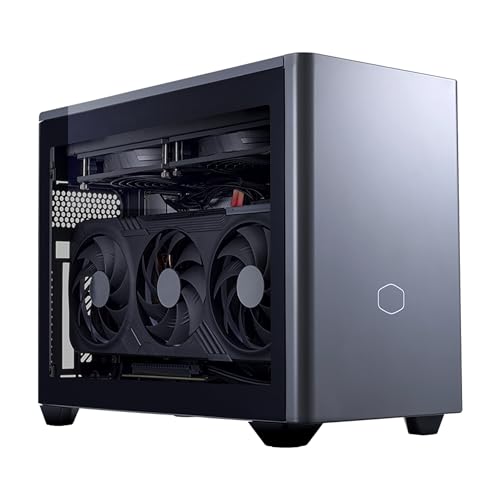
Small Form Factor Gaming PC Buying Guide: Power Without the Tower
A small form factor gaming PC solves a problem a full tower never could: it puts real gaming hardware into the space a tower wastes. This small form factor gaming pc buying guide is for anyone whose desk is small, whose gaming happens on a living-room TV, whose PC travels between rooms or houses, or who simply looks at a forty-litre tower and thinks there has to be a better way. There is — but the category hides two very different kinds of machine under one label, and confusing them is the single most expensive mistake buyers make.
The first kind is the true small form factor desktop: a Mini ITX machine built from desktop parts, with a desktop graphics card, a desktop-class cooling system and, in the best cases, room to upgrade later. The second kind is the gaming mini PC: a laptop’s processor and graphics chip folded into a box the size of a thick paperback, drawing laptop levels of power and offering laptop levels of upgradability — which is to say, storage and sometimes memory, and nothing else. Both are legitimate. Both appear in this guide, clearly labelled. What matters is that you buy the one that matches how you actually game, because the gap between them shows up in frame rates, in noise, in heat and in what you can change two years from now.
Throughout this guide we refer to real machines on sale now, each one checked against Amazon’s own product data before inclusion, so the specification quoted here is the specification in the listing title — not a marketing summary. If you are still weighing whether the whole idea suits you, our companion pieces Small Form Factor Gaming PC Pros And Cons and Is A Small Form Factor Gaming PC Worth It argue the honest case both ways, and How To Choose A Small Form Factor Gaming PC turns the criteria below into a step-by-step decision process. This page is the buyer’s reference: what the sizes mean, what the graphics options actually deliver, and which six machines we would shortlist today.
Key Takeaways
- Decide which family you are buying first: a Mini ITX desktop with a full desktop GPU, or a mini PC built on laptop silicon. They share a label and almost nothing else.
- Volume is measured in litres. Under about 4 litres means laptop-class parts; roughly 8 to 20 litres is where desktop graphics cards and real cooling live.
- A desktop RTX 5070 Ti and a laptop RTX 5070 Ti are different products with different power budgets. The name on the listing is not the whole story — the chassis size and cooling tell you which one you are getting.
- 32GB of memory and at least 1TB of storage is the comfortable specification for a machine bought to last; 512GB fills up with three or four modern games.
- Upgrade expectations should be set before purchase. Mini PCs mostly accept storage upgrades; Mini ITX desktops can usually take a new graphics card later, which doubles their useful life.
Where to Buy
The six machines below are the shortlist this guide keeps coming back to, ordered from the strongest all-rounder to the most affordable way in. Prices move constantly in this category, so use the links to check the current figure against the tier descriptions in the text rather than treating any number as fixed.
- Best overall: Cooler Master NR2 Pro Gaming PC (Ryzen 7 9800X3D, RTX 5070 Ti) — check the latest price on Amazon from the product page.
- Best true 3-litre premium: ASUS ROG NUC 16 Gaming Mini PC (RTX 5070 Ti) — check the latest price on Amazon from the product page.
- Best mid-tier value in a compact box: MINISFORUM G1 Pro Gaming Mini PC (RTX 5060) — check the latest price on Amazon from the product page.
- Best for a living-room TV setup: ASUS ROG GR70 Gaming Mini PC (RTX 5070) — check the latest price on Amazon from the product page.
- Best budget route to a desktop GPU: Rmatamini SFF Gaming PC (i5-14400F, RTX 5060) — check the latest price on Amazon from the product page.
- Best starter box you can expand later: GMKtec K12 Gaming Mini PC (Radeon 780M, OCuLink) — check the latest price on Amazon from the product page.
Every machine named on this page was checked against Amazon’s own product data before it was included, and the links above go to the listings on reviewstook.com’s retail partner, Amazon, where you can confirm the exact configuration, current availability and delivery options before you spend anything.
In this guide
Quick Picks
- Best Overall: Cooler Master NR2 Pro Gaming PC (Ryzen 7 9800X3D, RTX 5070 Ti) — a desktop RTX 5070 Ti and a 9800X3D in a Mini ITX case with a 280mm liquid cooler — the least compromised small PC here.
- Best Premium Mini: ASUS ROG NUC 16 Gaming Mini PC (RTX 5070 Ti) — laptop-class RTX 5070 Ti performance in a 3-litre box with a three-year warranty behind it.
- Best Mid-Tier: MINISFORUM G1 Pro Gaming Mini PC (RTX 5060) — a 16-core Ryzen 9 and an RTX 5060 with fast wired networking, at a noticeably lower tier than the flagships.
- Best for the Living Room: ASUS ROG GR70 Gaming Mini PC (RTX 5070) — sub-3-litre, quiet-cooled and Wi-Fi 7 equipped, so it disappears under a TV.
- Best Budget Desktop GPU: Rmatamini SFF Gaming PC (i5-14400F, RTX 5060) — the cheapest route on this page to a real desktop RTX 5060 in a small case.
- Best Expandable Starter: GMKtec K12 Gaming Mini PC (Radeon 780M, OCuLink) — integrated graphics today, an OCuLink port for an external GPU tomorrow, and three M.2 slots for storage.
How These Picks Were Chosen
Every machine in this guide was verified against Amazon’s product data through the Creators API before it was written about, and the specifications in each spec box come from that verified listing data. That process removed several tempting inclusions: machines whose titles advertised a current graphics card but whose detailed specifications revealed an older one, mini PCs marketed with the word gaming whose graphics were integrated chips from several generations ago, and at least one listing where the memory figure in the headline did not match the configuration actually being sold. If a machine could not be verified, it does not appear here with a link.
The shortlist was then balanced deliberately across the category rather than stacked with six versions of the same idea. It contains two Mini ITX desktops with full desktop graphics cards, three mini PCs built on high-end laptop silicon with discrete laptop GPUs, one budget small desktop, and one integrated-graphics mini PC whose value lies in its expansion ports. That spread is the honest shape of this market: most buyers are choosing between those families, not between six near-identical boxes.
We also weighted support and longevity. A three-year warranty on a machine with no user-replaceable graphics card matters more than the same warranty on a tower you can repair yourself, so warranty terms are noted where the listing states them. Cooling design was treated as a performance feature, not a cosmetic one, because in a small chassis the cooler decides how much of the silicon’s rated performance you actually get in the second hour of a session. Finally, nothing here was included on the strength of a headline discount; tier position is described in words, and you should confirm the live figure on the listing before deciding.
The Six Machines We Would Shortlist, Reviewed in Detail
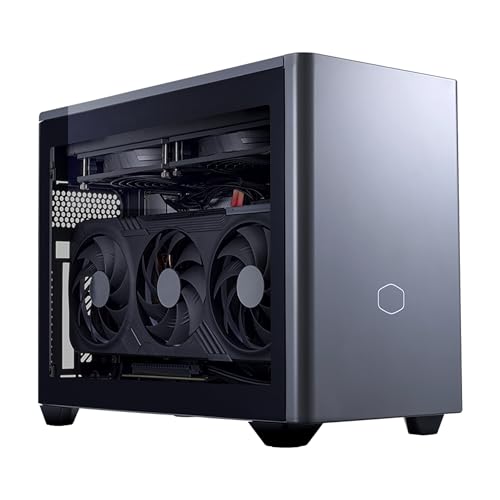
Best Overall — Cooler Master NR2 Pro Gaming PC (Ryzen 7 9800X3D, RTX 5070 Ti)
Strengths
- A desktop RTX 5070 Ti with 16GB of memory — no laptop compromise hidden behind the name
- The Ryzen 7 9800X3D is the strongest gaming CPU in this guide, and it is a desktop chip in a desktop socket
- A 280mm AIO liquid cooler in a Mini ITX case is serious thermal headroom, which means sustained rather than burst performance
Trade-offs
- Mini ITX is small, not tiny — this will not hide behind a monitor the way a 3-litre mini PC does
- Liquid cooling adds a pump and tubing to a machine you may want to move often
- The specification is more than 1080p gaming needs, so part of the budget buys headroom you may never use
| Processor | AMD Ryzen 7 9800X3D |
|---|---|
| Graphics | NVIDIA GeForce RTX 5070 Ti 16GB (desktop GPU) |
| Memory | 32GB DDR5 6000MHz |
| Storage | 2TB M.2 SSD |
| Cooling | 280mm AIO liquid cooler |
| Form factor | Mini ITX |
| Operating system | Windows 11 |
Start with the distinction this whole guide is built on: this is a small desktop, not a mini PC. Inside the Mini ITX case sits a desktop Ryzen 7 9800X3D and a desktop RTX 5070 Ti with 16GB of graphics memory, cooled by a 280mm all-in-one liquid cooler. Nothing has been traded away to achieve the size except the empty space a tower would have contained. For a buyer who wants one machine that handles high-refresh 1440p today and stays relevant for years, this is the reference point everything else here is measured against.
The practical consequence is consistency. Laptop-based minis throttle in long sessions as their small heatsinks saturate; a 280mm radiator has the surface area to hold clock speeds indefinitely, so the frame rate in hour three matches hour one. The 2TB SSD also matters more than it sounds — modern game installs are large, and a machine this powerful invites a big library. Keep it on a desk rather than in a cabinet, give the radiator air, and it behaves like the full-size PC it technically is.
Best for: gamers who want desktop performance and upgrade potential without a tower / Not suited for: buyers who need a PC that fits in a shoebox or travels in a backpack

Best Premium Mini — ASUS ROG NUC 16 Gaming Mini PC (RTX 5070 Ti)
Strengths
- Genuinely tiny 3-litre chassis that mounts or hides almost anywhere
- RTX 5070 Ti laptop GPU paired with fast DDR5-6400 memory and a flagship mobile CPU
- Triple-fan QuietFlow cooling and a three-year warranty — support that matters on a sealed machine
Trade-offs
- The GPU is the laptop variant, so expect less than a desktop card of the same name
- 1TB of storage is the minimum comfortable figure at this tier, not a generous one
- Upgrades beyond storage are effectively off the table
| Processor | Intel Core Ultra 9 290HX Plus |
|---|---|
| Graphics | NVIDIA GeForce RTX 5070 Ti (laptop GPU) |
| Memory | 32GB DDR5-6400 |
| Storage | 1TB SSD |
| Chassis | 3-litre, black |
| Cooling | Triple-fan QuietFlow |
| Operating system | Windows 11 |
| Warranty | 3 years (per listing title) |
The ROG NUC 16 is what most people picture when they hear small form factor gaming PC: a 3-litre black box that can sit under a monitor, mount behind one, or disappear into a TV unit, yet contains an Intel Core Ultra 9 290HX Plus and an RTX 5070 Ti. In raw capability it sits a clear step below the Cooler Master above — the laptop GPU runs to a laptop power budget — but it is also a fraction of the size, and for gaming at 1080p and 1440p on a TV or a desk monitor it has power to spare.
ASUS’s triple-fan QuietFlow cooling is the detail that makes the package work, because a 3-litre chassis has nowhere for heat to hide. The three-year warranty listed for this model is the other detail worth weighing: on a sealed machine where you cannot swap a failed graphics card, manufacturer support is part of the product. Buy it for the footprint and the polish, with eyes open about the ceiling. Our full deep-dive is at Small Form Factor Gaming PC Review.
Best for: desk and living-room gamers who value size and finish as much as raw frame rates / Not suited for: buyers who plan to upgrade their graphics card in two or three years

Best Mid-Tier — MINISFORUM G1 Pro Gaming Mini PC (RTX 5060)
Strengths
- Ryzen 9 8945HX brings 16 cores and 32 threads — exceptional for streaming or mixing play with work
- RTX 5060 with GDDR7 memory is a well-matched 1080p and entry 1440p GPU
- 5GbE wired networking and Wi-Fi 7 are faster than most homes can currently feed them, in a good way
Trade-offs
- Compact chassis and a 245W power profile mean cooling works hard under full load
- The RTX 5060’s 8GB of graphics memory asks for sensible settings in the heaviest new releases
- A newer brand than ASUS or Cooler Master, so long-term support is less proven
| Processor | AMD Ryzen 9 8945HX, 16 cores / 32 threads, up to 5.4GHz |
|---|---|
| Graphics | NVIDIA GeForce RTX 5060 8GB GDDR7 |
| Memory | 32GB DDR5 |
| Storage | 1TB SSD |
| Networking | 5GbE LAN, Wi-Fi 7 |
| Displays | Quad 4K output |
| Power | 245W (per listing title) |
The G1 Pro is the value argument in this category done properly. MINISFORUM pairs a 16-core Ryzen 9 8945HX with a discrete RTX 5060, 32GB of DDR5 and a 1TB SSD, then adds networking most desktops lack: 5-gigabit Ethernet and Wi-Fi 7, plus quad 4K display output. For the player who games at 1080p, streams to friends, and also edits video or compiles code on the same box, the core count is not a spec-sheet decoration — it is the reason to choose this over a prettier rival.
Positioned honestly, it gives up the top tier of GPU performance to the two machines above it and charges a lower tier price for the privilege of existing. The 245W compact design will be audible under full gaming load in a quiet room, which is the physics of small boxes rather than a defect unique to this one. If your monitor is 1080p or a modest 1440p panel and your desk space is genuinely limited, this is where the sensible money in this guide lands.
Best for: 1080p and entry 1440p gamers who also stream, edit or multitask heavily / Not suited for: buyers who need top-end GPU performance in the smallest possible chassis


Best for the Living Room — ASUS ROG GR70 Gaming Mini PC (RTX 5070)
Strengths
- Sub-3-litre chassis with ARGB lighting that can be toned down or shown off
- Ryzen 9 9955HX and an RTX 5070 is a strong pairing for TV gaming at 1440p and upscaled 4K
- 2TB of storage as standard — the library size a living-room machine actually accumulates
Trade-offs
- Laptop-class GPU, so native 4K in demanding games means relying on upscaling
- A sealed mini PC: memory and graphics are fixed for the life of the machine
- Premium tier positioning for what is, in desktop terms, mid-range graphics hardware
| Processor | AMD Ryzen 9 9955HX |
|---|---|
| Graphics | NVIDIA GeForce RTX 5070 (laptop GPU) |
| Memory | 32GB DDR5-5600 |
| Storage | 2TB SSD |
| Chassis | Sub-3-litre |
| Cooling | Triple-fan QuietFlow |
| Networking | Wi-Fi 7 |
| Operating system | Windows 11 Home |
| Warranty | 3 years (per listing title) |
The GR70 is the NUC’s AMD-powered sibling in spirit: a sub-3-litre ASUS box with a Ryzen 9 9955HX, an RTX 5070, 32GB of DDR5-5600 and — the detail living-room buyers will appreciate most — 2TB of storage fitted from the start. A console replacement lives or dies on whether the next game fits without deleting the last one, and this machine defers that annoyance for a long time. Wi-Fi 7 suits rooms where running a cable to the TV is not realistic.
Under a television, its job is to be forgotten: quiet cooling, quick wake, and enough graphics power to drive modern games at TV distances where upscaled 1440p looks excellent on a 4K panel. Set the Windows power plan and the fan profile once, pair a controller, and it behaves like an appliance. It is the pick we would put in a media unit, and the setup walkthrough at How To Set Up Small Form Factor Gaming PC uses exactly this kind of machine as its example.
Best for: living-room gamers replacing or supplementing a console with a PC under the TV / Not suited for: players who want native 4K at maximum settings in the newest releases

Best Budget Desktop GPU — Rmatamini SFF Gaming PC (i5-14400F, RTX 5060)
Strengths
- A real desktop RTX 5060 8GB — the cheapest machine here with a full desktop graphics card
- The i5-14400F is a proven, well-balanced partner for that GPU at 1080p
- Desktop architecture means the graphics card can be replaced later, unlike any mini PC here
Trade-offs
- 16GB of DDR4 and 512GB of storage are the floor, not the target — budget for a storage upgrade
- A lesser-known brand, so expect basic fit and finish rather than ROG polish
- No headline warranty term in the listing title, so check the listing details before buying
| Processor | Intel Core i5-14400F |
|---|---|
| Graphics | NVIDIA GeForce RTX 5060 8GB (desktop GPU) |
| Memory | 16GB DDR4 |
| Storage | 512GB M.2 NVMe SSD |
| Form factor | Ultra small form factor desktop |
Every category needs an honest entry point, and this is it: an ultra-small desktop built around an Intel Core i5-14400F and a desktop RTX 5060. It will not win a beauty contest and its 512GB SSD will fill quickly, but the architecture is the important part. Because the graphics card is a desktop card, this modest box can be upgraded in a way none of the sealed minis can — a better GPU in two years transforms it, while a mini PC owner is shopping for a whole new machine.
Treat it as a foundation rather than a finished flagship. Add a larger SSD when the library demands it, keep expectations at 1080p where the RTX 5060 is genuinely strong, and you have the most upgradeable route into small form factor gaming that this guide can offer at the budget tier. For a first gaming PC in a bedroom or a shared flat, that trade — plain case, real GPU, open future — is the right one.
Best for: first-time buyers and budget-focused gamers who want a desktop GPU and an upgrade path / Not suited for: buyers who need lots of storage or memory fitted from day one

Best Expandable Starter — GMKtec K12 Gaming Mini PC (Radeon 780M, OCuLink)
Strengths
- OCuLink port allows an external desktop GPU dock later — a genuine upgrade path in a mini PC
- Three M.2 2280 slots make storage expansion unusually generous for the size
- Dual 2.5G LAN and USB4 give it a second life as a home server or workstation
Trade-offs
- Radeon 780M integrated graphics means today’s gaming is 1080p at modest settings, or lighter titles
- The value case depends on actually using the expansion ports one day
- 512GB fitted storage is small, even if expansion is easy
| Processor | AMD Ryzen 7 H 255 |
|---|---|
| Graphics | Radeon 780M integrated graphics |
| Memory | 32GB DDR5 |
| Storage | 512GB SSD, 3x M.2 2280 expansion slots |
| Expansion | OCuLink, USB4 |
| Networking | Dual 2.5G LAN |
| Displays | HDMI 2.1 |
The K12 asks a different question: what if the small PC you buy now is the small PC you grow? Out of the box, its Ryzen 7 H 255 and Radeon 780M integrated graphics handle esports titles, older games and 1080p play at sensible settings, backed by a generous 32GB of DDR5. That alone would make it a decent compact all-rounder. The OCuLink port is what earns it a place in a gaming guide — connect an external GPU dock through it and the machine gains desktop graphics without being replaced.
That path suits a specific buyer: someone whose budget or space is limited now, whose gaming is light today, and who likes the idea of one decisive upgrade instead of a new PC. The three M.2 slots and dual 2.5-gigabit networking also make it the easiest machine here to repurpose as a home server later. Judged purely as a game box on day one it is the weakest pick in this guide; judged as a platform, it is one of the smartest.
Best for: light gamers and tinkerers who want an OCuLink path to desktop graphics later / Not suited for: buyers who want high settings in demanding games immediately
Comparison Table
| Machine | Processor | Graphics | Memory | Storage |
|---|---|---|---|---|
| Cooler Master NR2 Pro 9800X3D | AMD Ryzen 7 9800X3D | NVIDIA GeForce RTX 5070 Ti 16GB (desktop GPU) | 32GB DDR5 6000MHz | 2TB M.2 SSD |
| ASUS ROG NUC 16 RTX 5070 Ti | Intel Core Ultra 9 290HX Plus | NVIDIA GeForce RTX 5070 Ti (laptop GPU) | 32GB DDR5-6400 | 1TB SSD |
| MINISFORUM G1 Pro | AMD Ryzen 9 8945HX, 16 cores / 32 threads, up to 5.4GHz | NVIDIA GeForce RTX 5060 8GB GDDR7 | 32GB DDR5 | 1TB SSD |
| ASUS ROG GR70 | AMD Ryzen 9 9955HX | NVIDIA GeForce RTX 5070 (laptop GPU) | 32GB DDR5-5600 | 2TB SSD |
| Rmatamini SFF Gaming PC | Intel Core i5-14400F | NVIDIA GeForce RTX 5060 8GB (desktop GPU) | 16GB DDR4 | 512GB M.2 NVMe SSD |
| GMKtec K12 | AMD Ryzen 7 H 255 | Radeon 780M integrated graphics | 32GB DDR5 | 512GB SSD, 3x M.2 2280 expansion slots |
Read the graphics column carefully, because it contains the whole argument of this guide in miniature. Two of these machines carry desktop graphics cards, three carry laptop GPUs with familiar names, and one relies on integrated graphics with an expansion plan. None of that makes any of them bad — it makes them different products for different rooms, budgets and expectations, which is exactly why the label on the category page cannot be trusted to choose for you.
How to Choose a Small Form Factor Gaming PC: The Five Decisions That Matter
Decision one is the family. If the PC will live on a desk, stay in one place, and be expected to last through a graphics upgrade, buy the Mini ITX desktop. If it must fit a shelf, a TV unit, a carry-on or a monitor mount, buy the mini PC and accept its ceiling. Everything else in this section refines that first choice; nothing overturns it. Buyers who get this decision wrong spend the ownership period annoyed at a machine that is doing exactly what its architecture promised.
Decision two is the graphics card, read properly. A desktop RTX 5070 Ti and a laptop RTX 5070 Ti share a name and a generation, but the laptop part runs within a far smaller power budget inside a chassis with far less cooling, and its sustained performance is correspondingly lower. The honest way to shop is to treat laptop GPUs as roughly a tier below their desktop namesakes for planning purposes, then check the chassis: a 3-litre box cannot cool like an 18-litre one, whatever the badge says. Match the GPU to your monitor — 1080p high-refresh is well served by an RTX 5060 class card, 1440p wants a 5070 class card, and native 4K in demanding games is beyond what most of this category should promise.
Decision three is cooling and noise, the specification nobody lists. In a tower, cooling is an afterthought; in a small chassis it is the product. Liquid cooling and large radiators in Mini ITX cases, or well-engineered multi-fan systems like ASUS’s QuietFlow in the minis, decide whether the machine you bought performs like the machine in the reviews after an hour of play, and whether you can hear it over game audio in a quiet room. If the PC will sit a metre from your ears or under a TV, weight this as heavily as the GPU.
Decision four is memory and storage, where small PCs punish optimism. Choose 32GB of memory if the budget allows any machine you intend to keep, because mini PC memory is often soldered or awkward to change, and 16GB is already the working minimum for gaming plus a browser and voice chat. For storage, 1TB is the sensible floor and 2TB is the comfortable choice; check how many M.2 slots the machine has and whether a second slot is free, because adding a drive later is the one upgrade almost every small PC permits.
Decision five is ports and placement. Count what you will actually plug in: monitors, a wired controller or fight stick, a capture device, external drives, a headset dongle. Check the display outputs match your screens — the G1 Pro’s quad 4K output and the K12’s HDMI 2.1 serve multi-monitor desks well — and confirm the networking fits your home, whether that is Wi-Fi 7 for a cable-free living room or multi-gigabit Ethernet for a wired desk. A small PC with the wrong ports is just a small problem. Our step-by-step companion, How To Choose A Small Form Factor Gaming PC, walks through these five decisions in order with a worksheet approach.
What Does Each Tier Actually Buy You?
At the budget tier, represented here by the Rmatamini and the K12, you are buying honest 1080p gaming. Esports titles run at high frame rates, big releases run well at medium-to-high settings, and the compromises are capacity and finish: smaller drives, plainer cases, less support. It is a rational tier for a first machine, a second-room machine, or a PC for a younger player, provided you accept a storage upgrade in its future.
The mid tier, where the G1 Pro sits, is the category’s sweet spot for most people. You gain a discrete GPU with modern features, a processor with cores to spare for streaming and everyday work, fast networking and enough storage for a real library — in a box that still qualifies as small by any definition. Most buyers who game at 1080p or entry-level 1440p should start their search here and only move up for a specific reason, such as a high-refresh 1440p monitor.
The premium tier splits in two. Premium minis like the ROG NUC 16 and GR70 charge for miniaturisation itself: flagship mobile silicon, engineered cooling and long warranties in 3 litres or less. Premium Mini ITX desktops like the NR2 Pro charge for the absence of compromise: desktop parts, liquid cooling and an upgrade path. Neither is a rip-off and neither is automatically better value — they are answers to different questions about where the PC will live. The mistake is paying premium-mini money while secretly wanting desktop upgradability, or buying the bigger ITX box for a shelf it does not fit. Measure your space, honestly, before you fall for either.
How Do You Set Up a Small Form Factor Gaming PC for Cool, Quiet Running?
Small PCs reward ten minutes of setup thought more than any tower does. Begin with placement: give the machine’s intake and exhaust vents clear air on every side, never seal it in a closed cabinet without ventilation, and keep it off carpet if any vent faces downward. A mini PC mounted behind a monitor looks clean, but check the monitor’s exhaust heat is not blowing straight into the PC’s intake. In a TV unit, an open-backed shelf or a small USB fan moving air through the compartment makes a measurable difference to sustained performance.
Next, configure before you play. Update the graphics driver and the machine’s BIOS or firmware from the manufacturer’s support page, set your monitor’s refresh rate in Windows display settings — high-refresh panels default to 60Hz more often than anyone admits — and choose a fan or power profile that matches your room: a balanced profile in a bedroom, a performance profile in a ventilated desk setup. Turn on your platform’s upscaling defaults in the games you play most, and set downloads and updates to run outside your gaming hours, because a small library drive plus a surprise 80GB update is a recurring small-PC frustration.
Finally, plan the cable run like it matters, because on a small desk it does. A single USB-C or Thunderbolt-style dock can keep a mini PC setup to two cables, wired Ethernet frees you from Wi-Fi contention in shared housing, and a controller receiver placed on a short USB extension away from the case avoids the interference that plagues receivers plugged directly beside USB 3 ports. The full room-by-room walkthrough lives at How To Set Up Small Form Factor Gaming PC. While you are finishing the desk, the right mouse matters as much as the machine — Best Gaming Mouse For Fps is a sensible next read for shooter players.
Common Mistakes
- Assuming a laptop GPU performs like the desktop card with the same name — it does not, and the chassis size is your clue.
- Buying 512GB of storage for a machine whose job is a modern game library, then living with constant deletions.
- Sealing a small PC inside an unventilated TV cabinet and blaming the hardware for the throttling that follows.
- Paying a premium for miniaturisation, then complaining the machine cannot take a new graphics card — that trade was the product.
- Forgetting to set the monitor’s refresh rate in Windows, and gaming at 60Hz on a high-refresh panel for months.
- Choosing integrated graphics for demanding games because the listing used the word gaming prominently.
Final Recommendation
If you want one answer: buy the Cooler Master NR2 Pro with the 9800X3D if your space allows a Mini ITX case, because it is the only style of small PC that asks nothing of you in return — desktop performance, desktop cooling, a desktop future. If your space does not allow it, the ASUS ROG NUC 16 is the premium mini done properly, and the MINISFORUM G1 Pro is the mid-tier machine we would recommend to most people without hesitation. On a budget, the Rmatamini’s desktop RTX 5060 beats a prettier mini’s integrated graphics every time, and the GMKtec K12 is the clever buy for anyone whose gaming will grow into an external GPU.
Whichever you choose, choose it as the machine it actually is — family first, GPU read honestly, cooling respected, storage sized for the library you will really keep. Do that, and a small form factor gaming PC is not a compromise at all. It is simply a gaming PC that respects the room it lives in. For the value argument in full, read is a small form factor gaming pc worth it before you order.
How Long Will a Small Gaming PC Stay Relevant?
Longevity in this category is decided less by the processor than by the graphics tier and the memory you start with. A desktop RTX 5070 Ti machine with 32GB of memory and 2TB of storage has no obvious expiry date for 1440p gaming; it will age the way good desktops age, gradually trading maximum settings for high ones over several years. A laptop-GPU mini starts a step lower on that same slope, so its comfortable years at a given resolution are fewer — not because it is badly made, but because it began closer to the line. Buy a mini one GPU tier above your current monitor’s demands if you intend to keep it a long time.
Storage and thermals are the two quiet lifespan factors. A machine with a free M.2 slot can absorb a bigger library without drama, which is why the K12’s three slots and the G1 Pro’s standard terabyte matter beyond their spec-sheet lines. Thermally, a small PC that runs at its limit from day one has less headroom for the dust and drying thermal paste of year three; a design with cooling to spare, like the liquid-cooled NR2 Pro or the triple-fan ASUS minis, degrades more gracefully. A ten-minute dust clean every few months, and keeping vents unobstructed, is genuinely all the maintenance most of these machines ask for.
There is also a resale and hand-me-down angle that favours the category. A capable mini PC that no longer serves as your main gaming machine becomes an excellent media PC, emulation box, home server or relative’s first computer, because its size makes it welcome in rooms a tower is not. The K12, with dual 2.5-gigabit networking, is practically designed for that second career. A small PC’s useful life is therefore often longer than its gaming life, which softens the upgrade-ceiling criticism considerably.
Warranty, Support and Buying Safely in a Category Full of New Brands
This market mixes century-old manufacturers with brands that did not exist five years ago, and the sensible response is neither snobbery nor blind trust — it is checking. Where a listing states a warranty term, as the ASUS minis and the LAN Gamer do with three years, treat that as a real feature worth money on a sealed machine. Where the title is silent, read the listing’s warranty section before ordering, and favour sellers with clear returns handling, because the most likely problem with any small PC is an early-life fault you will want exchanged, not repaired by post.
On delivery, test the machine properly inside the returns window rather than admiring it. Run your most demanding game for a full hour, not five minutes, and watch for the three small-PC failure signatures: frame rates that fall steadily as the session warms up, fan noise that cycles aggressively up and down, and Wi-Fi or Bluetooth dropouts when USB devices are connected. Check every port, confirm the memory and storage figures in Windows match the listing, and verify the graphics card reported by the system is the one you paid for. All of that takes an evening and converts a leap of faith into a verified purchase.
Finally, buy the configuration you need rather than the one on promotion. Small PCs are sold in dense variant grids — the same model name with different memory, storage and even graphics — and the cheapest listing under a familiar name is often a lesser machine wearing it. The spec boxes in this guide exist so you can compare the exact configuration in front of you against a verified reference before you commit.
Frequently Asked Questions
What is the difference between a small form factor gaming PC and a gaming mini PC?
A small form factor gaming PC is the broad category. Inside it, Mini ITX desktops use desktop processors and desktop graphics cards in compact cases, while gaming mini PCs use laptop processors and laptop GPUs in boxes of a few litres. The desktops are bigger, faster and upgradable; the minis are far smaller, quieter at idle and fixed in specification. This guide labels every pick so you always know which you are looking at.
Can a small form factor gaming PC run games at 1440p?
Yes, with the right graphics tier. Desktop RTX 5070 and 5070 Ti machines like the NR2 Pro handle 1440p very well, and laptop RTX 5070-class minis such as the GR70 play at 1440p with sensible settings and upscaling. RTX 5060-class machines are happiest at 1080p and can stretch to 1440p in lighter titles. Integrated graphics should be planned around 1080p at modest settings.
Are small gaming PCs louder than towers?
Under load, they can be, because smaller fans must spin faster to move the same air. Well-cooled designs — liquid cooling in the NR2 Pro, triple-fan systems in the ASUS minis — narrow the gap considerably, and placement helps: a small PC under a TV across the room is effectively silent at the sofa even when its fans are working. At idle and in light use, minis are usually quieter than towers.
Can I upgrade a small form factor gaming PC later?
It depends entirely on the family. Mini ITX desktops generally accept a new graphics card, more storage and more memory, subject to case clearance and power supply capacity. Mini PCs usually allow storage upgrades and sometimes memory, but the processor and graphics are soldered or fixed. The exception is an OCuLink-equipped mini like the GMKtec K12, which can add an external desktop GPU dock.
How many litres is a small form factor PC?
There is no official line, but the practical bands are consistent: under roughly 4 litres is mini PC territory with laptop parts, around 5 to 10 litres covers slim desktops like the 8.1-litre LAN Gamer class, and 10 to 20 litres is classic Mini ITX desktop territory with full desktop components. Measure your intended shelf or desk space in litres — length by width by height in centimetres, divided by 1,000 — before you shop.
Is 32GB of RAM worth it in a small gaming PC?
For a machine you intend to keep for several years, yes. Games alone rarely need more than 16GB today, but gaming plus voice chat, a browser, recording or streaming pushes past it, and in a mini PC you may never get a convenient chance to add more. Every premium and mid-tier pick in this guide ships with 32GB or more for that reason; budget machines with 16GB remain fine for focused gaming.
Should I buy a small PC or build one?
Building a Mini ITX PC gives you total control and can be satisfying, but small cases are the hardest builds: cable routing, cooler clearance and GPU length all bite. Buying prebuilt, as with every machine here, trades a modest premium for a tested thermal design and a single warranty covering the whole system — which, on a sealed mini PC, is the only kind of warranty available at all. First-time small-PC owners are usually better served buying.


