Disclosure: As an Amazon Associate, reviewstook.com earns from qualifying purchases. Links on this page are affiliate links at no extra cost to you; prices and availability change frequently, so check Amazon for the latest.

1080p Gaming PC Buying Guide: How to Buy the Right Machine the First Time
A good 1080p gaming PC is the easiest computer purchase to get right and, paradoxically, one of the easiest to get wrong. This 1080p gaming PC buying guide exists because the resolution itself is forgiving — almost any modern discrete graphics card can drive 1920 by 1080 pixels — yet the market is full of traps: towers with gaming styling and integrated graphics, ancient graphics cards dressed in new cases, and specifications that look balanced on a listing page but leave you with 256GB of storage and a power supply that cannot support any future upgrade. Buy well, and a 1080p machine will play everything you throw at it for years. Buy carelessly, and you will be shopping again within twelve months.
The good news is that 1080p remains the most popular resolution in PC gaming for rational reasons. Monitors are affordable, including genuinely excellent high-refresh models. Games are developed with 1080p as a baseline target, so a sensibly specified machine runs new releases at high settings instead of begging for mercy. Esports titles — the games most people actually play most hours — run at very high frame rates on modest hardware. And because the pixel count is a quarter of 4K, your graphics budget stretches dramatically further. The buyers who regret a 1080p purchase almost never regret the resolution. They regret a specific component choice, and this guide is organised around those choices, one at a time.
Throughout, we will refer to real machines that are on sale now, each verified against Amazon’s own product data before inclusion, so the specifications quoted are the specifications you would actually receive. If you are still deciding whether the whole category fits your gaming life, our companion analysis Is A 1080p Gaming PC Worth It weighs the value question directly, and 1080p Gaming PC Pros And Cons lays out the honest advantages and drawbacks side by side. This page is the practical one: what to check, what to prioritise, what to ignore, and which machines we would actually buy at each level.
In this guide
Key Takeaways
- The graphics card matters more than any other component at 1080p, but the entry point is lower than you think: a Radeon RX 6500 XT or GeForce RTX 3050 class card is a genuine gaming GPU, while integrated graphics is not.
- 16GB of RAM and at least 512GB of SSD storage are the comfortable minimums; 1TB of storage and 32GB of RAM are the upgrades that age best.
- Match the machine to your monitor. A basic 60Hz display wastes a powerful PC; a 144Hz or faster display is where mid-range and premium 1080p machines earn their money.
- Check the power supply wattage and rating before you buy. A 650W 80+ Gold unit protects your system and your upgrade path; an unspecified or 400W unit is a warning sign.
- DDR5 platforms (Ryzen 8000-series, recent Intel) offer a longer upgrade future than DDR4 platforms, which are cheaper today but at the end of their road.
- Never buy a “gaming PC” with integrated graphics only, 8GB of RAM, or an RX 580-era graphics card unless you fully understand the compromise — all three appear in gaming categories constantly.
Where to Buy the Picks in This Guide
Every machine below was verified through the Creators API before being listed here, and each link goes to the exact configuration described. Prices move constantly on prebuilt PCs — the same tower can swing noticeably between a normal week and a sale event — so use the links to check the latest price on Amazon rather than trusting any number quoted elsewhere. reviewstook.com lists only configurations we would be comfortable recommending to a friend, and where a machine has a real weakness, we say so in its section rather than hiding it.
WIWB Gaming PC Desktop (Ryzen 5 5500, RX 6500 XT) — Radeon RX 6500 XT, 16GB DDR4, 512GB SSD. Check on Amazon
ZYNEEX Prebuilt Gaming Desktop (Ryzen 5 5500, RTX 3050) — GeForce RTX 3050 6GB, 16GB DDR4 3200MHz, 1TB NVMe SSD. Check on Amazon
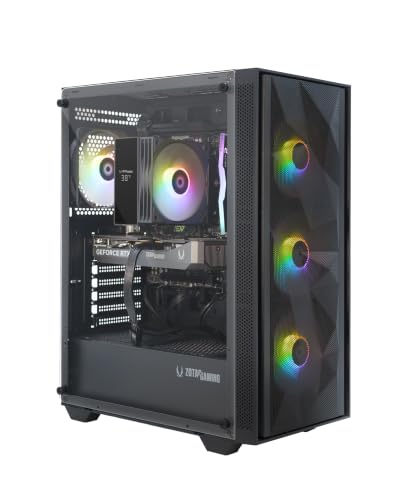
ZOTAC MEK Gaming PC (Ryzen 5 5500, RTX 5060) — GeForce RTX 5060 8GB, 16GB DDR4, 1TB NVMe SSD. Check on Amazon
Skytech Azure 3 Gaming PC (Ryzen 7 5700, RTX 5060) — GeForce RTX 5060, 16GB DDR4 3200, 1TB NVMe SSD. Check on Amazon
KOTIN Gaming PC Desktop (Ryzen 7 8700F, RTX 5060 Ti) — GeForce RTX 5060 Ti 8GB, 16GB DDR5, 1TB SSD. Check on Amazon
KOTIN Gaming PC Desktop (Ryzen 7 8700F, RTX 5060 Ti, 32GB) — GeForce RTX 5060 Ti 8GB, 32GB DDR5, 1TB SSD. Check on Amazon
Step One: Understand What 1080p Actually Demands
Resolution is simply a pixel count: 1920 across by 1080 down, about 2.07 million pixels per frame. Your graphics card has to draw every one of those pixels, dozens or hundreds of times per second. That workload is fixed and predictable, which is why 1080p advice can be so much more confident than advice for higher resolutions. At 1440p the card draws 78 percent more pixels; at 4K, four times as many. A card that is merely adequate at 4K is luxurious at 1080p, and a card designed for 1080p — the RX 6500 XT, RTX 3050 and RTX 5060 classes — will deliver exactly the experience it promises without the compromises that higher resolutions force.
The second variable is frame rate, and this is where buyers should think hardest before spending. A 60Hz monitor can show 60 frames per second and no more; anything your PC renders beyond that is invisible. A 144Hz or 165Hz monitor — now common and affordable at 1080p — shows a dramatically smoother image, and competitive players feel the difference in tracking and reaction long before they can articulate it. So the real question of this entire guide is not “can it run games at 1080p?” — almost everything here can — but “can it run my games, at my settings, at the frame rate my monitor can actually display?” A budget tower on a 60Hz screen and a premium tower on a 240Hz screen are both correct purchases. Cross them over, and both buyers have wasted money in opposite directions.
The third variable is settings and game type. Esports titles are engineered to run on almost anything, because their developers want the largest possible player base; they will hit very high frame rates on entry hardware. Big single-player releases are engineered to sell graphics cards; they will use everything a premium machine has, especially with ray tracing enabled. Most libraries contain both. Our step-by-step companion, How To Choose A 1080p Gaming PC, turns these variables into a decision worksheet; here, we translate them into component priorities.
Step Two: The Graphics Card — Spend Here First
At 1080p the graphics card decides your settings and your frame rate in the overwhelming majority of games, so it gets the first and largest share of any sane budget. The current market sorts itself into clear tiers. At the entry level sit the Radeon RX 6500 XT and GeForce RTX 3050: honest 1080p cards for esports at high frame rates and mainstream AAA games at medium-to-high settings, with the RTX 3050 adding DLSS upscaling, which meaningfully extends its life in supported titles. In the middle sits the GeForce RTX 5060 class: high settings in essentially everything at 1080p, strong ray tracing by the standards of the resolution, and DLSS support that will keep it relevant for years. At the top of what 1080p can use sits the RTX 5060 Ti, which is frankly more card than the resolution needs — and that is precisely its appeal for buyers who want maximum frame rates at maximum settings, or who suspect a 1440p monitor is in their future.
Two traps live in this tier list. The first is age disguised as value: the Radeon RX 580 and GeForce GTX 1070 were fine cards in their era, but that era has passed. They lack modern upscaling, draw a lot of power for their performance, and will struggle with current releases regardless of the modern-looking case around them. The second trap is no card at all. Integrated graphics — a listing that says “integrated graphics only”, or a processor with a GT suffix doing all the work — is not a gaming solution for modern 3D titles. It will run desktop software, video and very light games. Sellers place these towers in gaming categories because the cases have RGB fans. Read the graphics line of every listing before anything else, and if it does not name a discrete card, close the tab.
Video memory deserves a sentence of its own. At 1080p, 6GB is workable, 8GB is comfortable, and the pressure is easing rather than growing because texture budgets at this resolution are well understood by developers. Cards in this guide carry 4GB to 8GB; the 4GB RX 6500 XT configurations are esports-first machines and should be bought with that understanding, while 8GB cards are the safer all-round choice for players who buy new releases on day one.
Step Three: The Processor — Enough Is Enough, but Get Enough
The processor feeds the graphics card, runs the game logic, and handles everything else your PC is doing — Discord, a browser, recording, a stream. At 1080p, frame rates are high, which means the CPU is asked to prepare more frames per second than at higher resolutions; a weak processor can absolutely hold back a strong card here, particularly in esports titles chasing 200-plus frames and in CPU-heavy genres like strategy, simulation and large multiplayer games. The good news is that “enough” is a modest target. The Ryzen 5 5500 found in several machines in this guide is a capable six-core chip that pairs sensibly with entry and mid-range cards. The Ryzen 7 8700F, found in the premium picks, is a generation newer, on the DDR5 platform, and has headroom for streaming and for whatever games demand in three years. The Intel Core i5-14400F is the comparable current choice on the Intel side.
What should you avoid? Very old or very low-end processors paired with strong graphics cards — the imbalance wastes the card. Also be wary of listings that name a brand and a tier but not a model: “Intel Core i7” without a generation tells you almost nothing, because an i7 from many years ago is slower than a modern i5. Every pick in this guide names its exact processor, verified, and our full roundup in 1080p Gaming PC Reviews shows how the different CPU tiers behave across the range. If your gaming includes heavy multitasking — streaming to an audience, running a modded game with a browser full of guides, editing clips between matches — step up in CPU and memory together; those two upgrades serve the same workload.
Step Four: Memory and Storage — the Quiet Quality-of-Life Specs
RAM is where prebuilt PCs most often cut a corner that you will feel every day. 8GB is not enough for a modern gaming PC: Windows, a launcher, Discord and a game will crowd it, and the stutter that results gets blamed on the graphics card when the real culprit is memory. 16GB is the correct minimum and the standard across this guide’s picks. 32GB is the right call for streamers, heavy multitaskers, modded-game players and anyone who keeps a machine for many years — and notably, two configurations in our pick list ship with 32GB, which is still uncommon enough to be worth seeking out.
Storage is simpler: it must be an SSD, it should be NVMe, and it should be bigger than you think. Modern games are enormous; a handful of AAA titles plus Windows will overwhelm 256GB and crowd 512GB. 1TB is the comfortable size and appears in most of our picks. If you buy a 512GB machine — legitimate at the entry tier — know that adding a second drive later is usually easy in a tower case, and treat it as a planned upgrade rather than a surprise. What you should not accept at any price presented as a gaming machine is a spinning hard drive as the main storage, or 256GB paired with 8GB of RAM and integrated graphics, a combination that exists solely to hit a headline price.
Step Five: The Power Supply, Case and Connectivity — Read the Small Print
The power supply is the least glamorous line in a specification and the one most likely to decide whether your PC is a platform or a dead end. A named wattage with an 80+ Gold rating — 650W in several picks here — means the builder spent real money on the component that protects all the others, and it leaves room for a future graphics card upgrade. An unspecified power supply, or a 400W unit, tells the opposite story: the machine is built to its price, and your upgrade path is closed before you start. When two listings look identical except for price, the power supply and the motherboard platform are usually where the difference is hiding.
Connectivity is the other small print worth thirty seconds. WiFi 6 is the current baseline and WiFi 6E is a bonus if your router supports it; Wi-Fi 5 still works fine on most home networks but marks an older platform. Bluetooth matters more than buyers expect — controllers, headsets and speakers all use it — and it is not universal on budget towers, so check for it if you play with a controller on the couch. USB Type-C is appearing on better prebuilts and is worth having for fast external storage. None of these decide a purchase alone, but together they separate a thoughtfully built tower from a parts-bin special.
The Six Machines We Recommend, and Who Each One Is For
The picks below are ordered from the most affordable sensible entry point to the no-compromise option. Every one is a real, currently listed configuration, verified before inclusion. Read the verdict lines honestly: the right machine is the one that matches your monitor and your library, not the most powerful one on the page. Our single-machine deep dive, 1080p Gaming PC Review, takes the premium tier apart in much greater detail if you want to see what the top of this category looks like up close.

Best Budget — WIWB Gaming PC Desktop (Ryzen 5 5500, RX 6500 XT)
The honest entry point: a real discrete GPU and a capable six-core CPU for esports and mainstream gaming.
Strengths
- A sensible entry point into discrete-graphics 1080p gaming without paying for power you will not use at this resolution
- The Ryzen 5 5500 has enough cores for modern esports titles plus Discord, a browser and recording software running alongside
- WiFi 6 is built in, so the machine works in a bedroom or rental where running an Ethernet cable is not realistic
Trade-offs
- The RX 6500 XT is a 1080p card, full stop — it is not a sensible path to high-refresh 1440p later
- 512GB of storage fills quickly once two or three large modern games are installed
- The DDR4 platform is mature and affordable, but it is a dead end for future CPU upgrades
| Component | Specification (verified) |
|---|---|
| Processor | AMD Ryzen 5 5500 |
| Graphics | Radeon RX 6500 XT |
| Memory | 16GB DDR4 |
| Storage | 512GB SSD |
| Other | WiFi 6; Windows prebuilt tower (black) |
A first-time PC gamer, a student, or an esports-focused player whose library is Valorant, League of Legends, Rocket League, Fortnite and similar titles, and who wants a tower that simply works at 1080p on day one.
Storage is the honest limitation: budget for a second SSD sooner rather than later, because 512GB disappears fast with today’s install sizes.
Best for: the buyer described above. / Not suited for: anyone whose needs contradict that description — check the trade-offs before ordering.

Best for Storage Value — ZYNEEX Prebuilt Gaming Desktop (Ryzen 5 5500, RTX 3050)
Double the storage of most budget rivals, with DLSS support from its RTX 3050.
Strengths
- A full 1TB NVMe SSD at this tier is the standout — many rivals ship half the storage
- The RTX 3050 brings DLSS support, which stretches this budget card further in supported games
- The Ryzen 5 5500 and RTX 3050 pairing is well matched, with neither part obviously holding the other back
Trade-offs
- The RTX 3050 is an entry-level card: expect sensible settings, not maximum settings, in demanding 2025-era releases
- Smaller assembler brands mean a smaller support footprint than HP, MSI or CyberPowerPC
- DDR4 platform limits future CPU upgrade options
| Component | Specification (verified) |
|---|---|
| Processor | AMD Ryzen 5 5500 |
| Graphics | GeForce RTX 3050 6GB |
| Memory | 16GB DDR4 3200MHz |
| Storage | 1TB NVMe SSD |
| Other | ARGB air cooling; Wi-Fi |
A value-focused buyer who plays a mix of esports and mainstream titles and would rather have double the storage than a flashier case.
Graphics ceiling is the compromise: this is a medium-high settings 1080p machine, not a max-settings one.
Best for: the buyer described above. / Not suited for: anyone whose needs contradict that description — check the trade-offs before ordering.
Best Mid-Range — ZOTAC MEK Gaming PC (Ryzen 5 5500, RTX 5060)
Current-generation RTX 5060 graphics and a properly rated 650W Gold power supply.
Strengths
- An RTX 5060 with GDDR7 memory is current-generation graphics with DLSS support — the strongest GPU story in the mid tier here
- A 650W 80+ Gold power supply is properly specified, not a corner cut, which protects the whole system
- WiFi 6E is the newest wireless standard in this roundup, useful if your router supports it
Trade-offs
- The Ryzen 5 5500 is a generation behind the 8700F machines; in CPU-heavy simulation and strategy games it will show
- DDR4 memory again means the platform, not the GPU, is what ages first
- ZOTAC’s prebuilt support network is smaller than the biggest brands’, though the company is a long-standing graphics specialist
| Component | Specification (verified) |
|---|---|
| Processor | AMD Ryzen 5 5500 |
| Graphics | GeForce RTX 5060 8GB |
| Memory | 16GB DDR4 |
| Storage | 1TB NVMe SSD |
| Other | 650W 80+ Gold PSU; WiFi 6E; Windows 11 Home; GDDR7 memory |
A buyer who wants current-generation graphics and DLSS in a mid-tier tower, and mostly plays GPU-bound titles at 1080p.
The CPU is the modest part of the spec; competitive players chasing extremely high frame rates in CPU-bound esports titles should step up to an 8700F machine.
Best for: the buyer described above. / Not suited for: anyone whose needs contradict that description — check the trade-offs before ordering.

Best from a Prebuilt Specialist — Skytech Azure 3 Gaming PC (Ryzen 7 5700, RTX 5060)
An RTX 5060 tower from an established prebuilt specialist, with no weak line in the spec.
Strengths
- Skytech is an established US prebuilt specialist with a track record in exactly this category
- The RTX 5060 and 650W Gold PSU pairing is the sensible core of a modern 1080p machine
- 1TB of NVMe storage as standard avoids the most common budget-tier compromise
Trade-offs
- Wi-Fi 5 is a step behind the WiFi 6 and 6E machines in this list — fine on most home networks, but the oldest wireless here among the newer towers
- 16GB of RAM is standard rather than generous
- DDR4 platform, so the same long-term upgrade caveat as the other AM4 machines
| Component | Specification (verified) |
|---|---|
| Processor | AMD Ryzen 7 5700 |
| Graphics | GeForce RTX 5060 |
| Memory | 16GB DDR4 3200 |
| Storage | 1TB NVMe SSD |
| Other | 650W Gold PSU; Windows 11; Wi-Fi 5; Azure 3 series |
A buyer who wants a current-generation GPU from a known prebuilt specialist, with no obvious weak component in the spec sheet.
Wireless is the small print: Wi-Fi 5 where rivals offer WiFi 6 — irrelevant if you use Ethernet, worth knowing if you do not.
Best for: the buyer described above. / Not suited for: anyone whose needs contradict that description — check the trade-offs before ordering.

Best Premium — KOTIN Gaming PC Desktop (Ryzen 7 8700F, RTX 5060 Ti)
RTX 5060 Ti performance with DLSS 4 — more than 1080p needs, deliberately.
Strengths
- The RTX 5060 Ti is far more graphics card than 1080p strictly needs, which means high settings and high frame rates with headroom to spare
- DLSS 4 support gives this machine a longer useful life, because upscaling keeps frame rates healthy as games get heavier
- A 650W Gold-rated power supply is the kind of unglamorous component choice that makes future GPU upgrades realistic
Trade-offs
- You are paying for capability that a 1080p monitor cannot fully show — some of the budget is effectively buying 1440p readiness
- 16GB of RAM is fine today, but heavy multitaskers and modders will want 32GB eventually
- ARGB lighting and a showpiece case add cost that a pure performance-per-dollar build would spend elsewhere
| Component | Specification (verified) |
|---|---|
| Processor | AMD Ryzen 7 8700F |
| Graphics | GeForce RTX 5060 Ti 8GB |
| Memory | 16GB DDR5 |
| Storage | 1TB SSD |
| Other | WiFi 6; Windows 11 Home; DLSS 4; ARGB cooling; 650W Gold PSU |
A buyer who wants one machine to last for years: flawless high-refresh 1080p today, a credible 1440p upgrade path tomorrow, and enough CPU for streaming or content work on the side.
At a 1080p monitor this system is deliberately overpowered; if you know you will never move up in resolution, a cheaper tier buys the same visible experience.
Best for: the buyer described above. / Not suited for: anyone whose needs contradict that description — check the trade-offs before ordering.
Best No-Compromise — KOTIN Gaming PC Desktop (Ryzen 7 8700F, RTX 5060 Ti, 32GB)
The full specification: 5060 Ti, 32GB of DDR5 and a Gold-rated PSU in one tower.
Strengths
- This is the no-compromise configuration in the roundup: top CPU tier, top GPU tier and 32GB of DDR5 in one tower
- 32GB of memory removes the one caveat attached to the other 5060 Ti machines — streaming, mods and multitasking are all covered
- DLSS 4 and a 650W Gold PSU give it both performance longevity and upgrade headroom
Trade-offs
- It is the most machine here, and priced like it — at a 1080p monitor much of its power is reserve capacity
- If you never stream, mod or multitask, the 16GB version delivers the same in-game frame rates
- ARGB showpiece presentation will not suit every room
| Component | Specification (verified) |
|---|---|
| Processor | AMD Ryzen 7 8700F |
| Graphics | GeForce RTX 5060 Ti 8GB |
| Memory | 32GB DDR5 |
| Storage | 1TB SSD |
| Other | WiFi 6; Windows 11 Home; DLSS 4; ARGB cooling; 650W Gold PSU |
A streamer, creator or heavy multitasker who wants the strongest 1080p machine in this list and a real option on 1440p later.
The limitation is economic, not technical: you pay for headroom that pure 1080p gaming alone will not use.
Best for: the buyer described above. / Not suited for: anyone whose needs contradict that description — check the trade-offs before ordering.
How Much Should You Spend? Thinking in Tiers, Not Numbers
Because prices on prebuilt PCs move constantly — and because this guide will be read in sale weeks and quiet weeks alike — we deliberately frame the market in tiers rather than fixed figures. The entry tier buys a discrete GPU, six CPU cores, 16GB of RAM and a half-terabyte SSD: real gaming, sensible settings, esports at speed. The mid tier buys a current-generation GPU, a terabyte of storage and a properly rated power supply: high settings everywhere at 1080p, and the tier we recommend to most buyers who can reach it. The premium tier buys the strongest CPU platform, the 5060 Ti class of graphics and, in the best configurations, 32GB of memory: maximum frame rates, streaming headroom and a credible future at 1440p. Each tier is a legitimate place to stop. The mistake is not buying the entry tier; the mistake is paying mid-tier money for an entry-tier specification, which happens constantly when buyers shop by case lighting instead of component lists.
One more spending rule: reserve part of the budget for the monitor if you do not already own a good one. A premium PC feeding a ten-year-old 60Hz office monitor is a waste you can see. At 1080p, high-refresh monitors are the best-value upgrade in all of PC gaming, and pairing even a mid-tier tower with a 144Hz display produces a more dramatic improvement than spending the same money moving up a PC tier while keeping an old screen. Our head-to-head, 1080p Gaming PC Vs 1440p Gaming PC, explains why staying at 1080p with a fast monitor beats stretching to 1440p with a slow one for most players.
How to Set Up Your New 1080p Gaming PC for the Best Results
Buying well is half the job; the other half is the first evening. When the tower arrives, work through the basics in order. Remove all internal packaging — some builders ship protective foam inside the case, and it must come out before power-on. Connect the monitor cable to the graphics card’s ports, not the motherboard’s; this single mistake is the most common cause of “my new gaming PC is slow”, because the display ends up running on weak integrated graphics while the real GPU sits idle. Set your monitor’s refresh rate in Windows display settings, because many high-refresh monitors default to 60Hz until told otherwise. Update the graphics driver from NVIDIA or AMD directly, run Windows Update until it stops finding things, and remove the preinstalled trial software you do not want.
Then tune the games themselves. Enable DLSS or FSR upscaling in supported titles — on the RTX machines in this guide, DLSS at 1080p buys meaningful frame-rate headroom for a barely visible cost. Cap frame rates a few frames below your monitor’s maximum if you use variable refresh, and turn off ray tracing first, before lowering other settings, if a new release runs poorly: at 1080p it is the most expensive visual feature relative to what it adds on a smaller screen. Our full walkthrough, How To Set Up 1080p Gaming PC, covers every step including cable management, airflow placement and the settings checklist we use on a new machine. Pair the finished setup with a mouse that suits your grip — a roundup of FPS-focused gaming mice is a good starting point for shooter players — and the system is complete.
Common Mistakes When Buying a 1080p Gaming PC
- Buying integrated graphics in a gaming case. If the listing does not name a discrete graphics card, it is not a gaming PC for modern titles, whatever the category says.
- Paying for yesterday’s flagship. An RX 580 or GTX 10-series card in a new tower is old hardware with a new warranty on the case only. Modern entry cards outperform them with modern features.
- Ignoring the power supply. Unspecified or very low wattage closes your upgrade path and risks the whole system. Named wattage plus an 80+ rating is the signal of a serious build.
- Accepting 8GB of RAM or 256GB of storage. Both are below the practical minimum for gaming in 2026 and both are expensive annoyances to fix later.
- Mismatching the monitor. A premium PC on a 60Hz screen, or a budget PC expected to drive 240Hz, wastes money in both directions.
- Shopping by lighting. ARGB fans are cheap. Judge the CPU model, the exact GPU, the memory, the storage and the PSU — in that order — and let the lighting be a tiebreaker.
Final Recommendation
If you remember one principle from this buying guide, make it this: at 1080p, balance beats brute force. A current-generation graphics card, a capable modern processor, 16GB or more of memory, a terabyte of SSD if you can manage it, and a power supply with a name and a rating — that combination, at whatever tier your budget reaches, will make you happy for years. Most buyers should aim at the mid tier represented here by the RTX 5060 machines: high settings in everything, DLSS longevity, and no weak component. Esports-focused and budget-conscious buyers can step down to the RX 6500 XT and RTX 3050 picks with confidence, provided the monitor matches. And buyers who stream, create, or simply hate compromise should look at the 32GB premium configuration and stop apologising for it — headroom is a feature.
Whichever tier you choose, verify the exact specification on the product page before ordering, because prebuilt listings are revised and configurations change. Then set the machine up properly using How To Set Up 1080p Gaming PC, and enjoy the most forgiving, best-value resolution in PC gaming.
Prebuilt or Build Your Own? The Honest Comparison at 1080p
Every buying guide owes readers this section, because the alternative to a prebuilt is not nothing — it is a parts list and a free evening. Building your own 1080p machine has real advantages: you choose every component, including the power supply and motherboard that prebuilt listings sometimes leave vague; you learn the machine intimately, which makes every future upgrade and troubleshooting session easier; and at some tiers, particularly when components are on sale, the same specification costs less. For a certain kind of buyer the build is not a chore but the hobby itself, and no prebuilt discount compensates for taking it away.
The prebuilt case is equally real. One warranty covers the whole system, so a failure is a conversation with one company rather than a diagnostic project across five. The machine arrives tested as a system — a nontrivial point, because a meaningful share of first-time builds fail to boot for reasons that take a novice days to isolate. Your time has value, and at 1080p’s sensible tiers the price gap between building and buying has narrowed to the point where it often amounts to a modest fee for assembly, testing and support. Our practical advice: if you enjoy the idea of building, build — this guide’s criteria tell you exactly which parts to choose. If you regard the inside of a PC the way you regard the inside of a dishwasher, buy a prebuilt that names every component, and spend your enthusiasm on the monitor and the games. What you should not do is buy a prebuilt that hides its components and call it the best of both worlds; it is the worst of them.
Warranty, Support and Returns: the Unread Specification
Two towers with identical components are not identical products, because one of them will eventually need help. Before ordering, spend four minutes on the unglamorous questions. How long is the warranty, and does it cover parts and labour or parts only? When something fails, do you ship the whole tower, or will the builder send a replacement component with instructions — the difference between a week without a PC and an afternoon with a screwdriver? Is support reachable by phone and chat, and do other owners describe it as competent? Established builders — the HPs, MSIs and CyberPowerPCs of this category — justify part of their price here, and smaller assemblers compete by offering surprisingly personal support; both models can be good, but “no information available” is a model too, and it is the bad one.
Returns deserve the same thirty seconds. Marketplace purchases carry the platform’s return policies, which are generally protective in the first weeks — precisely when manufacturing defects reveal themselves. Use that window deliberately: in the first fortnight, run the machine hard, play your most demanding game for long sessions, and listen for fan faults, coil whine and instability while returning is painless. A gaming PC that survives its first two weeks of heavy use almost always survives for years; the early window is when the weak units identify themselves, and it costs you nothing but attention to catch them.
The Sixty-Second Listing Check
Everything in this guide compresses into a one-minute routine you can run on any listing, anywhere, including machines we have never seen. One: find the graphics card model — a named discrete card, or walk away. Two: find the exact processor model — numbers, not adjectives. Three: confirm 16GB of RAM or more. Four: confirm SSD storage of 512GB or more, ideally 1TB. Five: find the power supply’s wattage and rating — named and rated, or treat the machine as a closed box with no upgrade future. Six: check the wireless standard and Bluetooth against your peripherals. Seven: read the warranty length. A listing that passes all seven is a serious product at whatever tier it occupies; a listing that fails one has told you something true about its builder’s priorities. Run the check on our six picks and they pass it — that is not a coincidence, it is the selection process, and it is now yours.
Buying During Sales, and the Refurbished Question
Two money questions arrive in every reader’s mind, so let us answer them plainly. First, timing: prebuilt PCs follow the retail calendar, with the deepest competition between sellers around the major sale events, and the same configuration can be the worst buy of the month in a quiet week and the best in a sale week. The discipline is to decide the specification first, using this guide, and then let timing choose between your shortlisted equivalents — never let a countdown timer choose the specification for you, because a discounted trap is still a trap and a discounted dead-end platform is a five-year sentence bought at a small saving. Second, refurbished and open-box machines: these can be genuine value, particularly manufacturer-refurbished units with a real warranty, and the checks in this guide apply to them unchanged — exact components, power supply, warranty terms in writing. What we advise against is the informal second-hand market for a first-time buyer: the savings are real but so is the diagnostic burden when something is wrong, and a new buyer’s first machine should come with a support line, not a mystery. Experienced owners who can test and troubleshoot are a different case, and for them the used market’s previous-generation bargains — last year’s mid-tier cards in honest towers — are one of the category’s genuine pleasures.
Frequently Asked Questions
Is 1080p still a good resolution for PC gaming in 2026?
Yes — it remains the most popular resolution in PC gaming because monitors are affordable, high-refresh models are excellent value, and modern mid-range graphics cards run new games at high settings and high frame rates. You give up the extra sharpness of 1440p on large screens, which matters most on monitors above 27 inches.
What graphics card do I need for 1080p gaming?
For esports and mainstream titles, an RX 6500 XT or RTX 3050 class card is a genuine starting point. For high settings in new releases, look at the RTX 5060 class. The RTX 5060 Ti is more than the resolution needs and buys maximum frame rates plus a future 1440p option.
How much RAM does a 1080p gaming PC need?
16GB is the comfortable minimum and the right choice for most buyers. Choose 32GB if you stream, use heavy mods, keep many applications open while gaming, or plan to keep the machine for a long time.
Is a prebuilt 1080p gaming PC better than building my own?
Prebuilts trade a modest price premium for a warranty on the whole system, zero assembly risk and immediate use. In the current market the gap is often small, and for first-time buyers a good prebuilt — with a named power supply and exact component models listed — is a rational choice.
Can a 1080p gaming PC handle streaming?
Yes, especially the machines with stronger processors such as the Ryzen 7 8700F configurations in this guide. Modern NVIDIA cards also include dedicated encoding hardware that keeps the performance cost of streaming low. 32GB of RAM helps if you run streaming software, a browser and the game together.
What monitor should I pair with a 1080p gaming PC?
A 24-inch 1080p monitor with a 144Hz or higher refresh rate is the sweet spot for mid-range and premium machines. Budget machines pair happily with 1080p 75Hz to 144Hz displays. The key rule is symmetry: do not waste a fast PC on a 60Hz screen.
How long will a good 1080p gaming PC last?
A mid-tier machine bought today should play new releases at sensible-to-high settings for four to five years, helped considerably by DLSS and FSR upscaling. Entry-tier machines age faster in AAA games but remain excellent for esports and back-catalogue play for longer.