Disclosure: As an Amazon Associate, reviewstook.com earns from qualifying purchases. Links on this page are affiliate links at no extra cost to you; prices and availability change frequently, so check Amazon for the latest.
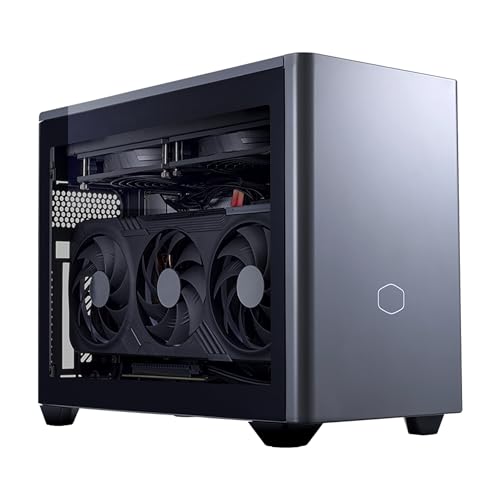
Small Form Factor Gaming PC Pros and Cons: The Honest Balance Sheet
Every small form factor gaming PC is a trade made physical, and this page exists to price that trade honestly. The small form factor gaming pc pros and cons are not a mystery — space saved against upgrade room surrendered, silence and tidiness against thermal headroom, portability against the absolute performance a tower can hold — but they are routinely mispriced by both sides. Enthusiasts oversell the mini as a free lunch; tower loyalists dismiss it as a toy. Neither survives contact with the actual machines, several of which appear in this analysis as worked examples, each verified against Amazon’s product data before inclusion.
One clarification before the balance sheet, because it changes every line of it: the category contains two families. Mini ITX desktops, like the Cooler Master NR2 Pro examined below, are ordinary PCs in small cases, with desktop graphics cards you can replace. Mini PCs, like the ASUS ROG NUC 16 and the MINISFORUM G1 Pro, are laptop hardware in a box — sealed, tiny, and fixed in specification. Some pros belong to both families, some cons apply to only one, and each entry below says which. A judgement formed about one family and applied to the other is the most common error in this whole debate.
If you finish this page and decide the trade suits you, Small Form Factor Gaming PC Buying Guide compares the current machines and How To Choose A Small Form Factor Gaming PC walks through choosing between them. If you finish it undecided on value specifically, Is A Small Form Factor Gaming PC Worth It takes the cost side of the argument apart in detail.
In this guide
Key Takeaways
- The core pro is real: a small PC returns desk, shelf and room space to you, travels easily, and can be the quietest, tidiest gaming setup in the house.
- The core con is equally real: mini PCs cannot upgrade their graphics, and all small PCs have less thermal headroom than a tower, so sustained performance costs engineering money.
- Mini ITX desktops escape the worst cons — they keep desktop performance and upgradability — at the price of being merely small rather than tiny.
- Price per frame is worse than a tower at every tier. You are paying for size itself, and the honest question is whether size is worth money to you.
- Most cons can be mitigated by buying correctly the first time: one graphics tier of headroom, storage sized generously, cooling respected.
Where to Buy
Six machines carry the argument in this analysis, two from the desktop family and four from the mini family, spanning flagship to budget. They are the evidence; the pros and cons are the verdict on what they demonstrate.
- The desktop-family example: Cooler Master NR2 Pro Gaming PC (Ryzen 7 9800X3D, RTX 5070 Ti) — check the latest price on Amazon from the product page.
- The premium mini example: ASUS ROG NUC 16 Gaming Mini PC (RTX 5070 Ti) — check the latest price on Amazon from the product page.
- The mid-tier mini example: MINISFORUM G1 Pro Gaming Mini PC (RTX 5060) — check the latest price on Amazon from the product page.
- The integrated-graphics example: GMKtec EVO-X3 AI Mini PC (Ryzen AI Max+ 395) — check the latest price on Amazon from the product page.
- The expandable mini example: GMKtec K12 Gaming Mini PC (Radeon 780M, OCuLink) — check the latest price on Amazon from the product page.
- The budget desktop example: Rmatamini SFF Gaming PC (i5-14400F, RTX 5060) — check the latest price on Amazon from the product page.
Every machine named on this page was checked against Amazon’s own product data before it was included, and the links above go to the listings on reviewstook.com’s retail partner, Amazon, where you can confirm the exact configuration, current availability and delivery options before you spend anything.
The Pros, Weighed Properly
Pro 1: The Space Is Genuinely Yours Again
This is the pro that sells the category, and it is not a trivial one. A 3-litre mini like the ROG NUC 16 occupies less desk than the monitor stand it can hide behind; a sub-3-litre GR70-class machine disappears into a TV unit designed for a console. In small homes, shared rooms, student housing and tidy households, the difference between a tower and a mini is not aesthetic preference — it is whether a gaming PC is welcome in the room at all. Owners consistently report the same surprise: the reclaimed space changes how the room feels out of all proportion to the litres involved, because a tower dominates by presence, not just by volume.
Pro 2: One Machine Can Live in Several Rooms
Portability inside the home is the underrated pro. A mini PC moves from desk to television in one hand, travels between two households in a backpack, and goes to a friend’s house for a multiplayer evening without a car being involved. Even the desktop-family machines are meaningfully more portable than towers — the 8.1-litre class was literally designed around LAN events. For students, separated families, renters and anyone whose gaming life is not anchored to one desk, this mobility is not a novelty; it is the feature the machine gets used for monthly, long after its benchmark scores are forgotten.
Pro 3: At Idle and in Light Use, Small Is Quieter and Sips Power
Mini PCs are built on laptop hardware designed to sip electricity, and it shows in daily life: silent or near-silent at the desktop, cool in media playback, and cheap to leave running as a home server or download box. Laptop-derived machines draw a fraction of a gaming tower’s idle power, which matters to anyone paying the electricity bill or keeping a machine on around the clock. The honest boundary of this pro is load — under full gaming load a small machine’s fans work harder than a tower’s, as the cons will cover — but most PCs spend most hours far from full load, and in those hours the small machine is the more civilised object.
Pro 4: The Setup Can Be Dramatically Tidier
A mini behind a monitor, a hub, and two cables is a desk aesthetic no tower can approach, and tidiness has practical value beyond looks: fewer cables to manage, a smaller dust footprint, a workspace that converts to other uses in seconds. For people who work at the same desk they game at, the small PC’s ability to visually disappear during the working day is a daily quality-of-life feature. Living-room gaming gains the same benefit — a small PC under a television looks like AV equipment, not like a computer that escaped from an office.
Pro 5: Modern Small PCs Are Genuinely Capable
The capability floor has risen to the point where the performance con needs careful wording. A current mini with a laptop RTX 5070-class GPU plays modern games at 1440p with upscaling and handles 1080p outright; the strongest integrated graphics, like the Radeon 8060S in the GMKtec EVO-X3, cover esports and lighter libraries without any discrete card at all; and a Mini ITX desktop like the NR2 Pro gives up nothing whatsoever to a tower of the same specification. Small no longer means slow. It means specific — the performance is real, but it is fixed at a level you must choose correctly, which is a con of a different kind, addressed below.
Pro 6: A Small PC Has a Longer Useful Afterlife
When a gaming tower retires, it retires to a corner — too big for the kitchen, too loud for the bedroom, too ugly for the living room. A retired mini goes on working: as a media PC under the TV it once dreamed of driving, an emulation and couch-gaming box, a home server — the K12’s dual 2.5-gigabit networking and triple drive slots read like a server specification — a child’s first computer, or a relative’s upgrade. Size is what makes those second careers possible, and they belong on the pro side of the ledger because they are years of real service that a tower’s bulk forecloses. A machine whose total useful life is eight years, three of them in a second role, has a different value equation from one scrapped at five.
Pro 7: The Whole Category Is Easier to Live With Day to Day
Small virtues accumulate. A mini can be lifted with one hand to dust behind it, carried to another room for a firmware-and-coffee session at the kitchen table, or packed in minutes when you move house. Prebuilt small PCs arrive as single tested units with a single warranty, sparing buyers the compatibility puzzles of building — and building inside a small case is the most fiddly build there is, a point even enthusiastic builders concede. None of these is a headline pro. Together they describe ownership with less friction, and friction, compounded daily, is what ownership actually consists of.
The Cons, Weighed Just as Properly
Con 1: A Mini PC’s Graphics Are Forever
This is the heaviest line on the debit side, and it applies to the mini family in full: the processor and graphics are soldered or otherwise fixed, so the day a game arrives that the machine cannot run acceptably, the remedy is a new machine. A tower — and a Mini ITX desktop — answers the same day with a graphics card swap at a fraction of the cost. The mitigation is buying headroom: a mini bought one tier above today’s needs converts this con from a trap into a schedule. The exception that proves the rule is an OCuLink-equipped mini like the GMKtec K12, which can add an external desktop GPU later — a real escape hatch, at real extra cost when the day comes.
Con 2: Heat and Noise Under Load Are Physics, Not Defects
A small chassis has small fans, small heatsinks and short airflow paths, and under sustained gaming load that arithmetic produces more noise, higher temperatures, or throttled performance — pick your compromise, because the machine will. Good engineering moves the compromise a long way: the NR2 Pro’s 280mm liquid radiator largely abolishes it, and ASUS’s triple-fan QuietFlow systems manage it impressively in 3 litres. But no engineering repeals it, and the budget end of the category, where cooling is the first cost cut, demonstrates the con at its worst. Buyers sensitive to noise should weight cooling design as heavily as the graphics card, and buyers in hot climates should weight it more.
Con 3: You Pay More for Less Raw Performance
At every tier, a small PC costs more than a tower of equal frame rates, or delivers fewer frame rates for equal money. Miniaturisation is engineering, and engineering is the product: flagship mobile silicon, custom cooling and dense design all bill you. The premium is steepest at the extremes — the tiniest flagships cost multiples of a budget desktop that out-games them. This con is not an accusation of poor value, because the size may be exactly what your home needs; it is a warning against buying small by accident, for a desk with room to spare, where the premium purchases nothing you will ever use. The value question gets its own full hearing at Is A Small Form Factor Gaming PC Worth It.
Con 4: Ports, Storage and Memory Are Rationed
Small machines carry fewer USB ports, fewer drive bays and, in the mini family, memory that may be soldered at purchase. The consequences arrive as small frictions: a hub becomes necessary, the library outgrows a 512GB drive within a season, the 16GB that seemed adequate meets a game plus a stream plus a browser. None of these is fatal — hubs exist, many minis have a second M.2 slot, and memory can be specced correctly at checkout — but they must be planned for, because the tower owner’s casual upgrade path is narrower here. The discipline this category demands at purchase is itself a mild con for spontaneous buyers.
Con 5: Repair Means the Manufacturer
When a tower fails, a competent owner swaps the faulty part by the weekend. When a sealed mini fails, the whole machine goes back to its maker, and you are without a PC for the duration. That makes warranty length and support quality load-bearing in a way tower buyers never consider — a three-year warranty on a mini, as listed for the ASUS machines in this analysis, is not a bonus but a structural part of the product. Lesser-known brands at attractive prices should be judged partly on the support standing behind them, because on a sealed machine, support is the spare-parts department.
Con 6: The Market Itself Is Confusing, and Variants Multiply the Risk
A softer con, but a real one: this category is unusually hard to shop. The same model name covers multiple configurations, new brands appear faster than reputations can form, and the word gaming is applied to machines with integrated graphics by sellers who know exactly what they are doing. The buyer’s defence — verifying every specification against the retailer’s own product data, as was done for every machine in this analysis — takes effort that tower shopping rarely demands. Budget for that effort as part of the purchase, or buy from the verified shortlist in this cluster’s buying guide and let its checking stand in for your own.
Con 7: Resale and Hand-Me-Down Value Favours Standard Parts
A tower’s components have individual second lives and individual resale values; a graphics card, a processor and a case can each find a new owner. A sealed mini is a single ageing unit whose value falls with its weakest fixed part — its graphics — even while its processor and memory remain strong. The afterlife pro above softens this within a household, where the machine’s second career is free, but as a store of resale value the mini is the weaker asset, and buyers who habitually sell on to fund upgrades should count it.
How Does the Balance Change by Tier and Over Time?
At the budget tier, the cons bite hardest in their curable forms — small drives, plain cooling, minimum memory — while the pros arrive in full, which is why the Rmatamini’s shape of compromise is the right one: structural pros, cosmetic cons. At the mid tier, represented by the G1 Pro, the balance is at its most even and most favourable: the price premium over a tower is at its slimmest relative to what the size delivers, and the performance is honestly sufficient for the most common monitors in homes. At the premium tier the equation inverts depending on the buyer: the price con reaches its maximum at the very moment the space, silence and finish pros reach theirs, so premium minis are simultaneously the easiest machines here to call terrible value and the easiest to call worth every penny — by different households, both correctly.
Over time, the balance sheet moves in one direction for minis and another for desktops. A mini’s pros are front-loaded — the space, the tidiness, the quiet idle are enjoyed from the first day and never diminish — while its chief con, the fixed graphics, grows teeth year by year as games advance. A Mini ITX desktop’s sheet barely moves: its modest space pro stays modest, its upgrade pro appreciates as the first card swap approaches. This is why the honest time horizon question — how long will this be my main gaming machine? — belongs in every small-PC decision. For a three-to-four-year main-machine life, a well-chosen mini’s pros dominate its whole ownership. For a seven-year plan, the desktop family’s sheet wins on endurance, and the buyer should let it.
The Balance Sheet at a Glance
| Machine | Family | Graphics upgradable? | Storage upgradable? |
|---|---|---|---|
| Cooler Master NR2 Pro 9800X3D | Mini ITX desktop | Yes — desktop card | Yes |
| ASUS ROG NUC 16 RTX 5070 Ti | Mini PC | No | Yes |
| MINISFORUM G1 Pro | Mini PC | No | Yes |
| GMKtec EVO-X3 | Mini PC | Via OCuLink external GPU | Yes |
| GMKtec K12 | Mini PC | Via OCuLink external GPU | Yes — 3 M.2 slots |
| Rmatamini SFF Gaming PC | SFF desktop | Yes — desktop card | Yes |
The table compresses the whole argument into its practical core: the family column predicts the upgrade column, and the upgrade column predicts how each machine ages. Everything else — noise, price, tidiness — varies by model and engineering. The family is destiny, which is why every guide in this cluster insists on choosing it first and choosing it consciously.
The Trade-Offs in Six Real Machines
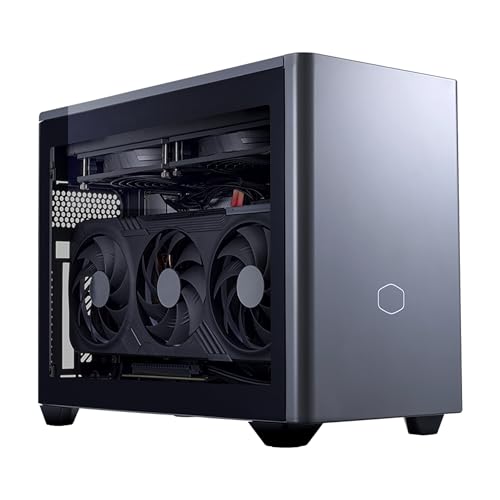
The Desktop Family’s Case — Cooler Master NR2 Pro Gaming PC (Ryzen 7 9800X3D, RTX 5070 Ti)
Strengths
- Keeps every tower pro that matters: desktop RTX 5070 Ti 16GB, desktop 9800X3D, replaceable parts
- 280mm liquid cooling answers the heat-and-noise con about as completely as it can be answered
- 2TB storage and 32GB memory mean the rationing con never shows up
Trade-offs
- Concedes the extreme end of the space pro — it is small, not invisible
- Liquid cooling makes it the least travel-friendly machine in this analysis
- Its price buys performance a 1080p-only household cannot use
| Processor | AMD Ryzen 7 9800X3D |
|---|---|
| Graphics | NVIDIA GeForce RTX 5070 Ti 16GB (desktop GPU) |
| Memory | 32GB DDR5 6000MHz |
| Storage | 2TB M.2 SSD |
| Cooling | 280mm AIO liquid cooler |
| Form factor | Mini ITX |
| Operating system | Windows 11 |
The NR2 Pro demonstrates that the category’s worst cons are family-specific, not universal. It is a small form factor gaming PC with a desktop’s balance sheet: the upgrade con does not apply, the thermal con is engineered down to a whisper, and the rationing con is absent from its specification. What it gives up is the mini family’s magic — it will not mount behind a monitor or ride in a jacket pocket. Buyers whose space fits it and whose priorities are longevity should read its row of the balance sheet and wonder why they were considering anything else.
Best for: buyers who want small without the sealed-machine cons / Not suited for: buyers who need a PC that disappears or travels constantly

The Premium Mini’s Case — ASUS ROG NUC 16 Gaming Mini PC (RTX 5070 Ti)
Strengths
- The space and tidiness pros at their maximum: 3 litres, mountable, silent at idle
- Performance pro is real — laptop RTX 5070 Ti is strong hardware by any measure
- Three-year warranty directly answers the repair con
Trade-offs
- The upgrade con applies in full: graphics fixed for life
- The price con applies in full: premium money for laptop-class performance
- 1TB storage makes the rationing con a live consideration
| Processor | Intel Core Ultra 9 290HX Plus |
|---|---|
| Graphics | NVIDIA GeForce RTX 5070 Ti (laptop GPU) |
| Memory | 32GB DDR5-6400 |
| Storage | 1TB SSD |
| Chassis | 3-litre, black |
| Cooling | Triple-fan QuietFlow |
| Operating system | Windows 11 |
| Warranty | 3 years (per listing title) |
The ROG NUC 16 is the mini family’s flagship argument, pros and cons both at full strength. Nothing in this analysis is tidier, quieter at rest, or easier to place; nothing except its own RTX 5080 sibling is a more expensive way to buy its frame rates. Its owners are buying a quality of placement and finish, and judged on those terms it is excellent. Judged as a tower substitute on a spacious desk, it is an extravagance. The machine does not change between those judgements — the buyer’s room does, which is the entire lesson of this page. Our full-length examination is at Small Form Factor Gaming PC Review.
Best for: buyers whose rooms reward the smallest, quietest, best-supported mini / Not suited for: buyers on spacious desks who would pay the premium for size they do not need

The Mid-Tier Mini’s Case — MINISFORUM G1 Pro Gaming Mini PC (RTX 5060)
Strengths
- Blunts the price con: flagship-class processor and a discrete RTX 5060 at a mid-tier position
- Networking pros towers rarely match — 5GbE and Wi-Fi 7 in a compact box
- 16 cores make the capability pro extend beyond gaming into streaming and work
Trade-offs
- Upgrade con applies: the RTX 5060 is the machine’s permanent ceiling
- Noise con is present under load — 245W in a compact chassis is audible work
- 8GB graphics memory tightens the settings compromise in the heaviest games
| Processor | AMD Ryzen 9 8945HX, 16 cores / 32 threads, up to 5.4GHz |
|---|---|
| Graphics | NVIDIA GeForce RTX 5060 8GB GDDR7 |
| Memory | 32GB DDR5 |
| Storage | 1TB SSD |
| Networking | 5GbE LAN, Wi-Fi 7 |
| Displays | Quad 4K output |
| Power | 245W (per listing title) |
The G1 Pro is where the balance sheet balances for the largest number of people. Its pros are the category’s pros — compact, capable, connected — and its cons are the category’s cons, honestly present but none of them extreme. It will not upgrade, it will be heard working, and its graphics memory asks for judgement in settings menus. In exchange it asks a mid-tier price for a machine that games at 1080p without apology and does everything else a household PC does, quickly. Most readers of this page are, whether they know it yet or not, describing this machine’s trade when they describe their needs.
Best for: the broad middle: 1080p gamers who want compact capability without flagship pricing / Not suited for: 1440p high-refresh players and committed upgraders


The Integrated Outlier’s Case — GMKtec EVO-X3 AI Mini PC (Ryzen AI Max+ 395)
Strengths
- Proves the capability pro can survive without a discrete GPU — Radeon 8060S is serious integrated graphics
- 128GB of memory abolishes the rationing con on the memory line entirely
- OCuLink softens the upgrade con with an external-GPU path
Trade-offs
- The performance ceiling is the lowest here for demanding games, however clever the silicon
- Much of its price buys memory and AI capability many gamers will never touch
- Integrated graphics share the thermal budget with the processor in one compact package
| Processor | AMD Ryzen AI Max+ 395, 16 cores / 32 threads, up to 5.1GHz |
|---|---|
| Graphics | Radeon 8060S integrated graphics |
| Memory | 128GB LPDDR5X, 8000MHz |
| Storage | 2TB PCIe 4.0 SSD |
| Expansion | OCuLink, USB4 |
| Networking | Wi-Fi 7, 2.5G LAN |
| Displays | Up to 8K output |
The EVO-X3 tests the boundaries of the whole analysis. It argues that for a large class of real libraries — esports, indie, older and strategy titles — the discrete GPU has become optional, and that the money is better spent on a remarkable processor with 128GB of memory that also devours workstation and AI tasks. For those libraries, its balance sheet is all pros. For a player whose library is next year’s blockbusters, its first con is decisive. No machine in this guide divides opinion more cleanly along the line of what you actually play.
Best for: players with lighter libraries plus heavy memory, creation or AI workloads / Not suited for: players whose gaming centres on demanding new releases at high settings

The Escape-Hatch Case — GMKtec K12 Gaming Mini PC (Radeon 780M, OCuLink)
Strengths
- Directly answers the upgrade con: OCuLink external graphics when you are ready
- Answers the storage con three times over with its M.2 slots
- 32GB DDR5 and dual 2.5G networking give it pros beyond gaming entirely
Trade-offs
- Day-one gaming performance is the weakest here — the pros are mostly future tense
- The escape hatch costs extra when used; the dock and card are a second purchase
- 512GB fitted storage means the storage pro must be self-installed
| Processor | AMD Ryzen 7 H 255 |
|---|---|
| Graphics | Radeon 780M integrated graphics |
| Memory | 32GB DDR5 |
| Storage | 512GB SSD, 3x M.2 2280 expansion slots |
| Expansion | OCuLink, USB4 |
| Networking | Dual 2.5G LAN |
| Displays | HDMI 2.1 |
The K12’s balance sheet is written in a different tense from the others: its biggest pro is an option, not a specification. Bought by someone who will genuinely exercise that option — adding the external GPU when their gaming outgrows the Radeon 780M — it converts the category’s worst con into a payment plan. Bought by someone who never will, it is an integrated-graphics mini that cost more than it needed to. The machine is a bet on your own future behaviour, and this analysis can only insist you place the bet knowingly.
Best for: light gamers now who are confident their ambitions — and budget — will grow / Not suited for: gamers who need the performance today, not the option of it

The Budget Desktop’s Case — Rmatamini SFF Gaming PC (i5-14400F, RTX 5060)
Strengths
- Escapes the upgrade con at the lowest price here, with a desktop RTX 5060
- Escapes the worst of the price con by being plain where plain is cheap
- The i5-14400F pairing is honestly matched to 1080p gaming
Trade-offs
- Storage con arrives immediately: 512GB is a starting allowance, not a library
- Finish, support and cooling are budget-grade — the noise con is unmitigated
- 16GB DDR4 is yesterday’s standard at today’s minimum capacity
| Processor | Intel Core i5-14400F |
|---|---|
| Graphics | NVIDIA GeForce RTX 5060 8GB (desktop GPU) |
| Memory | 16GB DDR4 |
| Storage | 512GB M.2 NVMe SSD |
| Form factor | Ultra small form factor desktop |
The Rmatamini shows the budget end of the balance sheet with unusual clarity. It spends its limited money on the one line that defines a gaming PC — a real desktop graphics card — and lets the cons collect where they hurt least and can be fixed cheapest: storage you can add, finish you can ignore, memory that suffices for focused gaming. Its pros are structural and its cons are cosmetic or curable, which at the budget tier is exactly the right way around. Buyers with more money should buy more machine; buyers with this money should buy this shape of compromise.
Best for: budget buyers who want the desktop family’s future at the lowest entry price / Not suited for: buyers who need storage, memory and polish included from day one
Who Feels Each Side of the Ledger Most?
The pros concentrate on particular lives. Renters and students, whose rooms are small and whose addresses change, feel the space and portability pros at full strength and the upgrade con at its weakest, because their ownership horizons are naturally shorter. Living-room gamers feel the tidiness and appliance pros daily. Parents buying for a child’s bedroom feel the size and single-warranty simplicity, and should weight the fixed-graphics con against the child’s likely horizon rather than an adult’s. Creators who game feel the mid-tier minis’ core counts as a pro this page has perhaps under-sold: a 16-core compact that edits all day and games all evening collapses two machines into one small footprint.
The cons concentrate just as specifically. Performance-per-money maximisers — the buyers who read frame-rate charts the way others read menus — feel the price con as a personal affront, and they are right to: it is the deliberate sacrifice of the thing they value most. Competitive players chasing the highest refresh rates at 1440p feel the laptop-GPU ceiling in minis and should be shopping the desktop family or beyond the category entirely. Tinkerers feel the sealed mini’s repair and upgrade cons as a loss of hobby, not just of options; for them the Mini ITX desktop is not a compromise but the point. Naming which household you are in does more to settle this category than any benchmark, because the pros and cons are not properties of the machines alone — they are properties of the match between a machine and a life.
How Do You Mitigate the Cons?
Most of this category’s cons are decided at the moment of purchase, which means most of them are optional. The upgrade con is mitigated by buying one graphics tier above your current monitor, converting a fixed ceiling into a distant one. The storage con is mitigated by speccing 1TB or 2TB initially, or choosing a machine with a free M.2 slot and using it early. The noise con is mitigated by paying for cooling engineering — liquid in a desktop, a named multi-fan system in a mini — and by placement with real airflow, as How To Set Up Small Form Factor Gaming PC details step by step.
The repair con is mitigated by warranty shopping: on sealed machines, compare warranty terms with the same seriousness as graphics tiers. The price con cannot be mitigated, only justified — by space genuinely saved, rooms genuinely shared, travel genuinely done. And the rationing con is mitigated by the oldest tool in this cluster: a written list of what you plug in and play, checked against the listing before money moves. A buyer who runs those mitigations experiences this category as almost all pros, which is not marketing — it is what buying correctly feels like from the inside. Read owner discussions of this category with that lens and a pattern emerges: the complaints cluster almost entirely on machines bought against the mitigations — the mini bought one tier too low, the 512GB drive bought on promotion, the small PC sealed into a cabinet — while the satisfied owners describe unglamorous purchases made against a written list. The category does not forgive improvisation, but it richly rewards a checklist, and this cluster exists to hand you one.
A Sixty-Second Self-Test
If the balance still feels abstract, answer five questions and count. Is the PC’s intended space smaller than a shoebox is long, or shared with non-gaming life? Will it move rooms or homes at least a few times a year? Is a three-to-four-year life as your main gaming machine acceptable? Do you game at 1080p, or at 1440p with upscaling welcome? Would a hub and one planned storage upgrade feel like normal ownership rather than an insult? Mostly yes answers describe a household the pros serve — proceed to the shortlist with confidence. Mostly no answers describe a tower household borrowing trouble, and the honest recommendation of this page is to let the category go, however charming the little machines are. Charm, weighed on this balance sheet, is a pro — but it is the only pro that should never be allowed to outvote the others on its own, however strong the pull of a beautiful little machine on a showroom page may feel in the moment before the measuring tape comes out.
Common Mistakes
- Judging the whole category by one family — condemning desktops for a mini’s sealed design, or crediting minis with a desktop’s upgradability.
- Counting the space pro without measuring the actual shelf, desk or cabinet the PC must fit.
- Treating the laptop-GPU naming as equivalent to desktop performance when weighing the capability pro.
- Ignoring the warranty line on a sealed machine, where support is the only repair path there is.
- Assuming the noise con from specifications alone, without weighing cooling design and listening distance.
- Forgetting that the price premium buys size — and paying it for a desk that never needed the saving.
Final Recommendation
The balance sheet, totalled honestly, reads like this. Choose a small form factor gaming PC when space, tidiness, portability or a living-room placement is a real constraint in your life, and the category will delight you — its pros are daily and its cons are manageable with correct buying. Choose the desktop family within it when longevity matters most, the mini family when size matters most, and an OCuLink mini when your needs are honestly staged across time. Choose a tower instead when none of those constraints is real, because the cons — price per frame above all — buy you nothing in a room with space to spare.
Keep the sheet beside you while you shop, and re-score it for each finalist against your own room, monitor and horizon rather than against an abstract ideal reader, because the totals genuinely change with the household doing the arithmetic. That is not a fence-sitting verdict; it is the actual shape of the trade, and it is why this category thrives alongside towers rather than replacing them. If the pros have won the argument, the shortlist and the choosing method are waiting at Small Form Factor Gaming PC Buying Guide and How To Choose A Small Form Factor Gaming PC.
Does Building Your Own Change the Balance?
Briefly, yes — in both directions. A self-built Mini ITX desktop softens the price con, because you pay for parts rather than assembly and margin, and it softens the repair con, because every component is a standard part you chose and can replace. It sharpens a different con the prebuilt analysis never faces: the build itself, inside the least forgiving case size there is, with cooler clearance, cable routing and graphics-card length all negotiated in millimetres, and no single warranty standing behind the result. The mini family cannot be built at all in any meaningful sense — the sealed designs are manufactured objects, not kits. So building moves the desktop family’s sheet further in the buyer’s favour while removing the mini family from the table, which is why committed builders and committed mini owners are both right about each other, and both incomplete.
Frequently Asked Questions
What is the biggest advantage of a small form factor gaming PC?
Space, and everything that flows from it: a PC that fits the room you actually have, moves between rooms and homes easily, sits under a TV like AV equipment, and leaves a desk looking like a desk. For buyers in small or shared spaces it is the difference between a gaming PC being welcome and being tolerated, which is why owners rate it as a lifestyle feature rather than a specification.
What is the biggest disadvantage?
For mini PCs, the fixed graphics: when the GPU ages out, the machine is replaced whole, unlike a desktop whose card can be swapped. For the category as a whole, the running mate is price per frame — small always costs more than a tower of equal gaming performance, because miniaturisation itself is the product being bought.
Are small form factor gaming PCs loud?
At idle and in light use, minis are among the quietest PCs made, because they use laptop hardware built to sip power. Under sustained gaming load, small fans work harder than a tower’s and can be more audible — unless the cooling is engineered for it, as with the NR2 Pro’s liquid radiator or ASUS’s multi-fan QuietFlow designs. Listening distance matters as much as the machine: across a living room, even a working mini disappears under game audio.
Do small gaming PCs overheat?
They run closer to their thermal limits than towers by design, and a badly placed or badly specced one will throttle — performance fading as it warms. A well-cooled model given proper airflow sustains its performance indefinitely. The practical rules are simple: never seal one in an unventilated cabinet, respect the fan profile, and judge any machine by its performance after an hour of play, not after five minutes.
Can a small form factor gaming PC be upgraded?
Mini ITX desktops, yes — graphics card, storage and usually memory, like any desktop. Mini PCs, mostly storage and sometimes memory; the processor and graphics are fixed. The middle path is a mini with an OCuLink port, such as the GMKtec K12, which can add an external desktop GPU dock later at additional cost.
Is a small gaming PC good for a living room?
It is arguably the best kind of PC for a living room. A sub-3-litre mini sits in a TV unit like a console, wakes fast, runs from a controller, and with a laptop RTX 5070-class GPU drives a 4K television convincingly through upscaling. The requirements are ventilation in the unit, a good HDMI connection, and a fan profile chosen for a quiet room.
Who should not buy a small form factor gaming PC?
Buyers with a spacious dedicated desk who value maximum performance per unit of money and a decade of internal upgrades — a tower serves them better on every line of the balance sheet. Also, buyers who need native 4K at maximum settings in the newest games should look at full-size desktops, because that workload exceeds what this category’s graphics tiers honestly offer.


