Disclosure: As an Amazon Associate, reviewstook.com earns from qualifying purchases. Links to Amazon on this page are affiliate links; they cost you nothing extra.
Lightweight mice are easier to flick and stop, which many FPS players prefer. Weight comes from the shell design, the battery and the cable, so wired and honeycomb designs are often the lightest.
This guide covers six lightweight gaming mice sold on Amazon. It is built from product listings, not our own testing, so confirm weight and shape on each product page.
New to gaming mice? Read our gaming mouse buying guide and how we pick products.
By the Reviewstook Editorial Team. Last updated: October 31, 2026.

In this guide
Quick Picks
| Mouse | Type | Best for |
|---|---|---|
| Attack Shark X3 (49g) | Ultralight wireless gaming mouse | A very light mouse at a modest price |
| Redragon M725 Honeycomb (49g) | Ultralight honeycomb gaming mouse | A budget honeycomb mouse |
| SteelSeries Aerox 5 | Honeycomb gaming mouse | 59 g with water resistance |
| Corsair M75 (Wired) | Ambidextrous wired FPS mouse | 74 g wired lightweight |
| Razer Viper V3 HyperSpeed | Lightweight esports mouse | 82 g with a flagship sensor |
| Corsair M75 Wireless | Ambidextrous wireless FPS mouse | 89 g with swappable side buttons |
6 Best Lightweight Gaming Mice
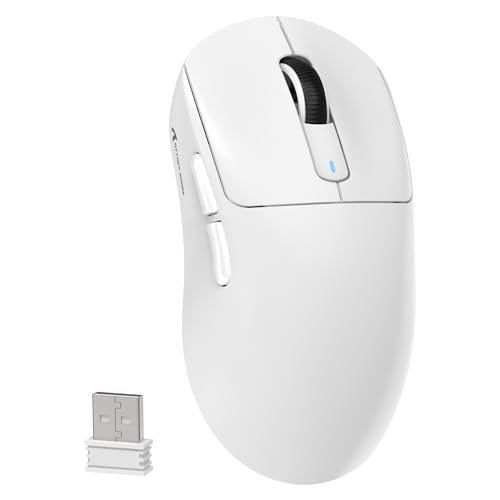
Top pickBest for gamers who want very low weight
1. Attack Shark X3 (49g)
An ultra-lightweight 49 g wireless gaming mouse with Bluetooth 5.2, 2.4 GHz wireless and wired use, plus the PixArt PAW3395 26K sensor, per the listing.
Good for: Gamers who want very low weight. Strengths: 49 g weight, tri-mode connection and a flagship-class sensor. Weaknesses: A lesser-known brand, so check support and shell comfort. Skip it if you want a big ergonomic mouse.


Best for budget buyers who want a light wireless mouse
2. Redragon M725 Honeycomb (49g)
A 49 g wireless honeycomb-shell mouse with three connection modes (Type-C wired, Bluetooth and 2.4 GHz) and up to 8,000 DPI, per the listing.
Good for: Budget buyers who want a light wireless mouse. Strengths: Three connection modes and a light shell. Weaknesses: A modest sensor spec and honeycomb shell may collect dust. Skip it if you want a premium sensor.

3. SteelSeries Aerox 5
A 59 g holey-shell gaming mouse with 3-zone RGB and AquaBarrier protection against splashes and dust, per the listing.
Good for: Gamers who want a light mouse with extra buttons and durability. Strengths: Light weight and splash protection. Weaknesses: The holes may collect dust; check the model variant. Skip it if you prefer a solid shell.

Best for fPS players who prefer a cable and low weight
4. Corsair M75 (Wired)
A 74 g wired ambidextrous FPS mouse with swappable side buttons, per the listing.
Good for: FPS players who prefer a cable and low weight. Strengths: 74 g and ambidextrous design. Weaknesses: Wired, so a cable drags if you dislike it. Skip it if you want wireless.

Best for competitive FPS players
5. Razer Viper V3 HyperSpeed
An 82 g wireless esports mouse with the Focus Pro 30K optical sensor and a forward sensor placement, per the listing.
Good for: Competitive FPS players. Strengths: A centralized-mass lightweight design and a high-end sensor. Weaknesses: Heavier than the ultralight options. Skip it if you want under 60 g.
Best for right and left-handed FPS players
6. Corsair M75 Wireless
An ambidextrous wireless FPS mouse with swappable side buttons, 26,000 DPI and 89 g weight, per the listing.
Good for: Right and left-handed FPS players. Strengths: Ambidextrous shape and swappable buttons. Weaknesses: Heavier than ultralight mice. Skip it if you want under 60 g.
Best Picks by Category
These labels summarize each pick’s strengths from the listings and are not hands-on test results. Check price on Amazon for current pricing.
- Popular pick: Attack Shark X3 (49g) — a very light 49 g wireless mouse with a flagship-class sensor; check price on Amazon.
- Everyday favourite: Razer Viper V3 HyperSpeed — an 82 g esports mouse with a flagship sensor for competitive play; check price on Amazon.
- Best value: Redragon M725 Honeycomb (49g) — a budget-tier honeycomb pick with tri-mode wireless; check price on Amazon.
- Budget pick: Redragon M725 Honeycomb (49g) — a budget-tier lightweight honeycomb option; check price on Amazon.
- Premium option: Razer Viper V3 HyperSpeed — a premium-tier esports mouse for competitive play; check price on Amazon.
Price, Rating and Review Comparison
The table compares the picks by price tier. Check price on Amazon to confirm current pricing.
| Product | Price | Rating | Ratings | Price tier |
|---|---|---|---|---|
| Redragon M725 Honeycomb (49g) | Check price on Amazon | See listing | See listing | Budget |
| Attack Shark X3 (49g) | Check price on Amazon | See listing | See listing | Mid-range |
| Corsair M75 (Wired) | Check price on Amazon | See listing | See listing | Mid-range |
| Corsair M75 Wireless | Check price on Amazon | See listing | See listing | Mid-range |
| SteelSeries Aerox 5 | Check price on Amazon | See listing | See listing | Mid-range |
| Razer Viper V3 HyperSpeed | Check price on Amazon | See listing | See listing | Premium |
How Much Feedback Backs Each Rating
Listing feedback changes over time, so check the live Amazon listing for the latest feedback before you decide. Here is the sample size behind each pick in qualitative terms.
- Attack Shark X3 (49g): backed by a moderate sample of listing feedback.
- Redragon M725 Honeycomb (49g): backed by a large sample of listing feedback.
- SteelSeries Aerox 5: backed by a moderate sample of listing feedback.
- Corsair M75 (Wired): backed by a small sample of listing feedback, so treat listing feedback cautiously.
- Razer Viper V3 HyperSpeed: backed by a large sample of listing feedback.
- Corsair M75 Wireless: backed by a moderate sample of listing feedback.
How to Choose
Weight is not everything
A very light mouse needs a comfortable shape and good feet. Try to match it to your grip.
Honeycomb shells
Holey shells save weight but may collect dust. Check the maker’s guidance.
Wired vs wireless
Wired is lighter at equal specs but the cable can drag.
How We Chose These Mice
We start from products that are sold on Amazon with a full product name and clear specifications, and we skip results that show only a brand name or a vague title. We then read the listing and the manufacturer information for each one and note the features that matter for this kind of mouse: weight, shape, sensor, connection and buttons. We do not run our own lab tests, and this guide does not contain hands-on measurements. Use it to build a shortlist, then check current prices, dimensions and return terms on the Amazon page.
Buying Guide: What to Check Before You Choose
Shape and grip come first
Most comfort problems come from a mismatch between mouse shape and grip. A palm grip rests the whole hand on the mouse and suits longer shapes. A claw grip arches the fingers and likes a higher rear hump. A fingertip grip uses only the fingers and favors small, light mice. Measure your hand from the wrist crease to the middle fingertip and read our grip guide before you order.
How light is light enough
Ultralight mice, roughly under 60 g, are easy to flick and stop, which many shooter players like. They can feel less steady in slow tracking, and holey shells let in dust. Weights in listings sometimes exclude the cable, so compare like with like. If you have only used a heavy mouse, give a light one about a week before judging it.
Sensors, DPI and polling rate
A modern gaming sensor is accurate enough for almost anyone. Look for a named sensor from a reputable brand, a polling rate of at least 1000 Hz and no mention of acceleration problems. See polling rate explained before paying extra for very high numbers.
Quick Reference: Which Pick Suits Whom
- Attack Shark X3 (49g): suits gamers who want very low weight
- Redragon M725 Honeycomb (49g): suits budget buyers who want a light wireless mouse
- SteelSeries Aerox 5: suits gamers who want a light mouse with extra buttons and durability
- Corsair M75 (Wired): suits fPS players who prefer a cable and low weight
- Razer Viper V3 HyperSpeed: suits competitive FPS players
- Corsair M75 Wireless: suits right and left-handed FPS players
Common Mistakes to Avoid
- Choosing on DPI numbers instead of shape and weight.
- Buying a very light mouse without checking it fits your grip.
- Paying for buttons you will not bind.
- Ignoring cable or battery details.
- Skipping the return window.
Setup and Care
- Plug the receiver into a nearby port for a short signal path.
- Turn off Windows pointer acceleration, then set DPI and in-game sensitivity; see our settings guide.
- Keep the feet and pad clean.
- Save profiles to the mouse if the software allows it.
How light should a lightweight gaming mouse be?
A lightweight gaming mouse is generally one under about 80 g, and ultralight models sit near 50 to 60 g. Lighter is not automatically better, so choose the weight your wrist and grip handle comfortably.
Lower weight makes a mouse easier to start and stop, which many shooter players like. It also means less inertia to fight during quick flicks and long sessions.
There are limits to the idea, though. Very light mice can feel less steady when you track slowly, and some players find them twitchy at first. Weight is only one part of how a mouse feels, and shape, shell stiffness and feet matter just as much.
Weight comes from several places:
- The shell: thin or holey shells save weight but may feel less solid.
- The battery: wireless mice carry a battery, while wired mice do not.
- The cable: a wired mouse feels lighter in the hand, but the cable can drag.
When you compare listings, check whether the stated weight includes the cable or any extra parts. If you are used to a heavy mouse, give a lighter one about a week before deciding, since your hand needs time to adjust.
Which lightweight gaming mouse should you buy?
The right pick depends on how low you want the weight, whether you prefer a cable and how much you want to spend. Use the matches below, then check the current listing.
- If you want the lowest weight and a flagship-class sensor, choose the Attack Shark X3 (49g). It is a lesser-known brand, so check support and shell comfort.
- If you want the cheapest light wireless mouse, go for the Redragon M725 Honeycomb (49g). The post notes a modest sensor spec and a shell that may collect dust.
- If you want a light mouse with splash protection and extra buttons, pick the SteelSeries Aerox 5.
- If you prefer a cable and an ambidextrous shape, look at the Corsair M75 (Wired). Check its feedback carefully, since far fewer people have rated it.
- If you want a flagship sensor in a lightweight esports shape, choose the Razer Viper V3 HyperSpeed.
- If you want wireless with swappable side buttons for either hand, go for the Corsair M75 Wireless.
If two mice seem equal, choose the one with the shape closest to your current mouse. A familiar shape reduces the adjustment time more than a few grams of weight.
Honeycomb shell or solid shell: which lightweight mouse is better?
A honeycomb shell saves weight by cutting holes in the body, while a solid shell feels sturdier and keeps dust out. Choose honeycomb if low weight is your priority and solid if you want a firmer feel.
Honeycomb mice, such as the Redragon M725 Honeycomb and the SteelSeries Aerox 5, can reach low weights without a thin cheap-feeling plastic. The holes also give some airflow, which can keep your palm cooler.
The downsides are practical. Dust and crumbs can enter, and some people find the holes uncomfortable against their skin. The SteelSeries Aerox 5 lists splash and dust protection, but you should check which model variant you are buying.
A solid shell, as on the Razer Viper V3 HyperSpeed and the Corsair M75, tends to feel more rigid in the hand. It is easier to wipe clean and does not let debris into the shell, though it may weigh more at the same size.
Consider your habits. If you eat at your desk or have pets, a solid shell is less hassle. If you want the lightest build and you keep your desk clean, honeycomb is a good fit. Either way, a quick wipe now and then keeps the shell and feet in good shape.
Is a wireless lightweight gaming mouse worth it?
A wireless lightweight mouse is worth it if you want a clean desk and no cable drag, as long as the battery weight does not bother you. A wired mouse is simpler and often lighter at the same spec.
Wireless mice add a battery, but the best designs still reach very low weights. Several mice here support more than one connection mode, so check the listing for wired, Bluetooth and 2.4 GHz options. For fast play, a dedicated 2.4 GHz receiver is the connection built for low latency.
A wired mouse avoids charging and never runs out of power. The cable can catch on the desk edge, so a mouse bungee or a flexible cable helps.
Weigh the trade-offs like this:
- Wireless: freedom of movement and a tidy desk, with charging as a chore.
- Wired: no battery worries, with a cable to manage.
Plug the receiver into a nearby port to keep the signal path short. Check the stated battery life on the listing, and remember that lighting and other settings can reduce it.
How do you get used to a lightweight gaming mouse?
Give a lightweight gaming mouse about a week of regular play, keep your settings the same and relax your grip. Most of the adjustment is your hand learning to use less force.
Start with the same DPI and in-game sensitivity you used on your old mouse, so any difference you feel comes from the mouse and not the settings. Changing several things at once makes it hard to tell what helped.
These habits make the switch easier:
- Hold the mouse more loosely, since a light mouse needs less pressure to move.
- Use a short aim practice session before ranked matches for the first few days.
- Check that the mouse pad is clean and the feet glide evenly.
- Adjust your seat and arm position if your wrist feels strained.
If your hand still feels cramped after a week, the shape is probably the problem, so use the return window rather than forcing it.
What to check before you buy a lightweight gaming mouse
Before buying, confirm the size against your hand, the real weight with any cable, the connection modes and the return terms. A short checklist prevents most regret.
- Size and shape: compare length, width and height with your hand measurement and grip.
- Weight basis: see whether the listed weight includes the cable and any extra parts.
- Handedness: confirm whether the shape is right-handed or ambidextrous.
- Connection: check which modes are included and whether the receiver is in the box.
- Feet and surface: make sure your mouse pad suits the feet, and keep both clean.
- Software: check that the companion software works on your system.
- Buttons: count them and see which can be remapped.
- Warranty and returns: read the terms on the listing and note the return window.
- Care: know how to clean a holey shell if you choose one.
When the mouse arrives, set the same DPI and in-game sensitivity you used before, turn off pointer acceleration and play several sessions before judging it.
What are the downsides of an ultralight mouse, and who should skip it?
The main downsides of an ultralight mouse are less stability in slow tracking, possible dust in a holey shell and a shape that may be too small for large hands. Skip it if comfort and steadiness matter more to you than low weight.
Being honest about trade-offs helps you choose well:
- Skip the Attack Shark X3 or Redragon M725 if you want a big ergonomic mouse or a premium sensor.
- Skip the SteelSeries Aerox 5 if you prefer a solid shell.
- Skip the Corsair M75 (Wired) if you dislike a cable on your desk.
- Skip the Razer Viper V3 HyperSpeed and Corsair M75 Wireless if you specifically want something under 60 g.
- Skip lightweight mice altogether if you like a heavier, planted feel when aiming.
Paying more can buy a refined shape or a higher-end sensor, but it will not fix a poor fit. A cheaper mouse that fits your hand is a better buy than a premium one that does not. A lesser-known brand may offer less support, so read the warranty terms before ordering.
Compare the picks above, check the current listing for size and what is included, then choose the mouse that fits your grip and how you play.
Learning to Aim With a Much Lighter Mouse
Moving to a lightweight mouse changes more than the number on a scale. It changes how a flick starts, how it stops and how tired your arm feels at the end of a session, and those changes take a short period of honest adjustment that many buyers mistake for the mouse being wrong for them. This section is about getting through that adjustment deliberately, so you can judge the six mice in this guide on what they can do for your aim once your hand has learned them, rather than on the strangeness of the first evening.
Expect the first sessions to feel fast and slightly uncontrolled. A lighter mouse moves with less effort, so the muscle memory built around a heavier one overshoots. The fix is patience plus one small sensitivity adjustment at a time, not a dramatic drop that trades overshoot for sluggishness. Give each setting several sessions. Your stopping accuracy improves as your fingers learn how little force the new weight needs, and grip pressure relaxes as trust builds. Players often grip a light mouse too hard at first, as if it might escape, and that tension is tiring and imprecise. Consciously relax the hand during calm moments in a game and the lighter touch that makes these mice rewarding will arrive faster.
Hand Size, Grip and the Limits of Light
Light does not rescue a wrong shape. A small ultralight shell under a large hand forces the fingers to curl and the palm to hover, which is more tiring than a slightly heavier mouse that fills the hand properly. Measure your hand, compare it with the dimensions given for each pick, and be honest about your grip. Fingertip players often thrive with the smallest, lightest shells because they steer with their fingers and want nothing in the way. Palm players need enough shell to rest on, and for them the lightest option in this guide may be the least comfortable despite winning the weight table. Claw players sit between those poles and should pay special attention to the height and position of the hump described in each review.
There is also a floor below which lighter stops helping most players. When a mouse becomes so light that ordinary clicks shift it, or so small that stability suffers in slow tracking, the benefit reverses. That floor differs by hand and by game, which is why this guide spans a weight range rather than crowning the single lightest mouse. Treat weight as a band to explore, not a contest to win. The best lightweight mouse for you is the lightest one that still feels planted when you track slowly and click firmly.
Honeycomb Shells, Solid Shells and Daily Care
Honeycomb designs save weight by opening the shell, and they ask a little more of their owners. Dust and crumbs find their way inside, hands that sweat during long sessions will want a wipe-down after play, and the mouse should live somewhere cleaner than the bottom of a bag. None of that is difficult, but it is real, and a buyer who knows they will never clean a mouse should choose a solid shell and accept its small weight difference with a clear conscience. Solid shells hide their structure, shrug off desk life and feel more familiar to anyone coming from a conventional mouse. The performance gap between a well-made honeycomb and a well-made solid shell is smaller than the care gap, so choose by the owner you are, not by the owner you imagine becoming for a mouse.
Wired and wireless lightweight mice divide along a similar honesty line. A wired ultralight removes battery weight and charging habits, and with a light, flexible cable and a tidy desk it can feel almost wireless. A wireless ultralight removes the last drag and the last excuse, at the cost of a power routine and usually a higher commitment. Judge your own desk honestly: if your cable currently catches, drags and annoys you daily, wireless solves a real problem. If your cable already disappears from your attention, the wired picks in this guide may give you the lightweight feel with the least ownership overhead.
Feet, Pads and the Surface Under a Light Mouse
A light mouse reveals its surface more than a heavy one does. Worn feet that a heavy mouse ploughed through will make a light mouse feel scratchy and inconsistent, and a pad that is too fast can make the new weight feel uncontrollable for the wrong reason. Start your lightweight trial on a clean, familiar pad with feet in good condition, so the only new variable is the mouse itself. Once you have adapted, you can experiment with faster surfaces deliberately. Changing mouse, pad and sensitivity in the same week teaches you nothing except confusion, and confusion is the main reason good lightweight mice get returned by players who would have loved them a fortnight later.
A Buyer’s Sequence for the Lightweight Shortlist
Narrow this guide’s six mice with a sequence that respects what lightweight ownership actually involves. First, measure your hand and remove any shell whose dimensions fight your grip, because light cannot rescue wrong sizing. Second, decide honestly between honeycomb and solid based on the cleaning you will actually do, and remove the other kind without regret. Third, choose your power style: the freedom and routine of wireless, or the simplicity and lower weight of a cable you already tolerate well. What remains after those three honest cuts is usually one or two mice, and between them the reviews’ notes on shape details, the hump, the sides and the main buttons will decide better than any further weight comparison.
Test the survivor properly. Keep your pad and settings stable for the first sessions, let the adaptation described in this guide happen, and judge stopping accuracy and comfort at the end of long sessions rather than the start. A lightweight mouse proves itself in hour two, when a heavier mouse would be making its weight known and the light one has disappeared from your attention. If it has not disappeared, if your hand still negotiates with it, believe that evidence and use the return window without shame. The category is full of shapes because hands differ, and finding yours is the entire exercise.
What Lightweight Owners Know After a Year
Ask experienced lightweight players what changed permanently and most will not mention the weight first. They mention cleaner desks, because feet and pads get maintained once a light mouse starts revealing their condition. They mention settled sensitivity, because the adaptation process taught them to change one variable at a time. And they mention knowing their grip properly for the first time, because choosing a light mouse forced the measurement that choosing a conventional one let them skip. Those lessons outlast any single mouse in this guide, and they are the quiet reason a careful lightweight purchase improves a setup even beyond the mouse itself.
Travel, Second Desks and the Lightweight Mouse Away From Home
A lightweight mouse travels well, which creates owners who use the same mouse at a desk, on a laptop and in other people’s houses, and that life has its own small disciplines. Keep the receiver with the mouse on every journey without exception, and if the mouse is wired, coil its cable loosely rather than winding it tightly around the shell, because lightweight cables and shells both resent being used as their own luggage straps. In a bag, give the mouse a pocket or case of its own; honeycomb shells especially should not rattle against keys and chargers. On an unfamiliar desk, expect the surface to change everything for the first minutes, and resist adjusting sensitivity until you have played on a pad or at least a consistent surface. Many travelling players carry a thin pad for exactly this reason: it makes every desk feel like home.
At a second desk, the same logic applies in miniature. The mouse is portable; the habits must be portable too. Keep the settings documented, the feet clean and the adaptation mindset ready, and a lightweight mouse becomes the one constant in a changing setup. That constancy is an underrated competitive advantage, and it is available free to any owner who treats a small mouse as the precision instrument it is rather than as an accessory to be thrown in a bag and forgotten.
What to Do When a Lightweight Mouse Feels Wrong After All
Sometimes the honest conclusion of a fair trial is that a particular lightweight mouse is wrong for your hand, and knowing how to reach that conclusion cleanly is part of buying well. Work through the evidence in order. The pad was clean and familiar, the feet were sound, sensitivity changed only in small steps and the adaptation was given real sessions. The shape was measured against your hand and the grip notes were read. If, after all of that, hour two still finds your hand negotiating rather than playing, the mouse has been acquitted of every fixable charge and convicted only of fit, which is reason enough to return it and choose the next shape with the trial’s evidence in hand.
Keep notes from the trial, because they are the shopping list for the replacement: where the hump sat wrongly, which side cramped, whether the clicks shifted the shell. A buyer with notes chooses the second mouse in minutes. A buyer with only a feeling starts the whole search again. Lightweight mice, more than most gaming gear, are chosen by elimination informed by touch, and every honest trial, including the one that ends in a return, moves the elimination forward.
Sensitivity, Resolution and the Settings That Actually Travel With a Light Mouse
Lightweight owners change computers and games often enough that their settings deserve a portable philosophy. Keep the mouse’s own stored sensitivity simple and documented, so a new machine starts from a known place rather than from whatever a previous installation left behind. Understand the relationship between the setting in the mouse, the setting in the operating system and the setting in each game well enough to know which layer you are adjusting, because stacked adjustments are how a familiar mouse becomes a stranger on a new computer. Change layers one at a time, in a calm practice environment, and record the result in the same note that holds your grip measurements and trial history.
That note, unglamorous as it sounds, is the lightweight owner’s real competitive equipment. It holds hand size, preferred shapes, the sensitivity that survived adaptation, the surfaces that suited you and the feet and pad pairings that worked. With it, every future mouse decision starts from evidence. Without it, every decision starts from marketing. The mice in this guide are good enough that the difference between a satisfying purchase and a restless one is usually that note, and the habits of measurement and patience it represents.
If You Only Remember Three Things About Lightweight Mice
First, fit precedes weight: measure your hand, respect your grip and remove wrong shapes before comparing grams, because light cannot rescue a shell your hand dislikes. Second, adaptation is part of the product: several honest sessions, one small setting change at a time and a clean, familiar surface are what separate a fair trial from a hasty return. Third, the surface is a partnership: feet and pad maintain or degrade each other, and the owner who inspects both monthly keeps the glide the purchase promised. Hold those three and the lightest mouse in this guide stops being a gamble and becomes what it should be, a precise instrument chosen by evidence and kept honest by habit.
Frequently Asked Questions
What counts as a lightweight gaming mouse?
Roughly under 80 g, with ultralight models near 50–60 g.
Are lighter mice better?
Many players prefer them for flicking, but comfort and shape matter more.
Do honeycomb mice break easily?
Not necessarily, but they may let in dust.
How do I choose a gaming mouse?
Start with shape and grip, then weight, connection and buttons. Sensor numbers matter least. See our buying guide.
What DPI should I use?
Most players use roughly 400 to 1600 DPI. See our DPI guide.
Do these mice work on Mac?
Basic functions normally do, but companion software may be Windows-only. Check each product page.
Is a 49 g mouse too light?
It depends on your hand and playstyle. Some players love how easy it is to flick, and others find it twitchy. Give it about a week before deciding, and check that the shape fits your grip.
Are lightweight gaming mice good for big hands?
They can be, but many ultralight shapes are small. Compare the listed dimensions with your hand length, and consider a larger shape if you use a palm grip. Weight alone does not tell you if it will fit.
Do honeycomb mice get dirty inside?
The holes can let dust and crumbs in. A quick wipe and a clean desk reduce the problem. Check the maker's guidance on cleaning for your model.
Is wired or wireless lighter for a gaming mouse?
At equal specs, a wired mouse is usually lighter because it has no battery. The cable can drag, though, which some players dislike. Wireless designs can still reach very low weights.
Do lightweight mice make you aim better?
Not by themselves. They make flicking and stopping easier for many people, but aim depends on practice, settings and comfort. Choose a mouse you can use steadily.
How do I know if a mouse shape fits my hand?
Measure your hand from the wrist crease to the middle fingertip and compare it with the product dimensions. Think about your grip too. Buy from a seller with a clear return window so you can test it.
Do I need special mouse feet or a special pad for a light mouse?
Not necessarily, but the feet and pad should suit each other and be kept clean. Some players prefer a specific surface feel. Check the listing for what feet are included.
How long does a wireless gaming mouse battery last?
It varies by model and settings, so check the listing for the stated battery life. Lighting and high polling rates can shorten it. Charging habits matter too.
How long does it take to get used to a lightweight mouse?
Expect several sessions of overshooting while your hand learns the lower effort needed. Adjust sensitivity in small steps, relax your grip consciously, and judge the mouse after the adjustment rather than on the first evening.
Can a mouse be too light?
Yes, for some hands and games. If clicks shift the mouse or slow tracking feels unstable, you have passed your useful floor. The best choice is the lightest mouse that still feels planted for you.
How do I care for a honeycomb mouse?
Keep it somewhere clean, wipe it down after long sessions, and clear dust from the openings gently. If you know you will never clean a mouse, a solid shell is the more honest choice.
Should I change my pad when I change to a light mouse?
Not at first. Start on a clean, familiar pad with feet in good condition so the mouse is the only new variable. Experiment with faster surfaces later, once your aim has adapted.
Bottom Line
For the lowest weight, the Attack Shark X3 and Redragon M725 list 49 g. For a known brand, look at the SteelSeries Aerox 5 (59 g), Razer Viper V3 HyperSpeed (82 g) and Corsair M75.
Related Reading
- 6 Best Gaming Mice Under $50
- 6 Best Gaming Mice Under $100: Premium Picks for Less
- 6 Best Gaming Mice Under $20: Wired and Wireless
- 6 Best Left-Handed and Ambidextrous Gaming Mice
- 6 Best MMO Gaming Mice with Side Buttons
More Gaming Mouse Guides
- Best Wireless Gaming Mice
- Best Budget Gaming Mice
- Best Logitech Gaming Mice
- Gaming Mouse Buying Guide


