Disclosure: As an Amazon Associate, reviewstook.com earns from qualifying purchases. Links to Amazon on this page are affiliate links; they cost you nothing extra.
An MMO mouse puts a grid of programmable buttons under your thumb so you can fire many abilities without touching the keyboard. Button count, layout and comfort matter more than DPI.
This guide covers six MMO gaming mice sold on Amazon. It is built from product listings, not our own testing, so confirm button layout and size on each product page.
New to gaming mice? Read our gaming mouse buying guide.
By the Reviewstook Editorial Team. Last updated: October 31, 2026.

In this guide
Quick Picks
| Product | Type | Best for |
|---|---|---|
| Corsair Scimitar RGB Elite | Wired MMO/MOBA mouse | 17 programmable buttons with a key slider |
| Razer Naga V2 HyperSpeed | Wireless MMO mouse | 19 programmable buttons and long battery |
| Razer Naga V3 Pro | Wireless MMO mouse with swappable plates | Swap between 12-, 6- and 2-button layouts |
| Redragon Wireless MMO Gaming Mouse (16 buttons) | Wireless MMO mouse | 16 macro buttons with 12 side buttons |
| Redragon MMO Mouse (19 buttons, 12 side buttons) | Wired MMO mouse | 19 macro buttons and weight tuning |
| UtechSmart Venus Pro | Wired MMO mouse | Budget MMO with RGB |
6 Best MMO Gaming Mice with Side Buttons
Top pickBest for mMO and MOBA players who use many binds
1. Corsair Scimitar RGB Elite
A wired MMO and MOBA mouse with 17 programmable buttons, 12 side buttons on a slider you can reposition, and an 18,000 DPI sensor, per the listing.
Good for: MMO and MOBA players who use many binds. Strengths: Key slider repositions the side buttons for your grip. Weaknesses: Wired, and large for small hands. Skip it if you want an FPS mouse.
Best for mMO players who want a premium wireless mouse
2. Razer Naga V2 HyperSpeed
A wireless MMO mouse with 19 programmable buttons, HyperSpeed wireless and Bluetooth, and up to 400 hours of battery, per the listing.
Good for: MMO players who want a premium wireless mouse. Strengths: 19 buttons with low-latency wireless. Weaknesses: Large and button-dense; a premium price. Skip it if you play FPS only.
Best for players who switch between MMO and other genres
3. Razer Naga V3 Pro
A wireless MMO mouse with three swappable magnetic side plates (12-, 6- or 2-button layouts) and Razer Synapse customization, per the listing.
Good for: Players who switch between MMO and other genres. Strengths: Swappable side plates for different games. Weaknesses: A premium product. Skip it if you want a simple low-cost mouse.

Best for budget MMO players who want wireless
4. Redragon Wireless MMO Gaming Mouse (16 buttons)
A rechargeable wireless MMO mouse with 16 programmable macro buttons, 12 side buttons and up to 16,000 DPI, per the listing.
Good for: Budget MMO players who want wireless. Strengths: Many macro buttons at a low price. Weaknesses: A lesser-known brand. Skip it if you want a premium build.


Best for budget MMO players
5. Redragon MMO Mouse (19 buttons, 12 side buttons)
An MMO mouse with up to 12,400 DPI, 19 programmable macro buttons, 12 side buttons and adjustable weights, per the listing.
Good for: Budget MMO players. Strengths: Lots of buttons and adjustable weights. Weaknesses: A lesser-known brand. Skip it if you want the most polished software.

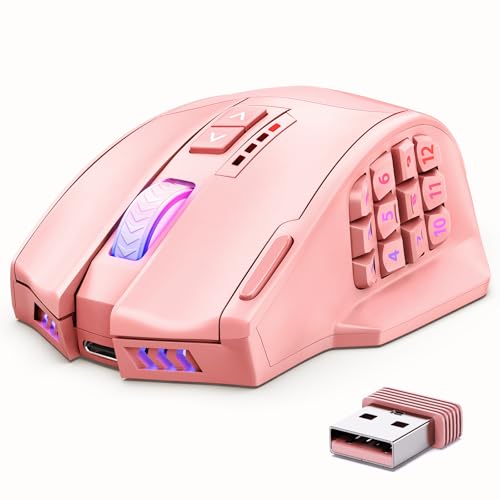
Best for budget MMO players
6. UtechSmart Venus Pro
A wired MMO mouse with up to 16,400 DPI, a 1,000 Hz polling rate and RGB lighting, per the listing.
Good for: Budget MMO players. Strengths: Many programmable buttons at a low price. Weaknesses: A lesser-known brand and wired. Skip it if you want wireless.

Best Picks by Category
These labels summarize listing features and are not hands-on test results.
- Top rated: UtechSmart Venus Pro — a budget wired pick with RGB; check price on Amazon.
- Most reviewed: UtechSmart Venus Pro — a widely chosen wired budget option; check price on Amazon.
- Best value: Redragon MMO Mouse (19 buttons, 12 side buttons) — a budget-tier wired pick with weight tuning; check price on Amazon.
- Lowest price: Redragon MMO Mouse (19 buttons, 12 side buttons) — an entry-level budget pick; check price on Amazon.
- Premium option: Razer Naga V3 Pro — a premium-tier wireless pick with swappable plates; check price on Amazon.
Price, Rating and Review Comparison
The table groups the picks by price tier for easy comparison. Prices change often, so confirm the current price on Amazon.
| Product | Price | Rating | Ratings | Price tier |
|---|---|---|---|---|
| Redragon MMO Mouse (19 buttons, 12 side buttons) | Check price on Amazon | See listing | See listing | Budget |
| UtechSmart Venus Pro | Check price on Amazon | See listing | See listing | Budget |
| Redragon Wireless MMO Gaming Mouse (16 buttons) | Check price on Amazon | See listing | See listing | Budget |
| Corsair Scimitar RGB Elite | Check price on Amazon | See listing | See listing | Mid-range |
| Razer Naga V2 HyperSpeed | Check price on Amazon | See listing | See listing | Mid-range |
| Razer Naga V3 Pro | Check price on Amazon | See listing | See listing | Premium |
How Much Feedback Backs Each Rating
A high average from a handful of ratings is weaker evidence than a slightly lower average from thousands. Here is how the sample size looks for each pick.
- Corsair Scimitar RGB Elite: a moderate sample of feedback on the listing.
- Razer Naga V2 HyperSpeed: a large sample of feedback on the listing.
- Razer Naga V3 Pro: a moderate sample of feedback on the listing.
- Redragon Wireless MMO Gaming Mouse (16 buttons): a large sample of feedback on the listing.
- Redragon MMO Mouse (19 buttons, 12 side buttons): a large sample of feedback on the listing.
- UtechSmart Venus Pro: a large sample of feedback on the listing.
How to Choose
Check the thumb grid
Look at how many side buttons there are and whether you can reach all of them with your thumb.
Wired or wireless
Wired is cheaper and never needs charging. Wireless removes the cable drag.
Software and macros
Customization software decides how well you can map buttons and macros.
How We Chose These Mice
We start from products that are sold on Amazon with a full product name and clear specifications, and we skip results that show only a brand name or a vague title. We then read the listing and the manufacturer information for each one and note the features that matter for this kind of mouse: weight, shape, sensor, connection and buttons. We do not run our own lab tests, and this guide does not contain hands-on measurements. Use it to build a shortlist, then check current prices, dimensions and return terms on the Amazon page.
Buying Guide: What to Check Before You Choose
Shape and grip come first
Most comfort problems come from a mismatch between mouse shape and grip. A palm grip rests the whole hand on the mouse and suits longer shapes. A claw grip arches the fingers and likes a higher rear hump. A fingertip grip uses only the fingers and favors small, light mice. Measure your hand from the wrist crease to the middle fingertip and read our grip guide before you order.
Side buttons and software
MMO mice put roughly six to twelve buttons under the thumb. The grid only helps if you can find buttons by touch and avoid pressing two at once. Binding is done in companion software, so check whether profiles can be stored on the mouse if you play on several PCs. Shooters rarely need a grid.
Sensors, DPI and polling rate
A modern gaming sensor is accurate enough for almost anyone. Look for a named sensor from a reputable brand, a polling rate of at least 1000 Hz and no mention of acceleration problems. See polling rate explained before paying extra for very high numbers.
Quick Reference: Which Pick Suits Whom
- Corsair Scimitar RGB Elite: suits mMO and MOBA players who use many binds
- Razer Naga V2 HyperSpeed: suits mMO players who want a premium wireless mouse
- Razer Naga V3 Pro: suits players who switch between MMO and other genres
- Redragon Wireless MMO Gaming Mouse (16 buttons): suits budget MMO players who want wireless
- Redragon MMO Mouse (19 buttons, 12 side buttons): suits budget MMO players
- UtechSmart Venus Pro: suits budget MMO players
Common Mistakes to Avoid
- Choosing on DPI numbers instead of shape and weight.
- Buying a very light mouse without checking it fits your grip.
- Paying for buttons you will not bind.
- Ignoring cable or battery details.
- Skipping the return window.
Setup and Care
- Plug the receiver into a nearby port for a short signal path.
- Turn off Windows pointer acceleration, then set DPI and in-game sensitivity; see our settings guide.
- Keep the feet and pad clean.
- Save profiles to the mouse if the software allows it.
What makes a good MMO gaming mouse?
A good MMO gaming mouse lets your thumb reach every side button without shifting your grip, and it holds up through long sessions. Button count is only part of that; the shape of the grid, the spacing and the software matter just as much.
In an MMO you often juggle a long list of abilities, consumables and utility commands. A thumb grid moves many of those off the keyboard, so your left hand can stay on movement. The benefit is real only if you can find each button by feel, because looking down at your mouse in a fight defeats the purpose.
Think about these qualities when you read any listing:
- Button feel: side buttons should click clearly and not be so soft that you press two at once.
- Grid layout: a flat grid, a staggered grid and a curved grid each suit different thumb lengths.
- Weight and balance: MMO mice are usually heavier than shooter mice, and a stable feel helps when your thumb is busy.
- Software: macros, layers and profile switching live in the companion app, so its quality matters.
- Connection: wired never needs charging, while wireless frees the desk of cable drag.
The picks above cover wired and wireless choices, a premium swappable-plate design, and several budget options, so you can match the list to how you play rather than chasing the biggest number.
Which MMO mouse should you buy?
The right pick depends on whether you want wireless, a flexible layout or the lowest cost. Use the matches below as a starting point, then confirm details on the listing.
- If you want a wired mouse whose buttons can be moved to fit your grip, go for the Corsair Scimitar RGB Elite, which uses a repositionable key slider.
- If you want a premium wireless mouse with a dense button grid and long battery life, choose the Razer Naga V2 HyperSpeed.
- If you play an MMO but also other genres and want to change the side layout, the Razer Naga V3 Pro with its swappable plates is the flexible option.
- If you want a low-cost wireless mouse with many macro buttons, look at the Redragon Wireless MMO Gaming Mouse (16 buttons).
- If you want a wired budget mouse with adjustable weights and a lot of buttons, the Redragon MMO Mouse (19 buttons, 12 side buttons) fits.
- If you want a simple wired budget mouse with RGB lighting, the UtechSmart Venus Pro is the straightforward choice.
When two picks seem close, let hand size and connection decide. A mouse that fits your hand and your habits will serve you better than one that looks stronger on paper.
If you are new to the genre, a wired budget model is a sensible first step. You can learn which buttons you really use before you spend more on a premium design.
How do you set up side buttons for MMO play?
Start by mapping your most used abilities to the buttons your thumb reaches without effort, and leave the hard-to-reach corners for rarely used commands. Good bindings are built around muscle memory, not around filling every slot.
A simple approach works well for most players:
- Put the abilities you press most often on the middle of the grid, where the thumb rests.
- Use the outer buttons for situational actions, such as mounts, emotes or utility items.
- Keep the same layout across characters where the game allows it, so your thumb learns one pattern.
- Change one group of bindings at a time and play with it before changing more.
Many games let you bind a button to a keyboard key, so you can combine the mouse with the game’s own keybind screen. That is often simpler than building complex macros. Check your game’s rules before using automated macros, because some games restrict anything that sends several actions from a single press.
If your mouse has layers or profile switching, you can store different layouts for different games. Save the profile to the mouse itself when the software allows it, so a reinstall or a different PC does not wipe your setup. Give the grid a few play sessions before judging it; most players need some time before the buttons feel natural.
What to check before you buy an MMO mouse
Before buying an MMO mouse, confirm that its size suits your hand, that the software runs on your system and that the return terms are clear. A few minutes with the listing prevents most disappointments.
- Hand size and grip: compare the length and width on the listing with your hand, and remember a thumb grid adds bulk. Our grip guide explains how to measure.
- Thumb reach: look for photos or descriptions of the side grid to judge whether your thumb can reach the far buttons.
- Connection type: check whether it is wired, a wireless dongle, Bluetooth or a mix, and how you charge it.
- Software support: confirm the companion app works on your operating system, and whether profiles can be stored on the mouse.
- What is included: look for spare plates, weights, a receiver or a cable, and note what is sold separately.
- Warranty and returns: read the terms on the listing and the manufacturer page, and note how long you have to send it back.
- Care needs: wireless models need charging, and all mice need clean feet and a clean surface.
If a detail is unclear, treat it as unconfirmed and check the manual or product page rather than assuming. Reading the questions and answers on the listing can also reveal practical issues, such as how the buttons feel after some use.
Wired vs wireless MMO mouse: which is better?
Neither is better for everyone. A wired MMO mouse is simpler and never needs charging, while a wireless one gives a cleaner desk and more freedom to move.
Wired models suit players who sit at one desk for long sessions and do not want to think about batteries. The cable can drag on the desk edge, but a cable clip or a mouse bungee usually fixes that. Among the picks above, the Corsair Scimitar RGB Elite, the Redragon MMO Mouse (19 buttons, 12 side buttons) and the UtechSmart Venus Pro are wired.
Wireless models suit players who want fewer cables or who move between a desk and a couch. The Razer Naga V2 HyperSpeed, the Razer Naga V3 Pro and the Redragon Wireless MMO Gaming Mouse (16 buttons) are wireless. With these, check these points on the listing:
- How the mouse charges, and whether you can keep playing while it charges.
- Whether it uses a dongle, Bluetooth or both, and where the dongle should be plugged in.
- The maker’s battery estimate, remembering that lighting and heavy use can shorten it.
A dense thumb grid means many buttons you press often, so a dropped signal or a flat battery in the middle of a raid is more annoying than in other games. Keep the receiver close to the mouse and charge before long sessions. If you cannot accept any risk of that, wired is the safer choice.
Is a cheaper MMO mouse enough, and who should skip one?
A cheaper MMO mouse is enough for many players, because the main job is giving your thumb extra buttons. Paying more mostly buys wireless, build polish, software depth and layout flexibility.
Here are the honest trade-offs:
- Budget models: they offer many buttons for little money, but the software may be less polished and the build less refined.
- Premium models: they usually bring better software, wireless options and design flexibility, at a higher cost.
- Wireless: it removes cable drag, but you must keep it charged.
- Wired: it never runs out of power, but the cable can catch on a desk.
Who should skip an MMO mouse? If you mostly play fast shooters, a large heavy mouse with a thumb grid can slow your aim, and a lighter standard mouse is a better fit. If you have small hands, a big button-dense shell may be uncomfortable. If you only use a handful of binds, a regular mouse with two side buttons may be all you need.
If an MMO mouse still sounds right, compare the picks above, check the current listing for size and what is included, then choose the one that fits how you will play.
A Training Plan for the Thumb Grid
An MMO mouse promises control and delivers a learning curve, and most disappointment with the category comes from skipping the learning while expecting the control. The thumb grid on the mice in this guide can transform ability rotations, inventory actions and communication commands, but only after your thumb knows the grid the way your other fingers know a keyboard. This section sets out a realistic training plan, measured in ordinary play sessions rather than heroic practice sessions, so the mouse you choose gets a fair chance to become the advantage it was bought to be.
Begin with far fewer bindings than the grid offers. Choose the three or four actions you press most often and place them on the buttons your thumb finds most naturally, usually the front and centre of the grid. Play normally for several sessions with only those bindings live. Empty buttons are not wasted buttons; they are future capacity, and filling every position on day one guarantees fumbles that teach your thumb to distrust the whole grid. When the first set feels automatic, add two more actions, grouped by logic rather than by the order they appear in a spell book. Abilities used together should live near each other. Rare, high-stakes actions deserve positions your thumb cannot hit by accident during frantic movement.
Building Bindings That Survive a Fight
Good binding design follows the rhythm of your game. Frequent, low-risk actions belong on the easiest buttons. Cooldowns you check by feel belong where your thumb can confirm them without looking. Anything that must never fire accidentally, such as a precious consumable or a disruptive command, belongs on the hardest button to reach or off the grid entirely. Test bindings in low-stakes content first: ordinary quests, practice areas or familiar encounters where a mistake costs nothing. Promote a binding to serious content only after it has survived the test content without a single wrong press across several sessions. That patience feels slow for a week and saves you in every difficult fight afterwards.
Profiles multiply the grid’s power and its confusion in equal measure. One well-understood profile per game, named plainly and backed up once it works, beats a thicket of experimental profiles nobody remembers creating. If you play more than one character or role, resist giving each one a completely different grid philosophy. Keep the shared actions, movement, interaction, defensive responses, in the same thumb positions across profiles, and vary only what the role truly changes. Consistency across profiles is what turns grid skill into a transferable habit rather than a memorised trick per character.
Comfort Over Long Sessions and Honest Limits
MMO sessions run long, and a mouse with a thumb grid is usually a larger, heavier tool than a shooter mouse. That size can be supportive for palm grips and tiring for small hands or fingertip styles, which is why the size and shape notes in each review in this guide deserve more weight than the button count. During your first long session, pay attention to your thumb as much as your wrist. A thumb that aches from stretching to the far row is telling you to move those bindings closer, not to endure. Reassign without pride. The grid serves the hand, never the reverse.
Be honest, too, about the games where the grid earns nothing. In a fast shooter, the extra buttons sit unused and the extra weight works against you, which is why many MMO players keep a second, simpler mouse or accept that one tool serves their main game best. There is no failure in that. A specialist mouse bought for a specialist purpose should be judged inside that purpose. The failure would be forcing it into every game and concluding that MMO mice are overrated, when the truth is narrower and more useful: in the right game, with trained bindings, they are close to irreplaceable, and outside it they are simply the wrong tool on the desk.
Care, Software and Keeping the Grid Reliable
Side buttons live where thumbs sweat and snacks happen, so keep the grid area clean and check that every button still clicks distinctly during a monthly minute of maintenance. Software profiles should be exported or noted once they work, because a computer change should not erase months of thumb training. When a button begins to feel different, deal with it early rather than retraining your thumb around a fault. Your bindings are an investment measured in hours. Protect the hardware and the profile that hold them, and the mouse in your hand becomes more valuable the longer you own it, which is a rare and satisfying direction for gaming gear to travel.
Putting the Whole System Together: Mouse, Bindings and Routine
The final piece of MMO ownership is routine. Before a serious session, glance at the profile you intend to use and confirm it is the one loaded, because the finest bindings in the world fail when the wrong profile is active. After new content or a role change, spend the first attempt in forgiving conditions, letting your thumb learn any new positions before they are needed under pressure. Keep a written or exported record of the bindings that work, stored away from the mouse software itself, so a new computer or a fresh installation is a restoration rather than a reinvention.
Review your grid monthly with the same honesty you brought to choosing the mouse. Buttons that never get pressed are telling you the action belongs elsewhere or nowhere. Buttons that get pressed by accident are telling you their position is wrong for their importance. Move one thing at a time, test it in easy content, and let the grid evolve toward your actual play rather than your imagined play. Over a season, that evolution produces a layout no guide could have given you, fitted to your hand, your class and your habits. The mice in this guide provide the hardware for that process. The process itself, patient, incremental and personal, is the real upgrade an MMO mouse offers, and it is available to any player willing to train a thumb the way they once trained their fingers on a keyboard.
Hand Health, Session Length and Playing for Years
MMO players measure their hobby in years, so the mouse must be sustainable across years of long sessions. Build breaks into progression rather than treating them as weakness: stand, open and close the hand, let the thumb that works the grid rest as deliberately as the wrist. Vary your content across a long evening where the game allows it, because unchanging repetitive inputs are harder on a hand than varied ones. If a particular button position begins to ache, move the binding before the ache becomes the reason you stop playing; the grid offers alternatives precisely so no single motion must be endured.
Chair, desk and monitor position frame all of this, as they do for every mouse category, but the MMO player’s longer sessions make the frame matter more. The elbow supported, the mouse close, the shoulder down: these unglamorous positions decide whether a five-hour session ends in satisfaction or stiffness. The best MMO mouse in this guide, perfectly bound and perfectly profiled, still needs that frame beneath it. Give it the frame, the training plan and the breaks, and it will serve the long campaigns it was bought for, season after season.
From One Game to a Library: Carrying Grid Skill Across Titles
Players who master a thumb grid in one game eventually face a second title with different abilities and a familiar temptation: copy the old layout wholesale and hope. Resist it partially. Carry across the philosophy, not the positions: shared actions in shared places, frequent actions on easy buttons, dangerous actions where they cannot be struck by accident. Then rebuild the game-specific layer from the new title’s actual rhythm, testing in forgiving content as this guide prescribes. The philosophy transfers instantly; the positions must earn their places again, and players who respect that distinction adapt to a new game in days rather than fighting their own muscle memory for weeks.
Keep a small written map of each game’s final layout, stored with the exported profiles. Memory is a poor archivist across a year of patches, breaks and returning seasons, and the player who returns to a beloved game after six away should be greeted by their own documentation, not by a grid that feels like a stranger’s. That archivist habit completes the MMO system: trained thumb, protected profile, documented layout. With all three in place, the mouse stops being equipment you own and becomes skill you have, which is the highest state gaming hardware can reach.
Choosing Your First MMO Mouse Without a Crystal Ball
First-time MMO mouse buyers face a peculiar problem: the quality that matters most, thumb trainability, cannot be tested in a shop or a specification. Approach it by proxy. Your history with other learned interfaces is the best evidence available: if you touch-type, play an instrument or use keyboard shortcuts fluently, your thumb will likely learn a grid with the patience this guide prescribes. If you prefer interfaces that need no learning, choose the pick whose grid is simplest to start with and whose shape serves you even if only a few buttons are ever bound, because a comfortable mouse with four used buttons beats an ambitious grid abandoned in a drawer.
Protect the experiment with the return window and the training plan together. The window gives the decision a deadline; the plan gives the deadline a fair test to judge. Buyers who use both rarely regret the category in either direction: they keep a mouse their thumb has genuinely adopted, or they return one with precise knowledge of why, which converts neatly into the right conventional mouse chosen next. Uncertainty is not the enemy of this purchase. Unexamined uncertainty is, and it is entirely curable with a fortnight of structured play.
If You Only Remember Three Things About MMO Mice
First, train the thumb in stages: a few essential bindings placed where your thumb naturally lands, additions made only when the earlier set is automatic, and dangerous actions placed where they cannot be struck by accident. Second, keep the system documented: profiles named plainly, layouts mapped and stored away from the software, so a new computer restores your skill instead of erasing it. Third, respect the specialist boundary: inside button-heavy games a trained grid is close to irreplaceable, while outside them the same mouse is simply the wrong tool, and judging it inside its purpose is fairness, not excuse-making. Those three habits convert a button-covered mouse from a novelty into a genuine extension of the player, which is the entire promise of the category.
A Closing Note on Mastery
Mastery of a thumb grid is a modest, genuine skill, built the way all such skills are built: in stages, with feedback, over ordinary sessions rather than heroic ones. The mouse provides the instrument, the game provides the curriculum and the player’s patience provides the method. What surprises most players who complete the training is how transferable the confidence feels. A hand that has learned one complex interface deliberately becomes better at learning the next one, in games and beyond them. That may be the MMO mouse’s most durable gift, outlasting any single title’s meta: proof, held in your own thumb, that your hands can still learn new tricks completely.
One Last Practical Promise to Make to the Grid
Make one promise when the grid is first configured, and keep it for a season: no binding changes in the middle of difficult content. New positions are born in forgiving places, tested until they survive without a wrong press, and only then promoted to the fights that matter. Mid-battle redesign feels responsive and teaches the thumb nothing except distrust, because every failure arrives wrapped in pressure and cannot be attributed cleanly. The calm rule turns each change into an experiment with a result, and results accumulate into the personal layout no guide could hand you. Protect the training environment, and the training will protect you when the content stops being forgiving.
Frequently Asked Questions
How many buttons do I need?
Many players are comfortable with 12 side buttons. Fewer if you use keybinds.
Are MMO mice good for FPS?
Not usually, they are large and heavy.
What about left-handed MMO mice?
See our left-handed mouse guide.
How do I choose a gaming mouse?
Start with shape and grip, then weight, connection and buttons. Sensor numbers matter least. See our buying guide.
What DPI should I use?
Most players use roughly 400 to 1600 DPI. See our DPI guide.
Do these mice work on Mac?
Basic functions normally do, but companion software may be Windows-only. Check each product page.
Do MMO mice improve gameplay?
They can, because they put many abilities under your thumb so your other hand can stay on movement. The gain depends on how well you learn the layout. If you only use a few binds, the improvement is small.
Are MMO mice good for work as well as gaming?
Yes, many people bind shortcuts for editing, spreadsheets or design software to the side grid. The buttons work like programmable shortcuts. Check that the software supports the apps you use.
Is a wireless MMO mouse worth it?
It is worth it if cable drag bothers you or your desk is tidy and cable-free. You must charge it, and some players prefer wired for simplicity. Check the stated battery details on the listing.
How long does it take to get used to a thumb grid?
Most players need some play sessions before the buttons feel natural. Start with a few bindings and add more gradually. Reaching buttons by feel without looking is the real goal.
Can I use an MMO mouse with a small hand?
It can be difficult, because many MMO mice are large and button-dense. Compare the listed size with your hand measurement first. A smaller mouse or one with swappable plates may fit better.
What is the difference between a MOBA mouse and an MMO mouse?
A MOBA mouse usually has fewer side buttons, while an MMO mouse has a larger grid. Some models are sold for both uses. Pick based on how many binds you actually use.
Do MMO mice need special software?
Most use companion software to assign buttons and macros. Basic clicking and movement normally work without it. Check that the software supports your operating system before buying.
How many side buttons should I bind at first?
Start with the three or four actions you press most, on the buttons your thumb finds naturally. Add more in pairs only when the earlier set feels automatic. Empty buttons are future capacity, not waste.
Where should rare or risky actions go on the grid?
Place high-stakes actions where your thumb cannot hit them by accident, or off the grid entirely. Frequent low-risk actions belong on the easiest buttons, grouped with the abilities they are used alongside.
Should each character have a completely different layout?
No. Keep shared actions such as movement, interaction and defensive responses in the same thumb positions across profiles, and vary only what the role truly changes. Consistency makes grid skill transferable.
Is an MMO mouse a good only mouse for every game?
For button-heavy games it can be close to irreplaceable once trained. For fast shooters its weight and unused buttons work against you, so many players judge it inside its specialist purpose or keep a simpler second mouse.
Bottom Line
For a premium wireless pick, the Razer Naga V2 HyperSpeed or the swappable-plate Naga V3 Pro. For wired, the Corsair Scimitar RGB Elite. For a budget, the Redragon models.
Related Reading
- 6 Best Gaming Mice Under $50
- 6 Best Budget Gaming Mice: Cheap Wired and Wireless
- 6 Best Gaming Mice Under $100: Premium Picks for Less
- 6 Best Gaming Mice Under $20: Wired and Wireless
- 6 Best Left-Handed and Ambidextrous Gaming Mice
More Gaming Mouse Guides
- Best Wireless Gaming Mice
- Best Lightweight Gaming Mice
- Gaming Mouse Buying Guide
- Best Mouse Grip for Gaming


