Disclosure: As an Amazon Associate, reviewstook.com earns from qualifying purchases. Links to Amazon on this page are affiliate links; they cost you nothing extra.
You do not need to spend much to get a decent gaming mouse. Cheap mice give up premium sensors, build quality and software, so choose by the features you will actually use.
This guide covers six budget gaming mice sold on Amazon. It is built from product listings, not our own testing, so confirm the current price and specifications on each product page.
New to gaming mice? Read our gaming mouse buying guide and how we pick products.
By the Reviewstook Editorial Team. Last updated: October 31, 2026.

In this guide
Quick Picks
| Mouse | Type | Best for |
|---|---|---|
| BENGOO Gaming Mouse | Wired budget gaming mouse | A very cheap wired mouse with RGB |
| Redragon M602 | Wired RGB gaming mouse | A long-running budget classic |
| TMKB Falcon M1SE | Wired honeycomb mouse | 75 g wired lightweight |
| Razer DeathAdder Essential | Wired ergonomic gaming mouse | A classic shape at a low price |
| MELOGAGA Wireless Gaming Mouse | Budget tri-mode mouse | Budget wireless with Bluetooth |
| INPHIC A9 V2 Explorer | Silent wireless mouse | A quiet wireless mouse for play and work |
6 Best Budget Gaming Mice

Top pickBest for gamers on a tight budget
1. BENGOO Gaming Mouse
A wired RGB gaming mouse with four DPI levels from 1,200 to 3,600 and six buttons, per the listing.
Good for: Gamers on a tight budget. Strengths: Very low cost with DPI switching. Weaknesses: A basic sensor range and few buttons. Skip it if you play competitive FPS.


Best for very low budgets
2. Redragon M602
A wired RGB gaming mouse with 7,200 DPI and key remapping, in a design launched in 2015, per the listing.
Good for: Very low budgets. Strengths: Low price and remappable buttons. Weaknesses: Dated design. Skip it if you want a modern sensor.


Best for budget gamers who want a light wired mouse
3. TMKB Falcon M1SE
A wired 75 g honeycomb mouse with up to 12,800 DPI, in a medium size, per the listing.
Good for: Budget gamers who want a light wired mouse. Strengths: Very light for its price class. Weaknesses: Wired, and a lesser-known brand. Skip it if you want wireless.


Best for budget gamers who want a trusted ergonomic shape
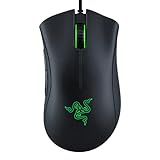
4. Razer DeathAdder Essential
A wired ergonomic mouse with a 6,400 DPI optical sensor, mechanical switches rated for 10 million clicks and a rubberized scroll wheel, per the listing.
Good for: Budget gamers who want a trusted ergonomic shape. Strengths: Comfortable shape and durable switches. Weaknesses: Wired and a basic sensor. Skip it if you want wireless or ultralight.

Best for budget users who want wireless for play and work
5. MELOGAGA Wireless Gaming Mouse
A white tri-mode mouse (Bluetooth, 2.4 GHz and USB-C) with eight DPI levels from 800 to 6,400 and a 1,000 Hz polling rate, per the listing.
Good for: Budget users who want wireless for play and work. Strengths: Three connection modes at a low price. Weaknesses: A lesser-known brand; check support. Skip it if you want a premium sensor.


Best for people who want a quiet mouse that also games
6. INPHIC A9 V2 Explorer
A wireless silent mouse with 12,800 DPI, dual Bluetooth, 2.4 GHz and USB-C, per the listing.
Good for: People who want a quiet mouse that also games. Strengths: Silent clicks and three connection modes. Weaknesses: A lesser-known brand. Skip it if you want the fastest esports mouse.

Best Picks by Category
These labels summarize listing features and are not hands-on test results.
- Top rated: Redragon M602 — a long-running budget classic; check price on Amazon.
- Most reviewed: Razer DeathAdder Essential — a trusted ergonomic shape; check price on Amazon.
- Best value: BENGOO Gaming Mouse — an entry-level wired pick with RGB; check price on Amazon.
- Lowest price: BENGOO Gaming Mouse — an entry-level budget pick; check price on Amazon.
- Premium option: Razer DeathAdder Essential — an upper-tier ergonomic pick in this budget group; check price on Amazon.
Price, Rating and Review Comparison
The table groups the picks by price tier for easy comparison. Prices change often, so confirm the current price on Amazon.
| Product | Price | Rating | Ratings | Price tier |
|---|---|---|---|---|
| BENGOO Gaming Mouse | Check on Amazon | See listing | See listing | Budget |
| MELOGAGA Wireless Gaming Mouse | Check on Amazon | See listing | See listing | Mid-range |
| TMKB Falcon M1SE | Check on Amazon | See listing | See listing | Mid-range |
| Redragon M602 | Check on Amazon | See listing | See listing | Mid-range |
| INPHIC A9 V2 Explorer | Check on Amazon | See listing | See listing | Mid-range |
| Razer DeathAdder Essential | Check on Amazon | See listing | See listing | Mid-range |
How Much Feedback Backs Each Rating
A high average from a handful of ratings is weaker evidence than a slightly lower average from thousands. Here is how the sample size looks for each pick.
- BENGOO Gaming Mouse: a large sample of feedback on the listing.
- Redragon M602: a large sample of feedback on the listing.
- TMKB Falcon M1SE: a large sample of feedback on the listing.
- Razer DeathAdder Essential: a large sample of feedback on the listing.
- MELOGAGA Wireless Gaming Mouse: a moderate sample of feedback on the listing.
- INPHIC A9 V2 Explorer: a large sample of feedback on the listing.
How to Choose
Decide wired or wireless
Wired mice are cheaper and lighter at the same spec. Wireless mice add convenience.
Do not chase the DPI number
A huge DPI figure is a marketing number. Sensor quality matters more.
Check the return policy
Cheap mice vary in quality. Keep the option to return.
How We Chose These Mice
We start from products that are sold on Amazon with a full product name and clear specifications, and we skip results that show only a brand name or a vague title. We then read the listing and the manufacturer information for each one and note the features that matter for this kind of mouse: weight, shape, sensor, connection and buttons. We do not run our own lab tests, and this guide does not contain hands-on measurements. Use it to build a shortlist, then check current prices, dimensions and return terms on the Amazon page.
Buying Guide: What to Check Before You Choose
Shape and grip come first
Most comfort problems come from a mismatch between mouse shape and grip. A palm grip rests the whole hand on the mouse and suits longer shapes. A claw grip arches the fingers and likes a higher rear hump. A fingertip grip uses only the fingers and favors small, light mice. Measure your hand from the wrist crease to the middle fingertip and read our grip guide before you order.
What you give up at a low price
Cheaper mice usually give up shell and cable quality, software polish and sensor consistency before they give up basic accuracy. Check the cable, the feel of the side buttons and the scroll wheel, whether the listing names the sensor, and the return policy. A named sensor from a known brand is a better sign than a huge DPI number.
Sensors, DPI and polling rate
A modern gaming sensor is accurate enough for almost anyone. Look for a named sensor from a reputable brand, a polling rate of at least 1000 Hz and no mention of acceleration problems. See polling rate explained before paying extra for very high numbers.
Quick Reference: Which Pick Suits Whom
- BENGOO Gaming Mouse: suits gamers on a tight budget
- Redragon M602: suits very low budgets
- TMKB Falcon M1SE: suits budget gamers who want a light wired mouse
- Razer DeathAdder Essential: suits budget gamers who want a trusted ergonomic shape
- MELOGAGA Wireless Gaming Mouse: suits budget users who want wireless for play and work
- INPHIC A9 V2 Explorer: suits people who want a quiet mouse that also games
Common Mistakes to Avoid
- Choosing on DPI numbers instead of shape and weight.
- Buying a very light mouse without checking it fits your grip.
- Paying for buttons you will not bind.
- Ignoring cable or battery details.
- Skipping the return window.
Setup and Care
- Plug the receiver into a nearby port for a short signal path.
- Turn off Windows pointer acceleration, then set DPI and in-game sensitivity; see our settings guide.
- Keep the feet and pad clean.
- Save profiles to the mouse if the software allows it.
Which budget gaming mouse should you buy?
The best budget gaming mouse is the one whose shape fits your hand and whose connection suits your desk. Use the matches below, then confirm details on the listing.
- If you want the lowest cost to get started with a wired RGB mouse, go for the BENGOO Gaming Mouse.
- If you want a long-running budget classic with remappable buttons, choose the Redragon M602.
- If you prefer a light wired mouse and like the honeycomb shell, pick the TMKB Falcon M1SE.
- If comfort and a trusted ergonomic shape matter most, the Razer DeathAdder Essential is the straightforward choice.
- If you want wireless with Bluetooth for both play and work, look at the MELOGAGA Wireless Gaming Mouse.
- If you want quiet clicks for shared spaces plus wireless flexibility, choose the INPHIC A9 V2 Explorer.
When two picks seem close, shape should break the tie. A mouse that fits your grip will feel better and aim better than one with a longer spec list.
Second, decide on wired or wireless. Wired mice avoid battery charging and receiver issues, and they are usually lighter at the same price. Wireless gives you a tidier desk and works with a laptop on the move.
Third, think about noise. If you game late or share a room, the quiet switches on the INPHIC may matter more than any sensor detail.
Finally, be realistic about your games. For casual and many single-player titles, any of these will do the job. For fast competitive shooters, plan on a better sensor later.
How do you choose a budget gaming mouse for your grip?
Choose a budget gaming mouse by matching its length, width and rear hump to your grip style and hand size. Comfort problems at this price almost always come from shape mismatch, not from missing features.
- Palm grip: your whole hand rests on the mouse. Look for a longer, taller body with support under the palm, like an ergonomic shape.
- Claw grip: your fingers arch and your palm touches the rear. A pronounced rear hump helps.
- Fingertip grip: you hold the mouse lightly with your fingers. Small, light mice suit this style.
Measure your hand from the wrist crease to the tip of your middle finger. Then compare it with the size notes on the listing. A medium size suits many adults, but hand size varies a lot.
Another check is handedness. Many ergonomic shapes are made for right-handed use, and a left-handed buyer should confirm the listing says the mouse is ambidextrous.
Weight is the other major factor. A lighter mouse such as the TMKB Falcon M1SE feels quick to move, while a heavier mouse can feel steadier for slow, precise aim. Neither is right for everyone.
Side buttons also deserve a look. If you play games that use extra binds, make sure the mouse has enough buttons, and see whether the software lets you remap them. If you rarely use side buttons, do not pay for them.
If you are unsure, buy from a seller with a clear return policy and test the mouse for a few days of real play.
Wired vs wireless budget gaming mouse: which is better?
A wired budget gaming mouse is usually better value and has no battery to manage, while a wireless one is better for a clean desk or a laptop. Both work for casual and many competitive uses.
Wired strengths. The BENGOO, Redragon M602, TMKB Falcon M1SE and Razer DeathAdder Essential have no charging step, so they are ready whenever you plug in. They also tend to be lighter for their price class, since there is no battery.
Wired weaknesses. The cable can catch on a desk edge. A soft, flexible cable helps, and a small clip or bungee holder can keep it out of the way.
Wireless strengths. The MELOGAGA and INPHIC offer multiple connection options, per their listings, including Bluetooth for a laptop or tablet and a receiver for a desktop. That flexibility suits people who use one mouse for gaming and for work.
Wireless weaknesses. You must charge the mouse, and signal can be less steady if the receiver sits behind a computer case. Plug the receiver into a nearby port to shorten the signal path.
- Pick wired if: you want the lowest cost, light weight and no charging.
- Pick wireless if: you value a tidy desk and use the mouse across several devices.
Check the listing for battery details, charging method and whether the mouse works while charging. Cheaper wireless mice vary on these points, so read before you buy.
What to check before you buy a cheap gaming mouse
Before you buy a cheap gaming mouse, check its size, connection type, buttons and software, and confirm the return terms. A short checklist prevents most disappointments.
- Size and shape: compare the listing’s dimensions with your hand and your grip style.
- Weight: make sure the weight suits you, particularly if you want a light mouse.
- Connection: confirm wired, 2.4 GHz receiver, Bluetooth or a mix, and that your device has the right port.
- Sensor and polling: look for a named sensor and a polling rate that suits gaming, not just a large DPI figure.
- Buttons and switches: count the buttons you need and read what the listing says about switches.
- Software: check whether the software supports your operating system, since some tools are Windows only.
- What is included: look for a receiver, cable and any spare parts.
- Warranty and returns: read the support terms and return window on the listing.
- Care: plan on a clean mouse pad, since dirty feet and pads hurt tracking.
Lesser-known brands can offer good value, but support can be thinner. Before you buy, look at how many people have rated the product and what common complaints say, without relying on a single score.
Once you receive the mouse, test cursor smoothness on your usual mouse pad, try the scroll wheel, and press each button. If a button double-clicks or the cursor jumps, return it within the window rather than living with it.
How do you get the most from a budget gaming mouse?
You get the most from a budget gaming mouse by setting it up carefully and keeping it clean. Small habits close much of the gap to pricier models.
- Turn off pointer acceleration. In your operating system settings, disable enhanced pointer precision so movement stays consistent.
- Pick one DPI and stick to it. Choose a moderate level, then fine tune in-game sensitivity until aiming feels natural.
- Use a good surface. A clean cloth pad gives steadier tracking than a bare desk, especially a glossy one.
- Keep the sensor clear. Dust or hair on the lens makes the cursor jump. Wipe it gently.
- Manage the cable or receiver. Keep a wired cable free of tight bends, and place a wireless receiver close to the mouse.
- Remap with purpose. Assign only the buttons you will actually press, such as one for a game action.
Give yourself a week with any new mouse. Muscle memory takes time to adjust, and a different shape or weight can feel odd at first. If it still feels wrong after that, the fit is probably off, and a return is reasonable.
Is a cheap gaming mouse worth it, and who should skip it?
A cheap gaming mouse is worth it for most casual players, students and anyone testing the hobby, because the gap to premium mice is smaller than prices suggest. The compromises are in build, sensor refinement and software.
Is it worth paying more? Spending more can buy better materials, a refined sensor, lower weight, longer battery life and stronger software. Those gains matter most to competitive players. If you play for fun, a budget mouse with a comfortable shape often feels fine.
What are the downsides?
- Cables, side buttons and scroll wheels may feel less solid.
- Software can be basic or limited to certain systems.
- Lesser-known brands may offer limited support.
- Very high DPI figures are a marketing number and do not guarantee accuracy.
Who should skip these mice?
- Competitive esports players who want the fastest, most consistent sensor.
- People with larger hands who need a bigger shell than a small or medium body.
- Users who want extensive onboard profiles and advanced software.
- Anyone who wants the lightest possible wireless mouse.
A budget mouse can be a good first step and a fine backup later. Compare the picks above, check the current listing for size and what is included, then choose the one that fits how you will use it.
How to Spend Little Without Buying Twice
The real cost of a budget gaming mouse is not its purchase moment; it is whether you are buying again in a few months because the first choice had a flaw you could have caught. This section is a discipline for avoiding that second purchase. It applies to every pick in this guide and to the wider budget shelf beyond it: know which compromises are harmless at a low price, which ones will annoy you daily, and how to test for the annoying ones while returning is still easy.
The harmless compromises are mostly about extras. Lighting that is simpler, software that is basic or absent, a shell without premium coatings, a cable that is adequate rather than luxurious: none of these stop you playing well, and several of them will never be thought about again after the first week. The dangerous compromises hide in the fundamentals. A shape that does not fit your hand will hurt every session. A sensor that misbehaves at the speeds you actually move will undermine every flick. Buttons that feel vague or a wheel that scrolls unevenly will be pressed thousands of times, and each press will remind you of the saving. Spend your scrutiny on fit, tracking and the controls you touch constantly, and let the extras be as plain as they like.
The First-Week Test for a Cheap Mouse
Use the first week as an examination while your options are open. Play your fastest game and your slowest one. Make wide swipes and tiny corrections, click rapidly and hold clicks down, use the wheel as a control and not just as a scroller, and work at your desk for an ordinary hour to see whether gaming comfort survives office reality. Check the cable’s behaviour across your whole pad if the mouse is wired, and check the wireless connection from where the receiver will actually live if it is not. A budget mouse that passes your own week has earned its place. One that fails it has given you the information cheaply, which is the entire point of testing early and honestly.
Settings can rescue or condemn a budget mouse unfairly. Set sensitivity in the game rather than stacking adjustments in several places at once, keep any pointer enhancement in the operating system off for gaming consistency where that option exists, and give a new mouse at least a few sessions before judging its tracking. Many returned mice were tracking exactly as designed for a hand that had not yet adapted to their shape and weight. Adaptation is not an excuse for a faulty mouse, but it is a stage every change of mouse goes through, and budget buyers who skip it churn through purchases that teach them nothing.
Making a Budget Mouse Last
Longevity at this level is mostly care rather than construction miracles. Keep the sensor area clean, stop dust and hair building up around the feet, and avoid the habit of slamming or squeezing the mouse in frustrating moments, because budget switches and shells have less margin for abuse than premium ones. Coil a wired cable loosely rather than winding it tightly around the mouse, store a wireless receiver with the mouse when travelling, and keep drinks at a distance your future self will thank you for. These habits sound like generic advice until you realise that most budget mice die of their environment, not their electronics.
Know the sensible upgrade path as well, because a good budget purchase teaches you what to value next. After months with an honest cheap mouse you will know your grip, your preferred weight, whether you use extra buttons and whether a cable bothers you. That knowledge is worth more than any review, including this one, because it is measured on your hand. When you eventually upgrade, you will spend on the things you proved you care about and ignore the rest. Viewed that way, the best budget mouse is not merely cheap. It is a well-chosen instrument for learning your own preferences, and the six picks in this guide were chosen to teach those lessons without punishing you for learning them.
Work, School and the Shared Desk
Many budget mice live double lives on shared or family computers, and that life has its own requirements. A mouse that needs elaborate software will confuse other users; a mouse that works well the moment it is plugged in will be loved quietly by everyone. Consider how loud the clicks are in a shared room, how the lighting behaves if the computer sleeps in a bedroom, and whether the shape suits more than one hand size if several people play. The unglamorous winner on a shared desk is the mouse nobody complains about, and at a budget price that is a genuinely high standard to meet.
The Budget Decision, Made Once and Made Properly
Finish the decision with the discipline the whole guide has been building toward. Rank what you cannot compromise, fit, tracking at your speeds and the controls you touch constantly, and refuse to trade any of them for lighting, branding or a headline number. Check the return route before you buy, because a tested budget mouse with an easy return is a safer purchase than a marginally cheaper one with none. Then commit to the first-week test and the adaptation period without shopping again in parallel. Parallel shopping during adaptation is how buyers end up owning three cheap mice and understanding none of them.
Once the mouse has passed your week, stop reading mouse reviews for a while. That advice sounds strange inside a mouse review, but budget gear delivers its value through use, not through continued comparison. Play, work, maintain the mouse as this guide describes, and let months of evidence accumulate about your grip, your weight preference and your button habits. When an upgrade eventually makes sense, it will be obvious, specific and satisfying, because it will be based on your own measured needs. That is the destination every pick in this guide was chosen to lead toward: not the cheapest mouse, but the cheapest route to knowing exactly what your hand wants.
Gift, First Mouse and Household Spare: Other Budget Roles
Budget gaming mice fill roles beyond the main desk, and choosing for the role sharpens the decision. As a first gaming mouse for a younger player, the priorities are a forgiving shape, simple setup without software demands and durability against enthusiastic handling. As a gift, the priority is the recipient’s hand and games, which the giver should discover casually before ordering rather than guessing from a box’s loudest number. As a household spare, the winner is the mouse that works instantly on any computer in the house, because a spare that needs setup during a failure is not a spare at all.
Each role still obeys the guide’s core discipline: fit first, fundamentals second, extras last. A spare with a shape nobody in the house can stand will be rejected in the emergency it was bought for. A gift chosen for its lighting rather than its size will be politely shelved. The budget category rewards buyers who know precisely what job the mouse must do, because at low prices every design is a compromise, and the art lies in choosing compromises your specific role will never notice.
Troubleshooting a Budget Mouse Before Blaming It
Budget mice are blamed quickly, sometimes for faults that belong to their environment, so learn the short diagnostic order that protects both your money and your patience. If tracking feels erratic, clean the sensor area and try a different surface or pad area first, because dust and a worn patch impersonate sensor failure convincingly. If clicks feel inconsistent, check for debris around the buttons and test on a second computer before concluding the switch is at fault. If a wireless model stutters, move its receiver closer with a clear path and test again in the same place in the same game. If a wired model drags, look at the cable’s route and the desk edge it crosses. Each test costs minutes and changes one variable.
Only when the fault survives those tests, in the same form, on a second setup where possible, has the mouse itself earned the blame. At that point the return or replacement conversation becomes simple, because you can describe exactly what was tested. Sellers and support teams respond well to that clarity, and so does your own budget: mice replaced for environmental reasons get replaced again, while mice replaced for proven faults end the story. Diagnosis is a money-saving skill disguised as a technical one, and budget ownership is where it pays fastest.
When a Budget Mouse Becomes the Main Mouse
An interesting thing happens to some budget mice: bought as a stopgap, they stay. The hand adapts, the shape proves itself across a season of games and the owner realises the upgrade they were saving for would solve problems they do not have. Recognising that moment saves real money, and it deserves the same honesty as recognising a failure. Test the feeling properly. Is anything about the mouse limiting a game you care about, in a way you can name? Does any part of a long session end in discomfort that returns the next day? If the answers are no, the stopgap has become the main mouse, and the correct upgrade is no upgrade at all.
Keep the spare batteries, the receiver discipline and the cleaning rhythm that got it there, and let the money earmarked for its replacement serve the setup elsewhere, perhaps on the pad or the chair where a named limitation actually lives. Budget gear’s deepest value is this permission it gives: to stop shopping when the tool fits. The picks in this guide were chosen to be capable of earning that permanence, and the owner who grants it, on evidence, has understood the category better than the owner who upgrades on schedule.
If You Only Remember Three Things About Budget Mice
First, protect the fundamentals and let the extras be plain: shape fit, honest tracking at your speeds and controls that feel right under your fingers are worth every scrutiny, while lighting and headline numbers are worth almost none. Second, test inside the return window as if you meant it, across your fastest and slowest games and an ordinary working hour, because a week of evidence is the cheapest insurance in the category. Third, diagnose before blaming: surface, cleanliness, receiver position and cable route explain most budget disappointments, and the owner who checks them in order spends money only on proven faults. A cheap mouse bought and kept under those three rules is not a compromise. It is one of the best-value objects on a gaming desk.
A Closing Note on Enough
The budget category teaches a lesson the wider hobby resists: enough is a real specification. A mouse that fits your hand, tracks honestly at your speeds and survives your desk’s daily life has met the full requirement of a gaming mouse, whatever else exists above it in a catalogue. The discipline of this guide, fit first, fundamentals second, diagnosis before blame, exists to help you recognise enough when it is already in your hand. Recognising it is worth more than any single saving in this article, because it ends the search and starts the playing, which was the point of the mouse all along.
Frequently Asked Questions
What is the best cheap gaming mouse?
The Razer DeathAdder Essential is a trusted ergonomic shape at a low price, per the listing.
Is a cheap wireless gaming mouse fine?
For casual play, yes. Competitive players may want a better sensor.
How much should I spend?
Spend enough for a comfortable shape and a decent sensor.
How do I choose a gaming mouse?
Start with shape and grip, then weight, connection and buttons. Sensor numbers matter least. See our buying guide.
What DPI should I use?
Most players use roughly 400 to 1600 DPI. See our DPI guide.
Do these mice work on Mac?
Basic functions normally do, but companion software may be Windows-only. Check each product page.
Is a gaming mouse worth it over a regular mouse?
Often yes, because gaming mice offer better shapes, button layouts and sensors for fast aiming. For basic office work a regular mouse is enough. If you game even a few hours a week, a budget gaming mouse is a sensible upgrade.
Does a higher DPI make a mouse better?
No, a higher DPI figure does not make a mouse better by itself. Most players use a moderate setting and adjust in-game sensitivity. Sensor quality and shape matter more than a big number.
What polling rate do I need for gaming?
A polling rate of 1000 Hz is a common and sensible standard for gaming. Higher rates add little for most players. Check the listing to see what the mouse supports.
Are wireless gaming mice laggy?
Good wireless mice using a receiver feel responsive in everyday play. Bluetooth can feel less direct than a receiver. For fast competitive games, many players prefer a wired or receiver connection.
How long do budget gaming mice last?
A budget gaming mouse can last for years with normal use, but switches and cables are the usual wear points. Keeping the mouse clean and avoiding cable strain helps. Check the warranty on the listing.
Can I use these mice for work and gaming?
Yes, most can handle both. Wireless models with Bluetooth, like the MELOGAGA and INPHIC, are convenient for switching devices. A quiet mouse is a plus in shared offices.
How do I clean a gaming mouse?
Unplug or turn off the mouse and wipe the shell with a slightly damp cloth. Clean the sensor lens and the feet with a dry cloth or cotton swab. Avoid soaking the mouse or using harsh cleaners.
What mouse pad should I use with a budget mouse?
A clean cloth pad with a consistent surface suits most optical mice. Avoid very glossy or glass-like surfaces unless the mouse says it supports them. A pad also protects the mouse feet from wear.
Which compromises are safe in a cheap gaming mouse?
Plain extras are safe: simple lighting, basic software and an ordinary cable do not affect play. Never compromise on shape fit, reliable tracking at your speeds, or the feel of the main buttons and wheel you use constantly.
How should I test a budget mouse in its first week?
Play your fastest and slowest games, make wide and tiny movements, test clicks and the wheel properly, and work at the desk for an ordinary hour. Test while returning is still easy, and change only sensitivity while you adapt.
How can I make a cheap mouse last longer?
Keep the sensor and feet clean, treat switches and shell gently, coil cables loosely, store the receiver with a wireless mouse, and keep drinks away. Most budget mice are killed by their environment, not their electronics.
What does a good budget mouse teach me about upgrading?
Months of use reveal your true grip, weight preference, button needs and feelings about cables. That self-knowledge makes any later upgrade precise, because you spend only on what you proved you value.
Bottom Line
For a trusted shape on a budget, the Razer DeathAdder Essential is the straightforward choice. For wireless on a budget, look at the MELOGAGA or INPHIC, and for a light wired mouse the TMKB Falcon M1SE.
Related Reading
- 6 Best Gaming Mice Under $50
- 6 Best Gaming Mice Under $100: Premium Picks for Less
- 6 Best Gaming Mice Under $20: Wired and Wireless
- 6 Best Left-Handed and Ambidextrous Gaming Mice
- 6 Best MMO Gaming Mice with Side Buttons
More Gaming Mouse Guides
- Best Wireless Gaming Mice
- Best Lightweight Gaming Mice
- Best Logitech Gaming Mice
- Gaming Mouse Buying Guide


