Disclosure: As an Amazon Associate, reviewstook.com earns from qualifying purchases. Links on this page are affiliate links; they cost you nothing extra. Prices and availability change often, so check the current Amazon listing before you buy.
Shoppers asking keychron k1 vs k2 vs k4 vs k6 whats the difference usually expect a spec sheet, and the honest answer is that these four keyboards differ less in quality than in shape of life: the K1 is the slim traveller, the K2 is the balanced default, the K4 is the number-pad keeper in a compact disguise, and the K6 is the minimalist’s 65% pocket rocket. All four share Keychron’s founding formula — wireless Bluetooth plus wired modes, Mac and Windows keycaps in the box, mechanical switches, and prices that embarrassed the industry when the line launched. This comparison walks each board’s layout, feel and ideal owner, then gives you a decision path based on three questions: how much desk you have, whether you need a number pad, and how your hands feel about low-profile keys.
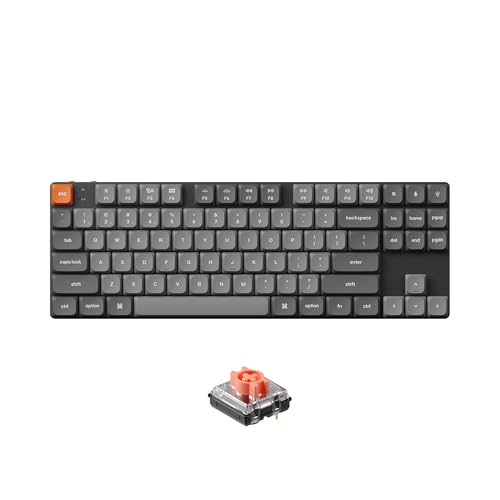
Key takeaways
- K1: 80% tenkeyless in an ultra-slim, low-profile body — the laptop-companion and travel choice. (The current K1-family listing in this guide is the K1 Max, the line’s modern flagship form.)
- K2: 75%, 84 keys, standard-profile switches — the all-rounder that made Keychron famous and the safest default for most desks.
- K4: 96%, 100 keys — a full number pad compressed into a near-TKL footprint; the data worker’s favourite trick.
- K6: 65%, hot-swappable in the listing here — the smallest footprint, no function row, maximum mouse room and hobbyist appeal.
- The difference that decides is layout and key height, not quality: all four are proper mechanical, multi-device, dual-system keyboards.
In this guide
Keychron K1 vs K2 vs K4 vs K6 — Whats the Difference? The four layouts at a glance
- K1 — 80% TKL, low profile: function row and arrows present, number pad absent, slim keys with short travel.
- K2 — 75%, 84 keys: function row compressed in, arrows present, number pad absent, standard key height.
- K4 — 96%, 100 keys: everything present including the number pad, compressed into a dense rectangle.
- K6 — 65%: arrows present, function row and number pad absent (function via a layer), standard key height.

Keychron K1 (K1 Max listing) — the slim 80% traveller
Badge: Best for laptop-centric and travelling desks
- Layout: 80% TKL, ultra-slim low profile
- Switches: low-profile (listing: Silent Red), hot-swappable
- Connectivity: Bluetooth / 2.4 GHz / wired
- Lighting: RGB backlit
- Software: Launcher web app support
- Compatibility: Mac, Windows, Linux
A note on naming, because accuracy matters here: the original K1 pioneered the low-profile mechanical idea, and the K1 family’s current flagship listing is the K1 Max used in this guide — same slim philosophy, modernised with 2.4 GHz wireless, hot-swap low-profile switches and Launcher support. Judge the K1 line by that philosophy: keys with roughly laptop-adjacent travel in a mechanical board that slides into a laptop bag’s sleeve and turns any café table or hot desk into a proper workstation. The 80% layout keeps the function row and a sane navigation cluster, so the slimming is in the height, not in the capability.
Low-profile typing is the K1’s defining sensation and its divider. Fingers glide rather than plunge; long sessions feel light; and users arriving from laptop keyboards find the transition nearly free, while users arriving from full-height mechanical boards may miss the deeper stroke’s ceremony. For writers and coders who live on laptops, that familiarity is the product. For a fixed desk that never travels, the K1’s slimness buys less — which is why its siblings exist.
Strengths
- Genuinely portable: the only one of the four that treats a laptop bag as home.
- Full TKL layout — nothing essential was sacrificed to slimness.
- Modern K1 Max specification adds 2.4 GHz and hot-swap to the family formula.
Trade-offs
- Low-profile feel divides typists absolutely; audition if you can.
- Low-profile switch ecosystem is narrower than the standard one for future experiments.
- At a fixed desk, standard-height siblings feel more substantial to many hands.
Best for: laptop-first workers, travellers, hot-deskers, minimalists with full-layout needs. / Not suited for: deep-travel typing romantics and number-pad users.

Keychron K2 — the 75% default
Badge: Best all-rounder for most desks
- Layout: 75%, 84 keys
- Switches: standard profile (listing: Keychron Super Brown)
- Connectivity: Bluetooth / wired USB
- Features: RGB, anti-ghosting, N-key rollover
- Compatibility: Mac and Windows, Version 2
The K2 is the board that built the company’s reputation, and its formula explains why: a 75% layout that keeps the function row by compressing rather than deleting, standard-height mechanical switches with their full ecosystem of replacements, Bluetooth multi-device pairing for the laptop-tablet-phone shuffle, and both operating systems’ keycaps in the box. It is the keyboard this comparison recommends to the undecided, because its compromises are the ones most desks can live with: no number pad (the majority’s honest usage), a footprint that frees the mouse, and a feel that satisfies mechanical newcomers and veterans alike.
The K2’s Version 2 refinements — improved Bluetooth, inclined bottom frame for wrist angle, dedicated screenshot and voice-assistant keys in the family’s tradition — made it the default recommendation of an entire era of desk-setup culture. Its taller profile among these four (a 75% board with standard switches sits proudly) is the one physical fact to check against your desk’s ergonomics; a palm rest pairs well. Owners upgrading within the family should also know the K2 now has magnetic HE siblings covered elsewhere in this series — the classic K2 remains the mechanical value anchor.
Strengths
- The balanced layout: function row kept, desk space saved, nothing essential missing.
- Standard switches mean the full hobby ecosystem is open to you.
- Dual-system, multi-device versatility is the family formula at its most proven.
Trade-offs
- No number pad — data-heavy users should look at the K4 before falling in love.
- Taller front height wants a palm rest for many wrists.
- Bluetooth-and-wired only in this listing; 2.4 GHz lives in newer family members.
Best for: most desks, most people — the default answer. / Not suited for: number-pad dependents and ultra-portable travellers.

Keychron K4 — the 96% number-pad illusionist
Badge: Best for data workers who refuse a full-size desk
- Layout: 96%, 100 keys
- Switches: standard profile (listing: Keychron Apex Brown)
- Connectivity: Bluetooth 5.1 / wired USB
- Lighting: white LED backlight (listing)
- Features: N-key rollover, Mac and Windows
The K4 performs the family’s neatest trick: it keeps a full number pad — the thing the other three surrender — while staying barely wider than the K2, by compressing the layout into a dense 96% rectangle where every key earns its place and the gaps between sections all but vanish. For spreadsheet professionals, accountants, data-entry specialists and anyone whose right hand speaks fluent ten-key, this is not a compromise but a rescue: number-pad speed without the full-size board’s desk conquest, and the mouse still sits closer than a traditional board allows.
The compression has a learning cost that honesty requires naming: the dense layout rearranges some navigation keys and shrinks the visual landmarks your fingers navigate by, so the first week includes hunting that the K2’s clearer sections spare you. Most K4 owners report the hunt ending and the density becoming invisible — the hand learns the map — but users who rely heavily on a separated arrow and navigation cluster should audition the layout mentally with unusual care. In exchange, the K4 is the only board of the four that never asks its owner to miss anything.
Strengths
- A real number pad in a near-75% footprint — the category’s best trick.
- Full key count means no layers, no compromises, for number-heavy work.
- Same dual-system wireless formula as its siblings.
Trade-offs
- Dense layout has a genuine adaptation week, especially around navigation keys.
- Widest of the four — the mouse sits a little further than with the K2 or K6.
- Backlight and trim vary by listing; confirm the exact configuration you are buying.
Best for: finance, data, and any right hand that thinks in ten-key. / Not suited for: minimalists and travellers, who should take the hint from its siblings.

Keychron K6 — the 65% minimalist
Badge: Best for small desks and maximum mouse room
- Layout: 65% compact
- Switches: hot-swappable (listing: Gateron G Pro Blue)
- Connectivity: Bluetooth / Type-C wired
- Lighting: white backlight (listing)
- Compatibility: Mac and Windows
The K6 takes the family’s compression furthest: sixty-five percent, arrows retained (the wise cut — many 60% boards sacrifice them and regret it), function row folded into a layer, and a footprint that leaves a desk feeling like a runway. It is the gamer-adjacent sibling, not for its lighting but for its geometry — the mouse gains a territory that aiming styles with low sensitivity genuinely spend — and the hobbyist’s sibling, because the hot-swappable listing here invites switch experimentation that turns a keyboard into a project in the best sense.
The layer life is the K6’s tuition: function keys, and some navigation, live behind the Fn key, and fluency means your left hand learns the chord geography. Desk workers whose days are thick with F-keys (debuggers, spreadsheet macro riders, legacy-software professionals) should count that cost honestly against the K2’s kept row. For everyone else, the K6’s minimalism is a daily pleasure — the desk looks calm, the bag gains a board that travels almost like the K1, and the typing feel is full-height mechanical, no slimming compromises asked.
Strengths
- Smallest footprint with arrows kept — the smart 65% cut.
- Hot-swappable switches open the hobby’s door widest of the four.
- Travels nearly as well as the K1 while keeping standard-height feel.
Trade-offs
- No function row — layer life is a real commitment for F-key-heavy work.
- No number pad, obviously, and no room to pretend otherwise.
- The compact right side compresses some keys; big hands should audition.
Best for: minimalists, gamers who value mouse room, hobbyist beginners, small desks. / Not suited for: F-key professionals and number-pad users.
The decision path: three questions
Question one: does your right hand need a number pad weekly?
If yes, your comparison is already over — the K4 is the only candidate, and its density tuition is the price of the pad. If no, proceed, and let the other three compete on the questions that remain. Be honest about “weekly”: the occasional spreadsheet does not need a pad (the number row serves), while daily data work is crippled without one.
Question two: does the keyboard travel?
If it lives in a laptop bag or moves between desks and cafés, the K1’s slimness is a daily dividend and the K6’s compactness a close second. If it anchors one desk forever, travel virtues are theoretical and standard-height feel (K2, K4, K6) should lead.
Question three: how F-key-heavy is your software?
Heavy F-key use (debugging, terminals, legacy applications, macro cultures) favours the kept rows of the K1, K2 and K4. Light use — browsers, documents, creative apps — frees you to choose the K6’s minimalism without paying its layer tax often enough to notice.
Feel, switches and the hobby dimension
Across the four, switch character follows the listings’ configurations — browns for tactile moderation on the K2 and K4 here, a clicky blue on the K6 listing, a silent red low-profile on the K1 Max — but the deeper point is architectural. Standard-height boards (K2, K4, K6) plug into the mechanical switch ecosystem to different degrees, with the K6’s hot-swap listing making experimentation a tray-pull rather than a soldering decision. The K1’s low-profile world is its own ecosystem — improving, but narrower. Buyers who suspect they are hobbyists in embryo should weight the K6 (and hot-swap variants generally) heavily; buyers who want a keyboard rather than a project should choose the switch character they like at purchase and never think about sockets again. Both relationships with the hobby are respectable, and Keychron’s genius was always serving both from one catalogue page.
Setup and shared habits
Step 1: Pair all your devices on day one
Whichever sibling you choose, the family ritual is the same: pair phone, laptop and tablet in one sitting, set the operating-system switch, install the matching keycaps, and label the spares. The multi-device shuffle is the line’s founding pleasure; configure it before it configures you mid-meeting.
Step 2: Give the layout a week before judging
Every board here except perhaps the K2 asks for a small motor-memory investment — K1’s travel, K4’s density, K6’s layers. Judge at day seven, not hour one, and use the return window as the trial it exists to be.
Step 3: Ergonomics are the desk’s job too
Front heights differ across the four; pair taller boards with a palm rest if your wrists float, keep the board centred on your body rather than on the desk’s aesthetics, and remember the footprint you saved belongs to your mouse shoulder.
Common mistakes in this exact comparison
The first is choosing by percentage as if it were a quality grade — 96% is not better than 65%; they are different answers to different desks. The second is buying the K4 for its pad and discovering your work was number-row work all along, leaving you with density tuition unpaid by any benefit. The third is buying the K6 for its looks and discovering your debugger needs F-keys hourly. The fourth is assuming the K1’s slimness is a compromise rather than a preference — for laptop natives it is the main event. The fifth is ignoring switch character in the specific listing: the same model name ships in different switch configurations, and the listing you buy is the keyboard you get.
Frequently asked questions
What is the main difference between the K1, K2, K4 and K6?
Layout and key height. The K1 is a slim low-profile 80%; the K2 a standard-height 75%; the K4 a 96% that keeps the number pad; the K6 a 65% minimalist. Quality, wireless versatility and dual-system support are shared family traits — you are choosing a shape of life, not a tier of goodness.
Which Keychron is best for office work?
The K2 for general office work — complete-enough layout, comfortable standard switches, proven versatility. The K4 if your office work is number-heavy. The K1 if your office is wherever your laptop opens.
Which is best for gaming?
The K6’s footprint gives the mouse the most room, which many players value most; the K2 serves players who also need the function row. None of the four is a magnetic rapid-trigger board — players shopping that feature should look at Keychron’s HE models or dedicated gaming boards covered elsewhere in this series.
Do all four work with Mac and Windows?
Yes — dual-system support with keycaps for both is the family’s founding formula. Set the mode switch to your primary system and install the matching caps; Linux users are also served by the standard layouts, per the listings.
K1 or K3-style low profile — why does height matter so much?
Low-profile switches shorten key travel, which speeds light typing and suits laptop natives, while standard-height switches give the deeper, more traditional mechanical stroke. It is the single most personal variable in this comparison, and the one most worth auditioning in person if a shop allows.
Can I change the switches later?
On hot-swappable configurations — the K6 listing here and the K1 Max — yes, within the correct switch family (standard or low-profile respectively). On soldered configurations, treat the factory switch as the keyboard’s permanent character and choose it carefully at purchase.
Does the version after the model name change which of the four I should buy?
Rarely, and letting it decide first is the most common way buyers end up with the wrong shape of keyboard in its newest revision. Successive versions within each line typically refine the details around a fixed idea: wireless behaviour, keycap legends and materials, switch options and small quality-of-life changes. The idea itself, meaning the layout, height and intended desk, stays the same, and that idea is what you live with for years. Decide K1, K2, K4 or K6 on layout and profile first, using the comparison above, then choose the newest version of that model your budget comfortably reaches and confirm its exact switch and connectivity options on the current listing. A buyer who reverses that order often owns a beautifully revised keyboard that still lacks the number pad, arrow cluster or low profile they needed all along.
Which of the four suits a laptop bag and working away from my desk?
The K1 is the natural traveller, because low profile is a packing feature as much as a typing one: it lies flat against a laptop, adds little thickness to a bag and feels familiar to fingers trained on laptop keyboards, so there is no adjustment period at a hotel desk or a kitchen table. The K6 is the alternative for travellers who pack by volume rather than thickness, since its compact footprint fits small bags and cramped trays, though its taller body needs a padded pocket rather than a document sleeve. Whichever you take, charge it before the trip, carry the cable even if you plan to work wirelessly, and pair it with your laptop at home first. The K2 and K4 travel perfectly well in a checked or cabin bag, but they are desk keyboards visiting a trip, where the other two are genuinely at home on one.
The bottom line
K1 for the road, K2 for the realm, K4 for the numbers, K6 for the minimalists — and quality held constant across all four, which is why the K line defined its category. Answer the three questions in the decision path honestly and the comparison resolves itself; the only wrong choice is buying a layout for a life you do not live.
Four desks, four answers: the comparison in lived form
Desk one belongs to a consultant whose office is a rotation of client sites and airport lounges. Her keyboard lives in a laptop sleeve, her function keys serve presentation and spreadsheet work, and her wrists prefer a low approach angle after years of laptop decks. The K1 was designed by someone who had met her. Desk two is a home office with a door, a monitor arm and a plant — the canonical remote-work photograph. Its owner writes, codes lightly, video-calls constantly and plays nothing faster than a strategy title. The K2 has been the correct answer to this desk for years, and nothing in this comparison dethrones it. Desk three runs a small business’s books: invoices by morning, inventory by afternoon, a right hand that enters figures the way pianists play scales. Only the K4 respects that hand. Desk four is a student’s narrow desk in a shared house, where the keyboard shares territory with textbooks and the mouse needs room for the evening’s games. The K6 turns that constraint into a style. Four desks, four different “best keyboards”, one catalogue — the comparison’s thesis in furniture form.
Battery, Bluetooth and the wireless commons
All four boards share the family’s wireless commons, with generation-level differences worth a calm paragraph. Bluetooth multi-device pairing is the founding behaviour: three devices, a key-chord to hop between them, and a wired mode for pairing ceremonies, firmware and zero-doubt work. Newer family members add 2.4 GHz for lower-latency wireless; the classic listings here centre Bluetooth and cable, which for writing and office work is not a limitation anyone’s prose will detect. Battery life scales with backlight habits more than with layout — RGB at full song is the common tax — and the household discipline is identical across the four: a weekly or fortnightly top-up rhythm, the cable kept in the desk’s drawer, and no anxiety, because every one of these boards becomes a wired board the second a cable appears. Choose among them on layout and feel; the wireless commons will not be the reason any of them disappoints you.
Sound signatures: what the neighbours hear
The four boards sound like their switches, and the listings here span the family’s range: the K6’s clicky blue configuration is the extrovert — delightful to its typist, audible to the household, and a genuine consideration for shared spaces and calls. The browns on the K2 and K4 are the diplomats, tactile without theatre. The K1 Max’s silent red low-profile is the introvert, built for libraries, late nights and open-plan peace. Sound is a purchasing criterion in its own right for anyone who works near other humans, and the listings’ switch configurations should be read as acoustic specifications, not just feel ones. Where a model’s listing offers switch choices, the choice is the sound of your next several years — choose for the room, not just the hand.
The upgrade and sidegrade map
Owners rarely arrive at this comparison empty-handed, so here is the family’s internal traffic. K2 owners tempted by travel slimness sidegrade to the K1 and keep the K2 as the home anchor — a two-board household is the family’s open secret. K6 owners who meet an F-key-heavy job sidegrade upward to the K2 and gift the K6 to a smaller desk, where it will be loved correctly. K4 owners almost never leave, because their requirement is binary and met. K1 owners whose travelling ends often settle into the K2’s deeper stroke for the permanent desk. None of these moves is an upgrade in quality; all are layout corrections as lives change, and the boards’ durability and resale make the corrections cheap to execute. Buy the layout your current life needs, confident that the family’s internal market will catch you when the life changes.
Keycaps, customisation and the gentle hobby
All four boards accept the desk-personalisation layer to different degrees: keycap sets (operating-system-correct legends matter — buy Mac/Windows-aware sets for these dual-system boards), desk mats that change the sound as much as the look, and palm rests matched to each board’s front height. The K6’s hot-swap sockets invite the deepest water — switch sampling as a hobby — while the K1’s low-profile caps and switches form their own smaller boutique. The comparison’s advice is temperance: live with the stock board for a month before customising, because half of all customisation purchases are solutions to first-week unfamiliarity, and the stock Keychron experience was engineered by people who understood the assignment. Customise from knowledge, not from novelty, and the board you end with will be yours in a way a checkout cannot sell.
Ergonomics across the four heights and widths
The family’s ergonomic story is written in two dimensions. Height: the K1’s low profile keeps wrists nearest to neutral for many users and pairs naturally with laptop-height desks; the standard-height trio sit taller, with the K2’s inclined frame and a palm rest forming the classic arrangement. Width: the K6 and K2 pull the mouse closest, the K1’s TKL is a step wider, and the K4 — pad and all — still beats a full-size board by a shoulder-friendly margin. There is no ergonomic winner, only ergonomic matches: a user with wrist sensitivity may find the K1’s shallowness medicinal, while another finds the standard boards’ sculpted keycaps kinder to accuracy and therefore to tension. Treat the first week as an ergonomic trial, adjust chair and desk before blaming the board, and remember that the layout you choose decides your mouse shoulder’s decade — a more consequential health decision than any switch.
What about the rest of the K line?
Four siblings make a comparison; the full K line is a clan. Between and beyond these four sit other percentages, low-profile variants of the mid-size boards, and the magnetic HE editions — including the K2 HE reviewed in this series — for buyers whose needs include rapid trigger. There are also the Q and V lines above and beside, trading the K’s value for metal construction and enthusiast features. The four in this article remain the clan’s centre of gravity because they map the four commonest desk shapes; readers whose shape is rarer — full-size loyalists, 40% adventurers, split-board ergonomists — should treat this comparison as the map’s centre and explore outward from the sibling whose compromises they minded least.
Value across the four: where the money goes
The K line’s founding scandal was price — mechanical, wireless, dual-system boards at figures the incumbents treated as impossible — and the four here still cluster in a band where the differences between them are smaller than the differences between any of them and the premium tier above. That clustering is liberating: choose on layout and feel, because the budget will not meaningfully punish the correct choice or reward the wrong one. The one value trap is generational: listings for the same model name span years of production, so confirm the version and configuration in the specific listing (the K2 here is Version 2; the K1 is represented by its current Max form) rather than buying a name and receiving an ancestor. Read the listing as carefully as this comparison, and the family’s value promise survives contact with the checkout.
Troubleshooting the family resemblance
Shared platform, shared quirks, shared cures. Bluetooth that stutters is usually a crowded radio environment or a computer’s power management sleeping the receiver — move the board’s primary device to the first pairing slot and keep firmware current. A board that types the wrong system’s shortcuts has its mode switch set for the other operating system — the switch is small and the embarrassment is universal. Backlight that drains a battery faster than expected is physics, and the cure is a dimmer habit or a wired week. Keycaps that feel different after a swap are a reminder to seat them fully. None of the four siblings has a private disease worth fearing; the family’s maturity is precisely that its problems are known, named and boring.
Final scoring, in words rather than numbers
Portability: K1 first, K6 a breath behind, K2 willing, K4 staying home. Completeness: K4 total, K1 and K2 ample, K6 deliberately partial. Typing ceremony: the standard-height trio for traditionalists, the K1 for laptop natives. Mouse room: K6’s runway, then K2, K1, K4 in order. Hobby depth: K6’s sockets lead, the family follows at varying distances. Default recommendation for the genuinely undecided: the K2, because its compromises are the median desk’s compromises — and the moment any single factor (pad, travel, minimalism, slimness) outweighs the median, the comparison hands you its specialist without an argument.
The one-sentence version for each board
K1: a real mechanical keyboard that lives in your laptop bag and keeps the whole layout. K2: the 75% board that taught the market what a default looks like. K4: a number pad that learned to share a small desk. K6: sixty-five percent of a keyboard, one hundred percent of a personality. Between them they cover the overwhelming majority of desks on earth, which is why this four-way comparison is the one Keychron shoppers actually need — and why answering its three questions honestly is worth more than memorising any of its specifications.
Stories from the four territories
The K1’s emblematic story is the consultant who stopped dreading hotel desks: the board in the sleeve, the laptop on a stand, and a full mechanical TKL blooming on a surface the size of a tray table. The K2’s is the household that bought one for a lockdown desk and, five years and two jobs later, has never replaced it — only re-paired it, the keyboard as the continuity object of a changing working life. The K4’s is the bookkeeper who auditioned three “compact” boards that all hid the pad in a layer, and whose relief at the K4’s honest rectangle is retold at family gatherings with more passion than keyboards usually inspire. The K6’s is the student whose desk photograph circulates among friends — board, mouse, runway of empty desk — and who has since converted two roommates by the simple method of letting them type a paragraph. Comparisons are decided by such stories more than by tables, because a keyboard is a daily companion; choose the story whose protagonist is living your life.
Buying during a generational overlap: a caution that protects all four choices
Keychron revises its line continuously, which is a virtue for the catalogue and a hazard for the hurried buyer. Model names persist across versions whose connectivity, switches and even layouts’ details evolve — the K2 in this guide is explicitly a Version 2 listing, and the K1 is represented by its modern Max form — so the discipline is uniform: read the exact listing’s title as the contract, confirm switch type and colour, layout language, and connection set against your requirements, and treat any mismatch as a different product rather than a disappointment to be absorbed. Sellers’ photographs lag revisions with some regularity; the title and the manufacturer’s own description are the senior documents. A buyer who spends three minutes on that verification will receive the sibling this comparison chose for them, which is the entire point of choosing.
The household with several humans and one of each
A final scenario deserves the comparison’s closing argument: the household that ends up owning several of the four, one per person, and discovers the family’s hidden feature — interoperability of habits. Keycaps swap between the standard-height siblings, the pairing rituals are identical, the mode switches all live in the same place, and a child graduating from the K6 to a K2 for a first job carries every habit across intact. Standardising a household on one clan is a legitimate strategy that this comparison endorses over the optimise-each-desk-in-isolation approach, because keyboards are used by hands that visit each other’s desks. Buy the clan for the household, the layout for the person, and let the family’s sameness do the quiet work.
What could still be better, across all four
A comparison that praises a family should also file its collective complaints. The naming and versioning, as noted, ask buyers to do verification work a clearer badge system would spare them. Stock keycaps across the classic line are serviceable rather than luxurious, and many owners will eventually treat a PBT set as the board’s true completion. Front heights on the standard boards assume a palm rest the box does not always provide. And the classic listings’ Bluetooth-centred wireless, while ample for writing, leaves the low-latency 2.4 GHz territory to newer siblings — a gap the family’s own evolution is closing model by model. None of these overturns any verdict in this article; all of them are the honest texture of a value line that spends its money on switches, wireless and layout rather than on presentation.
The trial week, choreographed
Whichever sibling arrives, choreograph its audition. Day one: pairing, keycaps, mode switch, and one honest page of typing before any judgement is uttered. Days two and three: your real workload at full speed, noting every moment a missing row or a dense corner taxes you — those notes are the comparison continuing inside your own life. Day four: the ergonomic audit — chair, desk, palm rest, mouse position — adjusted once, properly. Day five: a session in your second context (the sofa, the café, the other operating system) because these boards were bought for plural lives. The weekend: decide, using the notes rather than the novelty, and either commit or exchange for the sibling your notes keep naming. A family this interconnected makes the exchange a correction rather than a failure, and the trial week is the cheapest tuition in the entire keyboard hobby.
Longevity and the second-hand clan
K-series boards circulate second-hand with unusual health, because their failure modes are few and their appeal is layout-based rather than fashion-based. A used-market buyer should verify every key (a keyboard tester page makes this a two-minute ceremony), confirm the battery holds a working week, check that both operating systems’ keycaps are in the box, and confirm the version against the listing’s title with the same discipline as a new purchase. Sellers, correspondingly, should name the version and switch honestly — the clan’s reputation for painless hand-me-downs is a collective asset. A verified used K2 or K4 is among the rational purchases in all of peripherals, and the existence of that market is the final evidence for this comparison’s opening claim: these four differ in shape, not in worth.
The difference, distilled to a card you can keep
Carry this away: the K1 is defined by height (low), the K4 by content (everything), the K6 by absence (as little as possible), and the K2 by balance (the median of all virtues). Height, content, absence, balance — four philosophies wearing one logo. Identify which philosophy your desk practises and the model selects itself; argue with the philosophy and no specification will save the purchase. That is the whole comparison, and it has been hiding inside the question — whats the difference — since the beginning: the difference was never really between the keyboards.
A note for the reader upgrading from a laptop keyboard alone
If your current keyboard is the one built into your laptop, this comparison is your first mechanical decision and deserves a gentler on-ramp. The K1 will feel like a homecoming with better manners — same low approach, real mechanical definition — and is the lowest-risk first step. The K2 is the classic first mechanical for desk-bound newcomers, its deeper stroke a pleasure most discover they wanted. The K4 and K6 are specialist first boards, for the number-bound and the space-starved respectively. Whichever you choose, expect a week of recalibration and a permanent change in what your fingers consider normal; the laptop’s own keyboard will feel like a compromise afterwards, which is the surest sign the purchase worked.
Closing: the clan’s promise
Keychron’s K clan made a promise the industry thought was a pricing error: that a wireless, dual-system, genuinely mechanical keyboard could be an ordinary purchase rather than a luxury. These four boards are that promise in its four commonest shapes, still keeping it. Choose the shape that matches your desk’s philosophy, verify the listing like a grown-up, give it the trial week, and then enjoy the peculiar satisfaction of a comparison that ends — as the best ones do — with the feeling that there was never really a wrong answer, only a wrong fit.
One more axis: noise in shared homes
Households vote on keyboards too, and the four siblings campaign differently. The K1 Max’s silent configuration can share a room with a sleeping partner; the browns of the K2 and K4 are office-polite; the K6 listing’s clicky blue is a solo-dwelling pleasure or a separate-room board. If your desk shares air with other people’s concentration or sleep, let the household cast its vote before the checkout — a keyboard exiled by its own soundtrack serves no layout philosophy at all. Where a listing offers switch options, the quiet choice is often available inside the same model, which is the family’s final kindness: the philosophy need not change for the volume to come down.
The gift-giver’s version of this comparison
Buying for someone else compresses the decision kindly: for a student, the K6 or K2 depending on their desk’s width and their games; for a new remote worker, the K2 as the safest professional default; for a travelling partner, the K1; for the family member who does the household’s books and taxes, the K4, which will be received not as a gadget but as recognition. In every case include the receipt’s flexibility in the gift’s spirit — layouts are personal, the family makes exchanges painless, and a keyboard chosen by philosophy can be re-chosen by the recipient’s own hands within the clan.
And if you still cannot decide: the tie-breakers
When two siblings remain tied after the three questions, break the tie with these smaller truths. Prefer the board whose switch sound your household can live with at midnight. Prefer the board that fits the bag or the desk you actually own today, not the one in the renovation mood-board. Prefer hot-swap if curiosity about switches has ever crossed your mind twice. Prefer the kept function row if your software has ever punished its absence. And if every tie-breaker fails, prefer the K2 — the median exists precisely for the undecided, and a default chosen is better than a comparison prolonged past the point where any of the four would already be making your workdays better.
Postscript: why this comparison will outlive its listings
Listings will revise, switches will rotate, and one of these four will eventually wear a new suffix — but the four philosophies (height, content, absence, balance) are permanent features of the keyboard landscape, because they are features of desks and hands. Learn to see layouts as philosophies and every future comparison, in this family and beyond it, becomes a five-minute decision. That literacy, more than any single board, is what this article hopes you take from it into every future purchase you make.
The desk-measurement ritual, before any checkout
End the comparison physically. Measure your desk’s keyboard territory in centimetres and write the four footprints against it — not from memory, which flatters, but with a tape, which does not. Place a book of roughly each finalist’s size where the board will live and work around it for an afternoon; the mouse’s shoulder will file its report without being asked. Check the bag, if travel is in the brief, with the same honesty. Keyboards are among the few tech products whose dimensions are destiny, and five minutes with a tape measure has saved more returns than any review ever written — including, the authors admit, this one.
A word on colour, finish and desk identity
The four boards wear the family’s restrained palette, and the choice among finishes is the one decision in this comparison that is purely about pleasure — which does not make it trivial. A keyboard occupies the centre of your visual field for the working day; its colour either settles the desk or argues with it, daily, for years. Buy the finish your room wants, keep the spare keycaps that let the board change systems and moods, and do not let anyone persuade you that aesthetics are a lesser criterion for an object touched ten thousand times a day. The philosophies chose the layout; let the eyes choose the clothes.
The final answer, in the order the questions were asked
Whats the difference? Four layouts, two heights, one shared standard of quality and versatility. Which should you buy? The one whose philosophy — slim travel, balanced default, total content, radical minimalism — matches the desk and the life you actually have this year. How sure can you be? Sure enough, with a verified listing and a trial week, to stop comparing and start typing — which was, after all, the point of the keyboard.
One last constituency: the two-computer household
Many homes now run a work laptop and a personal machine off the same desk, and the K family’s three-device Bluetooth was designed for exactly that double life. All four siblings handle the hop with the same chord, which means the layout decision can be made purely on hands and desk — the connectivity will not punish any choice. Set the work machine as device one, the personal as device two, and let the keyboard become the desk’s switchboard; owners consistently report this small ritual as the moment the two computers start feeling like one workstation, whichever of the four boards performs it.
Maintenance, shared across the clan
Care is the family’s final sameness: a seasonal shake-and-air cleaning, keycaps pulled with a tool when crumbs accumulate, a cloth for the case, and a battery rhythm that treats a monthly top-up as insurance rather than emergency. Low-profile boards want a gentler hand with cap removal; standard boards forgive more. Keep the spare keycaps and the cable in a labelled drawer — the clan’s households run on such small administrations — and any of the four will serve until its layout, not its health, retires it.
The end of the comparison, and the beginning of the typing
Comparisons earn their keep only when they end well and on time. You now hold the four philosophies, the three questions, the tie-breakers and the tape-measure ritual — a complete decision kit that fits in an index card’s worth of memory. Use it once, buy the board it names, and spend the attention this article saved you on the work the keyboard was bought to serve. The clan will be here, in all four shapes, when your life changes shape to match another one of them.
A parting distinction: choosing once versus choosing forever
Nothing in this comparison is forever, and that is its comfort. Desks change, jobs change, hands change their minds — and a family of durable, resalable, habit-compatible boards is precisely the product line for lives in motion. Choose for this year with full commitment and no anxiety; the clan keeps the other three shapes warm for the year your life picks a different philosophy.
Reader, measure thy desk before anything else at all
One final repetition, because it is the comparison’s most practical sentence: the right Keychron is the one whose footprint your desk, whose layout your software, and whose height your hands all vote for together — and all three electorates can be polled this week, for free, before a single checkout is visited or a single key is pressed in earnest anywhere.


