Disclosure: As an Amazon Associate, reviewstook.com earns from qualifying purchases. Links on this page are affiliate links; they cost you nothing extra. Prices and availability change often, so check the current Amazon listing before you buy.
The k70 pro tkl is Corsair’s attempt to keep a famous name relevant in the magnetic era: the K70 lineage — aluminium frame, media controls, tournament manners — rebuilt around pre-lubed Hall Effect MGX Hyperdrive switches with adjustable actuation, rapid trigger and simultaneous-opposing-cardinal-direction (SOCD) handling. It is a wired tenkeyless board aimed squarely at competitive players who also want a keyboard that behaves like a premium desktop object the other twenty hours of the day. This review tests that dual claim, explains the magnetic features in the order a player will actually use them, and sets the K70 Pro TKL against its two natural rivals in this guide: SteelSeries’ Apex Pro TKL Gen 3, the other magnetic flagship, and Corsair’s own K70 Core TKL, the mechanical sibling for players who want the K70 shape without the sensors.
Key takeaways
- MGX Hyperdrive magnetic switches give adjustable actuation and rapid trigger — the modern competitive feature set, in a K70 body.
- Wired-only is a deliberate tournament choice: zero battery anxiety, zero wireless variables, maximum consistency.
- SOCD handling (marketed within Corsair’s FlashTap-style behaviour) cleans up opposing movement keys — a real advantage in strafing-heavy games, and a feature to check against your game’s own rules.
- The tenkeyless layout with dedicated media control keeps the K70 identity: this is a full-featured desk board, not a stripped esports plank.
- Choose the Apex Pro TKL Gen 3 for its OLED display and ecosystem; choose the K70 Core TKL if mechanical switches and a quieter, dampened board suit you better.

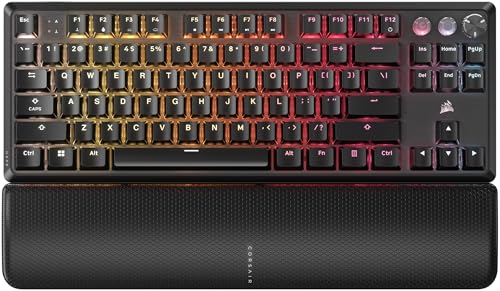
Corsair K70 PRO TKL — the magnetic flagship of a famous line
Badge: Best for competitive players who want a complete desk board
- Layout: tenkeyless (TKL), wired, RGB
- Switches: pre-lubed Hall Effect MGX Hyperdrive, adjustable
- Features: rapid trigger, simultaneous SOCD handling
- Keycaps: ABS double-shot
- Language/layout: QWERTY US
- Extras: K70-series media controls and aluminium build heritage
The K70 formula has always been completeness: a board that does not ask you to accept a missing media key, a flimsy frame or a gamer aesthetic that embarrasses a desk. The Pro TKL keeps that covenant and changes the engine. MGX Hyperdrive switches arrive pre-lubed — a detail the hobby will appreciate, because factory lubrication is the difference between a switch that feels finished and one that feels like a kit — and their magnetic sensing delivers the two behaviours competitive players now treat as table stakes: actuation set per key in software, and rapid trigger resetting keys at the first hint of release. In strafing-heavy shooters the combination is immediately legible: movement feels connected to intention with a directness that fixed-reset mechanical switches approximate but do not equal.
SOCD handling deserves its own sentence because it is the feature most likely to be misunderstood. When both opposing movement keys are held — an everyday accident in fast play — the keyboard must decide what the game receives. Corsair’s implementation resolves those conflicts cleanly (prioritising the latest input in the manner players expect), which removes a whole class of mushy, cancelled-out movements. One governance note, stated plainly: some competitive titles and leagues have rules about SOCD-style input cleaning, so check your game’s current stance before building your movement around it — the feature is a keyboard behaviour, and its legality is a rules question, not a hardware one.
Around the switches, the board is pure K70: an aluminium frame that does not flex under a frustrated palm, per-key RGB that can be tasteful or theatrical by profile, double-shot keycaps whose legends will not wear into ghosts, and the series’ media-control furniture that makes volume and playback a hand movement rather than a software visit. Wired-only will read as a limitation to the wireless generation, and for this board’s parish it is a position statement — consistency, zero latency variables, and a cable that tournament desks have never feared. Judge it as such: if your desk is a battlestation that also hosts your working life, the wire is invisible; if your keyboard travels between rooms, shop elsewhere in this guide’s wider family.
Strengths
- Complete magnetic feature set — adjustable actuation, rapid trigger, SOCD handling — in a premium, complete board.
- Pre-lubed switches and double-shot caps give a finished feel out of the box.
- K70 build and media controls make it a civilised daily driver, not just a match-day tool.
Trade-offs
- Wired only — no Bluetooth sofa life, no receiver-based desk-hopping.
- ABS keycaps, though double-shot, will shine with years of use where PBT would not.
- The feature depth lives in Corsair’s software ecosystem, which you must be willing to inhabit.
Best for: competitive FPS players with a fixed battlestation, K70 loyalists upgrading to magnetic, and players who want media controls on a tournament board. / Not suited for: wireless devotees, Mac-first desks (check the current listing’s platform notes), and tactile-switch purists.

SteelSeries Apex Pro TKL Gen 3 — the other magnetic flagship
Badge: Best alternative for OLED fans and SteelSeries households
- Switches: OmniPoint 3.0 adjustable magnetic (analog Hall Effect)
- Features: rapid trigger, Rapid Tap (SOCD), Protection Mode
- Display: OLED smart display
- Keycaps: PBT
- Connection: USB-C wired
SteelSeries wrote much of the magnetic playbook, and the Apex Pro TKL Gen 3 is its current flagship statement: OmniPoint 3.0 switches with fine-grained actuation adjustment, Rapid Tap for opposing-key handling, a Protection Mode that guards against accidental actuation on sensitive settings, and the line’s signature OLED display for on-board information and quick adjustments. Its PBT keycaps answer the K70 Pro’s one material concession. Choose between these two flagships on ecosystem and furniture: Corsair’s media-control completeness and K70 feel versus SteelSeries’ display, PBT and its own software world. Performance between them is a matter of tuning taste at a level where both are unambiguously competitive instruments.
Strengths
- OLED display is genuinely useful for settings and status at a glance.
- PBT keycaps for long-term texture and legend integrity.
- Protection Mode shows a mature understanding of hair-trigger accidents.
Trade-offs
- Also wired — the same battlestation-only parish as the Corsair.
- Its software ecosystem is a commitment of the same size as Corsair’s.
- Display is a delight you pay for whether or not you look at it.
Best for: SteelSeries households, OLED appreciators, PBT insistents. / Not suited for: buyers who want Corsair’s media wheel furniture or who are allergic to a second screen.

Corsair K70 CORE TKL — the mechanical sibling
Badge: Best for players who want the K70 shape with mechanical switches
- Layout: tenkeyless, wired, RGB
- Switches: pre-lubed MLX Red v2 linear mechanical, SOCD support
- Keycaps: ABS double-shot
- Build: sound-dampening layers, 1000Hz polling
The Core TKL is the control group in this experiment: the same K70 silhouette and desk manners, but with pre-lubed MLX Red v2 linear mechanical switches, sound-dampening construction and a friendlier position in the range. What you surrender is the magnetic layer — no per-key actuation tuning, no true rapid trigger — and what you keep is a smooth, quiet, finished-feeling mechanical board that many players, particularly those whose games do not reward rapid trigger, will honestly prefer. It is also the answer for buyers who like everything about the K70 Pro TKL except inhabiting another software platform to tune switches: the Core’s personality is fixed at the factory, in a good way, like a well-set-up instrument that simply plays.
Strengths
- Dampened, pre-lubed mechanical feel that is satisfying from the first keystroke.
- Simpler ownership: no actuation tuning to manage or mis-set.
- Same TKL completeness for the desk’s other twenty hours.
Trade-offs
- No adjustable actuation or rapid trigger — the competitive ceiling is lower in strafing-heavy titles.
- Linear-only character, like the magnetic boards, will not serve tactile lovers.
- Also wired, also ABS caps — the family resemblances persist.
Best for: mechanical loyalists, quieter-desk players, and anyone whose games do not tax reset speed. / Not suited for: players specifically shopping the magnetic advantage.
In this guide
Buying guide: magnetic TKLs without the marketing fog
Decide if your games pay for rapid trigger
Rapid trigger’s value is genre-denominated. Tactical shooters with counter-strafing mechanics pay in full; fighting games and rhythm titles pay well; MOBAs, MMOs and strategy titles pay in small change; single-player adventures pay in atmosphere rather than advantage. Audit your library before auditing keyboards — the K70 Pro TKL is a specialist instrument whose specialism your games must be able to spend.
Wired is a feature here, but know why
All three boards in this guide are wired, which tells you the category’s competitive consensus: at the level where actuation is measured in fractions of millimetres, nobody wants a battery or a radio in the argument. If your life needs wireless, the honest move is a different category (this site’s K2 HE coverage is the magnetic wireless alternative), not a wired flagship resented daily.
Software is the second product
With magnetic boards you buy a tuning platform as surely as a keyboard. Corsair’s iCUE and SteelSeries’ GG are both capable and both opinionated; whichever you choose will also court your other peripherals. Households already invested in one ecosystem should weight that heavily — peripheral unity is a real convenience, and switching costs are paid in evenings of re-learning.
Setting up the K70 Pro TKL
Step 1: Actuation in two passes
Start at a moderate actuation depth for a full day of mixed use. Then create a game profile with shallower actuation on movement and action keys only, leaving the rest of the board deliberate — the number one magnetic-board error is a globally hair-triggered keyboard that fires keys your palm brushes.
Step 2: Test rapid trigger deliberately
Open your main game’s practice range and spend ten minutes on counter-strafes and repeated inputs with rapid trigger on and off. The difference should be felt, not believed; if your title does not expose it, your money is buying headroom you may not need, which is useful knowledge for the return window.
Step 3: Check SOCD against your game’s rules
Confirm your primary title’s current position on SOCD-style input handling, set the board’s behaviour accordingly, and note the setting in your profile name. Rules in this area have moved before and may move again; a named profile is a two-minute adaptation instead of an evening of confusion.
Step 4: Media controls and lighting to taste
Set the media furniture up while you are in the software — volume behaviour, a lighting profile that is theatre for games and restraint for work — and save a work profile that makes the board office-civilised at one switch.
Common mistakes with competitive magnetic boards
The first is buying polling and actuation numbers as a substitute for practice; this class of board removes equipment excuses, which is its gift and its accusation. The second is leaving factory actuation untouched and concluding the technology is hype — the tuning session is not optional garnish, it is the product. The third is ignoring the keycap material over years: ABS double-shot legends are immortal, but the surface will polish with use, and players who hate shine should factor PBT replacements or the SteelSeries into the decision now. The fourth is cable neglect on a wired board — route it with slack, protect the connector, and the “limitation” of wired becomes the reliability it was designed to be.
Frequently asked questions
Is the K70 Pro TKL wireless?
No — it is a wired board by design, aimed at competitive consistency. If wireless is essential, look at magnetic boards built for it, such as the Keychron K2 HE covered elsewhere in this series, accepting their different layout and software world.
What are MGX Hyperdrive switches?
Corsair’s Hall Effect magnetic switches: a magnet and sensor measure each key’s position continuously, enabling adjustable actuation points and rapid trigger. They arrive pre-lubed for a smooth, finished feel, and their character is linear.
What does SOCD do, and is it allowed?
SOCD handling decides what happens when opposing direction keys are pressed together, resolving the conflict cleanly instead of cancelling your movement. Its acceptance varies by game and league and has changed over time — check your title’s current rules and configure the board to match them.
K70 Pro TKL or Apex Pro TKL Gen 3?
Both are magnetic flagships with rapid trigger and opposing-key handling. The Corsair leans on K70 completeness — media furniture, aluminium heritage, iCUE. The SteelSeries counters with an OLED display, PBT keycaps and its own ecosystem. Choose by ecosystem allegiance and by which furniture your hand will use daily.
Is the K70 Core TKL a downgrade?
It is a different instrument: mechanical switches, dampened build, no magnetic tuning. For players whose games do not reward rapid trigger, it may be the better purchase — simpler, quieter in character, and complete as a desk board. Downgrade is the wrong word; divergence is the right one.
Does the K70 Pro TKL work for typing and office work?
Yes, with a work profile: deepen actuation, tame the lighting, and the board becomes a handsome, complete TKL for the working day. Its switches are linear, so tactile devotees should audition before committing, as with every board in this guide.
How do I check whether rapid trigger or SOCD handling is allowed in my game?
Check before the match, not after a report. Tournament rules and individual game policies treat input-cleaning features differently, and they change, so read the current rules for the specific competition or ranked ladder you are entering rather than relying on what was permitted last season or in a different title. Set up a fully default profile with rapid trigger and SOCD behaviour disabled, label it clearly, and make switching to it part of your pre-match routine whenever the rules are silent or ambiguous. Practise on that default profile occasionally as well. A player whose movement collapses without software assistance has built a fragile skill, while a player who treats the features as a bonus keeps both the advantage where it is legal and the ability where it is not.
What desk setup does a wired tenkeyless board like this actually need?
Less than a full-size board demands, but the details matter because the cable is permanent. Route it from the rear with enough slack that the board can shift for typing and gaming positions without dragging, and keep the run clear of monitor arms and chair castors, which are the two things that actually destroy cables. Spend the space the missing number pad returns to you deliberately: a wider mouse area at a lower sensitivity is the competitive reason the layout exists, so do not let a desk organiser colonise it within a week. Keep the media controls within relaxed reach rather than centred for symmetry, set your chair height so your forearms sit level without a tall board forcing your wrists upward, and the tenkeyless format quietly delivers the ergonomic benefit it promised on paper.
The bottom line
The K70 Pro TKL succeeds at the hardest trick in peripherals: honouring a legacy while changing the engine. It is a complete, premium, media-friendly desk board that happens to contain a competitive magnetic instrument — and for the player whose battlestation is also their office, that combination, wired and unapologetic, is exactly the point.
The K70 name: a short history for buyers who remember
The K70 badge has been on competitive desks for over a decade, through mechanical generations that made it a default recommendation for players who wanted a board that felt like equipment. That history explains this model’s design conservatism: the aluminium, the media furniture, the refusal to chase miniaturisation trends. The Pro TKL’s wager is that the name’s constituency — players who keep a keyboard for years and expect it to anchor a desk — now wants magnetic performance without surrendering the furniture. It is a wager about loyalty as much as technology, and it shapes everything from the wired connection (the constituency never asked for wireless) to the double-shot caps (the constituency wears legends off lesser boards). New buyers without the history should read the board on its merits; returning owners should know their habits were the design brief.
Match-day workflow: profiles as a pre-game ritual
Serious players develop a pre-game ritual, and magnetic boards give the ritual new content. Five minutes before a session: confirm the game profile is loaded (actuation, rapid trigger, SOCD behaviour as your title’s rules currently stand), confirm the lighting profile that will not distract, set the media wheel’s behaviour for the evening’s music, and run thirty seconds of movement drills in a practice range to let your fingers re-meet the shallow actuation after a day of work-profile typing. The ritual matters because the board’s dual life is its risk as well as its virtue — a work profile carried into a match is a handicap nobody imposed but you. Treat profiles like football boots and house shoes: both yours, never confused, changed deliberately at the door.
Sound and feel: the linear question, answered for this board
All three boards in this guide are linear in character, and the K70 Pro TKL’s version of linear is the factory-lubed, dampened-by-build kind: a smooth stroke with a bottom-out that sounds like a decision rather than a clatter. Typists migrating from tactile boards should expect the same week of recalibration described in this series’ other magnetic reviews, with the same honest exit if the bump is missed. What the Pro adds is consistency across the board — large keys on stabilisers that behave, a spacebar that does not announce itself — which matters doubly on a board used for both prose and play, because sound is the one property both audiences judge. Streamers and call-heavy workers will find the board cooperative at normal microphone distances, provided the desk’s other acoustics are sane.
Ergonomics of the tenkeyless life
TKL is the competitive standard partly by fashion and partly by geometry: removing the number pad pulls the mouse hand toward the body’s centre, which over a six-hour session is a shoulder’s worth of difference. The K70 Pro TKL’s desk footprint keeps that benefit while retaining the full function row and navigation cluster that smaller boards sacrifice — a completeness that working players feel at 9 a.m. as much as gamers feel the footprint at 9 p.m. Pair it with a wrist rest if your desk height floats your wrists, keep the board’s feet flat unless your hands genuinely prefer the tilt, and remember that actuation depth is an ergonomic variable on magnetic boards: a shallower setting is less travel per keystroke, multiplied by a working life of keystrokes. Players with existing strain should treat that tunability as the board’s most underrated feature and set it with the same care as the gaming profiles.
The ecosystem decision, examined honestly
Corsair’s iCUE is the tollbooth on this board’s road: profiles, actuation, lighting and firmware all pass through it. For households already running Corsair fans, headsets or mice, the toll is already paid and the unity is a genuine pleasure — one application, one profile logic, one update rhythm. For a first Corsair purchase, budget an evening to learn the software’s geography, and know that the board’s core virtues (the switches’ feel, the build) do not depend on loving the app, only on visiting it. The SteelSeries alternative presents the identical bargain in a different livery, which is why this guide keeps returning the flagship decision to ecosystem allegiance: at this level, you are not choosing switches, you are choosing a household.
Durability and the tournament bag
A wired aluminium TKL is close to the ideal travelling competition board: no battery to swell or forfeit, no receiver to lose in a venue’s carpet, a frame that treats a bag’s knocks as weather. The ownership disciplines are the category’s usual ones — a hard case for travel, a cable with strain relief respected rather than yanked, keycaps pulled with a tool rather than fingernails when cleaning day comes. At home, the board’s weight keeps it planted through intense sessions, a small virtue that lighter boards counterfeit with rubber feet and hope. Expect the ABS caps to develop their shine over years; owners split into those who read it as patina and those who budget a PBT set as the board’s mid-life refresh, and both are right about their own desks. The switches’ contact-free sensing removes the classic mechanical failure of chatter from the board’s future, leaving the cable and the caps as the realistic wear items — a short list for a flagship.
What the numbers on the box do and do not promise
Competitive keyboards are sold with stopwatch language — polling rates, actuation fractions, latency claims — and a sceptical reading serves buyers better than either worship or dismissal. The honest summary is that the magnetic feature set (adjustable actuation, rapid trigger, clean SOCD resolution) produces differences players can feel in movement, while the headline rates mostly certify that the board will not be the bottleneck in a chain that includes a monitor, a game engine and a human. Buy the felt features, verify them in your practice range during the return window, and let the stopwatch numbers be what they are: evidence of engineering seriousness, not a promise of rank. The K70 Pro TKL withstands that reading comfortably, which is more than can be said for every board wearing competitive colours this year.
For the working player: office hours on a match board
The dual-life claim deserves a daytime audit. In office hours the Pro TKL’s virtues are the K70 classics: a complete layout that never sends you hunting for a function, media controls that respect a music-accompanied workflow, and a build that looks like it belongs in a professional room — with the RGB set to a work profile’s restraint, clients on calls will never know the board’s evening occupation. The linear switches at a deepened actuation make for fast, quiet-enough typing; the absence of a number pad remains the one occupational caveat, answered by the same advice as everywhere in this series — data-entry lives should buy data-entry layouts. Workers who game at lunch in the same chair will appreciate the profile switch as a genuine boundary ritual: work ends, the board changes its reflexes, and the afternoon’s spreadsheets stop haunting the evening’s strafes.
Troubleshooting the magnetic flagship
Keys firing from a resting hand mean the profile’s actuation is set for someone else’s fingers — deepen it per key, starting with the ones under your resting digits. Movement feeling inconsistent between sessions usually traces to a profile mismatch (work profile in a match) or to a game update that changed its own input handling; check the profile name first, the patch notes second, the hardware last. If SOCD behaviour seems to vanish, verify the feature’s setting survived a software update and re-confirm your title’s current rules position, because both move. Lighting and media quirks are iCUE’s parish — update it, and the board’s firmware with it, before suspecting the switches. A magnetic board that still misbehaves after profile, software and rules checks is a warranty conversation, and Corsair’s flagship support is part of the purchase.
The upgrade paths: from mechanical K70s and from budget boards
Two audiences arrive here with working keyboards. The mechanical K70 owner is owed a precise account of the difference: the Pro TKL will feel familiar in every dimension except the one that matters — the keys’ reflexes — and the upgrade is justified exactly when their games reward those reflexes, not by the calendar. Their old board remains a fine second-desk or hand-me-down instrument, and the family’s keycap and cable habits transfer. The budget-board upgrader faces a different revelation: not any single feature but the accumulation of finished details — lubed switches, stabilised large keys, a frame that does not flex, media furniture — that together change a keyboard from a peripheral into equipment. For that buyer the advice is to resist judging the board in the first evening’s novelty and to run the profile-tuning session properly, because the flagship’s value is concentrated in behaviours that defaults only advertise.
Gifting, teams and shared battlestations
Competitive gear is gifted constantly and chosen badly almost as often, so: the K70 Pro TKL is an excellent gift for a player whose main title rewards its feature set and whose desk is a fixed battlestation, and a poor one for a laptop-and-sofa player regardless of budget. Teams and gaming households sharing a station should exploit the profile system as a peace treaty — one profile per player, named, with actuation treated as personal as a sensitivity setting — because magnetic boards make per-player feel a software matter rather than a second purchase. Siblings sharing a board will still fight, but they will fight about screen time, not about whose keyboard settings these are.
Value: what the flagship premium buys in this category
Itemize the Pro TKL’s premium over competent mechanical TKLs and the bill is legible: magnetic switches with their tuning platform, pre-lubed finishing, the aluminium build, the media furniture and the flagship support line. Against the Apex Pro, the premium buys a different furniture set rather than a higher tier. Against its own Core sibling, it buys the entire magnetic layer. The value question is therefore unusually answerable: if your games spend the magnetic layer weekly, the premium is among the fairest in gaming peripherals; if they do not, the Core exists precisely to return the difference, and choosing it is not settling but shopping correctly. Flagship reviews rarely get to say that both answers are respectable — the K70 family’s structure, with a genuine mechanical sibling at a friendlier position, is what makes it sayable here.
A month of ranked evenings: the diary verdict
Week one is calibration and novelty — profiles built, actuation argued with, the practice range visited like a gym. Week two is where the board’s claim is actually tested, because novelty has expired and the movement either feels like an extension of intention or it does not; for strafing-heavy titles, the diary entry writes itself in the first clean counter-strafe that a mechanical board used to smear. Week three exposes the dual life: work profiles by day, match profiles by night, and the one evening the wrong profile rode into a match becomes the story that teaches the ritual. Week four is the quietest and the most telling — the board has stopped being reviewed and started being used, its media wheel worn smooth in habit, its cable forgotten, its name unmentioned in the post-game analysis because the equipment finally is not part of the story. Competitive gear aspires to exactly that invisibility, and the K70 Pro TKL reaches it on the schedule of a well-run month.
The spectator’s question: will anyone watching notice?
Streaming and content creation give flagship boards a second audience, and the Pro TKL plays to it in the ways that matter: a handsome, complete deck that photographs like a professional setup, per-key lighting that can carry a channel’s colours, and a sound profile that does not fight the microphone for the audience’s attention. Creators should still run the streamer checks — microphone placement relative to the board, a talk-profile with deeper actuation for quieter keys — but the starting point is strong. In an era when a keyboard is furniture in someone else’s living room via a stream, the K70’s decade of looking the part is a feature with a revenue line attached, and it is fair to count it.
Final scoring, in words rather than numbers
Switches: magnetic, lubed, tunable — the modern competitive standard, finished properly. Features: rapid trigger and SOCD handling present and configurable, with the rules caveat honestly attached. Build: K70-grade aluminium completeness with media furniture intact. Daily life: a wired, handsome TKL that works as hard as it plays. Value: flagship-fair for the player whose games spend its specialisms; the Core sibling guards everyone else’s wallet. The K70 Pro TKL is not a revolution wearing a famous name — it is the famous name, evolved, and for its constituency that is precisely the product they were waiting for someone to make.
The decision in one sitting
Answer three questions and the choice among this guide’s three boards is made. Do your main games reward rapid trigger and clean opposing-key handling? If no, the Core TKL is your board and this review congratulates your restraint. If yes, does your household already live in SteelSeries’ ecosystem, and do you want an OLED and PBT enough to change flags? If yes, the Apex Pro Gen 3. If no — if you want the complete K70 furniture, Corsair’s tuning world and a name your desk may already trust — the K70 Pro TKL is the magnetic flagship with your name, almost literally, on it.
LANs, dorms and other places the board will actually go
The wired TKL’s natural habitats beyond the home desk deserve a paragraph each in miniature. At a LAN, the board is the zero-negotiation citizen: plug in, load the profile, play — no pairing, no battery audit, no receiver lost to the venue’s floor. In a dorm, its completeness cuts both ways: the media furniture serves a room that is bedroom, office and cinema in one, while the wired tether keeps it honest in a space where wireless peripherals multiply beyond any router’s patience; the work profile’s lighting restraint is a roommate courtesy worth programming. In a shared family gaming room, the profile system and the board’s planted weight keep it the station’s anchor rather than another peripheral in the migration pattern. Each habitat rewards the same properties — completeness, consistency, plantedness — which is another way of saying the K70 formula was never really about a desk; it is about a station, wherever the station is.
What could still be better
The honest debit column: a wireless option would widen the parish without diluting the wired flagship’s identity, and its absence is a choice some buyers will vote against. PBT keycaps at this tier would end the shine conversation before it starts. The software, capable as it is, remains a second operating system to learn on top of the keyboard itself, and the category will not be mature until tuning a switch feels as simple as turning a volume wheel. And the SOCD conversation — powerful, useful, and governed by other people’s rulebooks — deserves clearer in-box guidance than any manufacturer currently gives it. None of these debits overturn the review’s verdict for the board’s intended player; all of them are the honest price list attached to its considerable virtues, printed here so the purchase is made with both columns open.
The practice-range protocol: verifying the flagship in your hands
Because magnetic advantages are felt rather than photographed, new owners should run a verification protocol inside the return window. Session one: movement drills — counter-strafes, alternating taps, repeated casts — with rapid trigger on and off, scored by feel and by any in-game counter your title offers. Session two: an actuation ladder, where movement keys descend a step per match until accidental activations appear, then rise one step and settle — your personal depth, found empirically. Session three: a full working day on the work profile, judged on error rate and end-of-day hand fatigue against your previous board. A K70 Pro TKL that wins sessions one and three has proven its dual claim in the only laboratory that matters. One that wins neither is a return made rational by evidence — and the protocol, not pride, should make that call.
Cleaning, care and the five-year desk
Flagships earn their keep across years, and the care rhythm is light: a seasonal keycap pull and crumb excavation, a cloth for the aluminium, compressed air for the switch field, and hands off the sensors’ internals — magnetic platforms want dust removed, not lubricants added by amateurs, since the factory lube is part of the product you bought. The cable deserves the same respect as the board: no sharp desk-edge bends, no yanking by the cord, a spare sourced before the original fails if the board travels. Firmware updates arrive through the software and should be applied at calm moments, with profiles exported first as a matter of household discipline. A K70 Pro TKL kept this way has no scheduled obsolescence in it — its replacement, when it comes, will be a choice rather than a rescue, which is the definition of a flagship that did its job.
The sceptic’s corner: three challenges, answered
“It is a mechanical board with extra steps.” The steps are the product: actuation and reset behaviour that fixed switches cannot offer, felt in the first practice range by any player whose game taxes them — and skippable, via the Core, by every player whose game does not. “Wired is a downgrade in this decade.” For a fixed competitive station, wired is the elimination of variables, and the constituency for this board has voted for that elimination with a decade of tournament desks. “The software is the real product and the board is its dongle.” The board’s build, switches and furniture exist and excel with the software closed; the software unlocks tuning, it does not rent you the keyboard. Scepticism answered, the remaining question is the one this review opened with — whether your desk is the dual-life station this board was built to anchor — and by now you know your desk.
Accessibility and different hands
Magnetic tuning has an accessibility dimension that deserves more than a footnote. Players whose hands tire quickly, or whose motor control makes deep, forceful keystrokes costly, can set actuation so shallow and light that the board responds to intention rather than effort — a genuine widening of who can play comfortably at a high level, achieved in software rather than by specialist hardware. Conversely, players prone to accidental presses can deepen actuation beyond any mechanical board’s fixed point, buying certainty. Parents setting up a first serious board for a young player can use the same dials to build forgiving defaults that tighten as skill grows. These uses rarely headline a gaming keyboard’s marketing, and they may be the most durable argument for the technology itself: a keyboard whose feel is a setting is a keyboard that can meet more hands where they are.
Where the category goes next, and why this board will age well in it
Magnetic keyboards are mid-leap: analogue reporting, per-application automatic profiles and ever finer actuation control are arriving through the same sensor platforms this generation established. A board bought now should therefore be judged partly on its update path and its maker’s attention, and Corsair’s flagship line is maintained with the seriousness its price promises. Even if the frontier moves, the K70 Pro TKL’s fundamentals — build, layout, furniture, the felt advantage of rapid trigger — are not the kind that expire; they are the kind that become the baseline the next frontier is measured against. Buy it for today’s games with confidence, and let tomorrow’s firmware be interest on a sound principal.
The one-sentence version, for the reader in the queue
If your battlestation is fixed, your games are movement-hungry, and you want your competitive keyboard to be a complete piece of desk equipment rather than a stripped plank with lights, the K70 Pro TKL is the magnetic flagship that was designed around your exact life — wire, wheel, aluminium and all.
Second-hand sense for a flagship board
Flagship keyboards hold value, and the used market for K70s is perennial — with magnetic-specific checks now added to the usual ones. Beyond the standard inspection (every key firing, stabilisers calm, cable and connector sound), a used magnetic board should be tested for its tuning: open the software, move an actuation slider, and confirm the board responds and remembers; confirm rapid trigger toggles as expected; and factory-reset the profiles so the previous owner’s settings do not haunt your first week. Keycap shine on a used ABS set is cosmetic and priced accordingly. A verified used Pro TKL is a rational route into the magnetic tier, and the board’s build quality is precisely what makes the route rational — equipment-grade objects survive their first owners gracefully.
Desk setup around the board: mouse space, monitors and the TKL dividend
A TKL purchase is really a desk-geometry purchase, and the dividend should be spent deliberately. The reclaimed width belongs first to the mouse: a larger pad, a lower sensitivity with room to use it, and a shoulder that stays neutral through long sessions. Second, it belongs to the desk’s other citizens — the notebook, the phone stand, the coffee that previously lived in the mouse’s territory and caused the incidents everyone remembers. Players who buy a TKL and leave the space empty have bought half the product; the K70 Pro TKL’s completeness (function row retained, navigation retained) means the space was bought without selling capability, which is the entire tenkeyless argument in one sentence. Set the desk up as if the layout were a decision, because it was.
Closing note: equipment, not ornament
The highest compliment this category can pay is that a board becomes equipment — trusted, maintained, unmentioned in victory and defeat alike because it was never the variable. The K70 Pro TKL is built, tuned and furnished to become exactly that for the dual-life desk, and its famous name turns out to be less a marketing inheritance than a standard it has to meet every evening. On the evidence of its switches, its build and its completeness, it meets it.
A last check: the three profiles every owner should build
Leave this review with homework that pays rent. Build the Match profile (shallow movement keys, rapid trigger on, SOCD set to your title’s current rules, lighting that informs rather than distracts). Build the Work profile (deeper actuation, restrained lighting, media furniture tuned for calls and focus music). Build the Guest profile (factory-sane defaults at moderate depth) for the friend, sibling or colleague who sits down at your station — because a magnetic board at someone else’s hair-trigger settings is an ambush, and hospitality is a profile away. Three profiles, twenty minutes, and the K70 Pro TKL’s dual-life promise becomes a switch you can throw rather than a claim you have to trust.
Why the wire will not embarrass you in five years
Every few years a peripheral category declares cables dead, and every few years the tournament stage — the one place where excuses are audited — keeps its cables. The K70 Pro TKL’s wire belongs to that audit culture: it is the connection that cannot be interfered with, run flat, or left in another room, and in five years it will work exactly as it does tonight, which is more than any battery in this guide can promise. Wireless has its own genuine parish, covered elsewhere in this series; this board’s parish is the fixed station, and within it the wire is not the past. It is the point.
The household verdict: living with a tournament board
Non-playing household members get a vote on any object this prominent, and the Pro TKL usually wins it: it looks like serious furniture rather than a toy, its work profile keeps its light civilised, and its sound at typing distance is a murmur rather than a mechanical clatter — the linear, lubed, dampened character paying a domestic dividend. The one negotiation is the desk’s cable, which wants a routed path rather than a drape. Households that run a battlestation in shared space should treat that negotiation as part of the purchase, because a flagship that the household resents will be exiled to a drawer regardless of its actuation figures — and exiled flagships win no matches at all.
Inventory of a correct decision
When the K70 Pro TKL is the right purchase, the evidence accumulates quietly: a practice range that feels connected, a workday that never thinks about the keyboard, a media wheel worn into habit, a cable forgotten, a profile switched without looking. When it is the wrong purchase, the evidence is equally clear and equally early — a wire resented daily, a game library that never spends the features, a hand that misses its bump. Both verdicts arrive within the return window of a well-bought flagship, which is why this review has insisted on protocols and practice ranges rather than impressions. Run them, believe them, and keep or return the board as the evidence instructs.
Postscript: the name on the box, earned nightly
Brand lineages in gaming hardware usually decay into nostalgia licences. The K70’s has survived by repeatedly changing its engine while keeping its manners — mechanical to optical fashions, now to magnetic sensing — and the Pro TKL is the current proof. If it earns its place on your desk, it will do so the way its ancestors did: not by being talked about, but by being there, complete and consistent, on the thousandth evening as on the first.
Before you check out: the final three confirmations
Confirm the layout matches your region and language. Confirm your main title’s current rules on opposing-key handling, and your willingness to configure the board to match them. Confirm that a wired, tenkeyless, linear board is the shape of your station’s life — not the shape of a station you admire in photographs. Three yeses, and the flagship is yours with this review’s blessing.


