Disclosure: As an Amazon Associate, reviewstook.com earns from qualifying purchases. Links on this page are affiliate links; they cost you nothing extra. Prices and availability change often, so check the current Amazon listing before you buy.
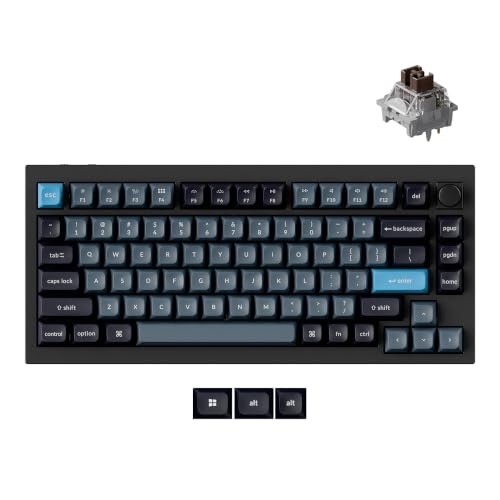
This keychron q1 pro review looks at the aluminium 75 percent board that has become the default answer when someone asks for one premium keyboard to do everything at a desk. The Q1 Pro combines a CNC-milled metal case, a gasket-mounted plate, hot-swappable switches, PBT keycaps, a rotary knob, and Bluetooth wireless in a layout that keeps the function row and arrow keys while surrendering the number pad. Below, it is examined on its own merits, then set against its two closest relatives, the magnetic-switch Q1 HE and the Q1 Max, so you can see exactly which Q1 your desk is asking for.
The Q1 Pro’s reputation rests on a simple claim: that a ready-made keyboard can deliver the feel enthusiasts used to build for themselves. This review tests that claim where it matters, in the typing feel, the sound, the wireless manners, the remapping depth, and the small daily behaviours that decide whether a premium board earns its premium across years rather than across an unboxing.
Key takeaways
- The Q1 Pro is a full-aluminium, gasket-mounted 75 percent keyboard with hot-swappable switches, PBT caps, a knob, and Bluetooth plus wired modes.
- Its typing feel is the headline: soft at the bottom of the stroke, deep in sound, and stable in a way plastic boards cannot imitate.
- Bluetooth suits multi-device desks; there is no 2.4 GHz receiver, so competitive wireless gaming is not its arena.
- The Q1 HE trades mechanical switches for magnetic Hall Effect ones with rapid trigger for gamers; the Q1 Max adds a 2.4 GHz mode and VIA support refinements.
- It is heavy and proud of it. Buy it for a desk that stays put.
In this guide
How the picks were chosen
The main pick is the verified Keychron Q1 Pro listing in its Apex Brown tactile configuration, the setup we would hand to the widest range of buyers. The alternatives are the Q1 HE, whose magnetic switches serve a different purpose, and the Q1 Max, which extends the same idea with an additional wireless mode. All three were verified against current catalogue data for this review, each is labelled as its own model wherever it appears, and the comparison sections explain the differences rather than blurring them. Current figures live behind the check-price links, because printed prices go stale.

Keychron Q1 Pro: the main review
Best for one-desk professionals who type all day
- Layout: 75 percent, function row, arrow keys, rotary knob
- Case: full aluminium, double-gasket mounted plate
- Connection: Bluetooth 5.1 and USB-C wired
- Switches: hot-swappable, Apex Brown tactile configuration reviewed
- Keycaps: double-shot PBT, south-facing RGB backlighting
- Software: QMK-based remapping with launcher support
The first thing the Q1 Pro teaches your hands is what its case is for. Aluminium at this thickness does not flex, does not creak, and does not move, so every keystroke happens on a foundation that feels geological. Into that foundation the gasket mount introduces the one softness in the design: the plate floats, and the bottom of each keystroke lands with a small, forgiving give. The combination, rigid outside and cushioned inside, is the board’s whole character, and it is immediately, almost unfairly pleasant compared with the hollow tap of a plastic board.
Sound follows the same recipe. The Q1 Pro speaks in a low, muted register, a soft thock on the letter keys and a deeper note on the space bar, with none of the ping or rattle that betrays cheaper construction. In a home office it is a pleasure; in a shared office it is a good citizen; on a call it stays beneath notice. Owners upgrading from mainstream boards consistently name the sound as the thing they could not go back from, ahead of any feature on the box.
The layout deserves its own praise for what it refuses to surrender. The function row is real, the arrows are real and findable by touch, and the knob sits where a finger can reach it without a expedition. Navigation keys share space through layers, which takes a week to internalise and then stops being a topic. For writers, programmers, and general professionals, this is the compact layout with the fewest daily apologies, and the Q1 Pro executes it in the best materials its brand offers.
Wireless behaviour is the board’s one deliberate compromise. Bluetooth pairing is stable across its devices, the swap between machines is quick, and wake from sleep is prompt. What the Pro does not offer is a low-latency receiver, so its wireless mode is a typing connection: excellent for work, fine for casual play, and not the tool for competitive gaming. Wired, the board is responsive and complete, and many owners simply cable it for game nights and unplug it for the working week, a rhythm the board supports gracefully.
Remapping is where the Q1 Pro quietly outclasses most ready-made boards. Its QMK foundation and launcher support let you move keys, build layers, assign the knob to the control your software begs for, and store it all on the board. An hour spent here in the first fortnight pays rent for years, because the board stops being a standard layout you adapt to and becomes your layout, full stop. Mac and Windows support is handled with the brand’s usual keycap sets and toggle, so a dual-system desk loses nothing.
Strengths
- Superb typing feel and sound from the aluminium gasket design
- Complete 75 percent layout with knob, hot-swap sockets, and PBT caps
- Deep, on-board remapping that makes the layout genuinely yours
Trade-offs
- No 2.4 GHz receiver, so wireless gaming stays casual
- Substantial weight rules out travel for most owners
- Premium tier, especially against the wired Q1
Best for: professionals who type for a living at one desk and want their keyboard to feel like it. Not suited for: competitive wireless gamers and commuters.

Keychron Q1 HE: the magnetic alternative
Best for gamers who want the Q1 shape with rapid trigger
- Layout: 75 percent in the Q1 family shape
- Switches: Gateron double-rail magnetic Hall Effect, hot-swappable within the magnetic family
- Features: rapid trigger and adjustable actuation
- Connection: 2.4 GHz, Bluetooth 5.2, and wired modes
- Software: QMK launcher configuration
The Q1 HE keeps the Q1’s aluminium silhouette and changes its soul. Magnetic switches sense key position continuously rather than at a fixed point, which enables rapid trigger, where a key resets the instant it starts rising, and adjustable actuation, where you choose how deep a press must go. For fast-paced gaming those are real advantages, felt most in repeated strafing and rapid corrections. The HE also adds the 2.4 GHz connection the Pro lacks, completing its gaming brief.
The trade is feel and ecosystem. Magnetic switches type with a smooth, linear character that many writers find less satisfying than a good tactile mechanical switch, and the replacement switch market for magnetic boards is narrower. Buy the HE because you game seriously, not because it is newer; for a typing-first desk the Pro remains the better instrument, a judgement this review makes without hesitation.
Strengths
- Rapid trigger and adjustable actuation for competitive play
- Tri-mode wireless including the low-latency receiver
- Same premium aluminium build as the Pro
Trade-offs
- Linear magnetic feel will not please tactile typists
- Narrower switch ecosystem than mechanical boards
- Gaming features are wasted on a typing-only desk
Best for: gamers who also want a premium desk board. Not suited for: writers who type for feel.

Keychron Q1 Max: the fully-loaded alternative
Best for buyers who want every connection the Q1 shape can offer
- Layout: 75 percent with knob, full aluminium case
- Connection: 2.4 GHz, Bluetooth, and USB-C wired
- Switches: hot-swappable, Jupiter Banana tactile configuration in the verified listing
- Polling: high-rate polling in its performance modes
- Software: QMK and VIA remapping
The Q1 Max is the Q1 with the connectivity question answered completely: a 2.4 GHz receiver joins Bluetooth and wired, so the same board can type wirelessly at the desk and play wirelessly in the evening without compromise. Its Banana tactile switches give a rounder, more pronounced bump than the Pro’s brown configuration, which some typists prefer outright. If your objection to the Pro was specifically its Bluetooth-only wireless, the Max is the model that removes it while keeping the mechanical switches the HE exchanges away.
Strengths
- Complete tri-mode wireless in the Q1 aluminium shape
- Mechanical hot-swap switches with a distinctive tactile option
- High polling rates for wired and receiver play
Trade-offs
- The most premium tier of the three Q1s here
- Still a heavy, desk-bound board
- Feature set exceeds what a pure typist will ever use
Best for: mixed work-and-play desks that want one board, wirelessly, for both. Not suited for: buyers for whom the Pro already answers everything.
Keychron Q1 Pro Review: Pro, HE, or Max?
The three Q1s divide by connection and switch philosophy, and the division is clean once stated plainly. The Pro is the typist’s board: mechanical switches, Bluetooth for the multi-device desk, and the line’s signature feel at the most accessible premium tier of the three. The HE is the gamer’s board: magnetic switches, rapid trigger, and a receiver, bought for advantages that only appear in fast play. The Max is the completist’s board: mechanical switches plus every connection, for the desk that refuses to choose between work and play.
Choose wrong and the penalty is mild, because all three are excellent aluminium keyboards; choose right and the board disappears into your routine in the way the best tools do. Our broader Keychron Q series guide places the Q1 among its differently-sized siblings if your layout answer is still open, and our Keychron Q2 Pro daily-driver coverage covers the same decision one size down.
Buying guide for the Q1 Pro
Start by confirming the desk. The Q1 Pro rewards a permanent, reasonably spacious workstation and punishes, with its weight, any plan that involves carrying it. Measure your mouse territory with the board’s footprint in mind; 75 percent is compact, but this is a dense, tall compact, and a cramped right side will tax your shoulder more than any switch choice will please your fingers.
Switch configuration comes next. The Apex Brown tactile setup linked above is the versatile default: defined enough to teach economical typing, quiet enough for shared rooms, and characterful enough to justify the board’s feel-first reputation. Linear configurations suit gamers and light-touch typists; the Max’s Banana tactile suits those who want a firmer bump. Because the board is hot-swappable, treat the first set as a starting point and budget, mentally, for one experiment in the first year.
Finally, decide how you will actually connect. If your desk is one computer, the Pro’s Bluetooth is a tidiness feature and its wired mode a gaming feature, and that is enough. If your desk is two computers and a games library, read the Max section again before ordering, because retrofitting a receiver habit onto a Bluetooth board is not possible. The honest connection audit, done now, is the difference between the right Q1 and the almost-right one.
How to configure a Q1 Pro in its first week
Day one is for typing, not tinkering. Unbox the board onto a mat, pair it or cable it, and run a full key test, including the knob’s rotation and press. Type your real work. Keep a short list of the reaches that annoyed you and the controls you wished for; that list, and only that list, is your configuration agenda.
Later in the week, open the launcher and work the list. Put your most-missed navigation keys where your fingers looked for them, assign the knob to volume, zoom, or scrubbing according to your applications, and consider a layer for your most-used shortcuts and phrases. Store everything on the board so it travels between your machines. Readers replacing stabilisers or reseating the space bar during a deep clean should follow the stabiliser installation walkthrough and work gently; gasket-mounted large keys reward patience.
Maintenance thereafter is minimal: a weekly wipe, a monthly shake-out of crumbs, caps pulled and cleaned when they need it, and switches swapped with a puller whenever curiosity or wear suggests. The aluminium case will outlast several sets of everything attached to it, which is rather the point of buying it.
Common mistakes with premium 75 percent boards
The first is buying the feel and forgetting the footprint. A Q1 Pro on a shallow desk, pushed against a monitor stand with the mouse exiled to a corner, will be blamed for an ergonomic problem that belongs to the furniture. Give the board the desk it was designed for, chair height included, before judging its comfort.
The second is leaving the board at stock settings forever. A Q1 Pro unconfigured is a lovely keyboard and a fraction of itself. The remapping and the knob exist to be taught your habits; owners who skip that evening routinely underrate the board they bought, through no fault of the board’s.
The third is expecting receiver-grade wireless gaming from a Bluetooth board, and the fourth is its mirror: dismissing the board for gaming entirely, when wired it is responsive, remappable, and entirely capable for all but the most latency-obsessed play. Both errors come from reading the connection line carelessly, which is why this review has stated it in every section. Gamers whose evenings are competitive and wireless should start from our roundup of wireless mechanical keyboards and arrive at the Q1 family, via the HE or Max, with open eyes.
The Q1 Pro at work: three professions report
For the writer, the board’s gifts compound quietly. The soft landing reduces the percussive fatigue of a long drafting day, the tactile switches pace keystrokes without demanding attention, and the knob, remapped to scrolling or volume, becomes a small fidget with a job. Writers tend to keep stock keycaps longest, because the board’s feel is the purchase and the feel arrives complete.
For the programmer, the gifts are configurational. Layers put navigation and symbols under the home row, the knob scrubs timelines and zooms editors, and the on-board memory means the same layout greets you on the work machine, the home machine, and the borrowed machine. Programmers also exploit the hot-swap sockets most, tuning switch weight per finger in a way that sounds eccentric until you try it on a board that makes it easy.
For the designer and editor, the knob is the headline and the colour of the case is not far behind. A rotary control mapped to brush size, zoom, or playhead turns two-handed shortcuts into one-handed flow, and the board’s substantial, finished look suits a studio desk. These users also benefit most from the PBT caps’ resistance to shine, since their boards are seen as much as they are typed on.
Ergonomics and the tall-board question
A premium aluminium board is a tall board, and the Q1 Pro asks the usual tall-board questions of a workstation. Chair height should let forearms float level with the keys; the board should sit close enough that elbows stay near the body; a rest, if used, is for pauses rather than for typing from. Set up with that care, the gasket’s softness becomes an ergonomic feature in its own right, softening thousands of landings a day. Set up carelessly, the same board will be blamed for a desk’s geometry, as every tall board is.
Owners with existing wrist sensitivity should trial the board across a full working week rather than an afternoon, because the gasket feel changes how the day accumulates in the hands, and that change only shows across days. This is comfort advice, not medical advice; persistent pain deserves a professional’s attention and a workstation review, not a keyboard review’s optimism.
How the Q1 Pro ages
Five years with a Q1 Pro looks, by owner accounts, reassuringly boring. The case keeps its finish, the caps resist shine, the knob stays tight, and the switches, being replaceable, never get the chance to end the board’s life. The battery will fade as batteries do, and Bluetooth standards will drift, but the board’s core proposition, its feel, is mechanical and therefore durable. Premium pricing is easiest to justify on exactly this curve: a high cost divided by a long, satisfying service life.
That durability also sustains a healthy used market. A second-hand Q1 Pro in good order is a rational way into the line at a gentler tier, provided the buyer verifies the model name precisely, tests the knob and every key, and confirms which switch configuration is fitted. The board’s toughness means good used examples are common, and its remapping means a previous owner’s layout can be reset to stock in minutes.
The sound of money well spent: acoustics in detail
Keyboard sound is usually discussed as taste, but on the Q1 Pro it is closer to engineering. The aluminium case contributes mass, which lowers the pitch of every impact and shortens its decay. The gasket mount contributes isolation, so the plate’s vibration does not ring the case like a bell. The PBT caps contribute a denser, duller strike than thin caps produce. Together they yield the board’s signature: a low, brief, woody note that stays pleasant at typing speed and never develops the rattle or ping that makes long sessions in quiet rooms tiring.
Owners can tune that sound more than most ready-made boards allow. Switch choice changes the attack, a desk mat changes the resonance of the whole setup, and the case can be opened by the confident to experiment with the damping materials inside. None of this is required; the board sounds finished from the box. But the headroom exists, and it is part of why the enthusiast community adopted a mainstream product as one of its own.
Backlighting, legends, and the working dark
The Q1 Pro’s south-facing RGB backlighting orients its light toward the typist, which makes legends readable in a dim room without glaring across it. South-facing sockets also accept the widest range of aftermarket keycaps without interference, a practical detail that matters the first time an owner falls for a cap set. In daylight the lighting is decoration; at night it is a tool, and the board’s per-key control through its software lets you run it as either, at brightness levels that respect both your eyes and, on Bluetooth, your battery.
Legend quality on the stock PBT caps is crisp and durable, since the characters are formed in the plastic rather than printed on it. Owners who type by touch will rarely look at them; owners who hunt and peck on symbols will appreciate that the legends will outlast the board’s first set of switches. Small mercies, reliably delivered, are the texture of a premium product.
Battery behaviour on the Pro
Wireless life on the Q1 Pro follows the rule of its class: backlight discipline decides the interval between charges. Run the lighting modestly and the board goes a long stretch of working weeks between cables; run it brightly as a desk ornament and you will meet the cable sooner. The board charges over the same USB-C connection it types through wired, so the charging cable is never a special object to hunt for, and a weekly top-up rhythm, aligned with a Friday tidy of the desk, keeps the question permanently boring, which is where battery questions belong.
Standby behaviour is well mannered: the board sleeps when idle and wakes promptly on the first keystroke, occasionally swallowing that first character in the way of its generation of Bluetooth boards. Owners who find that irksome usually adopt the habit of tapping a harmless key to wake the board before typing in earnest, a two-second ritual that becomes invisible within a week.
The Q1 Pro against the wider premium field
Premium 75 percent boards are a crowded parish now, and the Q1 Pro’s position in it rests on completeness. Rivals may beat it on a single axis, a lighter case here, a faster receiver there, a more exotic mounting system somewhere else, but few match its whole hand: aluminium, gasket, hot-swap, PBT, knob, dual-system keycaps, deep remapping, and Bluetooth, in one box, at its tier, with this depth of owner documentation behind it. Completeness is an unglamorous virtue that ages well, because a board bought for one superlative can disappoint when your priorities rotate, while a board bought for balance keeps serving each new priority as it arrives.
That balance also explains the board’s role as a recommendation. Asked for one premium keyboard by someone whose work and tastes are only loosely described, experienced owners name the Q1 Pro because it is the hardest Q-shaped answer to regret. Its known limitations, weight and Bluetooth-only wireless, are the kind a buyer can evaluate from a listing, unlike feel, which must be trusted to reviews. This review has tried to make that feel legible: soft landing, low voice, geological stability. If those three phrases sound like your desk, the trust is well placed.
What we would change
A review that finds nothing to improve is a brochure, so here is our list. A 2.4 GHz receiver would close the board’s only functional gap, and the Max proves the brand can do it in this shape. A battery indicator with more granularity than optimism would help wireless owners plan. And the stock cable, adequate as it is, undersells a board of this finish; a braided, right-angled cable would match the object it serves. None of these wishes overturns the verdict. They are the wishes of reviewers who have spent long enough with the board to start furnishing it, which is its own kind of endorsement.
A month in: the long-exposure review
Premium keyboards photograph well on day one and reveal themselves across a month, so it is worth recording what the longer exposure shows on the Q1 Pro. The first week is novelty: the sound, the weight, the knob’s detents. The second week is configuration, as the remapping settles and the board starts anticipating its owner. The third and fourth weeks are the verdict, and the verdict is disappearance: the board stops being reviewed and starts being used, its qualities absorbed into the background of the work like good lighting in a studio.
What remains noticeable at a month is comparative. Type on a mainstream board after a month on the Q1 Pro and the mainstream board feels insubstantial in a way that is hard to un-feel: lighter in the hand, louder in the room, harder at the bottom of every stroke. That contrast, more than any specification, is what owners are paying for, and it is why the board’s resale values stay healthy. The Q1 Pro does not merely add features to a desk; it raises the desk’s standard for what a keyboard is, and standards, once raised, are sticky.
The honest caveat to the long exposure is adaptation cost in the other direction. A hand trained on the Q1 Pro’s soft landing may find the first days back on any lesser board genuinely unpleasant, which matters for people who type on several machines in several places. Standardising on one board, or accepting the contrast as the price of a home standard, are the two sane responses; the board itself cannot solve a problem it creates by being good.
Desk companions: what pairs with a Q1 Pro
A board of this character flatters certain companions. A wide desk mat gives its weight a grippy, quiet stage and unifies the setup visually. A pointing device with some substance, a full-size mouse or a trackball, balances the board’s presence better than a featherweight travel mouse does; our Kensington Expert trackball review covers the stationary classic of that kind. A monitor arm that clears the desk surface completes the scene the Q1 Pro was designed for: few objects, each deliberate, none of them rattling.
What does not pair well is clutter and compromise elsewhere. The board’s finish exposes a shabby desk the way a good suit exposes worn shoes, and owners frequently report a small cascade of tidying after its arrival. Budget a mat and a cable tidy into the purchase if your desk needs them, and the Q1 Pro will look like the beginning of an intentional workstation rather than a jewel in a junk drawer.
The buying decision, compressed
Everything above compresses into four questions. Is your desk settled enough for a heavy board? Is your typing serious enough, in hours per day, to feel a premium board’s difference? Is your wireless need about tidiness and multiple machines rather than competitive latency? And will you spend one evening configuring the board to your habits? Four yeses describe the Q1 Pro’s ideal owner so precisely that the purchase becomes a formality. A no on the third question redirects you to the Max or HE with this review’s blessing; a no on the first or second suggests the money will work harder elsewhere in your setup.
That compression is deliberate. Premium products attract decorative deliberation, and the Q1 Pro’s actual decision is refreshingly mechanical. It is a superbly made typing instrument with one named wireless limitation and one named physical commitment. Match those two facts to your life and the rest, switch flavour, case colour, knob assignments, is the enjoyable fine print of ownership rather than the substance of the choice.
It is also worth saying, before the verdict, that the Q1 Pro has become a reference point beyond its own sales. Other boards are described as Q1-like, comparisons use it as the premium baseline, and its formula, aluminium plus gasket plus hot-swap plus knob, reads like a checklist because this board and its siblings wrote the checklist. Buying a reference point has a practical benefit beyond status: every question you will ever have about it has been asked and answered by an enormous owner community, and every accessory market stocks for it. Novelty is exciting; documented excellence is useful, and usefulness compounds.
Newcomers to premium boards sometimes worry that a product this configurable will demand constant attention, and the fear deserves a direct answer. The Q1 Pro can be used, happily and completely, at its stock settings from the day it arrives; the configuration depth is an invitation, not a curriculum. Many owners remap nothing for months and then change exactly one key, the one that has been quietly annoying them, and find the board’s reputation for depth justified by that single, easy fix. Depth that waits politely until needed is the best kind, and it is the kind this board offers.
Gift, upgrade, and first-premium scenarios
Three buying scenarios recur for this board, and each has a wrinkle worth knowing. As an upgrade from a mainstream mechanical keyboard, the Q1 Pro is the rare purchase whose improvement is felt in the first sentence typed; budget the wrist-rest conversation and a mat, and the upgrade is complete. As a first premium board, it is a safe harbour: complete, documented, and forgiving of configuration mistakes because everything can be reset. As a gift, choose the tactile configuration, include the mat you would want yourself, and expect the recipient to mention the keyboard in conversation for an unseemly number of weeks.
In all three scenarios the same acceptance routine applies on arrival: every key tested, the knob turned and pressed, both connection modes proven, the layout toggle set for the main machine. Ten minutes of method at the start is what separates the owners with a five-year board from the owners with a returns story, on this product as on every product in this cluster of reviews.
One more constituency should hear from this review directly: the buyer cross-shopping the Q1 Pro against a cheaper board plus a separate macro pad or knob controller. The integrated board wins on desk order, on-board memory, and the absence of a second cable and a second battery, and it usually wins on total cost once the accessories are honestly totalled. Separate devices win on modularity alone. Most desks, given the choice in that full accounting, choose integration, and the Q1 Pro is integration executed at a high standard.
The Pro in a sentence each of its rivals would recognise
Ask the wired Q1 what the Pro adds and it answers honestly: freedom from the cable, at the price of a battery to mind. Ask the HE and it concedes the Pro the better typing feel while keeping the gaming crown. Ask the Max and it admits the Pro covers most desks at a friendlier tier, reserving itself for the desks that need everything. A product whose rivals can state its virtues that clearly has a defined place in its line, and defined places, in a catalogue as large as this brand’s, are what let buyers choose in minutes instead of weekends.
That defined place is the centre of the Q1 range, and centres hold. The Pro is neither the cheapest way into the shape nor the most featured, and it is the one this review expects to satisfy the broadest range of readers for the longest time, which is the only definition of a default recommendation that has ever made sense.
So the review ends where the board begins: with the hands. If you can, put yours on any gasket-mounted aluminium board before ordering, even a friend’s, even briefly, because the Q1 Pro’s argument is tactile and ten seconds of it teaches more than ten paragraphs. Readers who cannot should know that this board’s feel is the most consistently praised in its class by the people who type on it daily, and that consistency, across that many hands, is the closest thing reviewing has to a guarantee.
Small print: versions, colours, and configurations
The Q1 family has run long enough that small variations exist between production periods and listings: switch offerings rotate, colours come and go, and bundled extras shift. None of it changes the board’s identity, but all of it rewards the listing-reading discipline this cluster of reviews keeps recommending. Confirm the switch configuration, the colour, and the knob’s presence from the listing in front of you, because the Q1 name covers a family of near-identical listings and the differences live exactly in those lines.
Buyers who care about a specific switch should also know that the hot-swap design forgives the market’s rotation: a configuration bought today can become another configuration next season for the cost of a switch set. That forgiveness is the practical soul of the board, and it is why this review can recommend the Pro without knowing which switch your fingers will finally settle on.
Forgiveness, in fact, is a fair one-word summary of the ownership experience on offer here. The board forgives a wrong first switch, a forgotten remapping, a desk shared between two operating systems, and a work pattern that swings between documents and games. Products that forgive this much tend to be kept, and kept products are the ones whose reviews, years later, read as accurate rather than optimistic. This one intends to age that way.
Order it onto a clear desk, give it its day of stock typing, teach it your shortcuts within the fortnight, and then let it recede into the background of serious work, which is where the best keyboards in the world quietly live.
Why 75 percent became the professional default
The Q1 Pro’s layout sits inside a larger shift worth understanding, because it explains the board’s audience. Full-size keyboards encoded an era when the number pad was the data-entry tool and desk space was cheap. Tenkeyless boards traded the pad for mouse room. The 75 percent format completed the logic by compressing the navigation cluster into layers while keeping the function row and arrows, arriving at the smallest board that still behaves like a complete keyboard for text work. Professionals adopted it because their work is text, navigation, and shortcuts, in that order, and the format serves exactly that order.
The Q1 Pro is that format’s premium expression, which is why it keeps being chosen as the one-board answer by people who could buy anything in the catalogue. Understanding the format’s logic also tells you when to defect from it: number-heavy work belongs on the Q5 Pro or Q6 Pro from our series guide, and mouse-dominated creative work may prefer the Q2’s smaller footprint. Layout is destiny in keyboards, and the Q1 Pro’s destiny is the writing, coding, thinking desk.
The cost question, answered in hours
Premium keyboards invite sticker hesitation, so do the arithmetic the way owners do. A board used six hours a day across five years delivers its feel across roughly nine thousand working hours. The price difference between the Q1 Pro and a mainstream board, divided across those hours, prices the upgrade at a trivial amount per day of noticeably better typing, lower noise, and a desk object that still looks and feels new at the end. Buyers who type an hour a day reach the opposite conclusion with the same arithmetic, and both conclusions are correct, which is why hours-per-day has been this review’s recurring question.
There is also the replacement arithmetic. Two mainstream boards bought and discarded across the same five years can cost what one Q1 Pro costs, while generating more waste and less satisfaction. Durability is a financial feature as much as an environmental one, and the Q1 Pro’s aluminium, replaceable switches, and wear-resistant caps are durability expressed in materials rather than in marketing.
Run your own hours honestly and the Q1 Pro either justifies itself in a paragraph or excuses itself from your shortlist, and a review can ask for no cleaner outcome than that.
For the reader upgrading from a K-series board
Many Q1 Pro owners arrive from Keychron’s own K line, and the step deserves a sentence of orientation. You will keep the layout logic, the dual-system manners, and the brand’s general honesty, and you will gain mass, softness, silence, and configurability in proportions that surprise most upgraders on the first morning. You will lose some portability and gain a battery question if you came from a wired model. Owners describe the move as going from a good keyboard to a piece of furniture, and furniture, once placed, tends to stay.
Furniture is the right final metaphor for this board. It is chosen deliberately, placed deliberately, configured once, and then relied on without ceremony for years, which is precisely the relationship its owners describe and precisely the one this review recommends it for.
A note on buying during sales and restocks
Premium Keychron models move through promotions and restocks in waves, and configurations sell unevenly: the popular switch and colour combinations vanish first, leaving the listing technically in stock and practically different. If your heart is set on a specific configuration, buy the configuration rather than the discount when both appear, because a switch set swapped later costs more than the saving and the colour cannot be swapped at all. Patience is a virtue in this market only when the configuration you want is genuinely certain to return.
And when the board does arrive, in whichever configuration, give it the unhurried first day this review prescribed. Premium feel declares itself across hours, not unboxings, and the Q1 Pro rewards the patient evaluator with the most consistent first week in its class.
Closing context: the board and the brand’s arc
The Q1 Pro also marks a point in its maker’s arc worth noting for buyers who care about support horizons. It belongs to the generation where Keychron’s premium line matured from promising to established, with the software, parts availability, and community knowledge that maturity brings. Buying into an established generation trades the excitement of the newest revision for the safety of the best-documented one, and for a tool bought to be relied on, that trade is usually the wise one. The HE and Max extend the line forward; the Pro remains its centre of gravity, and centres, as this review has said before, hold.
Hold that thought at the checkout and the decision steadies: you are buying the documented centre of a mature line, in the layout most professional desks have converged on, with the one wireless caveat named in every section of this review.
If that caveat does not bite, nothing else in this long examination should stop you; the board’s virtues are the daily kind, and daily virtues are the ones that survive contact with a working life.
Proceed, then, with the calm of a buyer who has read the small print and found it acceptable, and let the board start its long, quiet service.
Your hands will file their own review within the week, and on the evidence of thousands of owners before you, it will agree with this one.
One last scenario: the two-computer household
Because it is the scenario the Pro was born for, give it the final word among the analysis sections. Two computers, one desk, one keyboard that presents the correct face to each: Bluetooth slots hold the pairings, the toggle corrects the modifiers, the keycaps in the box mean neither user squints at the other’s legends, and the board’s stored remapping follows it across both machines. Households that adopt this arrangement describe a small daily miracle of tidiness, and the Q1 Pro, heavy, beautiful, and unbothered, presides over it like it was designed for nothing else. In a sense, it was.
Presiding is the right verb to end on: the Q1 Pro does not demand attention, it earns residence, and residence at the centre of a working desk is the highest office a keyboard can hold.
Hold the office well, and it will hold your working days together for years.
That is the promise the aluminium, the gaskets, and the knob were all conspiring to make, and on the evidence assembled here, it is a promise kept.
Choose the Pro, then, unless your evenings demand the receiver or the trigger, and type like you mean it.
The board will meet you more than halfway, as it has met a generation of typists who asked their keyboard to be the best-made object on the desk.
On most desks, most days, it still is.
And a best-made object that also happens to be the one you touch most is a reasonable definition of money well spent.
Spend it once, configure it once, and type for years.
That is the whole of the Q1 Pro method, and it has carried this board to the centre of its line and its market.
Centres, held this well, are worth joining.
Welcome to it.
Final recommendation
The Keychron Q1 Pro is the easiest premium keyboard to recommend in its class, because its excellence is located exactly where a keyboard’s excellence should be: in the feel of every keystroke, the sound of every hour, and the build that promises both for years. Buy it if your desk is settled, your typing is serious, and your wireless needs are about tidiness and multiple machines rather than competitive latency. Step to the Q1 Max if you also need the receiver, and to the Q1 HE if magnetic rapid trigger is the point. Otherwise, the Pro is the Q1 to own.
Frequently asked questions
Is the Keychron Q1 Pro worth it over the standard Q1?
The Pro adds Bluetooth wireless to the wired Q1’s aluminium gasket formula. If your desk involves more than one machine, or a cable genuinely bothers you, the Pro earns its premium daily. If the board will sit cabled at one computer forever, the wired Q1 delivers the same feel for less, and the honest buyer should take the saving.
Does the Q1 Pro work with Mac and Windows?
Yes. It ships with keycaps for both systems, switches its modifier behaviour with a toggle, and stores remapping on the board itself, so each computer meets the layout it expects. Dual-system households are among the board’s happiest owners.
Can I game on the Q1 Pro?
Wired, comfortably, for all but the most latency-critical competition. Over Bluetooth it suits casual play. Competitive wireless players should choose the Q1 HE or Q1 Max for their receiver modes and, in the HE’s case, rapid trigger. The Pro’s wireless was designed for typing reliability across devices.
Are the Q1 Pro switches replaceable?
Yes, the board is hot-swappable, so mechanical switches pull out and press in without soldering. That makes the first configuration a low-risk choice and lets the board’s feel evolve. Use a switch puller, mind the pins on the way in, and test each swapped key before you tidy the desk.
What does the knob do, and can I change it?
It controls volume by default and can be reassigned through the board’s remapping support to zoom, scrolling, timeline scrubbing, brush size, and similar rotary tasks. Owners who map it to a control they touch hourly consistently rate it a favourite feature; it can also be left as a very satisfying volume control.
How heavy is the Q1 Pro, and does it matter?
It is a full aluminium board and feels like one: substantially heavier than plastic keyboards of the same size. On a desk that weight is stability and silence. In a bag it is a commitment. Buy it as furniture for a settled workstation and the weight is a virtue; buy it as a travel board and it will argue with you daily. Readers who travel should look at our Keychron K3 ultra-slim review instead.


