Disclosure: As an Amazon Associate, reviewstook.com earns from qualifying purchases. Links on this page are affiliate links; they cost you nothing extra. Prices and availability change often, so check the current Amazon listing before you buy.
This keychron q series guide q1 q2 q3 q5 q6 compared exists because Keychron’s premium line confuses even experienced buyers: five aluminium keyboards that share a design language, a gasket-mounted typing feel, and full remapping support, yet differ in size, layout, and connection in ways that decide which desk each belongs on. This guide walks the line model by model, with verified listings for the Q1 Pro, the wired Q2, the wired Q3, the Q5 Pro, and the Q6 Pro, and then turns the comparison into a decision you can make by layout first and features second.
The Q series is Keychron’s statement range: CNC-milled aluminium cases, double-gasket mounting, hot-swappable switches, PBT keycaps, and QMK and VIA support for remapping every key. Within that shared recipe, the number after the Q is mostly a size. Q1 is the 75 percent board, Q2 the 65 percent, Q3 the tenkeyless, Q5 the compact 96 percent with a number pad, and Q6 the full-size flagship. The Pro suffix adds wireless over Bluetooth to the wired recipe; models without it are wired-only, and this guide labels them plainly wherever they appear.
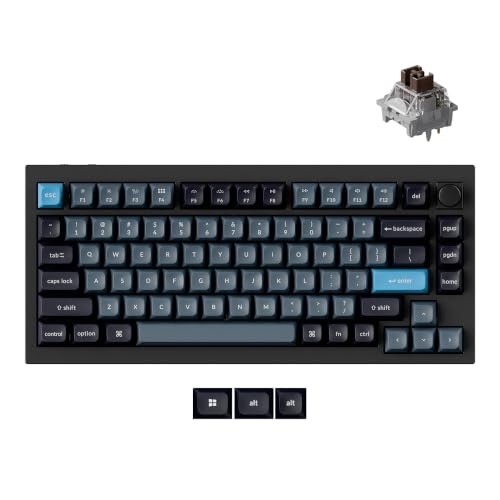
Key takeaways
- All five boards share the Q formula: full aluminium case, gasket mount, hot-swappable switches, PBT caps, and deep remapping.
- Choose by layout first: Q2 for minimal desks, Q1 for the balanced compact, Q3 for a traditional TKL, Q5 for a number pad in a compact body, Q6 for everything on board.
- The Q1 Pro, Q5 Pro, and Q6 Pro add Bluetooth wireless; the linked Q2 and Q3 listings are the wired models, and they are not Pro versions.
- Every Q board is heavy. These are desk anchors, not travel keyboards.
- The rotary knob, where fitted, is genuinely useful for volume, zoom, and timeline scrubbing once remapped to your applications.
In this guide
How the picks were chosen
Each model below links to a listing verified against current catalogue data for this guide. The Q1 Pro, Q5 Pro, and Q6 Pro listings are the wireless Pro models. The Q2 and Q3 listings are the wired knob versions of those models, verified as such, and the text treats them as wired boards throughout; a buyer who wants a wireless Q2 Pro should read our separate coverage of that model rather than assume this listing is it. Switch configurations vary by listing, so check the switch line before ordering, and use the check-price links for current figures rather than relying on any number printed elsewhere.

Keychron Q1 Pro: the balanced 75 percent
Best for most buyers entering the Q line
- Layout: 75 percent with function row, arrow keys, and rotary knob
- Case: full aluminium, gasket-mounted plate
- Connection: Bluetooth 5.1 and USB-C wired
- Switches: hot-swappable, Apex Brown tactile configuration in the verified listing
- Keycaps: double-shot PBT
- Software: QMK and launcher-based remapping
The Q1 Pro is where the Q idea reaches its widest audience, because 75 percent is the layout that keeps a function row and arrows while surrendering only the number pad and the navigation cluster’s elbow room. In aluminium with a gasket mount, the typing feel is the line’s signature: a soft, deep, muted stroke with a flex that takes the edge off bottoming out, and a sound that stays in the low register even in a quiet room. The Pro’s Bluetooth makes it the one Q1 that can serve a laptop-and-desktop household without a cable swap, though competitive gamers will still plug in.
Strengths
- The line’s signature gasket feel in the most versatile layout
- Wireless flexibility the wired Q1 lacks, with the same aluminium build
- Knob, hot-swap sockets, and PBT caps complete the enthusiast checklist
Trade-offs
- Heavy enough that travel means commitment
- Bluetooth only, with no 2.4 GHz receiver mode
- Premium tier pricing over the wired Q1
Best for: buyers who want one premium board for work and play at a single desk. Not suited for: number-pad devotees or frequent travellers.

Keychron Q2 wired: the compact 65 percent
Best for minimal desks and mouse-heavy work
- Layout: 65 percent with arrow keys and rotary knob
- Case: full aluminium, gasket-mounted plate
- Connection: USB-C wired only in this verified listing
- Switches: hot-swappable, Gateron G Pro Red linear configuration in the listing
- Software: QMK and VIA remapping
The Q2 shrinks the Q formula to 65 percent, dropping the function row into the number row’s fn layer and keeping dedicated arrows, which is the compromise most compact-board users actually want. What remains is the full aluminium, gasket-mounted experience in a board that leaves a desk feeling spacious, a real advantage for mouse-driven work like design, editing, and gaming. The verified listing is the wired knob version, and wired-only is a genuine limitation to weigh: this Q2 belongs to a fixed desk, and its cable is part of its life.
Strengths
- Maximum desk space returned to the mouse hand
- Same aluminium gasket build as its larger siblings
- Knob version adds a control most 65 percent boards omit
Trade-offs
- Wired only in this listing; no Bluetooth or receiver
- Function row lives on a layer, which F-key-heavy users will feel
- Still heavy for its size, so portability is relative
Best for: minimalists and mouse-centric workers at a fixed desk. Not suited for: buyers who need wireless or a physical function row. Our dedicated Keychron Q1 Pro review shows what stepping up one size buys.

Keychron Q3 wired: the traditional tenkeyless
Best for typists who want a familiar layout, perfected
- Layout: tenkeyless with full function row and navigation cluster
- Case: full aluminium, gasket-mounted plate
- Connection: USB-C wired only in this verified listing
- Switches: hot-swappable, Gateron G Pro Brown tactile configuration in the listing
- Software: QMK and VIA remapping
The Q3 is the Q line wearing a classic silhouette: a tenkeyless board with the spacing, navigation cluster, and function row that decades of typists have memorised. Nothing needs relearning, and that is its charm. The aluminium gasket build turns a familiar layout into a distinctly premium object, with the same soft, deep typing feel as the Q1 Pro and a case that could double as a doorstop in an emergency. The verified listing is the wired knob version, so, like the Q2 above, it is a fixed-desk instrument.
Strengths
- Zero learning curve: the classic TKL layout, executed in aluminium
- Full navigation cluster for document and code navigation
- Gasket feel and hot-swap sockets for long-term tuning
Trade-offs
- Wired only in this listing
- The largest footprint of the three smaller Q boards
- No number pad, which spreadsheet users should note before romanticising TKL
Best for: traditionalists who want the familiar layout at premium quality. Not suited for: wireless seekers or number-pad users.

Keychron Q5 Pro: the number pad, compacted
Best for data workers who refuse to give up the pad
- Layout: 96 percent with number pad in a near-TKL footprint
- Case: full aluminium, gasket-mounted plate
- Connection: Bluetooth 5.1 and USB-C wired
- Switches: hot-swappable
- Extras: programmable rotary knob, PBT keycaps, RGB backlighting
The Q5 Pro performs the line’s neatest trick: it keeps a full number pad while staying close to a tenkeyless board’s width, by compressing the navigation cluster into the main block. For accountants, data-entry professionals, engineers, and anyone whose day includes long strings of figures, that pad is not nostalgia but throughput, and the Q5 Pro delivers it without demanding a full-size desk. The Pro’s Bluetooth frees the cable, and the knob earns its keep in spreadsheets and timelines alike.
Strengths
- A real number pad without full-size width
- Wireless Pro connectivity with the aluminium gasket build
- Knob and remapping support for workflow shortcuts
Trade-offs
- Compressed navigation area takes a short adjustment period
- Among the heaviest boards in the line
- Compacted layout means some legends and positions differ from a classic board
Best for: number-heavy professionals who want premium feel in a manageable footprint. Not suited for: minimalists, who should look at the Q1 Pro or Q2.

Keychron Q6 Pro: the full-size flagship
Best for buyers who want everything, permanently installed
- Layout: full-size with number pad, function row, and navigation cluster
- Case: full aluminium, gasket-mounted plate
- Connection: Bluetooth and USB-C wired
- Switches: hot-swappable, Banana tactile configuration in the verified listing
- Extras: programmable knob, KSA double-shot PBT keycaps
The Q6 Pro is the line’s maximalist statement: every key a full-size board offers, in a milled aluminium case with the gasket-mounted feel, plus Bluetooth and a knob. It suits the desk that never moves and the user who never wants to reach for a layer. Its weight is considerable even by Q standards, which reads as permanence rather than inconvenience in its natural habitat. If your work truly spans documents, data, and navigation all day, the Q6 Pro is the one-board answer in this guide.
Strengths
- Complete full-size layout with nothing on a layer
- The line’s build and feel at their most substantial
- Wireless flexibility plus a knob for media and workflow control
Trade-offs
- Occupies a full-size desk footprint, mouse room included
- The heaviest and most premium-priced board in this comparison
- Overkill for buyers who never touch a number pad
Best for: fixed, full-size desks and completionists. Not suited for: small desks or anyone who moves their keyboard often. Readers comparing aluminium boards beyond this family can continue with our roundup of aluminium mechanical keyboards.
The decision framework: layout first, then connection, then switches
Buyers drown in Q-series comparisons because they compare everything at once. Compare in order instead. Layout first, because it governs every hour: count how often you truly use a number pad, honestly rather than aspirationally, and note whether your software leans on F-keys. That count alone usually eliminates three of the five boards. If the pad is daily, your choice is the Q5 Pro for compactness or the Q6 Pro for tradition. If it is never, your choice is the Q2 for space, the Q1 Pro for balance, or the Q3 for familiarity.
Connection second, because it governs where the board can live. The Pro models’ Bluetooth suits multi-device desks and tidier setups; the wired Q2 and Q3 suit fixed desks and players who want the simplest, most responsive link. Neither is a defect. A wired board at a permanent desk loses nothing in daily life, while a wireless board carried between a laptop and a desktop earns its premium every single day. Match the connection to the desk’s actual geography, not to an abstract preference for modernity.
Switches third, because they are the only choice here that is reversible. Every Q board in this guide is hot-swappable, so a switch you tire of is a twenty-minute experiment rather than a new purchase. Start with the configuration in the listing that matches your noise environment, tactile for most offices, linear for quiet speed, and know that the board forgives the decision. That forgiveness is a large part of what the premium buys, and it is why we rank switch choice last instead of first.
What the Q formula feels like, and why people pay for it
Newcomers reasonably ask what a gasket mount and an aluminium case actually change, since the keys and switches resemble cheaper boards’. The case changes the sound and the stability: aluminium does not flex, creak, or wander, and its mass turns each keystroke’s landing into a short, low note instead of a hollow one. The gasket mount changes the feel: the plate floats on soft mounts, so the bottom of each stroke has a small give that typists describe as softness or bounce, and which wrists experience as kindness across a long day.
Together they produce the quality owners call thock and reviewers call refinement, and the honest summary is that the Q boards feel expensive in the hand in a way that survives novelty. Whether that feel is worth the premium over Keychron’s own V and K lines depends on how much of your life is spent typing. For an hour a day, it is a luxury. For eight, it is the difference between a tool you tolerate and a tool you enjoy, amortised across thousands of hours. Our Keychron Q2 Pro coverage explores the same formula at 65 percent with wireless, for readers whose layout answer landed there.
Buying guide: configuring any Q board well
Knob or no knob is the first configuration question where a choice exists. The knob versions in this guide’s listings earn their place if your day includes volume changes, zooming, scrolling long documents, or scrubbing media timelines, because a dedicated rotary control under the finger beats a shortcut chord for all four. If your work is pure text, the knob is furniture. Neither answer is wrong; the honest one saves money or adds joy, depending on the desk.
Colour and finish deserve a practical note. Q cases come in a small palette of serious colours, and the finish resists wear well, but a keyboard is seen all day, so choose the colour you want to live with rather than the one on promotion. Keycap profiles in this line are tall and sculpted, giving the boards their distinctive sound and feel; owners coming from low-profile boards should expect a genuine adjustment period, and may want to read our Keychron K3 ultra-slim review to understand the opposite philosophy before committing to height.
Finally, budget for the board as a system. A Q board’s weight and height flatter a solid desk and a good mat; its remapping rewards an hour invested in setup; its hot-swap sockets invite a future switch experiment that costs a fraction of a new board. Buyers who plan those small investments get the premium experience the price promises. Buyers who unbox and never configure still get a fine keyboard, but they leave part of what they paid for in the firmware.
How to set up a Q board: remapping, knob, and layers
Begin with the physical setup: place the board, connect it, and type for a day in its stock configuration before changing anything. Premature remapping is the enthusiast’s classic error, because you cannot know which keys your hands miss until your hands have told you. Keep a note, literal or mental, of every reach that annoyed you; that list is your remapping agenda.
Then open the remapping software and work through the list. Move your most-missed navigation keys to the layer positions your fingers suggested, assign the knob to the control your applications beg for, volume in media work, zoom in design tools, timeline scrubbing in editing, and set one or two shortcuts for the phrases or commands you type daily. The Q boards’ support for QMK and VIA-style remapping means these changes live on the board itself, travelling with it between computers, which is the correct place for them.
Maintenance on a Q board is light but specific. The aluminium case wipes clean and shrugs off dust; the PBT caps resist shine far longer than basic caps do. Pull caps with a proper puller when you clean beneath them, support the board’s large keys while doing so, and consult the stabiliser installation walkthrough before reseating any stabilised key, because the space bar on a gasket board deserves patience rather than force. Switch swaps need no tools beyond a puller: power down, pull straight, seat the new switch’s pins carefully, and test before reassembling your desk.
Common mistakes when buying into the Q line
Buying by size envy is the first. A full-size Q6 Pro looks magnificent in photographs and eats a small desk alive, pushing the mouse into a cramped corner that will tax a shoulder daily. Measure your desk and your mouse territory before choosing a layout, and let the tape measure overrule the photograph. The line’s smaller boards are not lesser versions; they are the same quality aimed at different desks.
Assuming every Q is wireless is the second, and it is the mistake this guide has been at pains to prevent. The Q2 and Q3 listings linked here are wired models. Their Pro-named siblings exist elsewhere in the range, but a listing is a specific product, and a buyer who needs Bluetooth should order a Pro model by name rather than discover the distinction at unboxing.
The third mistake is under-using the board after buying it. A Q board left at stock settings is a fine keyboard and a fraction of what it can be. The remapping, the knob assignments, and the layer for your applications are where the premium converts into daily time saved. Set aside one evening in the first fortnight to configure it properly; owners who do rarely go back to stock boards without complaint.
Fourth, do not buy a Q board as a travel keyboard and then review it as one. These are among the heaviest boards in their sizes, by design. If your life is mobile, the slim end of the catalogue, covered in our survey of low-profile mechanical keyboards, will serve you better and cost your shoulder less.
Five desks, five answers
The writer’s desk, where the keyboard is the primary instrument and the mouse a supporting actor, belongs to the Q1 Pro or the Q3. Choose the Q1 Pro if desk space is finite and wireless tidiness appeals; choose the Q3 if your navigation habits are classical and your desk is generous. Both give the gasket feel in a layout that never asks text work to visit a layer, and both will still be typing beautifully when cheaper boards have been replaced twice.
The analyst’s desk belongs to the Q5 Pro, and it is not close. Number entry is the day’s core motion, the pad is where speed lives, and the Q5 Pro’s compacted width keeps the mouse closer than a full-size board would. The programmer’s desk splits by habit: those who live in a terminal and a modal editor often thrive on the Q2’s compactness and layers, while those who navigate large codebases with function keys and navigation clusters are happier on the Q1 Pro or Q3. The shared household desk, finally, belongs to a Pro model, because Bluetooth slot-swapping between two people’s computers is the feature that turns one premium board into two people’s keyboard.
The gaming desk deserves a direct answer. Wired, every board in this guide is responsive and fully capable for serious play, and the linear configurations suit fast, repeated presses. Wireless play on the Pro models over Bluetooth is a casual mode, not a competitive one, since the line offers no low-latency receiver. Players who want one board for both worlds should either accept the cable while gaming or look at gaming-first boards; the Q line’s priorities are feel and build, and it does not apologise for them.
Q series against Keychron’s other lines
Buyers cross-shopping within the brand should understand what the premium buys over the V series, which shares much of the Q’s shape language in lighter materials, and over the K series, which prioritises wireless convenience and value. The Q’s aluminium case, gasket mount, and weight are the difference: a quieter, softer, more settled typing experience and an object that feels permanent. The V line is the rational choice for many, lighter and less expensive with similar layouts; the Q is the choice when feel is the point of the purchase rather than a by-product of it.
Against rival premium brands, the Q line’s enduring argument is completeness at its tier: hot-swap sockets, PBT caps, a knob option, full remapping, and Mac and Windows support in the box, without assembly. Kit keyboards can out-customise it for hobbyists willing to build; the Q serves the buyer who wants the custom result without the build weekend. Knowing which of those buyers you are is worth more than any single comparison in this guide.
Sound and feel, size by size
All five boards share the family voice, a low, muted clack with a soft landing, but size colours it. The Q2’s smaller case sounds a touch brighter and more compact; the Q6 Pro’s mass gives the deepest, most settled note of the five; the Q1 Pro and Q3 sit between, with the Q5 Pro close to the Q6 in character. None of them is loud in the way an undamped board is loud, and all of them are audible in the way mechanical boards are honest. In a shared office the tactile and linear configurations pass without comment; the line’s sound discipline is one of its professional virtues.
Feel follows a similar gradient. The gasket give is present across the line, fractionally more noticeable on the larger plates. Keycap height and profile are consistent, so a hand trained on one Q board is trained on all of them, a small mercy for households standardising on the line. The knob, where fitted, turns with a detented smoothness that invites the remapping this guide keeps recommending; an unused knob on a Q board is a small daily waste.
Ownership: the five-year view
Premium boards should be judged on a five-year horizon, and the Q line’s prospects are strong. The aluminium cases do not age visibly in desk service; the PBT caps resist the shine that dates cheaper boards; the hot-swap sockets mean switch wear or changing taste costs a set of switches, not a keyboard; and the remapping support keeps the board adaptable as your software and habits evolve. The components that do age, cables on the wired models and batteries on the Pro models, are the replaceable or manageable kind.
Resale reflects that durability. Q boards hold their appeal on the used market because their wear is mostly cosmetic and their specification stays relevant, which matters to buyers who rotate equipment. Buy used with the usual discipline: confirm the exact model and switch configuration, test the knob and every key, and remember that a wired Q2 bought used is still a wired Q2, whatever the seller’s headline implies.
Weight, desks, and the physics of permanence
Every Q board is heavy enough to change how a desk behaves, and the change is mostly welcome. A board that does not drift during an animated typing session, that stays where the morning put it, removes a small recurring friction from the day. The same mass makes the boards poor travellers and excellent anchors, and buyers should decide which of those they are purchasing before the parcel arrives. If your keyboard commutes, this is the wrong line; if your keyboard presides, it is the right one.
Desk material plays a supporting role. On glass and polished wood, the boards’ rubber feet grip adequately but a mat improves both grip and sound; on a mat, the Q boards settle into their quietest, most composed character. Height matters as well: the line’s sculpted keycaps sit tall, so the wrist-rest conversation from our other reviews applies here too. Set the chair so forearms float level, rest between bursts rather than during them, and the premium feel will be matched by premium comfort.
The knob, taken seriously
Because the knob appears across this guide’s listings, it deserves its own examination. A rotary control earns desk space when it maps to a continuous variable you adjust often: volume, obviously, but also zoom in design and photo tools, playhead position in audio and video editors, brush diameter in drawing applications, and scroll velocity in long documents. The Q boards’ remapping lets the knob serve different variables in different applications’ contexts through layers, which turns a novelty into an instrument.
The buyers who dismiss the knob are usually those whose work has no continuous variable, pure text being the common case. For them the knobless variants, where they exist, are the honest saving. The buyers who remap it well describe it the way photographers describe a control dial, as the difference between reaching for the tool and thinking through the tool. Decide which description matches your software before paying for the feature.
Switch strategy for a first Q board
First-time premium buyers often agonise over the switch configuration, and the Q line’s hot-swap sockets exist to make that agony unnecessary. Choose by room: tactile for the shared office and the thoughtful typist, linear for the quiet room and the gamer, and avoid clicky in any space with other people in it. Then live with the choice for a month. If a different feel still calls, a replacement switch set costs a fraction of the board and swaps in an evening, and the old set keeps as spares. The board is a platform; treat the first switch set as its opening configuration rather than its destiny.
Keycap experiments follow the same logic. The stock PBT sets are good enough that most owners never change them, but the standard stems mean the entire aftermarket is available when curiosity strikes. Change one variable at a time, switches or caps, and give each change a week, or you will never know which change your hands were applauding. That discipline, borrowed from the enthusiast hobby, serves Q owners particularly well because the board rewards tuning more than most.
Mac and Windows on a Q board
The Q line continues the brand’s dual-system courtesy: a layout switch, keycaps for both systems in the box, and remapping that lets each system have its own layer if the household wants it. For the mixed desk, a single Q board can present a Mac face in the morning and a Windows face in the afternoon with the modifiers behaving correctly in both. That courtesy sounds minor in a comparison table and feels major across a year of shared use, which is why it keeps appearing in this guide’s reasoning.
Linux users are served by the same openness, since the boards present as standard keyboards and the remapping ecosystem is platform-agnostic in practice. A Q board is one of the safer premium purchases for a multi-system household precisely because no operating system in the house can make it feel like a compromise.
Reading a Q listing without being misled
Q listings compress a lot of configuration into a title, so read them the way this guide read its own picks: model number first, Pro suffix second, knob or no knob third, switch configuration fourth, colour last. A listing that buries the suffix or the switch line is asking you to guess, and guessing is how a buyer who needed Bluetooth unboxes a wired board. The five listings linked in this guide were each verified on exactly those points, and the per-model sections state the connection plainly so the comparison cannot mislead you even if you skim.
That discipline generalises to the whole premium market, where near-identical names hide materially different products. The minute spent reading the configuration line is the highest-value minute in the purchase, ahead of any review, including this one.
The upgrade paths inside the line
Owners rarely stay with their first Q configuration forever, and the line anticipates the journey. A Q2 owner who outgrows the layer-based function row steps to the Q1 Pro without relearning the feel. A Q1 Pro owner whose work turns numerical steps to the Q5 Pro and keeps the wireless habit. A Q3 owner who wants the same familiarity with nothing missing at all arrives at the Q6 Pro. Because the build, caps, and remapping philosophy are constant, each step feels like widening the same instrument rather than replacing it, which is a civilised way for a product line to treat its loyalists.
The reverse journey happens too, and it is worth blessing in print: owners who downsize from a full-size board to the Q1 Pro or Q2 routinely report that the smaller board improved their desk and their shoulder, and that the keys they surrendered were keys they had been keeping for a job they no longer did. Layout honesty cuts in both directions, and the Q line’s breadth means the honest answer is usually inside it.
One final consideration for the undecided: the cost of choosing wrong inside this line is unusually low. Every board here is well made, every layout serves somebody’s real work, and the used market for the line is active, so a mismatch becomes a trade rather than a write-off. That safety net is itself a product of the line’s quality, and it should embolden buyers who have done the layout thinking and are hesitating at the last step. Measure the desk, count the number-pad days, pick the connection that matches the listing’s name, and proceed; the Q series has been rewarding that sequence of decisions for years.
A short history of why this line exists
The Q series emerged when the custom keyboard hobby’s values, metal cases, gasket mounts, remapping, and switch choice, began migrating into ready-made products. Keychron’s contribution was to industrialise those values without sanding off their appeal: a buyer could order the board, unbox it, and be typing on a gasket-mounted aluminium keyboard the same evening, with the option to open it up and tune it later. That bridge between the hobby and the mainstream is the line’s historical role, and it explains both its specification and its audience.
The five models in this guide represent the bridge’s mature form. Layouts span the full practical range, the Pro models acknowledge that even enthusiasts dislike cables, and the knob acknowledges that a keyboard can be a control surface for more than text. Buyers comparing the Q line with kit keyboards should weigh the evening-versus-weekend distinction honestly; buyers comparing it with office keyboards should weigh the decade-versus-year distinction. Both weighings are legitimate, and they point at different products, which is exactly what a healthy market looks like.
What reviewers argue about, and what actually matters
Premium keyboard discourse loves arguments that ownership barely notices: plate materials debated like wine, gasket implementations ranked with false precision, sound tests recorded through different microphones compared as if they were measurements. The Q line attracts its share of that discourse. Strip it away and the ownership-relevant facts are few and sturdy: the boards are heavy, quiet for mechanical keyboards, soft at the bottom of the stroke, completely remappable, and built to be serviced by their owners at the level of switches and caps.
If those five facts match your wants, the model choice reduces to the layout framework earlier in this guide, and the remaining arguments can be safely enjoyed as entertainment. If they do not, no refinement of gasket or plate will rescue the purchase, and a different category of board, lighter, slimmer, or cheaper, is the honest destination. Reviews earn their keep by making that sorting quick, and this guide has tried to sort rather than to dazzle.
The Q board as a workplace signal
A closing observation, half practical and half sociological: a Q board on a desk changes how the desk is read, by visitors, by colleagues on video calls, and by its owner. It signals that typing is real work here and that tools are chosen rather than inherited. That signal has genuine if unquantifiable value in client-facing and creative work, and it partly explains purchases that pure ergonomics cannot. There is no shame in it; professionals in every field keep one beautiful tool. The Q line simply makes a persuasive candidate for the keyboard-shaped slot in that tradition.
That signalling cuts the other way in one setting worth naming: the truly mobile professional, for whom a heavy aluminium board announces the wrong priorities every time it is lifted out of a bag in a client’s office. Context is the whole of product judgement, and the Q line’s context is the settled desk. Honour that context and the line’s considerable virtues are all available to you; ignore it and even the finest of the five will feel like a beautiful mistake you carry around.
For everyone else, the settled-desk majority, this guide’s advice can be compressed to a postcard. Pick the smallest layout that contains every key your week truly uses. Confirm the connection in the listing’s name rather than in your hopes. Choose the switch for the room the board will live in. Then spend one evening teaching the board your shortcuts, and let it spend the following years repaying the lesson. That is the entire Q series method, and it works for the Q1 Pro exactly as it works for the Q6 Pro, because the line was designed as one idea in five sizes.
Readers who arrived here from the value end of the catalogue sometimes ask whether the Q premium is a tax on enthusiasm. The fairest answer this guide can give is that the premium buys three concrete things, mass, softness, and silence, plus one abstract thing, permanence, and that all four are priced honestly against the years a board like this stays in service. Divide the difference by the working days of five years and the tax becomes a rounding error with excellent key feel. That arithmetic, more than any single feature, is why the Q line keeps its place at the top of its brand’s catalogue and in comparisons like this one.
And if the arithmetic still does not move you, that is useful information rather than a failure of persuasion: it means your typing hours or your priorities sit where the V or K lines serve better, and this brand, to its credit, sells those too. A comparison guide that can only recommend its most expensive subject is an advertisement. This one recommends the Q1 Pro to its most likely reader, blesses four other choices for four other desks, and happily waves the mobile and the budget-minded toward slimmer and lighter reading elsewhere on this site.
Whichever of the five you land on, unbox it onto a clear desk, give it a day at stock settings, and then make it yours with the remapping session described above. Premium keyboards reveal themselves slowly, across weeks of small satisfactions, and the Q line is engineered for exactly that slow reveal.
The one-page version, for readers in a hurry
Same brand, same aluminium gasket formula, five sizes. The Q2 is the 65 percent wired compact for minimal fixed desks. The Q3 is the wired tenkeyless for traditionalists. The Q1 Pro is the wireless 75 percent all-rounder and this guide’s default recommendation. The Q5 Pro is the wireless 96 percent that keeps a number pad in a compact body. The Q6 Pro is the wireless full-size flagship. All five are heavy, hot-swappable, fully remappable, and built for a desk that does not move. Choose the size, verify the suffix, and the rest is configuration.
Keep that summary beside the listings while you shop and the comparison cannot go far wrong: the models differ less in quality than in geography, and geography, the size of your desk and the shape of your week, is a question you are better placed than any reviewer to answer.
One small, easily missed delight of the line deserves the last word before the verdict: the boards age into their owners’ desks. The aluminium takes on the faintest personal polish where hands brush it, the keycaps settle, the remapping accretes a year of small conveniences, and at some point the keyboard stops being a product you bought and becomes part of the furniture of your working life. Manufacturers can engineer many things, but that transition is earned only by objects that keep their promises daily, and it is the deepest reason this guide can recommend any of the five with a clear conscience.
Bring that long view to the checkout and the choice sharpens wonderfully: you are not buying the best keyboard of this season, you are choosing the keyboard your hands will live on for the next several years, in the size your desk can honestly host.
Measured against that horizon, the differences among the five shrink to what this guide said at the start: size, connection, and the small matter of a knob. Everything else, the case, the mount, the caps, the switches’ welcome mat, is the shared inheritance that makes the comparison a pleasure rather than a gamble.
So measure once, choose once, and type for years; that is the Q series bargain, stated as plainly as this guide can state it.
The five listings above are the verified doors into that bargain; walk through the one whose size matches your desk.
Delivery day: what to do in the first hour
When a Q board arrives, resist the urge to remap it before your hands have an opinion. Unbox it onto a mat, connect it in the mode you will actually use, and run a full keyboard test to confirm every key, the knob’s press as well as its turn, and the backlight’s levels. Type a page of real work. Note, literally, the three reaches that annoyed you and the one control you wished existed. That note is the agenda for your configuration session later in the week, and boards configured from such notes end up personal in a way that boards configured from internet templates never do. Keep the packaging until the test is done, charge or cable the board as its model requires, and let the first day be about typing rather than tinkering; the tinkering will keep, and it will be better aimed for the wait.
That first-hour discipline sounds fussy and pays for itself for years, because a Q board configured around your actual annoyances becomes measurably yours, while one configured around a stranger’s template remains a very nice keyboard that belongs to somebody else’s habits.
Personal, in the end, is the Q line’s whole argument: a standard of build that invites you to finish the product around your own hands, your own software, and your own desk.
Finish it well, and the comparison that brought you here will be the last keyboard comparison you need to read for a long while.
That is the quiet ambition behind all five of these aluminium boards, and it is an ambition their owners, year after year, report fulfilled.
Choose your size, and join them.
The desk you save, and the typing you improve, will be your own.
Final recommendation
For most readers, the Q1 Pro is the Q line’s centre of gravity: the complete-enough layout, the signature aluminium gasket feel, and wireless flexibility in one board. Choose the Q2 wired if your desk is minimal and permanently wired, the Q3 wired if your layout loyalties are classical, the Q5 Pro if numbers are your living, and the Q6 Pro if you want the full-size flagship with nothing left on a layer. Decide by layout, confirm the connection matches the listing’s name, and configure the board properly in its first fortnight; do those three things and any of the five will reward you for years.
Frequently asked questions
What does the Pro suffix mean in the Keychron Q series?
In this line, Pro models add Bluetooth wireless to the wired Q formula, along with the same aluminium gasket-mounted build. Models without the Pro suffix, including the Q2 and Q3 listings linked in this guide, are wired-only. Always match the model name in the listing to the connection you need, because the suffix is the specification.
Which Q series keyboard is best for most people?
The Q1 Pro, for most desks. Its 75 percent layout keeps a function row and arrow keys, its Bluetooth covers multi-device setups, and its size leaves reasonable mouse room. Buyers who need a number pad should step to the Q5 Pro or Q6 Pro instead; buyers with very small desks should consider the Q2.
Are Keychron Q keyboards good for gaming?
Wired, yes: they are responsive, fully remappable, and available in linear switch configurations that suit fast play. Over Bluetooth on the Pro models they suit casual gaming but not latency-critical competition, because the line has no low-latency receiver mode. Many owners type on a Q all day and game on it wired in the evening without complaint.
Can I change the switches on a Q series keyboard?
Yes. Every board in this guide is hot-swappable, so switches pull out and press in without soldering. That makes the initial switch choice low-risk and lets the board’s feel evolve with your taste. Use a proper switch puller, support the board, and align the new switch’s pins carefully before pressing it home.
What does the rotary knob do?
By default it usually controls volume, and through the board’s remapping support it can be reassigned to zoom, scrolling, timeline scrubbing, brush size, and other rotary tasks in your applications. Owners who assign it to a control they use hourly rate it among the board’s best features; owners who leave it on volume in a setup with other volume controls use it less.
Is the Q series worth it over the cheaper V series?
It is worth it when typing feel and build are the point of the purchase: the aluminium case and gasket mount deliver a quieter, softer, more settled experience, and the boards are built for a long service life. If your priority is a good layout at a lighter weight and a friendlier tier, the V series is the rational buy and the Q is the indulgence. Heavy typists tend to call the Q an investment instead, and hours-per-day is the honest way to decide which word fits you. Readers earlier in their research may also want our comparison of the Keychron K1, K2, K4 and K6 differences for the value end of the family.


