Disclosure: As an Amazon Associate, reviewstook.com earns from qualifying purchases. Links on this page are affiliate links; they cost you nothing extra. Prices and availability change often, so check the current Amazon listing before you buy.
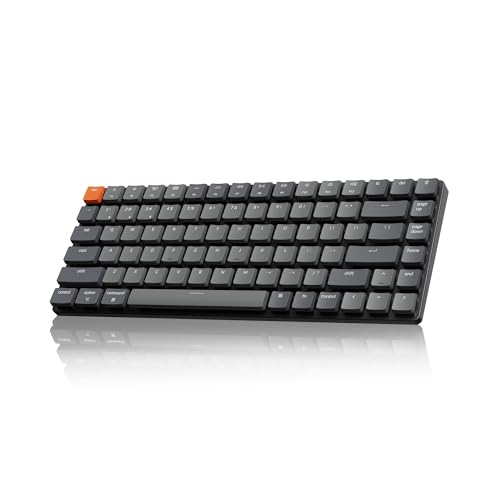
This keychron k3 review ultra slim wireless examines the thinnest serious mechanical keyboard in Keychron’s catalogue, a 75 percent board that slips into a laptop sleeve like it was designed by the sleeve. The K3’s proposition is extreme portability without giving up real switches, a function row, or three-device Bluetooth, and this review tests that proposition against the compromises thinness demands: a modest battery, low-profile switches that divide opinion, and keycaps with nowhere to hide. Three verified versions are compared below, the Version 2 that defined the model, the Max that modernised it, and the Version 3 that refreshed it.
The K3 is best understood as an answer to a specific person: the traveller or minimalist whose laptop keyboard feels like a compromise they re-make every day. For that person the relevant question is never whether a thicker board types better in the abstract, but whether a board this thin types well enough to be worth carrying everywhere. The answer, with caveats this review will not hide, is yes.
Key takeaways
- The K3 packs 84 keys, a function row, and arrow keys into one of the slimmest mechanical cases ever sold, making it a genuine laptop-bag keyboard.
- Low-profile switches mean short travel and a quick, light keystroke; laptop natives adapt fast, heavy-handed typists may not.
- The battery is small because the case is small, so charging is a weekly rhythm rather than a monthly event.
- The Version 2 is the classic; the Max adds a 2.4 GHz mode and hot-swappable switches; the Version 3 refreshes the formula with new switch options and RGB.
- Hot-swappable variants turn the K3 from an appliance into a small hobby, which the original optical-switch models never tried to be.
In this guide
How the picks were chosen
All three picks were verified against current catalogue data for this review. The main pick is the Keychron K3 Version 2 in its brown-switch, white-backlight configuration, because it is the model the keyword describes and the one most buyers will meet first. The K3 Max follows as the modernised alternative with tri-mode wireless, and the K3 Version 3 as the refreshed alternative with hot-swappable switches and RGB. Each is labelled as its own model wherever it appears; none is presented as another. Prices are deliberately not printed, since they move, so use the check-price links to see the current figure for the configuration you want.

Keychron K3 Version 2: the main review
Best for travellers who type everywhere
- Layout: 75 percent, 84 keys with function row and arrow keys
- Profile: ultra-slim low-profile case, among the thinnest mechanical boards available
- Connection: Bluetooth 5.1 for up to three devices, plus USB-C wired
- Switches: low-profile brown tactile configuration reviewed; other options in the range
- Backlight: white LED configuration reviewed
- Compatibility: Mac and Windows support with layout switching
Pick up a K3 and the first surprise is how little there is to pick up. The board is a shallow aluminium-topped tray that flexes almost not at all, with keys that sit so close to the surface that the whole keyboard reads as a single slab. On a desk it looks less like equipment and more like a design object, and in a bag it genuinely disappears alongside a laptop in a way no standard-height board can imitate. Portability is not a feature of this keyboard; it is the keyboard.
Typing feel follows from the physics. The low-profile switches actuate early and bottom out soon after, producing a brisk, precise keystroke that rewards a light hand. Brown tactile switches add a small, early bump that helps you type without bottoming out once your fingers learn the board, and at that point the K3 becomes quietly fast: less finger travel per word adds up across a working day. The flat keycaps take a day to stop noticing, and the tight spacing takes about as long; then the board simply feels like yours.
The compromises are structural, not accidental. A case this thin holds a small battery, so the K3 lives on a weekly charging rhythm with the backlight in use, longer with it off. The same thinness leaves little room for sound treatment, so the board’s voice is a light, high tick rather than a deep thock, pleasant in a café and unobtrusive on calls, but never luxurious. And the low-profile switch ecosystem, while healthy, is a smaller world than the standard-height one, with fewer exotic options for owners who later catch the customisation bug.
Strengths
- Truly pocketable-by-keyboard-standards design that travels in a laptop sleeve
- Complete 84-key layout with function row, so portability costs no essential keys
- Crisp, quick low-profile typing that suits writers and laptop converts especially well
Trade-offs
- Small battery means regular charging, particularly with the backlight on
- Short key travel will not satisfy typists who love a deep, cushioned stroke
- No 2.4 GHz receiver mode on this version, so wireless gaming is casual only
Best for: frequent travellers, café workers, and minimalist desks that still need a full layout. Not suited for: buyers who want weeks of battery, deep key travel, or a receiver-based gaming connection.

Keychron K3 Max: the modernised alternative
Best for slim-board fans who also game or customise
- Layout: 75 percent low-profile layout in the K3 tradition
- Connection: 2.4 GHz, Bluetooth, and USB-C wired modes
- Switches: hot-swappable low-profile switches, Banana tactile configuration in the verified listing
- Case: wooden-case variant in the verified listing
- Software: QMK-based remapping with launcher support
The K3 Max answers the two criticisms the original K3 could not escape. The first was connectivity: Bluetooth alone left gamers and latency-sensitive users plugging in a cable, so the Max adds a proper 2.4 GHz mode alongside Bluetooth and wired. The second was permanence: early K3 switches were not a playground, so the Max makes its low-profile switches hot-swappable, letting owners change feel without changing keyboards. Add modern remapping support and the Max becomes the K3 for people who intend to keep one board for a long time and shape it to their habits.
The verified listing’s wooden case deserves a sentence of its own, because it changes the board’s character from tech-minimal to something warmer and more furniture-like, a small but real consideration for a keyboard that sits in a living space. Underneath the case options, the Max keeps the family virtues intact: the same slim profile, the same complete layout, the same travel-first proportions.
Strengths
- Tri-mode wireless removes the original’s biggest functional gap
- Hot-swappable switches extend the board’s life and its hobby potential
- Modern remapping support for users who build custom layers
Trade-offs
- Sits in a higher tier than the Version 2
- Still a slim case, so battery life remains a rhythm rather than a marathon
- Low-profile switch choice, while swappable, is narrower than standard-height boards offer
Best for: travellers who game, and owners who customise. Not suited for: buyers who simply want the classic K3 at the classic tier.
Keychron K3 Version 3: the refreshed alternative
Best for buyers who want the newest take on the original idea
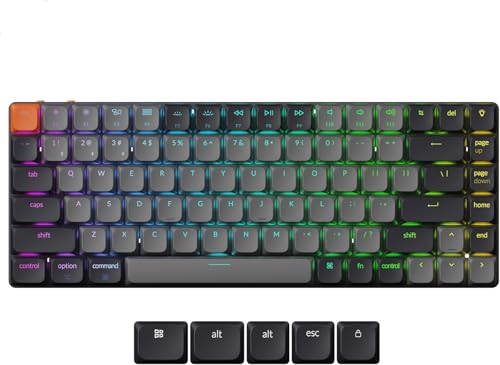
- Layout: 75 percent, hot-swappable low-profile layout
- Switches: Banana tactile switch configuration in the verified listing
- Backlight: RGB
- Connection: Bluetooth and wired modes
- Software: QMK-based customisation support
Version 3 is the K3 with its lessons applied inside the original formula rather than above it. Hot-swappable sockets arrive without leaving the slim brief, RGB replaces the white-only backlight of the classic configuration, and the Banana tactile switch in the verified listing gives the board a more pronounced tactile character than the gentle brown of the Version 2. For a buyer choosing between the v2 and v3 at similar money, the v3’s swappability alone is a strong argument: a worn or unwanted switch becomes a two-minute swap instead of a new keyboard.
Strengths
- Hot-swappable switches in the classic slim form
- RGB backlighting for low-light desks and a little personality
- More decisive tactile feel from the Banana switch configuration
Trade-offs
- No 2.4 GHz mode, unlike the Max
- RGB use shortens the interval between charges on a small battery
- Tactile character is a preference; linear-leaning typists should try before committing
Best for: new buyers who want the current version of the classic. Not suited for: buyers who need receiver-based wireless, who should choose the Max.
Keychron K3 Review Ultra Slim Wireless: choosing between the three
The three versions divide buyers cleanly once you name your priorities. If the board’s job is to live in a bag and serve a laptop and a tablet with minimum fuss, the Version 2 remains the purest expression of the idea and usually the gentlest on the budget. If the same bag also contains a gaming habit, or if you already know you will want to change switches within the year, the Max earns its premium with hardware you will actually use. If you are buying new today, like the classic formula, and value swappable switches and RGB without needing a receiver, the Version 3 is the balanced middle.
What none of the three does is repeal the physics of thinness. All three carry small batteries by desktop-board standards, all three type with the short, brisk stroke of low-profile switches, and all three sound lighter than a tall board. Choosing between them is choosing extras; choosing the K3 at all is choosing the slim philosophy, and that choice should be made with your hands and your travel pattern, not with a feature table. Readers still deciding on profile itself will find the contrast drawn sharply in our Keychron K2 v2 review, where the same layout stands at full height.
Buying guide: what to check before ordering a K3
Switch family is the first checkpoint, because K3 history includes both optical and mechanical low-profile switches, and the variants behave differently and accept different replacements. Read the listing’s switch line carefully and match it to your intent: optical configurations are consistent and quick, mechanical configurations are the ones that connect to the wider low-profile switch market, and hot-swappable models say so explicitly. A listing that does not make the switch family clear is a listing to leave.
Second, decide how you feel about the battery before the board arrives. The K3 asks for a charging rhythm, weekly-ish in typical backlit use, and owners who accept that rhythm stop noticing it within a month. Owners who expected a month between charges experience the same battery as a flaw. Neither reaction is about the hardware; both are about the match between the hardware and the expectation, and the expectation is yours to set now, while it is free.
Third, think about your surfaces. The K3’s slim body and light weight make it a wonderful board on a stable desk and a slightly lively one on a wobbly café table, where a heavier board’s mass would calm things down. A thin desk mat under the board settles it and softens its voice, and we count a mat as part of the K3 kit rather than an accessory. If your work happens on trains and tray tables, expect to type a touch more gently than you would at home.
Fourth, confirm the layout legends you need. The K3 serves Mac and Windows users with the family’s usual switching, and dual-system buyers should confirm the keycap set in the box matches the listing, as configurations vary. If you type in a language layout other than the standard US arrangement, check availability before falling for the board, because slim boards have fewer regional variants than mainstream ones.
How to get the best from a K3
Start with posture, because a slim board changes the geometry of a desk. The K3’s low front edge lets your wrists stay close to neutral without a rest for most typists, which is one of its quiet ergonomic gifts. Keep the board close, keep your forearms roughly level, and resist the urge to add a tall wrist rest that would undo the profile’s whole point. If you came from a tall board, give your hands three days before judging; the shorter stroke reorganises your typing more than you expect, and day one is a liar.
Manage the backlight as a budget. The white or RGB light is there to make legends readable in dim rooms, not to decorate the desk at noon. Run it at the lowest level that does its job, or switch it off in daylight, and the battery interval stretches immediately. This single habit is the difference between owners who call the K3’s battery adequate and owners who call it small, on identical hardware.
Keep the board clean in the way slim hardware prefers. Crumbs and dust have less room to hide and more effect on feel in a shallow case, so a weekly tip-and-tap over a bin and a pass of air at an angle keeps the switches feeling new. Caps on hot-swappable versions pull with a standard puller; on any version, pull straight and slowly. Our guide to how to type faster pairs well with the K3, incidentally, because short-travel boards reward exactly the light, economical technique that guide teaches.
Finally, use the three Bluetooth slots deliberately. Assign them in a fixed order, main laptop, second machine, phone or tablet, and never improvise, because slot confusion is the source of nearly every report that a K3 has stopped working. It has almost never stopped working; it is talking politely to a device in another room, waiting for you to notice.
Common mistakes K3 buyers make
Expecting tall-board travel is the first. The K3’s stroke is short by design, and a buyer who secretly wants the deep, cushioned descent of a full-height switch will experience every keystroke as a small disappointment. Try a low-profile board anywhere, a shop, a colleague’s desk, before ordering, because this preference is physical and no review can argue you out of your own hands.
Buying the clicky variant for travel is the second mistake, and it is a social one. A clicky K3 in a quiet train carriage or a shared workspace announces its owner at length. The tactile and linear variants were made for the K3’s natural habitats; the clicky one was made for a room of one’s own.
The third mistake is treating the K3 as a gaming board in its Bluetooth-only versions. It games pleasantly in casual and single-player settings, and wired it is responsive enough for most players, but competitive wireless play belongs to the Max or to purpose-built boards in our roundup of wireless mechanical keyboards. Matching the tool to the evening saves money and frustration in equal measure.
Fourth, some buyers skip the case or sleeve because the board feels sturdy, and then meet the one scenario slim boards dislike: point pressure in a crowded bag, which can bend a space bar wire or crack a cap. A rigid sleeve costs little and weighs less. The board that travels everywhere deserves the small armour that lets it keep doing so.
The K3 among its slim rivals and siblings
Within Keychron’s own line, the K3’s nearest relative is the K1, the 80 percent low-profile board whose version 4 story is told in our Keychron K1 v4 review. The K1 spreads its keys a little wider and carries a slightly larger battery; the K3 compresses everything into the 75 percent shape and wins the portability contest outright. Buyers choosing between them are really choosing a footprint, since the typing philosophy is shared.
Against the wider slim market, the K3’s distinction is completeness. Many ultra-slim boards surrender the function row or the arrow keys to achieve their profile; the K3 surrenders neither, which is why it can serve as a person’s only keyboard rather than as a travel accessory to a real one. That completeness, in a case this thin, remains a small engineering flex years after launch, and it is the reason the model keeps being recommended to people who work from several places each week.
The honest counterpoint is that slim rivals with larger batteries now exist, and buyers who travel rarely may rationally trade a millimetre or two of thinness for a longer interval between charges. The K3’s answer is that its thinness is not a statistic but a daily experience: the board that is always with you beats the board that is slightly better at home. Which side of that argument you land on depends on your calendar more than on any keyboard.
A traveller’s week with the K3
Monday begins at a kitchen table, the board paired to a laptop, coffee within spill range that the slim case survives by being easy to lift and wipe. Midweek moves to a train, where the K3 sits on a tray table without crowding it and types quietly enough that the seat neighbour never looks up. Thursday is a client’s office, the board pairing to a second machine in seconds and making a borrowed desk feel like a workstation. Friday ends at home, the board on its third slot, talking to the home computer while the laptop charges.
That week is the K3’s design brief performed in public, and it explains the model’s loyal following better than any specification. The board’s compromises, the charging rhythm, the short stroke, are the price of admission to that week, and its owners pay the price knowingly because the alternative is typing on whatever each location happens to provide. A keyboard that makes every desk yours is a different category of product from a keyboard that makes one desk perfect, and the K3 should be judged inside its own category.
Charging, in that week, happens once, overnight, probably midweek, and takes about as much planning as charging a phone. Owners who build the habit stop counting. The board also sips power politely in standby, waking quickly when a key is pressed, so the Monday-morning reunion after a weekend in a bag is instant rather than ceremonial.
Switch feel in the low-profile world
Low-profile switches compress the whole mechanical drama into a shorter distance, and the K3’s variants play that drama in different keys. The tactile brown of the classic configuration whispers its bump early and lets a practised finger ride over it at speed. The Banana switch of the newer configurations speaks more firmly, with a rounder, more deliberate tactility that some typists find more satisfying and others find more tiring across a long day. Linear variants remove the bump entirely and turn the board into a smooth, quiet instrument that rewards an even lighter touch.
What surprises newcomers is how much of typing feel lives in the bottom of the stroke at this height. With travel this short, the landing is part of every keystroke’s character, and the K3’s case design keeps that landing firm rather than harsh. Typists who strike keys like they owe them money will still prefer a tall board’s cushion; typists with a modern, glancing technique often find the K3 faster precisely because there is less distance to waste. Neither group is wrong, and the existence of hot-swappable versions means the second group can fine-tune without re-buying.
Sound follows feel. The K3’s voice is a light tick with a firmer note on the space bar, easily softened by a desk mat and never boomy, because a shallow case has no chamber to boom in. In shared spaces this restraint is a feature that specification sheets undersell. Record a voice note or join a call and the board stays in the background of your professional life, which is where a keyboard’s sound belongs.
Durability and the long view
Slim boards invite a fair question about toughness, and the K3’s answer is better than its silhouette suggests. The aluminium-topped case resists the twists that crack plastic trays, the low keys present less leverage for bags and sleeves to pry at, and the board’s light weight means drops carry less energy. Its genuine vulnerabilities are the ones this review has named: a space bar wire that dislikes point pressure, a battery that ages like every battery, and switches on non-swappable versions that cannot be exchanged in minutes if one fails.
Ownership data across the model’s long life is reassuring on the whole. K3s live in bags for years and keep typing; the failures that end them tend to be batteries and accidents rather than switches or electronics. Buyers planning a long relationship should favour the hot-swappable versions for the simple reason that every replaceable part is a year added to the board’s plausible life. That advice generalises, and our survey of hot-swappable mechanical keyboards shows how the slim class compares on that front.
Ergonomics of going low
The ergonomic argument for a board like the K3 is about wrist angle, and it is worth making carefully rather than evangelically. A tall keyboard on a typical desk can push the wrists into extension, bending them upward as the fingers reach the keys, and holding any joint near the end of its range for hours is a recipe for complaint. A low-profile board reduces the height the hands must climb, so the wrists sit flatter with no other change to the workstation. For many laptop natives this simply restores the posture they already type in, which is why the transition feels like coming home.
Flat is not automatically correct, though. The rest of the setup still governs: a desk at the wrong height will defeat a slim board as surely as a tall one, and a chair without support will find other joints to bill. Treat the K3 as one component of a comfortable desk, the component that stops asking your wrists to climb, and set chair, desk, and screen heights with the same care. Comfort is a system property, and keyboards get credited and blamed for the whole system’s behaviour more than they deserve in both directions.
One specific habit matters with low boards: because the front edge is low, the temptation to rest the heels of your hands on the desk while typing is strong. Resting between bursts is fine; typing from a planted position pivots the fingers from the wrist and quietly loads it. Float lightly while typing, rest fully while thinking, and the K3’s ergonomics deliver what its profile promises.
Accessories that complete a K3 kit
The rigid sleeve comes first, for the reasons already given: the board’s life includes bags, and bags include point loads. Choose one sized for a 75 percent board so the K3 does not swim inside it, and let it live in the bag permanently so packing the board takes seconds. The second accessory is a thin desk mat, which steadies the light board on slick surfaces, softens its landing note, and gives the whole setup a defined territory on borrowed desks.
A short, flexible USB-C cable earns its place as the third item, because the cable that ships in the box is not always the cable a café table wants. With those three, the K3 kit is complete for most owners. Switch pullers and spare switches join the kit only for hot-swappable versions, and spare keycaps are a pleasure rather than a need. The K3 philosophy is travelling light; accessorise in that spirit and stop early.
The acceptance routine for a new K3
When the board arrives, spend ten minutes proving it to yourself. Work through every key on an online test page, pressing the space bar at its extremes as well as its centre. Pair all three Bluetooth slots, even if the third is a phone you rarely type on, and practise swapping until it is boring. Toggle the layout switch to your system and confirm the modifier legends match your habits. Run the backlight through its levels so you know what each costs in ambience. Then put the board in its sleeve, put the sleeve in your bag, and take it somewhere, because a travel keyboard’s acceptance test is a trip.
Anything that fails that routine on a new board is a conversation with the seller, not a flaw to live with. Anything that passes has earned the presumption of years of service, because the K3’s failure modes are front-loaded: a board that arrives right almost always stays right, with the battery’s slow fade the only scheduled change in its behaviour.
Who should skip the K3 entirely
Fairness to the reader includes naming the buyers this board will not please, however well it is made. The deep-travel devotee, who types for the sensation of a long keystroke and a cushioned landing, will find the K3’s brevity unsatisfying in a way no feature can compensate. The month-between-charges buyer, whose desk philosophy is minimal maintenance, will experience the battery as a recurring errand. The competitive gamer on Bluetooth versions will blame the connection for losses that belong to the matchup of tool and task. And the buyer who needs a number pad daily will feel its absence in every session, because no 75 percent board can argue with arithmetic.
Each of those buyers has a better home elsewhere in the market, several of them elsewhere in this brand’s own catalogue, and a review that pretends otherwise would be selling rather than reviewing. The K3’s excellence is specific: it is the complete keyboard that travels like a laptop accessory. Buyers whose lives match that sentence will love it with unusual loyalty. Buyers whose lives do not should believe this section and choose differently, with our thanks for reading carefully.
Value across the three versions
Judged as value rather than as features, the Version 2 is the efficient purchase for the traveller who needs nothing the Max adds. Its formula is proven, its tier is friendly, and its resale market is liquid if your needs change. The Max converts money into time: time not spent charging as often relative to its class, time not spent replacing a board when your switch taste matures, time not spent cabling up to game. Buyers who keep hardware for many years usually find that trade favourable. The Version 3 splits the difference, modernising the parts of the classic that owners most often wished modern, swappable switches and better lighting, while leaving the price philosophy intact.
Whichever version you choose, buy the configuration you actually want rather than the one on promotion, because switch feel is the one property you will notice ten thousand times a week. A small saving on the wrong switch is the most expensive bargain in keyboards, and the K3’s buyers, who carry their choice everywhere, feel that truth more than most.
Pairing the K3 with the rest of a mobile desk
A travel keyboard earns its keep as part of a kit, and the K3 combines naturally with a slim pointing device and a laptop stand. The stand raises the screen to a civilised height, the board restores real keys at desk level, and a compact mouse or trackball completes a workstation that assembles in two minutes in a hotel room or a rented desk. Travellers who work with trackballs may enjoy our Kensington Expert trackball review for the stationary end of that spectrum, though the travel kit usually favours a small mouse for weight.
The mobile desk also reframes the battery question. A kit that already includes a nightly phone charge absorbs a weekly keyboard charge without noticing it, and a small power bank covers the exceptional week. Judged as part of a system rather than as a solitary specification, the K3’s endurance is proportionate to its size and its role, which is the most that can fairly be asked of any component.
Finally, the K3 rewards owners who standardise. One board, known by the hands, in every location, removes the micro-adjustments that moving between different keyboards imposes, and those adjustments are a hidden tax on travel work. The board’s whole design, complete layout, three slots, dual-system manners, exists to make standardisation painless. That, more than thinness for its own sake, is the product being sold, and it is a genuinely useful one.
Learning curve, measured in days
New owners consistently describe the same arc. The first day brings a handful of errors at the board’s edges, where the compact layout compresses keys your fingers expected to find further apart, and a general sense that the keys end sooner than your hands planned. The third day brings fluency for most typists, with the short stroke starting to feel like efficiency rather than absence. By the end of the second week the board has usually disappeared into the work, and the owner’s only remaining awareness of it is positive: the desk is tidier, the bag is lighter, the laptop’s own keyboard feels increasingly like an emergency backup.
Two groups sit outside that arc. Touch typists with very large hands sometimes find the tight spacing a lasting negotiation rather than a brief one, and should trial the board with a returns window. And gamers who rest their fingers heavily on the movement keys may actuate the light low-profile switches unintentionally until they adjust their resting weight. Both are knowable in a week, which is why we keep recommending a trial rather than a leap for a board whose feel is this distinctive.
There is a small ritual worth adopting in the first week: type the same paragraph each morning, on the K3, and notice when you stop noticing. That morning, usually somewhere in the second week, is when the board stops being new equipment and becomes your keyboard, and it is a more reliable readiness test than any benchmark. Owners who skip the ritual still arrive at the same place; they just cannot say when it happened, and there is some pleasure in being able to say.
A last word on colourways and finishes, since the K3 is bought partly with the eyes. The model’s restrained palette suits the professional settings it works in, and the newer case options, including the wooden Max variant in our verified listing, widen the board’s emotional range without changing its manners. Choose the finish you will enjoy seeing on borrowed desks and in your own bag; a travel tool seen daily should please its owner at a glance as well as under the fingers.
Office politics of a quiet, slim board
Hot-desking workplaces have made the K3 a quiet beneficiary of office politics. A personal keyboard that fits in a drawer or a bag solves the shared-equipment problem elegantly: your keys, your layout, your cleanliness standards, on any desk the day assigns you. The board’s modest sound profile keeps it welcome in open plans, and its quick pairing means the morning setup ritual is measured in seconds. Several owners describe the purchase less as buying a keyboard than as opting out of the office keyboard lottery, a framing this review finds persuasive.
The same logic serves students moving between library, seminar room, and hall of residence, and clinicians, consultants, and field workers whose office is wherever the laptop opens. In each case the K3’s value is not that it is the finest keyboard in any one location, but that it is the same good keyboard in every location, and consistency, for people who type for a living in motion, compounds like interest.
It is fair, before closing, to acknowledge the emotional register of this particular product. Most keyboards are bought; the K3 tends to be adopted. Its owners name their travel kits around it, recommend it to colleagues with unusual specificity about switch choice, and replace it, when the battery finally fades years in, with another K3 more often than with a rival. Products earn that kind of loyalty by fitting a life precisely, and the fit here is the traveller’s life, measured in tray tables, borrowed desks, and the small daily relief of typing on keys that feel like your own.
None of that loyalty should exempt the board from the practical questions this review has pressed on: switch family, battery expectations, sleeve, and slot discipline. Answer those four honestly and the K3 is among the most predictable purchases in the whole keyboard market, a product whose ownership experience has been rehearsed by an enormous number of travellers before you. Skip them and the same board can mystify, usually for about a week, until the answers assert themselves anyway. We recommend the cheaper order of events.
For readers weighing the K3 against doing nothing, keeping the laptop keyboard and spending the money elsewhere, the deciding question is how much of your typing happens away from a home desk. Below a certain share, the laptop keyboard is a rational tool and the K3 a luxury. Above it, the arithmetic flips: every week of travel typing on a proper keyboard repays a slice of the purchase, in comfort, in speed, and in the simple morale of using your own equipment. Only you know your calendar, and your calendar, more than any review, is the buying guide that matters here.
The second-hand market, finally, treats the K3 kindly, which matters to buyers who rotate gear. Clean Version 2 units find new owners quickly because the model’s reputation does the selling, and the hot-swappable versions hold their appeal as their switch flexibility stays relevant. Buy used with the same checks this review applied to its sibling boards: verify the version and switch family from the underside label, test the space bar at its ends, ask after the battery’s current rhythm, and confirm the sleeve and cable are included. A K3 that passes those questions is a traveller that has simply changed hands.
Gift buyers appear in this model’s story too, usually giving it to someone whose work has gone hybrid and whose bag tells the tale. If that is you, the tactile configuration is the safe present, the sleeve is the thoughtful addition, and a note saying the battery likes a weekly charge will save the recipient a puzzled evening in month one. Few tech gifts integrate into a daily routine as completely as a keyboard that travels, and fewer still keep being thanked a year later.
And for the reader who has reached this point still torn between the K3 and a taller board, a closing experiment settles it better than prose can. Borrow any low-profile board for one full working day of real tasks, not a shop-counter minute, and note two things at the end: whether your shoulders and wrists feel fresher, and whether your error count fell once the morning passed. Those two notes, in your own hand, outweigh every paragraph above, including this one. The K3 will happily stand or fall by them, as it has stood or fallen for its owners all along.
A note on the K3 and small hands, large hands
Hand size quietly shapes slim-board satisfaction, so it deserves explicit treatment before the verdict. Smaller hands often take to the K3 immediately: the compact spacing matches their natural span, the light switches ask little of shorter fingers, and the whole board feels scaled to them in a way full-size equipment rarely does. Larger hands face the tighter negotiation mentioned earlier, particularly around the right-hand cluster where the arrows and their neighbours sit close. The negotiation usually succeeds, but the trial matters more as hand size grows, and the 80 percent K1 exists precisely for those who want low profile with a little more air between the keys.
Parents buying for a student will find the same scaling argument works in the K3’s favour, with the added practicalities that the board survives a school bag better than most and that its complete layout covers everything from essays to introductory programming without a layer of compromises to learn. Add the sleeve, choose the tactile switches, and the kit is done.
One more practical scenario deserves ink: the K3 as a second keyboard rather than a main one. Many owners keep a tall board at home and the K3 for everything beyond the front door, and the pairing works because the hands adapt to each within minutes once both are familiar. If that is your plan, match the switch character across the two boards where you can, tactile at home and tactile away, so the negotiation each transition asks of your fingers stays as small as the K3 itself.
That two-board pattern also explains a curiosity of the K3’s reputation: it is reviewed by travellers as a revelation and by desk-bound enthusiasts as a curiosity, and both reviews are accurate reports of different lives. This page has tried to keep the traveller’s life in focus, because that is the life the keyword’s readers are living, while leaving the door open, in every section, for the reader whose life points the other way.
So the K3 leaves this review as it leaves most of its owners’ evaluations: not the best keyboard in any single room, and the best keyboard across all of a traveller’s rooms, which for its intended reader is the title that counts.
Buy it with the sleeve, charge it with your phone’s rhythm, and let it make every desk you meet feel a little more like your own. That is the whole promise, and the K3, in each of its three versions here, keeps it.
A closing observation on timing: the K3 tends to be bought at transitions, a new job, a new course, a newly hybrid life, and transitions are when a tool that standardises your working day has outsized value. If you are standing at one of those thresholds with a bag that suddenly matters, the K3’s case has rarely been stronger, and the version choice above will get you to the right one without drama.
Whichever threshold brought you here, the board’s invitation is the same one it has extended since launch: stop typing on whatever the room provides, and start typing on the keyboard you chose. For a surprising number of people, that small sovereignty over the working day is worth every compromise this review has catalogued, and then some.
The three versions linked above are the current, verified ways to buy into that invitation; everything else in this long review exists to make sure the version, the switch, and the expectations you arrive with are the ones you actually wanted.
Choose once, choose carefully, and then let the board get on with its quiet work of making unfamiliar desks feel like yours.
That is a promise few keyboards can make with a straight face, and the K3 makes it daily.
Final recommendation
The Keychron K3 remains the slim keyboard against which slim keyboards are measured, because it never traded away the keys that make a keyboard complete. Buy the Version 2 for the classic, affordable traveller; buy the Max if your slim board must also game wirelessly and grow with your hobby; buy the Version 3 for the refreshed classic with swappable switches and light. Whichever you choose, choose it for the life it enables, a real keyboard on every desk you touch, and accept its charging rhythm and short stroke as the honest price of a board that fits where laptops fit.
Frequently asked questions
How slim is the Keychron K3, really?
Slim enough to change categories. The K3 is among the thinnest mechanical keyboards sold, with a case that sits a fraction as tall as a standard board and keys that barely rise above it. In practice it slides into a laptop sleeve beside the computer, which no full-height keyboard can do, and that portability is the model’s defining trait.
Is the K3 good for long typing sessions?
For typists who like a light, short stroke, yes. The low front edge keeps wrists near neutral, and the tactile configurations help you type without bottoming out once adapted. Typists with a heavy striking style often find the short travel fatiguing and are better served by a full-height board such as the K2.
How long does the K3 battery last?
The battery is compact because the case is compact. Expect a weekly-style charging rhythm with the backlight in regular use, and a longer interval with the light off or low. The Max and Version 3 share the slim-case reality, so brightness discipline matters on every K3; treat charging like charging a phone and it stops being a topic.
What is the difference between the K3, K3 Max, and K3 Version 3?
The Version 2 is the classic Bluetooth model. The Max adds a 2.4 GHz wireless mode, hot-swappable switches, and modern remapping, at a higher tier. The Version 3 refreshes the classic with hot-swappable switches, RGB backlighting, and newer switch options while staying Bluetooth-based. All three share the slim 75 percent layout.
Can the K3 connect to multiple devices?
Yes. The K3 pairs over Bluetooth with up to three devices and switches between them with a shortcut, and it also works wired over USB-C. The Max adds its 2.4 GHz receiver as a further option. Assign the slots in a fixed order and the board becomes a tidy hub for a laptop, a second computer, and a phone or tablet.
Is the K3 suitable for gaming?
Casual and single-player gaming, yes, especially wired. Competitive wireless play needs the low-latency receiver mode found on the K3 Max or on dedicated gaming boards. The slim switches feel responsive in hand, so the limitation is the connection, not the keys. Buyers building a mixed work-and-play desk may also want our guide to the Keychron Q series line for the premium end of the family.


