Disclosure: As an Amazon Associate, reviewstook.com earns from qualifying purchases. Links on this page are affiliate links; they cost you nothing extra. Prices and availability change often, so check the current Amazon listing before you buy.
This keychron k1v4 review new and improved low profile version 4 looks back at the slim 84-key board that quietly became the default recommendation for people who wanted mechanical feel without mechanical height. The K1 Version 4 is no longer sold new through a verified listing we can link, so this page is deliberately prose-only: it explains what the v4 actually was, what the version 4 changes fixed, who should still hunt one down used, and which questions to ask before paying for a second-hand unit in 2026.
That honesty matters because the K1 name now covers several different keyboards. A shopper searching for the v4 today will mostly find the K1 Max, the K1 Ultra, and a later numbered revision, all of which share the low-profile idea but differ in switches, wireless hardware, and case construction. Treating any of those as the v4 would be a disservice, so they appear here only as named successors in the prose, never as substitutes wearing the v4 label.
Key takeaways
- The K1 Version 4 is an 84-key, 80 percent low-profile mechanical keyboard built around Gateron low-profile switches, a slim aluminium frame option, and Bluetooth pairing for up to three devices.
- Version 4 mattered because it steadied the board’s two historical weak points: a wobbly space bar on early runs and a shallow, scratchy feel on some switch batches.
- It is a used-market purchase now. Battery age, switch condition, and stabiliser wear decide whether a given unit is a bargain or a project.
- Touch typists who learned on laptop keyboards usually adapt to it within a day; gamers who bottom out hard usually prefer a taller board.
- If you need warranty support and modern 2.4 GHz wireless, a current successor makes more sense than a clean v4 at a similar asking price.
In this guide
Keychron K1v4 Review New and Improved Low Profile Version 4: what the board is
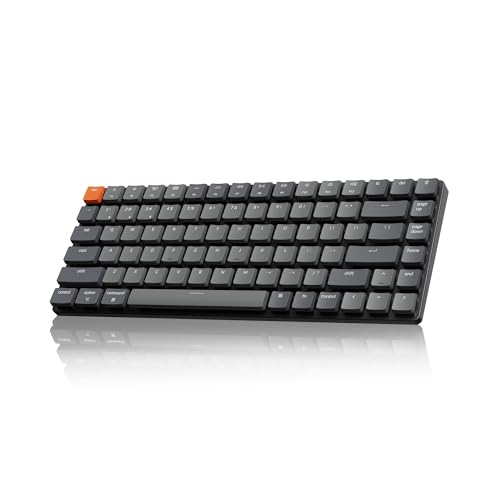
The K1 sits in Keychron’s line as the slim counterpart to the chunkier K2. Where the K2 stacks its 84 keys into a compact 75 percent block with tall keycaps, the K1 spreads the same idea across an 80 percent layout and then flattens everything: the case is a shallow tray, the switches are Gateron’s low-profile line at roughly two-thirds the height of a standard MX switch, and the keycaps are wide, flat, and close together. The result is a keyboard that slides into a laptop sleeve and sits on a desk without asking your wrists to climb.
Version 4 arrived as a running revision rather than a relaunch. Keychron kept the 84-key layout, the Mac and Windows keycap sets in the box, the USB-C wired mode, and Bluetooth 5.1 pairing for three hosts. What changed sat underneath: revised stabilisers on the space bar and other large keys, a switch offering that included low-profile optical options alongside the mechanical Gateron switches on some configurations, and small case tweaks that reduced the flex some owners of earlier versions noticed when typing hard in the corners.
Two frame variants circulated, a lighter plastic build and an aluminium frame build that added stiffness and a noticeable amount of weight. The aluminium version is the one most reviewers tested and the one that holds up best on the used market, because the tray resists the twisting that slowly loosens a plastic case. Backlighting came in white-only and RGB flavours, and neither is bright enough to read legends in a sunlit room, which was true of most low-profile boards of its era.
Battery capacity on the v4 was modest by modern standards. The slim case simply had no room for a large cell, so heavy backlight use shortened the gap between charges in a way that surprised owners coming from membrane wireless boards. With the light off and ordinary office use, the board comfortably lasted a working week and more; with RGB running at full brightness, charging twice a week was normal. Any used purchase in 2026 should assume the cell has lost some capacity on top of that.
How the picks on this page were chosen
There are no linked picks on this page, and that is a deliberate editorial choice rather than an oversight. Our verification process checks every product we link against the retailer’s own catalogue data, and no current listing corresponds to the Keychron K1 Version 4 itself. The listings that do exist under the K1 name belong to other versions with different hardware. Rather than dress one of those up as the v4, this article keeps the v4 discussion prose-only and describes its successors in words, so you can search for them by their correct names.
The judgements below rest on the v4’s documented specification, the changes Keychron described between versions, and the long ownership record this model accumulated: it was one of the most widely sold low-profile mechanical keyboards of its period, so its failure modes are well mapped. Where a claim depends on configuration, such as switch type or frame material, the text says so, because a v4 with optical switches and a plastic frame is a meaningfully different keyboard from a v4 with mechanical switches and an aluminium frame.
Typing feel: the low-profile compromise, honestly stated
Low-profile switches shorten both the travel before actuation and the total travel to the bottom of the stroke. On the v4 that means a key press resolves quickly, with a crispness that suits fast touch typing, and then ends sooner than a standard switch would. Writers who dictate their day through a keyboard often love this: fingers move less, hands stay flatter, and long sessions ask less of the wrists when the desk setup is right. The same shortness frustrates people who type with force, because there is less cushion at the bottom of the stroke and the hard landing transmits straight into the fingertips.
Switch choice shapes the experience more than the case does. The linear red variant is the quietest and the easiest to press accidentally when resting your fingers; the tactile brown variant adds a small bump that helps touch typists find actuation without looking; the clicky blue variant announces itself to a whole room and has no place in a shared office. Optical versions of the v4 feel slightly different again, with a cleaner, less scratchy stroke on good units and a reputation for consistency, at the cost of a smaller aftermarket switch ecosystem.
Keycap shape deserves its own paragraph because it is where laptop converts feel most at home and where mechanical purists feel most alienated. The v4’s caps are wide and flat with a gentle dish, spaced tightly. Accuracy during the first hour can actually dip, because the flat surface gives your fingers less guidance than sculpted caps do. By the second day most people are back to full speed, and many report a small gain, which they usually credit to the shorter travel rather than the caps themselves.
Sound is the v4’s quiet strength in its mechanical form. A low-profile board has less internal volume to resonate, so the v4 produces a muted clack rather than the deeper thock of a gasket-mounted board or the ping of a cheap tall case. In an office or on a call, that restraint matters. The space bar is the loudest key, as on nearly every board of the period, and it is the first place to listen when judging a used unit: a rattly space bar on a v4 usually means worn stabiliser stems, which are replaceable but fiddly at this size.
The version 4 changes, one by one
Stabiliser behaviour was the headline fix. Earlier K1 revisions could produce a space bar that ticked on one side when pressed off-centre, a small annoyance that grows teeth over thousands of presses a day. Version 4 units are consistently better here, though not perfect; the design still uses the compact stabiliser hardware that low-profile boards are stuck with, so a heavy-handed space bar press will always feel less planted than on a premium tall board.
The second change was consistency of the switch supply. Owners of earlier revisions reported mixed batches, where a handful of keys felt scratchier than their neighbours. The v4’s production run is remembered as more uniform, which is part of why it became the safe used recommendation. Uniformity is also what you are testing when you run your fingers across a second-hand board row by row before buying.
Third, the wireless behaviour settled down. Bluetooth pairing on the v4 holds three devices and swaps between them with a key combination, and the wake-from-sleep lag that annoyed owners of some earlier slim boards is shorter here. It remains Bluetooth, with the limits that implies: fine for typing, documents, and casual play, but a competitive gamer will still plug in the cable, because the v4 offers no low-latency 2.4 GHz dongle mode. That single omission is the clearest line between the v4 and its modern successors.
Finally, Keychron’s habit of shipping both Mac and Windows keycaps in the box continued with the v4, along with the physical switch on the back that changes the layout behaviour between the two systems. Dual-system households were the K1’s natural audience from the start, and the v4 served them well: one board on the desk, one toggle, two computers behaving as they should.
Buying guide: judging a used K1 v4 in 2026
Because every v4 transaction now happens on the used market, the buying guide for this keyboard is really an inspection guide. Start with identity: confirm the board is genuinely a version 4 by asking for a photo of the label on the underside, and confirm which switch type and frame the unit carries, since listings routinely omit both. A seller who cannot say whether the switches are mechanical or optical does not know the board well enough to describe its condition reliably either.
Battery health is the second gate. Ask how long the board runs between charges with the backlight off, and treat a vague answer as a warning. A worn cell is not a deal-breaker if the price reflects it and you mostly type at one desk where the cable can stay plugged in, but it undermines the entire point of a wireless slim board if you planned to move between rooms. Replacement cells exist through parts channels, yet fitting one involves opening a glued-and-clipped slim case, which is not a beginner repair.
Third, test every key if you can, or ask for a video of a full keyboard test page being worked through. Low-profile switches are soldered or socketed depending on configuration, and not every v4 variant makes swapping a dead switch easy. One dead key on a home-row letter is a board you should walk away from; a dead key on a rarely used function key is a negotiating point.
Fourth, inspect the stabilisers and the space bar specifically. Press the space bar at its far left and far right ends, then in the middle. All three presses should sound and feel alike. Check the enter and shift keys the same way. Rattle here is the most common v4 complaint and the most tedious to fix, because the compact stabiliser wires sit under a plate that does not invite casual disassembly.
Fifth, price the board against its successors rather than against its own history. The v4 was a mid-tier purchase when new. A used unit asking close to the cost of a current low-profile board with a warranty, a bigger battery, and a 2.4 GHz receiver is priced on nostalgia, not value. Clean aluminium-frame units with healthy batteries deserve a premium over plastic ones; yellowed keycaps, a missing cable, or a missing Mac keycap set all argue the other way. Our wider roundup of low-profile mechanical keyboards shows what the current field looks like if the used hunt stalls.
How to set up a K1 v4 for comfortable all-day typing
Step one is desk geometry, because a low-profile board rewards a flat setup and punishes a raised one. Place the board so your forearms rest roughly level, with elbows near a right angle, and skip the wrist rest while actively typing; the v4’s low front edge means most people need no rest at all, and hovering slightly is better than planting your wrists and pivoting from them. If your desk is tall, lower the chair-side equation from the other end by raising the chair and supporting your feet.
Step two is pairing discipline. Pair the board to your main computer first and name the slots in your head by position, because the three Bluetooth slots are the source of most v4 confusion: the board remembers the last slot used, and a keyboard that seems dead is often simply talking to a sleeping laptop in another room. When you add a second machine, test the swap shortcut until it is muscle memory, and keep the cable in the desk for the day a wireless stack misbehaves before a deadline.
Step three is choosing your backlight behaviour deliberately. Run the light at the lowest level that lets you read legends in your room, or turn it off entirely if you touch type; on this board the backlight is the battery budget, and every step of brightness is paid for in charging frequency. Owners who make this one change routinely double the interval between charges.
Step four is a light cleaning routine suited to slim hardware. Turn the board off, hold it upside down and tap the edges to clear crumbs, then use short bursts of compressed air at an angle rather than straight down, which drives debris under the flat caps. Wipe caps with a cloth barely dampened with water; the legends are printed or laser-etched depending on variant and harsh solvents shorten their life. A keycap puller fits the v4’s caps, but pull slowly and straight up, because low-profile stems are easier to stress than tall ones. Readers comparing cleaning across board types may also like our notes alongside the stabiliser installation walkthrough, which covers the large-key hardware this board shares with taller designs.
Common mistakes K1 v4 shoppers make
The first mistake is buying the wrong K1. Listings abbreviate aggressively, and a K1 Max or a later numbered revision is not a v4 with a new hat; the switches, wireless system, and case all differ. If the listing’s photos show a 2.4 GHz receiver in the box, you are not looking at a v4 at all. Slow down and match the underside label to the version you intend to buy.
The second mistake is assuming low profile automatically means ergonomic. The v4 reduces the wrist extension that a tall board on a tall desk can cause, and that is a genuine comfort benefit for many typists. It does not fix a desk that is too high, a chair with no support, or a habit of resting wrists on a hard edge while typing. Comfort comes from the whole setup; the keyboard is one variable, and swapping it while keeping a bad desk height disappoints people every time.
The third mistake is chasing the clicky switch variant for an office because it felt fun in a thirty-second test. Clicky low-profile switches carry sound surprisingly far in a quiet room, and there is no quiet way to type on them. If your workplace is shared, the tactile or linear variant is the adult choice, and your colleagues will never know you made it, which is exactly the point.
The fourth mistake is ignoring the missing dongle. Buyers who split time between office work and fast-paced gaming sometimes assume all wireless boards offer a gaming-grade connection. The v4’s Bluetooth is a typing connection. It is stable and convenient, and it is not what you want under a competitive shooter. Those readers should look at our survey of wireless mechanical keyboards instead of forcing this board into the wrong job.
Who the K1 v4 still suits, and who should pass
The v4 still suits the laptop-native writer who wants a mechanical board that feels like a modest step rather than a leap: same flat hand posture, better key definition, a real tactile option, and a board that travels in the same bag as the computer. It suits dual-system users who value the included keycaps and the layout toggle. It suits minimal desks, where its thin tray and tidy 80 percent footprint leave room for a notebook or a trackball such as the one covered in the Kensington Expert trackball review.
It does not suit enthusiasts who want to tune. The v4 predates Keychron’s full embrace of open remapping on this line, the switch ecosystem is narrower than the standard-height world, and the case was never designed to be opened repeatedly for foam swaps and film experiments. Readers who want that hobby should start with our look at hot-swappable mechanical keyboards and treat the v4 as what it is: a finished appliance, not a platform.
Nor does it suit buyers who need a warranty. Every v4 is old enough that support runs through community knowledge and spare-parts luck. That is acceptable at a used price that reflects it, and unreasonable at anything approaching new-board money.
The 84-key layout under a working day
Layout is where the K1 v4 quietly wins arguments that specification sheets cannot settle. Eighty-four keys in an 80 percent arrangement means a full function row, a navigation cluster that keeps delete within reach, and arrow keys that sit where a laptop user’s fingers already expect them. Nothing essential hides behind a function layer during ordinary writing, and that absence of friction is the board’s real productivity feature. People who live in spreadsheets occasionally miss the number pad; everyone else forgets the question within a week.
The compactness does impose one discipline: the function row doubles up media and system shortcuts through the fn key, and the v4’s printed legends are the map. Learn the handful you actually use, brightness, volume, playback, and ignore the rest. Owners who try to memorise the whole layer system in an evening tend to bounce off the board; owners who adopt two shortcuts a week end up fluent without ever studying. This is a general truth about compact keyboards that the v4 illustrates kindly, because its legends are clear and its fn key sits in a sensible place.
Keycap legends deserve a note for used buyers. The v4 shipped with caps whose legends vary by backlight variant: shine-through legends on backlit versions can show wear as a softening of the letter edges, while non-backlit versions age more gracefully. Wear here is cosmetic, but on a board bought partly for its tidy look it is worth a close photograph before money moves. Replacement low-profile cap sets exist, though the v4’s stabiliser spacing on the space bar means not every generic set fits without persuasion.
Switch by switch: choosing a v4 variant
Because the used market offers whatever configuration happens to surface, buyers often choose between switch variants rather than between boards. The linear red variant is the forgiving starter: light, smooth, and quiet, with the trade-off that resting fingers can register accidental presses until your hands learn the actuation point. It is the variant we would steer a first-time mechanical buyer toward, particularly for home offices where nobody else has to listen.
The tactile brown variant is the considered choice for writers and programmers. Its bump is small, as low-profile tactiles generally are, but it is placed early in the stroke, so a practised typist can actuate and release without bottoming out, which is where the speed and comfort claims of low-profile boards actually come from. Brown units also tend to be the most common on the used market, which improves your odds of finding a clean one at a fair price.
The clicky blue variant is a personality decision. It is satisfying in a solitary room and antisocial everywhere else, and its resale audience is smaller, which can work in a buyer’s favour on price. If you work alone and type for pleasure as much as for output, a cheap blue v4 is a legitimate delight. If there is any chance the board will travel to a shared space, skip it without regret.
Optical variants complicate the picture in a useful way. Optical actuation removes the metal contact leaves that wear and oxidise, so an optical v4 may age more gracefully in its switches than a mechanical one of the same years. The counterweight is ecosystem: replacement optical switches are a narrower market, and mixing families is not possible. For a buyer planning to keep the board for years with minimal fuss, optical is arguably the safer used bet; for a buyer who enjoys tinkering, it is a dead end, and the mechanical board, or a modern hot-swappable model from our 75 percent mechanical keyboards roundup, is the better home.
Build quality after several years of service
The aluminium-frame v4 ages in a particular pattern. The case itself is nearly indestructible in desk service: it does not crack, the finish resists the polishing that palms give plastic, and the board keeps its flat, deliberate look. What ages is everything attached to the case. The battery fades first, as discussed. The USB-C port can loosen if the board spent its life being plugged and unplugged daily by the cable rather than by the connector; test it by wiggling the cable gently while the board is awake and watching for disconnects. The rubber feet harden and lose grip, a trivial fix with generic replacements.
Plastic-frame units show their years more honestly: a faint creak when picked up by one corner, a slight shine on the front edge, occasionally a hairline crack near a screw post if the board was dropped. None of these is fatal for a desk-bound keyboard, and a plastic v4 at the right price is a rational buy for a second workstation or a spare. Just price it as the more fragile object it is.
Keycap wear splits along the same lines as legend wear. The v4’s caps are thin by design, and heavy use can polish the home row to a shine that changes feel slightly under the fingers. Some owners like the familiarity of that polish; buyers who want a board that feels new should look for the low-mileage units that lived as a secondary keyboard, which surface regularly because many v4s were bought as travel boards and then left in drawers. A travel-board v4 with a strong battery is the used market’s best-kept secret.
The v4 against its own family tree
Context helps a used purchase, so consider the v4 against three reference points. Against earlier K1 revisions, it is the one to own: the stabiliser and consistency fixes are exactly the things that determine whether a slim board feels cheap or composed. Against the taller K2 in its second version, covered in our Keychron K2 v2 review, the v4 trades key travel and cap choice for flatness and portability; neither is better in the abstract, and households often end up with one of each. Against its modern successors, the v4 loses on wireless hardware, battery, and remapping, and wins on simplicity and, usually, price.
There is also a posture argument that cuts across the whole family. A slim board pairs naturally with a slim pointing device and a lower desk profile; a tall board pairs with a sculpted mouse and a more traditional setup. Mixing a very flat keyboard with a very tall mouse can leave one wrist happy and the other confused, which is why we suggest auditioning the whole desk as a system rather than optimising parts in isolation. The v4’s designers clearly imagined it beside a laptop on a clean desk, and it is at its best in exactly that scene.
Wireless behaviour in real rooms
Bluetooth keyboards live or die by the rooms they work in, and the v4’s wireless manners are best described as dependable within their generation’s limits. Pairing is quick, the three device slots hold their assignments across restarts, and reconnection after sleep takes a breath rather than a coffee break. In a home office with a laptop, a tablet, and a phone, the swap shortcut turns the board into a small switchboard, and this is the use case where owners report the most lasting satisfaction.
Crowded radio environments test it harder. A desk surrounded by wireless peripherals, a USB 3 hub radiating interference near the receiver path, and a laptop with its Bluetooth antenna buried behind a metal lid can combine into occasional repeated or dropped characters on any board of this era, the v4 included. The fixes are mundane and effective: move the board’s line to the computer clear of hubs, keep the distance short, and use the cable for the one machine that matters most. Judged against its contemporaries rather than against modern tri-mode boards, the v4 holds up respectably.
One behaviour worth knowing before you buy used: the board’s battery reporting to the host operating system is approximate. Treat the on-screen percentage as a mood rather than a measurement, and build the habit of charging on a schedule, weekly for most typists, instead of waiting for a warning that may arrive late. Owners who adopt the schedule stop thinking about the battery entirely, which is the correct relationship to have with a keyboard battery.
Three desks, three verdicts
Consider the board on a writer’s desk first: a laptop on a stand, an external monitor, long documents, and a premium on quiet. Here the v4 is in its element. The flat profile keeps wrists neutral beside the raised screen, the tactile switches give each word a small confirmation, and the modest footprint leaves the desk feeling like a place for paper as well as machines. This is the desk the v4 was designed for, and it still earns its place on it.
On a developer’s desk the verdict is a qualified yes. The layout keeps arrows and function keys close, the Mac and Windows support suits cross-platform work, and the wired mode removes wireless variables during long sessions. The qualification is remapping: developers who live on custom layers will find the v4’s generation of firmware less accommodating than current boards, and should weigh that honestly against the used price. If your customisation needs are limited to the shortcuts printed on the caps, the board will not hold you back.
On a gaming desk the verdict flips to a polite no, with a narrow exception. The exception is the relaxed, story-driven, mostly keyboard-and-mouse evening session, where the v4’s short travel feels snappy and the desk looks clean. The no applies to anything competitive or latency-sensitive, where the absence of a high-polling wireless mode and the board’s period electronics put it behind purpose-built equipment. A keyboard can be excellent and still be wrong for a particular desk, and recognising that is cheaper than learning it after checkout.
What a fair price looks like, in tiers
Without naming figures that would date this page, the used v4 market sorts into three honest tiers. The top tier is the verified aluminium-frame unit with a strong battery, both keycap sets, and its cable: worth a clear premium because it needs nothing from its next owner. The middle tier is the sound plastic-frame unit or the aluminium unit with a tired battery, priced for a buyer who types at one desk and can live with a cable nearby. The bottom tier is the project board, rattly stabilisers, worn legends, unknown battery, bought by someone who enjoys small repairs and priced accordingly.
The discipline is matching your tier to your patience. Most disappointment with this keyboard traces back to a tier mismatch: a buyer who wanted an appliance paid a project price and received a project. Ask the questions in the buying guide above, place the unit in its tier, and the v4 becomes one of the more predictable used purchases in the hobby, precisely because so many were sold that its behaviour is fully documented by its owners.
Living with the v4 for a year: maintenance and small repairs
A year of daily typing puts roughly a million keystrokes through a busy board, and the v4’s maintenance needs across that span are modest but specific. Dust and hair migrate under low-profile caps faster than under tall ones because the gap between cap and case is smaller; a monthly upside-down shake and air pass keeps the board feeling crisp, while a neglected board develops a faint scratchiness that owners often misdiagnose as switch wear. Nine times out of ten, cleaning restores the feel, which is worth knowing before a used board gets blamed for its previous owner’s housekeeping.
Stabiliser care is the second routine. If the space bar develops a tick, a small amount of dielectric grease on the stabiliser wire contact points, applied with a fine brush after removing the cap, usually silences it. Work slowly: low-profile stabiliser clips are small, and forcing a cap off at an angle is how stems get stressed. The same treatment, lighter still, suits the enter and shift keys. This is maintenance the v4’s designers assumed an owner might do, and it is well within a careful beginner’s reach.
Cable discipline is the third routine, and the cheapest. The USB-C port is the board’s lifeline for charging and wired mode, and it wears when cables hang off it at an angle or get yanked sideways. Route the cable so it leaves the port straight, unplug by the connector body, and the port will outlast the battery by years. A board whose port already wobbles is not necessarily a reject, but it belongs in the project tier of pricing until proven otherwise.
Accessories that genuinely help, and those that do not
A slim carrying sleeve is the one accessory that clearly earns its money with this board, because the v4’s reason to exist includes travel, and an unprotected keyboard in a bag collects exactly the debris its small gaps dislike. Choose a sleeve with a rigid face; soft pouches protect against scratches but not against the point loads that bend a space bar wire in transit.
A low, firm palm support helps some owners and hinders others, and the honest advice is to borrow before buying. The v4’s front edge is low enough that many typists float comfortably without support, while those with larger hands sometimes prefer a thin support for resting between bursts of typing. The rule that matters is to rest on it between typing, not during: planting and pivoting loads the wrist in a way no keyboard design can compensate for.
What does not help: tall replacement keycaps, which the switch stems and stabiliser spacing were never designed around; switch films and other enthusiast tuning parts aimed at standard-height boards; and decorative cables stiff enough to drag the board’s back edge. The v4 rewards owners who accept it as a finished design and accessorise around its slimness rather than against it.
The honest limitations list
Every review of this board should carry its limitations in one place, so here they are without softening. There is no 2.4 GHz wireless mode and no high-polling option, so competitive gaming is out. The battery is small by current standards and every surviving unit’s cell is older than it was. Remapping belongs to an earlier, simpler generation of Keychron firmware. The backlight, in either flavour, is a legend-reading aid rather than a light show. Keycap and switch ecosystems are narrower than the standard-height world’s. And there is no warranty standing behind any unit you can buy today.
None of those limitations contradicts the recommendation that follows, because the v4’s job was never to be everything. Its job was to give a laptop typist a mechanical keyboard that respected their existing habits, and within that job description the limitations mostly read as the honest costs of slimness. Buyers whose needs collide with the list should not negotiate with it; they should buy a different board, and this site’s keyboard coverage exists to help them choose it.
From a laptop keyboard to the v4: the transition, day by day
Most v4 owners arrived from a laptop’s built-in keyboard, so the transition deserves a concrete account. The first day feels like typing on a familiar surface that suddenly pushes back: the keys have real travel, a defined actuation, and a bottom that arrives with intent. Errors cluster around the function row and the right-hand modifiers, where spacing differs slightly from any given laptop. Speed typically dips a little and accuracy dips a little more, and both recover quickly.
By the end of the first week the pattern reverses. The defined actuation starts catching errors before they happen, because a half-pressed key no longer registers the way it can on a membrane or scissor board, and backspace use falls. Writers often describe this as the board making them honest. The flat caps stop being noticeable, and the hands settle into the shorter travel, with fingers lifting less between words.
A month in, the interesting change is what happens when the owner goes back to the laptop alone, on a train or in a meeting room. The built-in keyboard suddenly feels vague, and the owner understands what the v4 actually sold them: not speed, which was roughly theirs already, but certainty about each keystroke. That certainty is the product. Everything else in this review, the stabilisers, the wireless slots, the aluminium tray, exists to deliver it without asking the typist to rebuild their habits around a tall, sculpted, enthusiast board.
There is one group for whom the transition runs the other way, and fairness requires naming them: typists with a heavy, percussive style who learned on tall mechanical boards. For them the v4’s short stroke can feel abrupt no matter how long they give it, and their accuracy may never fully settle. They are not doing anything wrong; the board is simply built for a lighter hand. A trial period matters more for this group than for anyone else, and a used purchase from a seller with returns is the sensible way to run that trial.
The sixty-second used-buying checklist
Everything in the buying guide compresses into a short routine you can run through in a chat with a seller. Confirm the underside label says Version 4 and note the switch type and frame material from the same photograph. Ask for the battery’s current endurance with the backlight off, and for a short video of a keyboard test with every key pressed in sequence. Ask specifically about the space bar at both ends, the USB-C port’s firmness, and whether both the Mac and Windows keycap sets and the original cable are included. Then ask why the board is being sold; the most common honest answers, upgraded to a newer board or a spare that never got used, are both good signs.
Score the answers rather than hunting for perfection. A board that passes on identity, switches, and stabilisers but carries a tired battery is a fair middle-tier purchase for a desk-bound typist. A board with an evasive seller fails regardless of its photographs, because every fact you cannot verify becomes your repair bill later. The v4 rewards this small diligence more than most used electronics do, since its strengths and its wear points are so well documented that a careful buyer can predict their ownership experience before the parcel arrives.
Finally, keep the alternative in view while you negotiate. The current low-profile market is crowded and competent, and the v4’s used price only makes sense while it stays clearly below the cost of a warranted newcomer. The moment a listing crosses that line, the rational purchase flips, and no amount of version-4 nostalgia should talk you out of the warranty. Sentiment is a poor substitute for a returns policy.
A note on noise in shared spaces
Because so many v4s work in shared rooms, its acoustic footprint deserves a direct summary. In mechanical-switch form with tactile or linear switches, the board is quiet enough for an open office and for most calls, producing a soft, high, brief clack that microphones handle kindly. The space bar is the exception on worn units, which is one more reason the used inspection above starts there. Placing the board on a desk mat softens the bottom-out note further, and the aluminium-frame variant carries a slightly firmer, shorter sound than the plastic one. Clicky-switch units belong at home, full stop; no desk mat diplomacy will make them office citizens, and buying one for a shared space is the single most common v4 purchase their owners come to regret.
One last ownership observation belongs in the record. The v4 is a keyboard people keep. Its resale listings skew heavily toward upgrades and duplicates rather than dissatisfaction, and its owner communities still trade keycap and stabiliser advice years after production ended. Longevity of that kind is not a specification, but it is evidence: a board that thousands of typists chose to keep beside newer, faster, brighter rivals understood something real about how most people actually type. The version 4 is where that understanding settled into its most consistent form, and it is why this slim, discontinued keyboard still deserves a careful review rather than a footnote.
It is also worth stating plainly who maintained this board’s reputation: its owners. Keychron revised the K1 repeatedly because buyers kept reporting what annoyed them, and the v4 reads like a company that listened to the stabiliser complaints, the switch-consistency complaints, and the pairing complaints in that order. Later versions added features; version 4 subtracted frustrations. For a certain kind of buyer, the one who values a tool that has stopped surprising them, that subtraction is the more valuable of the two moves, and it is why a well-kept v4 can still feel like the finished article on a desk in 2026.
Final recommendation
Judged on its own terms, the Keychron K1 Version 4 earned its reputation: it is the revision where the slim K1 stopped feeling like an experiment and started feeling like a product. The stabilisers behaved, the switches were consistent, and the whole board asked almost nothing of a laptop typist’s habits while giving back a more deliberate, more accurate keystroke. If you find a clean aluminium-frame unit with a healthy battery at a fair used price, it remains a satisfying desk keyboard today. If the asking price drifts toward modern successors, buy the successor and enjoy the warranty, the bigger battery, and the dongle the v4 never had. Either way, buy with your eyes open about which version is actually in front of you, because with the K1 line the version is the product.
Frequently asked questions
Is the Keychron K1 v4 hot-swappable?
It depends on the configuration, which is why used listings need careful reading. Some v4 variants were built around optical switches with a degree of swap flexibility within that optical family, while mechanical-switch units were not designed for casual switch pulling. If switch swapping matters to you, confirm the exact variant with the seller and treat silence on the question as a no.
Does the K1 v4 work with both Mac and Windows?
Yes. The board includes keycaps for both systems and a hardware switch that changes how the modifier keys behave, and it pairs over Bluetooth with up to three devices or runs wired over USB-C. That dual-system friendliness was a core part of the K1’s appeal and the v4 keeps it fully intact.
How long does the K1 v4 battery last?
With the backlight off and ordinary office typing, a healthy v4 battery lasts well over a working week between charges. Backlight brightness is the dominant variable: full-brightness RGB can cut the interval to a couple of days. On a used unit, expect less than the board managed when new, and ask the seller directly about current endurance.
What is the difference between the K1 v4 and the K1 Max?
They are different generations of the same idea. The Max line adds a low-latency 2.4 GHz wireless mode, a larger battery, modern remapping support, and different switch and case options, in a board that is related to the v4 but not a revision of it. Shoppers who need those features should buy the Max under its own name; shoppers who want the v4’s simpler, slimmer character should not be sold a Max as though it were one.
Is the K1 v4 good for gaming?
For casual and single-player gaming it is perfectly pleasant, especially wired, where its short-travel switches feel responsive. For competitive play its Bluetooth connection and period hardware put it behind boards with high polling rates and dedicated low-latency receivers. Our comparison of the Keychron K1, K2, K4 and K6 differences helps place it against its siblings if you are deciding inside the family.
Should I buy a K1 v4 or a newer low-profile keyboard?
Buy the v4 when a verified-clean unit costs meaningfully less than a new board and you value its particular slim feel. Buy newer when the prices converge, when you need a 2.4 GHz connection, or when a warranty matters to you. Speed of typing is rarely the deciding factor; condition and price are. Readers still building speed itself may enjoy how to type faster more than another hardware swap.


