Disclosure: As an Amazon Associate, reviewstook.com earns from qualifying purchases. Links on this page are affiliate links; they cost you nothing extra. Prices and availability change often, so check the current Amazon listing before you buy.
Learning how to choose a smart thermostat starts with a truth most product pages skip: the best model for your neighbour can be the wrong model for your house, because a thermostat is not really a gadget purchase. It is a match between a small wall controller and the heating and cooling system already hidden in your walls, your wiring, your daily routine, and the phone ecosystem your household already uses. This guide walks through that match step by step, so by the end you can look at any smart thermostat, ask the right questions in the right order, and know within minutes whether it belongs on your shortlist or back on the shelf.
Key Takeaways
- Compatibility comes before features: confirm your HVAC system type and wiring first, especially whether you have a C-wire or a manufacturer-approved way to add one.
- Decide how the thermostat should think: a learning model, a schedule-driven model with room sensors, or a simple app-controlled model are three different ownership experiences.
- Match the thermostat to the voice assistant and smart home platform your household already uses, not the one you might adopt someday.
- Room sensors matter most in houses with hot and cold spots; in a small, even-tempered flat they add little.
- Installation safety is non-negotiable: power off at the breaker, photograph the old wiring, and leave high-voltage, millivolt, or complex heat pump systems to a licensed HVAC technician.
- Buy the thermostat your system, wiring, and routine point to, even when a glossier screen argues otherwise; fundamentals decide satisfaction.
In this guide
What You Need to Know Before Comparing Smart Thermostats
A conventional thermostat is a switch with a temperature sensor. It watches the air near the wall where it hangs, compares that reading with your set point, and calls for heating or cooling until the reading matches. A smart thermostat keeps that basic job and layers three things on top: connectivity, so you can control it from a phone or by voice; sensing, so it can react to occupancy, humidity, and sometimes the temperature in other rooms; and software, which turns those inputs into schedules, learning behaviour, geofencing, and energy reports. When you choose well, the heating system quietly adapts to your life. When you choose badly, you get a handsome wall display that fights your boiler, drops offline, or sits in manual mode forever because nobody in the house trusts it.
The first concept to grasp is that the thermostat does not make heat or cold. It only instructs the equipment that does: a furnace, a boiler, a heat pump, an air conditioner, or some combination of them. Each equipment type speaks to the thermostat through a set of low-voltage wires, and each wire carries one instruction: call for heat, call for cooling, run the fan, reverse the heat pump valve, power the controls, and so on. A smart thermostat can only control the functions it is wired for and programmed to understand. That is why two houses with the same thermostat can have completely different experiences: one system is a simple single-stage furnace the thermostat fully understands, while the other is a dual-fuel heat pump with auxiliary heat staging that needs careful configuration to avoid expensive mistakes.
The second concept is the C-wire, the common wire. Older thermostats often ran on batteries or stole tiny amounts of power from the heating circuit, which was fine for a simple dial or a basic digital display. A smart thermostat is a small computer with a colour screen, radios, and sensors, and it needs continuous, reliable power. The C-wire provides it. If your existing wiring bundle includes a C-wire connected at the furnace control board, installation is usually straightforward. If it does not, you have three honest options: use the power adapter or add-a-wire kit the thermostat manufacturer sells for exactly this situation, have an HVAC technician run a new wire, or choose a model the manufacturer explicitly supports for no-C-wire installations within its stated limits. What you should never do is improvise, jumper terminals on guesswork, or follow a stranger’s wiring hack. The safety section later in this guide explains the boundaries in detail.
The third concept is staging. Many heating and cooling systems run at more than one level of output. A two-stage furnace burns gently most of the time and brings in a higher stage on very cold mornings. A variable-speed system modulates almost continuously. A smart thermostat earns much of its comfort advantage by managing those stages intelligently, running longer, gentler cycles that even out temperature instead of blasting and coasting. But it can only do that if it is wired and configured for the stages your equipment actually has. When you compare models, look for explicit support for your stage count and equipment type in the manufacturer’s compatibility checker, and treat vague claims of universal compatibility with suspicion.
Finally, understand the difference between the three control philosophies, because this choice shapes daily life more than any screen size or finish. A learning thermostat studies your manual adjustments for a period and builds its own schedule, which suits households whose routines are regular but who hate programming. A sensor-led thermostat follows a schedule you set but averages or prioritises temperatures from wireless room sensors, which suits houses where the hallway is comfortable while the nursery or home office is not. A straightforward connected thermostat does exactly what its app schedule says, which suits renters, second homes, and anyone who values predictability over automation. None of these philosophies is best in the abstract. The right one is the one that matches how your household actually lives.
How to Choose a Smart Thermostat in 7 Steps
Step 1: Identify Your HVAC System Before You Shop
Start at the equipment, not at the shop. Find your heating system and write down what it is: gas or oil furnace, boiler with radiators or underfloor loops, electric baseboards, a heat pump with or without auxiliary heat, a packaged rooftop-style unit, or a dual-fuel combination. Note whether cooling is central, a separate system, or absent. Note the age of the equipment if you know it, and whether more than one thermostat zone exists in the house. If you have the equipment manual or a service sticker from your HVAC company, photograph it. This inventory takes ten minutes and eliminates most wrong purchases, because every reputable smart thermostat brand publishes a compatibility checker keyed to exactly these facts.
Pay special attention to three situations that change the answer completely. Line-voltage systems, most often electric baseboard heaters controlled by thermostats rated for high voltage, need a thermostat built specifically for line voltage; a standard low-voltage smart thermostat must never be connected to them. Millivolt systems, found on some older gas fireplaces and floor furnaces, are another specialist case. Proprietary communicating systems, where the thermostat and equipment exchange data over a vendor-specific bus rather than simple on-off signals, may lose their most advanced features if you swap in a generic smart thermostat. In all three cases the correct move is to ask the equipment manufacturer or an HVAC technician what smart control options exist, rather than forcing a mainstream model into service.
Step 2: Check Your Wiring and the C-Wire Question
With the power to the HVAC system switched off at the breaker — always, before any thermostat cover comes off — you can remove the existing thermostat from its wall plate and look at the wires. Most modern low-voltage systems use labelled terminals: R for power, W for heat, Y for cooling, G for the fan, and C for common, with additional letters for heat pump reversing valves, auxiliary heat, humidifiers, and second stages. Photograph everything before you touch a single wire. Count how many wires are in the bundle, including any spare wire tucked unused into the wall, because an unused spare can often become your C-wire with a connection at the furnace board, a job many homeowners still sensibly hand to a technician.
If there is no C-wire and no spare, read the fine print of any model you are considering. Some manufacturers supply a power extender kit in the box or as an accessory that shares existing wires safely within the design’s limits. Others state plainly that a C-wire is required. Respect that statement. A thermostat that browns out, reboots, or short-cycles the furnace because it is starved of power is not a bargain at any tier; it is a fault waiting for the coldest night of the year. When in doubt, budget for a technician visit to add the wire properly. It is a routine job for them, it future-proofs every thermostat you will ever fit, and it removes the single most common cause of smart thermostat misery.
Step 3: Choose the Control Philosophy That Fits Your Routine
Now decide how much thinking you want the thermostat to do. If your household keeps a fairly regular rhythm — up at similar times, out or busy during the day, home in the evening — a learning model can build a schedule from your first weeks of adjustments and then quietly maintain it, trimming the small wastes you would never bother programming. If your rhythm is irregular, with shift work, travel, or a home office used on unpredictable days, learning can feel like an argument: the thermostat keeps preparing the house for a pattern you are not following. In that case a schedule you control, reinforced by occupancy sensing and phone-based geofencing that sets back when the last person leaves, usually feels smarter in practice.
Sensor-led control deserves its own consideration. If the rooms you live in are not the room the thermostat hangs in — and in most houses the thermostat sits in a hallway chosen for wiring convenience, not comfort — remote room sensors let the system judge temperature where people actually are. Bedrooms at night, a nursery at nap time, a north-facing office all afternoon: the thermostat can prioritise the occupied sensor and let the hallway drift. Households in single-storey, open-plan, or well-balanced homes may never miss this feature. Households in multi-storey or older, uneven houses often describe it as the whole point of upgrading.
Step 4: Match the Platform, Assistant, and App to Your Household
A smart thermostat lives inside an ecosystem. Check which voice assistant it answers to, which smart home platform it joins, and whether it supports the interoperability standards your other devices use. A household already speaking to one assistant at lights and speakers should choose a thermostat that assistant controls natively, including voice adjustment, routines, and away modes. Check, too, whether the features you care about require a subscription. Core heating control should never sit behind a paywall, and on the leading models it does not, but some advanced reports, extended histories, or camera-adjacent home monitoring bundles in the same app may. Read what is free, what is paid, and decide with open eyes.
Then look at the app itself, because the app is the thermostat you will touch most. Screenshots and the manufacturer’s walkthrough will show you whether scheduling is visual and forgiving, whether more than one household member can hold an account with sensible permissions, and whether guests or a house-sitter can be given limited access without sharing your password. If an older relative lives with you or visits often, consider the wall experience as well: can they walk up and change the temperature without a tutorial? The best designs keep the physical interaction almost as simple as the dial they replaced.
Step 5: Weigh the Hardware Details That Matter Daily
With compatibility and philosophy settled, the hardware differences become a matter of taste and room fit. Screen quality matters if the thermostat hangs where you will see it all day; some models use a mirrored or fabric finish designed to disappear into a hallway, others present a bright, information-rich display. Presence sensing at the thermostat itself can wake the display as you approach and feed occupancy logic. Humidity sensing is worth having: in summer it supports dehumidification-aware cooling, and in winter it can protect windows and joinery by moderating a connected humidifier. Air-quality or outdoor weather displays are pleasant extras, not decision-makers.
Also consider what the thermostat can control beyond basic heating and cooling. Many models offer terminals or wireless support for a whole-home humidifier, dehumidifier, or ventilator, and can coordinate them instead of leaving them to separate dumb controls. If your home has such accessories, or you plan to add them, put accessory support on your checklist now. Retrofitting control later usually means replacing the thermostat again, which is exactly the waste this guide exists to prevent.
Step 6: Plan the Installation Honestly
Before you buy, decide who is installing it. A like-for-like swap on a standard low-voltage system with a C-wire present, clear labels, and a photograph of the old wiring is a well-documented DIY job for a careful homeowner, and the leading manufacturers provide genuinely good step-by-step app guidance. The mandatory safety rules are simple and absolute: switch the HVAC power off at the breaker before touching wires, verify the system is off, photograph the existing wiring before disconnecting anything, label wires by the terminal they came from rather than trusting colours alone, and never bypass a safety control, a fuse, or a manufacturer’s wiring diagram to make something fit.
Equally, know the stop signs. If the wiring is unlabelled, damaged, or does not match any diagram in the manual; if your system is line-voltage, millivolt, or a heat pump with complex auxiliary and emergency heat arrangements you do not fully understand; if the furnace board needs a new C-wire connection and you are not confident working inside that cabinet — stop and call an HVAC technician. A professional install is not a defeat. It is often bundled with a system check, and it protects both your equipment warranty and your house. For the full walkthrough of a standard installation, see our step-by-step installation guide.
Step 7: Judge Value by Tier, Not by Hype
Finally, place each candidate in its honest tier. Entry-tier smart thermostats deliver app control, scheduling, voice control, and basic energy reports, and for a small home with a simple system they may be everything you need. Mid-tier models add better displays, presence sensing, and more polished software. Premium models add room sensor ecosystems, learning refinements, accessory control, and the most capable handling of multi-stage and heat pump systems. The mistake is paying for a premium tier whose headline features your system cannot use — room sensors in a one-room flat, learning in a house with no routine — or starving a complex system with an entry model that cannot stage it properly. If you are weighing the upgrade itself before the model, our honest verdict on whether a smart thermostat is worth it works through the value case in full.
Gear for This Guide: Four Thermostats That Cover the Main Choices
The shortlist below is deliberately small. Each model represents one of the control philosophies and tiers described above, so choosing between them is really choosing between approaches. Use the descriptions to fix your tier and philosophy, then check price on Amazon for the current listing before you buy.
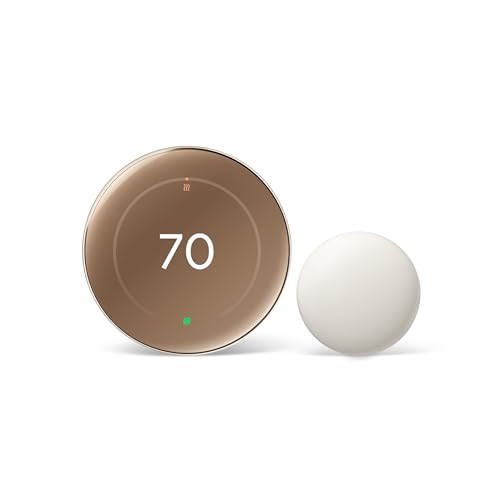
Google Nest Thermostat — the design-led, schedule-driven all-rounder
The mainstream Nest model takes the schedule-driven philosophy and wraps it in the most interior-friendly hardware in the class: a mirrored lens finish that reflects the wall around it and a simple swipe-and-tap edge control. It suits households that want app control, voice control through the Google and Alexa ecosystems, presence-based setbacks, and energy-use summaries without paying for the full learning flagship. Its compatibility is broad across standard low-voltage systems, and the manufacturer is explicit about when a C-wire or its power solution is needed, which makes it a clean first shortlist entry for a conventional furnace-and-air-conditioning home.
Best for: design-conscious households with a standard system and a predictable week. Not suited for: homes needing a rich room-sensor ecosystem or the most advanced multi-stage handling, where the flagship below or the ecobee approach fits better.
Nest Learning Thermostat — the premium learning option
The learning flagship builds its schedule from your adjustments, shows a polished, information-dense display, and carries the broadest equipment support in its family, including multi-stage systems and accessories. It is the model to choose when your routine is regular enough to learn, your system is complex enough to reward careful staging, and you want the thermostat to need the least ongoing attention. As with all learning models, give it a fair settling period and resist heavy manual overrides, or you will train it into the very irregularity you bought it to smooth out.
Best for: regular-routine households with multi-stage or accessory-equipped systems. Not suited for: shift workers and highly irregular homes, where learned schedules fight real life.

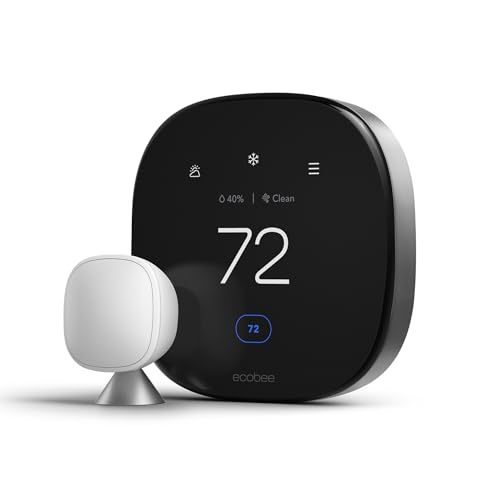
ecobee Smart Thermostat Premium — the room-sensor and air-aware choice
The ecobee flagship leads with sensing: a premium build, a large clear display, and a room sensor in the ecosystem so the system can judge comfort where people actually sit and sleep. Its scheduling is explicit rather than learned, which many households prefer, and its platform support is among the widest in the category, spanning the major assistants including Apple’s ecosystem. For a house with known cold bedrooms or a hot office, this sensor-led approach is often the most satisfying answer in the class, and its installation kit and guidance for homes without a C-wire are among the most thoughtfully documented — still to be used exactly as the manufacturer directs, never improvised.
Best for: uneven-temperature houses, multi-platform smart homes, and buyers who want explicit schedules. Not suited for: minimalists who will never place a room sensor and simply want the plainest connected control.

Amazon Smart Thermostat — the entry-tier Alexa option
The Amazon model strips the idea to its essentials for Alexa households: app and voice control, scheduling with hunches-based automation in the Alexa app, and a clean, unobtrusive wall presence at an entry tier. It is a sensible answer for a flat, a rental you have permission to upgrade, or a second zone, provided your system and wiring meet its stated requirements, including its C-wire expectations. It gives up the flagship displays, sensor ecosystems, and accessory depth of the premium tier, and it makes no apology for that trade.
Best for: Alexa households wanting simple connected control at the entry tier. Not suited for: anyone outside the Alexa ecosystem or with complex staging needs. A fuller comparison of the whole field sits in our smart thermostat buying guide.
Common Mistakes When Choosing a Smart Thermostat
The most common mistake is shopping by screen and finish before checking compatibility, then discovering at the wall that the wiring or system type rules the model out. The compatibility checker exists precisely to prevent this, and it takes minutes. Run it with your real system details, not with hopeful guesses, and if your system is unusual, believe the checker when it says no. A thermostat returned is an annoyance; a thermostat forced onto an incompatible system can short-cycle equipment, blow a control-board fuse, or leave auxiliary heat running far longer than it should, which is the opposite of saving energy.
The second mistake is ignoring the C-wire until installation day. Buyers assume the wires behind their old thermostat will be the wires the new one wants, and many older installations were done with the minimum cable the old thermostat needed. Decide the C-wire question while you can still choose a model, an adapter kit, or a technician visit calmly, rather than on a Saturday afternoon with the heating off and the wall open. The third mistake is choosing a learning model for an unlearnable household, covered above: match the philosophy to the routine, not to the marketing.
The fourth mistake is forgetting the rest of the household. A thermostat only one person can operate is a thermostat that gets overridden, covered with notes, or quietly resented. Check that partners, older relatives, and regular guests can all do the one thing everyone needs: walk up and make the room warmer or cooler without an app, an account, or a lesson. The fifth mistake is overlooking what happens without internet. Every model on the shortlist keeps heating and cooling to its last schedule locally if the connection drops, but app control, voice control, and reports pause. If your broadband is unreliable, weight the local wall experience and schedule stability more heavily in your choice.
Pro Tips From Installers and Long-Term Owners
Photograph your furnace control board as well as the thermostat wiring if a technician has the cabinet open for any reason; a labelled photo of both ends of the wire bundle makes every future thermostat swap, including the one you are planning now, dramatically simpler. Keep the old thermostat, its photograph, and its wiring notes in a labelled bag for the first full heating and cooling season after a swap. If anything behaves strangely, that bag is your instant rollback and your technician’s best diagnostic clue.
After installation, live with the schedule for a full week before judging it, and change one variable at a time. Owners who tweak set points, sensor priorities, and geofencing radii daily never learn which change helped. Finally, put a recurring note in your calendar, once in autumn and once in spring, to review the energy report and the schedule against the season. Ten minutes twice a year keeps a smart thermostat matched to a household that itself changes with the seasons. For a balanced view of the downsides before you commit, read the full pros and cons of smart thermostats.
Worked Examples: Three Households, Three Right Answers
Consider a family in a two-storey house with a gas furnace, central cooling, and bedrooms that run cold at night while the hallway thermostat sits satisfied. Their inventory shows a C-wire present and a standard two-stage furnace. The deciding feature is not learning; it is sensing. A sensor-led premium model, with a room sensor in the main bedroom given priority overnight, answers their actual complaint. They pair it with the assistant their speakers already use, and the cold-bedroom problem, not the gadget, dictated the purchase.
Consider a couple in a small flat with a simple combi boiler, no cooling, and a regular working week. Their wiring has no C-wire, but the manufacturer of their chosen design-led model supports their configuration with its stated power solution, confirmed through the compatibility checker. They do not need room sensors in one open living space, and they do not need accessory control. The mainstream model at the middle tier gives them scheduling, presence setback, and an app they both like, and the money not spent on flagship features they cannot use stays unspent.
Consider a homeworker in an older house with a heat pump, auxiliary heat, and a schedule that changes weekly. Learning would fight her, and auxiliary heat mistakes are the expensive kind, so she chooses an explicit-schedule model with strong heat pump configuration options, and she pays an HVAC technician to install and configure it, including verifying the auxiliary heat lockout settings against her system’s documentation. The technician’s visit, not the thermostat’s headline features, is what makes her setup economical. Her case is the clearest illustration of this whole guide: the right choice is a system decision, not a shopping decision.
Understanding Schedules, Geofencing, and Energy Reports Before You Buy
Three software features appear in almost every product description, and each deserves a clear-eyed look before it influences your choice. The schedule is the foundation. A good schedule interface lets you set different temperatures for waking, leaving, returning, and sleeping, copy days across the week in one gesture, and make a one-off change without destroying the pattern you built. A poor one buries the same functions under menus you will dread opening, and a schedule you dread editing becomes a schedule you never update when the seasons or your life change. When you compare models, look for screenshots or walkthroughs of the scheduling screen specifically, not just the glossy home screen, because the scheduling screen is where long-term satisfaction is decided.
Geofencing uses the location of household phones to infer whether anyone is home, setting the temperature back when the last phone leaves a defined radius and restoring comfort as someone returns. Done well, it captures the savings of a setback schedule without demanding that your life follow one. Done carelessly, it misfires: a phone left at home, a radius drawn too tightly around a workplace nearby, or a household member who declines location sharing can all leave the system heating an empty house or cooling an occupied one. If geofencing is a headline reason for your purchase, check how the model handles multiple phones, how it behaves when a phone is off or out of signal, and whether occupancy sensing at the thermostat and room sensors can back it up. The most reliable setups combine signals instead of trusting any single one.
Energy reports are the third feature, and the most oversold. A useful report shows runtime by day and month, compares it with the weather outside, and connects the dots in plain language: the system ran longer because the week was colder, not because anything is wrong. That context helps you spot genuine problems early, such as a system suddenly running far longer than the same weather demanded last year, which can be the first sign of a filter overdue for replacement or equipment that needs a service visit. Treat headline savings claims with calm scepticism. How much any household saves depends on how wasteful the starting point was. A home already run on a disciplined setback schedule has little left to recover, while a home heated to the same temperature around the clock has plenty. The thermostat enables the saving; your previous habits decide its size.
Questions to Ask Before You Put a Model in the Basket
Run any candidate through this final set of questions, in order, and let a wrong answer stop the purchase rather than be argued away. Does the manufacturer’s own compatibility checker confirm your exact system type, stage count, and accessories? Is your C-wire situation resolved, with either a wire present, a spare that can be connected properly, or the manufacturer’s stated adapter solution for your configuration? Does the control philosophy match your routine rather than your aspirations? Does it join the assistant and platform your household already speaks to, with the features you care about available without a subscription you resent?
Continue with the human questions. Can every regular occupant work it at the wall without instruction? Will it still run a sane schedule during an internet outage, and does its local behaviour suit a home with unreliable broadband? If you have a heat pump, are its configuration options documented clearly enough for you or your installer to set auxiliary heat behaviour correctly? If you plan a humidifier, dehumidifier, or ventilator later, can this thermostat control it, or will the accessory force a second replacement? And finally, who installs it: you, with labelled wires and a standard system, or a technician, because your system sits anywhere near the stop signs described earlier?
If a model passes every question, the remaining differences are taste: finish, display style, and the feel of the app. Those are legitimate grounds to choose on, once the fundamentals are safe. If a model fails an early question but charms you with its screen, let it go. Thermostats are ten-year wall fixtures in many homes, and the charm of a display fades in a month while a compatibility compromise complains for a decade. The households who love their smart thermostats are rarely the ones who bought the most features. They are the ones whose answers to these questions were boringly, completely right.
Special Cases: Zones, Second Thermostats, Renters, and Second Homes
Some houses have more than one thermostat because the heating system itself is zoned: separate ductwork branches or separate hydronic loops serve different floors or wings, each with its own controller. If that is your house, choose thermostats as a set rather than one at a time. Models from the same family share an app, share occupancy logic in some ecosystems, and present one learning curve to the household. Mixing brands across zones means two apps, two accounts, and two sets of quirks, which is survivable but rarely enjoyable. Also confirm how your zone control board interacts with smart thermostats, particularly where dampers or a zone panel sit between the thermostat and the equipment; a technician who knows your panel can answer in minutes what forums argue about for weeks.
Renters face a different version of the choice. The technical questions are identical, but permission comes first: most leases require the landlord’s written agreement before wiring changes, and the original thermostat should be kept, photographed in place, and refitted at the end of the tenancy. Choose a model whose installation touches nothing beyond the thermostat swap itself, avoid any solution that requires opening the furnace cabinet, and keep every screw and wire label. A renter who follows those rules can enjoy app control and scheduling for years and still hand the home back exactly as found.
Second homes and holiday properties invert the usual priorities. There, the headline features are remote visibility, low-temperature alerts that warn before pipes are at risk, and the ability to warm the house before arrival without heating it empty for a week. Occupancy logic matters less, because the house is empty on purpose, while reliability through a broadband or power outage matters more, because nobody is present to notice a problem. If this is your case, weight alert quality, outage recovery behaviour, and the clarity of the app’s remote dashboard above learning and room sensors, and consider asking a local HVAC company to hold a key and act on alerts you cannot.
Finally, households planning wider smart home work should think of the thermostat as one node among many. The same routines that dim lights and lock doors at night can set the sleeping temperature; the same arrival detection that disarms an alarm can end a setback. Choosing a thermostat that joins your platform cleanly, as covered in Step 4, is what makes those combinations possible later without replacing hardware. It is the cheapest future-proofing in this entire guide, because it costs nothing but a few minutes of checking before you buy.
How Your Climate and Your House Change the Choice
Climate quietly rewrites the priority list. In a heating-dominated climate, the features that matter are careful staging on cold mornings, sensible auxiliary heat management on heat pump systems, and a setback schedule that saves fuel overnight without making the house slow to recover before breakfast. Look for models whose heating logic and reports are detailed, and be wary of aggressive setbacks in very cold weather: a house that cools too far can spend the morning recovery running the least efficient stage of the system, undoing the night’s saving. In a cooling-dominated climate, humidity handling moves to the front. A thermostat that watches indoor humidity and can overcool slightly or coordinate a dehumidifier keeps a home feeling comfortable at a higher, cheaper set point, and it protects against the clammy feeling that makes people reach for ever-lower temperatures.
Construction matters just as much. A well-insulated modern house changes temperature slowly, so it forgives simple scheduling and rewards gentle, steady control. An older, draughty house changes temperature quickly, responds well to occupancy-based setbacks, and exposes every weakness in sensor placement: a thermostat on an outside wall, in a sunbeam, or above a heat source will misread the home no matter how smart its software is. If your current thermostat’s location is compromised, factor relocation into the plan, and treat relocation as a wiring job with the same safety rules as any other — power off, labelled wires, and a technician when the run is not straightforward.
House size ties the threads together. The larger and more varied the home, the more value sensing and staging deliver; the smaller and simpler the home, the more an honest entry-tier model covers the real need. Choosing with your climate, construction, and floor plan in mind is the difference between a thermostat that feels clairvoyant and one that feels like a stranger guessing at your life.
One last calibration before the questions below: talk to whoever services your heating system. HVAC technicians see the aftermath of every thermostat fashion, and a two-minute conversation during a regular service visit — which models behave well on systems like yours, which generate callbacks — is worth more than a weekend of comparison charts. If their answer names a family you had not considered, weigh it seriously. Local experience with your exact equipment type is the rarest and most useful data in this entire decision.
And when the choice is finally made, buy from a listing you can verify, keep the receipt with the wiring photographs, and register the product if the manufacturer offers registration for warranty and recall notices. None of that is exciting, and all of it pays off exactly once — on the day something goes wrong years later, when the household that kept its paperwork gets a fast answer and the household that did not gets a research project. A thermostat is a small purchase that touches the largest energy system in your home every single day. Choosing it slowly, on compatibility and routine rather than on gloss, is how that daily touch becomes a daily benefit instead of a daily negotiation.
The Fit Check Behind the Choice: Auditing Your Space for a Smart thermostat
Guides usually stop at the happy path, the day everything pairs, fits or works first time. This section covers the rest of the ownership curve with a smart thermostat: the judgement calls, the awkward cases and the fixes that experienced owners reach for. Keep it bookmarked for the second month rather than the first day; that is when these details start to matter.
Judge a smart thermostat by your heating and cooling system first: compatibility with your equipment and wiring decides the shortlist before features get a vote. Then judge the scheduling and sensing model, whether it learns, follows room sensors or simply runs a programme you set, against how your household actually lives. Photograph your current thermostat’s wiring before buying, check for the common wire many models need, and note your system type from the existing unit’s labels. Decide where temperature should be sensed, because the hallway where thermostats live is rarely the room whose comfort matters most.
In a home with a predictable work pattern, a thermostat that pre-warms or pre-cools for arrival beats one that reacts after you walk in uncomfortable. For bedrooms that run hot or cold relative to the hall, remote room sensors that let the system average or prioritise the sleeping rooms fix the oldest complaint in heating. For a second home or rental, remote alerts for very low temperatures and the ability to check the system from afar justify the smart layer on their own. The common thread is that most problems with a smart thermostat are placement, settings or expectation problems wearing a fault’s clothing. Work through the checks in order before concluding that anything is broken or badly made.
Apply all of this to the listings in front of you. When a listing such as the Google Nest Thermostat, Nest Learning Thermostat and ecobee Smart Thermostat Premium catches your eye, resist judging it by its headline claim and instead run the checks above against it: does its stated role match the room you measured, does its control path suit your household, and does the maker’s own guidance support the job you have in mind. A model that answers those questions cleanly on paper usually answers them cleanly in the home, and one that dodges them in the listing will dodge them on your wall, shelf or desk as well.
Systems with proprietary communicating controls and some older high-voltage setups sit outside most smart thermostats’ compatibility, whatever the box suggests. A thermostat is only as good as its sensor’s position; direct sun, a draught or a hot appliance nearby will run the whole house wrong. If the system short-cycles or the thermostat reboots when heating starts, the power supply to the thermostat is the first suspect, not the schedule. If one room never reaches the set point, check vents, doors and sensor placement before raising the temperature for the whole house.
- Start with placement and settings before assuming a fault.
- Change one thing at a time so you know what fixed it.
- Keep a short written note of the working configuration.
- Re-run the basic test after any furniture, network or season change.
- Check the maker’s manual for your exact model before forcing anything.
- Stop and reassess if a fix makes a safety-related behaviour worse.
If the app and the wall unit disagree, confirm both are on the same account and system after any router or password change. Keep the thermostat’s vents and sensors dust-free, replace room-sensor batteries on a rota, review the schedule at each season change, keep firmware updated, and have the heating system itself serviced on its own schedule regardless of the thermostat’s cleverness.
Keep a short note of what worked, which setting, which position, which order of steps. The next time the smart thermostat misbehaves, and most do eventually, that note turns an afternoon of guessing into ten minutes of fixing.
It also helps to think in seasons rather than in days. A smart thermostat that seems ideal in the week it arrives may face different light, different temperatures, different routines and different demands a few months later, and the models that age well are the ones chosen with that longer view in mind.
Keep the household in the loop as you decide. The person who did not choose the smart thermostat is usually the person who discovers its most annoying habit first, and a two-minute conversation before buying can surface the objection that saves a return.
Documentation is an underrated feature of ownership. Keep the manual, the receipt and a note of your settings together, because the day something needs adjusting is never the day you want to reconstruct how it was set up.
Frequently Asked Questions
Do all smart thermostats need a C-wire?
Most need either a C-wire or a manufacturer-approved alternative, because the screen, radios, and sensors need continuous power. Some models include or support a power extender kit that works within stated limits, and a spare unused wire in your existing cable can often be connected as a C-wire at the furnace board. Never improvise a power workaround. If your wiring is unclear, have an HVAC technician add a proper C-wire; it is a routine, future-proof fix.
Will a smart thermostat work with my heat pump?
Many do, and heat pumps are where a good smart thermostat earns its keep by managing auxiliary heat carefully. The catch is configuration: reversing valve behaviour, auxiliary heat lockouts, and staging must be set correctly for your specific system. Check your exact model in the manufacturer’s compatibility tool, and if the auxiliary and emergency heat arrangement is complex, have a technician install and configure it rather than guessing.
Can I install a smart thermostat myself?
On a standard low-voltage system with labelled wires and a C-wire, a careful homeowner following the manufacturer’s steps can usually manage it: power off at the breaker first, photograph the old wiring, label every wire, and work slowly. If anything is unlabelled, damaged, high-voltage, millivolt, or simply does not match the diagrams, stop and call a professional. Confidence is not a substitute for a wiring diagram.
Which is better, a learning thermostat or one with room sensors?
They solve different problems. Learning suits a regular routine and removes programming effort. Room sensors suit a house whose rooms disagree about temperature, because the system can judge comfort where people are. Some households benefit from both, but if you must choose, pick the one that answers your actual complaint: forgotten schedules point to learning, cold bedrooms point to sensors.
Will a smart thermostat work if the internet goes down?
Yes, for its core job. The thermostat keeps running its current schedule and manual wall control locally without a connection. What pauses is remote app control, voice control, and cloud features such as reports and learning updates. When the connection returns, those features resume. For homes with unreliable broadband, prioritise a model whose wall controls and local scheduling feel good to use daily.
Should I replace a working thermostat just to go smart?
Only if the connected features solve a real problem for you: rooms that are uncomfortable, a schedule nobody maintains, a second home you cannot easily visit, or heating running in an empty house. If your current thermostat already matches your life, the honest answer is to wait. Our detailed smart thermostat review of the category explains what ownership actually feels like once the novelty fades.
Related Guides
Round out the same rooms with the best smart speakers for voice control, the best smart door locks for the front door, the best smart light bulbs for lighting that follows the same routines, and the best Wi-Fi smart plugs for plug-in loads. If humidity is part of your comfort problem, see the best smart humidifiers, and for sensing beyond temperature, the best smart air quality monitors roundup.