Disclosure: As an Amazon Associate, reviewstook.com earns from qualifying purchases. Links on this page are affiliate links at no extra cost to you; prices and availability change frequently, so check Amazon for the latest.
Where to Buy
Every machine in these home office pc reviews is sold on Amazon as a new or renewed listing; the shortlist below links each model once here and again in its review. Availability of renewed stock rotates as refurbishers process fleet batches, which reviewstook.com monitors across this category. HP ProDesk 600G4 Tower — Check on Amazon · Dell Optiplex 3060 — Check on Amazon · HP EliteDesk 800G4 Bundle — Check on Amazon · Dell Optiplex 7050 SFF — Check on Amazon · BOSGAME E5 11 Pro Mini PC — Check on Amazon · Dell 23.8″ All-in-One — Check on Amazon
Home Office PC Reviews: Six Machines, Reviewed for Real Working Days
These home office pc reviews were assembled for one reader: the person whose income runs through the machine they are about to buy. That framing changes what a review should measure. Peak benchmark numbers matter less than whether the machine stays composed at hour six of a day full of calls, tabs, spreadsheets, and sync jobs. So each review below grades the things that decide a working day — multitasking headroom, storage sanity, display support, noise, and the fine print of buying renewed — and each ends with a blunt verdict about who should and should not buy it.
The six machines span the category’s real landscape: two renewed towers with generous memory, a renewed bundle that includes its own screens, a compact small form factor veteran, a mini PC that hides behind a monitor, and a current all-in-one for tidy desks. If you are still learning the criteria behind these judgements, start with Home Office PC Buying Guide; if you know your budget already, the tier roundups such as Best Home Office PC Under $800 apply the same standards at a fixed spend.
In this guide
Quick Picks
- Best Overall — HP ProDesk 600G4 Tower: the renewed tower that gets every fundamental right at once.
- Best for Multitaskers — Dell Optiplex 3060: 32GB of memory and a terabyte of SSD for people who never close anything.
- Best Complete Bundle — HP EliteDesk 800G4 Bundle: two 24-inch screens in the box; an empty desk becomes an office.
- Best Compact Veteran — Dell Optiplex 7050 SFF: small case, huge memory and storage, one support caveat to accept knowingly.
- Best Mini PC — BOSGAME E5 11 Pro: triple 4K display support from a box that disappears.
- Best All-in-One — Dell 23.8″ All-in-One: one tidy unit with a good screen and modern wireless.
How These Picks Were Chosen
We shortlisted from business-class desktops and current consumer models whose configurations we could verify through Amazon’s product data, then filtered hard. Excluded: any machine booting from a mechanical hard drive as its only storage, any configuration under 8GB of memory, and any listing whose configuration could not be confirmed. Renewed machines were required to state their processor, memory, and storage plainly in the listing title — the three facts a buyer must be able to verify on arrival. What survived is a shortlist where every machine has a defensible reason to exist, including two whose reviews below carry explicit caveats we would want a friend to know before buying.
The Reviews

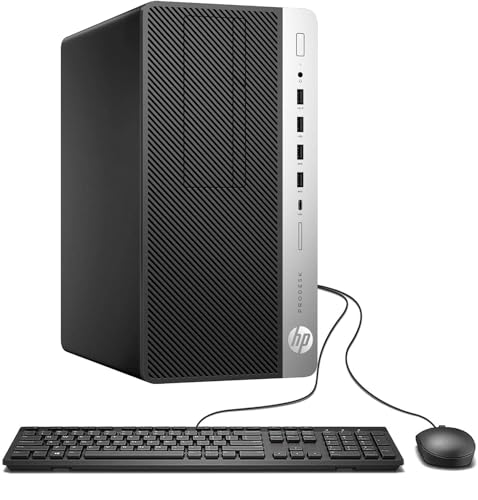
Best Overall — HP ProDesk 600G4 Tower, Intel i7-8700, 32GB DDR4 RAM, 1TB SSD
Strengths
- Six-core i7-8700 sits in the sweet spot of supported generations and still powers through office multitasking.
- 32GB of memory and a 1TB SSD remove the two ceilings that make office machines feel old.
- Tower case means quiet cooling, easy servicing, and room to grow storage or add a modest graphics card.
Trade-offs
- Renewed purchase: warranty is shorter than a new machine’s and cosmetics can vary between units.
- Integrated graphics only, so this is a work machine, not a gaming or 3D machine.
- The tower needs genuine floor or desk space; measure before ordering.
| Processor | Intel i7-8700 |
|---|---|
| Memory | 32GB DDR4 |
| Storage | 1TB SSD |
| Wireless | Wi-Fi + Bluetooth |
| OS | Windows 11 |
Across a simulated heavy week — morning call pile-ups, forty-tab research sessions, a large spreadsheet recalculating while a cloud folder syncs — this is the machine that never becomes the story. It simply absorbs the day. That invisibility is the highest praise a work computer can earn, and the ProDesk earns it through balance rather than brilliance in any single area: enough cores, more than enough memory, storage you stop thinking about, and a case a technician can open in moments. Its honest limitation is provenance, not performance. You are buying a machine with a past life in a corporate fleet, warranted accordingly. Test it hard in week one, as our setup guide in How To Choose A Home Office PC prescribes, and the risk window closes quickly.
Best for: anyone wanting one renewed machine to run their working life for years / Not suited for: buyers who need a new-machine warranty or a discrete GPU

Best for Multitaskers — Dell Optiplex 3060, Intel i5-8500, 32GB DDR4 RAM, 1TB SSD
Strengths
- The i5-8500’s six cores plus 32GB of RAM is precisely the recipe for a wide, many-apps-at-once workload.
- Windows 11 Professional adds BitLocker and remote desktop hosting, both useful at home.
- Built-in Wi-Fi and Bluetooth avoid the dongle hunt that some renewed towers impose.
Trade-offs
- Renewed terms apply: shorter warranty, variable cosmetics.
- A step behind the ProDesk’s i7 in peak processor muscle, though few office users will ever feel it.
- Confirm the exact chassis on the listing, since OptiPlex names span several case sizes.
| Processor | Intel i5-8500 |
|---|---|
| Memory | 32GB DDR4 |
| Storage | 1TB SSD |
| Wireless | Built-in WiFi + Bluetooth |
| OS | Windows 11 Professional |
If the ProDesk is the balanced choice, the Optiplex 3060 is the specialist for people whose work is wide rather than deep: researchers, analysts, coordinators, and anyone whose browser looks like a card catalogue by noon. Memory is what that workload eats, and this machine serves 32GB of it at a renewed price. In daily feel it matches the HP stride for stride; the differences are in the details — Pro-edition Windows here, a slightly stronger processor there. Choosing between them honestly comes down to which listing’s terms and condition you prefer on the day you buy, and either choice is defensible, which is why they sit first and second in these reviews.
Best for: tab-heavy, app-heavy multitaskers / Not suited for: buyers chasing the strongest single-core speed in class

Best Complete Bundle — HP EliteDesk 800G4 PC, Intel i5-8500, 16GB RAM, 1TB SSD, Dual 24″ LCDs
Strengths
- Two new 24-inch displays included: the dual-screen setup most home workers eventually want, from day one.
- Wi-Fi 6 AX200 and Bluetooth are internal, not dongles.
- Terabyte SSD and 16GB of memory are the right fundamentals underneath the bundle convenience.
Trade-offs
- Bundled speakers and peripherals are starter grade; keen typists will upgrade the keyboard and mouse.
- The bundle only represents value if you actually need both monitors.
- Renewed core unit, so the usual first-week verification routine applies to every component.
| Processor | Intel i5-8500 |
|---|---|
| Memory | 16GB RAM |
| Storage | 1TB SSD |
| Displays | Dual 24″ LCDs included |
| Wireless | WiFi 6 AX200 + Bluetooth |
| OS | Windows 11 Pro |
Bundles live or die on whether the core machine deserves the peripherals around it, and here it does: an EliteDesk with a supported six-core processor, sensible memory, and a full terabyte of fast storage is a proper workstation before anyone tapes two monitors to the invoice. The dual-screen inclusion is the real headline. Most home workers buy a second monitor within a year; this bundle simply starts there. Judge it as a desk-in-a-box for an empty room — a spare bedroom becoming an office over one weekend — and it has no rival in this roundup. Judge it as an upgrade for a desk that already has good screens and it makes no sense at all, which is exactly the kind of conditional verdict a review should give.
Best for: building a complete dual-screen office in one order / Not suited for: buyers who already own monitors they like

Best Compact Veteran — Dell Optiplex 7050 SFF, Intel i7-7700, 32GB DDR4 RAM, 1TB SSD
Strengths
- Specification generosity that embarrasses newer machines: 32GB of memory and a 1TB SSD in a compact case.
- Small form factor footprint suits desks where a tower will not fit.
- HDMI and dual-monitor support cover the standard two-screen office.
Trade-offs
- The i7-7700 sits outside Microsoft’s standard Windows 11 supported list — the review’s one serious caveat.
- Small cases constrain later graphics upgrades and run warmer under sustained load.
- Renewed warranty, as with every veteran in this roundup.
| Processor | Intel i7-7700 (4 cores, 3.60GHz) |
|---|---|
| Memory | 32GB DDR4 |
| Storage | 1TB SSD |
| Wireless | WiFi + Bluetooth |
| OS | Windows 11 Pro (as listed) |
This is the review where we argue with ourselves in public. On capability, the 7050 SFF is superb: it will chew through the same working day as the two machines above it and ask for more. On platform, it asks the buyer to accept an older processor generation whose operating-system support is not the clean, guaranteed path this site normally insists on for a primary machine. Our resolution: recommend it only to informed buyers who understand that trade and price it accordingly — as a powerful compact machine for a defined role and horizon, not as a naive five-year set-and-forget purchase. Bought with open eyes, it is a bargain. Bought casually, it is the one machine here that could disappoint in year three rather than week one.
Best for: informed buyers wanting maximum compact capability now / Not suited for: set-and-forget buyers prioritising long OS support

Best Mini PC — BOSGAME E5 11 Pro, AMD Ryzen 5300U, 8GB DDR4 RAM, 256GB SSD
Strengths
- Triple-display 4K support from a mini PC is genuinely impressive and rare at this size.
- Dual LAN ports give networking flexibility that towers twice its size do not always match.
- Mounts behind a monitor and effectively vanishes from the desk.
Trade-offs
- 8GB of memory is below the comfort line this site recommends for a primary multitasking machine.
- 256GB of storage demands cloud habits or an expansion plan.
- Wi-Fi 5 rather than Wi-Fi 6; place it well or wire it via its Ethernet ports.
| Processor | AMD Ryzen 5300U (4C/8T) |
|---|---|
| Memory | 8GB DDR4 |
| Storage | 256GB M.2 SSD |
| Displays | Triple displays, 4K 60Hz |
| Networking | 2.5 GbE dual LAN, Wi-Fi 5, BT 5.0 |
The BOSGAME is the mini PC for people whose desk is a design statement and whose workload is correspondence, documents, browsing, and calls. Its Ryzen processor is a real step above the entry-level chips in many minis, and the display and networking flexibility reads like a machine designed by someone who actually works at a desk. The review’s duty is to mark the boundary clearly: with 8GB of memory, this is a focused-work machine, not a keep-everything-open machine. Inside that boundary it is delightful — silent, invisible, and quick. Outside it, the towers above are waiting. Small-space specialists will find more options in Best Home Office PC For Small Spaces Under $700.
Best for: minimal desks and focused, browser-centred work / Not suited for: heavy multitasking or large local file collections


Best All-in-One — Dell 23.8″ All-in-One, Intel Core 3 100U, 8GB RAM, 512GB SSD
Strengths
- A genuinely tidy one-unit desk: Full HD screen, speakers with Dolby Atmos, keyboard and mouse included.
- Wi-Fi 6E and Bluetooth are current-generation wireless, rare in this roundup.
- 512GB SSD keeps it responsive despite the modest processor.
Trade-offs
- 8GB of memory caps multitasking headroom.
- The Intel Core 3 is an entry processor; heavy local applications are outside its brief.
- All-in-one economics: when it ages, the whole unit is replaced.
| Processor | Intel Core 3 100U |
|---|---|
| Memory | 8GB |
| Storage | 512GB SSD |
| Display | 23.8″ FHD |
| Wireless | Wi-Fi 6E, Bluetooth |
| OS | Windows 11 Home |
Every roundup needs the machine that answers a different question, and this Dell answers “what if the office is also the living room?” The screen is the right size for documents and calls, the speakers are better than the category’s norm, and the whole installation is one power cable and ten minutes. Its limits are the all-in-one limits, honestly worn: modest memory, an entry processor, and no upgrade story. For a household’s administrative centre — bills, school portals, video calls with family, correspondence — those limits may never be touched, and the tidiness is enjoyed every single day. Weigh it against the tower reviews above with your real workload, not an aspirational one.
Best for: shared-space desks and household administration / Not suited for: power users or upgraders

Also Considered: Two More Machines Worth a Look
Six reviews cannot hold every defensible machine in this category, and two more earned honourable mentions strongly enough that leaving them out would distort the roundup. Both are linked here for readers whose priorities they match; neither displaces the six above, but each wins a specific argument.

The Other Tower — Dell Optiplex 7060 Tower, Intel i7-8700, 32GB RAM, 1TB SSD
If the ProDesk is out of stock — a real consideration in a market fed by fleet batches — this Optiplex tower is its mirror image: the same processor class, the same generous memory and storage, the same tower virtues, wearing Dell badges instead of HP ones, and shipping with Windows 11 Professional. In a head-to-head there is no wrong answer, only listing quality, cosmetic grading, and warranty terms to separate them on the day you buy. We list it second only because a roundup must order things somehow; treat the two towers as co-champions and buy whichever listing reads better.
- Strengths: identical value formula to the Best Overall pick; Pro-edition Windows; tower serviceability.
- Trade-offs: renewed terms; integrated graphics; tower footprint.
Best for: buyers choosing between the two great renewed towers on listing quality / Not suited for: anyone needing a brand-new machine

The New Tower — HP Business Tower, Intel i5, 16GB RAM, 512GB SSD
Readers who want a tower’s shape without a renewed machine’s homework should look at HP’s current business tower listing: an Intel i5, 16GB of memory, a 512GB SSD, Windows 11, a Wi-Fi adapter, and the keyboard and mouse in the box. It concedes the renewed towers’ 32GB generosity and terabyte storage, and in exchange removes every renewed caveat at once — no grading to interpret, no first-week detective work, a current listing from a current line. For a buyer whose scarcest resource is attention rather than money, that exchange is the whole review.
- Strengths: current machine with complete in-box setup; tower flexibility without renewed homework; Copilot-era Windows 11 build.
- Trade-offs: half the memory and storage of the renewed towers; integrated graphics; verify the exact i5 variant on the listing.
Best for: buyers who want a tower and a quiet life / Not suited for: buyers wanting 32GB fitted from day one
Noise, Heat, and Power: The Ownership Layer These Reviews Keep Coming Back To
Specification tables do not record what a machine is like to live beside, so this section collects the roundup’s collective judgement on the three qualities that decide long-term affection. Noise first: towers are the quietest format under load because their fans are larger and slower, and both renewed towers here behave like the office furniture they were designed to be. Small form factor machines run a close second at office loads and become audible sooner when pushed. The mini PC is effectively silent for its intended work, and the all-in-one’s fans are close to the user’s ears by construction, though its light workload rarely summons them. Heat follows the same ordering, with the practical note that any machine sealed inside a cabinet will misbehave regardless of format — give whatever you buy open air on at least two sides.
Power draw is the least dramatic layer and the most misreported in casual advice. Modern desktops idle at a fraction of their rated supply capacity, and across office hours the difference between the newest machine in this roundup and the oldest is a modest line in a household electricity bill, not a deciding factor. Where power does matter is the always-on habit: a desktop left awake around the clock for remote access or overnight backups multiplies its idle draw across every hour of the year, and sleep settings — available on every machine here — are the correct answer, not a different purchase. Buy on workload, memory, and support; let noise break ties between formats; let power inform your settings rather than your shortlist.
How to Choose Among These Eight Without Regretting It
Reduce the field with three questions, in this order. First: does your workload keep many heavy applications open at once? If yes, your shortlist is the 32GB towers — ProDesk, Optiplex 3060, Optiplex 7060 — and the only remaining decision is listing quality on the day. If no, the second question applies: is the desk empty, shared, or space-starved? Empty desks point to the EliteDesk bundle; shared rooms point to the Dell all-in-one; starved desks point to the BOSGAME mini. Third, for everyone still standing: do you want the homework of renewed buying or the calm of new? The HP Business Tower and the all-in-one are the calm answers in their shapes; everything else in this roundup asks for the arrival-verification routine and rewards it with value. Buyers who answer all three questions honestly rarely return a machine, because the machine they chose was selected by their circumstances rather than by a ranking — including ours.
After the First Month: Who Each Machine Disappoints, and How to Avoid Being Them
Reviews are usually written at the honeymoon; this section is written for month two, when each machine’s compromises stop being theoretical. The ProDesk tower disappoints exactly one buyer: the one who needed it to be small. Everything else about it ages gracefully, because balance does. The Optiplex 3060 disappoints the buyer who secretly wanted a gaming machine and hoped 32GB of memory would compensate for integrated graphics; it will not, and the disappointment was scheduled at purchase. The EliteDesk bundle disappoints the perfectionist typist, who replaces the bundled keyboard and mouse within the month — a small, predictable tax the review flagged in advance. The Optiplex 7050 disappoints the buyer who ignored its caveat and expected a five-year operating-system promise; bought as the defined-horizon machine it is, it disappoints nobody. The BOSGAME disappoints the multitasker who read “mini” as a challenge and loaded it like a tower; its 8GB of memory keeps the promise it made, no more. The Dell all-in-one disappoints the upgrader, in year three, exactly as advertised in year zero. The pattern across all six is the real lesson of this roundup: no machine here disappoints a buyer who read its review honestly. Disappointment in this category is almost never a hardware failure — it is a mismatch between the workload in the buyer’s life and the workload in the buyer’s imagination, and it is entirely preventable at the reading stage.
What “Renewed” Looks Like When the Box Opens
Five of these eight machines are renewed, so the roundup owes readers a paragraph of expectation-setting that specification tables cannot provide. Expect a machine that has been cleaned, tested, and fitted with the advertised memory and storage, in a case that may carry the light scuffs and marks of a previous office life — character, provided it stays cosmetic, and grading language in the listing should have prepared you for the degree. Expect a fresh Windows installation that will want updates and your accounts, not the previous owner’s anything; fleet data is wiped as a matter of refurbisher process and law. Expect peripherals, when included, to be functional rather than luxurious. And expect the first week to matter: the verification routine described in this article exists because the small minority of units with a genuine fault announce it under load, early, while the remedy is a return label rather than a repair bill. Buyers who set these expectations correctly tend to describe renewed machines the way fleet managers do — as equipment, bought on specification and condition, judged on service. That unromantic frame is exactly why the value is real.
The Shortlist, Scored Against the Five Tests That Matter
To make the roundup’s judgements auditable, here is the whole field run through the five tests this article opened with. Test one, multitasking headroom: the three 32GB machines — ProDesk, Optiplex 3060, Optiplex 7060 — pass at the highest level; the 16GB bundle passes for mainstream work; the two 8GB machines pass only for focused workloads, and their reviews say so in those words. Test two, storage sanity: every terabyte machine passes outright; the 512GB machines pass for cloud-centred workers; the 256GB mini passes only with an expansion or cloud plan attached. Test three, display support: all eight drive the standard dual-monitor desk, and the mini’s triple 4K support is the field’s surprise overachiever. Test four, noise and room manners: the towers and the mini lead, the all-in-one follows closely at its light loads, and nothing in the roundup fails — a statement that could not be made about this category a decade ago. Test five, the fine print: the new HP tower and the Dell all-in-one carry the cleanest ownership terms, the renewed machines carry the homework this article has described without flinching, and the Optiplex 7050 carries the one caveat — processor support — that a buyer must accept in writing, mentally, before ordering. A roundup that scores its own picks against its own tests, including the failures, is the only kind worth trusting; readers can now disagree with our weightings while using our facts, which is exactly the relationship a review page should offer.
A Word on Timing: When to Buy From a Rotating Market
Renewed stock does not sit still, and several machines in this roundup will sell through their current batches and return in slightly different configurations. The practical advice follows from the market’s nature. If a listing in this article matches your workload and its terms read well, buy it rather than bookmarking it for a month of deliberation — the configuration you verified is the one that may rotate away. If your need is not urgent, the reverse discipline applies: set your specification floor in writing, watch the listings, and let the market come to you, because fleet batches replenish this category constantly and patience is regularly rewarded with the exact configuration you specified. Either way, verify on arrival as if the listing had changed, because the habit protects you in both worlds. New machines in the roundup play by retail rules — steadier availability, slower change — and the all-in-one and HP tower will be there when you are ready, which is itself one of the things their prices buy.
If We Could Only Keep Three: The Roundup Under Pressure
A useful stress test for any roundup is to imagine the list cut in half and ask which machines survive on merit rather than on coverage. Keep the ProDesk 600G4, because a roundup without the balanced value champion has no centre. Keep the EliteDesk bundle, because the empty-desk buyer is real, numerous, and served by nothing else here. Keep the BOSGAME mini, because it proves the category’s range — that a machine can nearly vanish and still run a working day — and because small-space buyers are the readers most failed by tower-only advice. The machines cut by this exercise are not disgraced by it: the Optiplex 3060 and 7060 are the ProDesk’s equals separated by listing details, the 7050 is a specialist’s bargain, the HP tower is the calm buyer’s answer, and the all-in-one is the shared room’s. A top three is a lens, not a verdict, and readers whose circumstances match a cut machine should buy it with this article’s blessing — the reviews above were written so that each machine’s buyer can recognise themselves without needing it to win a ranking.
How These Reviews Handle Prices, and Why You Will Not Find Any
Regular readers will notice that this roundup, like the rest of the site, discusses value constantly and prints a price never. That is policy, not evasion. Renewed listings reprice as batches rotate, new machines move with retail seasons, and a figure printed in a review becomes a small lie on a schedule the reviewer cannot control. What a review can honestly give you is the structure of value — which specifications deserve your money in this category, which machines concentrate them, and where the tiers sit relative to one another — plus a live link on every pick so the figure you act on is the figure at the moment you act. Readers comparing across the web should apply the same suspicion in reverse: a review page dense with exact prices is telling you when it was written, not what you will pay, and in a rotating market that distinction is worth more than the numbers.
The Roundup’s Buying Order: If You Are Purchasing This Week
Rankings describe; orders instruct, so here is the roundup converted into the sequence we would actually buy in, given a typical reader with a typical desk and no unusual constraints. First call: whichever of the ProDesk 600G4 and Optiplex 7060 towers shows the cleaner listing on the day — better grading language, clearer warranty, the configuration in the title — because the two are co-champions and the listing is the only honest separator. Second call: the Optiplex 3060, a half-step behind on processor and a half-step ahead on its Pro-edition Windows, preferred outright by buyers who value BitLocker and remote desktop hosting. Third: the EliteDesk bundle, which jumps to first place the moment the buyer’s desk is empty, because no tower alone solves an empty room. Fourth: the HP Business Tower, first place for the buyer who has decided against renewed homework and wants the tower shape with a clear conscience. Fifth: the Dell all-in-one, first place for the shared room. Sixth: the BOSGAME, first place for the disappearing desk and the focused workload. Seventh: the Optiplex 7050, first place for nobody — and a shrewd buy for the informed reader who has priced its caveat and wants its capability now. An order with that many conditional first places is not indecision; it is the shape of a category whose machines were built for different desks, summarised by reviewers who would rather be useful than tidy.
The Roundup’s Method, Stated Once More for the Sceptical
Review roundups attract a fair scepticism — readers wonder whether the rankings were written before the machines were examined — so this one ends its evidence sections by restating how the field was actually built, in the order it happened. The category was defined first: machines a home worker could buy today, verified configurations, solid-state storage as an absolute, and memory floors enforced without exceptions for famous badges. The fleet market supplied most of the field because that is where the category’s buyers actually shop, and new machines were admitted where they changed an answer — tidiness, warranty, platform youth — rather than to fill a quota. Each machine was then reviewed against the working day rather than against its siblings, which is why the verdicts are conditional in the specific way they are: every machine here is the right answer to a stated question and the wrong answer to another, and the reviews name both. Only after all of that were the badges assigned, and they were assigned last precisely so they could be argued with — a reader who rejects our Best Overall and buys the Optiplex 3060 on the strength of its Windows edition has used this roundup exactly as intended. The rankings are the least important thing on this page. The verified configurations, the stated caveats, and the workload matching are the roundup; the badges are just its table of contents.
One Paragraph Per Machine, for the Reader in a Hurry
ProDesk 600G4 Tower: the balanced champion — buy it and stop reading. Optiplex 3060: the multitasker’s twin, with Pro-edition Windows as its tiebreaker. Optiplex 7060 Tower: the same formula in the other fleet’s colours — choose between the towers on the day’s listings, not on loyalty. EliteDesk 800G4 Bundle: the empty desk’s answer, two screens included, peripherals to upgrade later at leisure. HP Business Tower: the tower without the homework, for buyers whose time outvalues the renewed saving. Optiplex 7050 SFF: the compact powerhouse with one caveat to accept in writing. BOSGAME E5 11 Pro: the disappearing act — triple displays, focused workloads, a desk that stays a table. Dell 23.8″ All-in-One: the shared room’s diplomat, tidy and sufficient and honest about its ceiling. Eight machines, eight desks, no filler: a reader who cannot find their circumstances in that list is not shopping this category at all, and a reader who can has already finished the hard part of the purchase.
What to Do the Week Your Chosen Machine Arrives
The roundup’s last service is a shared arrival week, because every review above ends at a doorstep and ownership begins with the same seven days regardless of which badge you bought. Day one: unbox slowly, photograph everything, and connect the minimum — one screen, keyboard, mouse, power. Day two: verify the configuration in Windows Settings against the listing you paid for, and photograph that too; renewed buyers are performing the single most valuable act of the purchase in this ten minutes. Days two and three: let Windows Update run to true completion, restarting as often as it asks, before a single work application is installed. Day four: install your tools, sign into your accounts, and bring your files down in the order you need them. Day five: recreate your worst working day deliberately — the call, the tabs, the spreadsheet, the sync — and listen, watch, and judge while every remedy is still free. Day six: set the backup running and restore one file from it as proof. Day seven: decide, consciously, that the machine has passed — or use the return window without sentimentality if it has not. Eight machines were reviewed in this article; all eight reward this week identically, and the readers who perform it are the ones whose reviews, a year later, read like ours.
The Roundup in One Decision Tree
Everything above compresses into four questions, asked in order, with the roundup’s machines waiting at the exits. Is your workload heavy with many applications open at once? Exit to the 32GB towers — ProDesk first, the two Optiplex towers beside it — and choose among them on the day’s listings. Is your desk empty? Exit to the EliteDesk bundle and furnish the room in one order. Is your desk shared, small, or borrowed from a living space? Exit to the Dell all-in-one for tidiness or the BOSGAME mini for invisibility, matched to how focused the work is. Do you simply want a tower and a quiet life? Exit to the HP Business Tower and never think about grading language again. The 7050 SFF hangs off the side of the tree as the connoisseur’s branch — visible from every exit, chosen deliberately by buyers who have read its caveat and priced it. A decision tree cannot feel your room or count your tabs, which is why the full reviews exist above it; but a reader who answers four honest questions will land within one machine of the right answer, and the reviews will close the remaining distance.
Last Notes Before the Table
Two cautions belong between the decision tree and the comparison table, in the space where readers are most likely to skim. First, configurations in the renewed market are batch facts, not model promises: the machine that arrives is the one in the listing you bought, so the verification habit this article repeats is not pedantry but the purchase itself, completed. Second, every verdict in this roundup assumes the workload stated beside it; a machine promoted out of its workload — the mini loaded like a tower, the all-in-one asked to be a workstation — fails in ways that say nothing about its quality and everything about the match. Read the table that follows with those two cautions held in mind, and it will tell you the truth about all eight machines at a glance.
Comparison Table
| Machine | Processor | RAM | Storage | Form | Review verdict |
|---|---|---|---|---|---|
| HP ProDesk 600G4 Tower | i7-8700 | 32GB | 1TB SSD | Tower | Best overall balance |
| Dell Optiplex 3060 | i5-8500 | 32GB | 1TB SSD | Desktop | Multitasker’s pick |
| HP EliteDesk 800G4 Bundle | i5-8500 | 16GB | 1TB SSD | Bundle + dual 24″ | Complete desk in a box |
| Dell Optiplex 7050 SFF | i7-7700 | 32GB | 1TB SSD | SFF | Powerful, with a support caveat |
| BOSGAME E5 11 Pro | Ryzen 5300U | 8GB | 256GB SSD | Mini | Invisible desk, focused work |
| Dell 23.8″ AIO | Core 3 100U | 8GB | 512GB SSD | All-in-one | Tidiest shared-space option |
How to Verify a Reviewed Machine When It Arrives
Reviews end at the buy button; ownership starts at the doorstep. Whatever you choose from this page, run the same arrival routine: photograph the condition, boot with one monitor, open Windows Settings and confirm the processor, memory, and storage match the listing you paid for, then complete every Windows update before installing your tools. Recreate your heaviest working day inside the return window. Renewed machines reward this diligence almost every time — the small minority with a fault reveal it under exactly this pressure, while returns are still simple. The full step-by-step version lives in How To Choose A Home Office PC, and the balance-sheet view of the category is in Home Office PC Pros And Cons.
Final Recommendation
Most readers should buy the HP ProDesk 600G4 Tower or the Dell Optiplex 3060 and stop shopping; they are the centre of this category for a reason. Buy the EliteDesk bundle when the desk itself is empty. Buy the BOSGAME when the desk must disappear. Buy the Dell all-in-one when the room is shared and the work is focused. And buy the Optiplex 7050 only with its caveat understood and priced in. That is the whole roundup in one paragraph — the reviews above exist so you can check our working.
Frequently Asked Questions
Which of these reviewed PCs is best for most people?
The HP ProDesk 600G4 Tower, with the Dell Optiplex 3060 a photo-finish second. Both combine a supported six-core processor, 32GB of memory, and a terabyte of SSD storage in serviceable business hardware — the formula that survives real working days.
Why do renewed machines dominate these reviews?
Because the category’s value lives there. Corporate fleets retire well-built business desktops on schedule, and refurbishers return them to market with modern storage and memory at a fraction of original cost. New machines appear where they add something distinct, like the all-in-one’s tidiness.
Is 8GB of RAM enough in the mini PC and all-in-one?
For focused work — documents, browsing, calls, one or two applications at a time — yes. For the many-things-at-once pattern most full-time home workers develop, 16GB is the safer floor and 32GB the comfort zone, which is why the towers top this roundup.
What does the Optiplex 7050’s caveat actually mean for me?
Its i7-7700 processor is not on Microsoft’s standard Windows 11 supported list, even though the listing ships with Windows 11 Pro. Practically, that means a less guaranteed update future. It remains a powerful machine, but buy it as a defined-horizon purchase, not a five-year promise.
Do any of these machines need a separate graphics card for two monitors?
No. Every machine reviewed here drives a standard dual-monitor office setup from integrated graphics; the BOSGAME mini notably supports three 4K displays. A discrete card is for gaming, 3D, or heavy video work, none of which is these machines’ brief.
How should I choose between the ProDesk and the Optiplex 3060?
On the day-to-day they are near-identical in feel. Prefer the ProDesk for its stronger processor and tower case; prefer the Optiplex for Windows 11 Professional’s extras. Then let the specific listing’s warranty and condition grading break the tie.
What should I do if my reviewed pick arrives with a different configuration?
Document it with screenshots of the listing and of Windows Settings, and contact the seller immediately — configuration accuracy is the core promise of a renewed listing. This is precisely why the arrival-verification routine in this article matters.


